
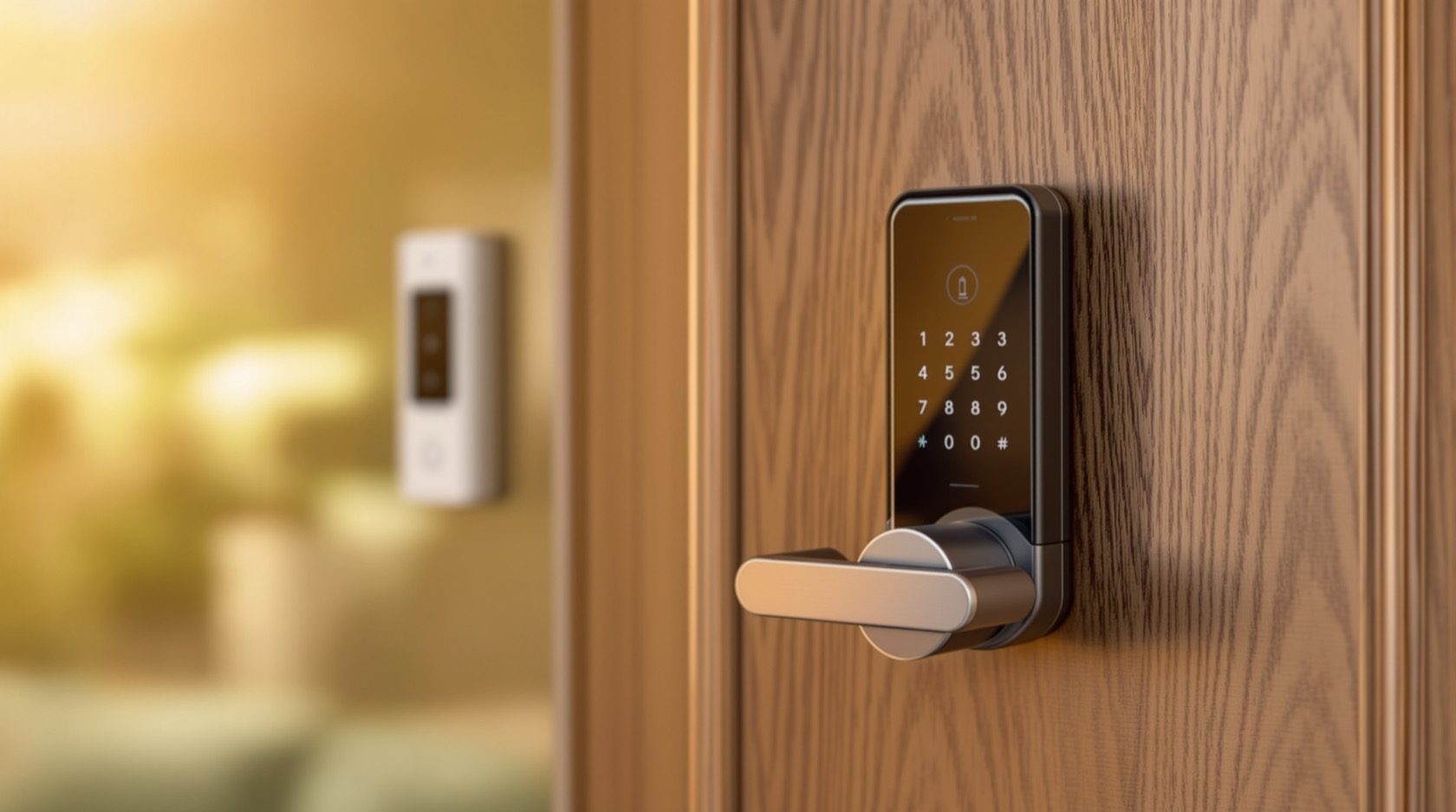
Video Door Phones with Smart Locks in India (2026): See, Then Unlock
How to pair a video door phone with a home smart lock so you can video-verify a visitor and let them in without walking over or handing out keys, with a hard focus on mechanical override, power-cut behaviour and egress safety.
You are in the kitchen with your hands full, or three hundred kilometres away on work. The doorbell rings. On the indoor monitor, or on your phone, you see the maid, or a parcel agent, or your parents who arrived a day early. Instead of shouting "coming", wiping your hands and walking to the door, you glance at the screen, recognise the face, and tap one button. The front door lock clicks open. Nobody was handed a key, nobody was left standing in the sun, and you never left the stove.
That is the whole promise of video door phones with smart locks: the door phone lets you see and talk, the smart lock lets you let them in, and the two together turn "answering the door" into a glance and a tap. This guide is part of Studio Matrx's video door phone hub, and it sits at the home front door. It is deliberately narrow: your own house, your own lock, your own family and visitors. The wider world of society gates, RFID cards, guard desks and boom barriers lives in the door-phone access-control guide — think of this as the intimate, single-door cousin of that larger system.
Scope & safety. This guide helps you plan and choose; it is not a wiring manual. A lock on a door you exit through is a life-safety device — get the lock selection, any electrical wiring and any fire-alarm interlock done by a licensed locksmith, electrician and, where a fire-escape door is involved, a fire-safety professional. Always keep a working mechanical key override, understand what your lock does in a power cut, and never fit a lock that could trap someone inside. A networked lock is also a network target and holds personal data under the Digital Personal Data Protection Act, 2023. This is educational guidance, not legal, electrical or fire-code advice.
The everyday flow: see, verify, unlock
Strip away the marketing and the pairing does exactly four things in sequence. Understanding this flow tells you what you actually need and where the safety questions hide.
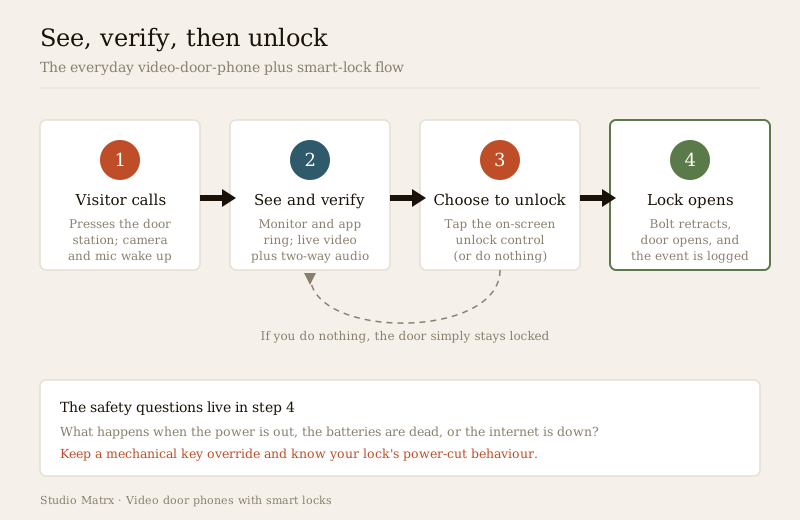
1. The visitor calls. They press the call button on the door station (or ring a smart video doorbell). The camera and microphone come alive.
2. You see and verify. The indoor monitor rings, and — if the system supports it — the mobile app rings too, so you can answer from the sofa or from your office. You watch the live video and, if needed, use two-way audio to ask "who is it?". At night the night-vision guide covers seeing a face in the dark. This verification step is the whole point — you never unlock for a face you have not seen.
3. You choose to unlock. You tap an unlock control on the monitor or in the app. Doing nothing is a valid choice: the door simply stays shut.
4. The lock opens. The command travels to the smart lock, the motorised bolt or latch retracts, and the door can be pushed open. A good system writes a log line: who opened it, from which device, at what time.
The failure that matters is not "the app was slow". It is what happens at step four when the power is out, the batteries are dead, or the internet is down — which is why half of this guide is about the lock, not the door phone.
Distinguishing this from CCTV and from access control
Three neighbouring ideas get muddled in Indian shops and listings. A quick separation saves you buying the wrong thing:
| You want to… | The right tool | Where to read |
|---|---|---|
| See and talk to a visitor from an indoor monitor, then unlock | A video door phone paired with a smart lock (this guide) | You are here |
| Just record who came to the door, as a camera | A doorbell camera / CCTV at the door | Doorbell cameras, CCTV two-way audio |
| Run cards, gate, guard desk and many doors for a society | An access-control system | Door-phone access control |
A video door phone is a two-way intercom answered from a monitor or app — it is about conversation and admission at your door, not surveillance recording. Keep that lens as you read.
The smart-lock types that pair with a door phone
"Smart lock" covers a spread of hardware. What matters for pairing is (a) how it physically secures the door and (b) how it receives an "open" command. Most Indian home retrofits fall into two body styles and a handful of credential types.
By how it holds the door
- Smart deadbolt (retrofit). Replaces or sits over an existing deadbolt; a motor throws the bolt. Popular for retrofits because it fits many Indian wooden and metal doors with modest carpentry. Almost always battery-powered.
- Smart mortise lock. A full lock body mortised into the door edge, common on newer Indian flats and villa main doors — sturdier, often combining latch, deadbolt and handle. Also usually battery-powered, sometimes with wired power as an option.
- Electric strike / electromagnetic lock (mains-powered). Not a consumer "smart lock" but the classic way a door phone releases a gate or a common-area door — a button on the monitor energises a strike or maglock. This is the electrical, professionally-installed path and the one that raises the sharpest egress questions (below).
By how you (and the door phone) open it
| Credential | How it fits the door-phone flow | Notes for India |
|---|---|---|
| App / Bluetooth | Phone unlocks over Bluetooth when near; door-phone app may trigger it | Works without internet at the door; range is short |
| Wi-Fi | Unlock remotely from anywhere; easiest to pair with a cloud door phone | Depends on home Wi-Fi and power; the network risk is highest here |
| Keypad (PIN) | Give the maid or a guest a code instead of a key; door phone still verifies visually | Set unique PINs, change them when staff change; watch for worn keys revealing digits |
| RFID card / tag | Tap-to-enter for regulars; the door phone handles unknown visitors | Convenient but cards get lost — plan for revoking one |
| Fingerprint | Household members enter on their own print; visitors use the door phone | Humidity, wet or worn fingertips raise false-rejects in Indian summers |
Fingerprint and face are biometrics. If a lock stores fingerprints, treat that data as sensitive personal data under the Digital Personal Data Protection Act, 2023 — minimise what you collect, and for face specifically the facial-recognition door-phone guide explains why it is often overkill for a home.
How the integration actually happens
There are three honest ways a door phone ends up able to open a lock. Knowing which one a product uses tells you what can break.
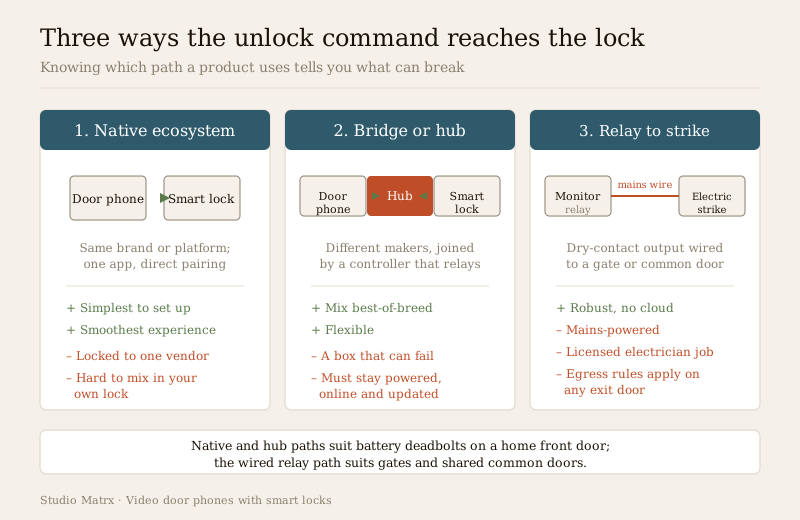
1. Native ecosystem (same brand or platform)
You buy a door phone and a lock designed to work together — same manufacturer, or both certified for one platform (a home-automation ecosystem). One app shows the live video and an unlock button for the paired lock. This is the smoothest experience and the easiest to set up. The cost is lock-in: you are tied to that vendor's roadmap, app quality and continued support, and mixing in a lock you already own may be impossible.
2. A bridge or hub
Your door phone and your lock come from different makers, and a hub (a home-automation controller, or a platform that speaks to both) relays the command: the door phone tells the hub "open", the hub tells the lock. This is flexible — you can pick the best door phone and the best lock — but you have added a box that must be powered, kept online and kept updated. If the hub is down, the automated unlock is down (your mechanical key and the lock's own keypad still work). Read the smart-home guide before committing to a hub-centred home.
3. A relay to an electric strike (the wired path)
The classic door-phone method for a gate or a common door: the indoor monitor has a small relay (a "dry contact") that, when you press unlock, closes a circuit to an electric strike or an electromagnetic lock. This is robust and does not depend on any cloud — but it is mains-powered, it must be wired by an electrician, and on any door people walk out through it drags in the egress rules below. It is the right answer for a compound gate; it is usually the wrong answer for your bedroom-facing front door, where a battery deadbolt is simpler. See the electrical hub for who does this work.
The genuinely useful cases
The pairing earns its keep in a handful of real situations — and it is worth being honest that a plain door phone with a manual latch already covers many homes.
- You are home but busy. Cooking, on a call, on another floor — you verify the maid or a delivery on the monitor and tap open without crossing the house.
- You are out and someone trusted needs in. A relative arrives early, a plumber you booked is at the gate — you answer on the app, confirm by video, and let them in for the few minutes they need, then confirm on the log that the door re-locked.
- Temporary, revocable access. A guest for the weekend, a cook for the month — a keypad PIN or a time-boxed app permission means no cut key floating around, and you disable it the day they leave.
- No copied keys. The oldest Indian security leak is the spare key given to staff and quietly duplicated. Codes and app permissions can be revoked in seconds; a copied brass key cannot.
If none of these match your life, a good door phone with a manual gate latch may be all you need — the smart lock is a convenience, not a requirement.
Safety first: the four questions that matter more than features
This is the part to read twice. A door lock is a life-safety device, and a networked one adds failure modes a brass key never had.
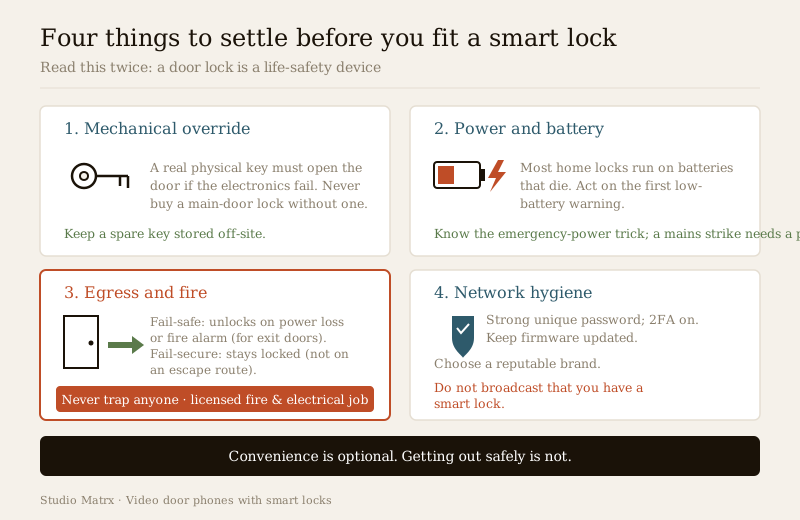
1. Keep a mechanical key override — always
Whatever the app promises, insist the lock has a physical key cylinder that opens it when the electronics are dead, flat or confused. Keep a metal spare key somewhere off-site (a trusted neighbour, a relative). A smart lock with no mechanical override is a single point of failure between you and your own home — for a main door, avoid it.
2. Understand power-cut and dead-battery behaviour
Most home smart locks (deadbolts, mortise, keypad, fingerprint) run on batteries. India's power cuts do not affect them directly — but the batteries do die, usually at the worst time. So:
- Learn the low-battery warning (app alert, beeps, a blinking light) and act on the first one, not the fifth.
- Know the emergency power trick many locks offer — a 9V cell or a USB port on the outside to jump-start a dead lock long enough to enter a code — and keep the means to use it.
- Keep the mechanical key (see above) as the ultimate fallback.
If instead you used a mains-powered electric strike or maglock, then a power cut does matter directly, which is the next question.
3. Egress and fire: never trap anyone
This is non-negotiable and it is a licensed professional's decision, not yours or a handyman's.
- Fail-safe means the lock unlocks when power is lost or the fire alarm triggers — the correct behaviour for a door people must escape through.
- Fail-secure means it stays locked when power is lost — fine for a store-room or an external gate that is not an escape route, dangerous on an exit door.
- On any door that is part of a fire-escape route, the National Building Code of India and local fire rules govern the lock: it must release on alarm and must never obstruct escape. The lock choice, the wiring and the fire-alarm interlock are a coordinated job for a licensed fire-safety consultant, an electrician and a door-hardware specialist — never a DIY relay. And never position an electric lock so it can block a fire-escape path.
A battery deadbolt on a normal flat door that also opens by hand from the inside is usually fine for egress; a mains lock on a stairwell or a society exit is exactly where people get this dangerously wrong.
4. Treat the network like a second front door
A connected lock is on your network, so it is a target. Defensively:
- Use a strong, unique password on the lock's app and account — never the default, never reused from elsewhere.
- Turn on two-factor authentication (2FA) for the account that can open your door.
- Keep firmware updated — updates patch security holes; enable auto-update or check quarterly.
- Choose a reputable brand that ships security fixes and will still exist in five years, over the cheapest unbranded lock.
- Do not broadcast that you have a smart lock — no stickers, no boasting online, and lock down what the app shares.
For the broader picture of hardening connected devices at home, the smart security systems guide and the remote-access security guide go deeper.
India realities: heat, humidity, power and price
- Heat and humidity age electronics and drain batteries faster; a front door in direct afternoon sun or driving monsoon needs a lock rated for it, and fingerprint readers false-reject more with wet or sweaty fingers.
- Power cuts are why battery locks are actually reassuring for a home front door — they keep working through load-shedding — while mains electric strikes need a thought-through backup and fail-safe behaviour.
- Retrofit is the norm. Most Indian homes add a smart deadbolt or mortise lock to an existing door rather than rebuild; check your door thickness and material before buying.
- Rough ₹ bands (2026, indicative — verify current prices):
| Lock type | Typical range (₹) | Notes |
|---|---|---|
| Retrofit smart deadbolt (app/Bluetooth) | 8,000 – 20,000 | Common home front-door choice |
| Smart mortise lock (keypad + RFID + fingerprint + app) | 15,000 – 40,000 | Villa and premium-flat main doors |
| Electric strike / maglock + relay wiring | 3,000 – 15,000 + electrician | Gates and common doors; mains, licensed |
| Home-automation hub (if bridging brands) | 4,000 – 15,000 | Only if native pairing is not available |
Treat these as sanity-checks on a quote, not fixed rates — they move with brand, features and city.
When to bring in a professional. You can plan the flow, choose the lock type and set up the app yourself. Hand over: fitting a mortise lock into the door, any mains wiring for an electric strike or maglock, and — critically — any lock on a fire-escape or exit door, including its fire-alarm interlock and fail-safe behaviour — to a licensed locksmith, electrician and fire-safety professional together. If in doubt whether your door is an egress door, ask; getting egress wrong can trap someone in a fire. See the electrical hub.
Key takeaways
- Pairing a video door phone with a smart lock lets you see-and-verify a visitor, then unlock the front door with one tap — no walking over, no copied keys — and its best uses are letting in family, staff and deliveries when you are home-but-busy or out, plus temporary, revocable access.
- Integration happens one of three ways — native same-brand, a bridge/hub across brands, or a wired relay to an electric strike; native is simplest, a hub is flexible but adds a failure point, and the relay is robust but mains-powered and a licensed job.
- Always keep a mechanical key override and understand power-cut behaviour — most home smart locks are battery-powered, so act on the first low-battery warning and keep a real key off-site.
- Egress is life-safety and not DIY — a lock on an exit or fire-escape door must fail-safe (unlock) on power loss or fire alarm, must never trap anyone, and its selection, wiring and fire interlock is a coordinated licensed-professional job under the National Building Code and local fire rules.
- A networked lock is a network target — use strong unique passwords and 2FA, keep firmware updated, pick a reputable brand, do not broadcast that you have a smart lock, and remember biometric data is sensitive under the DPDP Act, 2023.
References
- Digital Personal Data Protection Act, 2023 — a smart lock's stored PINs, fingerprints and access logs are personal (and, for biometrics, sensitive) data; minimise collection, secure the account, and revoke access when staff or guests leave.
- Manufacturer specifications and datasheets — verify the presence of a mechanical key override, the battery type and emergency-power method, the low-battery behaviour, firmware/security-update policy, and any door-phone or platform compatibility on the maker's own datasheet before buying.
- National Building Code of India (SP 7), Bureau of Indian Standards, and local fire-safety and municipal rules for any electric lock on an egress or fire-escape door — fail-safe release and fire-alarm interlock are governed by code; verify the current edition via the BIS catalogue: https://www.services.bis.gov.in/
This is an educational overview, not legal, electrical or fire-code advice. Lock installation, mains wiring, and any lock on an escape route are qualified professional tasks — engage a licensed locksmith, electrician and fire-safety professional, and verify any standard's current status via the BIS catalogue before relying on it.
Export this guide
Related Guides — Deep-dive reading
Access Control Maintenance in India (2026): Readers, Locks and Fail-Safe Egress
How to keep a card, keypad, fingerprint or face access-control system reading reliably and locking securely — and, above everything, how to test that its doors still release on a fire alarm and on power loss, so an access-controlled door never becomes a life-safety trap.
SecurityFire-Egress Compatibility for Smart Locks in India (2026): Never Trap Anyone
How to make sure a smart lock or access-controlled door on an escape route always lets people out in a fire or emergency: fail-safe hardware, free egress, fire-rated doors, and the fire-alarm interlock.
SecuritySmart-Lock Power Battery Planning in India (2026): How the Lock Is Fed and What Happens When Power Runs Out
The install-side power decision for a smart lock: battery versus wired mains, sizing a UPS so a power cut cannot lock people out, and always planning the dead-battery get-in-anyway path with a mechanical key.
SecurityRelated Tools — Try Free
Video Door Phone Feature Selector
Tick what you want the door phone to do — app, night vision, two-way audio, smart lock, access control or facial recognition — and get the features and integrations to spec, with the privacy and safety caveats.
Feature SelectorAccess-Control Battery-Backup Calculator
Size the standby battery so an access system keeps running through a power cut, with an egress life-safety note.
Battery BackupApartment Video Door System Planner
Enter flats, entrances, floors and guard desk for a first-pass building intercom plan — door stations, indoor monitors, guard station, the right architecture and an indicative cost band.
Building Planner