
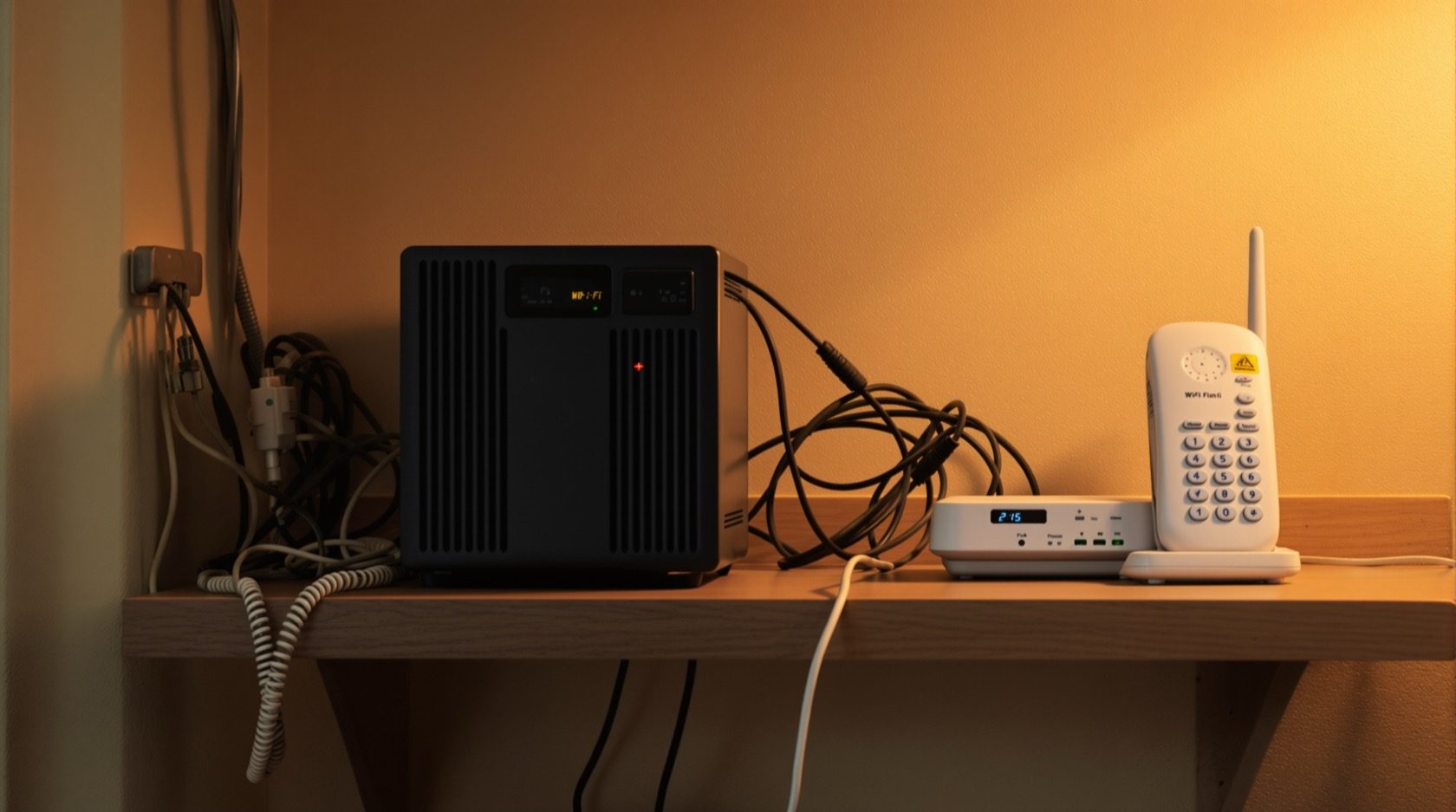
Video Door Phone Power Backup in India (2026): Keeping the Door Alive Through Power Cuts
How to keep the indoor monitor, door station and — for app kits — the router and ONT running through India's power cuts, using a small UPS, the home inverter circuit, or a built-in battery, so you can still see and answer the door.
Ask most people what could stop their door phone working and they will say the camera, the wiring, maybe the app. Almost nobody says the thing that actually stops it most often in India: the power cut. Evening load-shedding, a tripped MCB, a monsoon outage — the moment the mains drops, an unbacked door phone goes dark, and it goes dark at exactly the hours when the doorbell rings most. A door phone that dies with the load-shedding is only half a system.
Video door phone power backup is the quiet part of the design that decides whether your door stays answerable when the lights go out. It is the most overlooked issue in the whole install, and for the app-connected kits it is worse than it looks: even if the monitor and door station are backed up, if the router loses power your phone can no longer reach the door from another room or from the office. This guide, part of Studio Matrx's video door phone hub, covers what actually needs backup, the options homeowners really use, how to size it at a plain level, and the Indian realities — frequent cuts, the inverter-home norm, and what heat and monsoon do to batteries.
Scope & safety. This guide helps you plan and coordinate backup power and decide what to put on it — the wiring itself is a licensed electrician's job. Anything that connects to the mains board, a dedicated inverter circuit, or an inverter/battery bank must be installed by a qualified professional; see the electrical hub. A door device also carries privacy duty: point it only at your own doorstep, and treat footage and audio as personal data under the Digital Personal Data Protection Act, 2023. This is educational guidance, not legal advice.
Why this matters more in India than anywhere
A door phone is a small always-on system, and in India "always-on" runs straight into a grid that is not. Load-shedding, unplanned trips, monsoon outages and long summer cuts are normal across much of the country — which is exactly why the inverter is already a fixture in so many Indian homes. The door phone should ride on that same instinct.
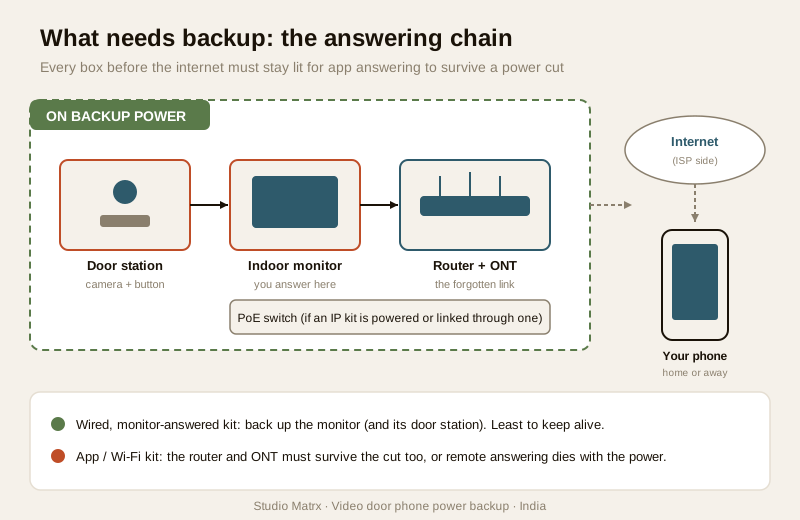
The catch is that a video door phone is not one device but a small chain, and the chain is only as alive as its weakest link during a cut:
- The indoor monitor — the screen you answer from. Dead monitor, no answering, no matter what else is up.
- The door station (the outdoor unit with the camera, button and speaker). Many wired kits power the door station from the monitor over the same cable, so backing up the monitor often backs up the door station too — but not always; confirm it for your kit.
- For Wi-Fi and app kits, the router — and behind it the ONT (the fibre box from your ISP) and any PoE switch. This is the link everyone forgets. If the router is dead, the door station cannot reach the cloud and your phone cannot reach the door, even if the door station itself has power. Remote answering dies with the router.
So the honest question is not "will my monitor survive a cut?" but "will the whole path from the visitor's face to my screen survive a cut?" For an app-answered kit that path runs monitor (or door station) → router → ONT → internet → your phone, and every box on it before the internet needs to stay lit. The mobile-app door phone guide explains why the router is the real single point of failure for remote answering.
What actually needs backup
Work out your list before you buy anything. It depends on how you answer the door.
| If you answer at… | Must stay powered | Also needed for it to work |
|---|---|---|
| The indoor monitor only (classic wired VDP) | Indoor monitor; door station (often fed from the monitor) | Nothing else — a self-contained wired pair |
| Your phone / app, at home | Monitor or door station; router; ONT; any PoE switch | Home Wi-Fi up |
| Your phone / app, away from home | Door station; router; ONT; PoE switch | Router reaching the internet through the cut |
The pattern is clear: the more you rely on the app, the more of the network you must keep alive. A purely wired, monitor-answered system needs the least backup; a cloud doorbell answered on your phone needs the router and ONT up or it is useless the moment the power drops. Put the router on backup — it is the single highest-value addition, and it helps far more than the door phone alone.
The four ways to power it through a cut
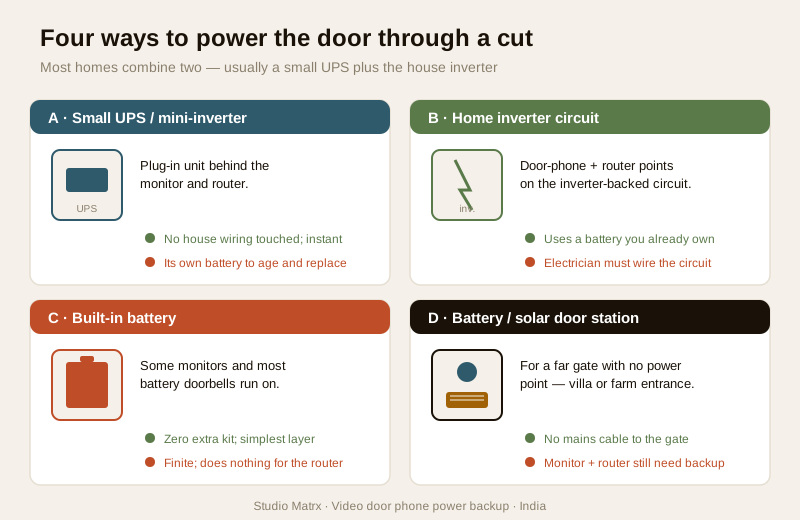
There are really only four options homeowners use, and most homes end up combining two of them.
Option A — a small UPS/inverter feeding the monitor and router
A small dedicated UPS (or mini-inverter) sits behind your monitor and router and takes over instantly when the mains drop. Most VDP monitors and doorbells run on low-voltage DC (commonly 12V or 24V, or a small adaptor), and routers/ONTs are low-draw too, so a modest unit gives useful hours. This is the cleanest retrofit: it does not touch your house wiring, it is plug-and-play, and it keeps the door phone up even when the house inverter is off or overloaded. A small "mini-UPS" designed for routers (with 12V DC outputs) is a popular, cheap way to keep the network alive for hours.
Option B — the home inverter circuit, with the door phone and router on it
Most Indian homes already have an inverter feeding selected circuits — some lights, fans, the TV point. The neat move is to have an electrician put the door phone point and the router point on the inverter-backed circuit. Then every mains cut is handled by the battery you already own, with nothing extra to buy. This is often the best-value answer for a new build or a rewire — decide it at the wiring stage so the points land on the right circuit. It is electrical work: a licensed electrician must do the circuit, not you.
Option C — a built-in battery on some monitors and doorbells
A few smart monitors and most battery video doorbells carry their own rechargeable cell, so they simply keep running for a while when the mains stop — no external kit at all. Convenient, but with limits: the battery is finite (a busy doorbell may need recharging in weeks), it does nothing for your router, and heat shortens its life. Good as a layer, rarely enough on its own for an app kit. The smart video doorbell guide covers battery models in depth.
Option D — battery or solar door stations
At gates far from any power point — a villa boundary, a farm entrance — a battery or solar-charged door station avoids running mains cable to the gate at all. It solves the door-station side of the power problem, but the indoor monitor and (for app answering) the router still need their own backup indoors. Useful for villa and standalone-gate cases; see also the wireless door phone guide.
Sizing it, at a plain level
You do not need to derive formulas — you need three numbers and a sanity check. (For the full arithmetic, the CCTV side already has a proper treatment; borrow it, as below.)
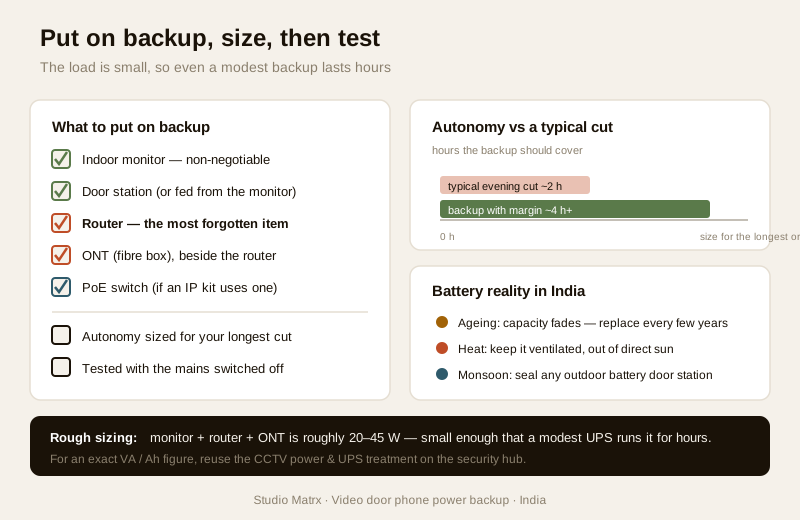
1. Add up the watts of everything you want kept alive: indoor monitor, door station (if separately powered), router, ONT, and any PoE switch. A monitor and door station together are usually a few watts to a couple of dozen; a home router plus ONT another 10–20 watts. It is a small load — that is the good news.
2. Decide how many hours of autonomy you want. How long is a typical cut where you live? Two hours? Six overnight? Size for the longest ordinary cut, not the once-a-year marathon.
3. Turn watts × hours into a rough battery/VA figure, and pad it generously — batteries never deliver their full nameplate, and they weaken with age and heat.
| Load kept alive | Rough continuous draw | For ~4 hours you want, roughly |
|---|---|---|
| Monitor + door station only | 5–25 W | A small UPS / a modest inverter share |
| Monitor + router + ONT | 20–45 W | A small UPS or a few Ah of 12V, comfortably |
| Monitor + router + ONT + PoE switch | 30–60 W | A slightly larger UPS / a healthy inverter margin |
Treat these as conceptual bands to reason with, not a spec — real figures come from your devices' own labels. Because a door phone plus router is genuinely a small, steady load, even a modest backup gives long hours; the numbers rarely get scary. If you do want to work an exact VA/Ah figure (especially when you are sizing one backup for the door phone and cameras together), use the security hub's dedicated tool: the CCTV power supply and UPS guide and the CCTV hub treat backup-power sizing properly, and the same method applies to the door phone's little load. No need to re-derive it here.
Practical: the things that actually decide whether it works
- Put the router on backup — this is the headline. For any app or Wi-Fi kit, the router (and ONT) is the difference between "I can still answer the door on my phone during a cut" and "the door phone is offline." Backing up the router helps the whole home, not just the door.
- Use an electrician for the inverter circuit. Deciding which points go on the inverter is planning you can do; connecting them is licensed work. Coordinate it at the wiring stage and route it through the electrical hub.
- Batteries age — plan to replace them. A UPS or inverter battery is a consumable. Its capacity fades over years, so the "four hours" you sized for slowly becomes two. Note the install date and expect to replace a small UPS battery every few years, sooner in hot regions.
- Heat and monsoon are hard on cells. Indian summers and a warm meter cupboard cook a battery and shorten its life; monsoon damp and a door station in the weather stress the outdoor end. Keep the UPS/inverter battery somewhere ventilated and out of direct sun, and make sure any battery door station is properly weather-sealed.
- Test it deliberately. Once it is installed, flip the mains off for a few minutes and confirm the monitor still shows the door and — for an app kit — that your phone still connects from mobile data. A backup you have never tested is a guess.
A "what to put on backup" checklist
Tick these when you plan the install:
- [ ] Indoor monitor — on backup (non-negotiable; it is how you answer).
- [ ] Door station — confirm whether it is fed from the monitor (then it is covered) or separately powered (then back it up too).
- [ ] Router — on backup if you answer on the app, at home or away. The most-forgotten item.
- [ ] ONT (fibre box) — on backup alongside the router; without it the router has no internet during a cut.
- [ ] PoE switch — on backup if your IP door phone is powered or connected through one.
- [ ] Autonomy — sized for the longest ordinary cut where you live, with margin for battery ageing.
- [ ] Tested — mains switched off and the whole answering path confirmed working, on-site and on the app.
How it ties into the rest of the door phone
Power backup is one decision inside a larger plan. Where the door station sits (placement) and how it is cabled (wiring) decide how easy the backup wiring is; the class of system you chose — wired, IP or app-connected — decides how much of the network you must keep alive. In apartments, the society/RWA intercom usually has its own backup at the panel, but your in-flat monitor and router are still yours to power. And the same backup you build for the door phone can, sized up, carry your CCTV too — plan them together and buy one slightly bigger battery rather than two small ones.
When to bring in a professional. You can plan the device list, choose a plug-in UPS, and decide which points belong on the inverter. Hand the inverter circuit, any mains-connected wiring, and the battery-bank install to a licensed electrician — see the electrical hub. For a door station at a far gate or an IP kit on a PoE switch, let the installer confirm the powering and backup together so nothing on the answering path is left unbacked.
Key takeaways
- A door phone that dies with the load-shedding is only half a system — in India, power backup is the single most-overlooked part of a door phone install, and it matters at exactly the evening hours the bell rings most.
- For app and Wi-Fi kits the router is the real weak link — back up the monitor and the router and ONT, or remote answering dies with the power even if the door station is fine.
- Four options, usually combined: a small plug-in UPS on the monitor and router, the home inverter circuit with the door-phone and router points on it, a built-in battery on some monitors/doorbells, and battery/solar door stations at far gates.
- Size it simply — add the watts of everything you keep alive, pick the hours you want, pad for ageing; the load is small so even a modest backup lasts hours. For exact VA/Ah, reuse the CCTV power/UPS treatment rather than re-deriving it.
- Batteries age, and heat and monsoon shorten them — note the install date, replace UPS batteries every few years, keep them ventilated and out of the sun, and test the whole answering path with the mains off before you rely on it.
References
- Digital Personal Data Protection Act, 2023 — video door phone footage and audio are personal data; a backup plan keeps recording and access secure through a cut, so treat passwords, cloud access and any recording the same whether on mains or battery.
- Manufacturer specifications — confirm the operating voltage and wattage of your indoor monitor, door station, router and ONT from each device's own datasheet before sizing a UPS or inverter battery; verify built-in-battery run-times on the maker's sheet, not the box.
- National Building Code of India (SP 7) and relevant BIS wiring and installation standards for any inverter circuit, dedicated point or battery-bank work — an electrician must design and connect these; verify the current edition via the BIS catalogue: https://www.services.bis.gov.in/
This is an educational overview, not legal advice. Inverter circuits, mains-connected wiring and battery-bank installation are qualified professional tasks — engage a licensed electrician and verify any standard's current status via the BIS catalogue before relying on it.
Export this guide
Related Guides — Deep-dive reading
Smart Home Power Backup in India: Keeping It Running During Power Cuts
Load-shedding is a fact of Indian life. Here is how to make sure your router, hub, cameras and locks survive an outage — for surprisingly little money.
Smart HomeWireless Video Door Phones in India (2026): The Honest Guide
How wireless video door phones work, the two flavours (a dedicated RF kit or an app-first Wi-Fi door station), and the real India trade-offs on range, power, latency and subscriptions before you buy.
SecurityResidential Electrical Systems: The Complete Guide for Indian Homes
How the electricity in an Indian home actually works — from the utility supply and meter through the distribution board, circuits, wiring, earthing and protection, to lighting, safety, energy efficiency, smart controls, solar and backup — written so a homeowner can understand, plan and judge it, and know exactly where a licensed electrician must take over.
Electrical & WiringRelated Tools — Try Free
Video Door Phone Type Selector
Answer a few questions about your building, cabling, budget and internet and get the right video door phone — analog / wired / wireless / IP, single-home or multi-apartment, monitor or app.
Door Phone SelectorSecurity Backup Power Calculator
Size a UPS/inverter and battery to keep CCTV, NVR, router and alarm running through a power cut — load, Ah, VA and cost.
Backup PowerSolar CCTV Sizing Calculator
Enter cameras, sun-hours and backup days to get the solar panel wattage, battery Ah and an indicative kit cost for an off-grid camera.
Solar Sizing