
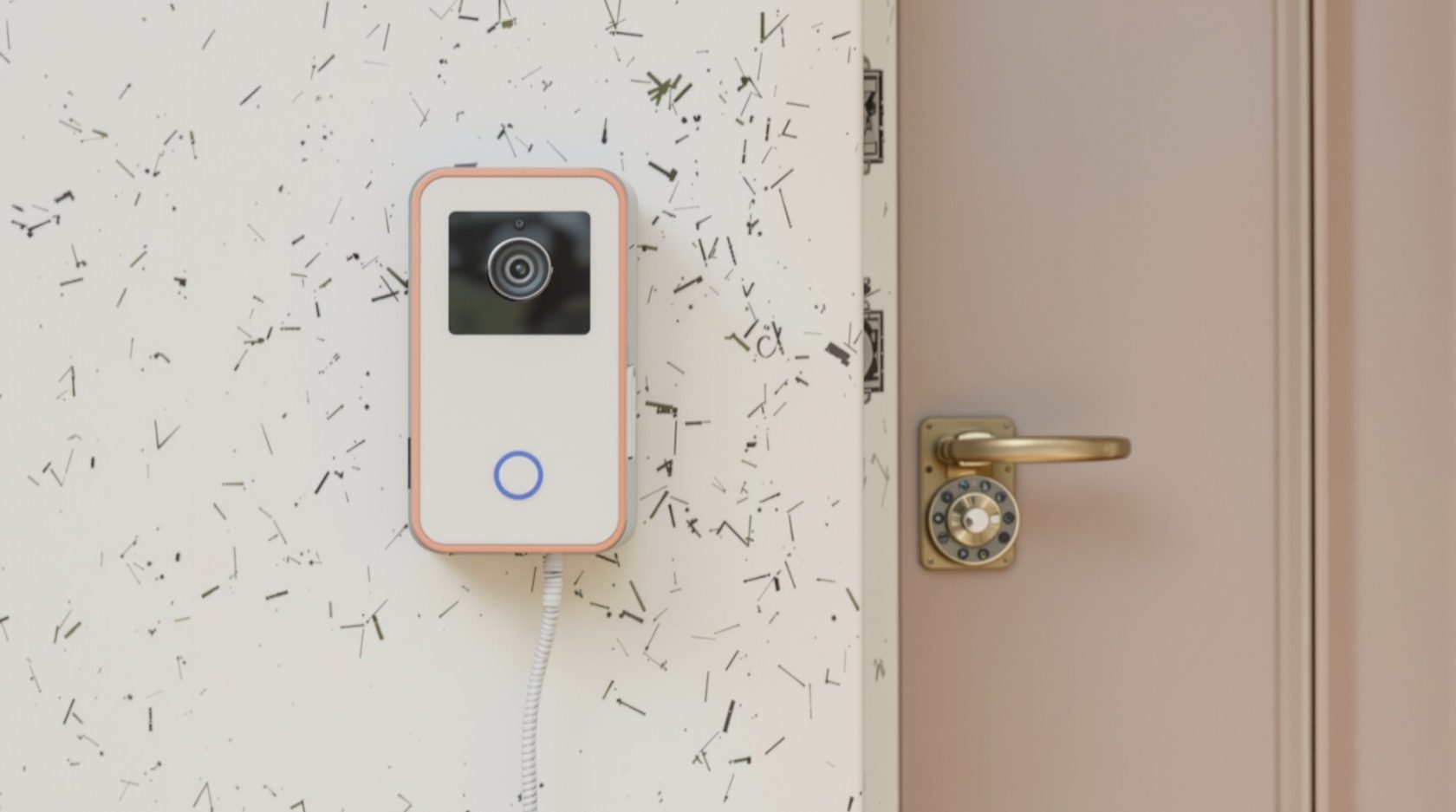
Analog Video Door Phones in India (2026): The Simple Wired Choice
The traditional door station wired to a dedicated indoor monitor, sending video as an analog signal with no network, app or subscription — why it is still India's default budget pick, what you give up, and when to step up.
Walk into most Indian flats and independent houses that already have a video door phone, and the odds are it is an analog one. A camera-and-button unit by the gate or door, a length of thin multi-core cable snaking through the wall, and a small screen on the hallway wall that lights up when someone presses the button. No router, no app, no monthly fee — you press to talk, you press to open. It is the version that has sold by the crore across India for a reason: it is cheap, it is simple, and it just works.
Analog video door phones are the traditional, most common class of door phone in Indian homes today. The defining trait is in the plumbing: the door station is wired by a dedicated cable straight to a dedicated indoor monitor, and the picture travels down that cable as an analog video signal — not as data over your home network. This guide, part of Studio Matrx's video door phone hub, explains exactly how that works, why it stays the budget default, what you trade away for the low price, the typical Indian kits and rupee bands, the 4-wire and 2-wire cabling, and — honestly — when analog is the right pick and when you should step up to an IP or wireless model instead.
Scope & safety. This guide helps you plan, choose and coordinate an analog video door phone; it is not a rewiring manual. The mains adaptor that powers the system is an electrician's job, and any strike lock on the gate is the door-hardware trade's. A door camera watches a shared entry space, so point it at your own doorstep — not a neighbour's door or the shared corridor beyond your unit — because that footage is personal data under the Digital Personal Data Protection Act, 2023. This is educational guidance, not legal advice.
First, what "analog" actually means here
A video door phone is a two-way intercom you answer from an indoor monitor: someone at the door presses a call button, your indoor screen rings and shows their face, and you talk back and (optionally) release a lock — all without opening the door. That is different from a doorbell camera, which is a CCTV-style device you answer on your phone with no dedicated indoor unit. If you are still deciding between the two families, start at the pillar guide.
Within video door phones, "analog" describes how the picture gets from the door to the screen. In an analog kit, the door station sends a composite analog video signal — the same basic idea as old CCTV — down a dedicated pair of wires to one specific monitor. The audio, the call signal and the power for the door unit all ride the same little bundle of cores. Nothing is digitised into network packets; nothing touches your Wi-Fi or router. Contrast that with an IP door phone, where the picture is encoded as data and sent over a network cable or Wi-Fi, which is what unlocks phone apps and remote viewing.
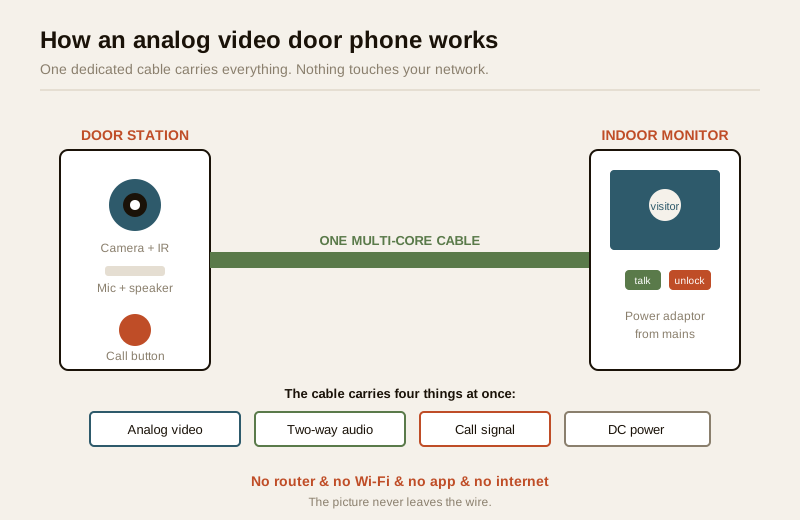
The whole system is a closed loop of two boxes and one cable. That closed loop is the source of every strength and every limitation that follows.
How an analog kit works, end to end
Trace a visitor's press through the system and you have understood the whole thing:
- The door station by the gate holds a small camera (often with a few infra-red LEDs for night), a microphone, a speaker and a call button. Many have a wide-angle lens and a metal or hardened-plastic face for the weather.
- The cable — a single dedicated multi-core run — carries the analog video up to the monitor, carries two-way audio both ways, carries the "someone is calling" signal, and carries DC power down to the door unit. One cable, several jobs.
- The indoor monitor on your hallway or kitchen wall is the brain and the screen. It has the power supply (fed from a small mains adaptor an electrician wires in), the ring, the display, a talk button, and usually an unlock button if you have fitted an electric gate lock.
- When someone presses the button, the monitor chimes, wakes its screen and shows the live analog picture. You press talk to speak, and — if wired — press unlock to release the gate.
That is the entire machine. There is no account to create, no firmware to update, no network to secure, and nothing to subscribe to. For a single flat or a single villa gate, that simplicity is the whole point.
The power question — and why it matters in India
The system runs on low-voltage DC from an adaptor plugged into a normal socket and wired in by an electrician. In a power cut the door phone goes dark unless that adaptor sits on backup — an inverter circuit or a small UPS. This is where many Indian homes trip up: they put lights and fans on the inverter but forget the door phone, so during evening load-shedding the gate intercom is dead. Because an analog kit draws very little, it is cheap and easy to keep alive; just make sure the socket feeding its adaptor is on your backup line. For anything involving the mains side, use a licensed electrician — see the electrical hub.
Why analog is still the default budget choice
For a very large share of Indian homes, analog is not a compromise — it is genuinely the sensible answer. The advantages are real:
| Strength | What it means for you |
|---|---|
| Cheapest class | A basic analog kit costs a fraction of an IP or app-based system; the door station plus a 7-inch monitor can be entry-level. |
| Dead simple | Two boxes, one cable. Anyone in the family can use it on day one — press to see, press to talk, press to open. |
| No network needed | No router, no Wi-Fi password, no IP addresses, no app account. Nothing to configure. |
| No subscription | You buy it once. There is no cloud plan, no monthly fee, ever. |
| No cybersecurity surface | Because it never touches the internet, it cannot be remotely hacked, snooped or roped into a botnet. The picture physically stays on the wire. |
| Works in a power cut | On a small inverter or UPS, it keeps answering the door when the grid is down. |
| Rock-solid reliability | Fewer moving parts and no network mean fewer things to go wrong; a well-installed analog kit runs for years untouched. |
The privacy-and-security angle is underrated. A homeowner who does not want any camera that can, in principle, be reached from the internet gets exactly that with analog: a self-contained loop that no app, cloud or attacker can touch. For a family that just wants to see who is at the gate before opening it, that is a feature, not a shortfall.
What you give up
Honesty is the point of this guide, so here is the other side of the ledger. The same closed loop that makes analog cheap and safe also caps what it can do.
| Limitation | The practical consequence |
|---|---|
| Usually no phone app | You answer only from the indoor monitor. If you are not home, you cannot see or talk to the visitor. |
| No remote viewing | You cannot check the gate from work or while travelling — there is no internet path out of the house. |
| Lower resolution | Analog video is typically softer than the HD/2K you get from a good IP door phone; fine for recognising a face up close, less so for fine detail. |
| Limited scalability | Adding many monitors, multiple door stations or tying into a building system is awkward and wire-heavy compared with IP. |
| Fixed, single building | The dedicated cable ties one door to one (or a few) monitors in one structure. It does not naturally extend across a campus or to a second home. |
| Little or no recording, by default | Many basic kits do not record at all; you see the visitor live and that is it (though this is changing — see below). |
None of these matter for the classic use case — one household, one gate, answer-at-the-door. All of them start to matter the moment you want to answer the gate from your phone, keep a record of who called, or wire up a larger or multi-building setup.
Typical Indian kits and price bands
Treat these as ballparks to sanity-check a quote, not fixed rates — they move with brand, screen size, build quality and whether a lock or extra monitor is bundled. Prices are for the kit (door station plus indoor monitor); installation, the mains adaptor, cabling and any electric lock are usually extra.
| Kit type | Typical screen | Indicative price band (₹) | Who it suits |
|---|---|---|---|
| Entry analog kit | 4.3"–7" colour | ₹2,500 – ₹5,000 | A single flat or small home, budget first |
| Standard analog kit | 7" colour, night IR | ₹4,500 – ₹8,000 | Most flats and villas — the mainstream pick |
| Analog + SD snapshot | 7", records to SD card | ₹6,000 – ₹12,000 | Wants a basic record of who called, no cloud |
| Analog + Wi-Fi bridge | 7", app add-on | ₹8,000 – ₹16,000 | Wants occasional phone alerts but a wired core |
| Two-monitor / villa kit | 7" ×2 | ₹9,000 – ₹18,000 | A monitor on two floors of a villa |
Add to the kit price: the multi-core cable (a few rupees a metre, more for a long run), an electrician's visit for the mains adaptor, and — if you want the gate to open from indoors — an electric strike or magnetic lock plus its fitting by the door-hardware trade. For a plain answer-at-the-door setup you can skip the lock entirely and just talk, then walk down to open the gate yourself.
The wiring: 4-wire and 2-wire
Analog kits come in two cabling families, and knowing which you are buying saves a lot of grief — especially in a retrofit where pulling new cable through finished walls is the expensive part.
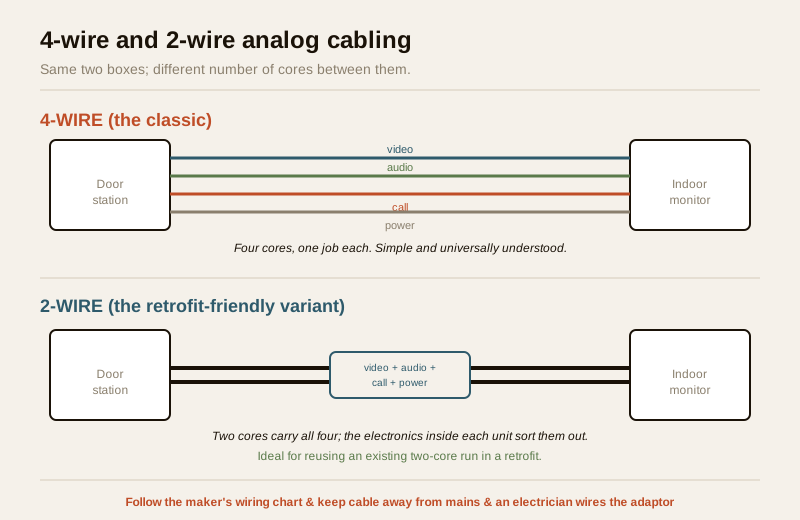
The classic 4-wire
The traditional and still most common analog kit uses a 4-core cable between the door station and the monitor. The four cores each do one job: one carries the analog video, one pair handles the two-way audio, one carries the call signal, and one supplies DC power to the door unit. (Exact core assignments vary by brand — always follow the maker's own wiring chart, and let an electrician terminate the power side.) It is simple, cheap and well understood by every installer in India.
The catch is distance and the cable itself: a long run or thin, poor-quality cable causes the picture to dim, smear or pick up noise. For anything beyond a short gate-to-hallway run, use good-quality cable of the gauge the manufacturer specifies, and keep it away from mains cabling to avoid interference.
The 2-wire variant
Newer analog kits offer a 2-wire option that carries video, audio, call and power down just two cores, with the electronics inside each unit separating them out. The big appeal is retrofit: in an older home that already has a two-wire audio-only door phone or a spare two-core run, you may be able to reuse the existing pair and avoid cutting channels through finished walls. Two-wire systems also tolerate longer runs more gracefully in some product lines.
The trade-off is that 2-wire kits cost a little more and are fussier about matching compatible door station and monitor from the same system — you cannot always mix brands. If you are wiring a brand-new home from scratch, either works; if you are retrofitting and dread the mess of new cable, ask specifically about a 2-wire kit.
The blurring line: SD cards and Wi-Fi bridges
Here is a nuance that trips up a lot of buyers. Many kits sold today as "analog video door phones" now bolt on one or both of two extras, and it pays to know exactly what you are getting:
- SD-card snapshot / recording. The monitor takes a photo (or a short clip) each time someone calls and saves it to a memory card in the monitor. This gives you a basic local record of who came to the door — genuinely useful — without any cloud or subscription. It is still an analog system at heart; the recording is a local extra, not remote access.
- A basic Wi-Fi bridge. Some kits add a small Wi-Fi module so the monitor can push a call alert to a phone app. This is a bridge bolted onto an analog core, not a true IP door phone. It can be handy, but it is often less polished than a purpose-built IP or wireless system, and — importantly — the moment you add Wi-Fi you also add the network and cybersecurity surface that pure analog avoided. If remote viewing is a priority, a proper IP kit usually does it better; if it is a nice-to-have, an analog-plus-bridge kit is a reasonable middle path.
The rule of thumb: if the core promise is a wired door station talking to a wired indoor monitor, it is analog — the SD card and Wi-Fi bridge are add-ons. If the picture fundamentally travels over the network and the app is the primary way you answer, you have crossed into IP territory, whatever the box calls itself.
When analog is the right, honest pick
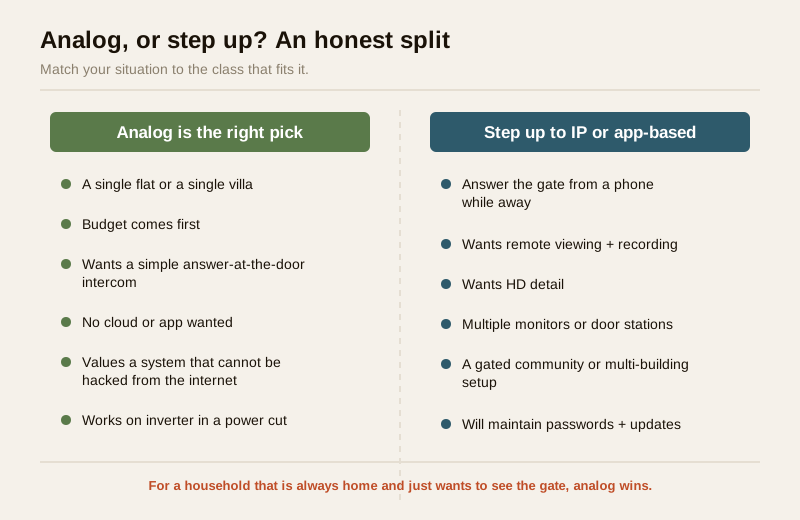
Analog is the correct choice — not a downgrade — when most of these are true:
- You have a single flat or a single villa, one gate or one main door.
- Budget comes first and you want the most door phone for the least money.
- You want a simple answer-at-the-door intercom that anyone in the family can use, with no learning curve.
- You do not want a cloud, an app or a subscription, and you value a system that cannot be reached from the internet.
- You want something that keeps working in a power cut on a small inverter or UPS.
For that homeowner, spending more on an IP system buys features they will never use. If you want to be systematic about the choice, the video door phone type selector walks through it, and the guides on wired versus wireless versus IP door phones lay out each family in depth.
When to step up instead
Move up from analog when you want capabilities the closed loop simply cannot give:
- You want to answer the gate from your phone while at work or travelling — that needs an IP or app-based system.
- You want reliable remote viewing and cloud recording, not just a live look at home.
- You want HD detail, for example to read faces or a delivery clearly.
- You are wiring several monitors, multiple door stations, or a building/campus — an apartment or gated community setup where analog does not scale gracefully.
- You are building broader home security and want the door phone to sit alongside CCTV and remote access — see the ultimate home security guide and building security systems guide.
For a villa or independent house owner who travels, the phone-app answer is often worth the extra cost. For a resident who is always home and just wants to see the gate, it rarely is.
India realities: monsoon, power and the electrician
Three things decide whether an analog kit lasts in Indian conditions:
- Seal the door station against the monsoon. The outdoor unit takes sun, dust and driving rain. Choose a unit with a decent weather rating, mount it under an eave or a small rain-shield where you can, and make sure the cable entry at the back is sealed so water cannot track into the electronics. A leaked door station is the number-one cause of an analog kit failing early.
- Put it on power backup. Feed the mains adaptor from an inverter or UPS circuit so the door phone survives load-shedding. It draws little; keeping it alive is cheap.
- Use an electrician for the adaptor, and the door trade for a lock. The kit is low-voltage and simple, but the adaptor connects to the mains — that is a licensed electrician's job (see the electrical hub). Any electric strike or magnetic lock on the gate is the door-hardware trade's work. Coordinate them; do not improvise the mains side yourself.
When to bring in a professional. You can choose the kit, plan where the door station and monitor go, and coordinate the whole job yourself. Hand the mains adaptor wiring to a licensed electrician, the strike or magnetic gate lock to the door-hardware trade, and any cable run that involves cutting into walls or working at height to a qualified installer. If you add a Wi-Fi bridge, treat it like any networked device: change the default password and keep it updated, because footage is personal data under the DPDP Act, 2023.
Key takeaways
- An analog video door phone is a closed loop: a door station wired by a dedicated multi-core cable to a dedicated indoor monitor, with the picture sent as an analog signal — no router, no app, no subscription, no internet.
- It is India's default budget pick for good reasons: cheapest, dead-simple, nothing to configure, no cybersecurity surface, and it keeps answering the door in a power cut on a small inverter.
- You trade away the phone app, remote viewing, HD detail and easy scaling; for a single flat or villa that just wants answer-at-the-door, none of that matters — so analog is the right choice, not a downgrade.
- Know your cabling: the classic 4-wire carries video, audio, call and power on four cores; a 2-wire variant squeezes all four onto two cores and shines in retrofits where you can reuse an existing pair. Follow the maker's wiring chart and let an electrician wire the mains adaptor.
- Watch the blurring line: many "analog" kits now add SD-card snapshots (a local record, no cloud) or a basic Wi-Fi bridge (which reintroduces a network surface); if remote viewing is a real priority, a proper IP system usually does it better.
References
- Digital Personal Data Protection Act, 2023 — a door camera records identifiable people at a shared entry, which is personal data; point it at your own doorstep, and if you add a Wi-Fi bridge or app, keep passwords private and access restricted.
- Manufacturer specifications — verify the exact core-by-core wiring chart, the weather/IP rating of the door station, the supply voltage of the mains adaptor, and any SD-card or Wi-Fi capability on the maker's own datasheet before buying or installing.
- National Building Code of India (SP 7), Bureau of Indian Standards, and local municipal bye-laws for the electrical aspects of wiring the mains adaptor; engage a licensed electrician and verify the current edition via the BIS catalogue: https://www.services.bis.gov.in/
This is an educational overview, not legal advice. Wiring the mains adaptor, cutting into walls, work at height and fitting an electric gate lock are qualified professional tasks — engage a licensed electrician and the door-hardware trade, and verify any standard's current status via the BIS catalogue before relying on it.
Export this guide
Related Guides — Deep-dive reading
CCTV vs Video Door Phone: Which Does Your Home Need?
They look similar and get confused constantly, but a CCTV camera and a video door phone do different jobs — one watches the whole property and records, the other answers your door and controls who comes in. This guide settles CCTV vs video door phone for Indian homes: what each is for, where they overlap, real rupee costs, apartment versus villa relevance, and why most homes end up wanting both.
Smart HomeComplete Guide to Security System Cybersecurity in India (2026): Protecting the Systems That Protect You
The cameras, locks, alarms and door phones you install to feel safer are internet-connected computers that can themselves be attacked, and an insecure one is worse than none. This pillar maps the whole attack surface — devices, network, accounts and data, operations — and points to every guide that hardens it.
SecurityPoE vs Wi-Fi CCTV: Which Home Security Cameras Are Better?
One camera type runs power and video down a single Cat6 cable to an NVR and almost never drops out; the other clips to a wall in minutes and streams over your home Wi-Fi. This guide settles PoE vs Wi-Fi CCTV for Indian homes — reliability, video quality and bandwidth, cabling and power, retrofit versus new-build effort, NVR versus SD and cloud storage, hacking risk, real rupee costs, scalability and outdoor use — and gives a clear verdict for each kind of home.
Smart HomeRelated Tools — Try Free
Video Door Phone Type Selector
Answer a few questions about your building, cabling, budget and internet and get the right video door phone — analog / wired / wireless / IP, single-home or multi-apartment, monitor or app.
Door Phone SelectorCCTV System Type Selector
Answer five questions and get the right CCTV setup — analog / IP / hybrid, wired / wireless, local / cloud — with reasons.
CCTV SelectorApartment Video Door System Planner
Enter flats, entrances, floors and guard desk for a first-pass building intercom plan — door stations, indoor monitors, guard station, the right architecture and an indicative cost band.
Building Planner