
Facial-Recognition Door Phones in India (2026): Proportionality, Privacy and the DPDP Act
What a door station that recognises enrolled faces actually does, the few cases where it genuinely helps, and the DPDP, accuracy, bias and consent caveats that must come first, for homes and societies.
A facial-recognition door phone is a door station that has learned a small set of faces — the family, perhaps a regular maid or cook, a society's staff — and uses them to greet an enrolled person, add a named line to the entry log, or, in some setups, trigger an unlock. When it sees a face it does not know, it simply alerts a resident to answer. Marketed as the futuristic top of the range, it is genuinely clever. It is also, for most Indian homes, more than you need — and it collects the single most sensitive kind of personal data a door can collect.
This guide is deliberately honest and proportionate. It sits in the Studio Matrx Video Door Phone hub alongside the complete pillar guide, and its lens is narrow: the face at the door. For the deeper surveillance-ethics treatment of face recognition across a whole camera estate, read the companion facial-recognition CCTV guide — this page will not duplicate it.
Scope & safety. A face template is sensitive personal data under the Digital Personal Data Protection Act, 2023. Treat enrolment as a considered, consent-and-notice choice, not a default. This guide helps you plan, decide and coordinate; it is strictly defensive and gives no method to identify, track, defeat or spoof anyone. If recognition triggers an electric lock, life-safety egress governs the door — the lock, wiring and fire interlock are a licensed professional's job, never DIY. This is educational guidance, not legal advice.
Start with the caveats, not the features
Most guides open with the shiny bit. This one opens with the honest bit, because with biometrics the order matters.
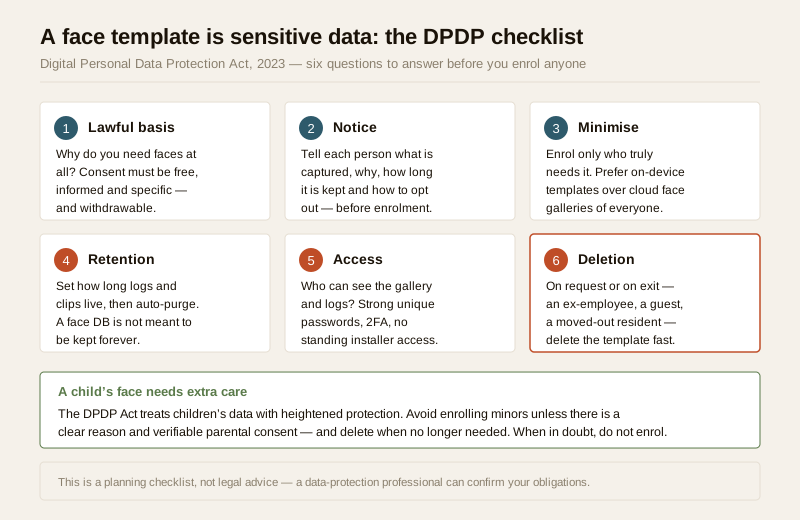
A face-recognition door phone does not store a photo album of everyone who walks past. At enrolment it turns a consenting person's face into a numeric template — a mathematical signature — and stores that. At the door it makes a fresh signature and asks a single question: does this match an enrolled one closely enough? That template is still, unambiguously, sensitive personal data under the DPDP Act, 2023. You cannot change your face the way you change a password, and a leaked face database is a permanent harm. That single fact should shape every decision below.
The DPDP checklist, in plain terms
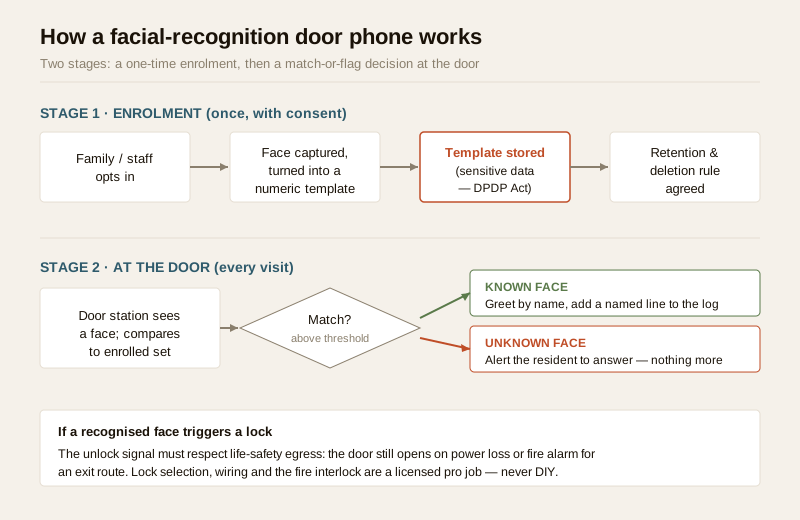
If you (a home) or your RWA (a society) enrol faces, you become responsible for that data. Six questions decide whether you are doing it lawfully and decently. Answer all six before you enrol a single person.
| Question | What it means at a door |
|---|---|
| Lawful basis | Why do you need faces at all, when a keypad or app would do? Consent must be free, informed, specific and withdrawable. |
| Notice | Every person is told, before enrolment, what is captured, why, how long it is kept, and how to opt out or ask for deletion. |
| Minimise | Enrol only who truly needs it. Prefer templates kept on the device over a cloud face-gallery of the whole household and its staff. |
| Retention | Logs and clips have a defined life and then auto-purge. A face database is not meant to be kept forever. |
| Access | Who can see the gallery and logs? Strong unique passwords, 2FA, and no standing installer access. |
| Deletion | On request or on exit — an ex-employee, a departed guest, a moved-out resident — the template is deleted promptly. |
A child's face deserves extra care: the DPDP Act protects children's data more strictly, so avoid enrolling minors unless there is a clear reason and verifiable parental consent, and delete when it is no longer needed. When in doubt, do not enrol.
What it actually does (and does not) do
Set expectations correctly and the technology stops being magic. A door-phone recognition feature does three modest things well:
- Greets an enrolled face. The station recognises a family member walking up and can skip the ring, or show a friendly named prompt inside.
- Keeps a named log. Instead of "someone came at 4:12 pm," the log can read "recognised: house-help, 4:12 pm" — useful at a society gate for a legitimate, consented record of who staff are.
- Flags an unfamiliar face. It nudges you to actually answer the two-way audio call rather than ignore the buzzer, and can prioritise the alert on your mobile app.
What it does not do: turn your door into a bank vault, work perfectly in monsoon glare or backlight, or replace a person answering the door. And it must never be used to covertly identify or track passers-by — that is neither its purpose here nor a defensible use.
Accuracy: false accepts, false rejects and bias
No recognition system is 100 per cent right, and the failures cut both ways. Understanding them is the difference between using the feature sensibly and over-trusting it.
| Failure mode | What happens at the door | Why it matters |
|---|---|---|
| False reject | Family member is not recognised — in rain, harsh backlight, a mask, a new beard, or simply with age | Annoying at best; dangerous if a face is the only way in and someone is locked out |
| False accept | A stranger is treated as known, or logged as a family member | Undermines the whole point; a lookalike or a photo could, on a weak system, be waved through |
| Demographic bias | Accuracy can differ across skin tone, age and gender | Some family members or staff may be recognised less reliably than others — unfair and unsafe |
The practical rules that follow from this are simple: never make a face the only way in, always keep a reliable non-biometric fallback (app, keypad, RFID, key), and treat the recognition as a convenience layer, not a hardened gatekeeper. If accuracy in your light and weather is poor, turn the feature off — a plain smart video doorbell or wireless VDP with good night vision will serve you better.
Spoofing and liveness, handled responsibly
A fair question is whether a photo or video on a phone can fool the camera. The honest, defensive answer is: on cheap systems, sometimes; on good ones, much less so, because they use liveness detection to tell a real face from a flat image. This guide gives no method to defeat any system. Your job as a buyer is only this: choose a reputable, liveness-capable product from a maker with a real security track record, keep its firmware updated, and — the recurring theme — do not over-rely on it. If a recognised face is enough to open a door on its own, a determined attacker will target that link; pairing recognition with a second factor and a person's judgement is the sane posture. For the wider ethics and the surveillance implications of running face recognition at scale, defer to the facial-recognition CCTV guide.
The honest verdict for a home: usually overkill
Here is the part the sales pitch skips. For the overwhelming majority of Indian homes, a facial-recognition door phone solves a problem you do not have, at the cost of collecting data you would rather not be responsible for.
A good ordinary setup already covers the real need: you see and speak to whoever is at the gate through two-way audio, you answer from anywhere on the app, you get a clip when someone calls or lingers, and a separate keypad, RFID tag or smart lock handles hands-free entry — all without a single biometric template to secure, delete, or explain to a data regulator. That is cheaper, simpler, and carries none of the bias or false-match risk.
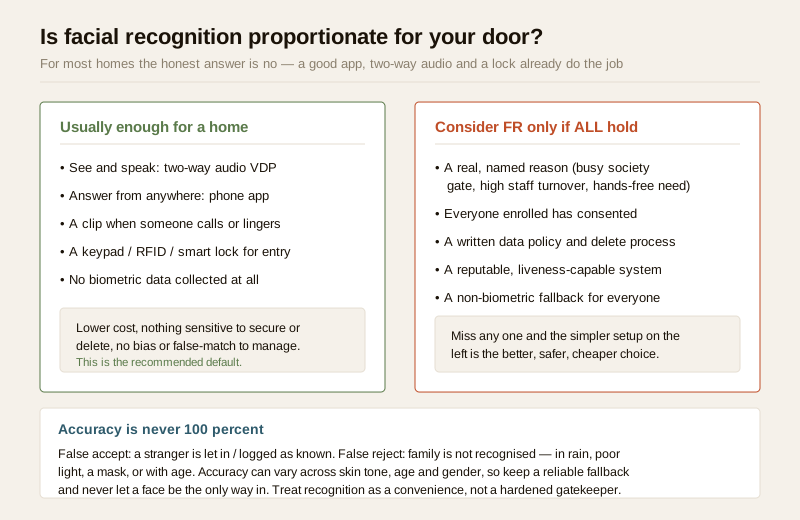
Facial recognition earns its place only when all of a short list is true: there is a real, named reason (a busy society gate with high staff turnover, or a genuine hands-free-entry need); everyone who will be enrolled has freely consented; there is a written policy and a working deletion process; the product is reputable and liveness-capable; and there is a non-biometric fallback for everyone. Miss any one of those and the simpler, non-biometric setup is the better, safer and cheaper choice. If your only reason is "it looks advanced," that is not a reason — it is a liability.
For societies and gated communities
At a society gate the maths changes a little, because a named, consented staff log has genuine value and the volume of people is higher. But so does the responsibility, because now you are processing many residents' and workers' biometric data, not just your own family's.
If an RWA is even considering it, the governance must come first, and the gated-communities security guide covers the wider framework. In brief:
- Consent of all affected residents and staff. Recognition at a common gate touches everyone. It needs a transparent, opt-in decision through proper RWA process, not a committee installing it quietly. Nobody should be forced to enrol to enter their own home — there must always be a non-biometric way in.
- A written data policy. Who controls the database, where templates live, how long logs are kept, who may view them, how a resident asks for deletion, and what happens to the data if the vendor changes. Put it in the AMC and the society bye-laws.
- A named accountable person. One office-bearer owns compliance, access reviews and deletion requests — the same discipline you would apply to society CCTV.
- Delete on exit. When a guard, maid or resident leaves, their template goes with them, promptly.
For most societies, a well-run guard-to-resident intercom with a disciplined visitor register and good multi-apartment door systems delivers the security benefit with far less privacy exposure than face recognition at the gate.
If recognition triggers a lock
Some systems will, on a match, release an electric lock — effectively access control driven by a face. If you go there, two non-negotiables apply, and both point away from DIY.
First, life-safety egress. A lock on a door people exit through must never trap anyone. For an egress door the lock must be fail-safe — it releases on power loss and on a fire-alarm signal — and it must never sit on a fire-escape route it could block. Fail-secure (stays locked without power) is only for doors that are not an escape route. This is governed by fire-code and NBC egress rules, not by preference.
Second, the wiring and the fire interlock are a licensed job. Selecting the lock, sizing the power and battery backup for India's cuts, and wiring the fire-alarm interlock is qualified fire-safety, door-hardware and electrical work — coordinate it, do not attempt it. Route it through the electrical hub and the smart-lock guide, and remember the honest risk: a networked lock is a network target, so keep strong unique credentials, apply updates, and always retain a mechanical override.
To sanity-check which features you actually need before spending on recognition, the feature selector walks you through the trade-offs.
When to bring in a professional. You can plan, decide and coordinate: whether recognition is proportionate at all, who consents, what the data policy says, and which reputable liveness-capable product to shortlist. Hand to licensed professionals everything to do with the lock, its wiring, power backup and the fire-alarm interlock, and consult a data-protection professional to confirm your DPDP obligations before you enrol anyone — especially at a society scale or where a child's data is involved. Never position a lock so it blocks a fire-escape route, and never let a face be the only way through a door.
Key takeaways
- Caveats lead, features follow. A face template is sensitive personal data under the DPDP Act, 2023 — enrol only with a lawful basis, clear notice, real consent, data minimisation, a retention limit, controlled access and a prompt deletion path.
- It is honestly modest. A facial-recognition door phone greets enrolled faces, keeps a named log and flags unknown faces — it does not replace a person answering the door, and accuracy is never 100 per cent.
- Failures cut both ways. False rejects lock out family, false accepts wave through strangers, and accuracy can vary by skin tone, age and gender — so never make a face the only way in; always keep a non-biometric fallback.
- For most homes it is overkill. A good app, two-way audio, night vision and a keypad or smart lock deliver the real benefit with none of the biometric liability — that simpler setup is the recommended default.
- Locks and egress are a pro job. If a match triggers a lock, egress doors must be fail-safe and off fire-escape routes; the lock, wiring and fire interlock are licensed work, never DIY.
References
- Digital Personal Data Protection Act, 2023 — a facial template is sensitive personal data; process it only with a lawful basis, notice, consent, minimisation, defined retention, restricted access and a deletion process, with heightened protection for children's data. Confirm your specific obligations with a data-protection professional.
- Manufacturer specifications — verify recognition accuracy claims, liveness/anti-spoofing capability, where templates are stored (on-device versus cloud), firmware-update policy and IP weather rating on the maker's own datasheet before buying.
- National Building Code of India (SP 7), Bureau of Indian Standards, and local fire-safety bye-laws govern egress and any electric-lock interlock on an exit door; verify the current edition via the BIS catalogue: https://www.services.bis.gov.in/
This is an educational overview, not legal advice. Assess proportionality and confirm DPDP obligations with a data-protection professional, and engage licensed fire-safety, door-hardware and electrical professionals for any lock, wiring or fire-interlock work; verify any standard's current status via the BIS catalogue before relying on it.
Export this guide
Related Guides — Deep-dive reading
Face-Recognition Locks in India (2026): Proportionality, Privacy and the DPDP Act
How a smart lock that unlocks on a recognised face actually works, the genuine hands-free appeal, and the DPDP, accuracy and honest overkill caveats that must come first, for Indian homes.
SecurityAccess Control Maintenance in India (2026): Readers, Locks and Fail-Safe Egress
How to keep a card, keypad, fingerprint or face access-control system reading reliably and locking securely — and, above everything, how to test that its doors still release on a fire alarm and on power loss, so an access-controlled door never becomes a life-safety trap.
SecuritySecurity Fire Alarm Integration in India (2026): Smart Alerts, Certified Systems, Fail-Safe Egress
The most important sentence a smart-home designer can say about fire is also the least profitable: a smart-home smoke sensor or fire notification is a helpful add-on, not a substitute for a certified fire-alarm system. This guide draws the line hard — life-safety detection and alarm belongs to the NBC-governed certified system — and then covers the genuinely useful, correctly-scoped automations the smart layer can add on a verified fire signal: unlock for egress, open the gate for the fire tender, light the escape path, stop the away-scene, and notify everyone loudly. All of it fail-safe. None of it in the way of the system that actually saves lives.
SecurityRelated Tools — Try Free
Video Door Phone Feature Selector
Tick what you want the door phone to do — app, night vision, two-way audio, smart lock, access control or facial recognition — and get the features and integrations to spec, with the privacy and safety caveats.
Feature SelectorVideo Door Phone Type Selector
Answer a few questions about your building, cabling, budget and internet and get the right video door phone — analog / wired / wireless / IP, single-home or multi-apartment, monitor or app.
Door Phone SelectorApartment Video Door System Planner
Enter flats, entrances, floors and guard desk for a first-pass building intercom plan — door stations, indoor monitors, guard station, the right architecture and an indicative cost band.
Building Planner