
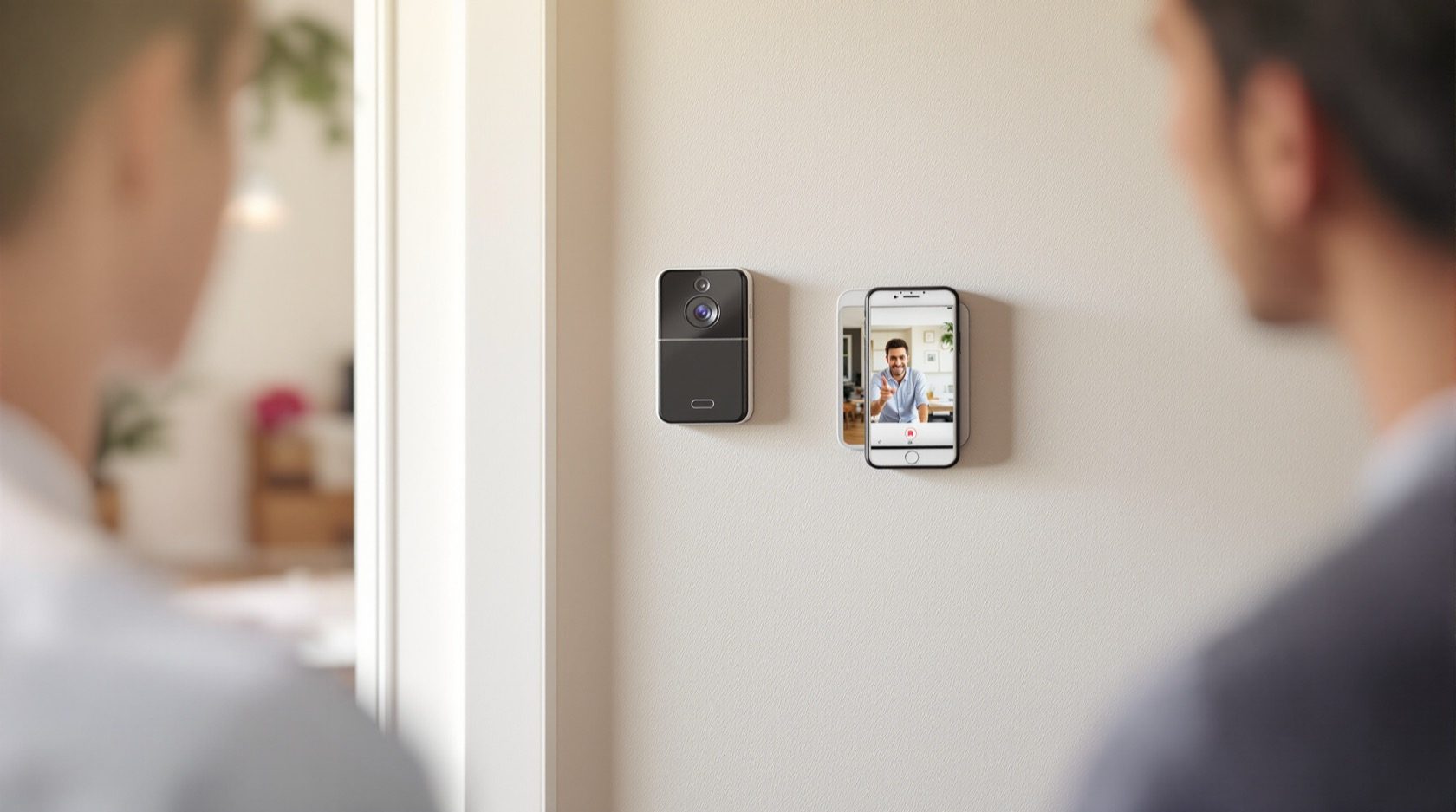
Wireless Video Door Phones in India (2026): The Honest Guide
How wireless video door phones work, the two flavours (a dedicated RF kit or an app-first Wi-Fi door station), and the real India trade-offs on range, power, latency and subscriptions before you buy.
A visitor presses the button at your gate, and a moment later you are looking at them and talking back — from a monitor on the living-room wall, or from your phone on the sofa. What makes it wireless is simply this: there is no data cable snaking from the gate to the screen. The picture and audio travel over the air, either on the kit's own private radio link or over your home Wi-Fi. For a rented flat, an older house with no conduit, or a gate too far to chase a wall to, that changes everything.
Wireless video door phones are the fastest-to-install way to see and speak to whoever is at your door. But "wireless" is a word that hides a lot of fine print, and in Indian conditions — thick walls, power cuts, a gate at the far end of a compound, monsoon on the outdoor unit — the fine print is exactly what decides whether the thing works on the night you need it. This guide, part of the Studio Matrx video door phone hub, lays the honest picture out: the two very different kinds of wireless system, what "wireless" does and does not save you, and how to judge whether wireless is right for your door or whether a wired system is the safer call.
Scope & safety. This guide helps you plan, compare and choose a wireless door phone and coordinate its install. A wireless data link still needs power — and tapping mains for a door station or a bell transformer is a licensed electrician's job (see the electrical hub). Point the camera at your own doorstep, not a neighbour's door or the shared corridor beyond your unit — the footage is personal data under the Digital Personal Data Protection Act, 2023. A networked door device is only as safe as its password and firmware; never leave defaults in place. This is educational guidance, not legal advice.
What "wireless" actually means at your door
First, clear up a common mix-up. A video door phone is a two-way intercom: a visitor presses a button at an outdoor door station, and you answer from an indoor monitor on your wall and/or an app, seeing and speaking to them. That is different from a doorbell camera, which is more of a CCTV-style device you mostly watch through a phone. The two overlap — a Wi-Fi door station that rings your phone looks a lot like a smart doorbell — but the door-phone framing keeps the indoor answering point at the centre, which matters for elders and children at home who will not fumble with an app.
"Wireless" refers to the link that carries the video and audio, not the whole device. And there are two genuinely different ways to build it.
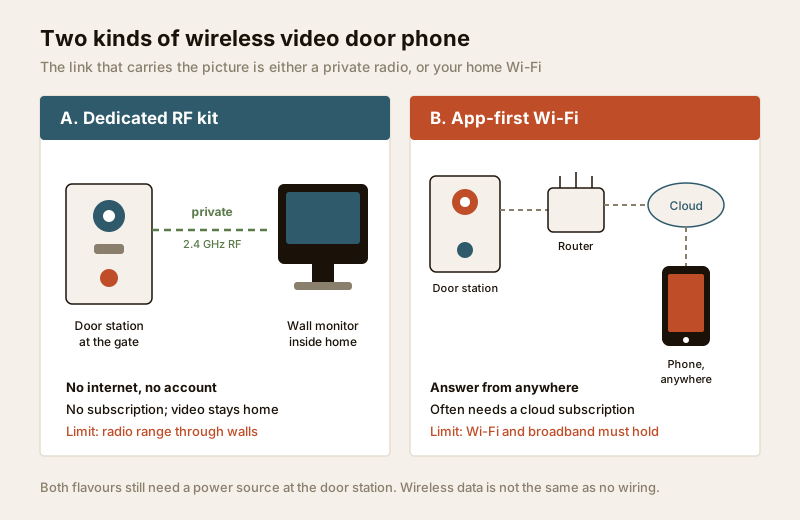
Flavour A — a dedicated wireless kit with its own indoor monitor
Here the door station and the indoor monitor are a matched pair, talking to each other over a private radio link — usually a dedicated 2.4 GHz RF channel, sometimes a proprietary band. You mount the door station at the gate, put the monitor on the wall, pair them once, and they work as a closed system. No internet, no router, no account, no subscription — the video never leaves your home.
This flavour behaves most like a traditional wired door phone, just without the cable between the two units. It suits people who want a simple wall monitor the whole household can use, and who do not want their door on the internet at all. The catch is range: a private radio link has a fixed reach, and Indian walls eat radio.
Flavour B — an app-first Wi-Fi door station
Here the door station joins your home Wi-Fi like any other gadget. When someone rings, the signal travels to your router, out to the maker's cloud, and back down to your phone — which may be in the next room or in another city. Many of these ship without a wall monitor at all; the phone is the monitor. Some pair with an optional indoor chime or screen.
This flavour is the most flexible — you can answer the door from anywhere — but it inherits every weakness of your broadband and Wi-Fi, and it usually leans on a cloud service with a subscription for recording and, sometimes, even for reliable ringing. Its security hygiene is now your responsibility, exactly as with any remotely accessed camera.
| Dedicated wireless kit (RF) | App-first Wi-Fi door station | |
|---|---|---|
| Link | Private 2.4 GHz / RF, station-to-monitor | Home Wi-Fi to router to cloud |
| Indoor answering | Dedicated wall monitor | Phone app (optional chime/screen) |
| Internet needed? | No | Yes, for remote & usually recording |
| Subscription | None | Often, for cloud recording/features |
| Answer away from home? | No | Yes |
| Best for | Simple household use, privacy | Retrofit, renters, remote answering |
| Main risk | RF range through walls | Wi-Fi dropouts, cloud/subscription |
The one thing every buyer gets wrong: wireless data is not no wiring
This is the single most important sentence in the guide: a wireless data link does not mean no wiring. The camera and screen at your door are electronics, and electronics need power. "Wireless" only removes the signal cable between the units — it does not conjure electricity out of the air. Every wireless door station is powered one of two ways, and both have India-specific consequences.
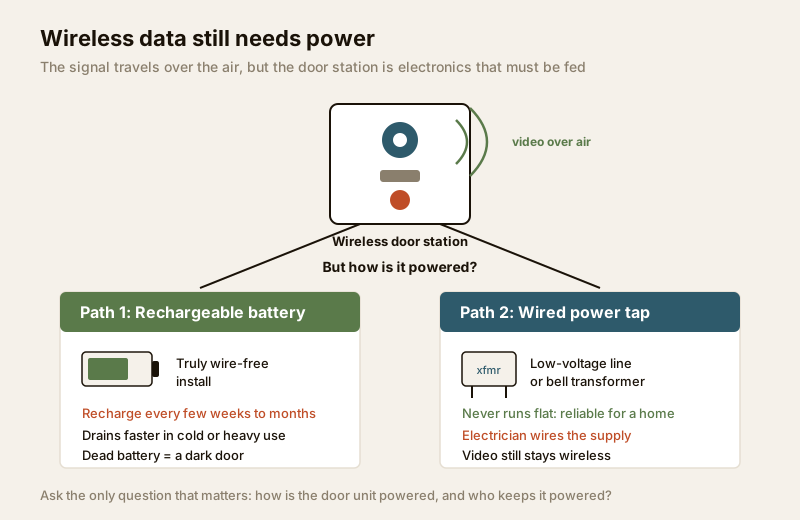
- Battery-powered. The door station carries a rechargeable pack. No power cable at all — genuinely wire-free, and the reason these are loved for rentals. But someone must take the unit down and recharge it every few weeks to a few months, and the interval shrinks in heavy use, cold weather, or when the camera wakes for every passing dog. If nobody remembers to charge it, the door goes dark. A dead battery is the most common failure of this whole category.
- Wired power (data still wireless). The video is wireless, but a thin low-voltage power line — or a proper bell transformer wired off the mains — feeds the door station so it never runs flat. This is the more reliable choice for a permanent home, but running that supply, and especially wiring a transformer at the consumer unit, is an electrician's job, not a DIY tap. See the electrical hub for how that power point should be done.
So when a shop says "fully wireless," ask the only question that matters: how is the door unit powered, and who keeps it powered? If the answer is "battery," you have signed up for a recharging chore. If the answer is "we run a small power wire," then you still need an electrician — the install was never truly wire-free.
The honest trade-offs for India
Wireless buys convenience. Here is what it costs, laid out plainly so you can weigh it against your own gate, walls and broadband.
Range and reliability at an outer gate
Radio and Wi-Fi both weaken with distance and with every wall they pass through — and Indian construction is unkind to them. Solid brick, reinforced-concrete columns, a metal gate, and the sheer distance from a compound gate to a first-floor router all sap the signal. A kit that works perfectly across a small flat can drop out completely between an outer boundary gate and a monitor two rooms and a staircase away.
- For a compact apartment, where the door station is metres from the router, wireless usually holds up well.
- For a villa or independent house with a gate at the end of a drive, or a door station on the far side of thick walls, wireless is where dropouts, freezes and missed rings begin — and a wired system often wins. See the villa and independent-house security guide for the wider picture.
- A Wi-Fi extender near the gate can rescue a marginal link, but it is one more device that needs power and can itself fail.
Latency and the missed-ring risk
With a dedicated RF kit, the ring reaches your wall monitor almost instantly. With an app-first Wi-Fi unit, the ring has to travel to the cloud and back to your phone — and if the Wi-Fi is congested, the broadband is slow, or the phone is asleep with notifications throttled, the ring can arrive seconds late or not at all. A visitor who has already walked away is a real, everyday failure of app-only systems. If reliable, instant answering matters — an elderly parent letting in a known visitor, say — a physical wall monitor beats an app notification every time. Two-way audio quality also depends on that link; the two-way audio guide explains why a laggy channel makes conversations talk over each other.
Cloud dependency and subscriptions
Many app-first door stations store their clips in the maker's cloud and charge a monthly or yearly subscription for it — and sometimes the free tier is so thin that even basic recording needs the paid plan. Before buying, find out exactly what stops working without a subscription: is it just cloud recording, or is it also alerts, snapshots, or history? A door phone whose usefulness quietly expires when a plan lapses is a poor foundation for home security. Prefer models that at least offer local storage (a microSD card or a local hub) so the device still records if you never subscribe.
Power cuts kill Wi-Fi — plan the backup
India's most under-appreciated wireless failure: when the power goes, your router and broadband go with it, and an app-first door station on Wi-Fi goes silent — even if the door station itself is on a battery. A dedicated RF kit is more resilient (the two units can each be on their own small backup), but an internet-dependent system needs the whole chain backed up: router, modem/ONT, and the door station. A small UPS or inverter on the router is the usual answer. Plan this in from the start; a door phone that dies with the evening load-shedding is exactly half a door phone.
Monsoon, dust and heat at the gate
The door station lives outdoors in Indian weather. Look for a stated IP weather rating (IP54 and up for a sheltered spot; higher if fully exposed), a rain hood, and a mounting position under an eave or a small canopy where you can manage it. Battery units suffer doubly in the monsoon — you are opening the housing to recharge, which is one more chance for water to get in. Heat shortens battery life; dust films the lens the same way it does a CCTV camera.
Security hygiene: a door on the network is a door on the internet
An app-first door station is a small computer facing the outside world. Treat it like one, or it becomes the weak point in your home. None of this is about defeating anything — it is basic self-defence for a device that watches your entrance.
- Change the default password immediately to a long, unique one, and never reuse it elsewhere.
- Turn on two-factor authentication (2FA) on the app account so a leaked password alone cannot open your camera to a stranger.
- Keep the firmware updated — makers patch security holes, and an un-updated door camera is a known risk.
- Use a strong Wi-Fi password and, if your router supports it, put the door station on a separate guest/IoT network so a compromised gadget cannot reach your laptops and phones.
- Mind the privacy line. Aim the camera at your own doorstep, not a neighbour's entrance or the shared corridor beyond your unit. Footage is personal data under the DPDP Act, 2023, and in an apartment or gated community the RWA may have its own rules. The remote-access security guide goes deeper on all of this.
When to prefer wireless — and when to go wired
Wireless is not better or worse than wired; it fits some doors and not others. This is the decision in one view.
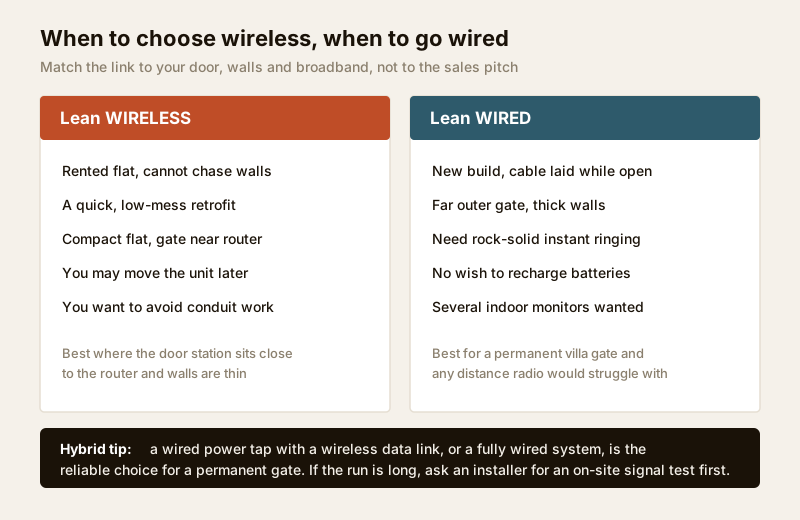
Lean wireless when:
- You rent, or otherwise cannot chase walls or drill conduit.
- You want the fastest possible install with minimal mess — no wall-chasing, no long cable runs.
- The layout is a compact flat where the gate and the router are close.
- You expect to move the unit or take it with you.
Lean wired (or a wired-power hybrid) when:
- It is a new build or a renovation where cable can be laid cleanly while walls are open.
- The gate is at the far end of a compound or behind thick walls where radio struggles.
- You need rock-solid, instant ringing every time — no cloud round-trip, no missed calls.
- You do not want to recharge batteries or depend on broadband.
- You want several indoor monitors wired to one door station across a larger home.
Not sure which way your door leans? Run your specifics through the video door phone type selector, and read the companion wired guide for the other half of the picture. For the full landscape of options, start at the complete video door phone guide.
When to bring in a professional. You can mount a battery door station and pair a wireless kit yourself. But hand over any mains-connected work — a bell transformer, a wired low-voltage power tap, anything at the consumer unit — to a licensed electrician (see the electrical hub). Route any strike-lock or door-hardware wiring to the door/hardware trade. And if the gate is far, high, or behind thick walls, have an installer do a quick on-site signal test before you commit to wireless — it is far cheaper than discovering the dropout after the wall is painted. In an apartment or society, clear the install and the camera's field of view with your RWA first.
Key takeaways
- Wireless means no data cable, not no wiring — every door station still needs power, either a battery you must recharge every few weeks to months, or a wired power tap an electrician runs while the video stays wireless.
- There are two flavours: a dedicated RF kit with its own wall monitor (private, no internet, no subscription, but range-limited) and an app-first Wi-Fi station that rings your phone (flexible and remote, but tied to your broadband and often a cloud subscription).
- Range is the villa killer — thick walls and a far outer gate cause dropouts and missed rings; wireless shines in compact flats and a wired system often wins for large houses.
- Power cuts take your Wi-Fi down too, so an app-first system needs the whole chain — router, modem and door station — on backup, or it goes silent during load-shedding.
- A networked door is an internet-facing computer: change the default password, turn on 2FA, keep firmware updated, and point the camera at your own doorstep only, since footage is personal data under the DPDP Act, 2023.
References
- Digital Personal Data Protection Act, 2023 — video and audio captured at your entrance is personal data; aim the camera at your own doorstep, restrict who can view the app and footage, and respect shared-space and RWA rules in apartments and gated communities.
- Manufacturer specifications — verify the wireless band and range, the stated IP weather rating, battery life and recharge interval, local-storage support, and exactly which features require a paid cloud subscription on the maker's own datasheet before buying.
- National Building Code of India (SP 7), Bureau of Indian Standards, and local wiring rules for any mains, bell-transformer or low-voltage power work feeding a wireless door station; verify the current edition via the BIS catalogue: https://www.services.bis.gov.in/
This is an educational overview, not legal advice. Mains-connected power, bell transformers and door-hardware wiring are qualified professional tasks — engage a licensed electrician or the door trade, and verify any standard's current status via the BIS catalogue before relying on it.
Export this guide
Related Guides — Deep-dive reading
CCTV vs Video Door Phone: Which Does Your Home Need?
They look similar and get confused constantly, but a CCTV camera and a video door phone do different jobs — one watches the whole property and records, the other answers your door and controls who comes in. This guide settles CCTV vs video door phone for Indian homes: what each is for, where they overlap, real rupee costs, apartment versus villa relevance, and why most homes end up wanting both.
Smart HomePoE vs Wi-Fi CCTV: Which Home Security Cameras Are Better?
One camera type runs power and video down a single Cat6 cable to an NVR and almost never drops out; the other clips to a wall in minutes and streams over your home Wi-Fi. This guide settles PoE vs Wi-Fi CCTV for Indian homes — reliability, video quality and bandwidth, cabling and power, retrofit versus new-build effort, NVR versus SD and cloud storage, hacking risk, real rupee costs, scalability and outdoor use — and gives a clear verdict for each kind of home.
Smart HomeComplete Guide to Security System Cybersecurity in India (2026): Protecting the Systems That Protect You
The cameras, locks, alarms and door phones you install to feel safer are internet-connected computers that can themselves be attacked, and an insecure one is worse than none. This pillar maps the whole attack surface — devices, network, accounts and data, operations — and points to every guide that hardens it.
SecurityRelated Tools — Try Free
Video Door Phone Type Selector
Answer a few questions about your building, cabling, budget and internet and get the right video door phone — analog / wired / wireless / IP, single-home or multi-apartment, monitor or app.
Door Phone SelectorApartment Video Door System Planner
Enter flats, entrances, floors and guard desk for a first-pass building intercom plan — door stations, indoor monitors, guard station, the right architecture and an indicative cost band.
Building PlannerSecurity Backup Power Calculator
Size a UPS/inverter and battery to keep CCTV, NVR, router and alarm running through a power cut — load, Ah, VA and cost.
Backup Power