
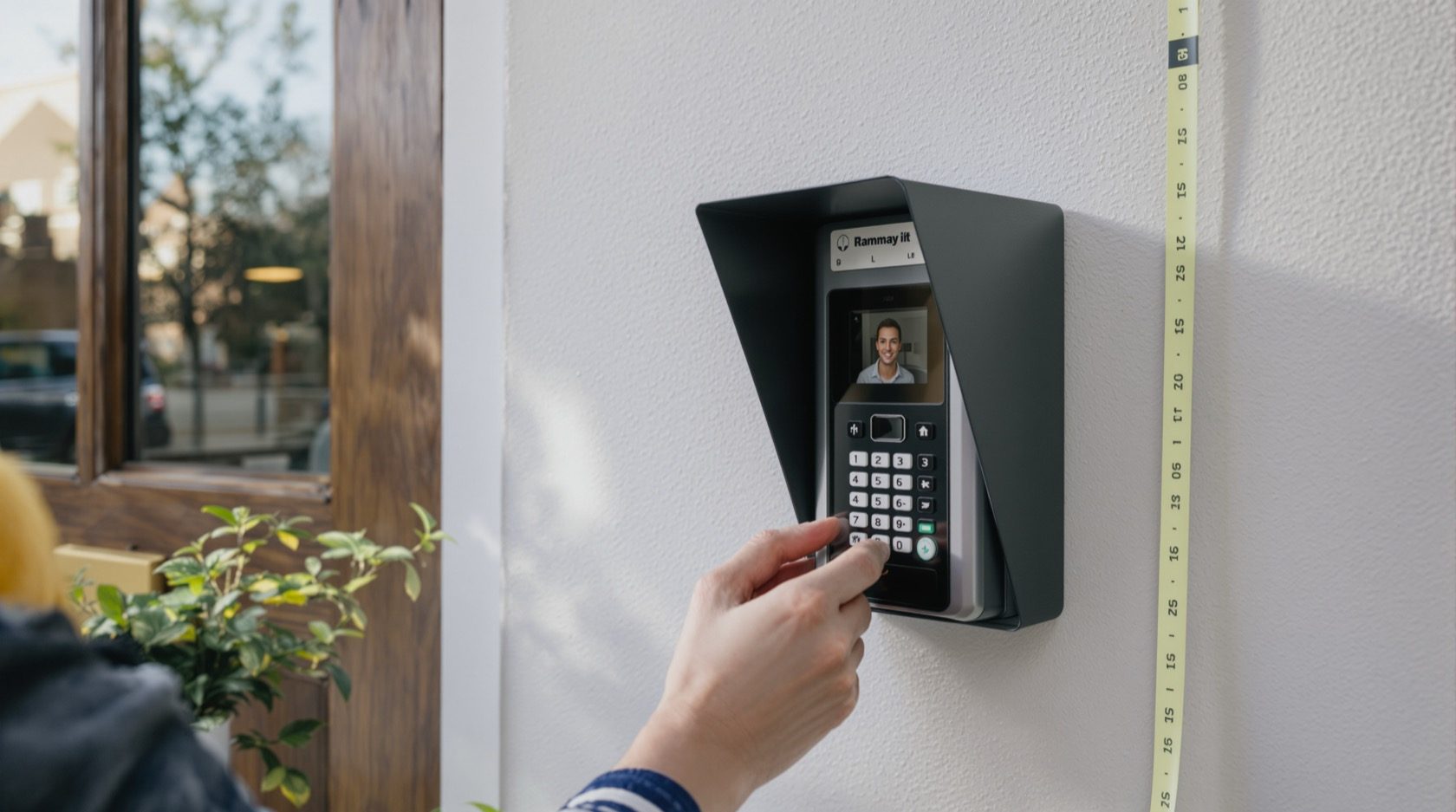
Video Door Phone Placement in India (2026): Where to Mount the Door Station and Indoor Monitor
The single most-skipped step: where the outdoor door station and the indoor monitor actually go. Camera height, latch-side siting, rain-hoods, backlight, neighbour privacy, and a second monitor so you never miss the door.
Most video door phones in India are bought carefully and mounted carelessly. The installer arrives, the drill comes out, and the door station goes wherever the wall is convenient and the cable is shortest. Then you get a system that shows the top of every visitor's head, blinds itself against the afternoon sun, or a monitor bolted in a back passage where you never hear it ring. The unit was never the problem. The video door phone placement was.
Video door phone placement is simply deciding, before anyone drills, exactly where the outdoor door station and the indoor monitor go — the height, the side, the shelter, the aim, and the room. Get it right and the same hardware quietly does its one job well: you see who is at the door and let them in. This guide is part of Studio Matrx's video door phone hub and sits beside the pillar guide. A video door phone is a two-way intercom you answer from an indoor monitor or app — one door, one clear answer. That is a different job from a CCTV coverage grid: CCTV blankets a property with many cameras; the door phone is the single station that answers the door. This guide is only about placing that one station and its monitors well.
Scope & safety. This guide helps you plan and mark exactly where a door station and monitor should go and hold your installer to it. The drilling, cable runs through walls, mains power tap and any gate-lock or strike wiring are licensed-professional tasks — hand cabling-at-height and mains work to a low-voltage installer and an electrician. A door camera watches your own doorstep and entrance; aim it at your entry, never into a neighbour's door, window or a shared corridor beyond your unit, and treat any recording as personal data under the Digital Personal Data Protection Act, 2023. This is educational guidance, not legal advice.
The one rule that decides everything: camera height
The door station's camera has a fixed lens pointing straight out. Whatever height you mount it at is the height whose face it frames. Mount it too high and you record a bald patch and a pair of shoulders; too low and you frame a belt buckle. The face is the whole point — you are trying to recognise the person, not admire their haircut.
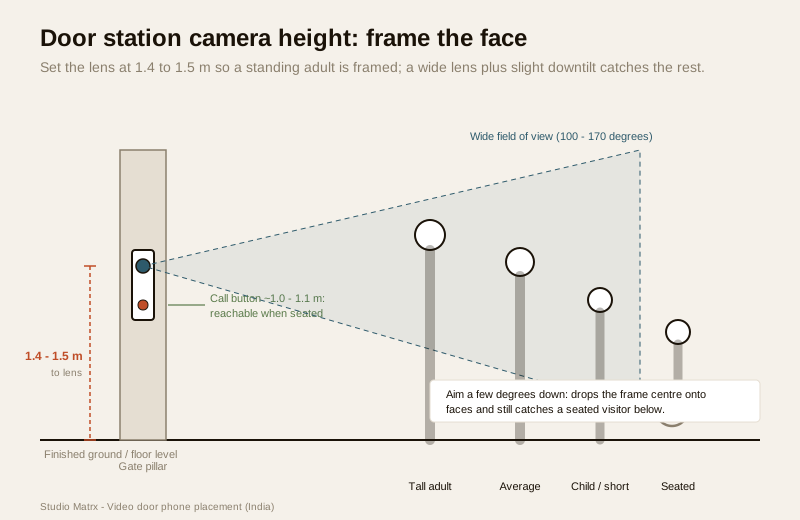
The workable answer for India is to put the camera lens at about 1.4 to 1.5 metres above the finished floor or ground. At that height the lens sits roughly at the eye-to-chin line of an average standing adult, so a visitor standing naturally at the door has their face squarely in the frame. This is a little lower than many installers default to, because the instinct is to mount the whole unit at "eye level" — but on most door stations the camera sits near the top of the housing, so mounting the unit at your eye level puts the lens above everyone else's.
Framing everyone, not just an average adult
Real visitors are not one height. The same station must reasonably frame a tall relative, a shorter neighbour, a child sent up with a parcel, and a wheelchair user whose face sits far lower than a standing adult's. Two things rescue you here:
- A wide field of view does the heavy lifting. Most door-station cameras are wide-angle (often 100 to 170 degrees). A wide lens set at 1.4 to 1.5 m has enough vertical spread to catch a tall visitor's face and a seated visitor's face in the same frame — you lose sharpness at the edges but you do not lose the person. Check the field-of-view number when you choose the unit; the feature selector and type selector list it.
- A slight downward tilt helps. If the station allows it, angle the lens down a few degrees. That drops the centre of the frame toward chest-and-face height for standing visitors while still catching a seated visitor below — better than aiming dead level, which wastes the top third of the image on sky and wall.
For a home where an elderly parent or a wheelchair user answers the door, also think about the call button reach: mount the station so the button sits around 1.0 to 1.1 m, within comfortable reach of a seated visitor, rather than up at the top of a tall unit. On a combined unit that fixes both button and camera height together, 1.4 to 1.5 m to the camera usually lands the button in a reachable band; if it does not, favour button reach and rely on the wide lens and downtilt for framing.
Where on the wall: siting the door station
Height is half the job; the other half is which surface, on which side, under what shelter. Four siting rules matter more than the rest.
Put it on the latch side, where a visitor naturally stands
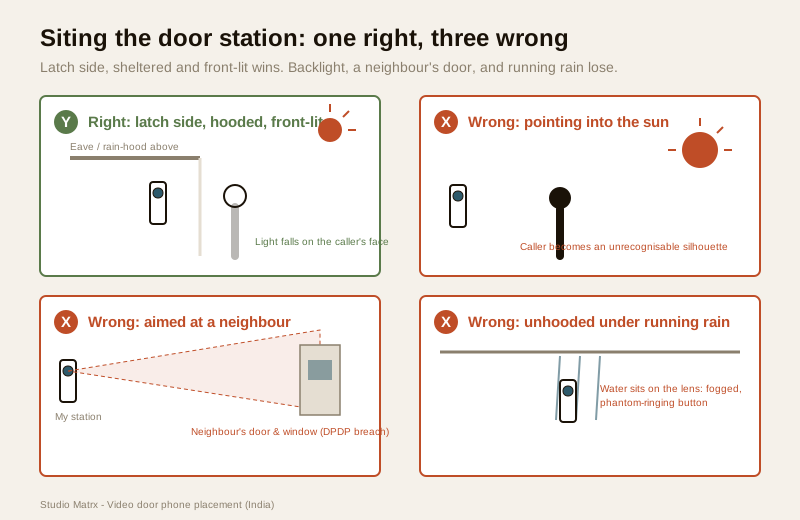
Mount the station on the latch side of the gate or door — the side that opens, where a person waits to be let in — not the hinge side they have to lean across. Set it a comfortable arm's length from the opening so the visitor stands square to the camera when they press the button, and so opening the gate does not swing a leaf across the lens. On a villa this is usually the gate pillar; on a flat it is the wall beside the door leaf.
Shelter it from direct rain and sun
An Indian door station lives outdoors through monsoon and forty-degree afternoons. Even a weather-rated unit lasts longer and reads better when it is sheltered:
- Mount it under an eave, porch, portico or gate-pillar cap where the roofline already throws shade and sheds rain, or fit a rain-hood / weather-shield over it. A hood keeps monsoon water off the lens and the button, and stops rain-streaks turning the image into a blur.
- Rain running down the wall above an unhooded station is the classic monsoon failure: water sits on the lens, the picture fogs, and the touch button starts phantom-ringing.
Avoid strong backlight behind the visitor
A camera exposes for the brightest thing it sees. If the station faces a bright background — the open sky, a west-facing wall in full afternoon sun, a white-tiled lobby lit from behind — it darkens everything in front to compensate, and the visitor becomes a silhouette you cannot recognise. Aim the station so the visitor's face is lit, not backlit: prefer a wall where light falls on the caller rather than streaming toward the lens, and avoid pointing it straight into the setting sun. Where you cannot avoid it, choose a unit with good backlight handling (WDR) and lean on night vision and IR for after dark.
Point at your doorstep — never into a neighbour's home
This is the privacy rule, and it is not optional. The door camera exists to see your visitor at your entrance. Aim and, where the unit allows, mask the view so it covers your gate, your doorstep and the approach to it — and not a neighbour's front door, their windows, the inside of their home, or a shared corridor beyond your own unit. In tight plots and apartment landings this takes real care: a station angled for a wide view of "the whole passage" often ends up staring at the flat opposite. Recorded footage and audio are personal data under the DPDP Act, 2023, and a camera trained on a neighbour's private space is both bad manners and a real dispute waiting to happen. The dedicated privacy guide covers masking, notice and consent in full.
Villa gate vs flat door: two different jobs
| Villa / independent house | Flat / apartment | |
|---|---|---|
| Where the station goes | On the compound gate pillar (and often a second at the front door) | On the wall beside the flat door, in the shared lobby/landing |
| Distance to indoor monitor | Long — 10 to 30 m of cable across the plot | Short — a few metres inside the flat |
| Weather exposure | Full outdoor: needs a hood or pillar-cap shelter | Sheltered by the lobby, but landing light can backlight |
| Privacy pinch-point | The public street beyond the gate | The neighbour's door directly opposite on the landing |
| Permission | Yours to decide within your boundary | Often needs RWA / society permission to fix anything in the shared lobby |
On a villa, plan the gate-station and its long cable run at construction stage — the villa guide covers gate-plus-door layouts and gate release. In an apartment, the door and its landing are frequently shared property: get society permission before drilling into a common wall, keep the aim tight to your own doorway, and see the apartment intercom guide and the security guide for apartments.
Placing the indoor monitor (and a second one)
A door station you cannot hear is useless. The indoor monitor's placement decides whether you actually answer the door, so treat it with the same care.
Mount it at eye level, where you already are
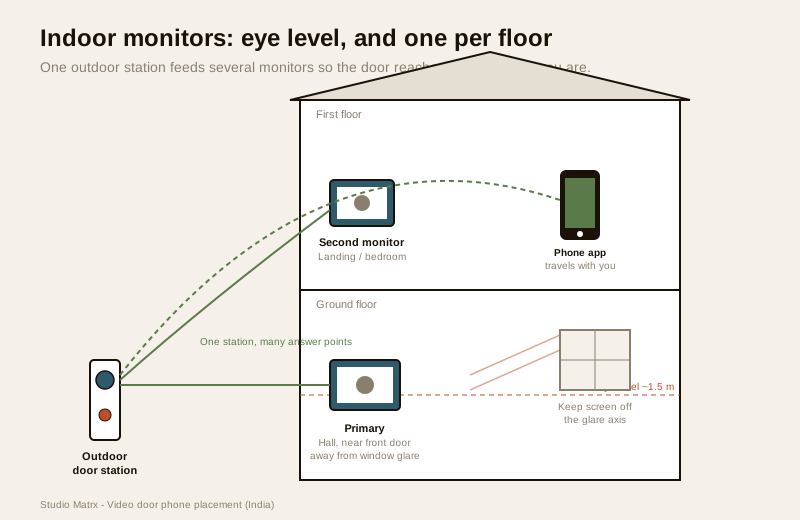
- Height: put the screen at a comfortable standing eye level, about 1.5 m to the centre of the display, so you glance at it without stooping or reaching up.
- Where: near where the family actually spends time and, ideally, near the entry you will use to let people in — a hall, the living room by the main door, or the kitchen. A monitor in a spare bedroom no one sits in will be missed every time.
- Away from glare: keep the screen out of direct sunlight from a facing window, which washes out the image and makes you miss faces. A wall at right angles to the window beats a wall opposite it.
- Reachable and wired: it needs the door-station cable and a power point behind it; plan both at the same time. The wiring guide covers the cable run, and because the monitor dies in a power cut without backup, pair placement with the power-backup guide.
A second monitor so you never miss the door
One monitor covers one floor and one room. In a two-storey house, or a flat where the kitchen is far from the living room, a single monitor guarantees missed calls. Add a second (or third) indoor monitor so the bell reaches you wherever you are:
- Upstairs: on the landing or in the main bedroom, so the first floor hears the gate.
- Kitchen: where a lot of the day is spent and the front door is out of earshot.
- Most wired systems support two to four monitors on the same door station; confirm the model's monitor limit before buying. A mobile-app door phone adds your phone as a "monitor" that travels with you — useful, but the wall monitor near the door stays the primary answer point.
Test before you drill
The cheapest fix is the one you make before the holes exist. Every placement decision above can be checked in ten minutes with no commitment:
1. Hold the station where you plan to fix it. Have someone hold the door station at the marked height and spot, and stand a couple of "visitors" of different heights — a tall adult, a shorter person, someone seated on a chair to stand in for a wheelchair user — in front of it.
2. Look at the live picture on the monitor or app. Is every face framed? Any silhouette from backlight? Any water-run path down the wall above it? Any part of a neighbour's door or window in shot?
3. Check the button reach. Can a shorter or seated visitor comfortably press it?
4. Hold the monitor at its spot too. Stand where you usually sit or work — can you see the screen and hear the chime? Try it against the afternoon glare from the nearest window.
5. Only then mark and drill. Tape a paper template or pencil the outline, walk away, come back and look again before the installer drills. A mark costs nothing to move; a hole does not.
This five-minute rehearsal catches nearly every placement mistake in this guide. For choosing the unit itself before you place it, the type selector, feature selector and apartment system planner narrow it down, and the cost calculator sizes the budget.
When to bring in a professional. Marking heights, holding a mock-up, standing test "visitors" and checking the live view are yours to do. Hand the drilling into masonry, the cable run through walls and across the plot, the mains power tap for the monitor, and any gate-strike or lock wiring to a low-voltage door-phone installer and a licensed electrician — see the electrical hub. In an apartment, get RWA / society permission before fixing anything to a shared lobby wall, and keep the camera aimed strictly at your own doorway.
Key takeaways
- Camera height is the master decision — set the door-station lens at about 1.4 to 1.5 m so a standing adult's face is framed, and lean on a wide field of view plus a slight downtilt to catch tall, short, child and wheelchair-seated visitors in the same shot.
- Site the station on the latch side, sheltered and front-lit — beside the gate pillar or door leaf, under an eave or a rain-hood against the monsoon, and never pointing into the setting sun that turns a visitor into a silhouette.
- Point at your own doorstep, never a neighbour's — aim and mask the view to your entrance; footage is personal data under the DPDP Act, 2023, and a camera on a neighbour's door is a dispute waiting to happen.
- Place the monitor at 1.5 m eye level where you actually are — near the entry you use, away from window glare, and add a second monitor upstairs or in the kitchen so you never miss the door.
- Test before you drill — hold the station and monitor in place, stand test visitors of different heights, check the live view and button reach, then mark and only then drill; villas need a gate-pillar plan, flats need society permission.
References
- Digital Personal Data Protection Act, 2023 — a door camera's footage and audio are personal data; aim and mask it at your own entrance only, do not capture a neighbour's private space or a shared corridor beyond your unit, and post notice where required.
- Manufacturer specifications — confirm the door-station camera's field-of-view angle, mounting-height guidance, weather (IP) rating, tilt allowance and the maximum number of indoor monitors on the maker's own datasheet before you fix the position.
- National Building Code of India (SP 7), Bureau of Indian Standards, and local municipal bye-laws for any electrical, mains-power or cabling aspect of the install; verify the current edition via the BIS catalogue: https://www.services.bis.gov.in/
This is an educational overview, not legal advice. Drilling, cabling, mains power and gate-lock wiring are qualified professional tasks — engage licensed installers and an electrician, obtain any required society permission, and verify a standard's current status via the BIS catalogue before relying on it.
Export this guide
Related Guides — Deep-dive reading
CCTV vs Video Door Phone: Which Does Your Home Need?
They look similar and get confused constantly, but a CCTV camera and a video door phone do different jobs — one watches the whole property and records, the other answers your door and controls who comes in. This guide settles CCTV vs video door phone for Indian homes: what each is for, where they overlap, real rupee costs, apartment versus villa relevance, and why most homes end up wanting both.
Smart HomeSecurity for People Living Alone in India (2026): Calm, Practical Habits When There Is No Second Person to Notice
Living alone is an ordinary and growing part of Indian life - the student in a new city, the working single, the elder whose children are abroad, the person after a separation. It does not call for fear. It calls for a few deliberate habits, because there is no second person in the home to notice trouble, raise the alarm, or catch an accident. This is calm self-reliance, layer by layer.
SecurityVilla Video Door Phones in India (2026): Gate, Front Door and Every Floor
How to plan a video door phone for an independent house, bungalow or duplex: a station at the compound gate and the front door, indoor monitors on every floor, gate release, and wiring run at construction stage.
SecurityRelated Tools — Try Free
Apartment Video Door System Planner
Enter flats, entrances, floors and guard desk for a first-pass building intercom plan — door stations, indoor monitors, guard station, the right architecture and an indicative cost band.
Building PlannerVideo Door Phone Type Selector
Answer a few questions about your building, cabling, budget and internet and get the right video door phone — analog / wired / wireless / IP, single-home or multi-apartment, monitor or app.
Door Phone SelectorCCTV Cable-Length Calculator
Total cable to buy for a CCTV job and a warning when a run exceeds the cable's maximum length.
Cable Length