
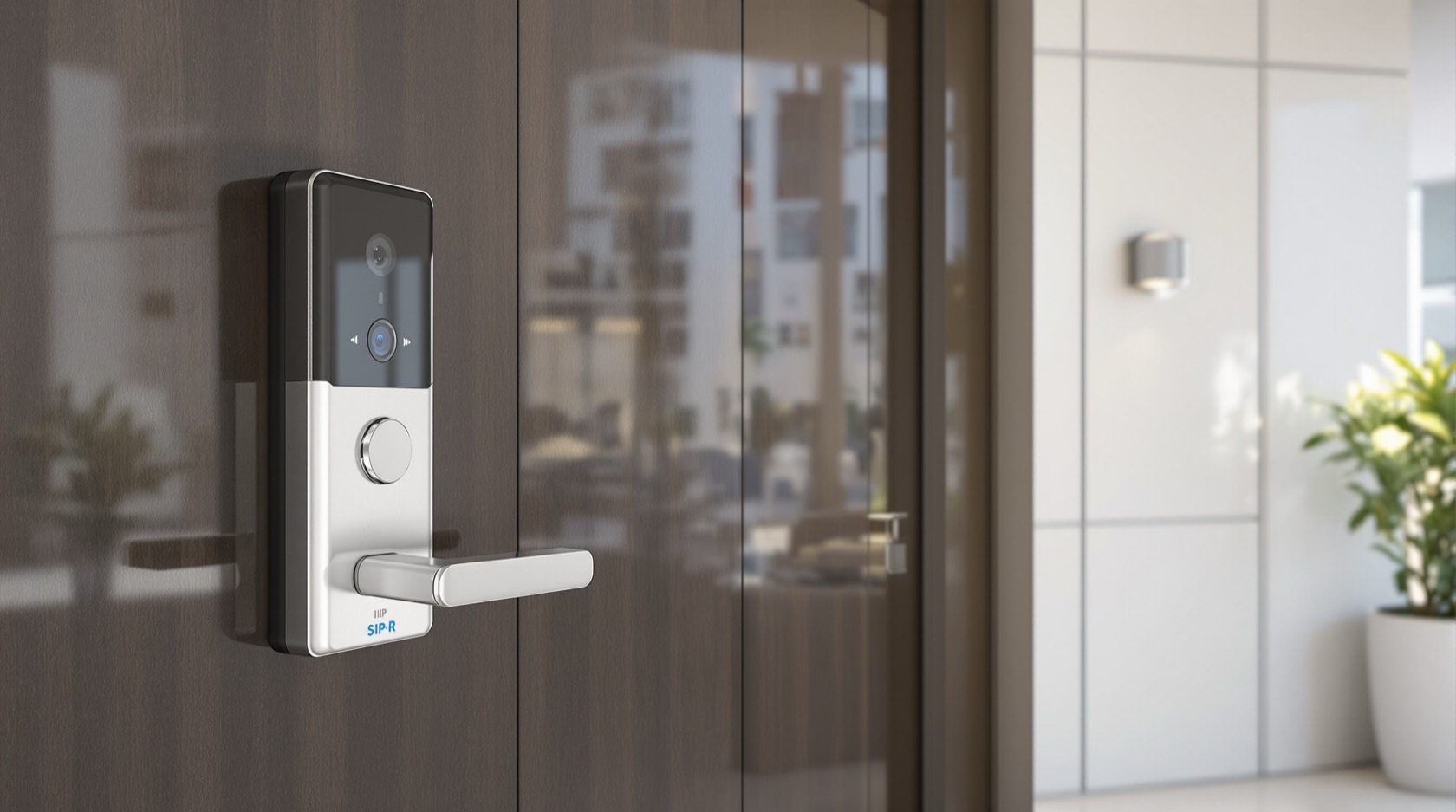
IP Video Door Phones in India (2026): The Networked Entry System
How network-based video door phones work over Cat6 and PoE, why they win for towers, villas and offices, what they cost, and the structured cabling and network security they demand.
Walk up to the gate of a new apartment tower or a networked villa and press the call button, and something quietly modern happens. The door station is not sending a picture down a private cable to one monitor bolted to a wall. It is a small computer on the building's network, streaming HD video and two-way audio over the same kind of cabling that carries the internet, so that any monitor in the flat, the guard at the gate, and every resident's phone can answer that one call. That is the shape of an IP video door phones system, and it is the direction most new construction in India is heading.
An IP (Internet Protocol) video door phone treats the door station, the indoor monitors and the recording box as networked devices, the way IP CCTV cameras already are. This guide is part of Studio Matrx's video door phone hub and its sub-hub landing: after the analog, wired and wireless families, IP is the one you specify when the building is new, large, or meant to run as a connected system. It is written for homeowners choosing for a single villa, and for architects and builders speccing a door-entry system across a whole project.
Scope & safety. This guide helps you plan, decide and coordinate the right networked door-entry system and hold your installer and network contractor to account. It is strictly defensive: it does not explain how to defeat, tap, spoof or disable any intercom or lock. Structured cabling at height, the mains supply to the PoE switch, and any electric-strike or magnetic-lock wiring are licensed trades — a network/cabling contractor and an electrician, not a DIY job. A door camera watches a shared entry space, so point it at your own doorstep or gate, not a neighbour's door or the corridor beyond your unit; footage is personal data under the Digital Personal Data Protection Act, 2023. This is educational guidance, not legal advice.
What "IP" actually changes
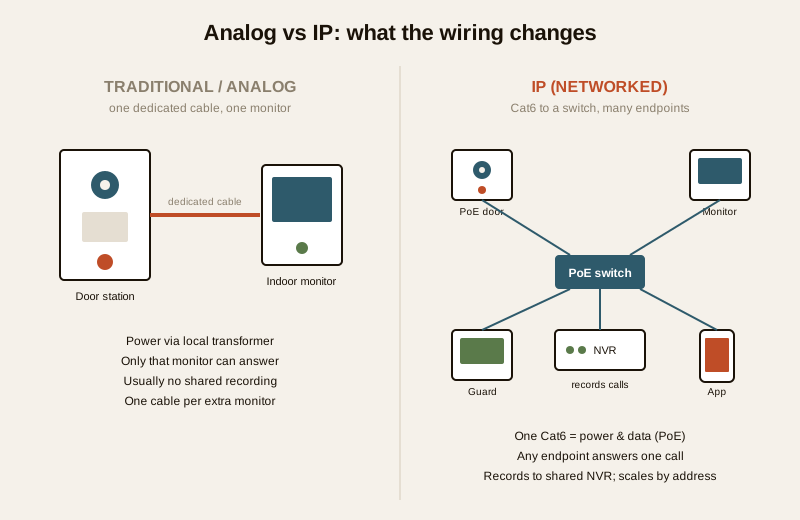
Every video door phone does the same job: someone at the door calls, you see and speak to them from inside, and you can release the door. What changes between families is the plumbing. An analog or traditional wired system runs a dedicated cable from the door station to each monitor, carrying an analog video signal that only those monitors understand. An IP video door phones system instead puts the door station and every monitor onto a standard data network — the same Cat6 structured cabling, switches and IP addressing that carry a building's computers and its IP CCTV.
That single change cascades into everything else:
- One cable does two jobs. With Power over Ethernet (PoE), a single Cat6 run from a network switch to the door station carries both the data and the power. No separate transformer at the gate, no parallel power cable — the electrical load moves back to a central switch you can put on a UPS.
- Any monitor can answer any door, because they are all just addresses on the network. A guard station at the gate, three monitors inside a flat, and the app on every resident's phone can be rung by the same call and any of them can pick up.
- It records to shared infrastructure. Because the door station is an IP video source, an NVR (Network Video Recorder) — often the same one running the building's CCTV — can record every call and every person who came to the door, into the same timeline as the cameras.
- It scales by adding addresses, not cables. Growing from four flats to four hundred is a matter of network design and licensing, not of running individual home-runs to a central box that only has so many ports.
It is still "wired" — just over the LAN
A common confusion: is IP the same as a wireless door phone? No. An IP system is firmly a wired system — it depends on structured Cat6 cabling run through the building — but it is wired to a network, not point-to-point to a monitor. The wireless family uses radio to avoid cabling in a retrofit; the traditional wired family uses dedicated intercom cable point-to-point. IP borrows the reliability of wires and the flexibility of a network. Think of it as the analog-versus-IP CCTV story, applied to the doorbell: the picture rides your data network instead of a private coax or intercom pair.
The standards that make it interoperable
Part of what makes IP attractive to a builder is that, done well, it is not locked to one brand. Two families of standards matter, described in plain terms:
- SIP (Session Initiation Protocol) is the same call-setup language used by internet phones (VoIP). A SIP-based door station "rings" monitors and phones the way an office phone system rings extensions. It means a door call can, in principle, reach a softphone app, a desk phone, or a guard console from different makers, and it is why large residential and commercial systems lean on SIP.
- ONVIF-style profiles are the interoperability agreements that let IP video devices from different manufacturers talk to a common recorder. An ONVIF-conformant door station can usually be recorded by an ONVIF NVR even if the two carry different badges — the same reason a mixed IP-CCTV system can share one recorder.
You do not need to master these acronyms, but you should ask for them by name when speccing a project, because they are what protect you from being trapped with a single vendor for the life of the building. A door station that speaks SIP and records over ONVIF can be maintained, extended and partly replaced years later; a fully proprietary one cannot.
| What you are buying | Analog / traditional wired | IP (networked) |
|---|---|---|
| Cabling | Dedicated intercom / coax cable, point-to-point | Structured Cat6, star-wired to a switch |
| Power to door station | Local transformer or from monitor | PoE — power and data on one Cat6 run |
| Who can answer | The wired monitor(s) | Any monitor, guard station, and phone app |
| Recording | Often none, or a small local store | To an NVR, shared with IP CCTV |
| Scaling | New cable run per monitor | Add a network address; design + licences |
| Interoperability | Usually one brand | SIP / ONVIF-style, multi-vendor possible |
| Night video | Adequate to good | Typically HD with better low-light handling |
| Best fit | Single flat, retrofit, budget | Towers, villas-as-systems, offices, communities |
Why IP wins for larger and newer buildings
For a single small flat, an IP system is usually overkill (more on that below). Its advantages compound with size and with how "connected" you want the building to be.
Any monitor, the guard, and every phone answer one call
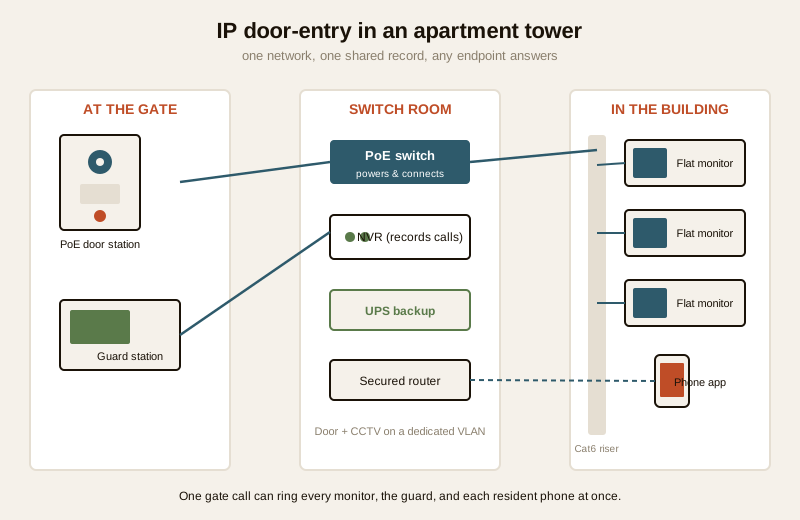
In a multi-apartment tower this is transformative. A visitor at the main gate calls a flat; the call can ring the flat's indoor monitors and the resident's phone wherever they are and be routed via the guard station for screening. A resident stuck in traffic can see and speak to a delivery agent and, where the building allows it, coordinate access — all from the same call. That is only practical because the door station and every endpoint are addresses on one network. See how this fits the wider picture in the building security systems guide.
Recording to an NVR, alongside the CCTV
Because the door station is an IP video source, every call and every caller can be recorded into the same NVR and timeline as the building's IP CCTV. For a gated community or an office, that shared record — "who came to which door, when" — is far more useful than a doorbell that forgets everything the moment the call ends. It also means door-entry footage inherits the CCTV system's remote access and retention discipline, for better and for worse: you must secure it the same way.
HD video and better night handling
IP door stations typically carry higher-resolution sensors and better low-light or IR performance than a legacy analog station, so you can actually recognise a face at the gate at night, not just detect a shape. This matters most where the entry is poorly lit or the camera has to cover a wider approach.
One app per resident, one system per building
A well-designed IP system gives every resident the door on their phone and gives the building one coherent system to maintain, rather than hundreds of unconnected doorbells. For the architect, that is a single line in the services drawings — structured cabling, a switch room, an NVR — instead of a tangle of per-flat intercom runs. Contrast this with a doorbell camera, which is a self-contained CCTV-style device answered from an app: fine for one flat, but it is not a building intercom and it does not integrate a guard station or a shared record. A video door phone is a two-way intercom answered from an indoor monitor and/or app; a doorbell camera is a camera. IP is the version of the intercom that behaves like building infrastructure.
The trade-offs: cost and a real network
None of this is free, and pretending otherwise is how projects end up with an expensive system nobody maintains.
It costs more, per door and overall
IP door stations, PoE switches, an NVR and structured cabling all cost more than an analog station wired to a monitor. For a single villa the premium can be a few tens of thousands of rupees over an analog equivalent; for a tower it is a line item in the building services budget. The value is real, but only if the building is large enough, or connected enough, to use what it is paying for.
It needs proper network design — not an afterthought
This is the part that gets skipped and then hurts. An IP door-entry system is only as reliable as the network under it, and that network must be designed, not improvised:
- A PoE switch with enough power budget to run the door station(s), sized for the load, and ideally with a spare port margin.
- A dedicated VLAN (network segment) so the door-entry and CCTV devices are logically separated from residents' internet traffic. This is both a performance and a security measure — you do not want a compromised laptop able to reach the door station, and you can read across to the CCTV remote-access security guide for why segmentation matters.
- IT-grade structured cabling — proper Cat6, terminated and tested, run in conduit or tray, not doorbell wire twisted onto a connector. This is a cabling contractor's work, done to a standard.
- Switch and NVR on a UPS, because in India the network will lose mains power, and a door-entry system that dies with the evening load-shedding is only half a system.
For any project of size, treat this exactly like the network planning you would do for IP CCTV — often it is the same network, the same switch room and the same NVR, which is precisely why doing it once, properly, at build stage pays off.
It is overkill for a single small flat
If you live in one 2BHK and want to see and speak to whoever is at your door, an IP system is more system than you need. A wired or wireless video door phone, or even a doorbell camera with two-way audio, will do the job for a fraction of the cost and the network fuss. IP earns its keep when there are many doors, many endpoints, a guard, a shared record, or a building meant to run as one system. If you are unsure which family fits, the video door phone type selector walks you through it, and the apartments and villas security guides give the wider context.
Where IP fits — and where it does not
| Situation | Is IP the right call? | Why |
|---|---|---|
| New villa wanting a networked home | Often yes | One structured-cabling backbone serves door, CCTV, data; future-proof |
| New apartment project / tower | Usually yes | Guard integration, per-flat app, one shared record, scales cleanly |
| Office / commercial building | Usually yes | SIP ties door calls into the phone/access system; multiple entries |
| Gated community | Usually yes | Central guard station, community-wide record, many gates and doors |
| Retrofit of a single old flat | Usually no | Structured cabling is disruptive; wired or wireless fits better |
| One small budget flat | No | Overkill; a simpler family costs far less and does the same daily job |
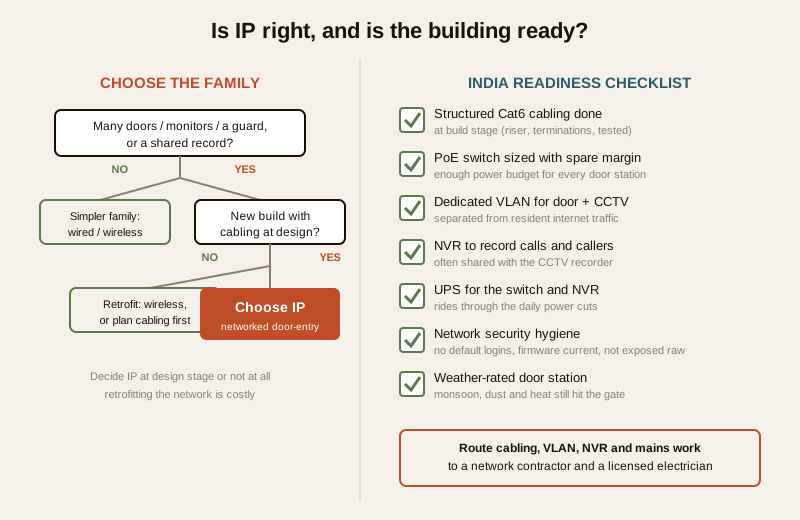
The rule of thumb for the architect or builder: decide IP at design stage or not at all. The whole advantage of IP comes from structured cabling, a switch room, VLANs and an NVR being planned into the building. Retrofitting all of that into a finished, occupied building is expensive and disruptive, which is exactly why the wireless family exists. If the cabling goes in with the building, IP is the natural choice for anything of scale.
Making it work in India
The technology is proven; the failures are almost always in the groundwork. Four India-specific realities decide whether an IP door-entry system thrives or limps:
- Structured cabling must be done at build stage. Retrofitting IT-grade Cat6 through occupied floors is the single biggest avoidable cost. If the building is going up, insist the door-entry and CCTV cabling — riser routes, a switch room, terminations, testing — is in the services drawings from the start. This is the one decision that cannot easily be undone later.
- Power backup for the switch is non-negotiable. Mains is unreliable across most of India. The PoE switch and NVR must sit on a UPS sized to ride through the daily cuts, or the entire door-entry system goes dark exactly when you rely on it. This mirrors the power planning you do for CCTV.
- Network security hygiene is now a door-security matter. An IP door station is a small computer reachable over the network. Change every default password, keep firmware current, segment it onto its own VLAN, and never expose it raw to the internet — the discipline in the remote-access security guide applies directly. A compromised door station is a compromised entrance.
- Monsoon, dust and heat still attack the door station. The station at the gate lives in the same brutal weather as any outdoor camera, so specify a properly weather-rated unit and a sensible mounting position, the same way you would for outdoor CCTV. The network may be indoors, but the front door is not.
For the wider building picture — how door-entry sits alongside CCTV, alarms and access control — the building security systems guide and the ultimate home security guide put IP door-entry in context, and the security hub links the rest.
When to bring in a professional. You can and should plan, decide and coordinate — choose IP or a simpler family, set the requirements (SIP/ONVIF, VLAN, UPS, recording), and hold your contractors to them. Hand the actual structured cabling, switch and NVR configuration, VLAN setup, the mains supply to the switch, and any electric-strike or magnetic-lock wiring to a licensed network/cabling contractor and an electrician — cabling at height and mains work are qualified trades. For any building of size, get the network designed properly before a single cable is pulled; a badly built network is the one part of an IP system you cannot easily fix later.
Key takeaways
- IP video door phones put the door station and every monitor on the building's network, so one PoE Cat6 cable carries power and data, and any monitor, the guard, and every resident's phone can answer one call.
- It is still a wired system — wired to a LAN, not point-to-point — which distinguishes it from the wireless and traditional wired families; the picture rides your data network like IP CCTV.
- IP wins for towers, networked villas, offices and gated communities: guard-station integration, recording to an NVR alongside CCTV, an app per resident, HD night video, and SIP/ONVIF interoperability that avoids vendor lock-in.
- The trade-offs are cost and a real network: a PoE switch with margin, a dedicated VLAN, IT-grade cabling and a UPS — plan it at design stage, because it is overkill and hard to retrofit for a single small flat.
- In India the groundwork decides everything: structured cabling done at build stage, power backup for the switch, network-security hygiene, and a weather-rated door station — footage is personal data under the DPDP Act, 2023, so secure and aim it responsibly.
References
- Digital Personal Data Protection Act, 2023 — door-entry video and call recordings are personal data; segment and secure the door-entry network, restrict who may view recordings, keep passwords private, and aim the camera at your own entrance, not a neighbour's door or a shared corridor beyond your unit.
- Manufacturer specifications — verify PoE class and power budget, SIP and ONVIF-profile conformance, sensor resolution, low-light/IR performance and IP weather rating on the maker's own datasheet before specifying or ordering.
- ONVIF and SIP (IETF RFC 3261) interoperability profiles — the openly published agreements that let IP door stations, monitors and recorders from different makers work together; confirm conformance claims against the published profile lists rather than a brochure.
- National Building Code of India (SP 7), Bureau of Indian Standards, and local municipal bye-laws for the electrical supply to the switch and any door-hardware wiring; verify the current edition via the BIS catalogue: https://www.services.bis.gov.in/
This is an educational overview, not legal advice. Structured cabling, network and NVR configuration, work at height, and any mains-electrical or door-hardware wiring are qualified professional tasks — engage licensed contractors and verify any standard's current status via the BIS catalogue before relying on it.
Export this guide
Related Guides — Deep-dive reading
Complete Guide to Security System Cybersecurity in India (2026): Protecting the Systems That Protect You
The cameras, locks, alarms and door phones you install to feel safer are internet-connected computers that can themselves be attacked, and an insecure one is worse than none. This pillar maps the whole attack surface — devices, network, accounts and data, operations — and points to every guide that hardens it.
SecurityMulti-Apartment Video Door Systems in India (2026): Designing the Whole-Building Entry System
The specifier's guide to a tower- or complex-wide video door system: gate and lobby door stations, a monitor in every flat, a guard station, risers and network backbone, central recording, ownership and DPDP duties.
SecurityCCTV Remote Access in India (2026): Watch From Your Phone, Safely
How to view your own cameras from anywhere without leaving the front door open to the internet — change the defaults, use strong credentials and 2FA, keep firmware current, prefer the vendor's secure cloud relay or a VPN, segment the camera network, and treat footage as personal data.
SecurityRelated Tools — Try Free
Video Door Phone Type Selector
Answer a few questions about your building, cabling, budget and internet and get the right video door phone — analog / wired / wireless / IP, single-home or multi-apartment, monitor or app.
Door Phone SelectorCCTV System Type Selector
Answer five questions and get the right CCTV setup — analog / IP / hybrid, wired / wireless, local / cloud — with reasons.
CCTV SelectorSecurity Cabling & PoE Planner
Estimate cable length, drops, PoE power budget, the right switch, conduit and cost for a CCTV/security cabling plan.
Cabling Planner