
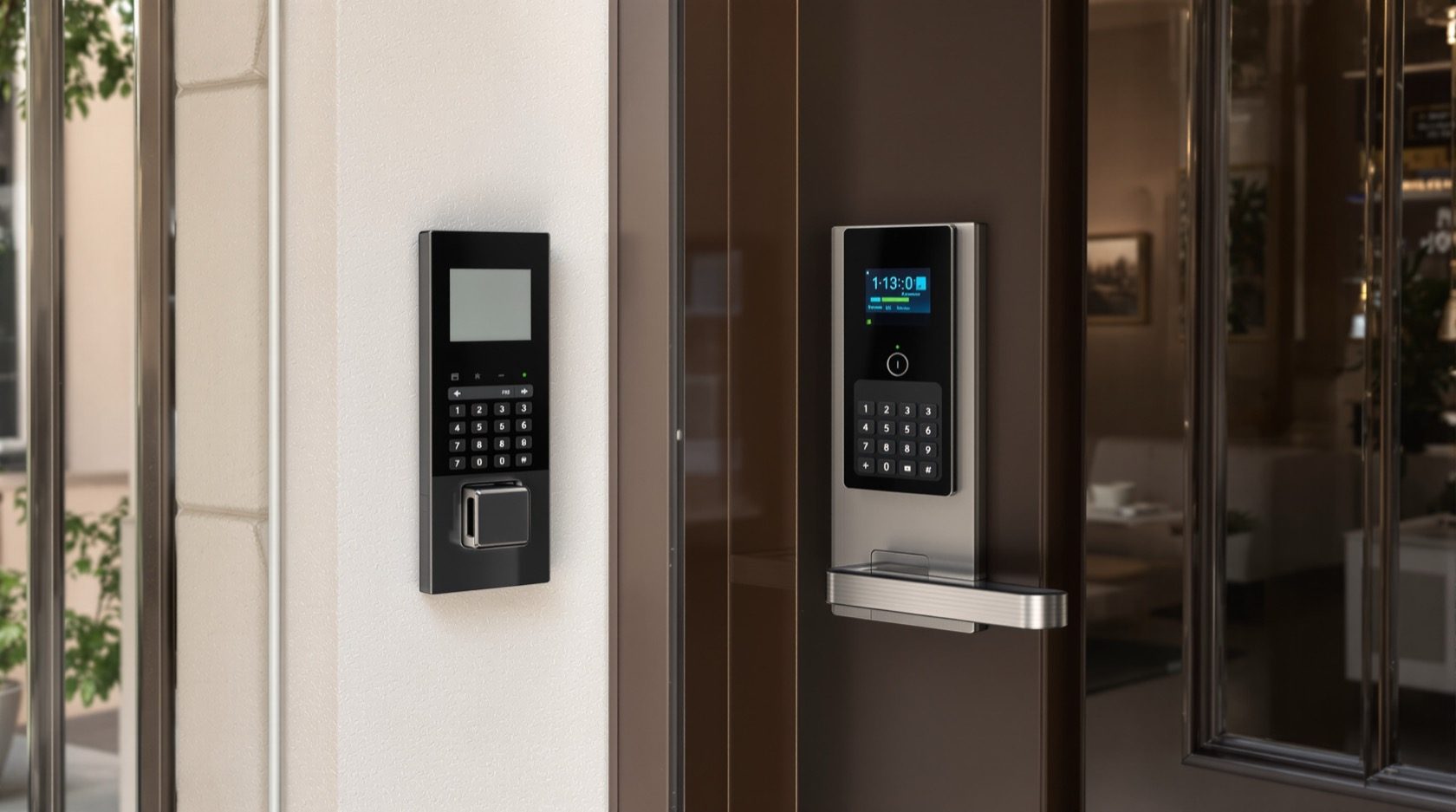
Video Door Phones with Access Control in India (2026): The Door Phone as Entry System
How a video door phone becomes the front end of a real access-control system — releasing a gate or lobby door, adding cards, PINs and app credentials, and keeping an audit trail — with life-safety egress and networked-lock risks kept honest.
A basic video door phone answers a question: who is at the door? An access-control-integrated one answers a second question and then acts on it: should this person come in, and — if yes — let them in. The moment your indoor monitor or phone can actually release the gate or lobby door, and the moment a resident can walk up and tap a card or key a PIN instead of waiting to be buzzed, the humble door phone has become the front end of an access-control system for the whole building.
This guide is the access-control lens of Studio Matrx's video door phone hub. It sits alongside the smart-lock sibling, which zooms into the lock on your own flat's door; here we look wider — the society gate, the lobby door, the shared entry that many families pass through, and the credentials and audit trail that turn "buzz them in" into a managed system. If you are still choosing a door phone at all, start with the complete guide to video door phones.
Scope & safety — read this first. This guide helps you plan, decide and coordinate an access system and hold your vendor to account. It is not a wiring manual. Any door people exit through is a life-safety escape route: the lock on it must release on power loss and on a fire alarm, that behaviour is governed by fire-code and the National Building Code of India, and selecting the lock, wiring it and interlocking it with the fire-alarm panel is a licensed fire-safety, door-hardware and electrician job — coordinated, never DIY, and never positioned so it can trap anyone. A networked lock is also a network target. This is educational guidance, not legal or engineering advice.
From "buzz them in" to an access system
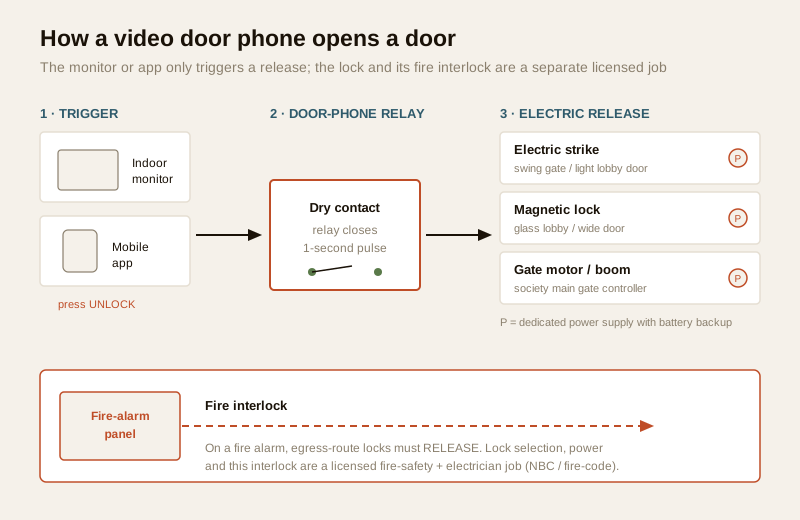
Almost every video door phone can do the simplest form of access control already: a relay inside the indoor monitor, closed for a second when you press the unlock icon, sends a pulse to an electric door release at the gate or lobby. That single pulse is the whole idea — everything else is layers on top of it.
An access-control-integrated door phone typically adds:
- Remote release — open the gate or lobby door from the indoor monitor, or from the mobile app when you are not home, after seeing and speaking to the visitor.
- Resident credentials — RFID cards or fobs, a PIN keypad, or an app pass, so residents let themselves in without buzzing anyone.
- Visitor credentials — a one-time or time-limited PIN or QR pass for an expected guest, maid or delivery, that expires on its own.
- An audit trail — a log of which credential opened which door, and when, plus the door-phone's own record of the call.
- Central management — a guard console or an admin app to add a resident, deactivate a lost card, or set a visitor pass, integrated with CCTV and the guard-to-resident intercom.
The device count barely changes; what changes is that entry becomes managed and recorded instead of ad-hoc. For a society that is the whole point — see the building security systems guide for where this fits in the larger picture.
How the door phone actually opens a door
The door phone does not "open" anything by itself. It closes a relay; a separate electric lock, on its own power supply, does the opening. Which lock is right depends entirely on the door — and on whether people exit through it, which is where life-safety comes in (next section). At a planning level there are three common releases in Indian buildings:
| Release type | Where it suits | How it behaves on power loss | Notes |
|---|---|---|---|
| Electric strike | A swing pedestrian gate or a light lobby door | Depends on type: fail-secure strikes stay locked, fail-safe strikes release | Cheap, common; the frame does the work, the door leaf is unchanged |
| Magnetic lock (maglock) | Glass lobby doors, wider doors | Always releases on power loss (holds only while powered) | Strong hold; must be on a fail-safe egress design with a manual release |
| Gate motor / boom | The society's main vehicle/pedestrian gate | Varies; usually has a manual declutch | The door-phone pulse triggers the motor controller, not the motor directly |
The door-phone's job is only to send the pulse. The lock, its dedicated power supply with battery backup, the exit button or sensor on the inside, the emergency manual release, and — for any escape-route door — the fire-alarm interlock are all separate, coordinated work by a licensed installer, electrician and fire-safety professional. Treat the door phone and the lock as two different trades that must be designed to talk to each other, not one gadget.
Life-safety first: an escape route must never trap anyone
This is the most important section in the guide, and it overrides convenience every time. An electric lock on a door that people use to get out of the building is a life-safety device, and it must fail open.
Two behaviours to understand at a plan level:
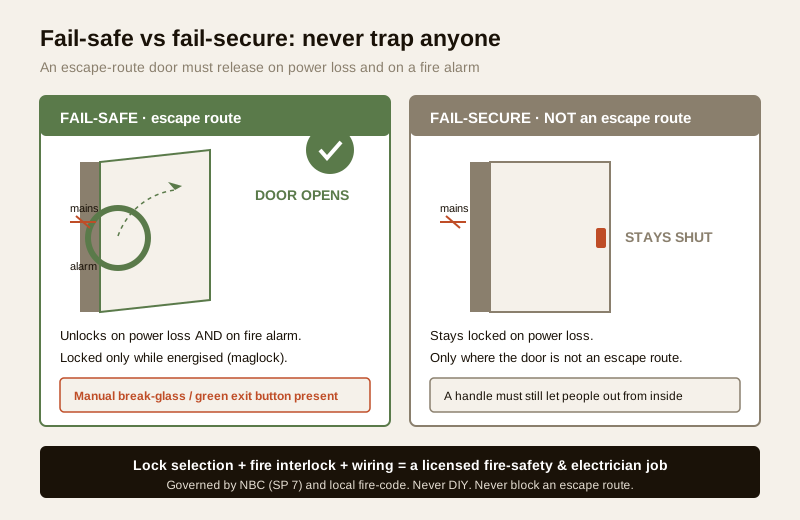
- Fail-safe (fail-open): the lock releases when power is cut and when the fire alarm triggers. It is locked only while energised. This is the required behaviour for a door on an escape route — in a fire or a power cut, people must be able to get out without a key, card, PIN or working phone.
- Fail-secure (fail-locked): the lock stays locked when power is cut. Acceptable only where the door is not an egress route and where staying locked in a power cut is safe — and even then people inside must always be able to leave via a mechanical handle or exit device.
The rules that govern this are not optional design taste. Fire-safety provisions and the National Building Code of India (SP 7, BIS), together with local fire-service requirements, set out that escape routes stay usable and that access-control locks on them are interlocked to release on a fire-alarm signal. Getting this right is a licensed fire-safety consultant, door-hardware specialist and electrician task, signed off and tested — not something to infer from a product box.
Some practical planning consequences you can own as the owner or RWA:
- Never let a vendor put a maglock on a fire-escape door without a fire-alarm interlock, a fail-safe design, and a clearly marked manual release (a break-glass or a green exit button). If they cannot show you the interlock, stop.
- Keep at least one exit that does not depend on power or a credential. Load-shedding is routine in India; the building must still be exitable.
- Position readers and locks so a queue or a jammed door never blocks the escape width. Security hardware must never narrow or block an escape route — see the electrical hub for who coordinates the power and interlock side.
The credential layers: video-verify plus card, PIN or app
Access control earns its keep by combining who is at the door (the video door phone's core job) with a credential that proves they may enter. The layers stack from most human to most automatic:
- Video verification — a guard or resident sees and speaks to the visitor and releases manually. The most judgment, the least convenience. This is the baseline every VDP gives you and it pairs with two-way audio.
- RFID card or fob — a resident taps a credential they carry. Fast, familiar in Indian societies, and — crucially — deactivatable: lose a card, the admin disables that card without re-keying anything.
- PIN keypad — a code, useful where a resident forgets a card. Weaker: codes get shared and shoulder-surfed, so treat resident PINs as convenience, not high security, and rotate them.
- App / phone credential — Bluetooth or cloud pass on a smartphone, often the same app that answers the door phone.
- Visitor pass — a one-time or time-boxed PIN or QR for an expected guest or delivery, that expires by itself so nobody has to remember to revoke it.
A good design does not use one layer everywhere. The society gate and the lobby might take cards and video-verify; a plumber gets a two-hour visitor PIN; a resident's own flat door is a separate decision covered in the smart-lock guide. For a structured way to weigh which features you actually need, the feature selector tool walks through it.
| Credential | Convenience | Revocable when lost | Honest weakness | Best used for |
|---|---|---|---|---|
| Video-verify only | Low | n/a | Slow; depends on someone watching | Any door, as the baseline |
| RFID card / fob | High | Yes — disable that card | Card can be handed on or lost | Residents at gate/lobby |
| PIN keypad | Medium | Change the code | Codes get shared/observed | Backup, low-risk doors |
| App / phone pass | High | Yes — revoke in admin | Depends on phone and network | Tech-comfortable residents |
| Temporary visitor pass | High | Auto-expires | Only as good as its time limit | Guests, maids, deliveries |
What access control gives a society
For a single flat or a villa, the door phone plus a decent lock is often enough — see the villa door-phone guide. Access control earns its cost in multi-family buildings, where many people share the same gate and lobby and someone has to manage it. This is exactly the terrain of the multi-apartment video door systems guide and the gated-community security guide. What it adds:
- Per-resident credentials instead of a shared key. A shared gate key or a single code known to hundreds of people cannot be controlled. Individual cards can be issued, tracked and, when someone moves out, revoked — without re-keying the whole society.
- An audit trail. The system logs which credential opened which door and when, alongside the door-phone's own call log. After an incident the committee has a record instead of a guess. (This is data — see the DPDP note below.)
- Deactivate a lost card in seconds. No locksmith, no new keys for everyone — the admin disables one credential.
- Temporary visitor codes for deliveries and staff that expire on their own, so the society is not accumulating live credentials nobody remembers issuing.
- One picture with the guard and CCTV. The release can be tied to the guard console and the entrance CCTV, so a release is seen, recorded and accountable. The overall approach sits inside a smart security system.
The RWA angle matters: access control is as much governance as hardware. Someone must own the credential list — issuing, revoking on move-out, and reviewing the log — or it quietly rots into "everyone has a card and nobody knows whose."
The honest risks of a networked lock
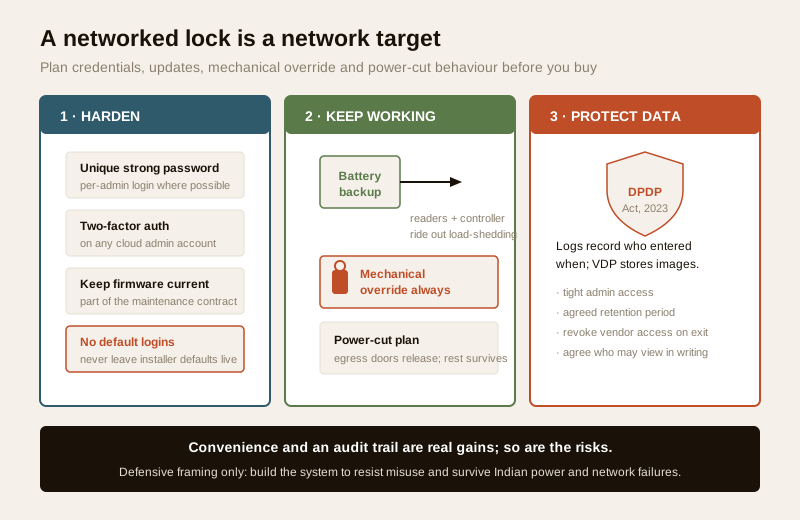
Convenience and an audit trail are real gains. So are the risks, and a defensive owner names them up front rather than discovering them later. A lock you can open from an app is, by definition, reachable over a network — so treat it as a networked device with the same seriousness you would a router or an IP camera's remote access.
- Credentials are the weak point. Default and shared passwords are how these systems get abused. Insist on a unique strong admin password, individual resident logins where possible, and two-factor authentication on any cloud admin account. Never leave the installer's default login live.
- Updates matter. Firmware and app updates patch security flaws. A controller that is never updated is a standing risk; make updates part of the maintenance contract.
- Always keep a mechanical override. Every access-controlled door needs a physical way to open it when the electronics, network or power fail — a key cylinder, a manual release, an exit device. This is both a life-safety requirement and plain resilience.
- Plan for power cuts. Decide, on paper, what each door does when the power drops: egress doors must release, and the controller and readers should have battery backup so the rest of the system does not simply die during load-shedding. This ties directly back to the fail-safe design above.
- Data is sensitive. The access log records residents' movements and the door phone may store visitor images. Under the Digital Personal Data Protection Act, 2023 that is personal data: keep the admin access tight, agree in writing who may see the logs and footage, set a retention period, and revoke any vendor's standing remote access when the job ends.
This is strictly a defensive checklist — build the system to resist misuse and to keep working through the ordinary failures of Indian power and networks. It is not a guide to defeating anyone's lock, and no reputable installer will frame it as one.
Retrofit vs new-build, and the money
Access control can be added to most existing societies, but the cost and mess differ sharply from designing it in.
- New build / planned upgrade. The electric release, exit buttons, fire interlock, reader cabling and controller power are designed together with the door phone. Cleanest, and the only way to get the fire interlock done properly without opening finished walls.
- Retrofit. A society with an existing wired or IP door phone can often add a controller, readers and an electric release at the gate and lobby without replacing everything — but the lock, its power and (for egress doors) the fire interlock still need the licensed trades, and running new reader cable in a finished building is where the cost hides.
Indicative Indian bands, to sanity-check a quote rather than fix a price — they move with door count, lock type, wired versus IP, and whether fire interlock work is needed:
| Scope | Indicative cost (₹) | What drives it |
|---|---|---|
| Add card/PIN release at one gate (retrofit, existing VDP) | ₹8,000 – ₹25,000 per door | Reader, controller, electric strike, labour |
| Maglock on a lobby door with exit button + fail-safe design | ₹12,000 – ₹40,000 per door | Maglock, PSU with backup, exit device |
| Fire-alarm interlock for an egress-route lock | quoted per site | Licensed fire-safety + electrician coordination |
| Society-wide access control (gate + lobbies + admin) | ₹1.5 lakh – several lakh | Door count, wired vs IP, integration with CCTV/guard |
| Per-resident RFID cards | ₹80 – ₹300 each | Card type, printing/encoding |
Where an egress door is involved, the fire-interlock line is never optional and never a place to save money — it is a life-safety and legal requirement, not an upsell.
When to bring in a professional. You can and should own the decisions: which doors get controlled, which credentials suit your residents, who manages the list, and the data terms. Hand every physical and electrical part to licensed trades — lock selection, mains and low-voltage power, exit devices, and above all the fire-alarm interlock and egress design for any escape-route door, which is a coordinated licensed fire-safety, door-hardware and electrician job governed by NBC and local fire-code. If a vendor offers to put an electric lock on an exit door without showing you the fire interlock and a manual release, do not proceed. Keep a mechanical override on every door and agree the data terms in writing.
Key takeaways
- The door phone is just the trigger. It closes a one-second relay; a separate electric strike, maglock or gate motor — on its own power and backup — does the opening. Treat them as two coordinated trades, not one gadget.
- Life-safety overrides convenience, always. Any door people exit through must be fail-safe — releasing on power loss and on a fire alarm — with a mechanical override; lock choice, wiring and fire interlock are a licensed fire-safety and electrician job under NBC/fire-code, and security hardware must never block an escape route.
- Layer credentials to the door. Video-verify plus RFID cards, PINs, app passes and time-limited visitor codes; cards and passes can be revoked instantly when lost, which is access control's real advantage over a shared key.
- Societies gain governance, not just gadgets — per-resident credentials, an audit trail, instant deactivation and integration with the guard and CCTV — but someone must own the credential list or it rots.
- A networked lock is a network target. Strong unique credentials and 2FA, kept-current firmware, a mechanical override, defined power-cut behaviour, and DPDP-compliant handling of logs and images are non-negotiable, defensive basics.
References
- Digital Personal Data Protection Act, 2023 — access logs record residents' movements and door-phone images are personal data; keep admin access tight, agree retention and who may view logs/footage in writing, and revoke vendor access on exit.
- National Building Code of India (SP 7), Bureau of Indian Standards, and local fire-service requirements — govern escape-route egress, fail-safe locking and fire-alarm interlock of access-control locks; confirm the current edition and any relevant standard via the BIS catalogue: https://www.services.bis.gov.in/
- Manufacturer specifications — verify the relay/dry-contact rating of the door phone, the fail-safe vs fail-secure behaviour and hold force of any electric lock, controller firmware support, and battery-backup runtime on the maker's own datasheet before ordering.
This is an educational overview, not legal or engineering advice. Electric-lock selection, power, wiring, exit devices and — above all — fire-alarm interlock and egress design for any escape-route door are qualified, licensed professional tasks; engage a fire-safety consultant, door-hardware specialist and electrician, and verify any standard's current status via the BIS catalogue before relying on it.
Export this guide
Related Guides — Deep-dive reading
Access Control Maintenance in India (2026): Readers, Locks and Fail-Safe Egress
How to keep a card, keypad, fingerprint or face access-control system reading reliably and locking securely — and, above everything, how to test that its doors still release on a fire alarm and on power loss, so an access-controlled door never becomes a life-safety trap.
SecurityFire-Egress Compatibility for Smart Locks in India (2026): Never Trap Anyone
How to make sure a smart lock or access-controlled door on an escape route always lets people out in a fire or emergency: fail-safe hardware, free egress, fire-rated doors, and the fire-alarm interlock.
SecurityFail-Safe vs Fail-Secure Locks: The Guide (India 2026)
Why fail-safe vs fail-secure is the single most important access-control decision, and how to get it right for every door.
Home Doors & EntrancesRelated Tools — Try Free
Video Door Phone Type Selector
Answer a few questions about your building, cabling, budget and internet and get the right video door phone — analog / wired / wireless / IP, single-home or multi-apartment, monitor or app.
Door Phone SelectorApartment Video Door System Planner
Enter flats, entrances, floors and guard desk for a first-pass building intercom plan — door stations, indoor monitors, guard station, the right architecture and an indicative cost band.
Building PlannerAccess-Control Battery-Backup Calculator
Size the standby battery so an access system keeps running through a power cut, with an egress life-safety note.
Battery Backup