
Video Door Phone Privacy in India (2026): Aiming, DPDP and Good Neighbours
A door phone films everyone who visits, waits or passes by. This guide covers where to point it, what the DPDP Act asks of you, how long to keep footage, and how to be a good neighbour.
A door camera is the one device in your home that watches other people by design. Every courier, every neighbour walking to the lift, every child playing in the corridor, every stranger at the gate passes through its lens and, often, its microphone. That is the whole point of a video door phone — you want to see who is there before you open the door. But it also means the little box on your gatepost is quietly building a record of people who never agreed to be filmed, and in 2026 that record is personal data with rules attached.
This guide is the privacy chapter of Studio Matrx's video door phone hub. It is not about locking down a fortress; it is about pointing the camera well, keeping the footage sensibly, and staying on good terms with the neighbours and the society. Get video door phone privacy right and the device protects your family without turning the corridor into a surveillance zone. Get it wrong and you invite a genuinely awkward RWA meeting — or worse.
Scope & safety. This guide helps you plan and set up a door device responsibly and be a good neighbour with it. It is educational guidance grounded in the Digital Personal Data Protection Act, 2023 and everyday society practice in India — it is not legal advice, and it never covers defeating, hiding or tampering with anyone's device. Mounting, cabling and mains-electrical work belong to licensed professionals — see placement and the electrical hub. If a real dispute or legal question arises, consult a lawyer.
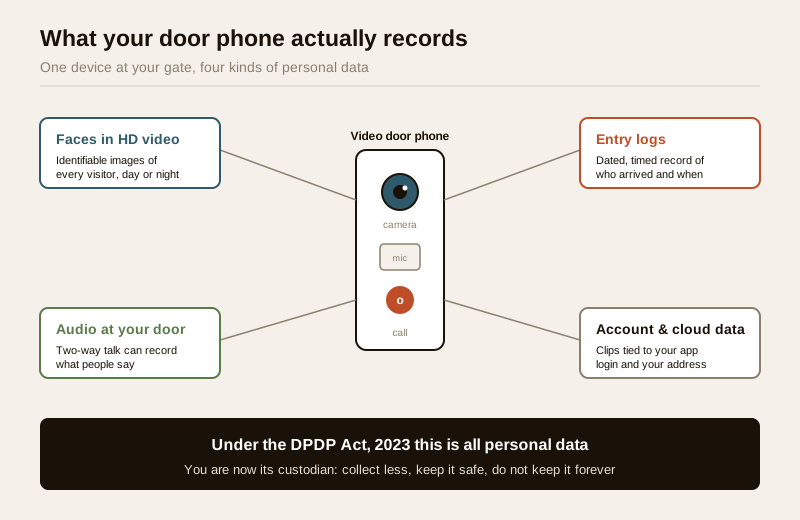
What your door phone actually records — and why it is personal data
Before you can protect anyone's privacy, it helps to see just how much a door phone gathers. It is far more than "a picture of who rang the bell."
- Video of faces — clear, identifiable images of every person who approaches, often in HD and, with night vision, around the clock.
- Audio — most door phones have two-way audio and can record what people say at your door, sometimes what they say a few steps away too.
- Timestamps and entry logs — a dated, timed record of exactly when each person arrived, how long they lingered, and often who they were if the device does facial recognition.
- Location and device data — tied to your address and your account, sometimes stored on a company's cloud server outside your home.
Put together, that is a detailed behavioural record of identifiable individuals. Under the Digital Personal Data Protection Act, 2023 (DPDP) — India's data-protection law — information that can identify a living person is personal data, and faces, voices and movement logs plainly qualify. Purely personal or household use gets lighter treatment than a business collecting data commercially, but the spirit is unmistakable: you are now the custodian of other people's information, and custodians are expected to collect no more than they need, keep it safe, and not keep it forever. The practical translation of that spirit is the rest of this guide.
The golden rule: aim at your own doorstep
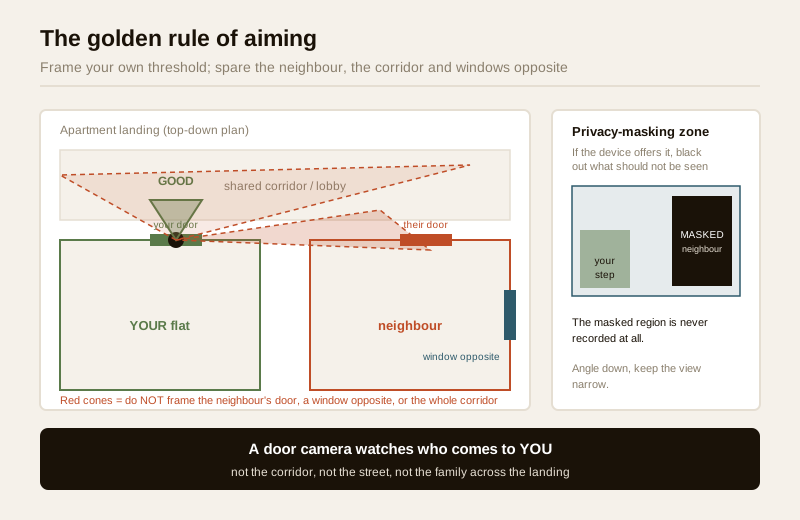
If you remember one thing, remember this. A door camera should frame your own threshold — your door, your doormat, your gate, the patch a visitor stands on — and as little of anyone else's world as possible. It is there to see who comes to you, not to watch the corridor, the street, or the family across the landing.
That single principle resolves most privacy problems before they start:
- Point at your entry, not the neighbour's. Do not frame the neighbour's door, their window, or through their doorway into their home. In an apartment, do not sweep the entire shared corridor beyond your own unit — a tight cone on your doormat is enough.
- Angle down, keep it narrow. A downward tilt and a sensible field of view captures the person at your door and clips out the private spaces on either side. The placement guide covers mounting height and angle in detail.
- Avoid windows and balconies opposite. A camera that happens to stare into someone's living-room window is a problem even if that was never your intent.
- Use privacy-masking zones if your device supports them. Many IP and app-based door phones let you black out part of the frame — the neighbour's door, a slice of corridor, a window across the way — so the camera never records that region at all. If the feature exists, use it; the feature selector flags which models offer masking.
The image below is the whole rule in one picture: the green cone is a considerate aim; the red cones are the ones that start disputes.
The apartment and shared-corridor case
Villas are simpler: your gate and porch are your own land, so a well-aimed camera mostly sees your property. Flats are where privacy gets delicate, because the corridor, lift lobby and staircase are shared, and your neighbour's door is a couple of metres from yours.
Two distinct situations exist, and people constantly confuse them:
| Situation | Who decides | What is expected |
|---|---|---|
| Your private flat-door camera | You, the resident | Aim tightly at your own threshold; do not surveil the neighbour's door or the length of the corridor. Many societies also ask you to register that you have one. |
| A society camera in a common area (lobby, gate, corridor, lift) | The RWA / management committee, not an individual | Needs a collective decision, a written CCTV/privacy policy, signage that filming is in progress, controlled access to footage, and a retention rule. |
A resident cannot unilaterally bolt a camera onto a common wall to watch the shared corridor — that is a society decision, and doing it alone is exactly the move that ends up in a heated WhatsApp thread. If the building genuinely needs corridor coverage, take it to the RWA and let it be installed as a society system with a policy behind it. Our apartment intercom and apartment security guides cover how these fit into a building; the society-wide view is in the gated-community security guide.
Even for a strictly private flat-door camera, the golden rule still binds: a tight aim on your own doormat, not a wide-angle stare down the whole floor.
Audio: the extra-sensitive layer
Video of a public-facing doorstep is one thing; recording what people say is more sensitive, and people feel it more keenly. Someone standing at your gate having a private phone call did not come to be recorded.
- Prefer live listen over always-recording audio. Two-way talk so you can speak to a courier is genuinely useful; silently archiving every conversation within earshot is rarely necessary. If your device lets you keep video-with-audio-off for the stored clips, consider it.
- Do not point the microphone into private space. The same aiming discipline applies to sound — a door phone should hear the person at your door, not the neighbours' front rooms.
- Be transparent. A small "recording in progress" sticker at the entrance is courteous and, for a society system, part of the expected policy. People behave differently, and more fairly, when they know.
Audio recording of others without their awareness sits in a grey, sensitive zone and can inflame a neighbour dispute quickly. When in doubt, record less.
Where the footage lives, and who can reach it
A door phone's clips sit somewhere — on a local monitor or memory card, or on the manufacturer's cloud tied to your app account. Wherever they live, whoever can open that app can watch everyone who has ever come to your door. Treat that access like a key to your home.
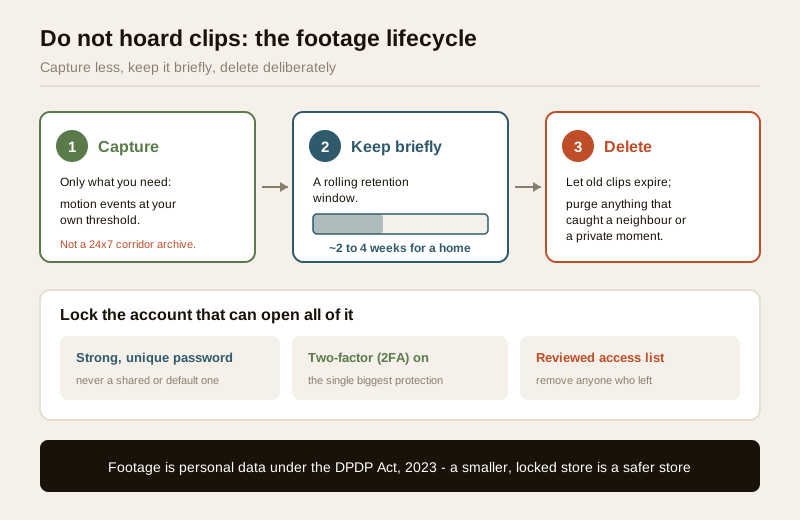
- Lock the account down. A strong, unique password and two-factor authentication (2FA) on the app are the single biggest protection. The full playbook — passwords, 2FA, revoking old logins, safe remote viewing — is in the remote access security guide; it is written for CCTV but every word applies to a door phone.
- Know who in the household or firm has access. Sharing the login around the family is normal; sharing it with a departed tenant, an ex-employee or a one-time installer is a leak. Review the list of people and devices that can open the app, and remove anyone who should no longer see the footage.
- Keep passwords private. Never hand the app login to an installer as standing access. If a technician needs to configure the device, change the password afterwards.
- Prefer devices and cloud plans that encrypt. Check the manufacturer's datasheet for encryption in transit and at rest, and pick a plan you can actually control and delete from.
Facial recognition raises the stakes here, because the device is not just storing faces but naming them — read the dedicated facial recognition door phones guide before enabling it, and never enrol a neighbour or visitor into your recogniser without their knowledge.
Data minimisation and retention: do not hoard clips
The instinct is to keep everything forever "just in case." DPDP's spirit — and plain good sense — pushes the other way: keep the least you need, for the shortest time that is useful, then delete it.
- Record for a purpose, not by reflex. Motion-triggered clips of visitors at your door are useful; a continuous 24×7 archive of the corridor usually is not, and it is a bigger liability if the account is ever breached.
- Set a sensible retention window and let old clips expire. For a home door phone, a rolling window of a couple of weeks to a month is plenty for the "who came while we were out" purpose. Cloud plans and local storage both let you cap this; use it.
- Delete deliberately. Purge clips you no longer need, especially anything that caught a neighbour or a private moment. A smaller store is both more private and easier to secure.
- Turn off what you do not use. If you never review audio, consider not recording it. If you do not need night-time corridor footage, mask or disable it.
| Practice | Do this | Avoid this |
|---|---|---|
| How much to record | Motion events at your own threshold | 24×7 archive of the shared corridor |
| Retention | A rolling window (roughly 2–4 weeks for a home) | Keeping every clip indefinitely "just in case" |
| Audio | Live two-way talk; record audio only if needed | Silently archiving all conversations in earshot |
| Old footage | Delete clips you no longer need | Letting years of faces pile up in the cloud |
| Access | Strong password + 2FA, reviewed access list | One shared login handed to everyone who ever asked |
Sharing footage responsibly
The moment a clip leaves your phone, you lose control of it — and it usually contains an identifiable person. There is a world of difference between two kinds of sharing.
- With the police, for a genuine incident: entirely reasonable. If there is a theft, a threatening visitor or a real safety concern, sharing the relevant clip with the authorities on request is the footage doing its job. Share the specific clip, not your whole archive, and keep a note of what you handed over.
- On WhatsApp groups or social media: tread very carefully. Posting a stranger's or neighbour's face to the society group to name-and-shame, or to the public internet, exposes an identifiable person, can be defamatory, can be wrong (people are misidentified constantly), and can escalate a minor annoyance into a serious dispute. "Does anyone recognise this delivery agent?" on a residents' group feels harmless and often is not.
The safe default: share narrowly, with the people who actually need it, for a real purpose — and resist the urge to broadcast a face to a group chat. If a matter is serious enough to name someone publicly, it is serious enough to involve the RWA or the police instead.
When a neighbour's — or the society's — camera overlooks you
Privacy runs both ways. One day it may be your window or door in someone else's frame — a neighbour's smart doorbell pointed across the landing, or a society camera that sweeps your entrance. You have standing to raise it, and the calm route works best.
1. Talk to the neighbour, politely and early. Most over-aimed cameras are thoughtless, not malicious — the owner simply mounted it and never checked what it sees. A friendly "your camera seems to look right at our door, would you mind angling it down?" resolves the large majority of cases. Point them at the golden rule: their camera should watch their threshold.
2. Ask about masking. If the device supports privacy zones, the neighbour can black out your door or window in seconds without losing their own coverage.
3. Take it to the RWA / management committee. If a polite word does not work, or if it is a society camera overlooking your home, raise it with the committee. Common-area cameras should have a policy, reasonable aiming and controlled footage access; the committee can require the camera be re-aimed or masked.
4. Lean on the reasonableness principle. The guiding question is not "is any camera allowed" but "is this camera's view of my private space reasonable and necessary?" A camera covering a shared gate is reasonable; one framed into your bedroom window is not. That framing keeps the conversation constructive rather than confrontational.
5. Escalate only if you must. Genuine, unresolved intrusion — a camera deliberately pointed into your private living space — is where a formal complaint or legal advice comes in. That is the last resort, not the first move.
When to bring in a professional. Aiming, account security, retention settings and neighbourly conversations are all things you can handle yourself. Bring in others when the work or the stakes rise: a licensed installer or electrician for mounting, cabling and any mains work (see placement and the electrical hub); the RWA / management committee for anything touching common areas or a society-wide policy; and a lawyer if a privacy dispute becomes a genuine legal question. This guide is educational, not legal advice.
Key takeaways
- A door phone records personal data — faces, voices, timestamps and entry logs of people who never agreed to be filmed — so under the DPDP Act, 2023 you are its custodian, expected to collect less, secure it, and not keep it forever.
- Aim at your own doorstep: frame your threshold and gate, never the neighbour's door, a window opposite, or the full shared corridor; angle down, keep the view narrow, and use privacy-masking zones if the device offers them.
- Common areas are a society matter — a private flat-door camera must still spare the neighbour, and any camera watching a shared lobby or corridor needs RWA consent, a written policy, signage and controlled footage access.
- Keep it small and locked — a strong password with 2FA, a reviewed access list, audio recorded only when needed, and a sensible retention window (roughly a couple of weeks to a month for a home) with old clips deleted deliberately.
- Share narrowly, and stay a good neighbour — give a specific clip to the police for a real incident, but think hard before posting a face to a WhatsApp group; and if a neighbour's or society camera overlooks you, a polite word, then the RWA and the reasonableness principle usually settle it.
References
- Digital Personal Data Protection Act, 2023 — establishes that information identifying a living person is personal data; door-phone video, audio and entry logs qualify, so aim narrowly, restrict access, and set a retention limit. Educational reference, not a substitute for legal advice.
- Manufacturer specifications — verify whether a device offers privacy-masking zones, audio-off recording, encryption in transit and at rest, and controllable retention on the maker's own datasheet before buying; the feature selector helps compare.
- National Building Code of India (SP 7), Bureau of Indian Standards, and local municipal and society bye-laws for any electrical or fixing aspect of mounting a door station; verify the current edition via the BIS catalogue: https://www.services.bis.gov.in/
This is an educational overview of privacy-respecting practice for door devices in India, not legal advice. Mounting, cabling and electrical work are qualified professional tasks, common-area cameras are a society decision, and any genuine legal dispute warrants a lawyer — verify any standard's current status via the BIS catalogue before relying on it.
Export this guide
Related Guides — Deep-dive reading
Security Privacy Assessment for Indian Homes
Getting the privacy side of home security right: camera placement ethics and limits, notice and consent, the extra caution audio demands, and treating footage as personal data you store, retain and delete responsibly under India's DPDP Act 2023 direction.
SecurityPublic Footpath Camera Restrictions in India (2026): Your Camera, the Public's Street
You can put a camera on your own gate, but the footpath and road outside are public space full of people who never agreed to be filmed. Here is how to point your camera fairly, capture the least public space you need, and stay a good neighbour.
SecurityCCTV vs Video Door Phone: Which Does Your Home Need?
They look similar and get confused constantly, but a CCTV camera and a video door phone do different jobs — one watches the whole property and records, the other answers your door and controls who comes in. This guide settles CCTV vs video door phone for Indian homes: what each is for, where they overlap, real rupee costs, apartment versus villa relevance, and why most homes end up wanting both.
Smart HomeRelated Tools — Try Free
Apartment Video Door System Planner
Enter flats, entrances, floors and guard desk for a first-pass building intercom plan — door stations, indoor monitors, guard station, the right architecture and an indicative cost band.
Building PlannerCCTV Camera Coverage & Count Calculator
Estimate how many CCTV cameras you need, the NVR channels, storage in TB for your retention period, and an indicative all-in cost with GST.
CCTV CalculatorVideo Door Phone Type Selector
Answer a few questions about your building, cabling, budget and internet and get the right video door phone — analog / wired / wireless / IP, single-home or multi-apartment, monitor or app.
Door Phone Selector