
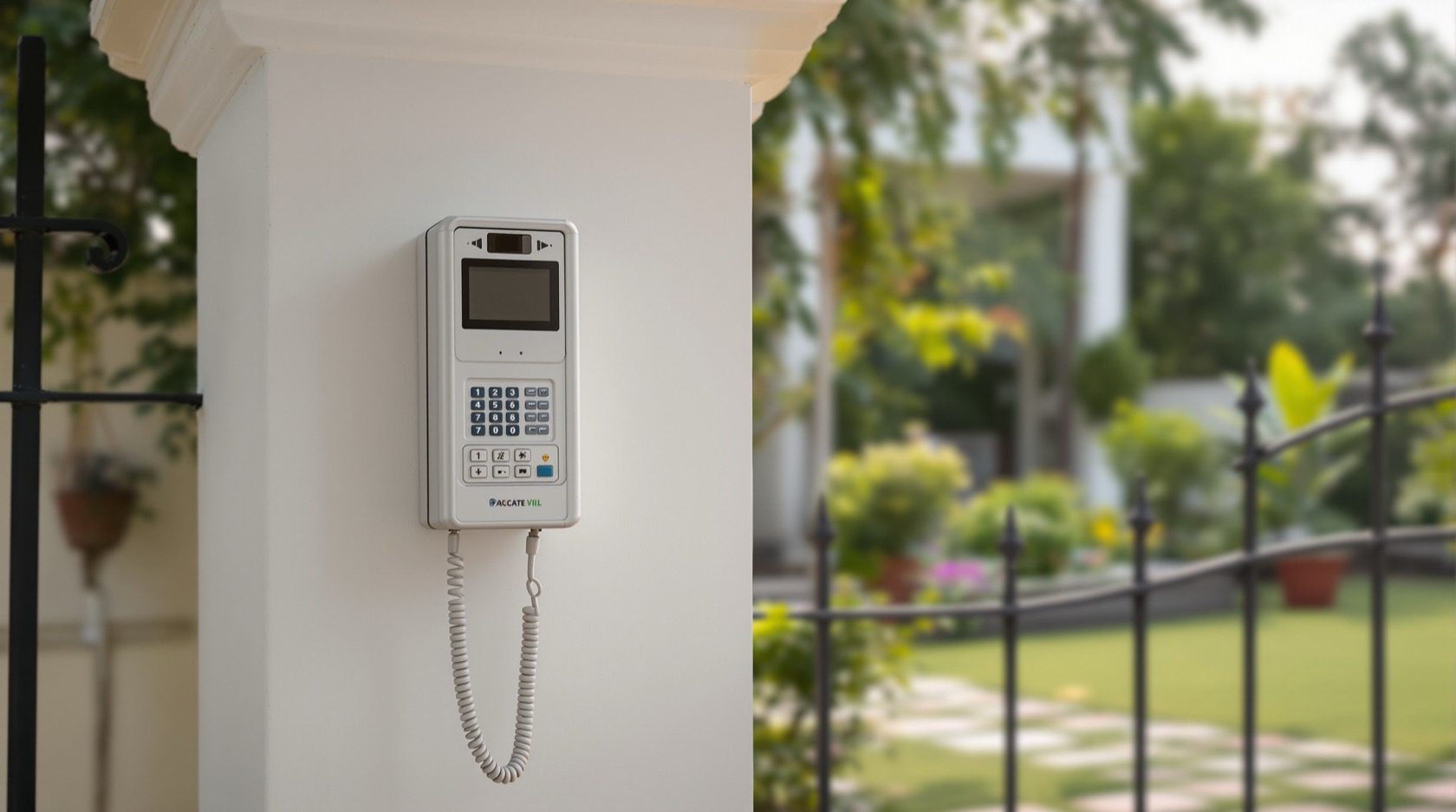
Villa Video Door Phones in India (2026): Gate, Front Door and Every Floor
How to plan a video door phone for an independent house, bungalow or duplex: a station at the compound gate and the front door, indoor monitors on every floor, gate release, and wiring run at construction stage.
A flat has one door, opening onto a shared lobby a few metres from the sofa. A villa is a different animal. There is a compound gate at the boundary wall, often ten or twenty metres from the house; a front door beyond the porch; sometimes a back or service gate for staff and deliveries; and the living space is spread over two or three floors. Answer "who is at the door" in a villa and the honest answer is: which door, and can whoever is upstairs even hear the bell?
Villa video door phones solve exactly this. Instead of one button and one screen, a villa system is planned as a small network: a door station where visitors actually arrive (the compound gate, the front door, or both), and an indoor monitor on every floor so you hear the gate whether you are in the ground-floor hall or the first-floor bedroom — plus, ideally, the ability to see and release the gate from your phone when the family is out. This guide is part of Studio Matrx's video door phone hub and sits beside the pillar guide; here we deal only with the independent-house case.
Scope & safety. This guide helps you plan, choose and coordinate a villa door-phone system. The gate-motor, electric strike lock, mains power and any cabling run through walls, at height or across the plot are licensed-professional tasks — split the work between a low-voltage door-phone installer, an electrician and (for an automated gate) the gate-motor vendor. A door/gate camera watches your own boundary and doorstep; point it at your entrance and plot, not into a neighbour's home or the public street beyond what you need, and treat recorded footage as personal data under the Digital Personal Data Protection Act, 2023. This is educational guidance, not legal advice.
Why a villa is not a flat
In an apartment the intercom is society infrastructure — a guard-managed multi-apartment system with one panel at the lobby and one monitor in each flat. A villa is yours alone, and its geometry creates three problems a flat never has:
- The gate is set back from the door. A visitor rings at the compound gate on the boundary wall, but you are inside the house. That is a long run — often 10 to 30 metres — between the outdoor station and the indoor monitor, which decides your cabling and, sometimes, whether you go wired or wireless at all.
- There is more than one way in. The main gate, the front door, a rear or service gate for domestic help and deliveries, sometimes a side utility gate. Each is a candidate for its own station or, at least, a decision about which one carries the door phone.
- The house is vertical. Ground floor, first floor, maybe a second floor and a terrace. A single monitor by the front door is useless when you are two floors up — you simply never hear the gate. A villa needs a monitor on each floor, or at least in each hall where people gather.
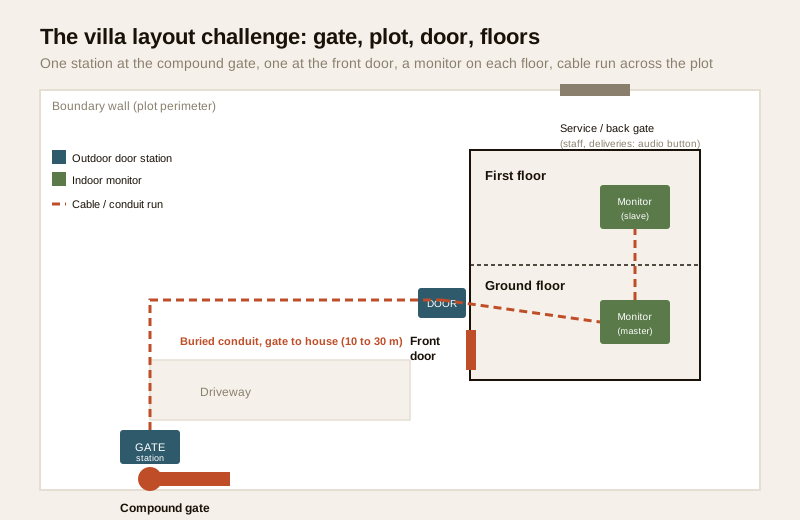
The classic villa layout: where do the stations go?
The first decision is not which brand — it is where visitors actually arrive, and therefore where the door station(s) belong. There are three common patterns.
| Pattern | Where the station(s) go | Best for | Trade-off |
|---|---|---|---|
| Gate-only | One station at the compound gate | Plots where the gate is the real entry and nobody gets past it without ringing | You still walk to the porch to receive a guest; no separate door screening |
| Door-only | One station at the front door | Small plots where the gate is open by day and the front door is the real barrier | The gate is unscreened; you meet strangers at the porch, not the boundary |
| Gate + door (recommended for most villas) | A station at the compound gate AND a slave/second station at the front door | Any villa where the gate is normally shut and you want to vet a visitor at the boundary before they even enter the compound | More cable, more cost; needs a monitor that supports two door stations |
For most independent houses the gate-plus-door pattern is worth the extra cabling. You screen a visitor at the boundary, decide whether to buzz the gate open, and then have a second check at the front door itself. If budget is tight, put the one station at the compound gate — that is the perimeter you most want to control — and use a simple wired doorbell or a smart video doorbell at the front door.
The service / back gate
Many villas have a rear or side gate for domestic staff, gardeners and deliveries. You rarely need a full video station there, but consider at least an audio call button wired to the same indoor monitors, or a simple doorbell, so someone at the service entry can announce themselves without walking round to the main gate. If deliveries are frequent, a second video station here earns its keep.
An indoor monitor on every floor
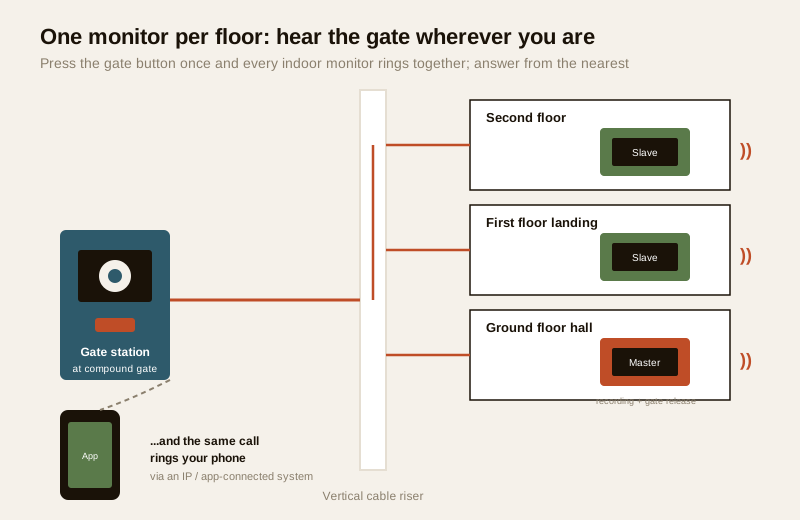
This is the single change that makes a villa system actually work. In a flat, one monitor is enough. In a two- or three-storey house you want a monitor wherever the family spends time and might otherwise miss the gate — typically:
- The ground-floor hall or living room (the main monitor, usually the one with recording and gate-release controls).
- The first-floor landing or master bedroom (a slave monitor, so an upstairs household hears the gate).
- A second-floor or terrace monitor if the house is that tall or someone works up there.
When the gate station is pressed, every monitor rings at once; you answer from whichever is nearest, and the others stop. Most wired villa systems support two, four or more monitors on one line; check the datasheet for the maximum and whether slave monitors need their own power. A quieter alternative on the upper floors is a system that also rings your phone through an app, so you carry the gate in your pocket instead of adding a screen to every room — more on that below.
Gate release: letting a visitor in without walking to the gate
The feature that most changes daily life in a villa is gate release — buzzing the compound gate or a lock open from the indoor monitor (or your phone) so you do not have to walk twenty metres in the rain to let in a known visitor. How it works depends on your gate:
- A manual swing gate with an electric strike lock — the door phone's relay energises an electric strike or a solenoid bolt so the gate can be pushed open when you press "unlock." Simple, but only suits a lighter pedestrian gate or wicket.
- An automated sliding or swing gate with a motor — the door phone does not move the gate itself; it sends a dry-contact "open" pulse to the gate-motor controller, exactly like the gate remote does. This is the neat, common setup for a villa: the door-phone installer provides the trigger, the gate-motor vendor wires it to the operator.
- A wicket gate beside a large main gate — often the best of both: keep the heavy vehicle gate manual/motorised, and put a small pedestrian wicket with an electric strike that the door phone releases for visitors on foot.
Coordinate the trades. The door-phone installer terminates the release relay; the electrician provides a safe supply; the gate-motor vendor (for an automated gate) connects the trigger and sets the auto-close timing. Getting these three to talk to each other at planning stage avoids the classic villa mess where the door phone is installed but "the gate part never got connected." For anything mains-connected, use a licensed electrician — see the electrical hub.
A safety note on locks and gates. A powered gate or strike must fail in a way that never traps people inside during a fire or power loss — discuss fail-safe versus fail-secure behaviour with the installer, and never let a gate or lock block the only escape route from the plot. Life-safety hardware is a professional decision, not a DIY one.
Remote answering when the family is out
A villa is often empty during the day — everyone at work or school — which is exactly when couriers, the gas delivery, or a service visitor arrives. An IP or app-connected villa door phone rings your smartphone when the gate button is pressed, wherever you are: you see the visitor, speak two-way, and can release the gate for a known delivery or tell a stranger to come back later. This is the same convenience a smart video doorbell gives a flat, scaled to a villa's gate.
The trade-off is a dependence on your home internet and power. If the broadband or the power is down, the app call cannot reach you — which is why the wired indoor monitors still matter for anyone at home, and why power backup (below) is not optional. For how remote viewing is secured, the CCTV remote-access guide applies equally to door phones: strong unique passwords, 2FA, and no lingering installer access.
Wiring reality: run the conduit at construction stage
This is where villa owners either save themselves years of grief or create it. The gate is far from the house, and the cable between the gate station and the indoor monitors has to get there somehow.
| Situation | The cable path | Cost & disruption |
|---|---|---|
| New build / under construction | Lay a buried conduit (a spare PVC pipe) from the gate pillar, under the driveway, to the house and up a riser to each floor while the plot is open | Cheap and invisible — a few hundred rupees of pipe and an hour of a mason's time. Do this even if you fit the door phone years later |
| Retrofit, wired | Either dig a trench across a finished driveway for a buried run, or run surface conduit along the boundary wall and up the house | Disruptive and visible; trenching a laid driveway is the single biggest villa retrofit cost |
| Retrofit, wireless/IP | Skip the long cable: a wireless or Wi-Fi kit links the gate station to the indoor chime/app over radio | Avoids the trench, but see the range and reliability caveats below |
The lesson: if your villa is under construction or you are laying a driveway, run an empty conduit from the gate to the house now, even if you have no immediate plan for a door phone. Pull a nylon draw-string through it. Retro-fitting that pipe later costs a hundred times more than laying it today. Include a riser sleeve from the ground floor to each upper floor for the indoor-monitor cabling too. The general cabling principles for entry systems apply; a villa just has longer runs.
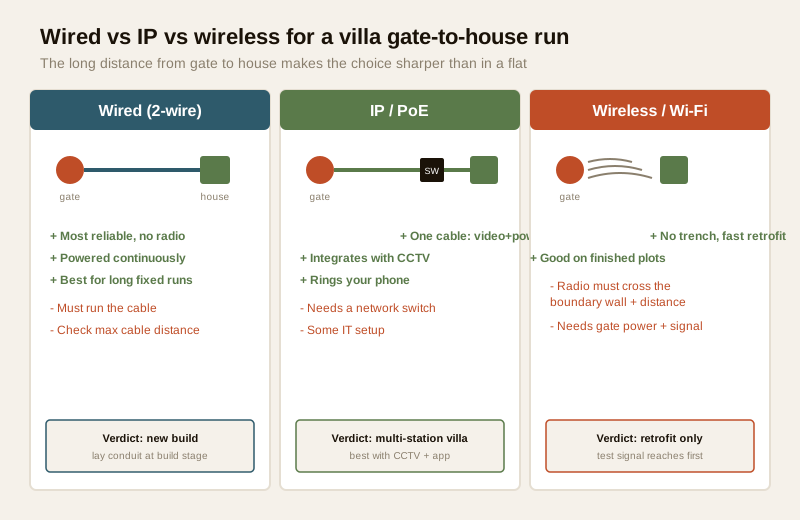
Wired vs IP vs wireless for a villa
The long gate-to-house distance makes the wired-versus-wireless choice sharper for a villa than for a flat.
| System | How it suits a villa | Watch-outs |
|---|---|---|
| Wired (2-wire / 4-wire) | The most reliable for long, fixed gate-to-house runs; no radio to drop; powered continuously | You must run the cable — ideally in conduit at build stage. Long runs need the right cable gauge; confirm the maximum distance on the datasheet |
| IP / PoE | One network cable carries video, audio and power; integrates cleanly with a villa's CCTV and rings your phone; excellent for multi-station, multi-monitor villas | Needs a network switch and some IT setup; still a cable run to the gate; depends on home network being up |
| Wireless / Wi-Fi kit | Fast retrofit with no trench; good when digging the driveway is impractical | Radio must span the gate-to-house distance and a boundary wall — thick masonry and distance kill Wi-Fi; needs power at the gate and a reliable signal; battery units need recharging |
| Analog VDP | Budget wired option for a simple gate-plus-one-monitor villa | Fewer smart features; no app answering unless bridged |
For a new-build villa, wired or IP is almost always the right answer — run the cable while you can, and get rock-solid reliability. For a finished villa where trenching is out of the question, a good wireless/Wi-Fi kit is the pragmatic choice, provided you test the signal actually reaches from the gate to the house before you commit. Not sure? Work through the video door phone type selector.
Weatherproofing the gate station
The gate station lives on the boundary wall, fully exposed — no porch, no eave. In India that means direct monsoon rain, blowing dust, and a west-facing pillar that bakes to painful heat by afternoon. Protect it or it will fail:
- Choose an outdoor-rated station with a stated IP rating (weather sealing) suited to full exposure; a flush-mount unit in the gate pillar with a rain hood on top sheds water far better than a surface box.
- Add a small canopy or recess so rain does not sheet straight down the lens and keypad, and so the afternoon sun does not wash out the screen or cook the electronics.
- Seal the cable entry into the pillar against water tracking down the conduit — a common failure point after the first monsoon. Weatherproofing here mirrors the CCTV IP-rating and sealing practice.
- Mind the heat. A station in full west sun can overheat; a recess and a hood help, and some units are rated for a wider temperature range — check the datasheet.
Power backup: the gate phone must survive a cut
Power cuts are a fact of Indian life, and they are exactly when a visitor or an intruder is most likely to test the gate. A door phone that dies with the mains is half a system. Plan backup:
- A small UPS or battery backup on the door-phone power supply keeps the gate station and the indoor monitors live through a cut. Size it for at least the length of a typical outage in your area.
- If the gate has a motor, the gate operator has its own power and often its own battery — confirm the gate can still be opened (manually released) during a cut; that is a gate-motor-vendor question.
- App-only villas are most exposed: if the power cut also takes down your broadband router, the phone call cannot reach you. Keep the router on the same UPS, or keep at least one wired indoor monitor that runs off the backed-up door-phone supply.
The power and UPS thinking from CCTV applies: a licensed electrician sizes and wires the backup safely.
Integrating with the villa's CCTV
A villa usually already has, or wants, CCTV around the plot. A door phone and CCTV are different tools — the door phone is a two-way intercom you answer, while CCTV records the perimeter — but they work best together:
- An IP door phone can feed its gate camera into the same NVR as the CCTV, so the gate view is recorded alongside every other camera and reviewable later.
- The gate camera covers the entrance; CCTV covers the blind spots the door station cannot see — the sides of the plot, the rear, the driveway, the terrace.
- Keep them logically separate for privacy and clarity: the door phone answers callers; CCTV keeps the record. Note that a device sold as a doorbell camera is a CCTV-style camera, not a two-way villa intercom — useful, but a different job.
Plan the whole entrance as one, using the apartment/villa system planner to lay out stations, monitors and camera coverage together, and read the villa security guide for how the door phone fits the wider plan for an independent house.
Typical Indian cost bands
Treat these as ballparks to sanity-check a quote, not fixed rates — they move with brand, station count, monitor count, cabling distance and whether a gate motor or lock is involved.
| Villa setup | Indicative cost (₹) |
|---|---|
| One gate station + one indoor monitor, wired | ₹6,000 – ₹15,000 |
| Gate + front-door stations + two indoor monitors, wired | ₹15,000 – ₹35,000 |
| IP system, 2 stations + monitors on 2–3 floors + app | ₹25,000 – ₹70,000+ |
| Wireless / Wi-Fi retrofit kit (no trench) | ₹8,000 – ₹25,000 |
| Add: electric strike lock at a wicket gate | ₹2,000 – ₹8,000 |
| Add: gate-motor trigger integration (motor priced separately) | ₹1,500 – ₹5,000 labour |
| Add: buried conduit run at construction stage | a few hundred ₹ of pipe + labour |
| Add: trenching a finished driveway (retrofit) | ₹5,000 – ₹25,000+ depending on length/surface |
The buried conduit line is the bargain of the list and the trenching line is the warning: the same cable path costs almost nothing at build stage and a small fortune afterwards.
When to bring in a professional. You can plan the layout, choose the stations, decide the monitor positions and place the cross-links yourself. Hand these to trades: the electrician for mains power, backup and any wall-chased cabling; the gate-motor vendor for connecting the door phone's release trigger to an automated gate and setting fail-safe behaviour; a low-voltage door-phone installer for the stations, monitors and long gate-to-house run. For a wicket-gate electric strike, insist on a lock that cannot trap people during a fire or power loss. Never let a departing contractor keep app or remote access to your gate. See the electrical hub and the villa security guide.
Key takeaways
- A villa is not a flat: plan for a compound gate set back from the front door, more than one entry point, and two or more floors — the door phone is a small network, not a single button.
- Put the station where visitors arrive — for most villas that means one at the compound gate plus a second at the front door, with an audio button or doorbell at the service gate.
- An indoor monitor on every floor is the change that makes it work: every monitor rings together so you hear the gate wherever you are, and an app-connected system also rings your phone.
- Run the conduit at construction stage — a buried empty pipe from the gate to the house costs almost nothing now and a fortune to trench later; choose wired/IP for a new build and a tested wireless kit only when digging is impossible.
- Weatherproof the exposed gate station and back it up on a UPS, coordinate the electrician, gate-motor vendor and door-phone installer for gate release, and use the system planner to tie the door phone into the villa's CCTV.
References
- Digital Personal Data Protection Act, 2023 — a gate or door camera records people and is personal data; point it at your own entrance and plot rather than a neighbour's home, restrict who can view footage, and revoke any contractor's remote access when their work ends.
- Manufacturer specifications — verify the outdoor IP (weather) rating, the maximum cable run for a wired station, the maximum number of indoor monitors on one line, and the release-relay contact rating on the maker's own datasheet before ordering.
- National Building Code of India (SP 7), Bureau of Indian Standards, and local municipal bye-laws for the electrical supply, backup and any gate-lock or automated-gate installation; verify the current edition via the BIS catalogue: https://www.services.bis.gov.in/
This is an educational overview, not legal advice. Mains power, backup, cabling at height or through walls, electric strike locks and automated-gate wiring are qualified professional tasks — engage a licensed electrician and the gate-motor vendor, and verify any standard's current status via the BIS catalogue before relying on it.
Export this guide
Related Guides — Deep-dive reading
CCTV vs Video Door Phone: Which Does Your Home Need?
They look similar and get confused constantly, but a CCTV camera and a video door phone do different jobs — one watches the whole property and records, the other answers your door and controls who comes in. This guide settles CCTV vs video door phone for Indian homes: what each is for, where they overlap, real rupee costs, apartment versus villa relevance, and why most homes end up wanting both.
Smart HomeSmart Gate Locks in India (2026): Locking the Compound Gate the Right Way
How to choose, mount and power a smart lock on a metal compound or property gate in India, weatherproofed for monsoon and heat, tied into gate automation and a video door phone, and planned so no one is ever trapped inside.
SecuritySmart Lock vs Traditional Lock in India (2026): Which Should Guard Your Door?
An honest, even-handed head-to-head for Indian homes — keyless convenience, e-keys and remote access on one side, simple key-in-hand reliability with no power dependence on the other — ending in a clear verdict by household, and one rule both must obey: never trap anyone inside.
SecurityRelated Tools — Try Free
Video Door Phone Type Selector
Answer a few questions about your building, cabling, budget and internet and get the right video door phone — analog / wired / wireless / IP, single-home or multi-apartment, monitor or app.
Door Phone SelectorApartment Video Door System Planner
Enter flats, entrances, floors and guard desk for a first-pass building intercom plan — door stations, indoor monitors, guard station, the right architecture and an indicative cost band.
Building PlannerSecurity Cabling & PoE Planner
Estimate cable length, drops, PoE power budget, the right switch, conduit and cost for a CCTV/security cabling plan.
Cabling Planner