
Multi-Apartment Video Door Systems in India (2026): Designing the Whole-Building Entry System
The specifier's guide to a tower- or complex-wide video door system: gate and lobby door stations, a monitor in every flat, a guard station, risers and network backbone, central recording, ownership and DPDP duties.
A single flat's door phone is a small decision. A whole tower's door system is a piece of building infrastructure — as much a part of the project as the lift, the fire panel or the water riser. It has to let a visitor at the gate call any flat, ring that flat's monitor and the resident's phone, loop in the guard, open a barrier, and keep a record — for hundreds of homes, through power cuts and monsoons, for the next fifteen years. Get it wrong at design stage and you are chiselling conduits into finished lobbies later.
This guide is for the people who specify that system: builders and developers, architects and MEP consultants, security integrators, and the RWA or society committees who inherit and run it. Multi-apartment video door systems are the whole-building counterpart to the single-flat setup — if you are a resident deciding on your own indoor monitor or app, start instead with the apartment intercom systems guide. Here we design the shared backbone that every flat plugs into. It sits inside the Video Door Phone sub-hub and the wider building security systems guide.
Scope & safety. This guide helps you plan, specify and govern a shared entry system and hold an integrator to account. The door/lobby camera watches a common, shared space, so treat footage as personal data under the Digital Personal Data Protection Act, 2023: cameras point at the entrance and lobby, never into any flat, and the RWA or builder — as the common-infrastructure owner — is responsible for who may view recordings and hold passwords. All cabling, mains power, UPS, riser work, work at height and integration with gate barriers or fire systems is licensed-professional work; see the electrical hub. This is educational guidance, not legal or engineering advice.
What a whole-building system actually is
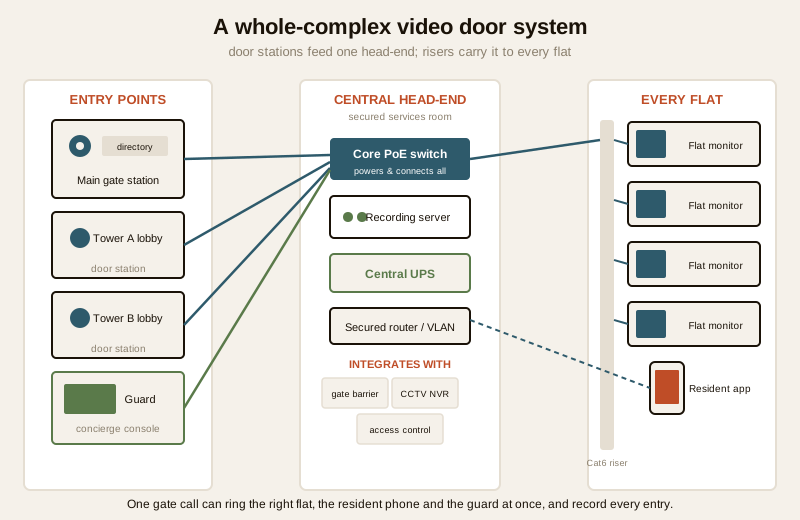
A single-flat video door phone is one door station and one indoor monitor. A tower or complex system is a network with four kinds of endpoint and a shared core:
- Entrance door stations — the panels a visitor uses at the main gate and at each tower or block lobby. Each carries a camera, a mic and speaker, and either a per-flat call button or, better at scale, a directory keypad the visitor uses to dial a flat number.
- A monitor in every flat — the resident's indoor answer point, plus (on IP systems) an app on every resident's phone so a call can be answered from anywhere.
- A guard or concierge station — a console at the security desk that can receive gate calls, screen visitors, call any flat, and (where fitted) trigger the barrier. Its role is a design decision in its own right; see the guard-to-resident intercom guide.
- A central head-end — the network switch(es), the recording server or NVR that logs calls and door snapshots, and the UPS that keeps the whole thing alive through a power cut, usually in a secured services or panel room.
Tie these together with a cabling backbone up the risers, and you have a system where one gate call can ring the right flat, the resident's phone and the guard desk at once, and every entry is recorded centrally.
Why IP/SIP is the norm at building scale
For a single villa or a small block, an analog bus system can still make sense. For a tower or a multi-block complex, IP — cameras and monitors as network devices, often speaking the SIP call protocol — has become the default, and for good reasons that only matter at scale:
- Any-to-any calling. On a proper IP/SIP system, any door station can call any flat, the guard can call any flat, and a flat can call the guard — without a rat's nest of dedicated wires. Adding a second lobby or a new block is a configuration change, not a rewiring job.
- An app for every resident. IP systems ring a mobile app alongside the indoor monitor, so residents answer the gate from work or hand access to a maid or a delivery without being home. This is the single feature residents ask for most.
- It shares one backbone. Door stations, monitors, the recorder and often the building CCTV can share the same structured-cabling and PoE (Power-over-Ethernet) network — one riser, one switch stack, one UPS — instead of separate parallel systems.
- It integrates. IP door entry can talk to the gate barrier/boom, the CCTV NVR, and access control (RFID/QR/biometric readers), so a single visitor event — call, verify, open, record — flows through one platform.
The trade-off is that an IP system is a small IT deployment: it needs a competent integrator, a dedicated VLAN, secured admin credentials and firmware discipline. For the class comparison and where analog still fits, see the IP video door phones guide and run a building through the apartment video door system planner.
| Concern | Analog bus (small blocks) | IP / SIP (towers and complexes) |
|---|---|---|
| Any-flat-to-any-door calling | Limited, wiring-bound | Native, software-defined |
| Resident mobile app | Rare / add-on | Standard |
| Adding a lobby or block | Re-wire | Re-configure |
| Shared with CCTV / access control | Separate systems | One backbone, integrated |
| Central call/entry recording | Limited | Server/NVR logs every call |
| Skill to run | Basic | IT-literate integrator + AMC |
| Best fit | Small society, tight budget, retrofit | New towers, large complexes, multi-block |
The design decisions the specifier makes
The hardware is the easy part; the decisions below are what separate a system residents love from one they route around. Make them at drawing-board stage.
How many entrance door stations, and where
Every controlled entry point that a visitor uses needs a station. Typically that means one at the main pedestrian gate, and one at each tower or block lobby so a visitor buzzed through the gate still announces themselves at the actual building door. Site each station:
- At a sheltered, well-lit spot — under the lobby soffit, not in driving rain or harsh backlight that blinds the camera.
- At an accessible mounting height (camera roughly at face level, keypad reachable from a wheelchair), on a solid wall or a vandal-resistant pedestal.
- With the camera framing the caller's face, not the sky or a glare-white wall behind them.
Fewer, better-sited stations beat many poorly placed ones. A directory-keypad station scales to hundreds of flats from a single panel; per-flat button panels only suit small blocks.
One lobby or several
A single-tower building with one lobby is simple: one lobby station. A gated complex with multiple towers needs a decision — one shared gate station plus a station per tower lobby is the usual answer, all federated on the same IP platform so the directory spans every flat and the guard sees every door. Phasing a large township? Design the addressing and the core to hold the final count from day one, even if you install block by block.
The guard station's role
Decide early how much the guard is in the loop. Options range from a passive desk that only monitors, to an active concierge model where the gate call reaches the guard first, they verify the visitor, then patch the call through to the flat and release the barrier. The active model suits premium and high-security complexes; it needs a proper guard console and a trained guard. The guard-to-resident intercom guide covers the workflow and etiquette in depth.
Per-flat monitor specification
You are buying the same monitor hundreds of times, so the spec compounds. Sensible baseline choices:
- A 7-inch touchscreen indoor monitor as standard; offer a larger or additional bedroom monitor as a paid upgrade.
- App parity — the resident app should do everything the wall monitor does (answer, view, unlock where permitted, review snapshots).
- PoE-powered monitors where possible, so there is one cable per flat and no separate adaptor to fail.
- A clear resident-replaceable boundary: what the resident owns inside their flat versus the common wiring that stops at the flat's network point — again, the apartment intercom systems guide is what you hand residents.
Structured cabling, PoE and the risers — decide at build stage
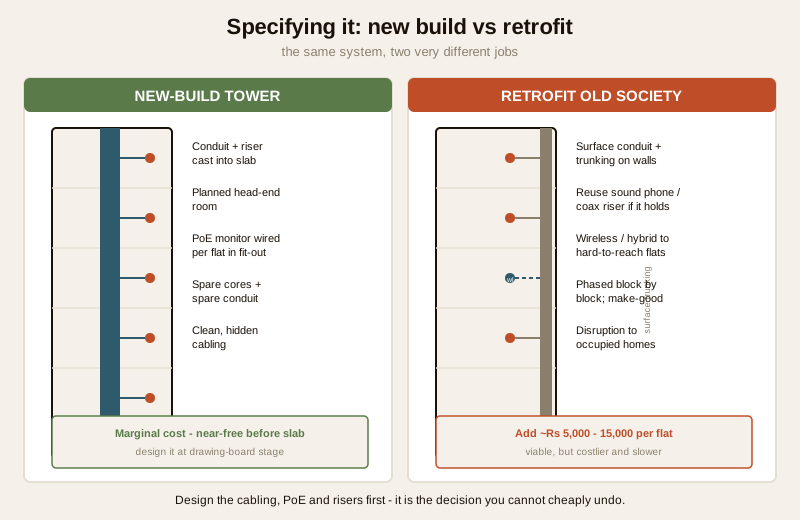
This is the decision that is nearly free before the slab is cast and brutally expensive after. Specify, at build stage:
- Cat6 (or better) structured cabling from the head-end up a dedicated communications riser in each tower, with a floor distribution point per landing feeding each flat's network point.
- Conduit and pull-boxes cast into the structure with spare capacity — a couple of spare cores per flat and a spare riser conduit for the future. You will be glad of it.
- PoE switching sized for every door station, monitor and camera on the segment, so power and data share one cable.
- Cabling designed alongside — not fighting with — the electrical, CCTV and data risers; keep the whole low-voltage backbone coordinated. All of this is licensed cabling and electrical work: see the electrical hub.
Retrofitting an old society reverses the economics. You work with surface conduit and trunking, reuse sound existing telephone or coax risers where an installer confirms they will carry the load, and reach awkward flats with wireless or hybrid links — accepting the compromises those bring. Phase it block by block and budget for making-good.
Power backup for the whole system
A door system that dies with the evening load-shedding is worse than none, because residents stop trusting it. Design a central UPS (and ideally the building DG feed) to hold the head-end — switches, recorder, router, gate station — through the longest realistic outage, and back up the per-lobby and per-floor active gear too. Size the battery honestly against your area's cut pattern. This is mains and battery work for a licensed professional.
Future-proofing
Specify for the building's life, not this year's catalogue:
- Open standards (SIP) and a mainstream platform, so you are not hostage to one vanished vendor.
- Spare capacity in the addressing scheme, switch ports, riser conduit and UPS headroom.
- A clear integration path to gate barriers, access control and CCTV even if some are phase-two.
- Documented as-built drawings, addressing and credentials handed to the RWA — a system nobody can administer is a system that decays.
Governance, ownership and privacy — it is common infrastructure
Here the tower system differs most sharply from a single flat: nobody privately owns it. The door stations, the lobby cameras, the guard console, the recording server and the risers are common infrastructure, and that carries duties.
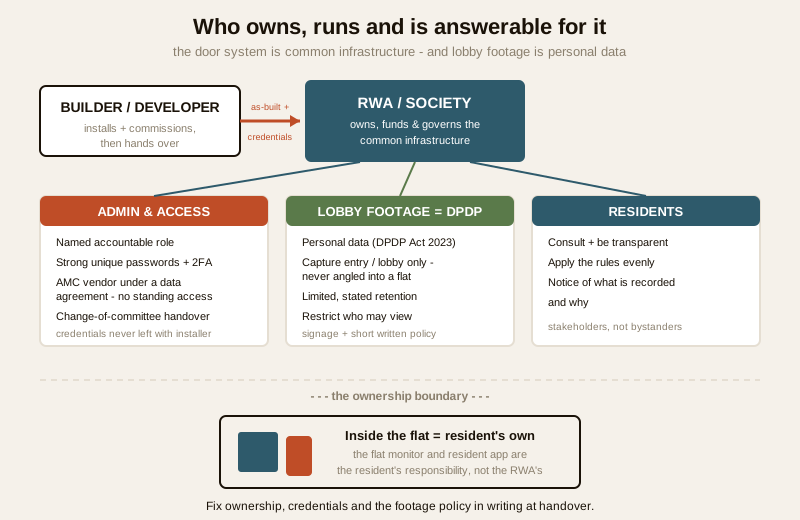
- Who owns it. In a new project the builder installs and commissions it, then hands it to the RWA/society on formation. From then on the RWA owns, funds and governs it through the common maintenance fund. Fix this handover in writing, with as-built documentation and credentials.
- Who administers passwords and access. One of the most common — and dangerous — gaps is credentials left with the installer, or a single committee member holding the only admin login. Assign administration to a named, accountable role (managing committee plus the AMC vendor under a signed data agreement), with strong unique passwords, 2FA where available, and a change-of-committee handover procedure.
- DPDP duties for lobby footage. The lobby and gate cameras record residents, visitors, staff and children in a shared space, which is personal data under the Digital Personal Data Protection Act, 2023. The RWA, as the entity deciding why and how that footage is captured, carries the duties: capture only the common entry areas (never angled into a flat), keep footage for a stated, limited period, restrict who can view it, and be transparent with residents about it. Signage at entries and a short written policy go a long way.
- Resident consent and fairness. Because it is shared and mandatory, treat residents as stakeholders: consult them, be transparent about what is recorded and why, and apply the rules evenly. A door camera that quietly watches one family's floor more than others is both unfair and a privacy problem.
India realities: new tower vs old society, phasing, AMC and cost
New tower vs retrofit
A new tower is the ideal case: you cast conduit and risers into the structure, plan the head-end room, and wire PoE monitors per flat during fit-out. The marginal cost is small and the result is clean. An old society retrofit is harder — surface trunking, reused or new risers, wireless links to stubborn flats, and disruption to occupied homes. Both are viable; the retrofit simply costs more per flat and asks for patience and phasing.
Phasing
Large complexes and retrofits alike benefit from a block-by-block rollout: design the addressing and core for the final count, then commission one tower or wing at a time. This spreads cost and lets you fix teething issues on block one before scaling.
The AMC is not optional
A building-scale system has hundreds of endpoints, outdoor stations in the weather, and a recording server that must not silently stop. Budget a proper Annual Maintenance Contract from day one — scheduled cleaning and checks of stations and cameras, verification that recording and retention are actually working, firmware updates, and a written fault-response SLA. Insist on a visit report the committee keeps, and — critically — a data-and-access clause: no standing installer access to footage, credentials stay with the RWA, and everything is revoked cleanly if you change vendors.
Ballpark cost per flat
Treat these as sanity-check bands for 2026, not quotes — they swing with brand, feature set, new-build versus retrofit, and how much CCTV/access-control integration you fold in.
| System class | Typical cost per flat (hardware + cabling + install) | Notes |
|---|---|---|
| Basic IP door entry, monitor + app, shared gate + lobby stations (new build) | ₹8,000 – ₹18,000 / flat | Marginal when cast into construction |
| Mid-tier: guard console, CCTV-integrated, per-tower stations (new build) | ₹18,000 – ₹35,000 / flat | Most common for new towers |
| Premium: concierge workflow, access control, barrier integration | ₹35,000 – ₹60,000+ / flat | High-security / luxury complexes |
| Retrofit into an occupied old society | add ₹5,000 – ₹15,000 / flat | Surface trunking, phasing, making-good |
| AMC (per year) | ~5 – 12% of system value / yr | Comprehensive with parts costs more |
Head-end gear (core switches, recording server, central UPS) and the guard console are shared costs spread across all flats; per-flat figures above fold in a share of them.
When to bring in a professional. The RWA or developer can and should plan and govern the system — set the requirement, choose the model, write the AMC, own the credentials and the DPDP policy. Hand the execution to licensed professionals: an MEP/electrical consultant and a security integrator for the cabling, risers, PoE, central UPS, gate-barrier and fire-system interfaces, and commissioning; see the electrical hub. Never let an integrator keep standing remote access to your recordings, and get as-built drawings, addressing and admin credentials in writing at handover. For choosing the right device class first, use the video door phone type selector.
Key takeaways
- A multi-apartment video door system is building infrastructure, not a gadget: entrance door stations, a monitor in every flat, a guard console and a central head-end, tied together by a cabling backbone up the risers.
- IP/SIP is the norm at scale — it gives any-flat-to-any-door calling, an app for every resident, one shared backbone with CCTV and access control, and central recording; analog only suits small blocks. See the IP video door phones guide.
- Decide at build stage the number and siting of door stations, one versus several lobbies, the guard's role, the per-flat monitor spec, and — above all — the structured cabling, PoE and risers, which are near-free before the slab and brutally costly after.
- It is common infrastructure: the RWA owns and funds it, a named role holds credentials under a data agreement with the AMC vendor, and lobby footage is DPDP-governed personal data with limited retention, restricted viewing and resident notice.
- In India, plan for power cuts with a whole-system UPS, phase large or retrofit projects block by block, budget a proper AMC, and reckon roughly ₹8,000–₹60,000 per flat depending on tier — send residents to the apartment intercom systems guide for their own flat, and model a building with the apartment video door system planner.
References
- Digital Personal Data Protection Act, 2023 — lobby and gate footage of residents and visitors in common areas is personal data; the RWA/owner decides its purpose and carries the duties of limited retention, restricted access and transparency.
- Manufacturer specifications — verify door-station IP/weather ratings, PoE class and power budget, maximum endpoints per platform, SIP compatibility and firmware support life on the maker's own datasheet before specifying at scale.
- National Building Code of India (SP 7), Bureau of Indian Standards, and local municipal bye-laws for the electrical, low-voltage cabling, UPS and life-safety aspects of a building-wide install; confirm the current edition via the BIS catalogue: https://www.services.bis.gov.in/
This is an educational overview, not legal or engineering advice. All cabling, mains power, UPS, riser work, work at height and integration with gate barriers or fire systems are qualified professional tasks — engage licensed MEP/electrical consultants and security integrators, and verify any standard's current status via the BIS catalogue before relying on it.
Export this guide
Related Guides — Deep-dive reading
Apartment Intercom Systems in India (2026): A Resident's Guide to Your Flat's Video Door Phone
How a building intercom actually works from inside your flat, audio versus video, what you can upgrade yourself versus the shared infrastructure the society controls, and Indian cost bands for a monitor replacement.
SecurityCCTV Remote Access in India (2026): Watch From Your Phone, Safely
How to view your own cameras from anywhere without leaving the front door open to the internet — change the defaults, use strong credentials and 2FA, keep firmware current, prefer the vendor's secure cloud relay or a VPN, segment the camera network, and treat footage as personal data.
SecurityGate Security in India (2026): Making the Main Entrance the Strongest Point, Not the Weakest
The main gate is the one gap in every boundary and the number-one weak point of any perimeter — here is how to make the leaf, the access decision and the discipline around it as strong as the wall it sits in.
SecurityRelated Tools — Try Free
Apartment Video Door System Planner
Enter flats, entrances, floors and guard desk for a first-pass building intercom plan — door stations, indoor monitors, guard station, the right architecture and an indicative cost band.
Building PlannerSecurity Cabling & PoE Planner
Estimate cable length, drops, PoE power budget, the right switch, conduit and cost for a CCTV/security cabling plan.
Cabling PlannerVideo Door Phone Type Selector
Answer a few questions about your building, cabling, budget and internet and get the right video door phone — analog / wired / wireless / IP, single-home or multi-apartment, monitor or app.
Door Phone Selector