
Mobile-App Video Door Phones in India (2026): Answer the Door From Anywhere
How answering your door from a phone app actually works, what the app really gives you, the honest reliability picture, and the security hygiene that keeps a networked door safe.
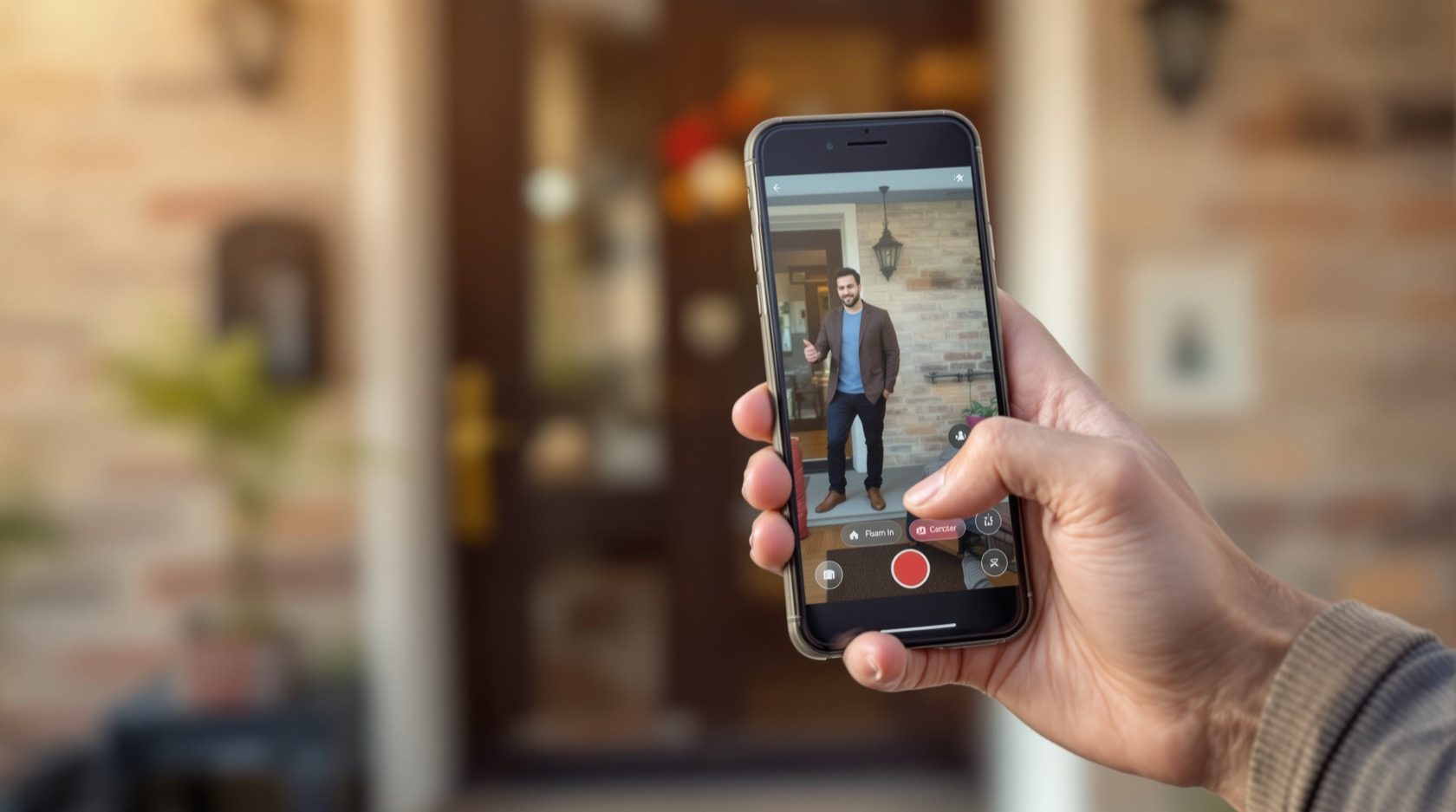
You are three kilometres from home when your phone buzzes: someone is at your door. You glance at the screen, see the courier holding a parcel, tap to speak, and tell them to leave it with the guard. You never had to be home, and you never had to miss the delivery. That is the single feature that has changed what a door phone means to most Indian households — mobile-app video door phones, the ones you can answer from your phone no matter where you are.
This guide is part of Studio Matrx's video door phone hub and its sub-hub landing. It focuses on one capability rather than one product family: the app. What actually happens between the door and your phone, what the app genuinely gives you versus what the marketing promises, where it quietly fails in Indian conditions, and — most importantly — the security hygiene that keeps a door you can open from your phone from becoming a door anyone can open from theirs. It is written for homeowners deciding whether app answering is worth it, and for architects and builders speccing systems that will carry it.
Scope & safety. This guide helps you plan, decide and coordinate an app-enabled door phone and use it safely. It is strictly defensive: it does not explain how to intercept, spoof or defeat any door phone, app or lock. Remote unlock from an app touches a physical lock and egress — the lock selection, wiring and any fire interlock is a licensed door-hardware and electrician job, never DIY, and a lock must never trap anyone or block a fire-escape route. A door camera and its app both handle personal data under the Digital Personal Data Protection Act, 2023 — keep the account private and aim the camera at your own doorstep. This is educational guidance, not legal advice.
How answering the door from your phone actually works
The magic is really a short relay. When a visitor presses the call button, the door station has to get a live video-and-audio call all the way to a phone that might be anywhere in the country. It does that in four hops:
1. The door station wakes up. The outdoor unit's camera and microphone start a call and hand the stream to your home network — over Wi-Fi for a wireless or smart unit, or over the wired LAN for an IP door phone.
2. Your router carries it out. The stream leaves your home through the broadband router and out to the internet.
3. It reaches your phone one of two ways. Either it goes up to the manufacturer's cloud server, which then pushes it down to your phone; or, on some systems, it takes a more direct peer-to-peer (P2P) path once the two devices have found each other. Either way, a push notification is what makes your phone ring in the first place.
4. You answer. The app opens a live view; you see and speak to the visitor over two-way audio, and — where a lock is fitted and you choose to enable it — you can release the gate or door.
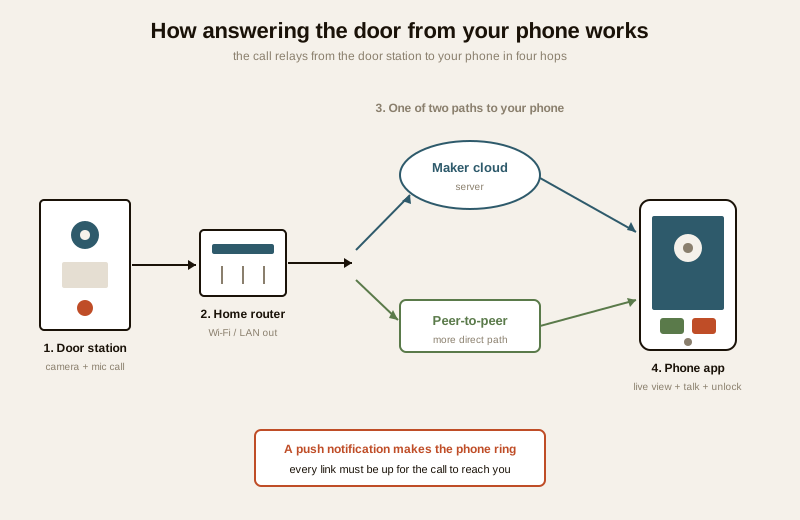
The whole chain usually completes in a couple of seconds. But notice how many links it has: the door's Wi-Fi, your router, your broadband, the maker's cloud, the internet path to your phone, and your phone's own data or Wi-Fi. Every one of those has to be up for the call to reach you. That is the source of both the convenience and the honest caveats we come to below.
Cloud vs peer-to-peer, in plain terms
You do not need to master the plumbing, but the distinction shapes reliability and privacy:
- Cloud-routed systems send the call (and often the recordings) through the manufacturer's servers. This makes remote access "just work" from anywhere and enables clip history, but it means the maker's cloud is now part of your front door, and clip storage often carries a subscription.
- P2P / direct systems try to connect the door and phone more directly, which can lower latency and keep video off a third-party server, but still typically rely on the maker's servers to introduce the two devices and to send the push notification.
What the app actually gives you
A good door-phone app is more than a remote doorbell. The genuinely useful features, and what each is really for:
| Feature | What it does | Why it matters in India |
|---|---|---|
| Ring notifications anywhere | Your phone alerts you the moment the button is pressed | Answer deliveries, guards and guests whether you are at work, travelling or in another room |
| Live view and two-way talk | See and speak to the visitor in real time | Screen a caller before opening; direct a courier without opening the gate — see two-way audio |
| Remote gate / lock release | Open the door from the app | Let in trusted help or family when you are out — only where a lock is fitted; see smart locks |
| Motion alerts | Notify you when someone lingers, even without ringing | Catch a loiterer or a "porch" visit; tune sensitivity to avoid alert fatigue |
| Recorded clips | Review who came while you were away | See the missed courier or unknown caller after the fact — often behind a cloud subscription |
| Share access with family | Multiple household members get the ring on their phones | Whoever is free answers; parents, spouse and adult children all covered |
| Multiple users / roles | Add and remove app users, sometimes with limited rights | Give a family member view-only, keep unlock to yourself; revoke a departed helper cleanly |
The shared-access point is worth dwelling on. In an Indian household the door is rarely answered by one person — a call that rings the whole family's phones, so whoever is free picks up, is often the single most useful thing about app answering. But every extra person with the app is an extra way into your door, which is exactly why the hygiene section below matters.
The honest reliability picture
App answering is genuinely useful, but it is not the unbreakable line a monitor on your wall is. Being straight about its limits is how you plan around them.
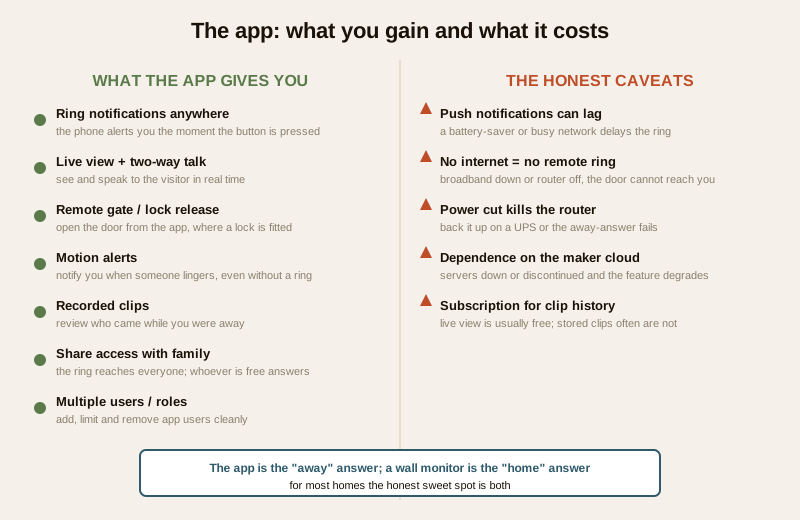
- Push notifications can lag — or not arrive. The ring travels through the maker's cloud and your phone's notification system. On a congested network, an aggressive battery-saver, or a "doze"-ing phone, the alert can arrive seconds late or, occasionally, not at all. You may reach the door view only after the visitor has left.
- No internet means no remote ring. If your broadband is down, or the router lost power, the door can no longer reach your phone. A visitor at the gate sees an unanswered door. This is the big one in India — see below.
- You depend on the maker's cloud. If the manufacturer's servers are down, discontinued, or the company folds, the remote feature can degrade or die even though the hardware is fine. A cloud-tied door phone is only as durable as its maker's service.
- Clip history often costs a subscription. Live view is usually free; recorded clips beyond a few seconds frequently sit behind a monthly or annual cloud plan. Read what is free and what is paid before you buy, and factor the recurring cost.
- Battery and data on your side. A wireless doorbell's own battery, and your phone's data allowance and battery-saver settings, all sit in the chain.
None of this makes app answering a bad idea. It makes it a complement to a system that also works locally, not a replacement for one. This mirrors the trade-offs in remote access for CCTV: the same cloud that gives you your home on your phone is a dependency and an attack surface you must manage.
Why a wall monitor still earns its place
Because the app can be late or unreachable, the most robust setups keep a local path too. An IP or wired system with an indoor monitor answers the door over your own cabling, with no internet in the loop — so even when the broadband is down and the cloud is unreachable, someone at home can still see and speak to the gate. The app is the "away" answer; the monitor is the "home" answer. For most households the honest sweet spot is both: a monitor for reliability at home, the app for reach when out.
Which door phones offer an app — and which do not
Not every family carries this feature. As a rule of thumb:
| VDP family | App answering? | Notes |
|---|---|---|
| Smart / Wi-Fi video doorbell | Yes — it is the whole point | App-first devices; cloud-routed; clip history often a subscription — see smart video doorbells |
| IP (networked) door phone | Usually yes | App runs alongside indoor monitors and a guard station; can record to an NVR — see IP door phones |
| Wireless (Wi-Fi) door phone | Often yes | Many wireless kits pair a monitor with a maker app |
| Classic analog door phone | Usually no | A traditional analog station wired to a monitor typically has no app path at all — see analog door phones |
If answering from your phone is a must-have, that decision quietly rules out a pure classic-analog setup and points you toward a smart, wireless or IP system. The video door phone feature selector walks you through matching features like app answering, remote unlock and recording to a family that supports them.
When app answering is worth it — and when it is not
The feature is not free of cost, complexity or risk, so it is worth being honest about who needs it.
App answering earns its keep when:
- You are frequently out and want to receive deliveries, screen visitors or let in trusted help remotely.
- Several household members share door duty and want the ring on their own phones.
- You travel and want to keep an eye on the door and review who came while away.
- You already run a smart-home or IP setup where the app fits naturally.
A monitor-only setup may be enough when:
- Someone is almost always home to answer at the wall panel.
- You would rather not depend on broadband, a cloud account or a subscription for your front door.
- You want the simplest, most private setup with the fewest moving parts and no networked attack surface.
The strongest answer for most homes is not either/or but layered: a reliable local monitor for when you are home, plus the app for when you are not — accepting that the app is a convenience layer with real dependencies, not the load-bearing part of your door security.
The security hygiene that matters most
Here is the part to take most seriously. A door phone you can open from a phone is, by design, a door that responds to the internet. That convenience is safe only if the account behind it is well kept. None of this is about defeating anything — it is the basic discipline that keeps your door yours. This is the same hygiene the CCTV remote-access security guide sets out, applied to your front door.
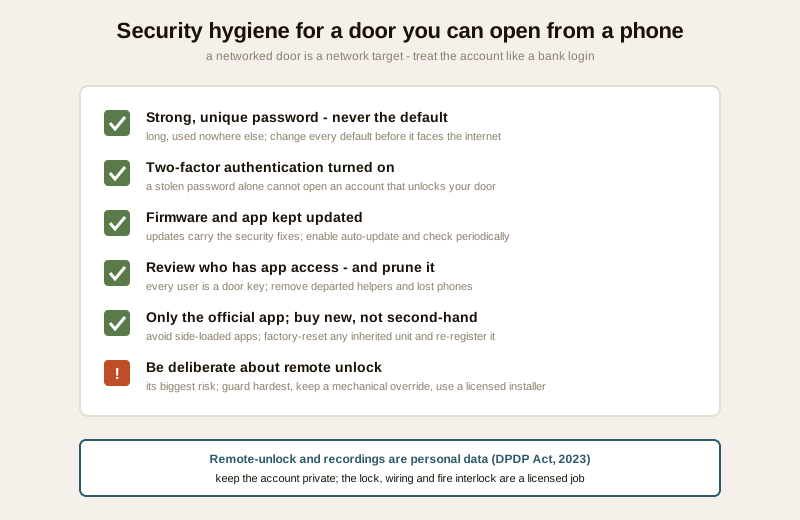
- Set a strong, unique password — never the default. The account that controls your door must have a long, unique password used nowhere else. A default or reused password is the single most common weakness in any networked device. Change every default before the device ever faces the internet.
- Turn on two-factor authentication (2FA). If the app offers 2FA, enable it. It means a stolen password alone cannot open your account — a second code from your phone or email is also required. For an account that can unlock your door, this is not optional in spirit.
- Keep firmware and the app updated. Updates carry security fixes. A door station or app left on old firmware is a known-weakness device left exposed. Turn on automatic updates where available and check periodically.
- Review who has app access — and prune it. Every family member, helper or former resident with the app is a door key. Keep a mental (or written) list of who is on the account, remove anyone who no longer should be there, and re-check after a helper leaves or a phone is lost or sold.
- Use only the official app and buy new. Install the app only from the official store and the maker's genuine listing; avoid unofficial or side-loaded "companion" apps. Prefer buying the device new — a second-hand unit may still be tied to a previous owner's account or carry tampered firmware. If you inherit one, factory-reset it and re-register it as new.
- Be deliberate about remote unlock. The convenience of opening the door from anywhere is also its biggest risk. If you enable remote unlock, protect that account especially hard (strong password plus 2FA), and consider whether view-and-talk alone meets your need while a person on-site handles the actual opening. Keep a mechanical override for power cuts, and treat the lock, its wiring and any fire interlock as a licensed job.
Treat the account the way you would a bank login, because functionally it now guards something just as sensitive: the way into your home.
Making it work in India
Four local realities decide whether app answering delights or disappoints:
- A power cut kills the router, and with it the remote ring. In much of India mains is unreliable, and when the power goes the broadband router goes with it — so the door can no longer reach your phone even though the door station may still be on a small backup. If app answering matters, put the router (and any wireless door unit's base) on a small UPS or inverter, exactly as you would plan power backup for CCTV and the electrical load. Without router backup, the "answer from anywhere" feature is only as reliable as your electricity.
- Patchy broadband caps the experience. A weak or congested connection means laggy video, delayed rings and dropped calls. Make sure the door station has a strong Wi-Fi signal or a wired link, and that your uplink can carry a video call; a mesh node near the gate often helps.
- Data residency and the DPDP Act. Your door footage and call recordings are personal data under the Digital Personal Data Protection Act, 2023. Where a system routes video and clips through a maker's cloud, you are trusting that provider with images of everyone who comes to your door. Prefer providers who are clear about where data is stored and who can access it, minimise what you record, and never point the camera at a neighbour's door or a shared corridor beyond your own entrance.
- Weather still attacks the door unit. The station at the gate lives in monsoon, dust and heat like any outdoor camera. A weather-rated unit and sensible mounting keep the whole app experience from failing at the source. The app is only as good as the camera feeding it.
For the wider picture — how app-answered door entry sits alongside CCTV, alarms and the rest — the security hub and the video door phone sub-hub link the family, and the smart video doorbell guide covers the app-first end of the range in depth.
When to bring in a professional. You can and should plan, decide and coordinate — choose whether you need app answering, pick a family that supports it, and set the hygiene rules for your household. Hand the physical work to licensed trades: any remote-unlock lock, its wiring, the mains supply and any fire-alarm interlock is a door-hardware specialist and electrician job, never DIY, and an egress door's lock must fail safe and never block a fire-escape route. For anything at height or near the mains, and for network setup on a larger IP system, engage a qualified installer.
Key takeaways
- Mobile-app video door phones let you see, speak to and often unlock for whoever is at your door from your phone, anywhere — the call relays from the door station through your router, then via the maker's cloud or a peer-to-peer path to a push notification on your phone.
- The app's real value is reach and sharing: ring notifications wherever you are, live view and two-way talk, remote release, motion alerts, recorded clips and a ring that reaches the whole family's phones — though clip history often carries a cloud subscription.
- Be honest about reliability: notifications can lag or be missed, no internet or a power-cut router means no remote ring, you depend on the maker's cloud, and the most robust setup keeps a local monitor too — the app is the "away" answer, the monitor the "home" answer.
- Smart, wireless and IP families offer apps; classic analog usually does not — so "answer from my phone" quietly steers your choice; the feature selector matches the feature to a family.
- Security hygiene is the whole game: a strong unique password, two-factor authentication, kept-updated firmware and app, a reviewed access list, only the official app, and deliberate care with remote unlock — a networked door is a network target, and footage is personal data under the DPDP Act, 2023.
References
- Digital Personal Data Protection Act, 2023 — door-camera images, call recordings and cloud-stored clips are personal data; understand where a provider stores data and who can access it, minimise what you record, keep the account private, and aim the camera at your own entrance, not a neighbour's door or a shared corridor.
- Manufacturer specifications and app documentation — verify whether the system is cloud-routed or peer-to-peer, whether two-factor authentication is offered, what clip storage is free versus subscription, the firmware-update policy, and the door station's Wi-Fi and weather rating on the maker's own datasheet before buying.
- OWASP and CERT-In consumer guidance on IoT and smart-device security — practical, vendor-neutral hygiene for internet-connected home devices: unique passwords, multi-factor authentication, timely updates and buying from trusted sources.
- National Building Code of India (SP 7), Bureau of Indian Standards, and local fire and municipal bye-laws where a remote-unlock lock touches egress and the mains supply; verify the current edition via the BIS catalogue: https://www.services.bis.gov.in/
This is an educational overview, not legal advice. Any remote-unlock lock, its wiring, mains-electrical work and fire-alarm interlock are qualified professional tasks — engage licensed contractors, keep a mechanical override and safe egress, and verify any standard's current status via the BIS catalogue before relying on it.
Export this guide
Related Guides — Deep-dive reading
Complete Guide to Security System Cybersecurity in India (2026): Protecting the Systems That Protect You
The cameras, locks, alarms and door phones you install to feel safer are internet-connected computers that can themselves be attacked, and an insecure one is worse than none. This pillar maps the whole attack surface — devices, network, accounts and data, operations — and points to every guide that hardens it.
SecuritySecurity for People Living Alone in India (2026): Calm, Practical Habits When There Is No Second Person to Notice
Living alone is an ordinary and growing part of Indian life - the student in a new city, the working single, the elder whose children are abroad, the person after a separation. It does not call for fear. It calls for a few deliberate habits, because there is no second person in the home to notice trouble, raise the alarm, or catch an accident. This is calm self-reliance, layer by layer.
SecurityOffline Access Control in India (2026): Standalone Locks That Work Without a Network
How standalone, non-networked access control works when the permission lives on the door or on the card, where offline is the right choice, how you manage it, and the honest trade-offs versus a live cloud system.
SecurityRelated Tools — Try Free
Video Door Phone Type Selector
Answer a few questions about your building, cabling, budget and internet and get the right video door phone — analog / wired / wireless / IP, single-home or multi-apartment, monitor or app.
Door Phone SelectorCCTV Cloud vs Local Cost Calculator
Compare cloud CCTV subscription against a local NVR + HDD — upfront, 5-year total, monthly fee and break-even.
Cloud vs LocalCCTV System Type Selector
Answer five questions and get the right CCTV setup — analog / IP / hybrid, wired / wireless, local / cloud — with reasons.
CCTV Selector