
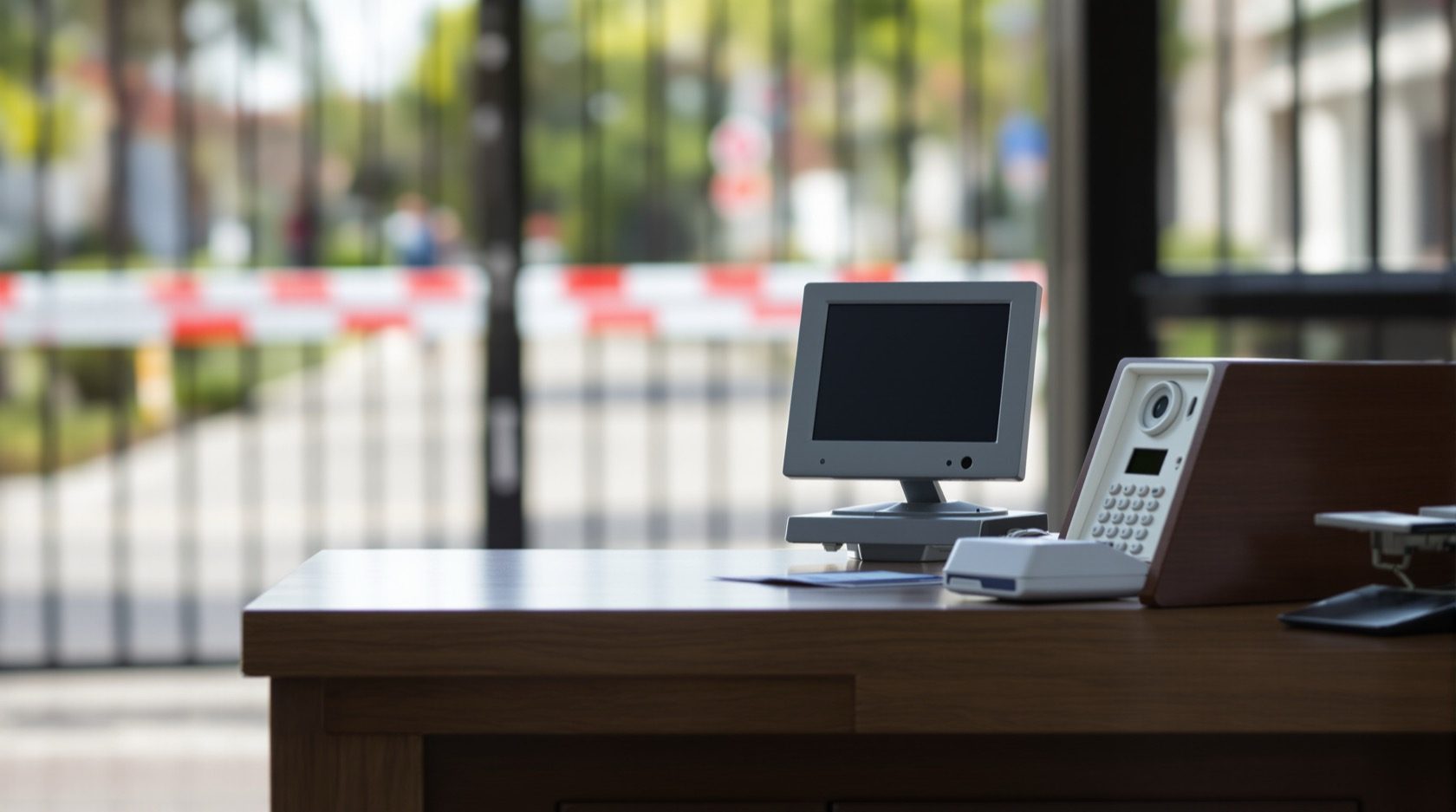
Guard-to-Resident Intercom in India (2026): The Gate-to-Flat Link Every Society Runs On
How the guard at the gate calls a flat to clear a visitor, delivery or cab: the console, EPABX and app-based versions, why it must survive a power cut, and how an RWA runs it fairly under the DPDP Act.
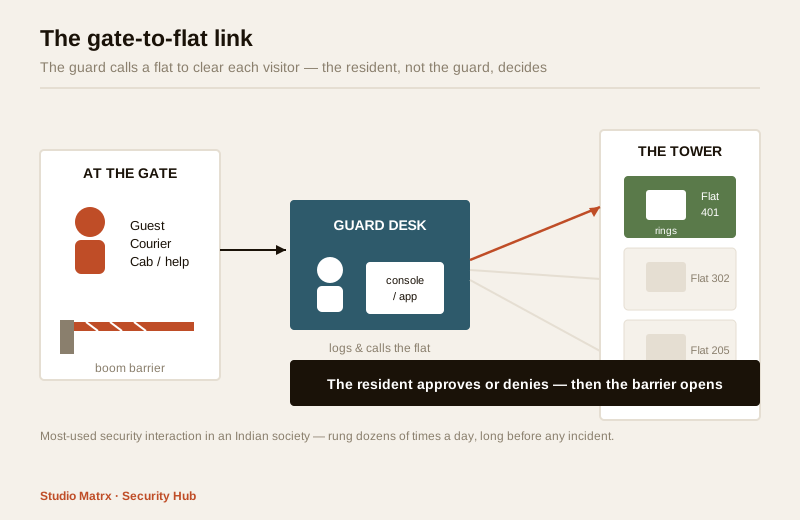
Walk up to almost any gated society in India and the first thing that decides whether you get in is not a lock or a camera. It is a short phone call. A visitor arrives, a courier arrives, a cab pulls up — and the guard at the gate picks up a handset, rings the flat, and asks: "Someone here to see you. Shall I send them up?" That call is the guard-to-resident intercom, and it is quietly the most-used piece of security equipment in the whole complex — rung dozens or hundreds of times a day, long before any incident, on an ordinary Tuesday.
It is also the piece most people never think about until it fails. This guide is written for two readers at once: the resident who wants to understand the link that clears every visitor to their door, and the RWA or society committee that has to choose, run, pay for and govern it fairly for everyone. It sits inside Studio Matrx's video door phone hub and pairs closely with the multi-apartment video door systems build and the apartment intercom systems guide.
Scope & safety. This guide helps a resident understand, and a committee plan, choose and govern, the gate-to-flat link. It is strictly about verifying visitors before they are let in — never about watching residents. The gate desk, any gate camera and the visitor register are common infrastructure the RWA runs on behalf of everyone, and the logs and footage are personal data under the Digital Personal Data Protection Act, 2023. Mains wiring, cabling in risers and boom-barrier electricals are licensed-professional work. This is educational guidance, not legal advice.
What it is, and why it is the backbone
A guard-to-resident intercom is the two-way communication link between the security guard at the gate or lobby desk and each individual flat. Its whole job is one thing: let the guard reach the resident to confirm a visitor before opening the gate. Nothing exotic — but everything else in a society's visitor management leans on it.
Think about how often it runs in a single day for one tower:
- A guest arrives and gives a flat number — the guard calls to confirm they are expected.
- A courier or food-delivery rider turns up — the guard rings the flat: collect at the gate, or send up?
- A cab or auto comes to pick someone up — the guard calls to say it has arrived.
- A domestic help, plumber or cook arrives — the guard checks they are allowed in today.
Every one of those is a decision that should be made by the resident, not the guard, and the intercom is the wire that carries the decision. Get it right and the gate is a real checkpoint. Get it wrong — a dead handset, an unanswered call, a flat that was never wired in — and the guard is left guessing, which means either genuine visitors are turned away or, far worse, unverified people are waved through.
How it fits the bigger system
The guard link is one layer of a society's door-entry stack, not the whole thing. Below it sit the per-flat video door phones at each door, and around it sit the gated-community security measures — boom barriers, a gate camera, patrolling. The intercom is what ties the gate to the individual home. When you plan a tower's system with the apartment video door system planner, the guard-to-flat call flow is the spine everything else hangs off.
The forms it takes
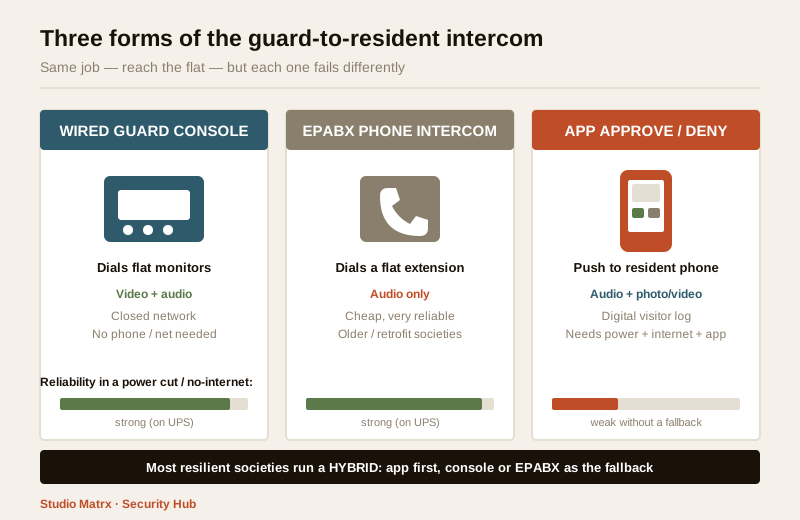
"Guard-to-resident intercom" is one function delivered in several very different ways. A committee choosing a system, or a resident trying to understand theirs, needs to know which form they have, because each fails differently.
| Form | How the guard reaches the flat | Audio / video | Where it fits |
|---|---|---|---|
| Dedicated guard console + flat monitors | Guard has a master console that dials any flat's indoor monitor by number | Usually video (guard can show the visitor) plus audio | The classic apartment video-door setup |
| EPABX-style phone intercom | Gate is one extension on a building phone exchange; guard dials a flat's extension | Audio only | Older / retrofit societies; cheap, robust |
| App-based visitor approval | Guard raises a visitor entry in an app; resident gets an approve / deny notification on their phone | Audio and photo/video in the app | Newer societies; growing fast |
| Hybrid | App as primary, physical console/EPABX as the fallback | Both | The most resilient real-world setup |
The dedicated guard console
The traditional and still-common form. The gate has a guard master station wired into the same cabling as the per-flat monitors. The guard punches in a flat number, the indoor monitor in that flat rings like a doorbell, and the resident answers on the wall unit. In a video system the guard can even turn the gate camera so the resident sees who is standing there. This is the version detailed in the multi-apartment video door systems guide, and it is robust because it is a closed, wired system with no dependence on anyone's mobile phone or the internet.
The EPABX phone intercom
Many older societies never installed video at all. Instead, an EPABX (a small building telephone exchange) gives every flat an internal extension and puts the gate on its own extension. The guard simply dials the flat's extension number and speaks. It is audio only — no picture of the visitor — but it is cheap, extremely reliable, and needs nothing more than a handset in each flat. For a tight budget or a heritage retrofit it is still a perfectly honest choice, and it pairs with a separate gate camera if a visual record is wanted.
The app-based approval
The fastest-growing form. A visitor-management app replaces (or sits beside) the console. The guard opens the app, enters the visitor's details — often with a photo — and the resident receives a push notification: approve or deny. The resident taps, the guard sees the result, and the gate opens or does not. It brings real advantages: a searchable digital visitor log, pre-approval of expected guests, delivery and daily-help management, and reaching a resident who is not physically home. But it also brings new failure modes, covered below, that a committee must plan around rather than assume away.
The society concerns that actually matter
Choosing a form is the easy part. Running it so it genuinely protects everyone, every day, is where committees and residents should spend their attention.
It must work in a power cut
This is the first and most important rule, and the one most often missed. In India the gate is exactly where the intercom matters most and exactly where power is least reliable. A guard-to-resident intercom that dies with the load-shedding is not a security system — it is a fair-weather convenience. The gate desk, the exchange or console, the network switch and any router the app depends on must sit on a UPS or inverter backup sized to ride through a typical cut. For app-based systems there is a double dependency: the gate needs power and a working internet link, so the broadband and its router need backup too, and the guard needs a fallback (a plain phone list, or a physical console) for when the internet is down even though the lights are on. Tie the gate's power and backup planning to a qualified electrician via the electrical hub; do not let it be an afterthought bolted onto the security AMC.
Every flat must actually be covered
A guard link is only as good as its weakest gap. Common, real coverage failures:
- A flat that was never wired in during a phased handover, so the guard has no way to call it and simply waves that flat's visitors through.
- A dead or unplugged monitor in a flat that the resident never reports because they rarely get visitors.
- On app systems, a flat where no resident installed the app — the notification goes nowhere.
An RWA should keep a simple live register: for every flat, which method reaches it (console, extension, app), and a periodic test that the method actually works. A once-a-quarter "call every flat" drill catches the silent gaps.
The shift to app-based approval, and its pitfalls
App-based approval is genuinely useful, but a committee that switches to it without planning for its weak spots trades one set of problems for another. The honest picture:
| Pitfall | What happens | How a society softens it |
|---|---|---|
| Residents ignore notifications | Approval sits unanswered; guest waits, or guard improvises | Keep a timeout rule — after X minutes unanswered, guard calls the flat's phone directly, never auto-admits |
| Elderly or low-tech residents | No smartphone, or cannot use the app | Keep the physical console / EPABX alive for those flats; never make the app the only path |
| Guests without the app | A visitor cannot self-check-in | The guard enters them — app should never require the visitor to install anything |
| No phone / dead battery / no signal | Resident unreachable via app | Fallback phone list at the gate; do not admit on silence |
| Over-trust in the app | Guard stops thinking, treats the app as the whole job | Train that the app is a tool, not a substitute for the verify-then-admit protocol |
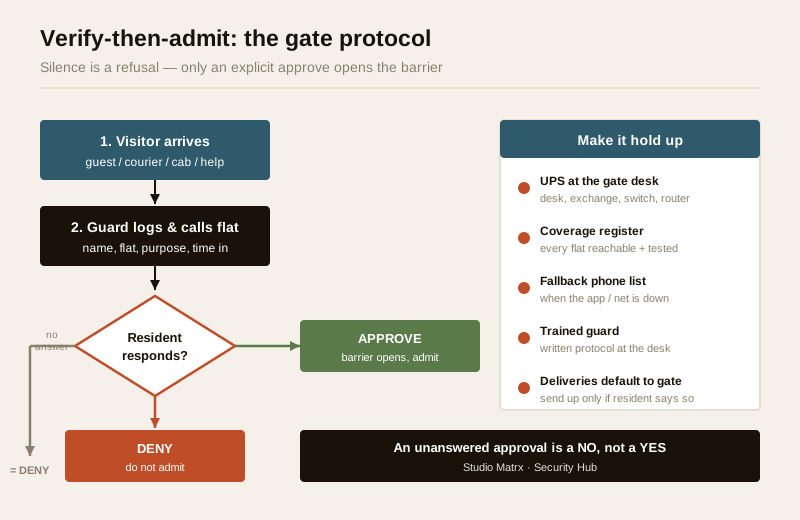
The rule that ties it together: an unanswered approval is a "no", not a "yes". Silence must never open the gate. Many incidents in societies come not from a clever intruder but from a guard who let someone through because the resident did not pick up and the visitor "seemed fine".
The false sense of security, and clear protocols
An intercom is a link, not a guarantee. It tells the resident someone is at the gate; it does not verify they are who they claim, and it cannot stop a resident from casually approving a stranger to save a phone call. The value comes from a clear, boring, followed protocol, not from the hardware:
1. Every non-resident is logged and verified before admission — name, flat visited, purpose, time in.
2. The resident, not the guard, approves — the guard's job is to reach the resident and record the answer, not to judge.
3. Silence is a refusal — no answer means the visitor waits or is turned away, never auto-admitted.
4. Deliveries default to the gate — collected at the gate unless the resident says send up.
5. The guard is trained and the protocol is written — a laminated one-page flow at the desk beats a clever app used loosely.
Privacy and governance: it is common infrastructure
Here is the part committees most often get wrong. The guard-to-resident intercom, the gate camera and the visitor register are common infrastructure the RWA operates on behalf of every resident — and the moment you record who visited whom and when, you are holding personal data. Under the Digital Personal Data Protection Act, 2023, the visitor log and any gate camera footage are personal data about identifiable people (visitors and residents alike), and the society, as the body deciding why and how that data is collected, carries the responsibility for handling it properly.
That does not mean stop keeping logs — a visitor register is legitimate and useful. It means the society needs a written policy, agreed at a committee level, covering at least:
- Purpose — the log and gate camera exist to verify visitors and for incident review, and nothing else. Never to track residents' movements, monitor domestic staff beyond entry/exit, or feed anyone's curiosity.
- Retention — how long the visitor log and gate footage are kept (a defined, reasonable window), and that older records are deleted, not hoarded forever.
- Access — exactly who may view the log or pull footage (say, the security supervisor and named committee members), and that casual browsing by guards or neighbours is not allowed.
- The gate camera points at the gate — the shared entry space — not into anyone's home or balcony.
- Vendor terms — if a third-party app hosts the visitor data, the society must know where it is stored, who at the vendor can see it, and that it is deleted on exit. A visitor-management app is a data processor acting for the society; put the terms in writing.
This is the same discipline the gated-community security guide and the apartment security guide apply to CCTV — a security tool run by a community for the community must be governed, or it curdles into surveillance.
India realities: setups, guards and money
A quick grounding for a committee sizing this up.
Typical setups. Older societies run EPABX audio intercoms, often with a separate gate camera. Newer and mid-range projects ship with wired guard-console video systems from the builder. Many societies of every age are now adding an app on top — sometimes replacing the console, better used alongside it as a hybrid.
The human factor. All of this rests on the guard actually following the protocol at 2 pm on a busy Sunday with ten visitors queued. Guard training and turnover matter more than the brand of console: a well-drilled guard on an old EPABX beats a bored one with a shiny app. The RWA should insist the security agency trains guards on the verify-then-admit flow and keep a written protocol at the desk.
Rough cost bands (sanity-check a quote, not fixed rates):
| Item | Typical India band |
|---|---|
| EPABX system for a tower (exchange + handsets) | ₹15,000 – ₹60,000+ depending on flats |
| Guard master console (added to a video-door system) | ₹8,000 – ₹30,000 |
| Per-flat indoor monitor (video) | ₹3,000 – ₹12,000 each |
| Visitor-management app | ₹15 – ₹40 per flat / month typical subscription |
| Gate-desk UPS / inverter backup | ₹5,000 – ₹25,000 |
The recurring app subscription and the electrician-installed UPS are the two costs committees routinely forget when comparing quotes — build them in.
When to bring in a professional. A resident can test their own monitor, install the society app and report a dead handset. Leave to licensed professionals: all mains wiring, cabling through risers and shafts, boom-barrier electricals, and the sizing and installation of the gate-desk UPS — coordinate these via the electrical hub. For the committee, the professional decisions are the written data policy (retention, access, DPDP compliance) and the vendor contract terms for any app that stores visitor data; put both in writing before you sign. Never let a departing security vendor keep access to your visitor logs.
Key takeaways
- The guard-to-resident intercom is the single most-used security interaction in an Indian society — the guard calling a flat to clear a visitor, delivery or cab — and everything at the gate leans on it.
- It comes as a wired guard console (video, closed-network, robust), an EPABX phone intercom (audio-only, cheap, very reliable), or an app-based approve/deny flow (rich features, but depends on power, internet and every resident's phone) — the most resilient societies run a hybrid.
- It must survive a power cut: put the gate desk, exchange, switch and router on a UPS or inverter, and for app systems back up the broadband too and keep a physical fallback.
- App-based approval has real pitfalls — ignored notifications, elderly residents, guests without the app — so keep the console alive for those who need it, and treat an unanswered approval as a "no", never a "yes".
- It is common infrastructure the RWA runs, and the visitor log and gate camera are personal data under the DPDP Act, 2023 — a society needs a written policy on purpose, retention and access, and the camera points at the gate, never into homes.
References
- Digital Personal Data Protection Act, 2023 — a society's visitor log and gate-camera footage are personal data; the RWA, as the body deciding why and how they are collected, must set a written policy on purpose, retention, access and vendor (data-processor) terms.
- Manufacturer specifications — verify guard-console range, number of extensions an EPABX supports, indoor-monitor compatibility, and app data-hosting location on the maker's own datasheet before ordering or subscribing.
- National Building Code of India (SP 7), Bureau of Indian Standards, and local bye-laws for any electrical, cabling-in-riser or backup-power aspect of a gate-desk install; verify the current edition via the BIS catalogue: https://www.services.bis.gov.in/
This is an educational overview, not legal advice. Mains wiring, riser cabling, boom-barrier electricals and UPS installation are qualified professional tasks — engage licensed installers, and have your society's data-handling policy reviewed before relying on it. Verify any standard's current status via the BIS catalogue.
Export this guide
Related Guides — Deep-dive reading
Visitor Vehicle Management in India: A Professional Guide
The everyday weak point of every society and office gate is not the resident's car — it is the visitor, the cab, the delivery rider and the contractor who must be let in without opening the whole park to anyone. This is the process, not just the hardware: verify at the gate before the boom lifts, park visitors away from resident bays, and never jam the gate a fire tender needs.
SecurityApartment Intercom Systems in India (2026): A Resident's Guide to Your Flat's Video Door Phone
How a building intercom actually works from inside your flat, audio versus video, what you can upgrade yourself versus the shared infrastructure the society controls, and Indian cost bands for a monitor replacement.
SecurityMulti-Apartment Video Door Systems in India (2026): Designing the Whole-Building Entry System
The specifier's guide to a tower- or complex-wide video door system: gate and lobby door stations, a monitor in every flat, a guard station, risers and network backbone, central recording, ownership and DPDP duties.
SecurityRelated Tools — Try Free
Apartment Video Door System Planner
Enter flats, entrances, floors and guard desk for a first-pass building intercom plan — door stations, indoor monitors, guard station, the right architecture and an indicative cost band.
Building PlannerSecurity Backup Power Calculator
Size a UPS/inverter and battery to keep CCTV, NVR, router and alarm running through a power cut — load, Ah, VA and cost.
Backup PowerSecurity Cabling & PoE Planner
Estimate cable length, drops, PoE power budget, the right switch, conduit and cost for a CCTV/security cabling plan.
Cabling Planner