

Smart Lock Buying Guide India (2026): How to Choose and Buy the Right One
A step-by-step way to actually choose a smart lock in India: check it fits your door, pick the credential type, choose only the features you will use, tick off the safety must-haves, compare specs and spot the red flags before you pay.
Buying a smart lock in India is less about finding "the best" model and more about following a sensible order of decisions. Skip the order and you end up with a beautiful lock that will not fit your door, or one that is cloud-only with a subscription you did not expect, or one from a brand with no service engineer within 500 km the day it fails. This smart lock buying guide walks the whole decision the way you would actually make it: will it fit, which credential, which features, the safety lines you must never cross, a spec sheet to compare models, where to buy, and the red flags that should stop you at the counter.
It is the synthesis guide for Studio Matrx's smart locks and access control library — where the deep dives on each door type, credential and feature already live. Here we pull them together into one buying process, and point you at the selector, compatibility checker, finder and cost calculator tools at each step.
Scope & safety. This guide helps you plan and decide — choosing and comparing locks. The actual fitting, any mains wiring, and any fire-egress interlock are licensed professional jobs; get the lock installed by the brand's fitter or a trained locksmith, not by trial and error on your only front door. A lock on a main escape-route door must keep a mechanical key override, must allow free exit from inside without a code, and must never trap anyone. Biometric, app-account and access-log data are sensitive personal data under the Digital Personal Data Protection Act, 2023. This is educational guidance, not legal advice.
The buying process in one picture
The mistake most people make is starting with the lock — a shiny model seen in an ad or a neighbour's flat — and only later discovering it does not suit the door or the household. Reverse it. Start from your door and your household, and let those narrow the field before you ever look at a specific product.
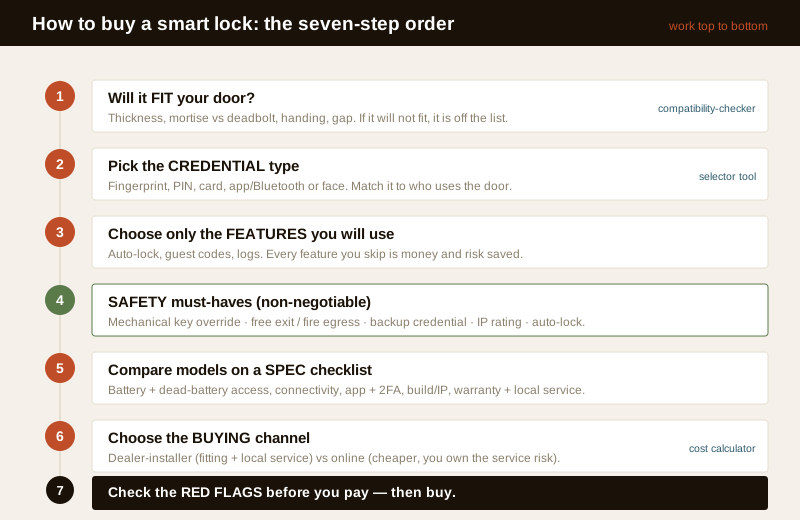
Work down the steps. Each one removes options, so by the time you are comparing actual models you are choosing between three that all fit and all suit you, not forty that mostly do not.
Step 1 — Will it fit your door?
This is the step people skip and regret. A smart lock is not one-size-fits-all: it must match your door thickness, the existing lock type (a mortise lock sits inside the door edge; a deadbolt or rim lock is different), the handing (which way the door swings and which side the handle is on), and the gap and frame. A lock built for a 35–45 mm hollow flush door will not sit on a 60 mm solid teak door, and a mortise-style smart lock cannot simply replace a rim latch.
- Measure your door thickness, note whether the current lock is a mortise, deadbolt or rim type, and check the handing before you shortlist anything. The door compatibility guide explains each measurement and why it matters.
- Run your door through the compatibility checker — it turns those measurements into the lock families that can physically fit.
- If you are matching a specific body style, the mortise smart locks and deadbolt smart locks guides show what each needs from the door.
Anything that clears this step is worth considering. Anything that does not, however good, is off the list — no feature makes up for a lock that will not mount on your door.
Step 2 — Pick the credential type
The credential is how the lock knows it is you: a fingerprint, a PIN code, an RFID card or tag, a phone app or Bluetooth, or a face scan. Most good locks offer several at once, but one is usually your day-to-day method, and that choice drives the rest. Match it to who uses the door.
| Credential | Best for | Watch-outs |
|---|---|---|
| Fingerprint | Fast daily entry, families, no phone needed | Kids' and elders' prints read poorly; wet/cut fingers fail — see fingerprint locks |
| PIN code | Guests, maids, deliveries via a temporary code | Code sharing and shoulder-surfing; use PIN code locks with expiring codes |
| RFID card / tag | Elders and children who struggle with fingerprints | Cards get lost; keep the list of active cards short |
| App / Bluetooth | Remote sharing, logs, no key to carry | Needs a charged phone; see app-controlled and Bluetooth locks |
| Face recognition | Hands-full entry, premium doors | Cost, lighting, and privacy — read face recognition locks |
A lock that offers three or four of these gives every member of the household a method that works for them, plus a fallback. The smart lock selector asks who uses the door and suggests the credential mix that fits; the credential deep-dives above cover the trade-offs. If you want remote unlocking for guests or family, add remote access and Wi-Fi locks to your reading.
Step 3 — Choose only the features you will use
Smart locks are sold on feature counts — dozens of unlock methods, geofencing, voice assistants, tamper alarms, auto-lock, one-time codes, activity logs. Every feature you do not need is money you overpay and a thing that can break or leak data. Decide honestly which handful you will actually use.
- Will genuinely use for most homes: several credential types, auto-lock after a set time, a backup mechanical key, low-battery warnings, one-time or expiring guest codes.
- Useful for some: app logs of who entered when (see audit trails), remote unlock, integration with a video door phone.
- Often unnecessary: cloud-only "smart home" ecosystems with monthly fees, voice-assistant unlocking, gimmick features you will try once.
The rule: pay for the credential mix and the safety features, be sceptical of everything sold as "smart." A cheaper lock with the right five features beats a costlier one with thirty you will never open the app to use.
Step 4 — The safety must-haves (non-negotiable)
Below is the line you do not cross to save money. These are not preferences; on a main door in an Indian home, treat every one as required. A lock that misses any of them belongs on a store cupboard, not your front door.
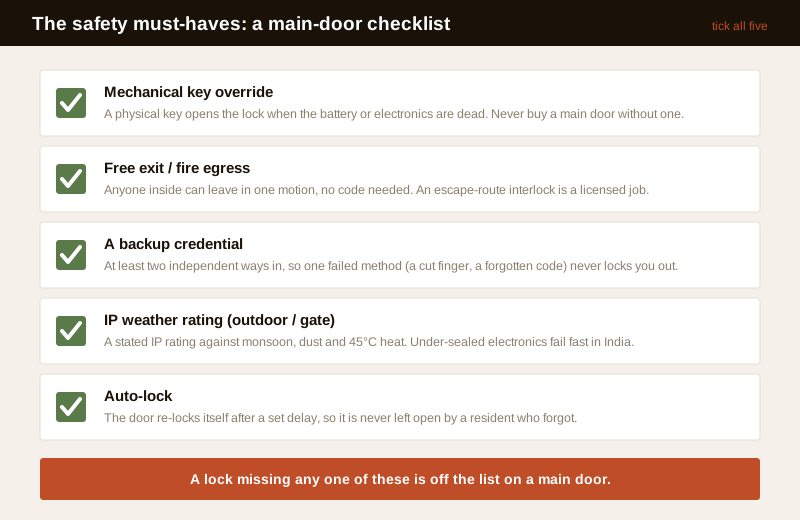
1. A mechanical key override. Batteries die, electronics fail, monsoon gets in. A physical key that opens the lock when the smart side is dead is your guaranteed way in — never buy a main-door lock without one. The mechanical key override guide explains why this is the single most important line.
2. Free exit and fire egress on a main door. Anyone inside must be able to leave immediately, without entering a code, by a single motion — a lever or thumb-turn. A lock that can trap people inside during a fire is dangerous and, on an escape route, a licensed-professional concern. See fire-egress compatibility and emergency access planning.
3. A backup credential. At least two independent ways in (say fingerprint plus a PIN or card) so a single failed method — a cut finger, a forgotten code — never locks the household out.
4. An IP weather rating for any lock on an outdoor door, gate or exposed face. Indian monsoon, dust and 45-degree heat kill under-sealed electronics; look for a stated IP rating and read the installation requirements.
5. Auto-lock. The door re-locks itself after a set delay so it is never accidentally left open — the commonest way a smart lock leaves a home unsecured is a resident who forgot to lock it.
If a salesperson waves any of these away, walk. There is always another lock.
Step 5 — The spec checklist to compare models
Once you have two or three locks that fit, suit your credentials and clear the safety must-haves, compare them line by line. Do not compare on price and looks alone — compare on the specs that decide whether the lock still works in year three.
| Spec line | What good looks like | Why it matters |
|---|---|---|
| Credential types | The mix you chose in Step 2, plus a backup | The lock must suit everyone in the home |
| Battery life & dead-battery access | 6–12 months typical; low-battery alerts; an emergency power option and a mechanical key | A dead battery must never lock you out — see power and battery planning and the battery guide |
| Connectivity | BLE for the phone; Wi-Fi (built-in or a bridge) only if you need remote | More connectivity means more to secure and power; see Wi-Fi vs Bluetooth |
| App quality & 2FA | A well-reviewed app, two-factor login, clear data terms | A weak app is the real weak point; read cybersecurity and privacy |
| Build & IP rating | Solid metal body; a stated IP rating for outdoor use | Cheap plastic and no IP rating fail fast in Indian weather |
| Warranty & local service | 1–3 years, with a service engineer reachable in your city | A warranty is worthless if no one will honour it near you |
That last line — warranty and local service — is worth more than any feature. A famous imported lock with no Indian service network is a gamble; a solid lock from a brand whose engineer answers the phone in your city is a safer buy even if it does fewer tricks. Budget the whole picture with the cost guide and the cost calculator, which include install and running costs, not just the sticker price.
Step 6 — Where to buy: dealer-installer or online
The same lock bought two ways is not the same purchase. What differs is who fits it and who answers when it fails.
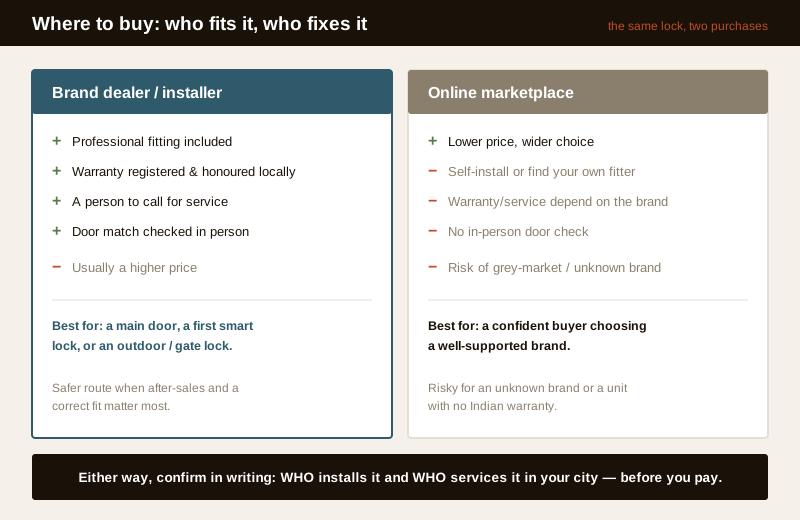
- Brand dealer or authorised installer. Usually costs more, but you get professional fitting, the warranty registered and honoured locally, someone to call when it fails, and a person who checks the lock against your actual door before you commit. For a main door and a first smart lock, this is the safer route.
- Online marketplace. Lower price and more choice, but you either self-install or arrange your own fitter, and warranty/service depend on the brand's network rather than the seller. Fine for a confident buyer choosing a well-supported brand — risky for an unknown brand or a grey-market unit with no Indian warranty.
Either way, confirm two things in writing before you pay: who installs it (and whether that cost is included) and who services it in your city, within what time. A lock is a long-term fixture on the one door you use every day; after-sales matters more than the launch-day discount.
Questions to ask the seller or installer
Take this list to the counter or the site visit. Good answers are specific; vague ones are a warning.
- Does this lock have a mechanical key override, and do I get physical keys?
- What happens on a dead battery — how do I get in, and how are low batteries warned?
- Is there a stated IP rating if this goes on an outdoor or gate door?
- Does the app support two-factor login, and where is my data stored?
- Is this a cloud-only lock, and is there any subscription for basic unlocking or logs?
- What is the warranty period, and who services it in my city — how fast?
- Is installation included, and who fits it?
- On a main door, does it allow free exit from inside without a code?
Step 7 — Red flags: when to stop and walk away
Some signs should end the purchase regardless of price or looks. If you see these, put it down.
- No mechanical key override on a main door. The single biggest red flag — it means a dead battery or failed board can lock you out with no backup.
- No local service or warranty. A brand with no engineer reachable in your city, or a grey-market unit with no Indian warranty, leaves you stranded the day it fails.
- Cloud-only with a pricey subscription for basics. If the lock cannot open, log or share access without a paid cloud plan — and stops working if the company or your subscription lapses — the risk sits with them, not you.
- An unknown-brand app with poor security. No two-factor login, a flood of one-star reviews about the app, unclear data handling, or an app that demands excessive permissions. The app is often the real weak point — read cybersecurity before trusting one.
- A lock that can trap people inside, or one a salesperson pushes for a fire-escape door without a free-exit lever. That is a life-safety failure, not a feature trade-off.
When to bring in a professional. Do the deciding yourself — measuring your door, choosing credentials and features, and comparing specs. Hand the fitting, any mains wiring, and any fire-egress or escape-route interlock to the brand's installer or a trained locksmith, and treat anything on an escape route as a licensed-professional job — see fire-egress compatibility and the electrical hub. If you manage an apartment or many doors, plan the whole system with the access control guide before buying door by door, and see the complete smart locks guide for the full picture.
Key takeaways
- Buy in order, not by looks: fit the door first, then pick the credential, then choose only the features you will use — each step removes options before you compare models.
- The safety must-haves are non-negotiable on a main door: a mechanical key override, free exit and fire egress, a backup credential, an IP rating for outdoor use, and auto-lock. A lock missing any of these is off the list.
- Compare on the spec checklist, not the sticker price: credential mix, battery life and dead-battery access, connectivity, app quality and 2FA, build and IP rating, and — most of all — warranty and local service in your city.
- Where you buy decides who fits and who fixes it: a dealer-installer costs more but gives fitting, local warranty and someone to call; online is cheaper but you own the install and service risk. Confirm both in writing before paying.
- Walk away on the red flags: no mechanical override, no local service, cloud-only with a pricey subscription for basics, an unknown-brand app with weak security, or any lock that could trap someone inside.
References
- Digital Personal Data Protection Act, 2023 — fingerprint templates, access logs and app-account data are sensitive personal data; confirm where a lock stores your data and whether templates stay on the device before you buy.
- Manufacturer specifications and datasheets — verify the mechanical key override, stated IP rating, battery life, connectivity and warranty terms on the maker's own datasheet, and confirm the Indian service network before ordering.
- National Building Code of India (SP 7), Bureau of Indian Standards, and local municipal bye-laws for any life-safety or fire-egress aspect of a door lock; verify the current edition via the BIS catalogue: https://www.services.bis.gov.in/
This is an educational overview, not legal advice. Lock fitting, mains wiring and any fire-egress or escape-route interlock are qualified professional tasks — engage a licensed installer or locksmith, and verify any standard's current status via the BIS catalogue before relying on it.
Export this guide
Related Guides — Deep-dive reading
Access Control Maintenance in India (2026): Readers, Locks and Fail-Safe Egress
How to keep a card, keypad, fingerprint or face access-control system reading reliably and locking securely — and, above everything, how to test that its doors still release on a fire alarm and on power loss, so an access-controlled door never becomes a life-safety trap.
SecuritySmart Locks in India (2026): The Complete Guide to How They Work, How to Choose and How to Fit One Safely
The umbrella guide to smart locks for Indian homes: what a smart lock actually is, the credential that opens it, the lock body it lives in, and the safety, power and privacy calls every buyer must make.
SecurityFingerprint Locks in India (2026): How Biometric Door Locks Really Work, and Their Honest Limits
How a fingerprint sensor reads a finger and matches it to enrolled templates, the genuine appeal of nothing to carry, and the wet-finger, elderly, privacy and backup realities every Indian buyer must weigh before choosing one.
SecurityRelated Tools — Try Free
Smart Lock Door Compatibility Checker
Tell us your door build, existing lock or prep, thickness and location and find out which smart-lock form factor fits — mortise, deadbolt, rim, gate or a special case — plus the measurements to take.
CompatibilityDoor Cost Calculator
Estimate the all-in cost of a door — leaf, frame, hardware, fitting and GST — by type, material and size.
Door CalculatorDoor Lock Selector
Answer a few questions and get the right lock type — mortise, multipoint, deadbolt, privacy or smart — for any door.
Door Tool