
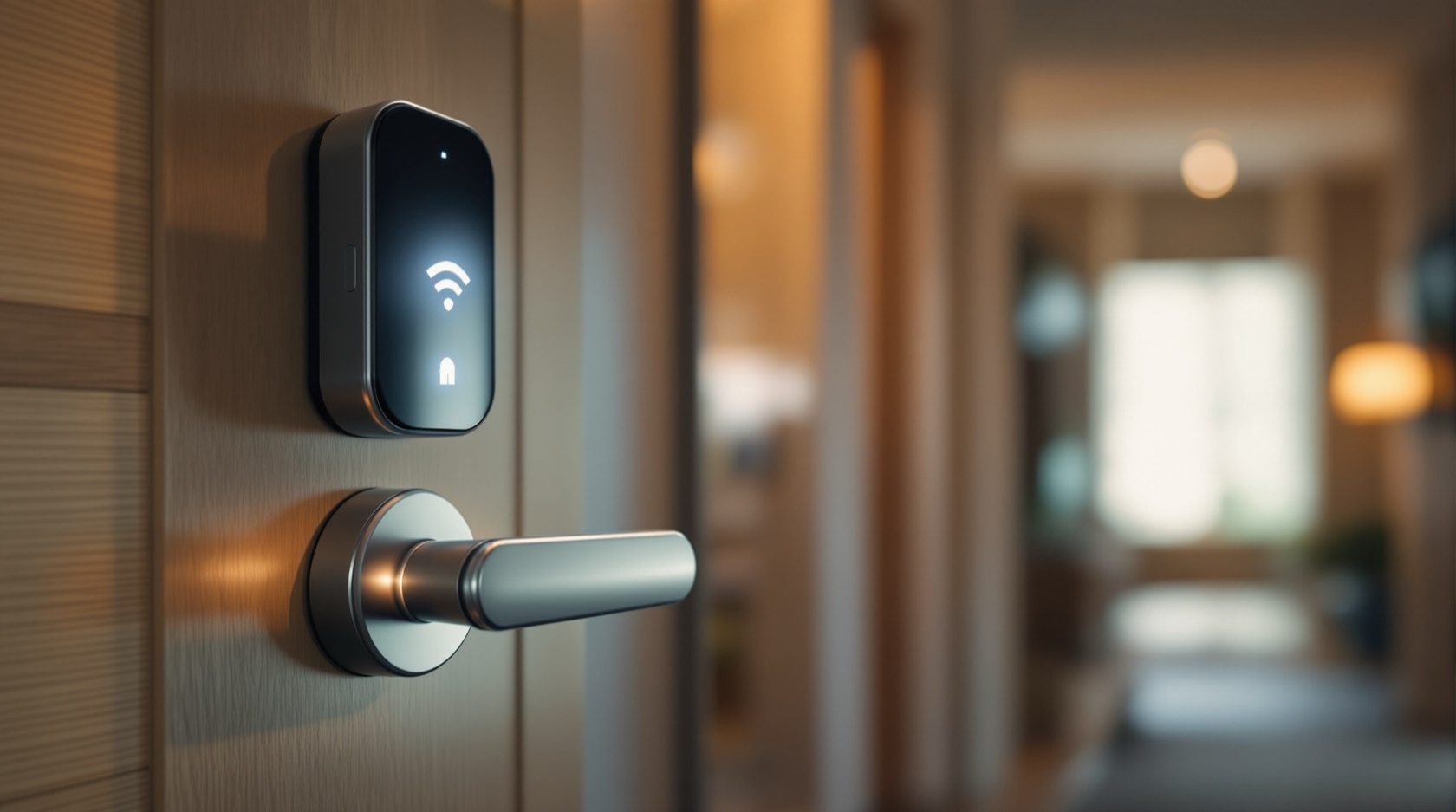
Wi-Fi Locks in India (2026): How Wi-Fi Smart Locks Give True Remote Access
A homeowner's guide to Wi-Fi smart locks — how the lock joins your home network for genuine unlock-from-anywhere, notifications and smart-home integration, and the honest India trade-offs of signal, battery, power cuts and network security.
A Wi-Fi lock is the smart lock that finally does the thing everyone imagines a smart lock should do: let you lock or unlock your door from anywhere in the world. Because the lock joins your home Wi-Fi network — either directly, or through a small bridge plugged in nearby — it is not limited to the few metres around the door the way a Bluetooth lock is. From your office, from a train, from another city, you can open the door for a courier, check that you actually locked up this morning, grant a plumber a one-time entry, and get a phone notification the instant anyone comes or goes.
That reach is genuinely useful, and for the right household it is worth paying for. But a Wi-Fi lock is also a more demanding animal than its cheaper Bluetooth cousin: it needs a reliable signal reaching an outer door where Wi-Fi is often weakest, it drains its batteries faster, a power cut that kills your router also kills your remote access, and — because it is a device that lives on the internet — it is a small security surface you must look after. This guide, part of Studio Matrx's smart locks and access control library and sitting under the complete guide to smart locks in India, explains exactly how a Wi-Fi lock works, when it earns its keep over a plain Bluetooth lock, and how to buy and run one honestly in Indian conditions.
Scope, safety & who fits it. This guide helps you understand and choose a lock. The actual fitting to the door, any mains wiring for a wired lock or bridge, and — critically — any interlock with a fire alarm on an escape door is a coordinated licensed job for a door-hardware fitter, an electrician and, where an egress route is involved, a fire-safety consultant. A lock on a door people escape through must never trap anyone and must never block an escape route; a home door should always keep a mechanical key override plus a non-networked backup credential. App-account and access-log data is personal data under the Digital Personal Data Protection Act, 2023. This is educational guidance, not legal advice.
What a Wi-Fi lock actually is
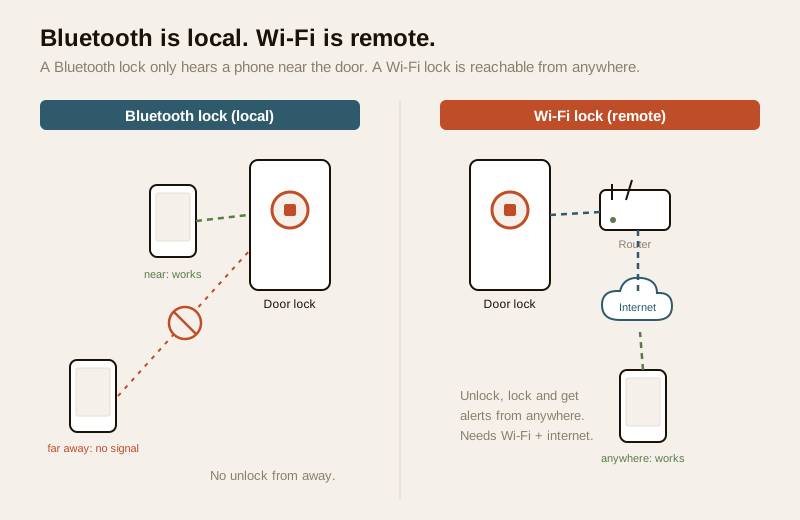
Almost every smart lock is two things joined together: an ordinary mortise or deadbolt on the door, and an electronic brain that decides whether to move it. What separates one type from another is how that brain hears from you. A Wi-Fi lock is one where the brain is connected to your home's Wi-Fi network and, through it, to the internet — so it can be reached from anywhere, and can reach out to send you alerts.
The single word that matters most here is remote. Contrast it with a Bluetooth lock, whose defining word is local: a Bluetooth lock only talks to a phone that is standing within a few metres of the door, so there is no true unlock-from-away. A Wi-Fi lock lifts that ceiling entirely. The trade is that it now depends on your network and, usually, on the maker's cloud service being reachable.
Direct Wi-Fi versus a bridge
There are two ways a lock ends up on your Wi-Fi, and the difference affects battery life and cost:
- Wi-Fi built into the lock. The lock itself carries a Wi-Fi radio and connects straight to your router. Simplest to picture, but a Wi-Fi radio is power-hungry, so a battery-only lock of this kind drains faster — which is why many built-in Wi-Fi locks are either wired to mains power or use a rechargeable pack you top up.
- Wi-Fi through a bridge (hub). The lock talks locally over low-power Bluetooth to a small mains-powered box — the bridge — plugged in inside the house within radio range of the door. The bridge is the part that sits on your Wi-Fi and relays commands to and from the internet. Because the lock itself only runs a thrifty Bluetooth radio, its batteries last far longer; the always-on job is handed to the mains-powered bridge. Many popular locks sell the bridge as an optional add-on, so you can buy the lock now and add remote access later.
Both give you the same remote powers. The bridge approach is common in India precisely because it keeps the door lock on frugal batteries while a plugged-in box does the heavy networking.
What "remote" actually buys you
- Unlock or lock from anywhere. Open the door for a courier, a house-help or a relative while you are miles away, then confirm it re-locked.
- Live notifications. Get a phone alert the moment the door is unlocked, locked, left ajar, or when someone enters a PIN or fingerprint — so you know your child reached home from school, or that the maid arrived.
- Remote guest access. Grant a time-limited digital key or PIN to a guest, tradesperson or Airbnb visitor from afar, and revoke it with a tap once they are done.
- A full activity log. See who unlocked and when, from your phone, wherever you are.
- Smart-home integration. Because it is on your network, a Wi-Fi lock can join a wider smart-home setup — link it to your voice assistant, or to a routine that also arms cameras and switches off lights when the door locks at night.
Wi-Fi versus Bluetooth — which do you actually need?
This is the decision most homeowners are really making, so it deserves a clear-eyed comparison. Neither is "better"; they suit different lives.
| Feature | Bluetooth (BLE) lock | Wi-Fi lock (built-in or via bridge) |
|---|---|---|
| Reach | A few metres, phone-to-lock | Anywhere with internet |
| True remote unlock | No | Yes |
| Live notifications when away | No | Yes |
| Needs home network / internet | No | Yes |
| Battery life | Longer (thrifty BLE radio) | Shorter, or needs wiring / a bridge |
| Works during an internet or power cut | Yes, at the door | Remote features stop; at-door credentials still work |
| Smart-home / voice integration | Limited | Yes |
| Typical cost | Lower | Higher (plus a bridge, if used) |
| Best for | A single home where someone is usually there to let people in | Owners who genuinely need away-from-home control and alerts |
The honest guidance: if you rarely need to let someone in remotely and are usually home to open the door yourself, a cheaper Bluetooth lock may serve you perfectly and spare you the network fuss. If you regularly admit couriers, staff or guests while out, want alerts when family come and go, or want the lock woven into a smart home, a Wi-Fi lock earns its price. To think this through across every credential — PIN, fingerprint, card, phone, remote — the smart lock selector tool walks you through it in a few questions, and the smart lock cost calculator helps you sanity-check a quote. Note too that remote access itself is a capability, not a single product — the remote-access locks guide and the app-controlled locks guide look at the same power from the app-and-service angle.
The honest India trade-offs — read this before you buy
A Wi-Fi lock is a fine tool when its needs are met and a frustrating one when they are not. Here are the realities specific to Indian homes.
The signal has to reach the door — and outer doors are where Wi-Fi is weakest
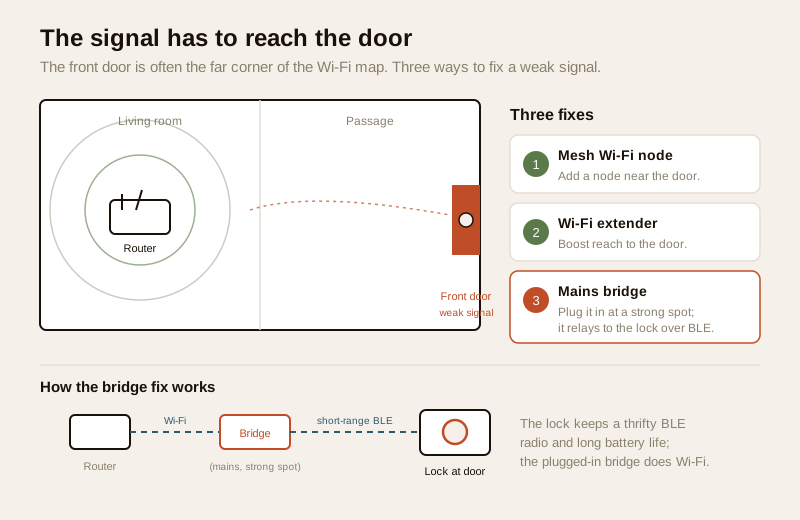
A Wi-Fi lock is only as reliable as the network it sits on, and the front gate or main door of an Indian home is frequently the far corner of the Wi-Fi map — behind a thick wall, at the end of a corridor, or out near a compound gate the router never really reached. A weak or dropping signal at the door means missed notifications and remote commands that fail just when you need them.
Before you buy, check the signal strength standing exactly where the lock will go. If it is weak, plan to fix the network first — a mesh Wi-Fi node or a well-placed extender near the door, or the bridge approach, where you can position the mains-powered bridge at the strong-signal spot indoors while the lock talks to it over short-range Bluetooth. For an outer gate far from the house, honestly assess whether Wi-Fi can reach at all; sometimes a Bluetooth lock or a wired access-control point is the more dependable answer, as the villa and independent-house security guide discusses.
Higher battery drain — or plan for power
A constantly-connected Wi-Fi radio consumes far more power than the sip a Bluetooth lock takes. A battery-only, built-in-Wi-Fi lock can need its cells changed markedly more often, and a lock that dies unexpectedly is a lock that locks you out. Manage this honestly:
- Prefer the bridge approach if you want long lock-battery life, since the lock then runs frugal Bluetooth and the mains-powered bridge does the networking.
- Or choose a wired or rechargeable-pack Wi-Fi lock if you accept mains involvement — routing that wiring is an electrician's job, covered in the electrical hub.
- Whatever you pick, respect the low-battery warnings, keep spare cells, and never ignore the app's nagging.
A power cut kills your router — so it kills remote access
This is the India-specific catch that surprises people. Your smart lock runs on its own batteries, so a power cut does not stop it working at the door. But remote access depends on your router and internet, and both go dark the moment the mains fails. During an outage you cannot unlock from away, you get no notifications, and any bridge is off too. The lock is fine; your reach into it is not.
The sensible fix is to put your router (and the bridge, if you use one) on a small UPS or inverter backup, so the network survives a typical outage and your remote access with it. This is a common, low-cost addition — a small router-UPS runs the modem, router and bridge for a few hours — and it is worth planning at the same time as the lock. The electrical hub covers backup power for home electronics; do the wiring through a licensed electrician.
It is a networked device — so treat it as a security surface (defensively)
A Wi-Fi lock lives on the internet, and that is a responsibility, not a reason for alarm. The whole of the guidance below is about choosing well and hardening — never about attacking anything. Handled sensibly, a reputable Wi-Fi lock is safe; handled carelessly, any internet device is a weak point.
- Buy a reputable brand that publishes firmware updates and states it uses strong, modern encryption for its app and cloud. Avoid unbranded bargain locks with no update path or unclear security claims.
- Use a strong, unique password on the app account that holds your digital keys, and never reuse a password from elsewhere. Treat that account as the keyring to your home.
- Turn on two-factor authentication (2FA) wherever the app offers it, so a leaked password alone cannot open your door.
- Keep the firmware updated through the app, exactly as you update a phone — updates close security gaps. A never-updated lock is frozen with whatever flaws it shipped with.
- Mind the subscription. Some brands gate remote access, notification history or advanced features behind a paid plan. Read what is free and what recurs before buying, so you are not surprised by a monthly fee to unlock your own door from work.
- Manage shared access. Review who holds a digital key or PIN, prefer time-limited keys for guests and helpers, and revoke them promptly when no longer needed.
If you ever read that a specific cheap lock has a known weakness, treat that purely as a reason not to buy it — the answer is always to choose a well-made, updated, reputable lock, never to tinker.
Privacy under the DPDP Act
A Wi-Fi lock's cloud account records who unlocked and when, streamed to a company's servers — and if the lock also uses a fingerprint or face, that biometric is sensitive personal data under the Digital Personal Data Protection Act, 2023. Be mindful of who administers the account, keep access to the household, delete a departed helper's or guest's credentials, and prefer a lock that stores any biometric template on the device rather than in a cloud. Minimise what you collect and know where it lives. The smart-home privacy picture and the complete smart-locks guide go deeper.
Safety must-haves — non-negotiable on any Wi-Fi lock
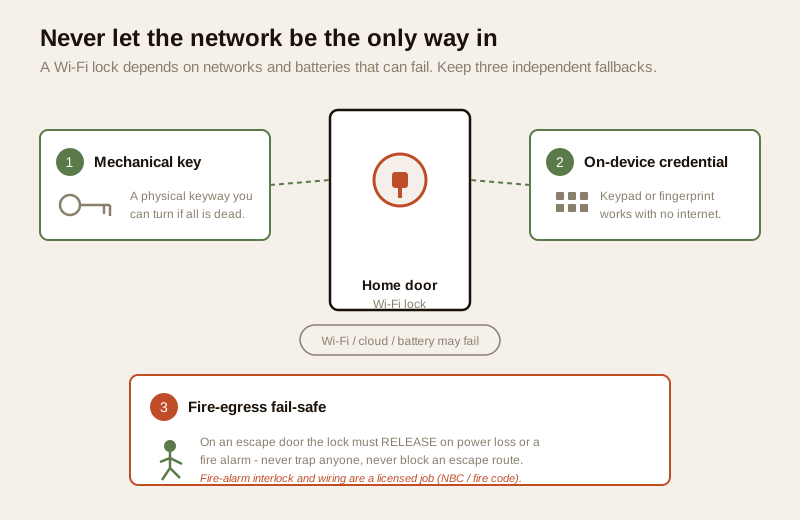
Because a Wi-Fi lock depends on networks and batteries that can fail, its fail-safe behaviour matters even more than on a simpler lock. Never let the network be the only way your household gets in or out.
- Mechanical key override. A home door should always keep a physical keyway you can turn if the electronics are completely dead. It is your last-resort way in.
- A non-networked backup credential. Enable the lock's keypad or fingerprint as well, so entry does not depend on Wi-Fi, the cloud, a subscription or a charged phone. If the internet is down, you still walk in with a PIN.
- Fire-egress fail-safe. On any door people escape through, the lock must be planned to fail-safe — to release on power loss or a fire-alarm signal — never to trap anyone. That selection, the fire-alarm interlock and the wiring are a coordinated licensed job, governed by the National Building Code and local fire rules. Never position a lock so it can block an escape route.
Fitting it in an Indian home
A few practical realities shape whether a Wi-Fi lock is the right buy.
- Apartment versus villa. In an apartment, the router is usually close enough that signal at the main door is manageable, and a bridge nearby handles the rest — a good fit. In a villa or independent house, the main gate can be far from the house; check the signal honestly and consider mesh Wi-Fi, or accept that an outer gate may suit a wired or Bluetooth solution better. The apartment and villa security guides frame this.
- Heat, dust and monsoon. Electronics on an outward-facing door take a beating from summer heat, dust and monsoon humidity. Choose a lock rated for outdoor or semi-outdoor use if the face is exposed, and shelter it under an overhang where you can.
- Pair it with the door camera, don't duplicate. If you want to see who is at the door before unlocking remotely, that is the job of a video door phone paired to the lock — covered in the video door phones with smart locks guide; this guide's lens is the lock and its network connection, not the camera.
- Price bands (indicative). Treat these as ballparks to sanity-check a quote, not fixed rates, and add any recurring subscription on top.
| Tier | Typical price (₹) | What you get |
|---|---|---|
| Bridge add-on for a bridge-ready lock | ₹2,000 – ₹5,000 | Adds remote access to a lock you already own or are buying |
| Mid Wi-Fi smart lock (built-in or bundled bridge) | ₹12,000 – ₹22,000 | Wi-Fi + keypad and/or fingerprint + key; notifications; time-limited digital keys |
| Premium Wi-Fi lock | ₹22,000 – ₹45,000+ | Well-built, multi-credential, smart-home integration, longer battery or wired power, robust app security |
When to bring in a professional. Choosing the lock, deciding built-in-Wi-Fi versus a bridge, and setting up your network are yours to plan. But the fitting to the door, any mains wiring for a wired lock or bridge and its UPS, and any fire-alarm interlock on an escape door is a coordinated licensed job — a door-hardware fitter with an electrician, and a fire-safety consultant where an egress route is involved. An escape-route door must be planned to fail-safe and is governed by the National Building Code and local fire rules; never place a lock so it can block an escape, and always keep a mechanical override. See the electrical hub and the smart-locks sub-hub for how these pieces coordinate.
Key takeaways
- A Wi-Fi lock joins your home network so you get true remote lock and unlock, live notifications, remote guest access and smart-home integration — the away-from-home control a local Bluetooth lock simply cannot offer.
- The remote power comes either from Wi-Fi built into the lock (higher battery drain, often wired) or via a mains-powered bridge (lets the lock keep long-lasting frugal Bluetooth) — the bridge route is popular in India for exactly that reason.
- Meet its India realities honestly: make sure the signal reaches the door (outer doors and gates are often weak), plan for higher battery drain or wired power, and remember a power cut kills the router — put the router and bridge on a small UPS so remote access survives an outage.
- It is a networked device, so buy and run it defensively: reputable brand, strong unique password, 2FA, firmware kept updated, and check for a subscription before buying. Account and log data is personal data under the DPDP Act, 2023.
- Never let the network be the only way in: always keep a mechanical key override and a non-networked backup credential, and on an escape-route door ensure fail-safe behaviour with a licensed fire-alarm interlock — never let a lock block an escape.
References
- Digital Personal Data Protection Act, 2023 — cloud access logs and any biometric templates are personal (and, for biometrics, sensitive) data; obtain consent, give notice, minimise collection, prefer on-device storage, set retention, and delete a departed user's access.
- Manufacturer specifications and datasheets — verify the specific lock's Wi-Fi or bridge design, app and cloud encryption, firmware-update policy, any recurring subscription, battery life or power requirement, and mechanical-override keyway on the maker's own datasheet before buying.
- National Building Code of India (SP 7), Bureau of Indian Standards, and local fire and municipal bye-laws for the fire-egress, fail-safe and electrical aspects of an escape-route door and any lock or router backup wiring; verify the current edition via the BIS catalogue: https://www.services.bis.gov.in/
This is an educational overview, not legal advice. Lock fitting, mains wiring, router backup power, and any fire-alarm interlock on an escape door are qualified professional tasks — engage licensed door-hardware, electrical and fire-safety professionals, and verify any standard's current status via the BIS catalogue before relying on it.
Export this guide
Related Guides — Deep-dive reading
Wi-Fi vs Bluetooth Smart Lock (2026): Which Connection Suits Your Home in India
How a smart lock talks to your phone decides almost everything about how it feels to live with. This even-handed head-to-head compares Bluetooth (short-range, local, long battery) and Wi-Fi (control from anywhere, alerts, faster drain) — and explains why the common sweet spot in India is a Bluetooth lock with a Wi-Fi bridge.
SecurityAccess Control Maintenance in India (2026): Readers, Locks and Fail-Safe Egress
How to keep a card, keypad, fingerprint or face access-control system reading reliably and locking securely — and, above everything, how to test that its doors still release on a fire alarm and on power loss, so an access-controlled door never becomes a life-safety trap.
SecurityFire-Egress Compatibility for Smart Locks in India (2026): Never Trap Anyone
How to make sure a smart lock or access-controlled door on an escape route always lets people out in a fire or emergency: fail-safe hardware, free egress, fire-rated doors, and the fire-alarm interlock.
SecurityRelated Tools — Try Free
Access-Control Battery-Backup Calculator
Size the standby battery so an access system keeps running through a power cut, with an egress life-safety note.
Battery BackupSecurity Backup Power Calculator
Size a UPS/inverter and battery to keep CCTV, NVR, router and alarm running through a power cut — load, Ah, VA and cost.
Backup PowerCCTV Cloud vs Local Cost Calculator
Compare cloud CCTV subscription against a local NVR + HDD — upfront, 5-year total, monthly fee and break-even.
Cloud vs Local