
Fingerprint Locks in India (2026): How Biometric Door Locks Really Work, and Their Honest Limits
How a fingerprint sensor reads a finger and matches it to enrolled templates, the genuine appeal of nothing to carry, and the wet-finger, elderly, privacy and backup realities every Indian buyer must weigh before choosing one.
There is a real magic to walking up to your door with full hands and simply touching your thumb to it. No fumbling for keys, no code to remember, no phone to unlock. That convenience is why fingerprint locks have become the most-asked-about smart lock at showrooms across India. But the same finger that opens the door in an air-conditioned showroom can be refused at eight in the morning when it is wet from washing, or after a day of manual work, or on a cold Delhi winter dawn. A fingerprint lock is a genuinely good choice for many homes and a frustrating one for others, and the difference is entirely in understanding how it works and where it struggles.
This guide is part of the Studio Matrx Smart Locks and Access Control library and sits under the complete guide to smart locks in India. Its lens is narrow on purpose: the fingerprint as a way in. How the sensor reads a finger, the honest limits an Indian buyer must weigh, how enrolment and removing a departed maid or tenant works, and why a fingerprint is not just a convenience but sensitive personal data you are responsible for.
Scope and safety. This guide helps you assess and choose a lock and coordinate its fitting; it is not a fitting manual. The lock hardware, any mains wiring, and any fire-alarm or egress interlock are a coordinated licensed job (door-hardware trade plus electrician plus, where an escape door is involved, a fire-safety consultant). A lock on a door people escape through must never trap anyone, and an escape door is governed by the National Building Code and fire code. On any home door, always keep a mechanical key override and a second way in such as a PIN, because batteries die and sensors fail. This is educational guidance, not legal advice.
How a fingerprint lock actually works
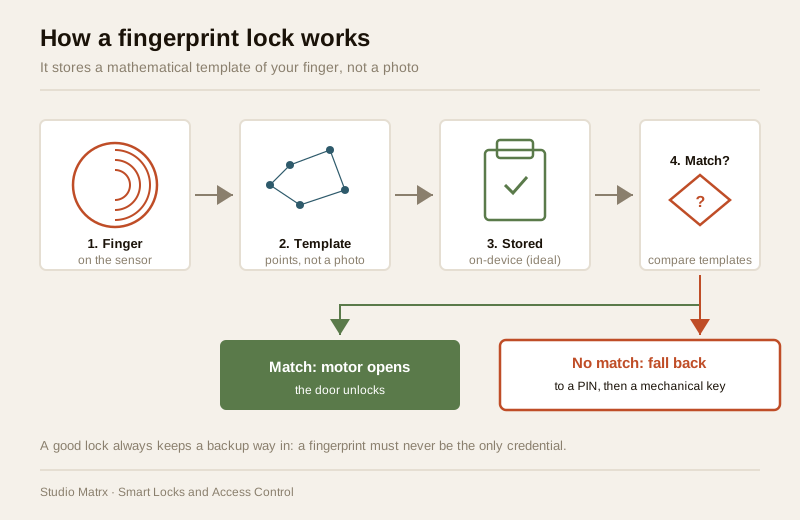
A fingerprint lock does not store a photograph of your finger. Understanding this one fact settles most of the confusion and much of the privacy worry.
When you enrol, the sensor reads the pattern of ridges and valleys on your fingertip and the software reduces it to a template: a compact mathematical map of a few dozen distinctive points (where ridges end, where they split), not a picture you could look at and recognise. That template is what gets saved. Later, when you touch the sensor to open the door, it reads your finger again, builds a fresh map, and checks whether it matches any enrolled template closely enough. If yes, the motor turns and the door opens. If no, it refuses and you fall back to a PIN or key.
There are two common sensor types, and the difference matters in Indian conditions:
| Sensor type | How it reads | Strengths | Weakness to know |
|---|---|---|---|
| Optical | Takes a light-based image of the ridge pattern | Cheaper, common on budget locks | Struggles more with dry, worn or dirty fingers; a flat image is easier to fool, so liveness detection matters more |
| Capacitive | Measures tiny electrical differences between ridges and valleys | Reads the finger's live surface, generally more reliable and harder to fool | Costs a little more; very wet fingers can still confuse it |
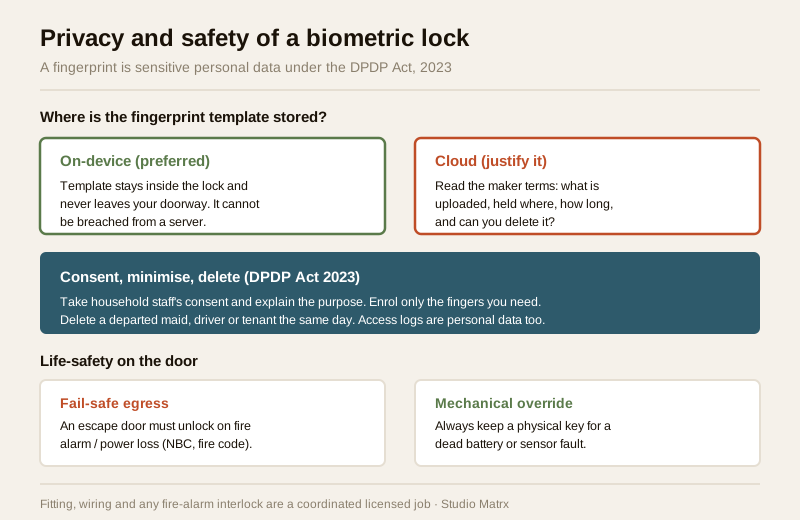
Where the template is stored is the second thing that matters, and it is a privacy question as much as a technical one. On a well-designed lock the template lives on the device itself, in the lock, and never leaves it. On some app-connected locks, enrolment or the template can involve the maker's cloud. On-device storage is the safer default, and we return to why under privacy below.
The genuine appeal
It is worth being clear-eyed about why people love these locks, because for the right household the benefits are real:
- Nothing to carry, nothing to forget. No key to lose, no code to memorise, no phone to keep charged. Your hand is the credential and it is always with you.
- Fast. A good capacitive sensor opens in well under a second, faster than fishing out a key.
- Per-person enrolment. Each family member enrols their own finger, so you can see and control who has access without cutting duplicate keys that then float around.
- No shared secret to leak. Unlike a PIN code that a child might tell a friend or a maid might pass on, a fingerprint cannot be casually shared or shoulder-surfed.
For a household of able-bodied adults with reliable fingerprints, in an apartment with a covered doorway, a fingerprint lock is often the most pleasant credential of all. The trouble is that not every finger and not every doorway is that.
The honest limits an Indian buyer must weigh
This is the section most showrooms skip, and it is the most important one. A fingerprint is a physical thing on a body that lives and works in Indian conditions, and it does not always read.
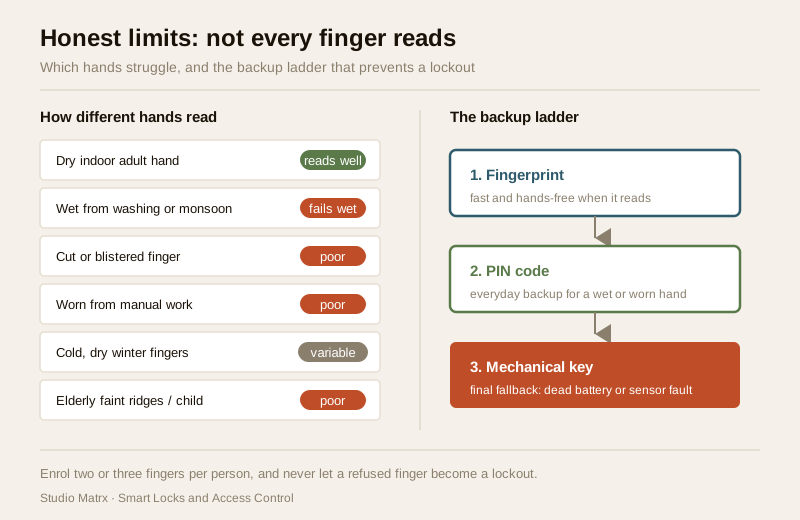
- Wet, dry, cut and worn fingers. A finger wet from washing dishes or caught in the monsoon, a very dry finger in winter, a cut or a fresh blister, or fingertips worn smooth by years of manual work, gardening, or cooking can all fail to read. This is not a defect; it is physics. For someone who does hard manual work with their hands, a fingerprint may be the least reliable credential, not the most.
- Heat, humidity and dust on the sensor. The sensor surface sits outdoors on your main door through forty-degree summers, driving monsoon damp and dust. A dusty or moisture-filmed sensor reads worse; the surface needs an occasional gentle wipe.
- False rejection and the frustration it breeds. No sensor is perfect. Even a good one occasionally refuses a legitimate finger (a false reject), and being refused entry to your own home while holding shopping is genuinely aggravating. Cheaper sensors do it more. The fix is not to keep re-pressing; it is to have a fast, dignified backup ready.
- Elderly and children. Older people often have faint, dry or worn ridge patterns that enrol and read poorly, and very young children's fingers are small and change as they grow. For a grandparent or a small child, a fingerprint is frequently the wrong primary credential.
The single conclusion that follows from all of this is not "avoid fingerprint locks." It is: a fingerprint must never be the only way in. A good lock always pairs it with at least one backup, and a home door should keep a mechanical key.
| Finger or user situation | Fingerprint reliability | Better everyday route |
|---|---|---|
| Able-bodied adult, dry indoor hands | High | Fingerprint is ideal |
| Hands wet from washing or monsoon | Low while wet | PIN or key |
| Manual-labour or worn fingertips | Low to medium | PIN, or enrol multiple fingers |
| Elderly with faint ridges | Low | PIN, or a paired card |
| Young child | Low and changing | PIN, or supervised entry |
| Cold, dry winter hands | Medium | Enrol two fingers; PIN backup |
A practical habit that helps a lot: enrol two or three fingers per person (say both thumbs and an index), so a cut or a wet hand is not a lockout. And treat the PIN code capability and the mechanical key not as afterthoughts but as first-class parts of the plan.
Enrolment and admin: adding and removing people
The everyday running of a fingerprint lock is enrolment and, just as important, removal. Households in India change: a maid leaves, a tenant moves out, a driver is replaced. The whole point of per-person credentials is undone if you cannot cleanly revoke one.
- Enrolment. The lock has an admin (usually the owner) who can add a new user by having them press a finger several times so the sensor builds a solid template. Give each person a name or number in the lock's list so you know whose finger is whose. Enrol two or three fingers each for reliability.
- Removal is the part that matters. When a maid, cook, driver or tenant leaves, delete their fingerprint the same day, exactly as you would take back a key. On a good lock you can remove one named user without disturbing anyone else's. If you cannot identify and delete individual users, that is a genuine shortcoming to weigh at purchase.
- Admin control. Keep the admin role to the owner (or a couple of trusted adults). Anyone who can enrol fingers can grant access, so this is the equivalent of who holds the master key.
A lock whose user list you can read, name and prune is worth more than a slightly cheaper one where users are anonymous slots you cannot tell apart. When you compare models, the smart lock selector lets you filter on capacity and admin features alongside credential type.
Privacy first: a fingerprint is sensitive personal data
This is the part that makes a biometric lock different from a keypad, and it deserves real weight. A fingerprint is biometric data, and under India's Digital Personal Data Protection Act, 2023, biometric information is sensitive personal data. When you enrol your family's and your staff's fingerprints, you are handling data about their bodies, and that carries responsibilities.
Fingerprint locks are one branch of biometric access; face-reading systems are another, and the same privacy logic applies to both. This guide stays on fingerprints, but the parallel on biometric-privacy for face is worth reading in the facial-recognition door phones guide.
The practical privacy checklist:
- Prefer on-device template storage. Choose a lock that keeps the template inside the lock and does not send it to the maker's cloud. A template that never leaves your doorway cannot be breached from a server. On-device is the privacy-safe default; treat cloud enrolment of biometrics as something to justify, not assume.
- Understand what the maker stores. Before buying, read the maker's privacy terms: is any biometric data uploaded, where is it held, for how long, and can you delete it? If the answer is unclear, prefer a lock that is clearly on-device only.
- Consent for household staff. A maid, cook or driver is a person whose biometric you are collecting. Ask, explain plainly why (door access only), take their fingerprint with their agreement, and delete it when they leave. Do not enrol someone's fingerprint without telling them what it is for.
- Minimise and retain briefly. Enrol only the fingers you need, keep the user list current, and delete departed users promptly. Do not hoard old enrolments.
- Access logs are personal data too. If the lock keeps a log of who opened the door and when, that record is also personal data under the DPDP Act. Keep it private and do not share it casually.
The through-line: collect the minimum, store it on the device where you can, tell people what you are doing, and delete when done.
Spoofing: choose well, do not try to defeat
A fair question is whether a fingerprint can be fooled. The responsible answer for a buyer is about choosing hardware that resists it, not about methods:
- Pick a reputable sensor with liveness detection. Better locks use capacitive sensors and liveness (anti-spoofing) checks that look for signs of a live finger rather than a flat copy. This is a headline feature to ask about and a reason not to buy the cheapest unbranded unit.
- Keep a mechanical override and treat the finger as one layer. No credential is infallible, which is exactly why a good lock is layered: a fingerprint for convenience, a PIN as backup, and a mechanical key as the final fallback. Layers, plus a reputable brand that ships security firmware updates, are your protection.
That is the whole of the safe advice: buy quality, keep layers, keep it updated. How any attack is actually performed is out of scope and not something a homeowner needs.
Power, backups and the Indian doorway
A fingerprint lock is a battery-powered electronic device on your door, and Indian realities apply:
- Plan for dead batteries. The lock runs on batteries that will one day die, often with a low-battery warning you might miss. This is precisely why a mechanical key override matters, and many locks also offer an emergency power contact. Never let a flat battery mean a locked-out family.
- Weather on the electronics. Heat, monsoon humidity and dust all age the sensor and board. A covered or recessed doorway extends the life of any smart lock; a fully exposed gate position is harder on it.
- Apartments versus villas. In a rented flat, check with the owner and society before changing the main-door hardware, and favour a lock that retrofits the existing door. For a society, the smart locks and access control sub-hub covers shared-entry considerations.
- If you want app or Wi-Fi features, remember the lock becomes a network device too, needing a strong unique account password and updates; the pillar complete guide to smart locks covers that side.
When to bring in a professional. Choosing the lock, planning where credentials sit and enrolling users are yours to do. The actual fitting of the lock, any mains wiring, and any interlock with a fire alarm or building access system are a coordinated licensed job (door-hardware fitter plus electrician, and a fire-safety consultant wherever an escape or fire door is involved). An escape door must fail-safe and is governed by the National Building Code; getting that wrong can trap people. Route it through the trades, and see the electrical hub for the wiring side. When in doubt about a main-door or escape-route lock, ask a professional before you commit.
Key takeaways
- A fingerprint lock reads a template, not a photo of your finger; a compact mathematical map of ridge points, ideally stored on the device itself and never in the cloud.
- The convenience is real but conditional: wet, dry, cut, worn manual-labour hands, cold winter fingers, the elderly and small children all read poorly, so a fingerprint must never be the only way in.
- Always keep backups: enrol two or three fingers per person, keep a PIN as everyday backup, and keep a mechanical key override for dead batteries and sensor failure.
- Removal is as important as enrolment: delete a departed maid, driver or tenant's fingerprint the same day, and buy a lock whose user list you can read and prune.
- Treat the fingerprint as sensitive personal data under the DPDP Act 2023: prefer on-device storage, understand what the maker keeps, take household staff's consent, and choose a reputable sensor with liveness detection rather than trying to out-clever a cheap one.
References
- Digital Personal Data Protection Act, 2023 (India) — biometric information (fingerprints) and access logs are sensitive personal data; observe notice, consent, minimisation, retention limits and the right to erasure when enrolling family and household staff.
- Manufacturer specifications and privacy terms — verify the sensor type (capacitive versus optical), liveness/anti-spoof claims, user capacity, backup credential options, and crucially whether fingerprint templates are stored on-device or in the maker's cloud, on the maker's own datasheet before buying.
- National Building Code of India (SP 7), Bureau of Indian Standards, and local fire bye-laws for any escape-door, fail-safe and electrical aspect of a lock installation; verify the current edition via the BIS catalogue: https://www.services.bis.gov.in/
This is an educational overview, not legal advice. Lock fitting, mains wiring and any fire-egress interlock are qualified professional tasks; engage licensed trades, treat biometric data in line with the DPDP Act, and verify any standard's current status via the BIS catalogue before relying on it.
Export this guide
Related Guides — Deep-dive reading
Face-Recognition Locks in India (2026): Proportionality, Privacy and the DPDP Act
How a smart lock that unlocks on a recognised face actually works, the genuine hands-free appeal, and the DPDP, accuracy and honest overkill caveats that must come first, for Indian homes.
SecurityFingerprint vs PIN Lock (2026): Which Keyless Entry Suits Your Indian Home?
A neutral head-to-head between the two most common keyless ways to open a smart lock in India — a fingerprint (biometric) and a PIN (code) — across convenience, everyday reliability in Indian conditions, who can use each, security, and privacy, ending in the honest verdict that you rarely have to choose.
SecuritySmart Locks in India (2026): The Complete Guide to How They Work, How to Choose and How to Fit One Safely
The umbrella guide to smart locks for Indian homes: what a smart lock actually is, the credential that opens it, the lock body it lives in, and the safety, power and privacy calls every buyer must make.
SecurityRelated Tools — Try Free
Access-Control Battery-Backup Calculator
Size the standby battery so an access system keeps running through a power cut, with an egress life-safety note.
Battery BackupBiometric-Capacity Calculator
Whether a biometric reader can hold all the enrolments and how many devices you need, with a 1:N speed note.
Biometric CapacitySecurity System Cost Estimator
Estimate the all-in capex with GST, annual running cost and 5-year total cost of ownership of a home or building security system.
Cost Estimator