
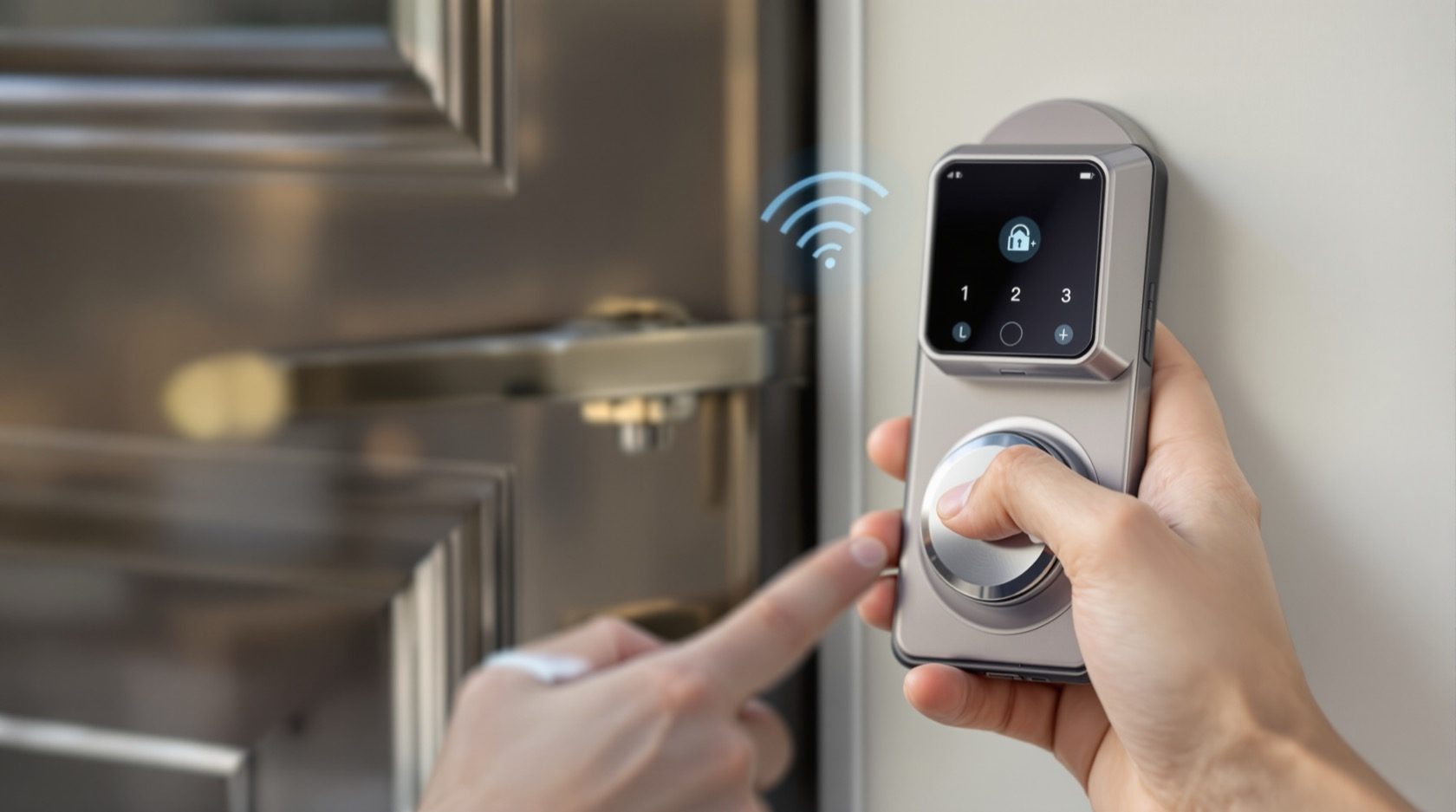
Bluetooth Locks in India (2026): How BLE Smart Locks Work, and Their Limits
A homeowner's guide to Bluetooth smart locks — how the phone-to-lock BLE link works without Wi-Fi or a hub, why they are cheaper and cloud-free, and the honest limits: no true remote unlock, phone dependence, and pairing security.
A Bluetooth lock is the friendliest first step into smart locking: you walk up to your own door, your phone in your pocket talks to the lock over a short-range radio link, and the bolt slides back — no key, no PIN, no internet. It is often the cheapest smart lock on the shelf, it does not depend on the cloud, and for a single home it can be genuinely convenient. But that same simplicity carries a hard limit that catches many buyers by surprise: a pure Bluetooth lock only works when you are physically near the door. There is no "unlock the house for the plumber from my office" unless you add extra hardware.
This guide is part of Studio Matrx's smart locks and access control library and sits under the complete guide to smart locks in India. It explains, in plain terms, how a Bluetooth lock actually works, why people like it, and — just as honestly — where it falls short, so you can decide whether it fits your door or whether a different credential suits you better.
Scope, safety & who fits it. This guide helps you understand and choose a lock. The actual fitting to the door, any mains wiring, and — critically — any interlock with a fire alarm on an escape door is a coordinated licensed job for a door-hardware fitter, electrician and, where an egress route is involved, a fire-safety consultant. A lock on a door people escape through must never trap anyone, and must never block an escape route; a home door should always keep a mechanical key override. Biometric and app-account data is personal data under the Digital Personal Data Protection Act, 2023. This is educational guidance, not legal advice.
What a Bluetooth lock actually is
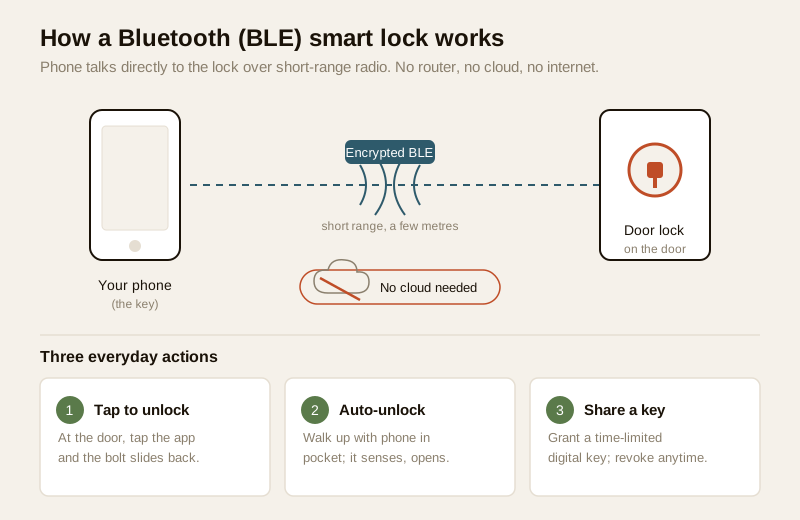
Almost every smart lock is really two things bolted together: an ordinary mortise or deadbolt on the door, and an electronic brain that decides whether to move it. A Bluetooth lock is one where that brain listens for a signal from your phone over Bluetooth Low Energy (BLE) — the same low-power, short-range radio your fitness band or wireless earbuds use. When your paired phone comes within range and the app confirms you are you, the lock motor turns and the door opens.
The word that matters most here is local. The conversation happens directly between your phone and the lock, over the air, across a few metres. Nothing goes to a server, no Wi-Fi router is involved, and — this is the crux — nothing can reach the lock from far away. That is both the charm and the ceiling of a Bluetooth lock.
How you actually use one, day to day
- Pairing. When you first set the lock up, you install the maker's app, and the phone and lock exchange a one-time secure "handshake" so they recognise each other from then on. This is the digital equivalent of cutting a key.
- Tap to unlock. Standing at the door, you open the app and tap unlock — the phone reaches the lock over BLE in a moment.
- Auto-unlock on approach. Most Bluetooth locks offer a hands-free mode: as you walk up with the phone in your pocket, the lock senses the phone is near and unlocks itself. Convenient, but worth turning off if your door opens onto a shared corridor, so it does not unlock while you are merely passing by.
- Sharing a digital key. You can grant family or a guest a key inside the app — ideally a time-limited one for a guest or a house-help — so they can unlock with their own phone without you handing over a physical key. Revoking that key is a tap, unlike a copied metal key you can never get back.
Most Bluetooth locks also keep a keypad, fingerprint reader or physical key as an alternative, so the phone is rarely the only way in. That backup matters more than it first appears, as we will see.
Why people choose Bluetooth
For a single home, a Bluetooth lock has real, honest appeal — and it is not just about being cheap.
- Lower cost. With no Wi-Fi radio and no cloud service to run, Bluetooth-only locks are usually the most affordable smart locks, often a clear step below comparable Wi-Fi models.
- No cloud dependency. Because the lock does not phone home to a server, it keeps working during an internet outage, and your daily use is not tied to a company's cloud staying up. Fewer moving parts, fewer things to break.
- Better battery life. A BLE radio sips power compared with a Wi-Fi radio that is constantly connected. Bluetooth locks typically run many months on a set of AA cells, where an always-on Wi-Fi lock drains faster — a real consideration in a country of frequent power cuts, since a lock's battery is its lifeline.
- A smaller privacy footprint. Less of your comings and goings is streamed to a cloud service, because much of the logic stays on the lock and your phone.
- Simplicity. Nothing to configure on the router, no network to secure beyond the lock and app themselves.
For comparison across every credential type — PIN, fingerprint, card, phone — the smart lock selector tool walks you through it in a few questions, and the sibling guides on PIN-code locks, fingerprint locks, RFID locks and NFC locks cover the alternatives.
The honest limits — read this before you buy
A Bluetooth lock is a good tool used within its limits and a frustrating one pushed past them. Here is where it stops.
No true remote access — the big one
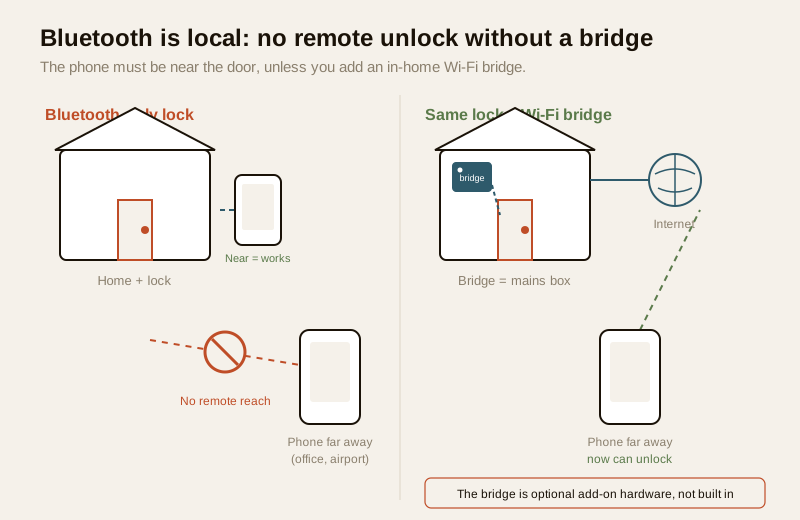
This is the single most important thing to understand. Because Bluetooth is short-range and local, a pure Bluetooth lock cannot be operated from away. You cannot let a courier in from your desk, check from the airport whether you locked up, or grant an electrician entry while you are across town. The lock simply cannot hear a phone that is not within a few metres of it.
To get that away-from-home control, you must add a Wi-Fi bridge (sometimes called a hub) — a small mains-powered box that sits inside the house within Bluetooth range of the lock and relays commands to and from the internet on the lock's behalf. Some locks sell this bridge as an add-on; some brands build Wi-Fi straight into the lock (a different, pricier category we cover in a separate guide on Wi-Fi and remote-access locks, coming next in this library). If genuine remote unlocking, live status and remote key-sharing are things you know you will use, be honest with yourself now: buy a lock that supports a bridge, or step up to a Wi-Fi lock, rather than being disappointed later. The complete smart-locks guide maps the whole ladder.
It lives and dies with your phone
If the phone is the key, then a dead phone is a lost key. A flat battery, a phone left at the office, a cracked handset, a factory reset, a switched phone that has not been re-paired — any of these can leave you at your own door unable to use the app. This is exactly why you should never let the phone be the only way in:
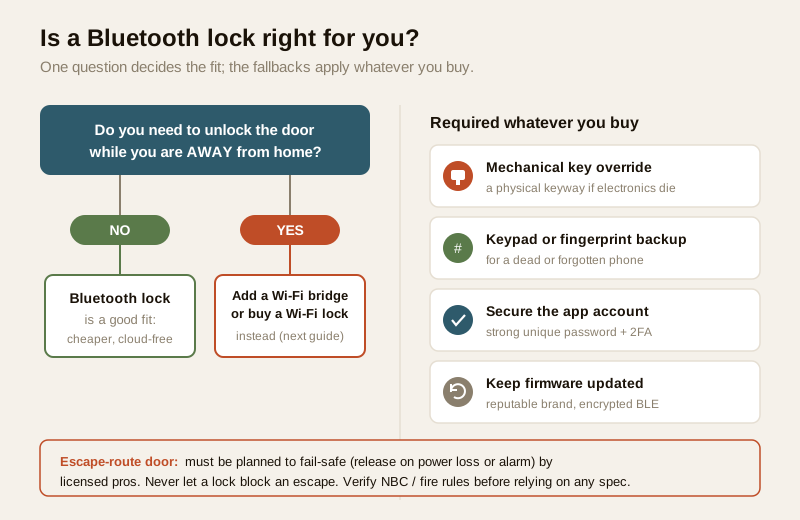
- Keep the lock's keypad, fingerprint reader or physical key enabled as a fallback, and make sure everyone in the home knows the backup method.
- Keep a mechanical key override for a home door — a physical keyway you can turn if the electronics are completely dead. On battery-powered locks, most makers also provide an emergency external power point (often a USB or 9V contact) to wake a fully drained lock long enough to open it.
Range and reliability
Bluetooth is short-range by design, and its signal is weakened by a thick door, a metal gate, or the phone being in a bag on the far hip. In practice this is minor — you are standing at the door anyway — but auto-unlock can occasionally be slow or need a second tap, and a very thick or metal-clad door can shorten the working distance. It is a convenience feature, not a precision instrument.
Pairing and app-account security
A Bluetooth lock is still a small networked device, and buying well matters. The guidance here is entirely about choosing and hardening, never about attacking anything:
- Pick a reputable brand that states it uses encrypted BLE (modern Bluetooth pairing is encrypted; a serious maker will say so) and that publishes firmware updates. Avoid unbranded bargain locks with no update path.
- Keep the firmware updated through the app, exactly as you would update a phone — updates close security gaps and fix bugs. A lock that is never updated is a lock frozen with whatever flaws it shipped with.
- Secure the app account. The app account that holds your digital keys deserves a strong, unique password and two-factor authentication where offered — treat it like the account that it is, a keyring for your home.
- Manage shared keys. Review who holds a digital key, prefer time-limited keys for guests and helpers, and revoke keys promptly when someone no longer needs access.
If you ever read that a particular cheap lock has a known weakness, treat that as a reason not to buy it — the fix is always to choose a well-made, updated, reputable lock, never to tinker.
Privacy under the DPDP Act
If your Bluetooth lock uses a fingerprint as one of its methods, that fingerprint is sensitive personal data under the Digital Personal Data Protection Act, 2023 — prefer a lock that stores the fingerprint template on the device, not in a cloud, and enrol only the people who need access. The app account itself records who unlocked and when; be mindful of who administers it, keep the log to the household, and delete a departed helper's or guest's access. Minimise what you collect, and know where it is stored. The wider smart-home privacy picture and the fingerprint locks guide go deeper.
Bluetooth vs the alternatives, at a glance
No single credential is "best" — it depends on your door, your household and whether you need remote control.
| Credential | Range / reach | Needs internet? | Remote unlock? | Typical cost | Best for |
|---|---|---|---|---|---|
| Bluetooth (BLE) | A few metres, phone-to-lock | No | No (unless you add a bridge) | Lower | A single home, phone-carrying household, cloud-averse buyers |
| PIN / keypad | At the door | No | No | Low | Anyone; a reliable no-phone fallback |
| Fingerprint | At the door | No | No | Mid | Fast, key-free entry for a fixed set of people |
| RFID / NFC card or fob | Touch / tap | No | No | Low–mid | Guests, kids, house-help without a smartphone |
| Wi-Fi (built-in or via bridge) | Anywhere with internet | Yes | Yes | Higher | Owners who truly need away-from-home control |
Many good locks are multi-credential — a keypad and Bluetooth and a mechanical key on one door — which is often the sensible real-world buy: the phone for convenience, a PIN or key for when the phone is dead. If you want to pair the lock with a door camera to see who is there before opening, that is covered in the video door phones with smart locks guide; this guide's lens is the lock itself.
Fitting it in an Indian home
A few realities specific to India shape the decision.
- Single-home fit. Bluetooth locks shine on a single independent house or apartment where the people who need access carry phones and are usually home to let others in. They are a poor fit where you frequently need to admit visitors remotely, or for a large building with many users and shared entrances — those call for networked access control, covered across the apartment and gated-community security guides.
- Power cuts and batteries. The lock runs on batteries, which is a strength during outages — but it means you must respect the low-battery warnings and keep the emergency power point and mechanical key in mind. Do not let the cells run flat.
- Heat, dust and monsoon. Electronics on an outward-facing door take a beating from summer heat, dust and monsoon humidity. Choose a lock rated for outdoor or semi-outdoor use if the face is exposed, and shelter it under an overhang where you can.
- Price bands (indicative). Treat these as ballparks to sanity-check a quote, not fixed rates.
| Tier | Typical price (₹) | What you get |
|---|---|---|
| Entry Bluetooth deadbolt / mortise | ₹4,000 – ₹9,000 | BLE unlock + physical key; basic app; often no bridge option |
| Mid multi-credential | ₹9,000 – ₹18,000 | BLE + keypad and/or fingerprint + key; time-limited digital keys; firmware updates |
| Premium, bridge-ready | ₹18,000 – ₹35,000+ | Well-built BLE + multiple credentials + optional Wi-Fi bridge for remote access |
When to bring in a professional. Choosing the lock and its credentials is yours to decide. The fitting to the door, any mains wiring, and any fire-alarm interlock on an escape door is a coordinated licensed job — a door-hardware fitter with an electrician, and a fire-safety consultant where an egress route is involved. An escape-route door must be planned to fail-safe (release on power loss or fire alarm) and is governed by the National Building Code and local fire rules; never place a lock so it can block an escape, and always keep a mechanical override. See the electrical hub and the smart-locks sub-hub for how these pieces coordinate.
Key takeaways
- A Bluetooth lock unlocks from a paired phone over short-range BLE — no Wi-Fi, no hub, no cloud needed for daily use — which makes it the cheapest, most cloud-light and often longest-battery smart lock for a single home.
- Its defining limit is that it is local: there is no true remote unlocking unless you add a Wi-Fi bridge or step up to a Wi-Fi lock. If away-from-home control matters to you, buy for that from the start.
- It lives and dies with your phone — always keep a keypad, fingerprint or physical-key fallback enabled, plus a mechanical override, so a dead phone never locks you out.
- Buy defensively: reputable brand, encrypted BLE, firmware kept updated, a strong app-account password with 2FA, and time-limited shared keys you revoke when done. Fingerprint and log data is personal data under the DPDP Act, 2023 — prefer on-device storage.
- On an escape-route door, selection, fail-safe behaviour, fire-alarm interlock and fitting are a coordinated licensed job; never let a lock block an escape, and verify current fire and building rules before relying on any spec.
References
- Digital Personal Data Protection Act, 2023 — fingerprint templates and access logs are personal (and, for biometrics, sensitive) data; obtain consent, give notice, minimise collection, prefer on-device storage, set retention, and delete a departed user's access.
- Manufacturer specifications and datasheets — verify the specific lock's BLE encryption, firmware-update policy, battery life, emergency-power provision, mechanical-override keyway and any Wi-Fi-bridge compatibility on the maker's own datasheet before buying.
- National Building Code of India (SP 7), Bureau of Indian Standards, and local fire and municipal bye-laws for the fire-egress, fail-safe and any electrical aspect of an escape-route door; verify the current edition via the BIS catalogue: https://www.services.bis.gov.in/
This is an educational overview, not legal advice. Lock fitting, mains wiring, and any fire-alarm interlock on an escape door are qualified professional tasks — engage licensed door-hardware, electrical and fire-safety professionals, and verify any standard's current status via the BIS catalogue before relying on it.
Export this guide
Related Guides — Deep-dive reading
Access Control Maintenance in India (2026): Readers, Locks and Fail-Safe Egress
How to keep a card, keypad, fingerprint or face access-control system reading reliably and locking securely — and, above everything, how to test that its doors still release on a fire alarm and on power loss, so an access-controlled door never becomes a life-safety trap.
SecurityFingerprint Locks in India (2026): How Biometric Door Locks Really Work, and Their Honest Limits
How a fingerprint sensor reads a finger and matches it to enrolled templates, the genuine appeal of nothing to carry, and the wet-finger, elderly, privacy and backup realities every Indian buyer must weigh before choosing one.
SecurityFire-Egress Compatibility for Smart Locks in India (2026): Never Trap Anyone
How to make sure a smart lock or access-controlled door on an escape route always lets people out in a fire or emergency: fail-safe hardware, free egress, fire-rated doors, and the fire-alarm interlock.
SecurityRelated Tools — Try Free
Door Lock Selector
Answer a few questions and get the right lock type — mortise, multipoint, deadbolt, privacy or smart — for any door.
Door ToolVideo Door Phone Type Selector
Answer a few questions about your building, cabling, budget and internet and get the right video door phone — analog / wired / wireless / IP, single-home or multi-apartment, monitor or app.
Door Phone SelectorAccess-Control Battery-Backup Calculator
Size the standby battery so an access system keeps running through a power cut, with an egress life-safety note.
Battery Backup