
Face-Recognition Locks in India (2026): Proportionality, Privacy and the DPDP Act
How a smart lock that unlocks on a recognised face actually works, the genuine hands-free appeal, and the DPDP, accuracy and honest overkill caveats that must come first, for Indian homes.
A face-recognition lock is a smart lock with a small camera that has learned a handful of faces — the household, perhaps a regular helper — and releases the bolt when it recognises one. Walk up with your hands full of shopping and the door simply opens: nothing to carry, nothing to remember, nothing to touch. It is the most futuristic-feeling credential on the market, and for a family juggling children and bags it is genuinely convenient. It is also, for most Indian homes, more lock than the problem needs — and it collects the single most sensitive kind of data a lock can collect: your face.
This guide is deliberately honest and proportionate. It sits in the Studio Matrx Smart Locks and Access Control hub beside the complete smart-lock pillar, and its lens is narrow: the face at the lock. This is not the camera-side story. For the deeper surveillance-ethics treatment of recognising faces across a whole estate, read the companion facial-recognition CCTV guide; for the same feature on a door station, see facial-recognition door phones. This page will not duplicate them.
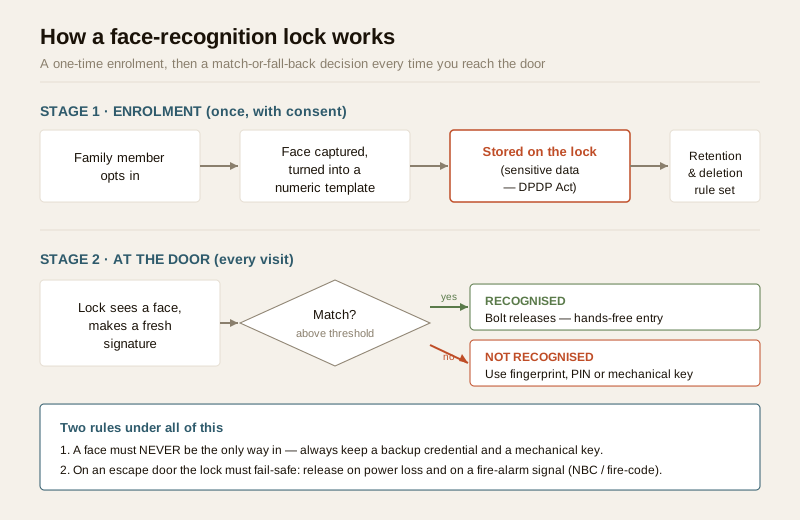
Scope & safety. A face template is sensitive personal data under the Digital Personal Data Protection Act, 2023 — treat enrolling one as a considered, consent-and-notice choice, not a default. This guide helps you plan, decide and coordinate; it is strictly defensive and gives no method to identify, track, defeat or spoof anyone. A lock on a door people escape through must never trap them: an egress door must fail-safe under NBC and fire-code, and the lock fitting, wiring and any fire-alarm interlock are a licensed professional's job, never DIY. Always keep a backup credential and a mechanical key override. This is educational guidance, not legal advice.
Start with the caveats, not the features
Most write-ups open with the magic. This one opens with the honest part, because with a biometric the order matters.
A face-recognition lock does not keep a photo album of everyone who passes. At enrolment it turns a consenting person's face into a numeric template — a mathematical signature, not a picture — and stores that. At the door it makes a fresh signature and asks one question: does this match an enrolled one closely enough? That template is still, unambiguously, sensitive personal data under the DPDP Act, 2023. You cannot change your face the way you change a PIN, and a leaked face database is a permanent harm. That single fact should shape every decision below, which is why privacy and proportionality lead this guide and the feature list comes second.
How it actually works: 2D versus 3D sensing
Not all face-recognition locks are the same, and the difference is the single most important technical choice. It comes down to how the camera sees a face.
- 2D (flat camera). A basic lock uses an ordinary camera and matches the two-dimensional image. It is cheaper, but it can struggle with light and angle, and because it only sees a flat picture it is inherently weaker against a flat image held up to it.
- 3D / structured-light / infrared depth. A better lock projects a pattern of infrared dots or uses a depth sensor to map the actual shape of a face — the contours, not just the picture. This is far more robust in poor light and, crucially, it can tell a real three-dimensional face from a flat photo. Good systems add liveness detection on top, checking for signs of a live person rather than a static image.
For a credential that opens your front door, a 3D or infrared depth-sensing lock with liveness detection is the only kind worth considering; a bare 2D lock belongs on a drawer, not a main door. The table below sets the two side by side.
| Aspect | 2D camera lock | 3D / IR depth-sensing lock |
|---|---|---|
| What it captures | A flat image of the face | The three-dimensional shape of the face |
| Low light / night | Often poor without a good IR fill | Works in the dark via infrared |
| Backlight and angle | Easily thrown off | More tolerant |
| Resistance to a flat image | Weak | Much stronger, especially with liveness |
| Typical cost | Lower | Higher |
| Suitable for a main door? | No — convenience novelty only | Yes, if reputable and liveness-capable |
Where the template is stored: on-device versus cloud
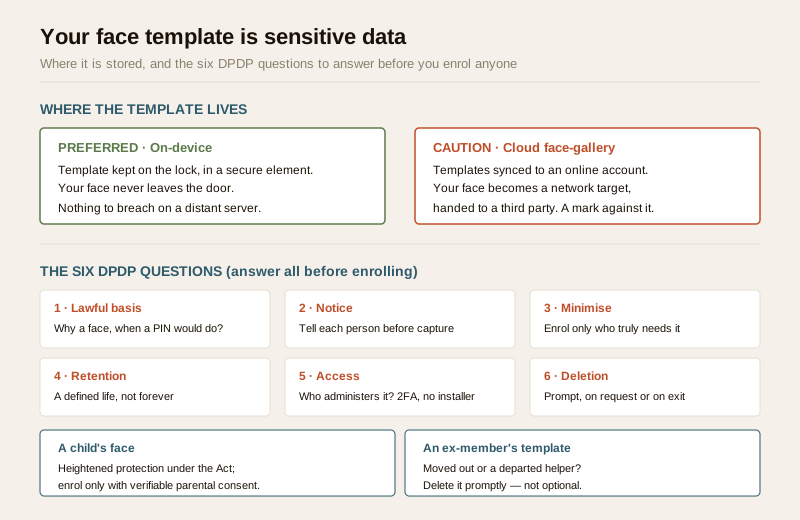
Equally important is where your face lives. A well-designed lock keeps the template on the device itself, in a secure element, and never uploads your face to a server. A weaker or more "connected" product may sync templates to a cloud account — which turns your face into a network target and hands a third party your most sensitive data. Prefer on-device storage. If a lock insists on a cloud face-gallery, treat that as a serious mark against it, and read the Wi-Fi lock guide and app-controlled lock guide for why any networked lock needs strong unique credentials, 2FA and prompt firmware updates.
The face template is sensitive data: the DPDP checklist
If you enrol faces, you become responsible for that data. Six questions decide whether you are doing it lawfully and decently — answer all six before you enrol a single person.
| Question | What it means at a lock |
|---|---|
| Lawful basis | Why do you need faces at all, when a fingerprint, PIN or key would do? For a household, enrolment must be a free, informed, specific and withdrawable choice. |
| Notice | Everyone enrolled is told, before capture, what is taken, why, where it is stored (on-device, ideally), how long, and how to ask for deletion. |
| Minimise | Enrol only who truly needs it. Prefer templates kept on the lock over any cloud face-gallery of the whole household and its staff. |
| Retention | The template and any logs have a defined life; an old, unused enrolment is deleted, not kept forever. |
| Access | Who administers the lock and can see the enrolment list and logs? Strong unique passwords, 2FA on any app, and no standing installer access. |
| Deletion | On request or on exit — a departed helper, a former flatmate, an ex-member of the household — that person's template is deleted promptly. |
Two situations need extra care. A child's face deserves heightened protection: the DPDP Act treats children's data more strictly, so avoid enrolling minors unless there is a clear reason and verifiable parental consent, and delete when it is no longer needed. And deleting an ex-member — someone who has moved out or fallen out — is not optional politeness; it is the responsible and lawful thing to do, and the lock you choose should make it a simple, reliable step. When in doubt, do not enrol.
Honest accuracy limits
No face system is 100 per cent right, and both kinds of error matter at a door. Understanding them is the difference between using the feature sensibly and over-trusting it.
- Lighting and angle. Harsh backlight, deep shade, night without good infrared, or a face turned away can all cause a miss. Indian doorways swing between glare and gloom through the day.
- Ageing and change. Faces change — a new beard, a haircut, weight change, or simply years passing — and a template captured once may recognise you less well over time.
- Twins, siblings and lookalikes. Close family resemblance is the classic weak point; identical twins can defeat weaker systems entirely.
- Masks, spectacles and helmets. A mask, new glasses, or a helmet can stop a legitimate face being recognised.
- Demographic bias. Recognition accuracy can differ across skin tone, age and gender, so some family members or helpers may be recognised less reliably than others — unfair and unsafe.
These failures fall into two kinds, and both carry a cost:
| Failure mode | What happens at the door | Why it matters |
|---|---|---|
| False reject | An enrolled person is not recognised — in rain, backlight, a mask, a new beard, or with age | Annoying at best; a lock-out if a face is the only way in |
| False accept | A stranger is treated as enrolled | Undermines the whole point — a lookalike, on a weak 2D system, could be waved through |
The practical rules that follow are simple: never make a face the only way in, always keep a reliable non-biometric fallback (fingerprint, PIN, RFID tag or key), and treat recognition as a convenience layer, not a hardened gatekeeper. If accuracy in your light and weather is poor, turn the feature off.
Spoofing, handled responsibly
A fair question is whether a photo held up to the camera can fool the lock. The honest, defensive answer: on cheap 2D systems, sometimes; on good 3D, liveness-capable systems, much less so, because they read the shape of a real face rather than a flat image. This guide gives no method to defeat any lock. Your job as a buyer is only this: choose a reputable, liveness-capable 3D product from a maker with a real security track record, keep its firmware updated, store templates on-device, and — the recurring theme — do not over-rely on it. If a recognised face is enough to open a door on its own, that link is what a determined intruder will target, so pair it with a second factor and never remove the mechanical key.
The honest verdict for a home: usually overkill
Here is the part the sales pitch skips. For the overwhelming majority of Indian homes, a face-recognition lock solves a problem you do not have, at the cost of collecting data you would rather not be responsible for.
A good ordinary biometric lock setup already covers the real need. A fingerprint reader for fast hands-on entry, a PIN for guests and helpers, and a mechanical key as the ultimate fallback gives you convenience, shared access and resilience — without a single face template to secure, delete, or explain to a data regulator. Fingerprints on a good lock are stored on-device as templates too, but a fingertip is far less exposed than a face that anyone can photograph, and the false-match and bias risks are better understood. That combination is cheaper, simpler, and carries none of the face-specific liability.
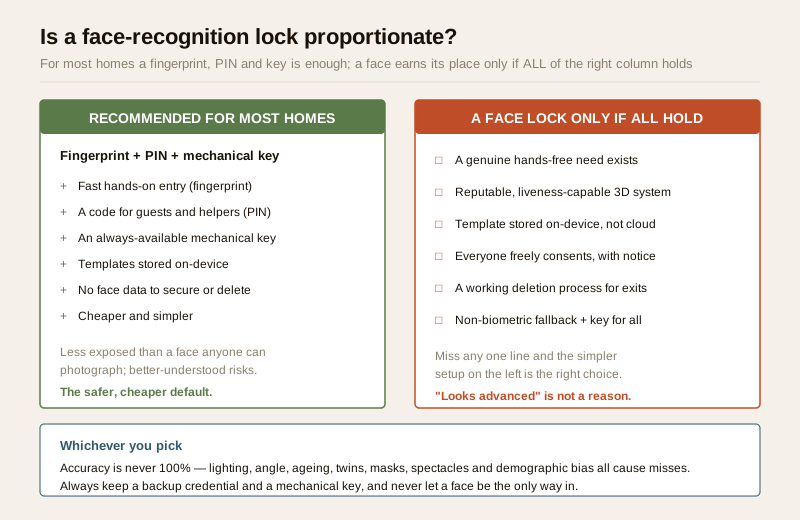
A face-recognition lock earns its place only when all of a short list is true: there is a genuine, named hands-free need (a real accessibility reason, or hands that are reliably full); the product is a reputable, liveness-capable 3D system storing templates on-device; everyone who will be enrolled has freely consented and been given notice; there is a working deletion process for ex-members and departed helpers; and there is a non-biometric fallback plus a mechanical key for everyone. Miss any one of those and the simpler fingerprint-PIN-key setup is the better, safer and cheaper choice. If your only reason is "it looks advanced," that is not a reason — it is a liability. To weigh credentials before you spend, the smart-lock selector and cost calculator walk you through the trade-offs.
Power cuts, weather and the backup that must never be skipped
A face-recognition lock is a small, always-on computer on your door, and India tests it hard.
- Power and battery. The lock runs on batteries; its camera and processor draw more than a plain keypad, so watch the battery level and keep spares. If the lock also depends on Wi-Fi for anything, remember a power cut kills the router too — plan for the lock to work locally on-device, not only via a cloud service.
- Weather. Monsoon rain, summer heat, dust and humidity all age an outdoor-facing camera and lens. Check the IP weather rating on the datasheet, and expect a dirty or fogged lens to hurt recognition — another reason a face must never be the only way in.
- The mechanical key. Every home door should keep a mechanical key override and a backup credential (a fingerprint or PIN). This is not belt-and-braces caution; it is the difference between a flat battery being a shrug and being a family locked out at night. Store a spare key off-site with someone you trust.
If the lock is on an egress door
A face-recognition lock is still an electric lock, and on a door people escape through, life-safety governs everything.
First, egress must fail-safe. A lock on an exit or fire-escape door must release on power loss and on a fire-alarm signal — it must never trap anyone — and it must never sit where it could block an escape route. Fail-secure (stays locked without power) is only for doors that are not an escape route. This is set by fire-code and NBC egress rules, not by preference.
Second, the fitting, wiring and any fire interlock are a licensed job. Selecting the lock, sizing power and battery backup for India's cuts, mounting it on the door without weakening the escape function, and wiring any fire-alarm interlock is qualified fire-safety, door-hardware and electrical work — coordinate it, do not attempt it. Route it through the electrical hub and read the complete smart-lock pillar for how these pieces fit together.
When to bring in a professional. You can plan, decide and coordinate: whether a face is proportionate at all, who consents, what happens to their template, and which reputable liveness-capable 3D product to shortlist. Hand to licensed professionals everything to do with the lock fitting, its wiring, power backup and any fire-alarm interlock, and consult a data-protection professional to confirm your DPDP obligations before enrolling anyone — especially where a child's data is involved. Never position a lock so it blocks a fire-escape route, never let a face be the only way through a door, and always keep a mechanical key.
Key takeaways
- Caveats lead, features follow. A face template is sensitive personal data under the DPDP Act, 2023 — enrol only with a lawful basis, clear notice, real consent, minimisation, a retention limit, controlled access and a prompt deletion path, with heightened care for a child's face and for deleting an ex-member.
- 3D beats 2D, and on-device beats cloud. For a main door choose a reputable, liveness-capable 3D / infrared depth-sensing lock that stores the template on the device, not a bare 2D camera and never a cloud face-gallery.
- Accuracy is never perfect. Lighting, angle, ageing, twins, masks, spectacles and demographic bias all cause false rejects and false accepts — so never make a face the only way in.
- For most homes it is overkill. A good fingerprint plus PIN plus mechanical key setup delivers the real benefit with none of the face-specific liability — that simpler combination is the recommended default.
- Backup and egress are non-negotiable. Always keep a backup credential and a mechanical key; on an escape door the lock must fail-safe and stay off the escape route, and the fitting, wiring and fire interlock are licensed work, never DIY.
References
- Digital Personal Data Protection Act, 2023 — a facial template is sensitive personal data; process it only with a lawful basis, notice, consent, minimisation, defined retention, restricted access and a deletion process, with heightened protection for children's data. Confirm your specific obligations with a data-protection professional.
- Manufacturer specifications — verify whether recognition is 2D or 3D / infrared depth-sensing, liveness / anti-spoofing capability, where the template is stored (on-device versus cloud), false-accept and false-reject rates, IP weather rating, battery life and firmware-update policy on the maker's own datasheet before buying.
- National Building Code of India (SP 7), Bureau of Indian Standards, and local fire-safety bye-laws govern egress and any electric-lock interlock on an exit door; verify the current edition via the BIS catalogue: https://www.services.bis.gov.in/
This is an educational overview, not legal advice. Assess proportionality and confirm DPDP obligations with a data-protection professional, and engage licensed fire-safety, door-hardware and electrical professionals for any lock fitting, wiring or fire-interlock work; verify any standard's current status via the BIS catalogue before relying on it.
Export this guide
Related Guides — Deep-dive reading
Access Control Maintenance in India (2026): Readers, Locks and Fail-Safe Egress
How to keep a card, keypad, fingerprint or face access-control system reading reliably and locking securely — and, above everything, how to test that its doors still release on a fire alarm and on power loss, so an access-controlled door never becomes a life-safety trap.
SecurityFingerprint Locks in India (2026): How Biometric Door Locks Really Work, and Their Honest Limits
How a fingerprint sensor reads a finger and matches it to enrolled templates, the genuine appeal of nothing to carry, and the wet-finger, elderly, privacy and backup realities every Indian buyer must weigh before choosing one.
SecurityComplete Guide to Security System Cybersecurity in India (2026): Protecting the Systems That Protect You
The cameras, locks, alarms and door phones you install to feel safer are internet-connected computers that can themselves be attacked, and an insecure one is worse than none. This pillar maps the whole attack surface — devices, network, accounts and data, operations — and points to every guide that hardens it.
SecurityRelated Tools — Try Free
Access-Control Battery-Backup Calculator
Size the standby battery so an access system keeps running through a power cut, with an egress life-safety note.
Battery BackupSecurity Backup Power Calculator
Size a UPS/inverter and battery to keep CCTV, NVR, router and alarm running through a power cut — load, Ah, VA and cost.
Backup PowerCCTV Camera Coverage & Count Calculator
Estimate how many CCTV cameras you need, the NVR channels, storage in TB for your retention period, and an indicative all-in cost with GST.
CCTV Calculator