
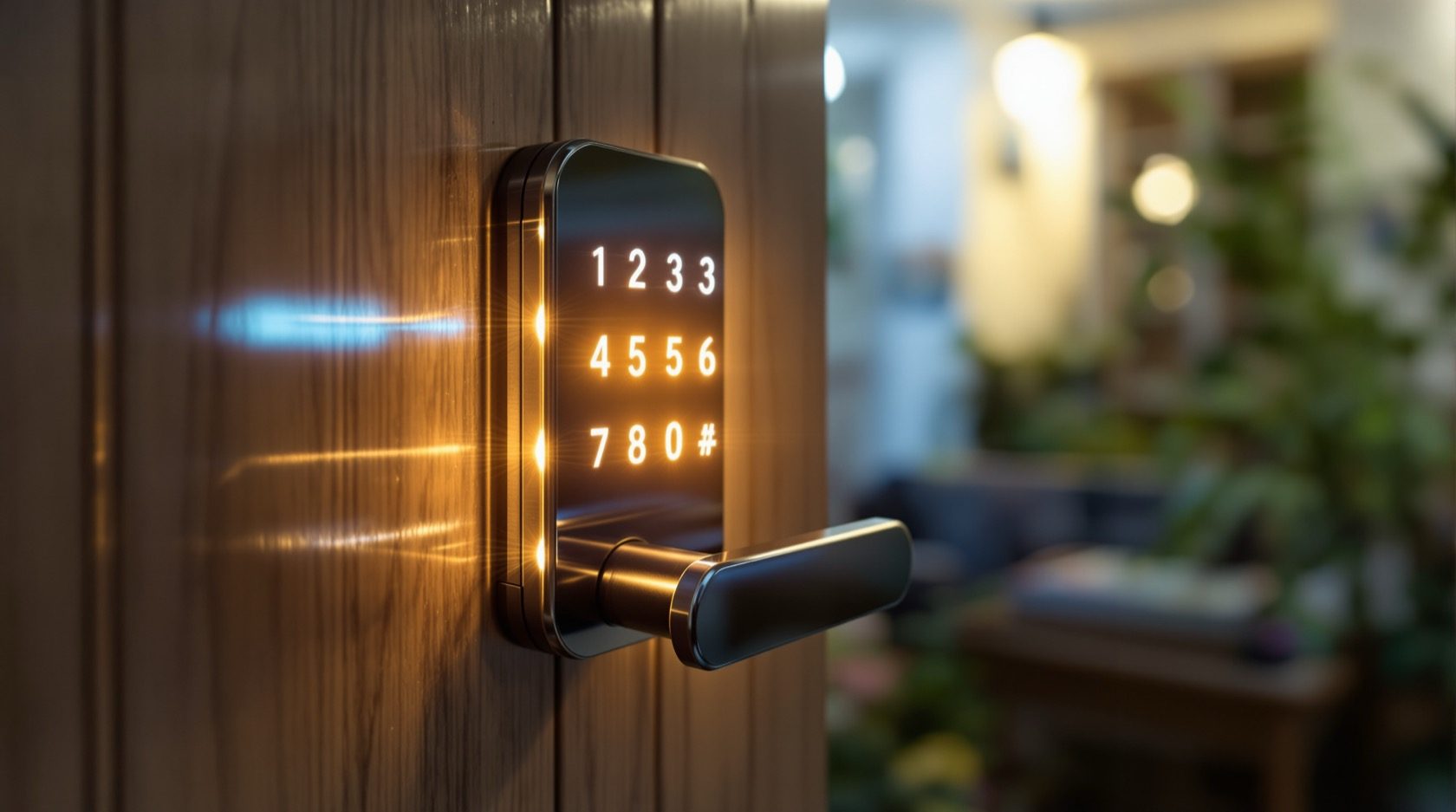
PIN-Code Locks in India (2026): The Keypad Smart Lock Buyer's Guide
How keypad smart locks work, why they are India's most popular entry-level smart lock, and how to choose one wisely — anti-peep codes, battery and dead-battery planning, managing codes for family and domestic help, and keeping a mechanical override.
Of all the smart locks sold in India, the humble keypad lock is the one most families actually end up buying first. There is no card to carry, no phone to pair, no fingerprint to enrol — you just tap a number and the door opens. You can tell your mother the code over the phone, set a different one for the maid, and never again stand at your own door patting your pockets for a key. That simplicity is exactly why pin-code locks are the default entry-level smart lock on Indian doors.
This guide is part of Studio Matrx's smart locks and access control library and sits under the complete guide to smart locks in India. Here the lens is narrow and practical: the keypad credential itself — how it works, what features actually matter when you buy, how to manage codes safely for a household with domestic help, and how to plan for the two things that catch people out, a dead battery and a power cut. If you are weighing the keypad against other ways of opening a door, its natural siblings are the fingerprint lock, the RFID card lock, the NFC lock and the Bluetooth lock — and the smart lock selector helps you compare them side by side.
Scope & safety. This guide helps you choose and manage a keypad lock. The actual fitting to your door, any mains wiring, and — for a shared or fire-escape door — the fire-alarm interlock are a coordinated LICENSED job (door-hardware trade plus electrician plus, where relevant, a fire-safety consultant), never DIY. A lock on a door people escape through must fail-safe and must never block an escape route, which is governed by the National Building Code and local fire rules. On any home door, always keep a mechanical key override so a dead battery or fault can never lock you out. Codes and access logs are personal data under the Digital Personal Data Protection Act, 2023. This is educational guidance, not legal advice.
How a keypad lock actually works
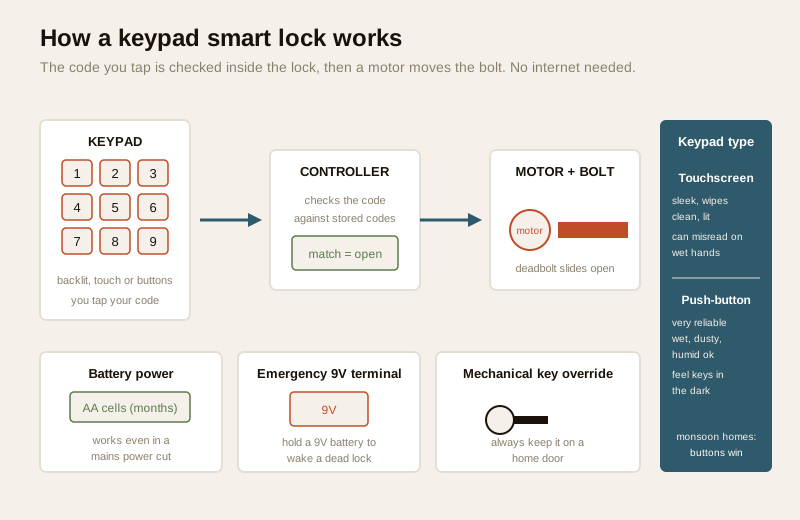
A keypad smart lock is, at heart, an ordinary deadbolt or mortise lock with a small computer bolted to the front. You enter a numeric code on the keypad; the lock's controller checks it against the codes stored in its memory; if it matches, a tiny motor drives the bolt back and the door opens. A few seconds later — or when the door closes — it locks itself again. No internet, no phone and no enrolment ceremony are needed for the basic open-with-a-code function; everything happens inside the lock itself, running on batteries.
There are two families of keypad, and the difference matters more than it first appears:
- Touchscreen (capacitive) keypads show the digits on a smooth glass panel that senses your finger, much like a phone screen. They look sleek, wipe clean easily, and usually light up at night. Their weakness is that they need a reasonably clean, dry fingertip: in peak monsoon humidity or with wet or very dry hands, a cheap capacitive panel can misread taps.
- Physical push-button keypads have real, movable buttons you press. They are less elegant but wonderfully reliable — they do not care about wet hands, humidity or dust, and you can often feel the numbers in the dark. For a gate, a utility door, or a home with heavy monsoon exposure, physical buttons are frequently the smarter choice.
Most keypad locks store several codes at once, so different people can have different codes, and the lock keeps a small log of which code opened it and when. That single idea — many codes, individually named and individually deletable — is what makes a keypad lock so much more useful than a shared physical key.
Why keypad locks are India's entry-level favourite
Every credential type has its fans, but the keypad wins first-time buyers for a handful of very down-to-earth reasons:
- Nothing to carry or enrol. A fingerprint lock needs every user's finger registered; an RFID lock needs cards handed out and tracked; a Bluetooth lock needs everyone to have the app and a charged phone. A code needs none of that — you can add a person in ten seconds by telling them four to six digits.
- Sharing is trivial. This is the big one for Indian households. You can give the maid, the cook, the plumber, a visiting relative or the courier a code without meeting them at the door or lending a key that then has to come back.
- It is the cheapest way in. Keypad-only locks are typically the most affordable smart locks on the market, which makes them the natural first step for a family testing the idea of keyless entry.
- It suits a house where not everyone has a smartphone. Grandparents, young children and domestic staff can all use a code with no device at all.
Where a keypad sits against the other credentials
| Credential | You need to carry | Enrolment | Easy to share | Typical India price band | Best for |
|---|---|---|---|---|---|
| PIN code (keypad) | Nothing | None — just tell the code | Very easy (speak or message a code) | ₹3,000 – ₹12,000 | First smart lock; households with domestic help |
| Fingerprint | Nothing (your finger) | Yes — register each finger | Hard (person must be present) | ₹6,000 – ₹20,000 | Family-only doors; hands-free entry |
| RFID card / fob | A card or fob | Issue and track cards | Easy to hand over, easy to lose | ₹4,000 – ₹15,000 | Guests, offices, societies |
| Bluetooth / app | A charged phone | App + pairing | Easy via app, needs everyone on the app | ₹6,000 – ₹18,000 | Tech-comfortable, phone-always households |
Bands are indicative 2026 retail ranges for the lock only, and most good keypad locks actually combine a code with at least one backup method plus a mechanical key. Use the smart lock selector to narrow down, and see the pillar guide for the full landscape.
The features that actually matter when you buy
Marketing pages list dozens of features. For a keypad lock, only a few genuinely change day-to-day life and safety. Weigh these:
Keypad type and backlight
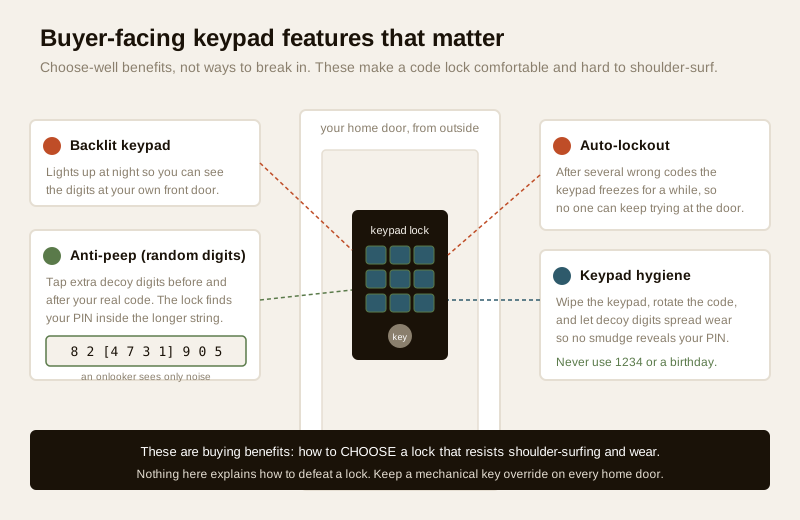
Decide touchscreen versus physical buttons using the humidity and location logic above. Whichever you pick, insist on a backlit keypad — a code lock you cannot see in the dark is a daily frustration at your own front door. A good backlight comes on the moment you touch or approach the panel.
Anti-peep / random-decoy-digit entry
A visible keypad has one honest weakness: someone standing nearby could try to watch your fingers, and over time an unwiped touchscreen can show which digits get used. Good locks turn this into a non-issue with an anti-peep (random-digit) feature, and it is worth buying for. It lets you type a string of extra, meaningless digits before and after your real code — the lock simply looks for your true PIN somewhere inside the longer string you tapped. To an onlooker there is nothing to read, because most of what you typed was noise. Treat this as a headline buying benefit, not an optional extra: it is the single feature that makes a keypad lock comfortable to use in a shared apartment lobby or in front of a delivery agent.
Fingerprint-smudge and worn-key hygiene
On any keypad — physical or touch — the buttons you press most can, over months, become visibly worn or hold a faint smudge pattern. This is a mild concern, not a crisis, and three habits neutralise it completely:
- Use the anti-peep feature so the extra decoy digits spread wear across the whole keypad, not just your four real ones.
- Wipe the keypad now and then, especially a touchscreen, which you should clean anyway for reliable reading.
- Choose a non-obvious code and, if the lock allows, rotate it occasionally. That way even a guessed digit set is not a guessed sequence.
Auto-lockout after wrong tries
A keypad lock worth buying will temporarily lock itself after a handful of wrong codes — going silent or refusing input for a minute or several. This is a quiet but important protection: it stops anyone standing at the door from trying code after code. Check that the lock you choose has this, and that the lockout time is meaningful.
A tamper or forced-entry alarm
Many keypad locks add a loud on-lock alarm if someone tries to pry the body or enters wrong codes repeatedly. On an apartment door or a gate this is a useful deterrent and a heads-up to those inside.
Managing codes: the real skill of owning a keypad lock
Buying the lock is easy; the ongoing craft is managing who has which code. A good keypad lock lets you hold several codes at once and treat them differently.
| Code type | What it is | Good use | Housekeeping |
|---|---|---|---|
| Permanent code | A standing code that works until you delete it | The family's everyday code | Keep the list short; know whose is whose |
| Temporary / time-limited code | Works only for a set window or number of uses | A weekend guest, a week-long painter | Expires on its own — the safest kind |
| One-time code | Opens the door exactly once, then dies | A single courier delivery, a one-off visitor | No cleanup needed |
| Duress / silent alert code | On some app-connected locks, a special code that opens but quietly signals distress | An emergency signal to family | Set it up but keep it private |
The discipline that keeps a keypad lock safe over years is simple:
- Give each regular person their own code, not a shared one. Then the log tells you who came and went, and you can revoke one person without disrupting everyone.
- Delete a code the moment a person leaves. When a maid, cook, driver or tenant stops working with you, remove their code that day — exactly as you would take back a key. This is the number-one hygiene habit and the one most people forget.
- Prefer temporary or one-time codes for anyone short-term. A painter here for a week gets a code that expires by itself, so there is nothing to remember to remove.
- Never use a guessable code. Avoid 1234, 0000, 1111, repeated digits, or anything a stranger could guess from you — a birthday, an anniversary, a house or flat number, or a vehicle registration. These are the first things tried and the easiest to learn about a family.
- Keep the permanent-code list short. Every standing code is a standing risk; if you cannot say whose each code is, it is time to reset them.
Where the lock is app-connected, you can often add, time-limit and delete codes from your phone and see the access log remotely — genuinely useful for a household with staff. But an app-connected lock is also a network target, so treat it like the pillar guide advises: a strong, unique account password, two-factor authentication on the app, prompt firmware updates and a reputable brand. And remember the privacy point — the access log and any codes are personal data under the DPDP Act, 2023, so decide who administers the lock, keep the log to what you actually need, and delete a departed person's entry rather than leaving it lying in the history.
Power, dead batteries and India's power cuts
A keypad lock has no keyhole to fall back on unless the maker gave it one, and it runs entirely on batteries — usually a set of AA cells lasting several months to a year. Two things must be planned for, and both are easy once you know them.
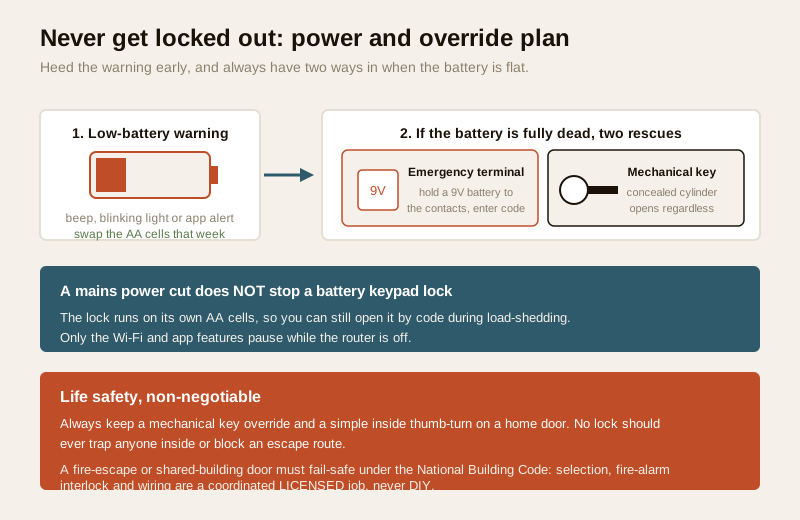
The low-battery warning. Every decent keypad lock warns you well before the batteries die — a beep, a flashing light on the keypad, or an app notification. Treat the first warning as your cue to change the cells that week; do not let it run to empty. Keep a spare set at home.
Getting in on a completely dead battery. This is the question every buyer should ask before paying, because a lock that traps you outside is worse than a key. Reputable keypad locks provide one or both of these:
- An emergency power terminal — a small pair of contacts, usually hidden under or beside the keypad, where you can hold a 9-volt battery for a few seconds to wake the lock just long enough to enter your code and get in. Keep a 9V battery in your bag or car; it is the classic dead-battery rescue.
- A mechanical key override — a concealed key cylinder that opens the lock with a physical key regardless of battery state. On a home door this is non-negotiable: keep the override key somewhere safe and off-site (with family or a trusted neighbour), not in a "hidden" spot outside the door.
Power cuts specifically. A keypad lock runs on its own batteries, so a mains power cut does not by itself stop the lock from working — this is actually a point in the keypad lock's favour compared with a mains-wired access system. What a power cut can affect is any app or Wi-Fi feature (your router is off, so remote code management pauses), but the physical open-with-a-code function keeps working on battery. For a shared building or a fire-escape door, however, whether the door should unlock on power loss (fail-safe) or stay locked (fail-secure) is a life-safety design decision, not a homeowner setting — see the fire-egress note below.
Fire egress and life safety — the non-negotiable
A lock is only ever as good as its behaviour in an emergency. For a normal home front door, a keypad lock that you can always open from the inside with a simple thumb-turn, plus a mechanical key override, is what you want — no one should ever be trapped inside by a lock. Never fit a keypad lock in a way that needs a code to get out in a hurry.
For any door that is a designated fire-escape or shared-building egress route, the rules step up and leave the homeowner's hands: whether the door must unlock automatically on power loss or a fire alarm (fail-safe) is governed by the National Building Code and local fire rules, and the selection, the fire-alarm interlock and the wiring are a coordinated licensed job — a door-hardware specialist, an electrician and, where required, a fire-safety consultant. Never position any lock so it blocks an escape route. For apartments and societies, the apartment security guide and the gated-community guide cover how these doors are coordinated at the building level, and the electrical hub covers any wired work.
India-specific realities
A few things about Indian homes shape the keypad-lock decision:
- Domestic help is normal, so code-sharing is a real feature, not a novelty. Give staff their own time-limited or permanent code, keep the log, and delete it the day they leave. This is where the keypad lock genuinely earns its place over a fingerprint-only lock.
- Monsoon humidity and dust test the keypad. In heavy-monsoon or coastal homes, a physical-button keypad or a well-rated touchscreen with a rain hood reads more reliably than a bargain capacitive panel. Wipe a touchscreen regularly.
- Heat and battery life. Summer heat and a west-facing metal door can shorten battery life; heed the low-battery warning early and keep spares plus a 9V for the emergency terminal.
- Apartments versus villas. In an apartment the keypad lock is usually a straightforward retrofit on your own flat door; on a shared lobby or gate it becomes a building decision. In a villa you may want keypad locks on the main door and a separate gate, each with its own code set.
When to bring in a professional. Choosing the lock, setting and managing codes, changing batteries and cleaning the keypad are all comfortably homeowner tasks. Hand the fitting and alignment on the door, any mains wiring, and — for a shared or fire-escape door — the fail-safe selection and fire-alarm interlock to the licensed trades: a door-hardware fitter, an electrician, and a fire-safety consultant where the door is an egress route, coordinated together. If you are pairing the lock to a video door phone so you can let visitors in remotely, that is a separate wiring job covered in the video door phone and smart lock guide — do not improvise it.
Key takeaways
- A keypad lock opens with a numeric code and needs nothing carried or enrolled, which is why it is India's most popular first smart lock — you can add someone in seconds by simply telling them the code.
- Buy the features that matter: a backlit keypad for night, an anti-peep random-digit entry so no one can read your code over your shoulder, an auto-lockout after wrong tries, and touchscreen versus physical buttons chosen for your humidity and location.
- Manage codes with discipline — one code per regular person, temporary or one-time codes for short-term visitors, never a birthday or 1234, and delete a code the moment a maid, tenant or worker leaves.
- Plan for power: the lock runs on batteries, so heed the low-battery warning early, keep a 9V battery for the emergency terminal, and always keep a mechanical key override — a mains power cut alone does not stop a battery keypad lock from opening.
- Life safety is non-negotiable — keep a mechanical override and a simple inside exit on a home door, never let a lock block an escape route, and route any fire-egress door's fail-safe design and wiring to coordinated licensed professionals under the National Building Code.
References
- Digital Personal Data Protection Act, 2023 — a keypad lock's stored codes and access log are personal data; decide who administers the lock, keep only the codes and history you need, and delete a departed person's code and log entry.
- Manufacturer specifications — before buying, verify on the maker's own datasheet the exact backup methods (emergency 9V terminal and/or mechanical key override), the anti-peep and auto-lockout behaviour, the IP/weather rating of the keypad, and the battery type and expected life.
- National Building Code of India (SP 7), Bureau of Indian Standards, and local municipal and fire bye-laws for the fail-safe behaviour and interlock of any fire-escape or shared-building door; verify the current edition via the BIS catalogue: https://www.services.bis.gov.in/
This is an educational overview, not legal advice. Door fitting, mains wiring and any fire-egress interlock are qualified professional tasks — engage licensed trades and verify any standard's current status via the BIS catalogue before relying on it.
Export this guide
Related Guides — Deep-dive reading
Access Control Maintenance in India (2026): Readers, Locks and Fail-Safe Egress
How to keep a card, keypad, fingerprint or face access-control system reading reliably and locking securely — and, above everything, how to test that its doors still release on a fire alarm and on power loss, so an access-controlled door never becomes a life-safety trap.
SecurityFingerprint Locks in India (2026): How Biometric Door Locks Really Work, and Their Honest Limits
How a fingerprint sensor reads a finger and matches it to enrolled templates, the genuine appeal of nothing to carry, and the wet-finger, elderly, privacy and backup realities every Indian buyer must weigh before choosing one.
SecuritySmart Locks in India (2026): The Complete Guide to How They Work, How to Choose and How to Fit One Safely
The umbrella guide to smart locks for Indian homes: what a smart lock actually is, the credential that opens it, the lock body it lives in, and the safety, power and privacy calls every buyer must make.
SecurityRelated Tools — Try Free
Door Lock Selector
Answer a few questions and get the right lock type — mortise, multipoint, deadbolt, privacy or smart — for any door.
Door ToolVideo Door Phone Type Selector
Answer a few questions about your building, cabling, budget and internet and get the right video door phone — analog / wired / wireless / IP, single-home or multi-apartment, monitor or app.
Door Phone SelectorAccess-Control Battery-Backup Calculator
Size the standby battery so an access system keeps running through a power cut, with an egress life-safety note.
Battery Backup