
Access-Control Audit Trails in India (2026): The Log That Makes a Door System Accountable
How an access system records who opened which door, when, and which attempts were denied — what a good audit trail captures, where the log lives, keeping it tamper-resistant and time-synced, and using it lawfully under the DPDP Act without over-surveilling people.
Every access-control system does two jobs. The obvious one is deciding, in the moment, whether to open a door. The quieter one — the one nobody thinks about until the morning after an incident — is remembering what it did. That memory is the access-control audit trails: the running record of who presented a credential at which door, at what time, whether the door opened, and which attempts were turned away. Without it, an access system is just an expensive lock. With it, the system becomes accountable — able to answer the question every security incident eventually asks: who opened the store room at 2am?
This guide is part of Studio Matrx's access-control pillar and sits alongside the role-based access, cloud and offline guides. It is written for the people who specify, administer and answer for a system — facility managers, RWA committees, office admins, architects and integrators — not for DIY fitting. It covers what a good log captures, where it physically lives, how to keep it trustworthy, how to export a clean record for an investigation, and — the part most vendors skip — how to hold and use that log lawfully.
Scope & safety. This guide helps you plan, specify and govern an audit trail; the reader hardware, mains and network wiring, and the fire-egress interlock are licensed professional jobs. An audit log is a record, not a lock — it never decides egress: any access-controlled door on an escape route must still fail-safe (free exit on power loss and on a fire-alarm signal, with a manual release) regardless of what the log does, and those emergency releases should themselves be logged. Above all, an access log is personal data under the Digital Personal Data Protection Act, 2023 — collect the minimum, keep it only as long as you need it, restrict who can read it, and never weaponise it to micro-manage staff or residents. This is educational guidance, not legal advice.
Why the log matters more than people think
A door reader that beeps green and lets someone in feels like the whole product. But the value of an access system in a dispute, an investigation, or an audit is entirely in the record it kept. Four everyday reasons a trustworthy audit trail earns its keep:
- Incident investigation. Cash missing from a drawer, a server rack opened, stock gone from a back room — the first question is always who had access and who actually went in. A clean log narrows a building of a hundred people down to the three who badged that door in the relevant window.
- Disputes and accountability. "I was never there." "Someone must have propped the door." A time-stamped granted event, correlated with CCTV, settles it fairly — and just as often clears an innocent person who was nowhere near.
- Compliance and handover. Many offices, labs, data rooms and regulated facilities must be able to demonstrate who could enter a controlled area and who did. The log is the evidence. It also proves the system is being administered — that leavers were removed, that access was reviewed.
- Deterrence. People behave differently when they know entries are recorded and reviewable. A well-publicised (and lawfully run) audit trail quietly discourages casual misuse without anyone being watched in real time.
Notice what unites these: the log is only useful if it is complete, accurate, time-true and trusted. A patchy log, a log with the wrong clock, or a log anyone can quietly edit is worse than none, because it invites false confidence.
What a good audit trail captures
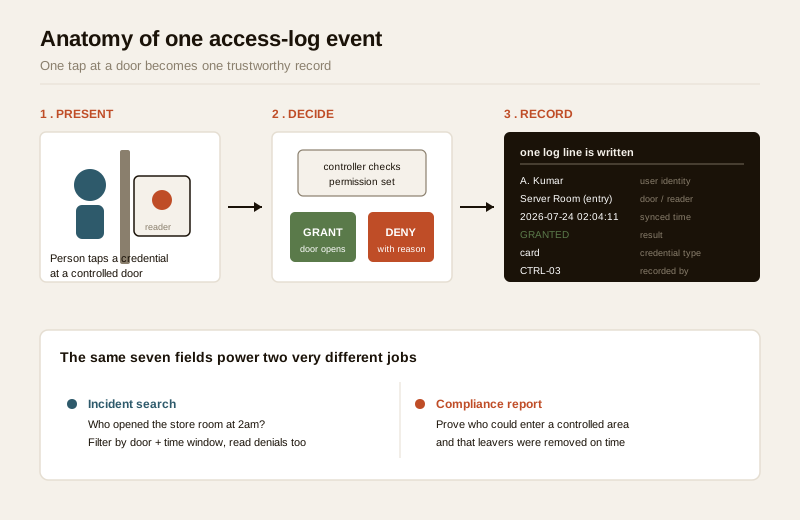
A log line is only as useful as the fields it records. A weak system logs "door opened." A good one records enough to reconstruct exactly what happened without guessing. Aim for these fields on every event:
| Field | What it records | Why it matters in an investigation |
|---|---|---|
| User identity | The named person (or credential ID mapped to a person), not just "card 0473" | Turns an anonymous badge into an accountable individual |
| Door / reader | Which specific door and which side (entry vs exit reader) | Distinguishes "entered the server room" from "walked past it" |
| Timestamp | Date and time to the second, from a synchronised clock, with time zone | The spine of every investigation; must match CCTV and other logs |
| Result | Granted or denied | Separates access that happened from access that was refused |
| Reason (on denial) | Why it was refused — unknown credential, valid credential/wrong door, outside schedule, expired, anti-passback | Denials are often the most revealing events (see below) |
| Credential type | Card, PIN, fingerprint/biometric, mobile, QR — and factor count | Flags credential misuse patterns and supports multi-factor review |
| Recording device | Which controller/reader logged it | Lets you spot a controller whose clock or feed has drifted |
Beyond per-door events, a mature system also logs administrative actions — a user being added or removed, permissions changed, a schedule edited, a door held unlocked, a manual emergency release fired, and (critically) who read or exported the log itself. These "meta" events are what let you trust the record: if someone can grant themselves access at midnight and no admin event appears, the trail has a hole.
Denials are the underrated half
Most people picture an audit trail as a list of doors opening. The denied events are often more useful. A cluster of denials on one door at 1am, a valid card repeatedly refused at a door it should never reach, or a departed employee's credential still being tried — these are signals a granted-only log would miss entirely. A good system records every refusal with its reason, and a good reviewer reads the denials, not just the grants. (This is about reading signals from your own log — never about probing someone else's system.)
Where the log lives
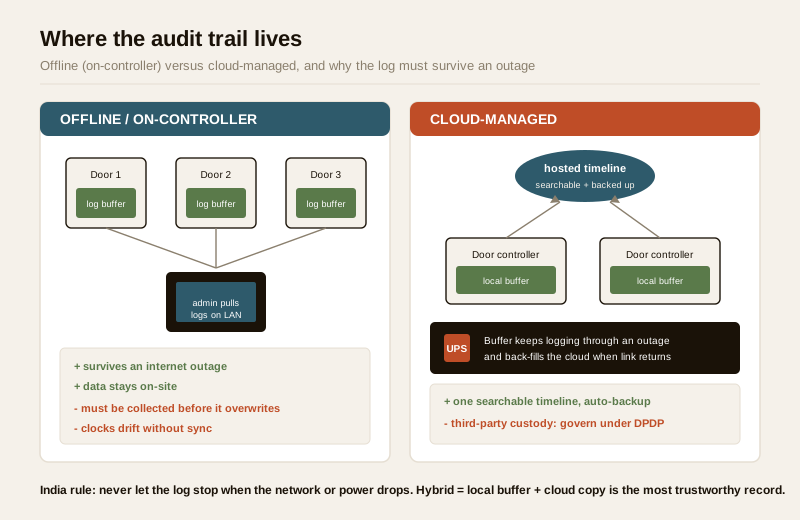
The single most important practical question is: where does the record physically sit, and does it survive the thing you are investigating? This is where the audit trail intersects directly with your cloud vs offline architecture.
| Where the log lives | How it works | Strengths | Cautions |
|---|---|---|---|
| On the controller (offline / local) | Each door controller stores events in local memory; an admin pulls them via software on the LAN | Works with no internet; log survives an internet outage; data stays on-site | Finite memory can overwrite oldest events if not collected; a controller failure can lose its buffer; clocks drift without sync; you must actively gather logs |
| Cloud-managed | Controllers push events to a hosted platform; the log is centralised and searchable from anywhere | One searchable timeline across all doors; automatic backup; instant remote review; usually cleaner time-sync | Depends on connectivity to upload (must buffer locally during an outage — see below); log sits on a third party's servers, raising DPDP data-location and processor questions |
| Hybrid (local buffer + cloud sync) | Controllers keep a local record AND sync to cloud when the link is up | Best of both: survives outages and centralises; no lost events | More components to specify and to secure; still a cloud copy to govern under DPDP |
The India reality decides much of this. Power cuts and patchy internet mean a pure-cloud audit trail that stops recording when the link drops is unacceptable — the controller must keep logging locally through an outage and back-fill the cloud when connectivity returns. Put controllers on a UPS so an event during load-shedding is still captured. For most sites, a hybrid — local buffer that survives the network, plus a cloud copy for search and backup — gives the most trustworthy record. See the cloud and offline guides for how each gathers and retains events.
Keeping the record trustworthy
A log is only evidence if it can be trusted. Two things above all make an audit trail credible: it is hard to tamper with, and its clock is right.
Tamper-resistance
You are never trying to make a log impossible to touch — you are trying to make any change visible and accountable. Specify a system whose logs are:
- Append-only to ordinary users. Day-to-day operators can read and export the trail but cannot edit or delete individual events. Deletion, if ever possible, should require the highest privilege and should itself write an audit event.
- Access-controlled and role-scoped. Reading the log is a privilege, granted through role-based access, not a right everyone with the app has. The fewer people who can read it, the more it is worth.
- Self-auditing. The act of reading or exporting the log is itself logged — the "log the readers of the log" principle. If you cannot tell who has been looking at the records, you cannot govern the records.
- Backed up. A local-only log on a single controller is one theft or fire away from gone. A synced or backed-up copy protects the very evidence you may need after an incident that damages hardware.
This guide will not describe how any log could be altered or how a credential could be defeated — that is out of scope by design. The point is defensive: buy a system that makes tampering hard and visible, and restrict who can touch it.
Time synchronisation — the quiet make-or-break
An audit trail lives or dies by its clock. If a controller's time is eleven minutes off, its events will never line up with your CCTV, with another building's log, or with a colleague's recollection — and a defence lawyer will drive a bus through the gap. Insist that:
- Every controller synchronises to a common time source (a network time server), not a hand-set clock that drifts.
- The same time source feeds your access system and your CCTV, so a door event and its video share one timeline.
- Time zone is recorded explicitly, and any clock change (including daylight handling, though India has none) is itself logged.
Get the clocks right on day one and the whole record becomes usable; get them wrong and every future investigation starts with an argument about whose time is correct.
Exporting a clean record for an incident
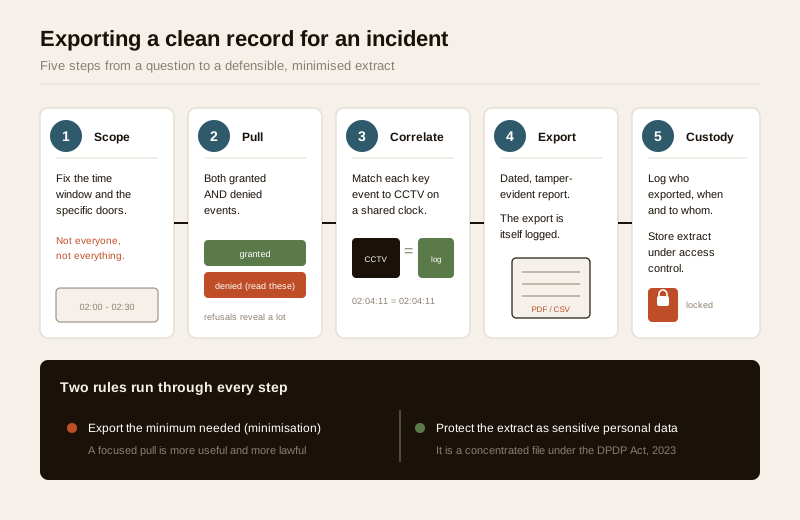
When something happens, the value of everything above is realised in one deliverable: a clean, defensible export you can hand to management, an investigator, or (rarely) the police. Do it methodically:
1. Fix the window and the doors. Decide the time range and the specific doors relevant to the incident. Resist the urge to export everything about everyone — a focused pull is both more useful and more lawful (minimisation).
2. Pull granted and denied events. The refusals often tell you as much as the entries.
3. Correlate with CCTV on a shared clock. For each key event, note the matching CCTV timestamp. A log line saying "A. Kumar, Server Room, granted, 02:04:11" paired with footage of the doorway at 02:04:11 is far stronger than either alone. This is why time-sync matters.
4. Export in a tamper-evident, readable form. A dated report (PDF/CSV) with the query parameters shown — which doors, which window, who ran it and when. The export itself should be an audited action.
5. Record the chain of custody. Who exported it, when, who received it, and why. Keep the raw system record intact; share only the relevant extract.
6. Store the extract under access control. The export is now a concentrated file of personal data — protect it at least as well as the live system.
The DPDP and ethics dimension — read this first, not last
Here is the point that must lead, not trail: an access-control audit trail is personal data. Under the Digital Personal Data Protection Act, 2023, a record of who went where and when — especially of employees, and especially when it involves biometric credentials or time-and-attendance data — is exactly the kind of information the Act is meant to protect. Holding it responsibly is not optional politeness; it is the price of running the system at all.
Principles to build into the specification and the house rules:
- Purpose limitation — the big one. Collect and use the log for security and safety, the purpose you told people about. Do not repurpose door events to police tea breaks, infer who talks to whom, rank staff by hours-at-desk, or otherwise micro-surveil people. An audit trail exists to answer "was this door misused?", not "is this employee working hard enough?" Mixing the two both breaks the law's purpose principle and destroys the trust the system depends on.
- Notice and lawful basis. Tell people the system exists, what it records, why, and for how long — clear signage and, for staff, a written policy. Where consent is the basis (particularly for employee biometrics), it must be genuine, not buried in a joining form.
- Data minimisation. Log the fields you need for security and no more. Do not collect richer personal data just because the reader can.
- Retention limits. Decide, in advance and in writing, how long log events are kept — long enough to investigate a delayed-discovery incident, short enough to respect the Act. Auto-purge past that window. Indefinite retention "just in case" is the opposite of what the Act asks.
- Restrict and log who can read. Reading the trail is a scoped role, granted to few, and every read/export is itself recorded. Log the readers of the log.
- Delete departed users properly. When a person leaves, revoke their credential and handle their historical events per your retention policy — a live credential for a former employee is both a security hole and a data-governance failure.
- Third-party / cloud custody. If the log sits with a cloud provider, they are processing personal data on your behalf — govern that relationship in writing (what they may access, where data sits, deletion on exit).
The through-line: the same log that makes a system accountable can, misused, become an instrument of surveillance. Specify it, and run it, so it does the first and never the second.
The one thing the log must never do: block egress
Because this is the most safety-critical section of the library, one clarification matters. An audit trail is a record; it has no say over whether a door opens in an emergency. A denied-or-granted log does not affect emergency egress, and it must not be allowed to. Any access-controlled door on an escape route must fail-safe — free exit on power loss and on a fire-alarm signal, with a manual release — governed by the fire code and coordinated as a licensed job, no matter what the software does. The log's only role here is to record that an emergency release or fire-triggered unlock happened, so the event is accounted for afterwards. Recording an emergency exit is good; impeding one is never acceptable.
When to bring in a professional. You can and should own the governance of the audit trail: what it captures, how long you keep it, who may read it, the retention and DPDP policy, and the incident-export procedure. Hand to licensed specialists the reader and controller fitting, the mains and network wiring, the fire-egress fail-safe interlock, and the time-sync and backup configuration. Use the access-control system designer to plan doors and the cost estimator to budget. For any regulated facility, take formal legal advice on lawful basis, notice and retention before go-live — this guide is not a substitute for it.
Key takeaways
- The log is what makes an access system accountable — it answers "who opened that door, when, and who was turned away," which is the whole point when an incident, dispute or audit arrives.
- Capture the right fields on every event: named user, specific door, synced timestamp, granted-or-denied, the reason for a denial, credential type, and the recording controller — plus administrative and "who-read-the-log" events. Read the denials, not just the grants.
- Mind where the log lives and keep it trustworthy: controllers must keep logging locally through internet and power outages (UPS + local buffer), sync clocks to one time source shared with CCTV, and make the log append-only, role-restricted and self-auditing.
- Export cleanly for an incident: scope the window and doors, pull granted and denied events, correlate with CCTV on a shared clock, produce a dated tamper-evident report, and record chain of custody — sharing the minimum needed.
- The audit trail is personal data under the DPDP Act, 2023: purpose-limit it to security (never micro-surveillance of staff or residents), give notice, minimise, set retention limits, restrict and log who reads it, and delete departed users — and never let the log interfere with fail-safe emergency egress.
References
- Digital Personal Data Protection Act, 2023 — access logs, visitor records and biometric/attendance data are personal (and often sensitive) data; observe lawful basis, notice, purpose limitation, minimisation, retention limits, restricted access and deletion, and govern any cloud processor in writing. Educational summary only, not legal advice.
- Manufacturer specifications — verify how a given access controller stores events, its local buffer size and overwrite behaviour, time-sync (NTP) support, tamper/audit features and export formats on the maker's own datasheet before specifying.
- National Building Code of India (SP 7) and local fire bye-laws, Bureau of Indian Standards — for the fail-safe egress, fire-alarm interlock and manual-release requirements that govern any access-controlled door on an escape route; verify the current edition via the BIS catalogue: https://www.services.bis.gov.in/
This is an educational overview, not legal advice. Reader/controller fitting, mains and network wiring, and the fire-egress interlock are qualified professional tasks — engage licensed installers, take formal legal advice on DPDP lawful basis and retention for regulated facilities, and verify any standard's current status via the BIS catalogue before relying on it.
Export this guide
Related Guides — Deep-dive reading
Access Control Maintenance in India (2026): Readers, Locks and Fail-Safe Egress
How to keep a card, keypad, fingerprint or face access-control system reading reliably and locking securely — and, above everything, how to test that its doors still release on a fire alarm and on power loss, so an access-controlled door never becomes a life-safety trap.
SecurityMulti-Factor Access Control in India (2026): Two-Factor Doors, Anti-Passback and Mantraps Done Right
What multi-factor access control means, the three factor categories, common two-factor combinations, and which high-security doors truly need them versus where a second factor just slows honest people down.
SecuritySecurity Fire Alarm Integration in India (2026): Smart Alerts, Certified Systems, Fail-Safe Egress
The most important sentence a smart-home designer can say about fire is also the least profitable: a smart-home smoke sensor or fire notification is a helpful add-on, not a substitute for a certified fire-alarm system. This guide draws the line hard — life-safety detection and alarm belongs to the NBC-governed certified system — and then covers the genuinely useful, correctly-scoped automations the smart layer can add on a verified fire signal: unlock for egress, open the gate for the fire tender, light the escape path, stop the away-scene, and notify everyone loudly. All of it fail-safe. None of it in the way of the system that actually saves lives.
SecurityRelated Tools — Try Free
Security System Cost Estimator
Estimate the all-in capex with GST, annual running cost and 5-year total cost of ownership of a home or building security system.
Cost EstimatorAccess-Control Battery-Backup Calculator
Size the standby battery so an access system keeps running through a power cut, with an egress life-safety note.
Battery BackupElectrical Safety & Load Audit
Home electrical audit — 10 categories, 65+ checkpoints across earthing, RCCB, MCB, wiring, switchboards, appliance circuits, DG/inverter backup.
Safety Audit