
Access Control Systems in India (2026): The Complete Guide
What an access control system really is, how it differs from a single smart lock, and how the credential-reader-controller-lock-software chain lets you manage who goes where and when, with a record and safe fire-egress.
Walk up to a glass door in a modern Indian office, tap a card or a phone, and the door clicks open. That small moment hides a whole system. The card is not talking to the lock; it is talking to a reader, which asks a controller, which checks a rulebook, unlocks the door, and writes a line in a log that says who went through, at which door, at what second. Multiply that across every door, lift, gate and turnstile in a building, across every employee, tenant, vendor and visitor, and you have access control — the discipline of managing who can go where, when, with a record.
This is the map guide for the access-control half of Studio Matrx's Smart Locks & Access Control hub. It explains what a system is, how it differs from a single smart lock, the chain of parts it is built from, and the decisions that shape a design — then points you to the deeper guides on credentials, topology, models, features and settings. Above all it leads with the one thing that makes access control the most safety-critical topic in the hub: these systems control the very doors people must escape through in a fire.
Scope & safety. This guide helps you plan, decide and coordinate an access-control system; the actual door hardware, mains and network wiring, and the fire-egress interlock are a licensed job for a security-systems integrator, electrician and fire-safety consultant working together. Any access-controlled door on an escape route MUST fail-safe — it must release on power loss and on a fire-alarm signal — integrate with the fire-alarm panel, and carry a manual emergency release (break-glass or request-to-exit). This is governed by the National Building Code and local fire code; never DIY it, never trap anyone, never block an escape route. Access logs and biometric templates are sensitive personal data under the Digital Personal Data Protection Act, 2023. This is educational guidance, not legal advice.
What access control actually is
An access control system is not a fancier lock. A lock answers one question at one door: is this key/code/finger allowed right now? An access-control system answers a richer question across many doors at once: is this person allowed at this specific door at this time of day on this day, and let us record the answer either way. That shift — from a device to a system with a directory of people, a rulebook, and a memory — is the whole idea.
Three capabilities define it:
- WHO — every person is a known identity holding a credential (a card, a fingerprint, a phone, a PIN, a QR code). The system has a directory; a stranger with no credential is simply unknown.
- WHERE and WHEN — permissions are granular. The housekeeping team may open the service lift lobby but not the server room; a contractor's card may work only 9am to 6pm on weekdays; a tenant's fob opens their own floor and the gym, nothing else.
- A RECORD — every grant and every denial is logged with person, door and timestamp. That audit trail is what lets you answer "who entered the store-room last night?" — something a mechanical lock can never do.
Access control versus a single smart lock
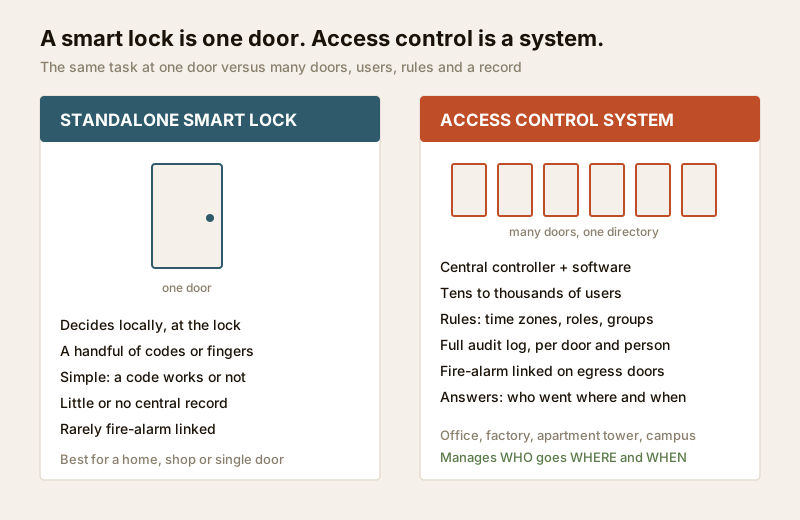
The single-door cousin of access control is the smart lock — and for a flat, a shop shutter or a home, a good smart lock is often the right answer, not a full system. The line between them is scale and central control:
| Standalone smart lock | Access control system | |
|---|---|---|
| Doors | One (or a few, unlinked) | Many, centrally managed |
| Who decides access | The lock itself, locally | A central controller + software |
| Users | A handful of codes/fingerprints | Tens to thousands, in a directory |
| Rules | Simple (a code works or it does not) | Time zones, roles, door groups, anti-passback |
| Record | Little or none | Full audit trail per door, per person |
| Fire-alarm link | Rare | Expected on egress doors |
| Typical setting | Home, single office door, shop | Office, factory, apartment tower, campus |
| Deeper guide | Complete guide to smart locks | This guide + the hub |
If you are choosing hardware for a single door — a PIN-code lock, a fingerprint lock, an RFID lock or an NFC/app lock — the smart-lock guides and the smart-lock selector are your tools. If you are managing many doors and many people with rules and records, you are in access-control territory, and this hub is where you should be. The two overlap: a networked smart lock can be a node in an access-control system.
The chain: how a system is built
Every access-control door, however grand the building, is the same five-link chain. Understanding it is understanding the whole discipline.
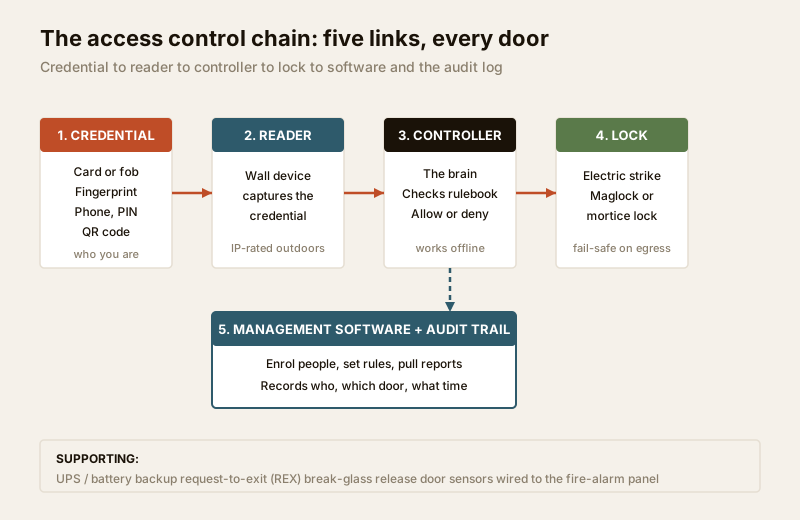
1. Credential — the thing that proves who you are. A proximity card or fob, a fingerprint or face, a phone (Bluetooth/NFC), a PIN, or a QR code. This is where most design choices start, and each method has its own guide (below).
2. Reader — the device on the wall that captures the credential and passes the read to the brain. Readers must survive Indian weather outdoors — heat, dust, monsoon — so an outdoor reader needs a proper IP rating and often a canopy.
3. Controller / panel — the brain. It holds the rulebook (who, where, when), makes the allow/deny decision, drives the lock, and records the event. Critically, a good controller keeps deciding even when the network or internet is down — vital given Indian connectivity and power realities.
4. Lock hardware — what physically holds the door: an electric strike, a magnetic lock (maglock), or a motorised/electrified mortice lock. The choice between fail-safe and fail-secure here is a life-safety decision, covered below.
5. Management software + audit trail — where an administrator enrols people, sets rules, pulls reports and reviews the log. It may run on a local server or in the cloud.
Around this core sit the supporting pieces: a power supply with UPS/battery backup (so a power cut does not silently disable or, worse, unsafely lock a door), request-to-exit (REX) sensors and emergency break-glass releases on the inside, door-position sensors, and the wiring that ties it to the fire-alarm panel.
The safety layer — read this before anything else
Access control is the most safety-critical topic in this hub for one blunt reason: these systems control the doors people run to in a fire. Get the credentials wrong and someone is inconvenienced. Get the egress wrong and someone can die. So this decides everything else.
Fail-safe versus fail-secure
The single most important electrical choice on an access-controlled door is what happens when the power dies:
| Fail-safe (fail-open) | Fail-secure (fail-locked) | |
|---|---|---|
| On power loss | Door unlocks | Door stays locked |
| Typical hardware | Magnetic lock (maglock) | Electric strike (many types) |
| Use on | Escape-route / fire-egress doors | Doors where security must survive an outage AND that are NOT on an escape route |
| Fire-alarm behaviour | MUST release on the alarm signal | Egress side must still free-exit mechanically |
| Life-safety rule | Required on egress | Never on a sole escape route |
The governing principle: no one may ever be trapped by a locked door on an escape route. In practice this means egress doors use fail-safe hardware (or free mechanical exit), are wired to drop open on a fire-alarm signal, and carry a manual break-glass / emergency door release and a request-to-exit device so a person can always leave without a credential. Access control legitimately restricts who can come in; it must almost never restrict who can get out.
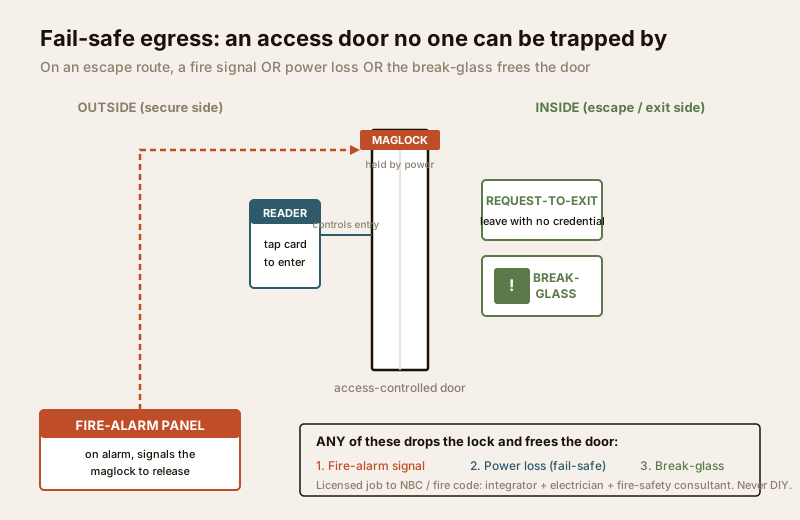
This wiring — the interlock between the access system, the door hardware and the fire-alarm panel — is not a DIY or generalist-electrician task. It is a coordinated job for a security-systems integrator, a licensed electrician and a fire-safety consultant, designed to the National Building Code of India and the local fire code, and signed off. The electrical hub covers the mains and backup side; the fire interlock itself must be engineered and inspected. If you take one thing from this guide, take this paragraph.
Power and India realities
An access-controlled door needs power to work and, on a maglock, power to stay locked — so a power cut has real consequences. Every design must plan for it: a UPS or battery backup sized to hold the controllers, readers and locks through a typical outage, chosen alongside the deliberate fail-safe behaviour above. Outdoor readers and gate hardware must also survive monsoon, dust and 45°C heat, so IP-rated enclosures and surge protection are not optional. Cloud-managed systems must keep working when the internet drops — which is why the controller, not the cloud, should make the moment-to-moment decision.
The decision axes — what shapes a design
Designing an access-control system is really a series of choices along a few axes. This guide introduces them; the linked guides go deep on each.
Credential method — how people prove who they are
The credential is where most people start, because it is what they touch. Each method trades convenience, cost, hygiene and security differently:
| Method | Feel | Watch-outs (buying cautions) | Deep guide |
|---|---|---|---|
| Card / fob (RFID) | Familiar, cheap, easy to issue | Insist on encrypted smartcards, not clonable low-frequency cards; cards get shared or lost | Card-based access control |
| Biometric | Nothing to carry or lose | Template is sensitive data (DPDP); needs liveness; dusty/wet fingers fail outdoors | Biometric access control |
| Mobile credential | Phone in pocket, easy remote issue/revoke | Depends on a charged phone and app; battery/OS edge cases | Mobile credential access |
| QR code | Great for visitors/one-time entry | Use dynamic/expiring QR, never a static reusable one | QR-code access control |
| PIN | No hardware to issue | Shared and shoulder-surfed easily; best as a second factor | PIN-code locks |
| Multi-factor | Two of the above (e.g. card + PIN) | For high-security doors; slower entry | Multi-factor access control |
A firm rule of the defensive stance: choose credentials for their strengths and mitigations, never study how to defeat them. Prefer encrypted smartcards over old clonable formats, dynamic QR over static, and liveness-checked biometrics — these are buying decisions, not hacking lessons.
Topology — where the brain lives
How the controllers connect shapes cost, resilience and who can manage the system. In brief (a dedicated guide goes deeper):
- Standalone — one door, one controller, programmed at the door. Cheapest; no central management or real audit trail. Really a step up from a smart lock.
- Networked (on-premise server) — controllers wired back to a local server running the management software. Full central control and audit; you own the data; needs IT and a UPS.
- Cloud-managed — controllers report to a cloud dashboard; manage from anywhere, no local server. Convenient across sites, but check what happens offline and where the data lives (DPDP).
- Offline / data-on-card — permissions written to the credential itself, for doors with no cabling (remote gates). Useful, but weaker audit and revocation.
Most Indian offices and apartment towers land on networked or cloud; the access-control system designer helps you sketch the topology and door count.
Model — how permissions are organised
Rather than granting every person to every door by hand, mature systems use a role-based model: define roles (Resident, Staff, Housekeeping, Vendor, Admin, Visitor), attach door-groups and time-zones to each role, and assign people to roles. Add a departing employee's exit and the whole thing stays sane. Concepts like anti-passback (a credential cannot be used to enter twice without exiting — a mitigation against sharing) and time zones live here. A deeper guide covers models and features.
Features — what the software does
The management layer is where access control earns its keep beyond the door:
- Visitor management — pre-registering guests, issuing a dynamic QR pass, a gate-to-flat approval flow (which is exactly where video door phones plug in).
- Time-and-attendance — using the same readers to log staff hours. Note: attendance data is also personal data under DPDP, with its own notice and consent duties, especially for employee biometrics.
- Audit trails and reports — the record of who went where and when, the reason the system exists, and a DPDP-governed asset in its own right.
- Integration — with CCTV (a door event pulls up the camera clip), lifts, alarms and the fire panel.
By setting — where it goes
The same chain is tuned very differently by place. A deeper by-setting guide covers each; in short:
| Setting | Typical shape |
|---|---|
| Apartment / society | Gate + lobby + lift + flat; resident fobs, visitor QR, VDP integration; RWA administers — see apartment security and gated communities |
| Office | Turnstiles + doors + server room; role-based, time-and-attendance, multi-factor on sensitive rooms — see commercial security |
| Lift | Floor-level restriction so a credential only calls permitted floors |
| Parking / gate | Long-range readers or ANPR, boom barriers, anti-passback |
| Turnstile | Flow control + tailgate deterrence in high-footfall lobbies |
For the whole-building picture — access control alongside CCTV, alarms and VDP — see the building security systems guide and the smart security systems guide.
Privacy: access data is sensitive under DPDP
Because an access-control system records who was where, when, and often holds biometric templates and staff attendance, it collects some of the most sensitive personal data in a building. Under the Digital Personal Data Protection Act, 2023, that carries duties you should design in from the start, not bolt on later:
- Lawful basis and notice — tell people what is collected and why; for employee biometrics, get genuine consent and offer a non-biometric alternative where you reasonably can.
- Minimisation and retention — collect only what the purpose needs, and set a retention period for logs and attendance rather than keeping them forever.
- Who administers — name who can see the logs and enrol/revoke people, and keep that list short.
- Deletion on exit — when an employee, tenant or visitor leaves, revoke their credential and delete their template and personal data per your retention rule. A departed person lingering in the directory is both a security and a privacy failure.
This is educational, not legal advice — for a specific deployment, take proper counsel.
Cost and getting started
Costs vary enormously with door count, credential choice, topology and whether you are retrofitting or building new. Rather than quote ranges that age badly, use the access-control cost estimator to sanity-check a quote, and the access-control system designer to sketch doors, readers and controllers before you brief an integrator. Broadly: the readers and locks are visible spend, but the controllers, cabling, backup power, fire interlock and software licensing are where budgets are really made or missed — and the fire-egress engineering is never the place to economise.
When to bring in a professional. You can and should plan and decide — count your doors, choose credential methods, pick a topology and write the rulebook. Hand the door hardware fitting, mains and network wiring, backup-power sizing, and above all the fire-alarm interlock and emergency-egress design to a licensed security-systems integrator, electrician and fire-safety consultant working together to the NBC and local fire code. Never let anyone install a maglock on an escape route without the fail-safe, fire-alarm drop and manual release engineered and inspected. Keep the administrator list short and set your DPDP retention and deletion rules before the first person is enrolled.
Key takeaways
- Access control is a system, not a lock — it manages who goes where, when, across many doors and users, with a central directory, a rulebook and an audit trail; a single smart lock is the single-door cousin.
- The chain is always the same five links — credential, reader, controller/panel, lock hardware, and management software with the audit log — plus backup power and the egress safety layer.
- Fire egress governs everything — access-controlled escape doors must fail-safe, release on a fire-alarm signal and on power loss, and carry a manual break-glass/REX release; this is a coordinated, licensed, NBC-governed job, never DIY.
- Choose credentials for strengths, not weaknesses — encrypted smartcards, dynamic QR, liveness-checked biometrics, multi-factor on sensitive doors; the credential guides go deep on each.
- Access data is sensitive under DPDP 2023 — logs, biometric templates and attendance need lawful basis, notice, consent (especially employee biometrics), minimisation, retention and deletion-on-exit; design it in from day one.
References
- Digital Personal Data Protection Act, 2023 — access logs, biometric templates and employee attendance are personal (often sensitive) data; establish lawful basis, notice, consent, minimisation, retention and deletion-on-exit before enrolling anyone.
- Manufacturer specifications — verify reader IP ratings, controller offline behaviour, maglock/electric-strike fail-safe versus fail-secure operation, and encryption standard of cards/credentials on the maker's own datasheet before specifying.
- National Building Code of India (SP 7) and the applicable state/municipal fire code — for escape-route hardware, fail-safe egress, fire-alarm interlock and manual release on access-controlled doors; verify the current edition via the BIS catalogue: https://www.services.bis.gov.in/
- Central electrical and life-safety codes for backup power and mains wiring of controllers, readers and locks — coordinate with a licensed electrician; see the electrical hub.
This is an educational overview, not legal or engineering advice. Door hardware, mains and network wiring, backup-power sizing and — above all — the fire-alarm interlock and emergency-egress design are qualified professional tasks; engage a licensed security-systems integrator, electrician and fire-safety consultant, and verify any standard's current status via the BIS catalogue before relying on it.
Export this guide
Related Guides — Deep-dive reading
Access Control Maintenance in India (2026): Readers, Locks and Fail-Safe Egress
How to keep a card, keypad, fingerprint or face access-control system reading reliably and locking securely — and, above everything, how to test that its doors still release on a fire alarm and on power loss, so an access-controlled door never becomes a life-safety trap.
SecurityOffline Access Control in India (2026): Standalone Locks That Work Without a Network
How standalone, non-networked access control works when the permission lives on the door or on the card, where offline is the right choice, how you manage it, and the honest trade-offs versus a live cloud system.
SecurityCard-Based Access Control in India (2026): RFID Cards, Readers, Controllers and the Audit Trail
How card-based access control actually works end to end, why old low-frequency cards are a security caution, how to issue and revoke cards, and how to keep every door fail-safe for fire egress.
SecurityRelated Tools — Try Free
Security Backup Power Calculator
Size a UPS/inverter and battery to keep CCTV, NVR, router and alarm running through a power cut — load, Ah, VA and cost.
Backup PowerSecurity System Cost Estimator
Estimate the all-in capex with GST, annual running cost and 5-year total cost of ownership of a home or building security system.
Cost EstimatorVideo Door Phone Type Selector
Answer a few questions about your building, cabling, budget and internet and get the right video door phone — analog / wired / wireless / IP, single-home or multi-apartment, monitor or app.
Door Phone Selector