
App-Controlled Locks in India (2026): What the Smartphone App Really Gives You
A homeowner's guide to app-controlled smart locks — the phone app as the control layer over a Bluetooth or Wi-Fi lock: digital keys, access logs, schedules and notifications, and the honest concerns of account security, data and app longevity.
An app-controlled lock is not really a separate kind of lock at all — it is a smart lock, Bluetooth or Wi-Fi, seen through the smartphone app that runs it. The app is the control layer: the screen where you lock and unlock, hand a guest a digital key that expires on Sunday night, glance at who opened the door and when, set the door to lock itself every night, and get a nudge on your phone the moment your child gets home. Where a keypad or a fingerprint is just one way to open one door, the app is the dashboard for the whole household's access.
That power is exactly why the app deserves a guide of its own. The convenience is real, but the app quietly changes what "front-door security" means: your door is now only as safe as your app account. This guide, part of Studio Matrx's smart locks and access control library and sitting under the complete guide to smart locks in India, explains in plain terms what the app actually gives you, and — just as honestly — the concerns you should lead with before you lean on it.
Scope, safety & who fits it. This guide helps you understand and use the app layer of a smart lock. The actual fitting to the door, any mains wiring, and — critically — any interlock with a fire alarm on an escape door is a coordinated licensed job for a door-hardware fitter, electrician and, where an egress route is involved, a fire-safety consultant. A lock on a door people escape through must never trap anyone, and must never block an escape route; a home door should always keep a mechanical key override plus an offline backup credential such as a PIN. App-account data and access logs are personal data under the Digital Personal Data Protection Act, 2023. This is educational guidance, not legal advice.
The app is the control layer, not the lock
It helps to separate three things that often get blurred together, because each is covered by a different guide in this library:
- The lock — the motorised bolt on the door and the credentials that open it (a PIN, a fingerprint, a card or fob, a phone).
- The connection — how the phone talks to the lock. Over short-range Bluetooth when you are at the door, or over Wi-Fi when the lock is on your home network. This decides whether the app can reach the lock only up close or from anywhere.
- The app — the control layer on top, the subject of this guide. The same app can drive a Bluetooth lock (working only near the door) or a Wi-Fi lock (working from your office), and to you the screen looks almost identical. What differs is reach, which is why we keep the Bluetooth, Wi-Fi and remote-access treatments separate.
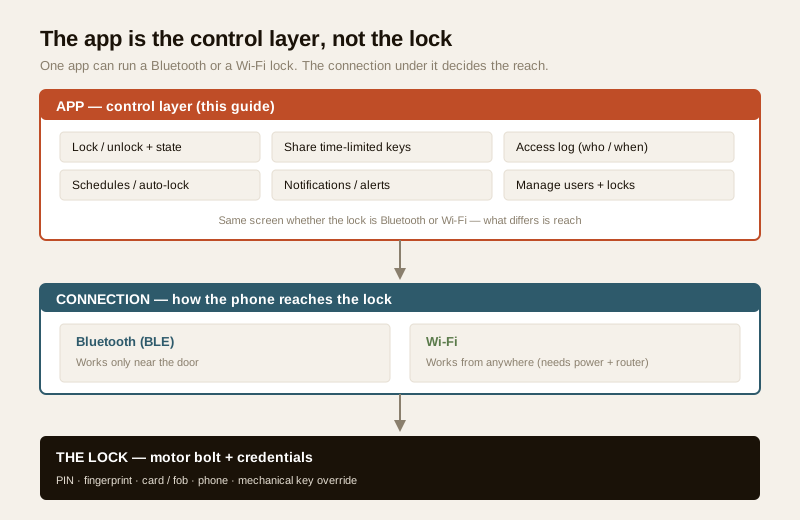
The practical takeaway: when you compare two locks, do not just compare the app screenshots. Ask what connection sits under the app, because that is what decides whether "unlock from anywhere" is real or only marketing.
What the app actually gives you
Here is the honest list of what a good smart-lock app does — the features that make the control layer worth having.
Lock and unlock from the phone
The obvious one: a tap in the app throws or releases the bolt. Over Bluetooth this works when you are at the door; over Wi-Fi it works from anywhere you have internet (the remote-access guide covers the away-from-home case in full). Most apps also show the current lock state — locked or unlocked — which answers the universal "did I lock the door?" question without a trip back home.
Share time-limited digital keys
This is the feature families actually fall in love with. Instead of cutting and handing over metal keys you can never get back, you grant a digital key inside the app to someone else's phone — and you decide the terms:
- Permanent for family members who live there.
- Recurring / scheduled for a house-help or cook — say, weekdays 8 a.m. to 11 a.m. only, so the key simply does not work outside those hours.
- One-time or short-window for a guest, a delivery, or a relative visiting for the weekend, expiring automatically afterwards.
Revoking a key is a single tap, unlike a copied key you can never retrieve. For an Indian household that regularly admits domestic help, a maid, a cook, a driver or a plumber, this is the single biggest day-to-day benefit — but it also carries the data responsibilities we come to below.
See an access log
The app keeps a log: who opened the door, with which credential, at what time. It is how you know the kids reached home safely, when the help came and left, or that a guest let themselves out. It is genuinely useful — and it is also a detailed record of people's movements, which is precisely why it is personal data to be handled with care.
Schedules, auto-lock and notifications
- Auto-lock — the door re-locks itself after a set time, so a door left ajar does not stay unlocked.
- Schedules — some credentials or the whole lock can follow a timetable.
- Notifications — a push alert when the door is unlocked, when a specific person enters, when the battery runs low, or when someone enters an incorrect PIN several times. These "someone-is-at-the-door" and "battery-low" nudges are often more useful than the unlocking itself.
Manage multiple users and multiple locks
For a family, the app is where you add and remove people, set who can do what (a full admin versus a family member who can only unlock), and — if you have a front door, a back door and a gate on the same system — manage them all from one screen. A larger building's needs go beyond a consumer app into proper access control, covered across the apartment and gated-community security guides.
To compare which credential and app style suits your door and household, the smart lock selector tool walks you through it in a few questions.
The honest concerns — read this before you rely on the app
The app's power cuts both ways. Lead with these concerns, not the features.
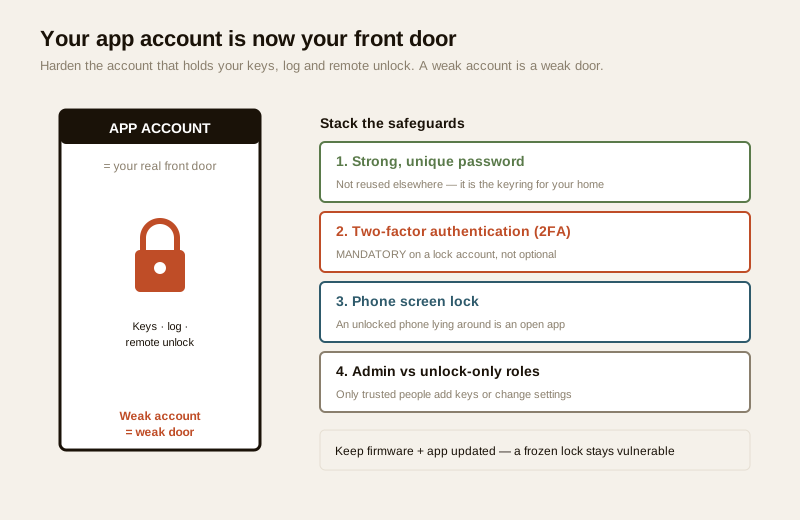
Your app account is now your front door
This is the one that changes everything. Once your keys, your log and your remote unlock live in an app account, a weak app account is a weak door. This is a defensive point, about hardening your own account — never about attacking anyone:
- Use a strong, unique password for the lock app — not one you reuse on other sites. Treat it as the keyring for your home, because that is what it is.
- Turn on two-factor authentication (2FA) wherever the app offers it, so a stolen password alone is not enough. On a lock account, 2FA should be considered mandatory, not optional.
- Secure the phone itself with a screen lock, since an unlocked phone left lying around is an open app.
- Review who is an admin. Only people you fully trust should be able to add keys and change settings; everyone else gets unlock-only access.
If you ever read that a particular budget lock's app has a known weakness, treat that as a reason not to buy it — the answer is always to choose a well-made, reputable, updated lock, never to tinker.
What data the app collects, and where it lives
An app-controlled lock is a data collector. Under the Digital Personal Data Protection Act, 2023 (DPDP Act), the access log and any biometric templates are personal data — and the log of who came and went, plus location if you enable geofence auto-unlock, is sensitive to the household. Handle it the way the Act frames it:
- Minimise. Enrol and share keys only with people who need access. Do not collect what you will not use.
- Know where it is stored. Prefer a lock that keeps a fingerprint template on the device, not in a cloud. Ask whether the log lives on the lock, on your phone, or on the maker's servers — and in which country.
- Geofence trade-off. "Auto-unlock as I arrive" needs your phone's location, sometimes continuously. It is convenient, but it is your movements being tracked; decide whether that trade is worth it, and turn it off if not.
- Consent and deletion. Tell family and help what is logged, and delete a departed helper's or guest's access and history when they no longer need it. An ex-employee or former tenant must be removed promptly.
The wider smart-home privacy picture goes deeper into living-with-the-data.
Dependence on the maker's app and servers
A lock you can only fully use through an app is a lock that depends on that app continuing to exist, work and be updated. Honest questions to ask before buying, especially of a budget brand:
- What happens if the company folds? A Bluetooth lock that also works purely on-device will keep opening from its keypad and key even if the app vanishes; a lock that leans entirely on a cloud service can lose remote features — or more — if the servers go dark. Favour a lock whose core opening does not require the cloud.
- Are there firmware and app updates? A reputable maker ships security updates for years. An unbranded bargain lock that is never updated is frozen with whatever flaws it shipped with. Keep both the firmware and the app updated, exactly as you would a phone.
- Longevity over sticker price. A slightly dearer lock from a maker likely to be around in five years can be the cheaper decision once you factor in support and updates.
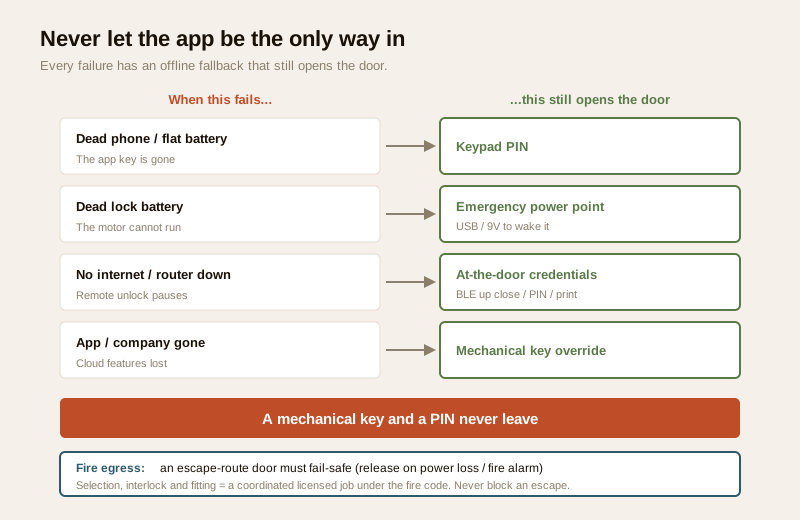
Dead phone, dead battery, no internet — always keep backups
The app must never be the only way in. Plan for the bad day:
- Dead phone or flat phone battery — a keypad PIN or a physical key still opens the door.
- Dead lock battery — respect low-battery alerts; most battery locks provide an emergency external power point (a USB or 9V contact) to wake a drained lock long enough to open it, and a mechanical keyway behind the fascia.
- No internet / router down — a power cut kills the router, so a Wi-Fi lock loses remote control during an outage; at-the-door methods (Bluetooth up close, PIN, fingerprint, key) still work. This is a key reason to never rely on remote unlock alone.
The rule of thumb: a mechanical key and a PIN never leave. They are the credentials that do not depend on a phone, an app, a company or the internet.
App feature checklist, at a glance
Use this to read a lock's app claims critically rather than at face value.
| App feature | What to check | Why it matters |
|---|---|---|
| Lock / unlock + state | Works over your chosen connection (BLE near door / Wi-Fi remote) | Decides whether remote control is real |
| Digital key sharing | Time-limited, recurring and one-time keys; instant revoke | The core benefit for households with help and guests |
| Access log | Where stored (device / phone / cloud); how long kept | It is a record of people's movements — personal data |
| Schedules / auto-lock | Auto-lock timer; per-user schedules | Stops a door being left unlocked |
| Notifications | Unlock, specific-person, low-battery, wrong-PIN alerts | Often more useful than the unlocking itself |
| Multi-user / multi-lock | Admin vs unlock-only roles; several doors on one app | Real family and multi-door management |
| Account security | 2FA available; strong-password enforced | Your account is your front door |
| Data / privacy | On-device biometric storage; geofence location control | DPDP Act compliance and household privacy |
| Updates | Firmware + app update history; brand longevity | A lock frozen at launch stays vulnerable |
Connection vs app — don't confuse the two
Because the same app can sit on very different locks, keep this distinction straight when you shop.
| The connection (Bluetooth vs Wi-Fi) | The app (control layer) | |
|---|---|---|
| Decides | Reach — near the door vs from anywhere | Features — keys, log, schedules, alerts |
| Covered by | Bluetooth, Wi-Fi, remote-access guides | This guide |
| The honest limit | BLE cannot reach from afar; Wi-Fi needs power + router | Account and data security become yours to manage |
| Key question | "Do I need to open the door while away?" | "Is my app account and its data properly hardened?" |
A well-chosen buy is usually multi-credential — app and keypad and a mechanical key on one door — so the phone is for convenience and the PIN or key is for when the phone or the app lets you down. If you want to see who is at the door before opening, that pairs the lock with a camera, covered in the video door phones with smart locks guide; this guide's lens is the app that runs the lock.
Fitting it into an Indian home
A few realities specific to India shape how you use the app.
- Sharing with domestic help and guests. The recurring digital key is tailor-made for a household that admits a maid, cook, driver or regular delivery — grant a weekday-morning key, revoke it the day someone leaves, and keep the log to the household. Explain to help what is recorded.
- Power cuts and the router. A cut takes the router down, so any remote app control pauses until power and internet return; at-the-door methods carry on. Plan around it rather than being surprised by it.
- App longevity for budget brands. India's shelves carry many unbranded value locks. The bargain that saves a few thousand rupees today can cost you if its app is abandoned — weigh brand longevity, not just the sticker.
- Heat, dust and monsoon. The lock's electronics face summer heat, dust and monsoon humidity on an outward door; choose a lock rated for the exposure and shelter it under an overhang.
- Price bands (indicative). Ballparks to sanity-check a quote, not fixed rates.
| Tier | Typical price (₹) | What the app layer gives you |
|---|---|---|
| Entry app-controlled (Bluetooth) | ₹4,000 – ₹9,000 | Basic app: unlock near door, simple key sharing, maybe a short log |
| Mid multi-credential | ₹9,000 – ₹18,000 | Time-limited + recurring keys, richer log, schedules, notifications, 2FA |
| Premium Wi-Fi / bridge-ready | ₹18,000 – ₹40,000+ | Full remote control, multi-lock management, robust updates, on-device biometrics |
When to bring in a professional. Choosing the lock and setting up its app is yours to do. The fitting to the door, any mains wiring, and any fire-alarm interlock on an escape door is a coordinated licensed job — a door-hardware fitter with an electrician, and a fire-safety consultant where an egress route is involved. An escape-route door must be planned to fail-safe (release on power loss or fire alarm) and is governed by the National Building Code and local fire rules; never place a lock so it can block an escape, and always keep a mechanical override. See the electrical hub and the smart-locks sub-hub for how these pieces coordinate.
Key takeaways
- An app-controlled lock is a smart lock seen through its phone app — the control layer that lets you lock and unlock, share time-limited digital keys, read an access log, set schedules and auto-lock, get notifications, and manage multiple users and locks.
- The app is not the same as the connection underneath it: check whether Bluetooth (near the door) or Wi-Fi (from anywhere) sits below, because that, not the app screenshot, decides real reach — see the Bluetooth, Wi-Fi and remote-access guides.
- Your app account is now your front door: a strong unique password and 2FA are mandatory, keep firmware and the app updated, and give only trusted people admin rights — a weak account is a weak door.
- Access logs and biometric templates are personal data under the DPDP Act, 2023: minimise what you collect, prefer on-device storage, weigh the geofence location trade-off, and delete a departed helper's or guest's access promptly.
- Never let the app be the only way in — a mechanical key and a PIN never leave, covering a dead phone, dead battery, no internet, or an abandoned app; and on an escape-route door, selection, fail-safe behaviour and fitting are a coordinated licensed job.
References
- Digital Personal Data Protection Act, 2023 — access logs and biometric templates are personal (and, for biometrics, sensitive) data; obtain consent, give notice, minimise collection, prefer on-device storage, set retention, and delete a departed user's access and history.
- Manufacturer specifications and datasheets — verify the specific lock and app: 2FA availability, firmware and app update policy, where the access log and biometric template are stored, geofence/location handling, emergency-power provision and the mechanical-override keyway, on the maker's own datasheet before buying.
- National Building Code of India (SP 7), Bureau of Indian Standards, and local fire and municipal bye-laws for the fire-egress, fail-safe and any electrical aspect of an escape-route door; verify the current edition via the BIS catalogue: https://www.services.bis.gov.in/
This is an educational overview, not legal advice. Lock fitting, mains wiring, and any fire-alarm interlock on an escape door are qualified professional tasks — engage licensed door-hardware, electrical and fire-safety professionals, and verify any standard's current status via the BIS catalogue before relying on it.
Export this guide
Related Guides — Deep-dive reading
Access Control Maintenance in India (2026): Readers, Locks and Fail-Safe Egress
How to keep a card, keypad, fingerprint or face access-control system reading reliably and locking securely — and, above everything, how to test that its doors still release on a fire alarm and on power loss, so an access-controlled door never becomes a life-safety trap.
SecurityFire-Egress Compatibility for Smart Locks in India (2026): Never Trap Anyone
How to make sure a smart lock or access-controlled door on an escape route always lets people out in a fire or emergency: fail-safe hardware, free egress, fire-rated doors, and the fire-alarm interlock.
SecuritySecurity for People Living Alone in India (2026): Calm, Practical Habits When There Is No Second Person to Notice
Living alone is an ordinary and growing part of Indian life - the student in a new city, the working single, the elder whose children are abroad, the person after a separation. It does not call for fear. It calls for a few deliberate habits, because there is no second person in the home to notice trouble, raise the alarm, or catch an accident. This is calm self-reliance, layer by layer.
SecurityRelated Tools — Try Free
Access-Control Battery-Backup Calculator
Size the standby battery so an access system keeps running through a power cut, with an egress life-safety note.
Battery BackupVideo Door Phone Feature Selector
Tick what you want the door phone to do — app, night vision, two-way audio, smart lock, access control or facial recognition — and get the features and integrations to spec, with the privacy and safety caveats.
Feature SelectorApartment Video Door System Planner
Enter flats, entrances, floors and guard desk for a first-pass building intercom plan — door stations, indoor monitors, guard station, the right architecture and an indicative cost band.
Building Planner