
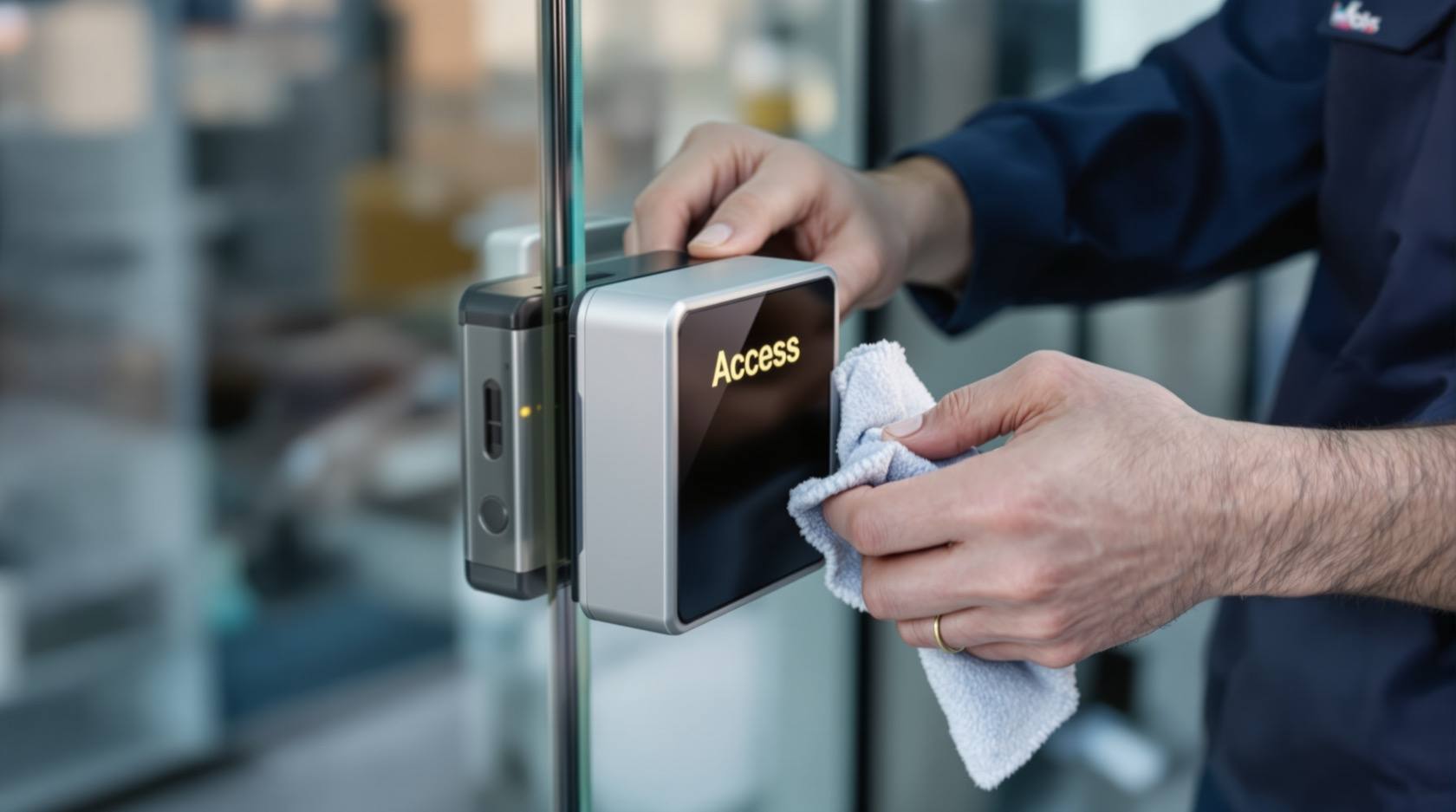
Access Control Maintenance in India (2026): Readers, Locks and Fail-Safe Egress
How to keep a card, keypad, fingerprint or face access-control system reading reliably and locking securely — and, above everything, how to test that its doors still release on a fire alarm and on power loss, so an access-controlled door never becomes a life-safety trap.
An access-control system can fail in two opposite and equally serious ways, and good maintenance guards both directions at once. It can fail closed — a reader that will not read, a lock that will not release, a flat backup battery — and now a staff member is stranded outside a door, or worse, a person is trapped behind a locked door during a fire or a power cut. Or it can fail open — a lock that no longer holds, a strike worn loose, an ex-employee's card still live in the database — and now the door that is supposed to keep people out simply does not. A neglected access-control door is therefore both a security hole and a life-safety trap, sometimes on the very same door.
The single most important truth in this whole subject is this: an access-controlled door on an escape route must release on a fire alarm and on loss of power, every time, and this must be tested — not assumed. Everything else in this guide — cleaning readers, aligning locks, adjusting closers, auditing credentials — matters, but nothing matters more than the door letting people out when it must. A picker, a guest, a child, a wheelchair user must never be sealed behind an electric lock because a battery failed or a fire relay was never tested. Maintenance is how you keep that promise.
This is a professional upkeep guide: what to check, how often, what a fault looks like, what a facility person may safely do and what belongs strictly to a qualified technician. It sits under the security-system maintenance pillar; for the standalone battery-and-motor locks on individual doors see smart lock maintenance, and for keeping the who-went-where records honest see access control audit trails.
Scope & safety. This is a maintenance and testing guide for facility managers, IT and security teams and their AMC contractors — not an installation manual and not a buying guide (for choosing a system see how to choose access control). A facility person can safely clean readers, check indicator lights, keep a logbook, audit the user list and — with a clear procedure — press the test buttons that prove egress works. Mains electrical work, lock alignment and replacement, door-closer and controller work, and any change to how a door behaves on fire or power loss are strictly for a qualified technician. Fail-safe egress is life-safety and is governed by the National Building Code (NBC = SP 7:2026) — escape-route doors must release on alarm and power loss; that testing is not optional. Biometric templates and access logs are personal and sensitive data under the DPDP Act 2023. This is not a price guide; budget for an AMC, but no fabricated figures here.
What an access-control door is actually made of
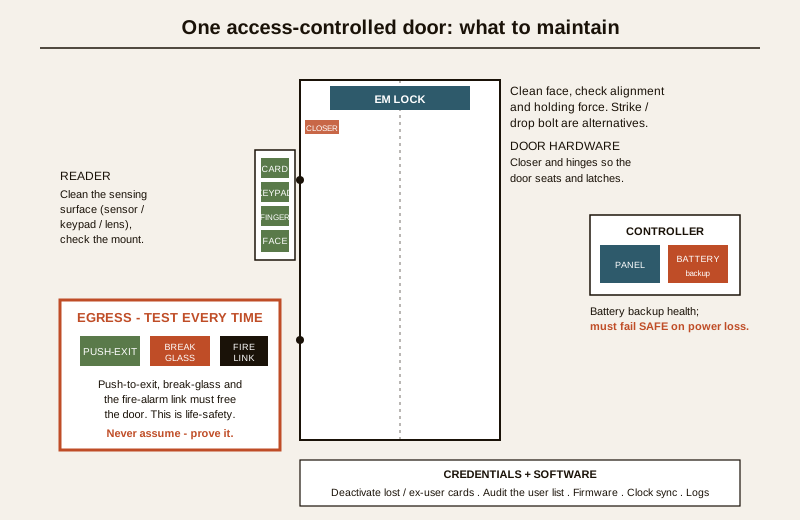
You cannot maintain what you cannot name. Every access-controlled door is a small chain of parts, and the chain is only as strong as its weakest, dirtiest or flattest link:
- The reader — the card, keypad, fingerprint or face unit that decides who is asking. It has to read cleanly and be mounted solidly.
- The electric lock — an electromagnetic (EM) lock, an electric strike, or a drop/dead bolt that physically holds the door. It has to align, seat and hold — and release the instant it is told to.
- The door hardware — the closer, hinges and frame that bring the door back to exactly the right position so the lock can catch. A sagging door or a lazy closer defeats a perfect lock.
- The controller and power — the panel that makes the decision, and the mains-plus-battery supply that feeds it. On an escape route the design must make the door fail safe (unlocked) when power is lost.
- The credentials and software — the database of who is allowed, the firmware, and the clock. A live card for a person who left is a hole; a wrong clock makes every log useless.
- The egress devices — the push-to-exit button, the emergency break-glass or door-release, and the fire-alarm interface. These are the life-safety layer, and they are tested every single time.
The reader — keep it reading
A reader that misreads is the commonest daily complaint, and usually the easiest to fix. The failure modes differ by type, but the discipline is the same: keep the sensing surface clean and the unit firmly mounted.
- Card and fob (RFID/proximity) readers rarely have an exposed sensor to clean, but a grimy or cracked faceplate, a loosened mount, or a nearby new metal fixture or interference source can shorten read range. Wipe the face, confirm it is solid on the wall, and confirm the read/beep and indicator light behave.
- Keypad readers collect finger grease and dust in the key gaps; worn or sticky keys cause missed or double digits. Wipe them; report keys that no longer click cleanly.
- Fingerprint readers depend entirely on a clean sensor. A film of oil, dust or a scratch on the platen is the number-one cause of "it does not recognise me". Clean the sensor gently with the cloth the maker specifies, never a solvent or an abrasive that will scratch it. Re-enrolling a stubborn finger is a software task, not a hardware one.
- Face readers need a clean lens and, just as importantly, the environment they were commissioned in — a camera blinded by afternoon glare, a moved light, or a lens filmed with dust will fail to match. Clean the lens; if reads dropped after nothing was cleaned, suspect lighting or a knocked mount and call the technician.
A facility person can safely do all of this cleaning and the visual mount check. What they should not do is open a reader, re-run wiring, or re-aim a face unit — that is technician work.
The electric lock — align, hold, release
The lock is the muscle, and it wears. Three lock families dominate Indian installations, each with its own upkeep.
- Electromagnetic (EM) locks. The magnet face and the armature plate on the door must meet flat and clean. Dust, paint flecks or a thin rust film between them reduces holding force — the door reads as locked but a firm push pops it. Wipe both faces (power isolated for anything more than a light wipe), and check the armature is not loose on the door and that the door closes squarely onto the magnet. A buzzing or warm lock, or one that no longer holds a solid pull, is a service call.
- Electric strikes. The moving keeper in the frame is a mechanical part that wears and can jam. A strike that buzzes but the door will not push open, or that rattles loose, needs a technician to align or replace it. Never file or force a strike.
- Drop bolts / dead bolts. The bolt must drop fully into a clean, aligned receiver. A sagging door misaligns the receiver so the bolt catches the edge or will not drop; forcing it wears the mechanism. Alignment is a technician task.
The through-line: cleaning the visible lock face is DIY-safe; alignment, holding-force problems, and any replacement are professional. And on any escape-route door, whatever the lock, the non-negotiable is that it releases instantly on command — tested below.
The door hardware — so the lock can do its job
A perfect lock on a badly hung door fails anyway, because the door never presents itself squarely for the lock to catch. This is the most under-maintained part of an access-controlled opening.
- The door closer must bring the door fully closed and latched at the right speed — not slam, not stall halfway leaving the door ajar and unlocked. Closers drift out of adjustment and leak oil with age. A door left standing open because the closer gave up is an open door, whatever the access system thinks.
- Hinges that sag or bind drop the door out of alignment with the strike or magnet. Squeal and drag are early warnings.
- The frame and seals should let the door seat flush so the lock engages fully.
Closer adjustment and hinge work are technician tasks — they involve tensioned mechanisms and the door's fire and self-closing rating on rated openings. A facility person's job here is to notice and report: a door not latching, standing ajar, dragging, or slamming.
The controller and power — fail safe on loss
This is where the life-safety logic lives, and where the most dangerous quiet failure hides: the backup battery.
- Battery backup health. The controller's standby battery is what keeps the system sane through a power cut — and, on doors designed to hold during an outage, keeps them controlled. Batteries age and lose capacity silently; a battery that tests fine at full charge may collapse under load. Have the technician load-test batteries on the AMC schedule and replace them on age, not just on failure. A flat battery discovered the night it mattered is the classic, avoidable disaster.
- Fail-safe versus fail-secure — get this right per door. On an escape route, the correct and code-driven behaviour is fail-safe: the lock unlocks when power is lost, so no one is ever trapped by a power cut. (Non-egress doors may be fail-secure by design, but never an exit that people must use to leave.) This is a design decision, not a maintenance change — but maintenance must verify each escape-route door still fails safe, because a swapped power supply or a rewired lock can silently invert the behaviour. If in any doubt about a door's fail mode, treat it as a fault and call the technician.
- Clean power and connections. Loose terminals, a failing power supply, and heat in the cabinet cause intermittent, maddening faults. This is technician territory — mains-adjacent work is never DIY.
Fail-safe egress — the test you never skip
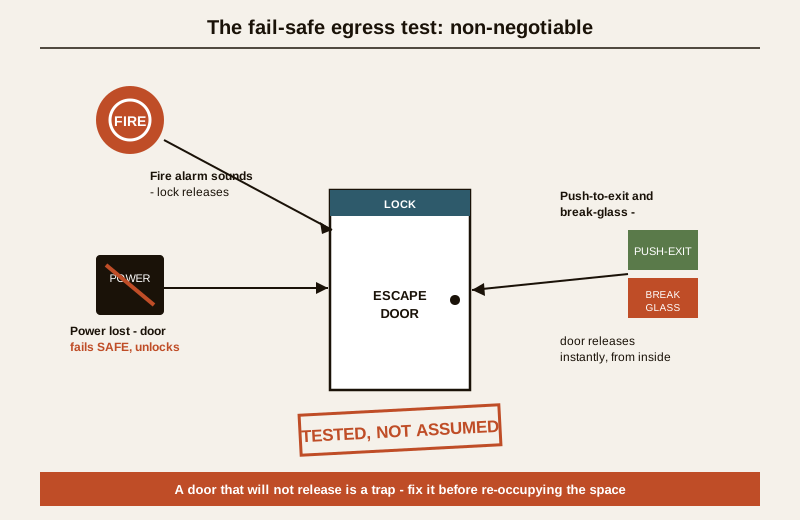
This is the heart of the guide. On every access-controlled door on an escape route, three things must be true and must be tested on a schedule, not assumed:
1. It releases on the fire alarm. When the building's fire alarm sounds, the access-control interface must drop the lock and free the door. Test this as part of the fire-alarm test, with the fire team, and log the result.
2. It releases on loss of power. Cut power to that door's lock (through the proper isolation, done with or by the technician) and confirm the escape-route door unlocks. If it stays locked, that is a life-safety emergency — stop and fix it.
3. The manual egress devices work. The push-to-exit / request-to-exit button must release the door, and the emergency break-glass or mechanical door-release must drop the lock immediately and obviously, from the inside, with no card and no delay. Press them and watch the door free.
Life-safety — do not skip, do not shortcut. A door that will not release on fire, on power loss, or on the break-glass is not a "maintenance backlog item"; it is a trap, and it must be corrected before the space is occupied again. NBC (SP 7:2026) governs means of egress; escape doors must be openable from the inside without a key, code or card, and access control must never override that. Pressing and proving the exit devices is a task a facility person can and should do routinely; anything that involves cutting power, rewiring the fire relay, or changing a door's fail mode is done by or with the qualified technician. When these interlock behaviours are what you are checking, this is the single most important test on the whole system.
Credential hygiene — the database is a door too
The neatest lock in the world is open if the wrong person still has a valid card. Credential maintenance is upkeep just as much as cleaning a reader.
- Deactivate lost, stolen and ex-user credentials immediately. A lost card or a departed employee whose access is still live is an unlocked door that no one can see. De-provisioning must be as prompt and reliable as the HR exit process — ideally driven by it.
- Audit the user list on a schedule. Periodically reconcile the access database against the real, current roster: every active credential should map to a person who should still have that access, at that door, at those times. Stale accounts, shared cards and "temporary" access that never expired are the rot. This ties directly to the access control audit trails discipline — the logs tell you who actually used a door, and the user audit tells you who still can.
- Keep the privileged list short. Administrator and master credentials that can add users or disable locks deserve the tightest control and the most frequent review.
Software, firmware and the clock
- Firmware and software updates. Controllers, readers and the management software receive security and reliability updates. Apply them on a considered schedule (test first where you can), because an unpatched controller is a cyber-exposed controller. This is generally a technician or IT task.
- Time synchronisation. Every controller and reader must share the correct time, kept in sync (NTP or the platform's own sync). If the clocks drift, time-based access rules misfire and — critically — the audit log timestamps become unreliable, undermining any investigation. A wrong clock quietly corrupts every record.
- Configuration backup. Keep a current backup of the access configuration and the user database so a controller failure does not mean rebuilding everyone's access from memory.
The log and audit review
Reviewing the system's own records is maintenance, because the logs surface faults you would otherwise miss: a door forced open, a reader logging repeated failed reads (dying reader or a probing attempt), a door held open too long, a lock that reports faults. Skim the event and alarm logs on a regular cadence and act on the exceptions. Under the DPDP Act 2023, remember that these access logs and any biometric templates are personal and sensitive data: restrict who can view them, keep them only as long as needed, and handle them carefully during any maintenance or export. The audit trails guide covers reading these logs properly.
Signs of trouble — catch it before it strands someone
- Slow, intermittent or failed reads — dirty sensor (especially fingerprint/face), loosened reader, interference, or a dying unit.
- Door will not latch or stands ajar — a tired closer, sagging hinges, or misalignment; the door is effectively unlocked.
- Door will not release on the exit button, break-glass, fire alarm or power loss — a life-safety emergency; stop and fix.
- Weak or dead backup — the system dies or a door misbehaves in a power cut; battery load-test and replace.
- Lock buzzes but door will not open, or holds weakly / pops on a push — worn or misaligned strike, or a dirty/loose EM face losing holding force.
- Log gaps, wrong timestamps, or a flood of failed reads — clock drift, a failing reader, or a door being probed.
A maintenance schedule
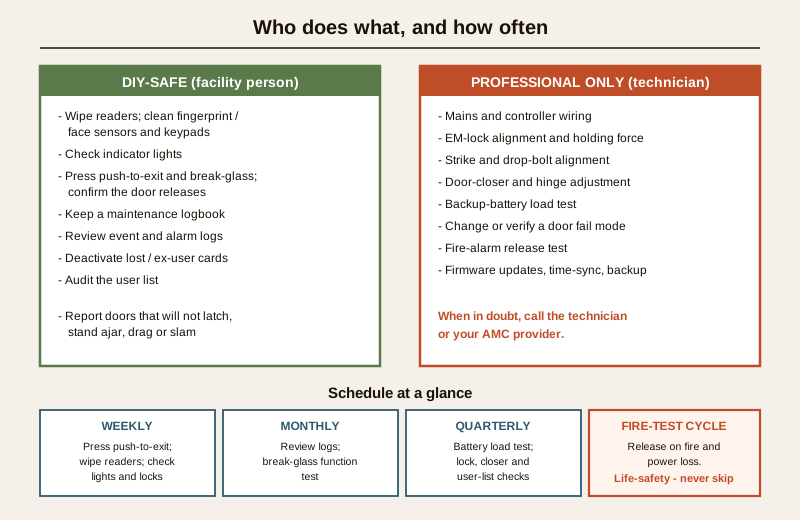
Frequencies are a sensible default; a high-traffic entrance, a harsh or dusty environment, or a statutory fire regime will pull tasks more often. Set the exact cadence with your AMC provider.
| Task | Frequency | Who |
|---|---|---|
| Press push-to-exit / request-to-exit on key doors; confirm release | Weekly | Facility (DIY-safe) |
| Wipe reader faces; clean fingerprint/face sensors and keypads | Weekly to monthly | Facility (DIY-safe) |
| Check indicator lights, listen for buzzing/warm locks, note ajar or dragging doors | Weekly | Facility (DIY-safe) |
| Review event and alarm logs for forced/held/failed-read exceptions | Monthly | Facility / security team |
| Deactivate lost, stolen and departed-user credentials | Immediately, on event | Facility / IT |
| Break-glass and emergency door-release function test | Monthly to quarterly | Facility with technician |
| Fail-safe egress test: release on fire alarm and on power loss, per escape door | On the fire-test schedule (with fire team) | Qualified technician |
| Backup-battery load test and age-based replacement | Quarterly / per AMC | Qualified technician |
| EM-lock holding-force check; strike and drop-bolt alignment | Quarterly / per AMC | Qualified technician |
| Door-closer and hinge adjustment; door seats and latches squarely | Quarterly / per AMC | Qualified technician |
| Firmware/software updates; time-sync verification; config backup | Per AMC / on release | Technician / IT |
| Full user-list audit against current roster | Quarterly to half-yearly | Facility / security team |
For the whole-property version of this table across every security subsystem, use the security maintenance calendar, and coordinate access-control upkeep with the rest via the maintenance sub-hub.
DIY-safe versus professional — the split
A facility person can safely: clean reader faces, fingerprint and face sensors, and keypads with the right cloth; check indicator lights and listen for buzzing or warm locks; notice and report doors that will not latch, stand ajar, drag or slam; press the push-to-exit and break-glass devices to confirm the door releases; keep a maintenance logbook; review event logs; deactivate lost, stolen and ex-user credentials; and run the periodic user-list audit.
Strictly for a qualified technician: any mains or controller wiring; EM-lock alignment and holding-force diagnosis; electric-strike and drop-bolt alignment or replacement; door-closer and hinge adjustment; backup-battery load testing and replacement; cutting power to test a door's fail mode; changing or re-verifying whether a door is fail-safe or fail-secure; the fire-alarm release test; and firmware updates. When any check touches how a door behaves on fire or power loss and you are not certain, treat it as a fault and call the technician or your AMC provider. Never leave an escape-route door in an untested or non-releasing state.
A short checklist
- Readers wiped, fingerprint and face sensors clean, keypads working; mounts solid.
- Locks clean and holding; no buzzing, warm or weak locks; strikes and bolts seating.
- Doors closing, latching and locking squarely; closers and hinges healthy.
- Backup batteries load-tested and in date; controller cabinet cool and tidy.
- Every escape-route door proven to release on the fire alarm and on power loss, and the push-to-exit and break-glass proven to release it — tested, logged, not assumed.
- Lost/stolen/ex-user credentials deactivated; user list reconciled to the current roster.
- Firmware current, clocks in sync, configuration backed up, logs reviewed; personal and biometric data handled per DPDP.
Key takeaways
- An access-control system fails two ways — a door that will not open and a door that will not lock; maintenance protects both, and the two can appear on the same door.
- Fail-safe egress is the non-negotiable — every escape-route door must release on a fire alarm and on power loss, and the push-to-exit and break-glass must free it instantly; test it, log it, never assume it (NBC = SP 7:2026).
- The reader lives or dies on a clean sensor — especially fingerprint and face units; wiping them is the highest-value DIY task.
- Locks, closers and hinges are a chain — a perfect lock on a sagging door still leaves it open; report doors that will not latch.
- Backup-battery health is the classic quiet failure — load-test and replace on age, so the system does not die the night it matters.
- Credentials are doors too — deactivate lost and ex-user cards at once and audit the user list on a schedule.
- The split is clear — cleaning, checking, testing egress and auditing users are DIY-safe; electrical, lock-alignment, closer and fail-mode work are technician-only.
Where to go next
- Security-system maintenance guide — the pillar this sits under, covering every subsystem's upkeep.
- Smart lock maintenance — the standalone battery-and-motor locks on individual doors.
- Access control audit trails — reading the logs and keeping the who-went-where record honest and DPDP-safe.
- How to choose access control — the buying-and-specifying companion to this upkeep guide.
- Security maintenance calendar and the maintenance sub-hub — coordinating access-control upkeep with the rest of the property.
- The smart locks and access control sub-hub and the main security hub.
References
- National Building Code of India (SP 7), Bureau of Indian Standards — means of egress, exit doors openable from the inside without special knowledge or a key, and the requirement that access control never impede escape. Verify the current edition (SP 7:2026) via the BIS catalogue: https://www.services.bis.gov.in/
- Digital Personal Data Protection Act, 2023 — access-control event logs and biometric templates are personal and sensitive data; agree in writing who may view them, retention periods, and how they are protected during maintenance and export.
- Manufacturer maintenance instructions for the specific readers, EM locks, electric strikes, controllers and battery-backup units installed — follow the maker's cleaning agents, load-test intervals and replacement schedules; they govern where this generic guide is silent.
This is an educational upkeep and testing overview for facility managers, security and IT teams and their AMC contractors — not legal advice, an installation manual or a price guide. Fail-safe egress and all life-safety functions take priority over any lock; escape-route doors must release on fire and power loss per NBC (SP 7:2026). Engage a qualified technician for all electrical, lock-alignment, door-closer, fail-mode and fire-interlock work, handle access and biometric data per the DPDP Act 2023, and verify any standard's current status via the BIS catalogue before relying on it.
Export this guide
Related Guides — Deep-dive reading
Emergency Lighting Testing in India (2026): The Function Test, the Duration Test and the Battery That Quietly Dies
Emergency lighting is what gets people out of a building in a power cut or a fire — and it is useless if its batteries have silently gone flat. This professional guide covers what emergency lighting is, the two tests that keep it honest (the short frequent function test and the longer periodic duration test that catches dying batteries), what to test across escape routes, stairs and exit signs, the statutory test log, and the safe split of who does what.
SecurityAccess Control Testing Checklist for India (2026): Every Door Opens and Locks as Designed
A ready-to-adapt per-door and system checklist to verify an access-control installation at commissioning and as a periodic check, with the egress and fire-to-release life-safety tests that must always pass before sign-off.
SecurityEmergency Door Release in India (2026): The One Device You Never Defeat
The break-glass unit or green exit button that instantly unlocks any access-controlled door so people can escape, working even when the controller, network or software has failed.
SecurityRelated Tools — Try Free
Access-Control Battery-Backup Calculator
Size the standby battery so an access system keeps running through a power cut, with an egress life-safety note.
Battery BackupBiometric-Capacity Calculator
Whether a biometric reader can hold all the enrolments and how many devices you need, with a 1:N speed note.
Biometric CapacityEmergency-Egress Checker
A life-safety self-check that access-controlled doors on escape routes still let people out in an emergency.
Egress Check