
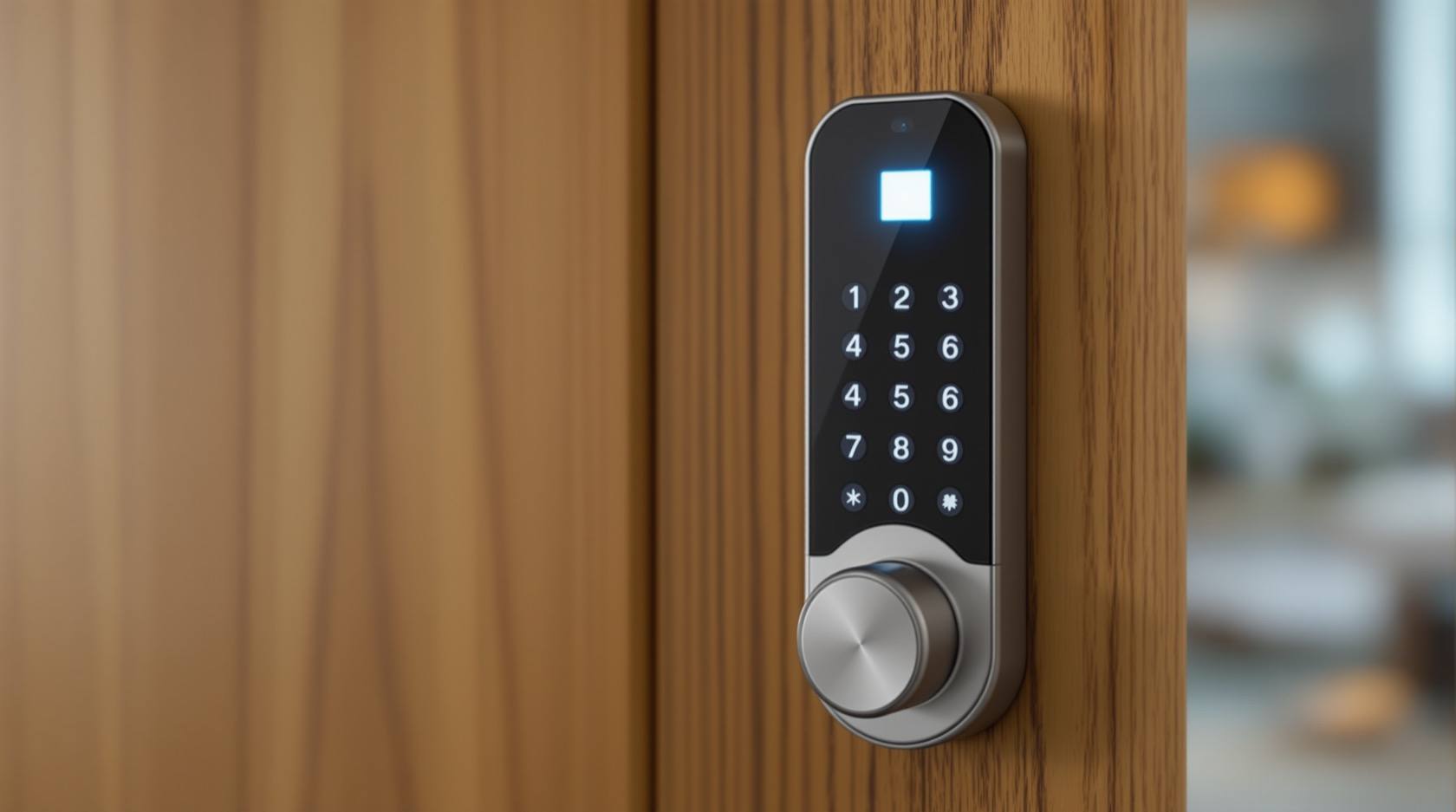
Fingerprint vs PIN Lock (2026): Which Keyless Entry Suits Your Indian Home?
A neutral head-to-head between the two most common keyless ways to open a smart lock in India — a fingerprint (biometric) and a PIN (code) — across convenience, everyday reliability in Indian conditions, who can use each, security, and privacy, ending in the honest verdict that you rarely have to choose.
Most smart locks sold in India put two keyless ways to open the door right on the front panel: press a finger on the sensor, or tap a code on the keypad. Faced with both, many buyers ask which one to actually use day to day — the fingerprint, or the PIN? The honest answer is the least dramatic one: you almost never have to choose, because the same lock offers both, and each is genuinely better in different moments. A fingerprint is unbeatable when your hands are full and it is only you at the door; a PIN is the one you can hand to a guest, a maid or a delivery, and the one that still works when your fingertip is wet, dusty or worn.
This guide is a plain head-to-head. It explains what each method is, compares them across the dimensions that matter in an Indian home — convenience, everyday reliability, who can use them, security and privacy — and then gives a verdict by scenario. It is not a buying guide and not a price list; for choosing the lock hardware itself see the smart lock buying guide, and for the bigger keyless-versus-key question see smart lock vs traditional lock.
Scope and how to read this. This is a neutral comparison of two unlock methods on the same smart lock, not a contest with a single winner. Both are legitimate; both ship on most locks together with a mechanical key. Nothing here is a reason to remove your key backup — keep it. This is not a buying or pricing guide, and it names no brands. Where biometric data is involved, the Digital Personal Data Protection Act, 2023 applies, so the guide flags where your fingerprint is stored. For the wider access-control picture, and how these two sit among cards, tags and app unlocking, see the security comparison pillar.
What each one is
A fingerprint lock reads the ridge pattern of your fingertip on a small sensor and matches it against fingerprints you enrolled earlier. Each person who is to use it must first register one or more fingers on the lock. Once enrolled, opening the door is a single touch — nothing to type, nothing to remember, nothing to carry. The lock does not store a photo of your finger; it stores a mathematical template, and on a well-made lock that template stays on the device itself.
A PIN lock opens when the right numeric code is tapped on the keypad. There is no enrolment ritual: anyone who knows the code can open the door, and you can change the code, delete it, or issue a second, temporary one whenever you like. A PIN carries nothing physical and reveals nothing about your body — it is simply a secret number, and its whole character follows from that. It works for a person you have never met, as long as you can tell them the number.
The head-to-head
Convenience
A fingerprint wins the everyday-speed contest for the people who live in the house. There is nothing to remember and nothing to type; a single touch opens the door, which is a real gift when you arrive with shopping bags, a sleeping child or a phone wedged under your chin. It is the fastest way in for a regular household member.
A PIN is a hair slower — you tap four to eight digits — but it has its own convenience that a fingerprint cannot match: it works for anyone you tell it to, with no enrolment. You do not need the person present in advance, you do not need their finger; you send a number over the phone. And a PIN keeps working when a fingerprint would not — with gloves on, with a plastered or bandaged fingertip, or for an elderly relative whose fingerprints have worn smooth with age.
Reliability in Indian conditions
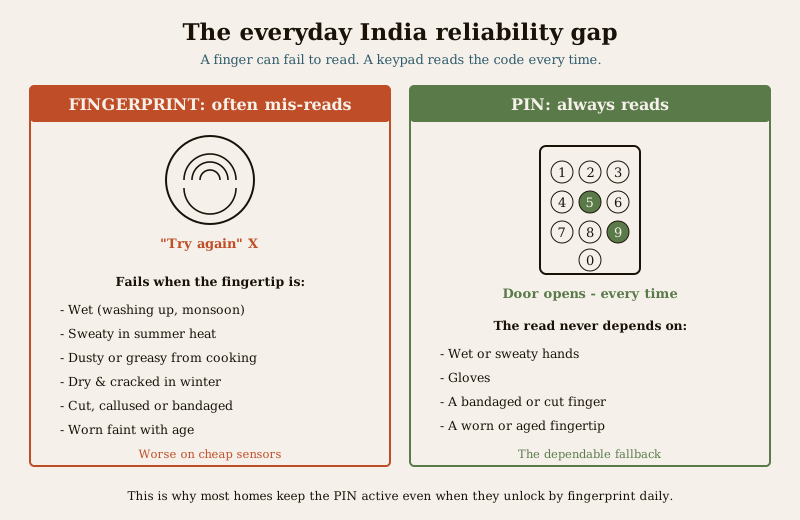
This is where the comparison gets genuinely practical, and where a PIN quietly pulls ahead as the dependable fallback. A fingerprint sensor can fail to read a finger, and in Indian daily life the reasons are common: a fingertip wet from washing up or the monsoon, sweaty in summer heat, dusty or greasy from cooking or the road, dry and cracked in winter, cut or callused from work, or simply worn faint with age. Cheap sensors miss more often and take more tries. None of this is catastrophic — you try again, or fall back to the PIN — but as a day-to-day annoyance it is real, and it is worth knowing before you rely on the fingerprint as your only way in.
A PIN, by contrast, always reads. Wet hands, gloves, a bandaged finger, a worn fingertip — none of it matters to a keypad. Type the number and the door opens. The keypad has its own small failings (a worn or dirty keypad, and in very cheap locks the number pattern can become visible from finger marks), but reliability of the read is not one of them. For sheer "it will work every single time," the PIN is the steadier of the two.
Who can use it, and how you share access
A fingerprint must be enrolled per person, on the lock, in advance. That is fine for the four or five people who live in the house, but it is awkward for the revolving cast an Indian home actually deals with: a maid who changes, a plumber for one visit, a delivery that needs the gate opened, a guest staying a week. You cannot enrol a fingerprint over the phone, and enrolling every temporary helper is impractical.
A PIN is made for exactly this. You can share it, change it, and — on most locks — issue a temporary or one-time code for a guest or a delivery, then delete it afterwards. This flexibility is a genuine strength. But it comes with the flip side that defines a PIN's security: a shared code can be shoulder-surfed, written down, forwarded or simply remembered by someone who should no longer have it. The discipline that makes shared PINs safe is to treat them as temporary — give a separate code where the lock allows it, and change the household PIN after a helper leaves or a code has been seen by too many people.
Security
Neither method is "more secure" in the abstract; they fail in different ways, and good habits close most of the gap.
A PIN's weakness is that it is a secret that can travel. It can be watched as you type it, guessed if it is obvious (a birth year, 1234, the flat number), or shared and never revoked. Its defence is entirely in how you use it: choose a long, non-obvious code, shield the keypad as you enter it, and change it when it has been over-shared. Done that way, a PIN is strong; done lazily, it is the weakest link on the lock.
A fingerprint's strength is that it cannot be shared, forwarded or shoulder-surfed — there is nothing to overhear or pass on, and nobody can "tell" your fingerprint to a stranger. Its weakness is narrower: on cheap sensors a fingerprint can occasionally be spoofed with a lifted or fake print, though this takes deliberate effort and is not the everyday risk a leaked PIN is. For most homes the fingerprint's un-shareable nature is a real security advantage against the most common problem — a code that quietly spreads.
Privacy and DPDP
Here the two are not equivalent, and it is worth being clear. A fingerprint is sensitive biometric personal data; a PIN is not. A number in your head is just a secret. A fingerprint template is information about your body, and it deserves the question: where is it stored? On a well-designed lock the template stays on the device, never leaves it, and is not uploaded to a cloud or an app account — that is what you want. Before buying, it is fair to ask the maker exactly this. Biometric data falls under the Digital Personal Data Protection Act, 2023, and the safe posture is on-device storage, no cloud copy, and the ability to delete an enrolled print completely. A PIN sidesteps this entirely: there is no biometric to store, so there is nothing sensitive to protect beyond the secrecy of the number.
Enrolment and admin
A fingerprint costs a little setup: each user enrols, ideally more than one finger, and the household admin manages the list. A PIN needs no enrolment at all — set a code and you are done — but it needs ongoing discipline: changing it periodically, and after it has been shared widely. Neither is heavy; they are simply different kinds of small effort.
The comparison at a glance
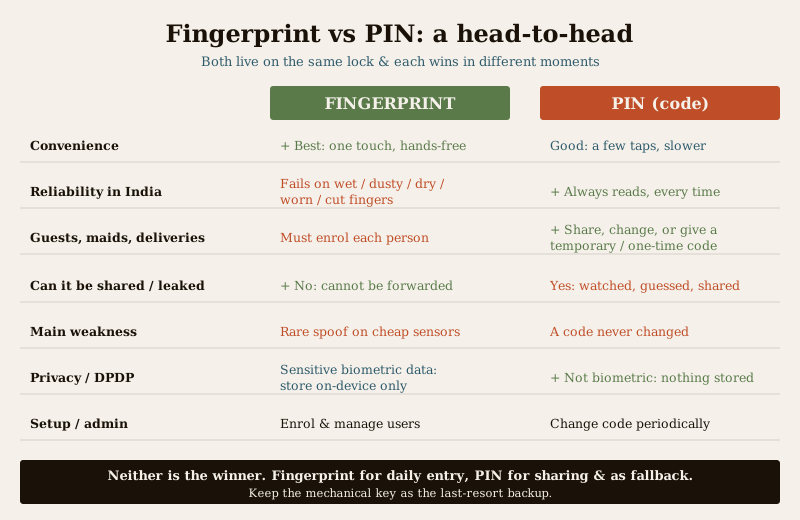
| Dimension | Fingerprint (biometric) | PIN (code) |
|---|---|---|
| Everyday convenience for residents | Best — one touch, nothing to remember or carry, hands-free | Good — a few taps; slightly slower |
| Reliability in Indian conditions | Can fail with wet, sweaty, dusty, dry, cut or worn fingers; worse on cheap sensors | Always reads — wet hands, gloves, bandages no problem |
| Works for guests, maids, deliveries | Awkward — must be enrolled per person, in advance, on the lock | Excellent — share, change, or issue a temporary/one-time code |
| Can it be shared or leaked | No — cannot be shoulder-surfed or forwarded | Yes — can be watched, guessed, forwarded; change it if over-shared |
| Main security weakness | Rare spoofing on cheap sensors | A shared or watched code that is never changed |
| Privacy / DPDP | Sensitive biometric data — ask where it is stored (want: on-device only) | Not biometric — nothing sensitive stored |
| Setup and admin | Enrol each person; manage the list | No enrolment; change the code periodically |
Which suits whom
Because both live on the same lock, the useful question is not "which do I buy" but "who in my home should lean on which, and for what."
- A regular household member wanting fast, hands-free entry — lean on the fingerprint. It is the fastest, most effortless way in for someone who is at that door every day, hands often full.
- Guests, a staying relative, or a house-sitter — use a PIN, and change it after they leave. No enrolment, no fuss, and easy to revoke.
- A maid, cook or regular helper — a PIN they can be given, ideally a separate code if the lock supports several, changed when the person changes. Enrolling a fingerprint for a helper who may not stay long is rarely worth it.
- A one-time delivery, plumber or electrician — a temporary or one-time PIN where the lock offers it, deleted the same day.
- An elderly relative, or anyone whose fingerprints read poorly — a PIN is kinder and more reliable than a sensor that keeps rejecting a worn or dry fingertip.
- Anyone, in wet or gloved conditions — the PIN is the dependable fallback the monsoon and the kitchen will make you glad of.
- Every home, always — keep the mechanical key as the last-resort backup for a flat battery or an electronics fault. Neither keyless method removes that need.
How to decide — the honest verdict
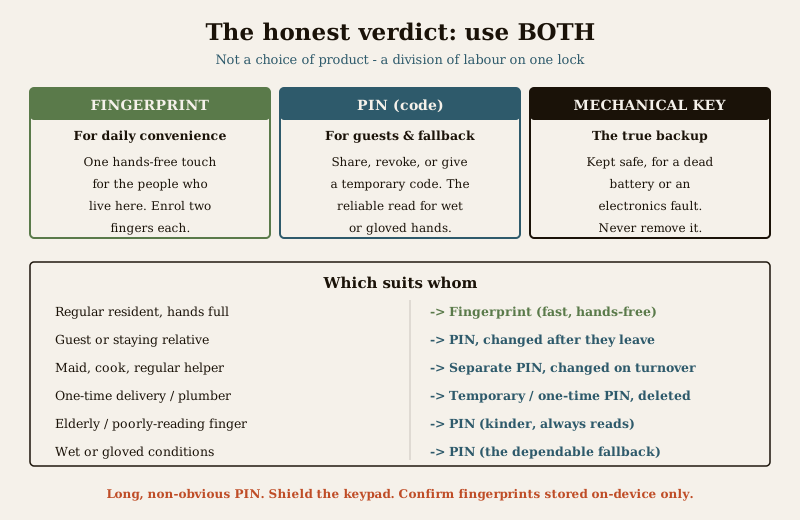
The honest verdict is that this is not really a choice between two products; it is a choice about how to use the two methods your lock already gives you. For almost every Indian home the best answer is: use both.
- Fingerprint for daily convenience — enrol the people who live there, so their everyday entry is a single hands-free touch.
- PIN for guests, helpers and backup — for anyone temporary, for shared access you can revoke, and as the reliable fallback for when a finger will not read.
- The mechanical key, kept safe, as the true backup — for a dead battery or a fault, because electronics do occasionally fail.
Tips that make the pair work: choose a long, non-obvious PIN, shield the keypad as you type, and change the code after it has been widely shared or a helper leaves; enrol two fingers per person so a cut or plaster on one hand is not a lockout; and confirm before you buy that fingerprint templates are stored on the device, not in a cloud. Do that, and the fingerprint-versus-PIN question dissolves into a comfortable division of labour rather than a compromise.
If you want to place this decision inside the larger access-control picture — how fingerprints and PINs compare with cards, tags and app unlocking — read the RFID vs biometric access control comparison and the practical how to choose access control guide. Both sit within the smart locks and access control sub-hub, and this article is one of the security comparison head-to-heads.
Key takeaways
- You rarely have to choose — most smart locks offer fingerprint and PIN together, plus a mechanical key. Use each where it is best.
- Fingerprint wins daily convenience — one hands-free touch, nothing to remember or carry, ideal for regular residents.
- PIN wins reliability and sharing — it always reads (wet, gloved, worn fingers included) and can be shared, changed and given temporarily to guests, helpers and deliveries.
- Security is about habits, not the method — a PIN is only as safe as it is long, unwatched and changed when over-shared; a fingerprint cannot be shared but can rarely be spoofed on cheap sensors.
- Privacy differs — a fingerprint is sensitive biometric data under the DPDP Act, so confirm it is stored on-device; a PIN stores nothing sensitive.
- Keep the mechanical key — it is the true backup for a dead battery or a fault, whichever keyless method you favour.
Where to go next
- Smart lock vs traditional lock — the bigger keyless-versus-key decision this sits inside.
- Smart lock buying guide — choosing the lock hardware, battery backup and key override.
- RFID vs biometric access control and how to choose access control — where fingerprints and PINs sit among cards, tags and app unlocking.
- The security comparison sub-hub, the smart locks and access control sub-hub, the security comparison pillar and the main security hub.
References
- Digital Personal Data Protection Act, 2023 — a fingerprint template is sensitive personal data; prefer locks that store it on the device only, with no cloud copy, and that allow complete deletion of an enrolled print. Verify a maker's storage claim before buying.
- Bureau of Indian Standards catalogue — for the mechanical and electronic lock standards a smart lock may carry, verify current status via https://www.services.bis.gov.in/
This is an educational comparison for homeowners, not a buying guide, a security audit or legal advice. Both fingerprint and PIN unlocking are legitimate and ship together on most locks; keep a mechanical key backup, choose a strong PIN, confirm on-device fingerprint storage, and consult the lock maker and a qualified installer for your specific door and lock.
Export this guide
Related Guides — Deep-dive reading
Fingerprint Locks in India (2026): How Biometric Door Locks Really Work, and Their Honest Limits
How a fingerprint sensor reads a finger and matches it to enrolled templates, the genuine appeal of nothing to carry, and the wet-finger, elderly, privacy and backup realities every Indian buyer must weigh before choosing one.
SecuritySmart Lock vs Traditional Lock in India (2026): Which Should Guard Your Door?
An honest, even-handed head-to-head for Indian homes — keyless convenience, e-keys and remote access on one side, simple key-in-hand reliability with no power dependence on the other — ending in a clear verdict by household, and one rule both must obey: never trap anyone inside.
SecurityFace-Recognition Locks in India (2026): Proportionality, Privacy and the DPDP Act
How a smart lock that unlocks on a recognised face actually works, the genuine hands-free appeal, and the DPDP, accuracy and honest overkill caveats that must come first, for Indian homes.
SecurityRelated Tools — Try Free
Smart Lock Finder
Find the right smart lock — access methods, tier and must-haves like a mechanical override — for your door and budget.
Door ToolAccess-Control Battery-Backup Calculator
Size the standby battery so an access system keeps running through a power cut, with an egress life-safety note.
Battery BackupBiometric-Capacity Calculator
Whether a biometric reader can hold all the enrolments and how many devices you need, with a 1:N speed note.
Biometric Capacity