

Cloud CCTV in India: Footage That Survives a Stolen Recorder
How cloud-stored CCTV works, its genuine advantages for Indian homes and shops, the real trade-offs of subscriptions, upload bandwidth and third-party data, and why hybrid local-plus-cloud is usually the smart middle.
There is one nightmare every CCTV owner shares: the break-in happens, and the first thing the intruder does is rip out or smash the recorder sitting in the hall cupboard. All that footage — the only evidence — walks out the door with them. Cloud CCTV is the answer to exactly that fear. Instead of keeping every frame in a box on your premises, it also ships a copy to a provider's servers over the internet, so the evidence lives somewhere the burglar can never reach.
This guide is the focused explainer on cloud-stored CCTV in Studio Matrx's CCTV hub. It sits alongside the local storage CCTV guide — the two are a pair, and most Indian homes end up wanting a bit of both. Read this to decide honestly whether cloud is right for you, and what it will really cost, before a salesperson decides for you.
Scope & safety. This guide helps you understand, choose and coordinate. Camera mounting, mains power and any electrical work belong to licensed professionals — plan them here, but have them installed and certified. Never place cameras in bathrooms, bedrooms or changing areas, and position them to cover only your own property, respecting neighbours, staff and the DPDP Act 2023.
How cloud CCTV actually works
Strip away the marketing and the chain is simple:
1. The camera captures video and compresses it on-board, exactly as any modern IP camera does.
2. Instead of (or as well as) writing to a local disk, the camera uploads that stream over your broadband to the provider's data centre — its "cloud".
3. The footage sits on the provider's servers, encrypted and time-stamped, held for whatever retention period your plan buys (often 7, 15 or 30 days).
4. You watch it through the provider's app — live view or playback — from anywhere with internet, with no recorder to log into.
The key mental shift: with local CCTV the footage lives in your building; with cloud CCTV a copy lives in a data centre somewhere else, and the app is just a window into it. That single change is the source of every advantage and every trade-off below.
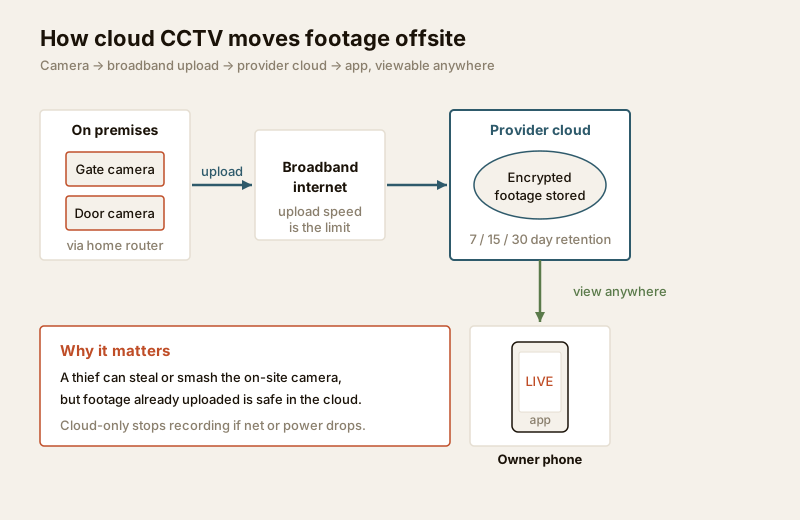
Two common shapes exist. Cloud-only cameras (many Wi-Fi "smart" cameras) keep almost nothing on-site and lean entirely on their plan. Cloud-recording add-ons bolt a cloud copy onto a normal camera or NVR system — this is the hybrid path we come back to at the end, and usually the wiser one.
The genuine advantages
Cloud is not hype. For the right owner it solves real problems that local-only systems cannot.
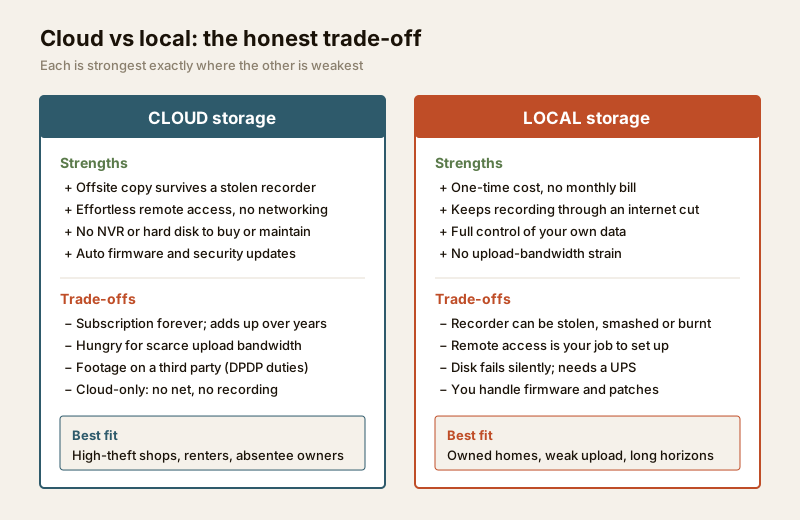
- An offsite copy that survives the recorder. This is the headline. Smash the camera, steal the NVR, cut the power — the footage already uploaded is safe in the data centre. For a break-in or a disgruntled-staff scenario, that is the whole point of having cameras at all.
- Easy remote access, done for you. No port-forwarding, no fiddly DDNS, no VLAN. You install the app, scan a code, and the live feed appears — because the provider handles all the networking. This is the single biggest reason non-technical owners choose it.
- No NVR hardware to buy or maintain. No recorder to sit in a cupboard, no surveillance hard disk to fill up, fail silently and let you down the one night it mattered. Fewer moving parts on your premises means fewer things to break.
- Automatic updates and features. Firmware, security patches and new features (better motion detection, person alerts) arrive from the provider without you touching anything. A local NVR that never gets patched slowly becomes a liability.
- Simple, and stays simple. Add a camera, it appears in the same app. No re-architecting. For a homeowner or a small-shop owner who wants security without becoming a part-time IT admin, that simplicity is genuinely valuable.
The real trade-offs for India
Now the honest half — the parts a glossy demo skips. These matter more in India than in the markets where these products were designed.
- The subscription never stops. Cloud storage is rented, not owned. A plan might look cheap per camera per month, but multiply by cameras, by months, by years. A ₹200/camera/month plan across four cameras is ₹9,600 a year — every year, forever. A local disk is a one-time cost. Over three to five years the cloud bill often dwarfs what a local recorder would have cost outright.
- Upload bandwidth is the catch. This is the India-specific killer. Cloud CCTV lives or dies on your upload speed, and most Indian broadband is asymmetric — a 100 Mbps plan may give only 20–50 Mbps up, shared with everyone streaming their own live footage. A single 4MP camera uploading continuously can want 4 Mbps up; four of them at once can choke a household connection, drop frames, or quietly fall back to blurry low-resolution clips right when you need detail. Check your upload speed, not the download headline — see network readiness for security.
- Your footage lives on a third party's servers. Video of your family, your customers and your staff sits in a company's data centre under their terms. Under the DPDP Act 2023, if that footage identifies people you carry real responsibilities as the one who decides why it is collected. Read the provider's data-location, retention and deletion policy, prefer strong encryption and check whether staff can view your feeds. Walk through this properly in the privacy assessment guide.
- Total dependence on internet and power. No internet, no upload — and on cloud-only cameras, a broadband outage means nothing is being recorded at all. Add India's power cuts, and a camera without a UPS on both the router and the ONT is simply blind during the exact window a smart intruder would choose. Local storage keeps recording through an internet outage; pure cloud does not.
When to bring in a professional. Decide the camera count, retention and cloud-versus-local split yourself — then hand camera mounting, cabling, mains power and the router/UPS setup to a licensed installer. Ask them to test real upload throughput with all cameras streaming at once before you commit to a cloud plan, so you find the bandwidth ceiling on paper, not during a burglary. Any work at the mains board is a licensed electrician's job — see the electrical hub.
Cloud CCTV at a glance — pros, cons and best fit
| Dimension | Strength of cloud | Weakness of cloud | Best fit |
|---|---|---|---|
| Theft resilience | Offsite copy survives a smashed/stolen recorder | Depends on footage having uploaded already | High-risk shops, isolated homes |
| Remote access | Effortless, provider-managed, no networking | — | Owners who travel, absentee landlords |
| Hardware | No NVR/disk to buy, fill or fail | Cameras still needed on-site | Renters, small setups, no cupboard space |
| Cost shape | Low upfront | Subscription forever; adds up over years | Short horizons; few cameras |
| Bandwidth | — | Hungry for scarce Indian upload capacity | Fibre with strong upload only |
| Privacy/control | Provider handles security patching | Footage on third-party servers (DPDP duties) | Read the data policy carefully |
| Outage behaviour | — | Cloud-only stops recording if net/power drops | Pair with local backup |
The pattern is clear: cloud is strongest exactly where local is weakest (theft of the recorder, remote access), and weakest exactly where local is strongest (ongoing cost, offline recording, data control). Which is the whole argument for not choosing one at all.
Hybrid: local plus a cloud copy — the pragmatic middle
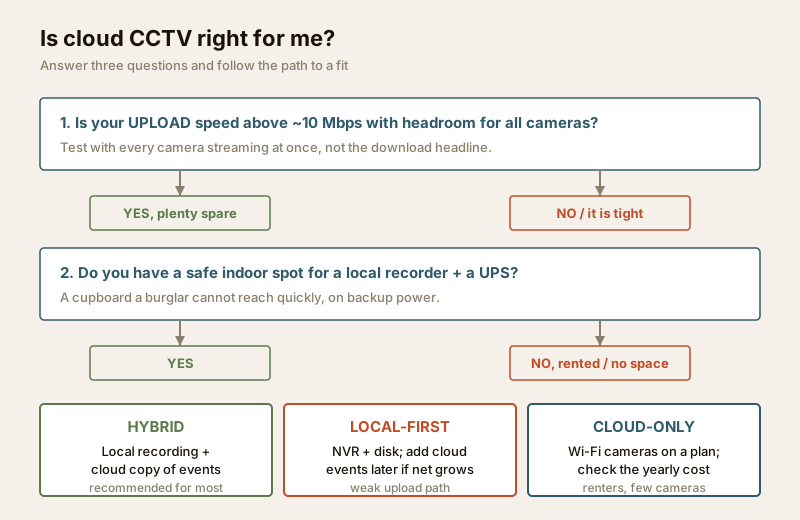
For most Indian homes and shops, the honest recommendation is neither pure cloud nor pure local, but both. A hybrid setup records everything to a local disk (an NVR or an SD card in the camera) and uploads a copy — or just the important motion events — to the cloud.
You get the best of each: the local disk records continuously and keeps working through an internet or power cut, while the cloud holds the offsite copy that survives if someone steals the recorder. To save your scarce upload bandwidth and your subscription rupees, most hybrid setups upload only smart-event clips (a person detected at the gate) rather than 24x7 video — a fraction of the data, protecting the moments that actually matter.
This is why the IP CCTV guide and the hybrid CCTV guide both matter here: a modern PoE + NVR system with a cloud add-on gives you a robust local base and the offsite safety net, and you control exactly how much goes up.
What it costs in India (indicative)
Prices move with brand, resolution and retention length — treat these as ballparks to sanity-check a quote, not fixed rates. The pattern that matters is upfront vs recurring.
| Approach | Typical upfront (₹) | Typical recurring (₹) | The real cost driver |
|---|---|---|---|
| Cloud-only Wi-Fi camera | ₹2,000 – ₹5,000 / camera | ₹150 – ₹400 / camera / month | The monthly plan, forever |
| Local NVR + disk (no cloud) | ₹28,000 – ₹55,000 for a 4-cam system | ₹0 (plus a disk every ~4–5 yrs) | One-time hardware |
| Hybrid: local NVR + cloud events | Local system + ₹0–₹2,000 setup | ₹100 – ₹250 / camera / month (events only) | A smaller plan on top of local |
| Longer retention (30 days+) | — | Adds ₹100 – ₹300 / camera / month | Retention length multiplies the plan |
A quick reality check: four cloud-only cameras at ₹250/camera/month is ₹12,000 a year in subscription alone — roughly a third of a whole local system, spent again every year. Run your own numbers before you sign, using the cloud vs local cost calculator, and size the storage side with security data storage planning.
Choosing well — a short checklist
1. Test your real upload speed with all cameras streaming at once. If it cannot comfortably carry them, cloud-only will disappoint — go hybrid with events-only upload.
2. Add up the subscription over five years, not one month. Compare that honest total against a one-time local system.
3. Read the data policy — where footage is stored, how long, who can access it, how you delete it, and whether it is encrypted. This is your DPDP responsibility, not the vendor's.
4. Put the router and ONT on a UPS, and prefer a system that keeps a local recording so a power or internet cut is not a blind spot.
5. Prefer hybrid unless you have a specific reason (a rented shop with no safe cupboard, a single camera, a short horizon) to go cloud-only.
For the wider picture — cameras, alarms, access control and resilience together — see the building security systems guide, and if you are still choosing between camera families, the complete guide to CCTV systems maps them all.
Key takeaways
- Cloud CCTV's one great virtue is the offsite copy — footage that survives a stolen or smashed recorder — plus effortless remote access and no NVR to maintain.
- The recurring subscription is the hidden cost: cheap per month, but it never stops, and over years it often exceeds a one-time local system.
- Upload bandwidth is the India-specific catch — check your upload speed with all cameras live, because asymmetric broadband chokes continuous cloud recording.
- Your footage lives on a third party's servers, so read the data-location and retention policy and honour your DPDP Act duties toward everyone the cameras capture.
- Hybrid — local recording plus a cloud copy of smart events — is the pragmatic middle for most Indian homes and shops: it survives theft and keeps recording through an outage. Model the cost with the cloud vs local calculator.
References
- Digital Personal Data Protection Act, 2023 — where CCTV footage identifies people, collect it for a legitimate purpose, cover only your own property and shared areas, and follow lawful retention and deletion practices; review the provider's data-processing terms.
- Bureau of Indian Standards catalogue — verify the current status of any electrical, cabling or installation standard before relying on it: https://www.services.bis.gov.in/
- Provider service and privacy terms — for any cloud plan, confirm data-centre location, encryption, retention period, staff-access policy and deletion process in writing before subscribing.
This is an educational overview. Camera mounting, cabling and any electrical work are qualified professional tasks — engage licensed installers, test real upload bandwidth before committing to a cloud plan, and verify any standard's current status via the BIS catalogue before relying on it.
Export this guide
Related Guides — Deep-dive reading
Local Storage vs Cloud CCTV in India (2026): Where Your Footage Should Live
A homeowner's honest head-to-head on where CCTV footage is kept — on a hard disk in the recorder at home, or uploaded to a per-camera cloud plan — across cost, theft resilience, internet dependence, retention, remote access and DPDP privacy, ending in a clear which-suits-whom, with hybrid usually the smartest answer.
SecurityCCTV Remote Access in India (2026): Watch From Your Phone, Safely
How to view your own cameras from anywhere without leaving the front door open to the internet — change the defaults, use strong credentials and 2FA, keep firmware current, prefer the vendor's secure cloud relay or a VPN, segment the camera network, and treat footage as personal data.
SecurityLocal Storage CCTV in India: NVR, DVR and Your Own Hard Disk, Explained
How on-site CCTV recording works, why a one-time recorder-plus-disk setup with no monthly bill still suits most Indian homes and shops, and how to counter its one real weakness — a stolen recorder.
SecurityRelated Tools — Try Free
CCTV Camera Coverage & Count Calculator
Estimate how many CCTV cameras you need, the NVR channels, storage in TB for your retention period, and an indicative all-in cost with GST.
CCTV CalculatorCCTV Cloud vs Local Cost Calculator
Compare cloud CCTV subscription against a local NVR + HDD — upfront, 5-year total, monthly fee and break-even.
Cloud vs LocalWindow Hardware Cost Calculator
Estimate window hardware cost — hinges, handles, locks, rollers and multipoint gears.
Window Calculator