
Electrical Backup Assessment for Home Security in India
The under-appreciated gap: a power cut silently disables your cameras, NVR, alarm, gate motor, router and Wi-Fi, leaving the home undefended exactly when it may be most vulnerable. How to map the security load, test what your inverter really covers, size backup, and protect against grid surges.
You can spend a lakh on cameras, sensors, a smart lock and a motorised gate, and still be completely undefended for the two hours the power is out — because almost every modern security device runs on electricity, and when the grid drops, they drop with it. In much of India a cut is not an exception; it is a weekly, sometimes nightly, event. And a burglar does not need to disable your system if the electricity board does it for them.
This is the quiet gap most home-security plans miss. A camera without power records nothing. An NVR without power stores nothing. An alarm without power cannot sound, a gate motor cannot close, and a Wi-Fi router without power means every "cloud" and "phone-home" feature goes silent — no live view, no motion alert, no remote check. This guide teaches you to assess your power resilience for security: map which devices need backup, test whether the backup you already have actually covers them, size what you need, and harden it against the surges the Indian grid is famous for.
It sits within the Home Security Hub and complements the master Security Risk Assessment Guide: power resilience is the vulnerability that makes every other layer fragile. When you are ready to turn your device list into numbers, the Security Backup Power Calculator does the watts-and-hours arithmetic for you.
Scope & safety. This is a defensive planning guide. It helps you assess and specify backup, never to defeat any measure. Anything touching mains wiring — inverter integration, a dedicated security circuit, a generator changeover, or a solar tie-in — is qualified work. Specify what you want, then have a licensed electrician size, install and certify it. Never let a battery, inverter or cable block a fire-escape route or a doorway.
Why a power cut is a security event
Think of your security system as a chain that runs on electricity. The chain is only as strong as its weakest powered link.
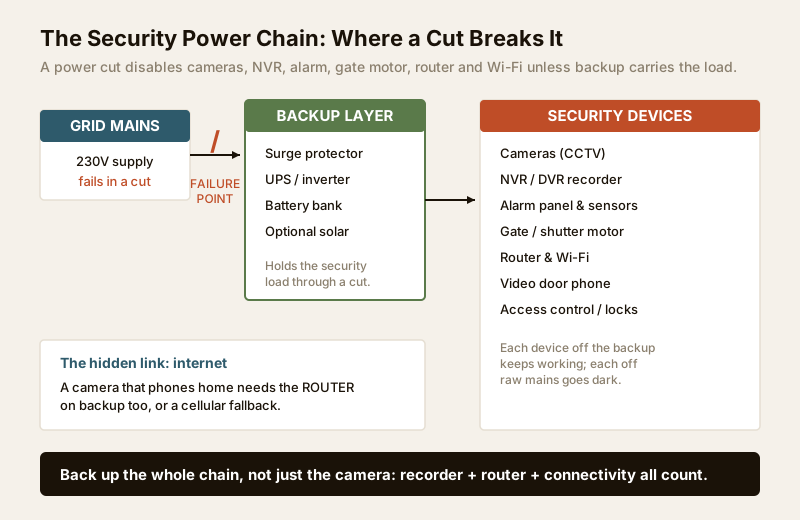
When the grid fails, everything downstream of it fails at the same instant unless a backup source is holding that load. The devices that go dark are exactly the ones you were relying on:
- Cameras and the NVR/DVR. No recording, no live view, no evidence. A common trap: the cameras run off the recorder over PoE, so if the recorder loses power, every camera goes down together.
- Alarm panel and sensors. Many panels have a small internal battery, but motion sensors, sirens and hubs may not — check each one.
- Gate and shutter motors. A cut can leave the gate stuck open (or force a manual override that anyone can operate).
- Router, Wi-Fi and the internet. This is the most-missed link. Any system that alerts your phone or stores to the cloud needs the router alive; if the router is not on backup, your "smart" system becomes a local island — see the smart security systems guide.
- Video door phone and electronic locks. A VDP without power cannot show who is at the gate; a mains-powered electric lock must fail to a safe state (never trapping people inside — egress first).
The uncomfortable timing: cuts cluster on monsoon nights and load-shedding evenings — precisely the hours a home is most exposed, when noise is masked and streets are quiet. Power resilience is not a luxury add-on; it is the difference between a system that works when you need it and one that works only when you do not.
Step 1 — Map the security load
Before you can back anything up, list every security device, what it draws in watts, and whether it truly needs to survive a cut. Nameplate ratings or the adapter label give you the watts; if only volts and amps are shown, multiply them. Be honest about what is essential — backing up a decorative floodlight wastes battery you want for the recorder.
Below is a typical independent-house or apartment setup. Your figures will differ; use it as a template and fill your own column.
| Security device | Typical draw (W) | Needs backup? | Priority runtime |
|---|---|---|---|
| 4-8 CCTV cameras (PoE) | 25-50 | Yes | Full cut |
| NVR / DVR recorder | 15-40 | Yes (critical) | Full cut |
| Broadband router + ONT | 10-20 | Yes (for alerts/cloud) | Full cut |
| Wi-Fi mesh / repeater | 5-15 | Yes if cameras are Wi-Fi | Full cut |
| Alarm panel + siren | 10-30 | Yes | Full cut |
| Motion / door sensors | 1-5 each | Yes | Full cut |
| Video door phone | 10-20 | Preferred | While home |
| Gate / shutter motor | 200-750 (peak) | Optional | Brief, on demand |
| Smart lock hub | 3-8 | Yes | Full cut |
| Floodlights (security) | 10-100 | Optional | Motion only |
Two things to notice. First, the always-on electronics — cameras, NVR, router, alarm — are surprisingly modest, often 80-150 W combined. Keeping them alive for hours is affordable. Second, the gate motor is a different beast: it draws little at rest but a large surge for a few seconds when it runs, which sizes the inverter rating even though it barely touches the battery. Separate the two in your mind.
Add up only the "Yes" rows to get your essential security load in watts. That number drives everything that follows.
Step 2 — Assess the backup you already have
Most Indian homes already own some backup — an inverter, a UPS on the computer, maybe a generator. The critical question is rarely "do I have backup?" but "does my backup actually reach the security load, and for long enough?" This is where assessments fail: the inverter runs the fans and tube-lights beautifully, but the CCTV and the router are wired to a circuit the inverter never sees.
Do a real test. Pick a safe moment, switch off the mains at the board (or wait for the next cut), and physically check each device.
| Assessment check | How to test it | Pass / Fail | Fix if it fails |
|---|---|---|---|
| Cameras still recording? | Trigger motion, confirm NVR saves clip | Move CCTV circuit onto backup | |
| NVR/DVR still powered? | Screen live during cut | Add dedicated UPS for recorder | |
| Router / internet alive? | Open remote app on mobile data | Put router on backup / add SIM fallback | |
| Alarm still armed? | Check panel status light | Verify panel battery, replace if weak | |
| Gate motor operable? | Try open/close during cut | Confirm motor on backup or manual key | |
| VDP responds? | Ring the doorbell during cut | Wire VDP to backup circuit | |
| Runtime long enough? | Time how long devices last | Size a bigger battery (Step 3) | |
| Switchover fast enough? | Watch for reboot/gap on cut | Use an online/UPS-grade source for NVR | |
| Surge protection present? | Inspect board for SPD / stabiliser | Add surge protection (Step 4) | |
| Battery healthy? | Note age; test under load | Replace tired battery (halves runtime) |
Score each row honestly. Every Fail is a line item for your plan. The most common failures I see: the security circuit was never moved onto the inverter, the router is on raw mains, and the inverter battery is five years old and holds a fraction of its rated runtime. A weak battery is the silent killer — a 200 Ah battery near end of life may deliver like a 90 Ah one.
Also note the switchover gap. A standard inverter takes a fraction of a second to cut in; sensitive electronics like an NVR can reboot in that gap, losing a minute of footage and forcing a restart. A true UPS (online or line-interactive) bridges it seamlessly — which is why a small dedicated UPS on just the recorder and router is often the single best upgrade.
Step 3 — Size it: load, runtime and battery
Sizing sounds technical but rests on one relationship: load (watts) x runtime (hours) = energy (watt-hours), and energy decides your battery. The load also sets the minimum inverter/UPS rating.
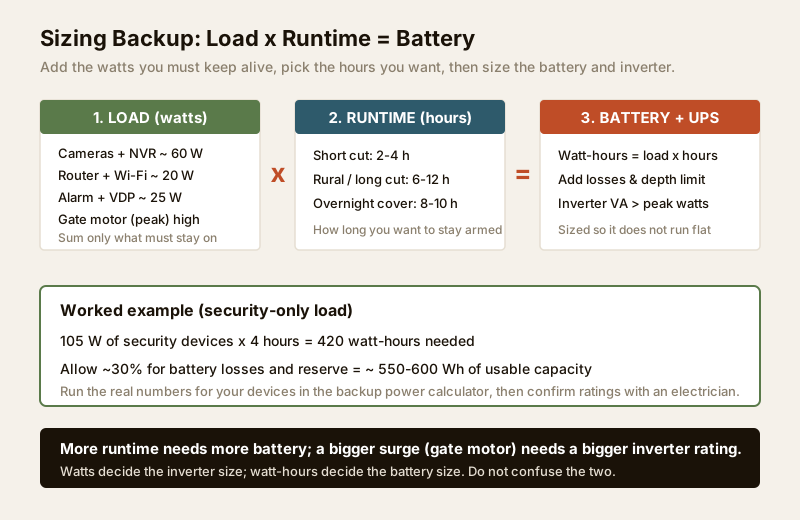
Work through it in order:
1. Essential load (watts). The sum of your "Yes" devices from Step 1 — say 105 W for cameras, NVR, router and alarm.
2. Desired runtime (hours). How long a cut do you need to ride out? A city with short cuts might target 2-4 hours; a rural home or one facing long load-shedding wants 6-12 hours or overnight cover.
3. Energy needed (watt-hours). Multiply: 105 W x 4 h = 420 Wh. Then add roughly 20-30% for battery inefficiency, cable losses and the fact you should not drain a battery flat — call it ~550-600 Wh usable.
4. Inverter / UPS rating (VA or W). Must comfortably exceed your peak draw, not the average — if a gate motor or floodlight shares the backup, that surge sets the size. For an electronics-only security load, a modest inverter is plenty; add the motor and the rating jumps.
The arithmetic is easy to get wrong by hand, so run your actual devices through the Security Backup Power Calculator — enter each device's watts and your target runtime, and it returns the battery capacity and inverter rating to specify. Take that output to your electrician rather than guessing. For the broader wiring picture, the electrical guide explains circuits and loads in depth.
Two sizing rules worth remembering: more runtime means a bigger battery; a bigger surge (motors) means a bigger inverter. Do not confuse the two — people routinely oversize the inverter and undersize the battery, then wonder why it dies in twenty minutes.
Step 4 — Surge protection: the Indian grid problem
Backup keeps devices alive; surge protection keeps them from dying. Indian grids are notorious for voltage spikes, brownouts and the sharp surge when power returns after a cut — and that return spike is a leading killer of NVRs, routers and camera power supplies. A security system fried by a surge is as useless as one with no power at all, and it fails silently: you only discover it when you need footage.
Layer your protection:
- Voltage stabiliser for the sensitive rack (NVR, router) if your supply swings widely.
- Surge protection device (SPD) at the distribution board — licensed-electrician work — to clamp spikes before they reach any circuit.
- A good UPS naturally filters and regulates the power it delivers, protecting whatever is behind it.
- Proper earthing. Surge protection only works with a sound earth; a poor earth is a common, invisible fault. Have it checked. For the broader context of safe, healthy electrical installations, see healthy homes.
Do not cite a specific code number from memory here; requirements for SPDs and earthing follow the applicable national wiring standard and your municipal supply rules — your electrician will specify to code.
Step 5 — Choose the backup option that fits
There is no single right answer; the best choice depends on how long your cuts run, your budget, and how much you must keep armed. Often the smartest setup layers two.
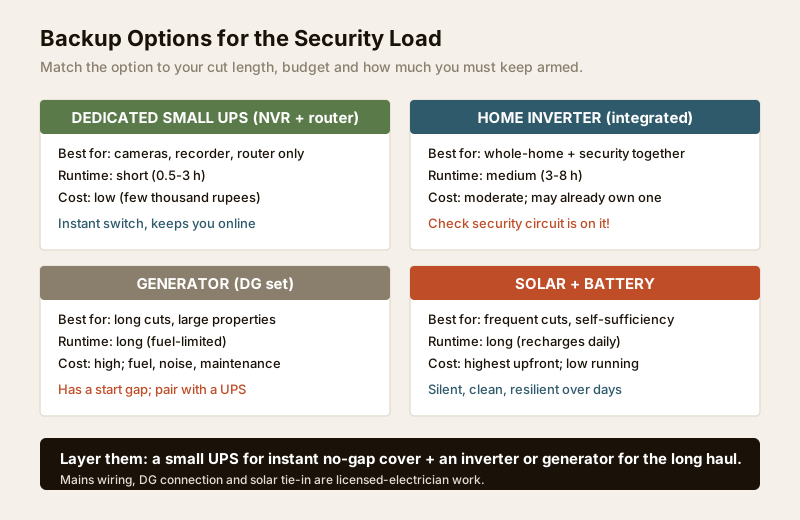
| Option | Best for | Runtime | Cost | Watch-out |
|---|---|---|---|---|
| Dedicated small UPS (NVR + router) | Keeping cameras, recorder and internet alive with zero switch gap | Short (0.5-3 h) | Low | Sized for electronics only, not motors |
| Home inverter (integrated) | Whole-home plus security on one system | Medium (3-8 h) | Moderate (may already own) | Confirm the security circuit is actually on it |
| Generator (DG set) | Long cuts, large villas, whole-property loads | Long (fuel-limited) | High + fuel, noise, upkeep | Start-up gap — pair with a UPS for no-gap cover |
| Solar + battery | Frequent/long cuts, self-sufficiency | Long (recharges daily) | Highest upfront, low running | Sizing and roof/tie-in need professionals |
A pattern that works for many homes: a small UPS on the NVR and router for instant, gap-free cover of the critical electronics and the internet, backed by the house inverter or a generator for the longer haul. That way a brief cut is invisible to your system, and a long one still keeps the essentials running.
Whatever you choose, remember the connectivity link. If your cameras or alarm rely on the internet to notify you, backing up the cameras but not the router is a false economy — you will have recordings you cannot see remotely. Keep the router on backup, and for critical setups consider a cellular fallback (a 4G router or a SIM-based dongle) so a broadband outage during a cut does not blind you. Whole-house resilience is part of good building security systems design.
When to bring in a professional
Do the assessment yourself — you know your devices and your cuts best. But all mains work is for a licensed electrician: moving the CCTV and router onto a backup circuit, wiring a dedicated security sub-circuit, installing an SPD or stabiliser, connecting a generator with a proper changeover, or a solar tie-in. Specify the load and runtime you worked out (the calculator output is ideal), and let them size, install and certify to code. If you are building or renovating, fold a backed-up security circuit into the design from the start — retrofitting is always costlier, as the security planning guide for new homes explains.
Re-assess after any change
Power resilience drifts. A new camera adds load; an ageing battery loses runtime; a gate motor added later may overload an inverter that was fine before. Re-run the load map and the switch-off test at least once a year, after adding any device, and whenever cuts in your area get longer. Batteries especially deserve a note in your calendar — most lose meaningful capacity in three to five years, and a tired battery quietly shrinks your protection long before it dies outright. Tie this into your broader emergency preparedness plan so power, alarms and response are considered together.
Key takeaways
- A power cut is a security event. Cameras, NVR, alarm, gate motor, router and Wi-Fi all die with the grid unless backup holds their load.
- Map the load first. List every security device and its watts; the essential always-on electronics are often only 80-150 W and cheap to sustain.
- Test what you already have. Switch off the mains and check each device — the inverter often never reaches the CCTV or router circuit, and old batteries halve runtime.
- Size by load x runtime. Watt-hours set the battery, peak watts set the inverter; run the numbers in the Security Backup Power Calculator.
- Back up the internet too, and add surge protection — a return-spike-fried NVR or an offline router is as useless as no power at all.
- Route all mains work to a licensed electrician, keep backup gear clear of escape routes, and re-assess yearly.
Start by mapping your load and sizing it with the Security Backup Power Calculator, then plan the wider system with the Security Risk Assessment Guide and browse the full security guides collection.
This is an educational planning guide. It is strictly defensive and does not describe how to defeat any security measure. Inverter, generator, solar, surge-protection and any mains or electronic-lock work is qualified professional work — engage a licensed electrician and verify applicable wiring-standard and municipal requirements for your installation. Security hardware must never obstruct fire-escape or egress routes.
Export this guide
Related Guides — Deep-dive reading
Smart Home Power Backup in India: Keeping It Running During Power Cuts
Load-shedding is a fact of Indian life. Here is how to make sure your router, hub, cameras and locks survive an outage — for surprisingly little money.
Smart HomeSecurity System Network Failure (2026): When Everything Goes Offline at Once, and How to Get It Back
When your whole security system drops offline together, the fault is almost never in the cameras. It is in the shared network they all lean on. This guide helps an Indian homeowner tell an internet outage from a router, switch or cabling fault, power-cycle things in the right order, and know when to call a professional.
SecurityElectrical Safety for Security Systems in India (2026): Powering It Without Peril
A homeowner's guide to the power side of home and RWA security systems, CCTV, alarms, gates, access control and NVRs, done so it protects you instead of quietly becoming a shock or fire hazard. What makes a supply safe, what to insist on, and why the mains work belongs to a licensed electrician.
SecurityRelated Tools — Try Free
Security Backup Power Calculator
Size a UPS/inverter and battery to keep CCTV, NVR, router and alarm running through a power cut — load, Ah, VA and cost.
Backup PowerSolar CCTV Sizing Calculator
Enter cameras, sun-hours and backup days to get the solar panel wattage, battery Ah and an indicative kit cost for an off-grid camera.
Solar SizingAccess-Control Battery-Backup Calculator
Size the standby battery so an access system keeps running through a power cut, with an egress life-safety note.
Battery Backup