
Security for Home Offices in India (2026): Locking Down the Room, the Kit and the Client Data
When your home also holds a work laptop, client files and a company login, it becomes both a home and a small workplace - with two kinds of security to get right. A plain-language guide for freelancers, remote employees and home-run small businesses in India: the physical office and the data, plus confidentiality, visitors, insurance and the line between work and home.
Working from home has become an ordinary part of Indian life. A freelance designer bills clients from a spare bedroom. A remote employee logs into a company system from a corner of the living room. A small trader runs a business from the front room, with stock in a cupboard and customer records on a laptop. In every one of these homes something has quietly changed: the house is no longer only a home. It is also a small workplace that holds expensive equipment and, more importantly, work and client data that other people are trusting you to protect.
That dual nature is the whole point of this guide. Home-office security has two halves, and most people only think about one. The first half is physical - the room, the door, the cabinet, the laptop that walks out of an unlocked flat in seconds. The second half is data and cyber - the work Wi-Fi, the company login, the client files, the screen a visitor can read over your shoulder. The data half is genuinely half the job, and it is the half a burglar alarm does nothing for. Get both right and you protect your livelihood and your clients. Neglect either and one weak point undoes the rest. This guide sits under the security for specific users pillar and the for-users sub-hub, and it leans on the wider home security systems guide for the fundamentals.
Scope & safety. This is educational guidance, not legal, security or insurance advice. A home office holds other people's data as well as your own, so treat it with care and proportion. Cameras and monitoring in a shared home capture family, guests and any domestic staff - all people with a right to privacy - so keep cameras out of private spaces (bedrooms, bathrooms), give notice, and handle any recording under the Digital Personal Data Protection Act, 2023; client and customer data you hold for work sits under the same law. Never let a security measure block escape: no lock, bar or arming state may trap anyone in a fire - egress always wins. And engage the right professional - a licensed installer for locks and alarms, your employer's IT or security team for work-device rules, and an insurer or broker for the right cover. Verify any standard's current status before you rely on it.
The two halves of home-office security
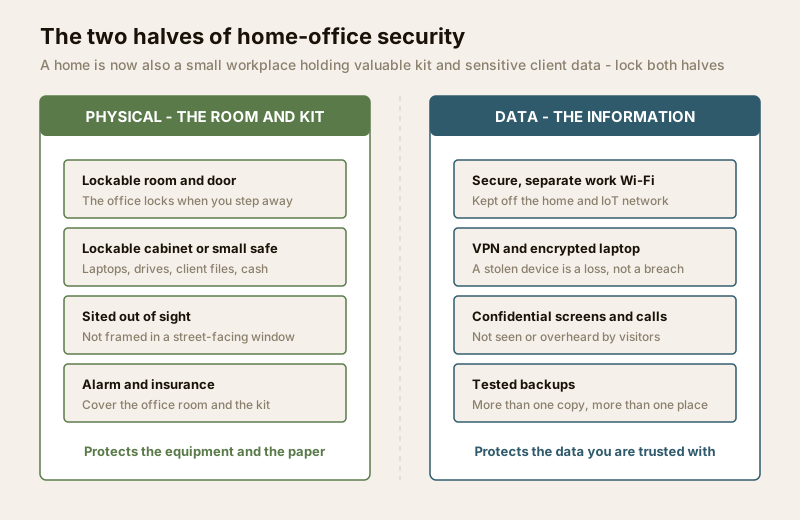
The single most useful idea here is to picture your home office as two locked boxes that need locking separately. One box is made of walls, a door and a cabinet; the other is made of a network, passwords and encryption. A thief who cannot open the physical box may still open the data box remotely, and someone who can walk into an unlocked flat may not need to hack anything at all.
| The two halves | What it protects | The main measures |
|---|---|---|
| Physical | The equipment and the paper - laptops, drives, documents, client files, cash and stock | A lockable room and door, a lockable cabinet or small safe, sensible siting out of sight, an alarm, and insurance on the kit |
| Data / cyber | The information - company systems, client records, logins, the work you are trusted with | A secure and ideally separate work Wi-Fi, a VPN, encrypted and patched devices, screen and call confidentiality, backups, and following the employer's policy |
Neither half substitutes for the other. The rest of this guide walks through both, then the human layer that surrounds them - confidentiality, visitors, insurance and the line between work and home.
The physical office: a room, a door, a cabinet
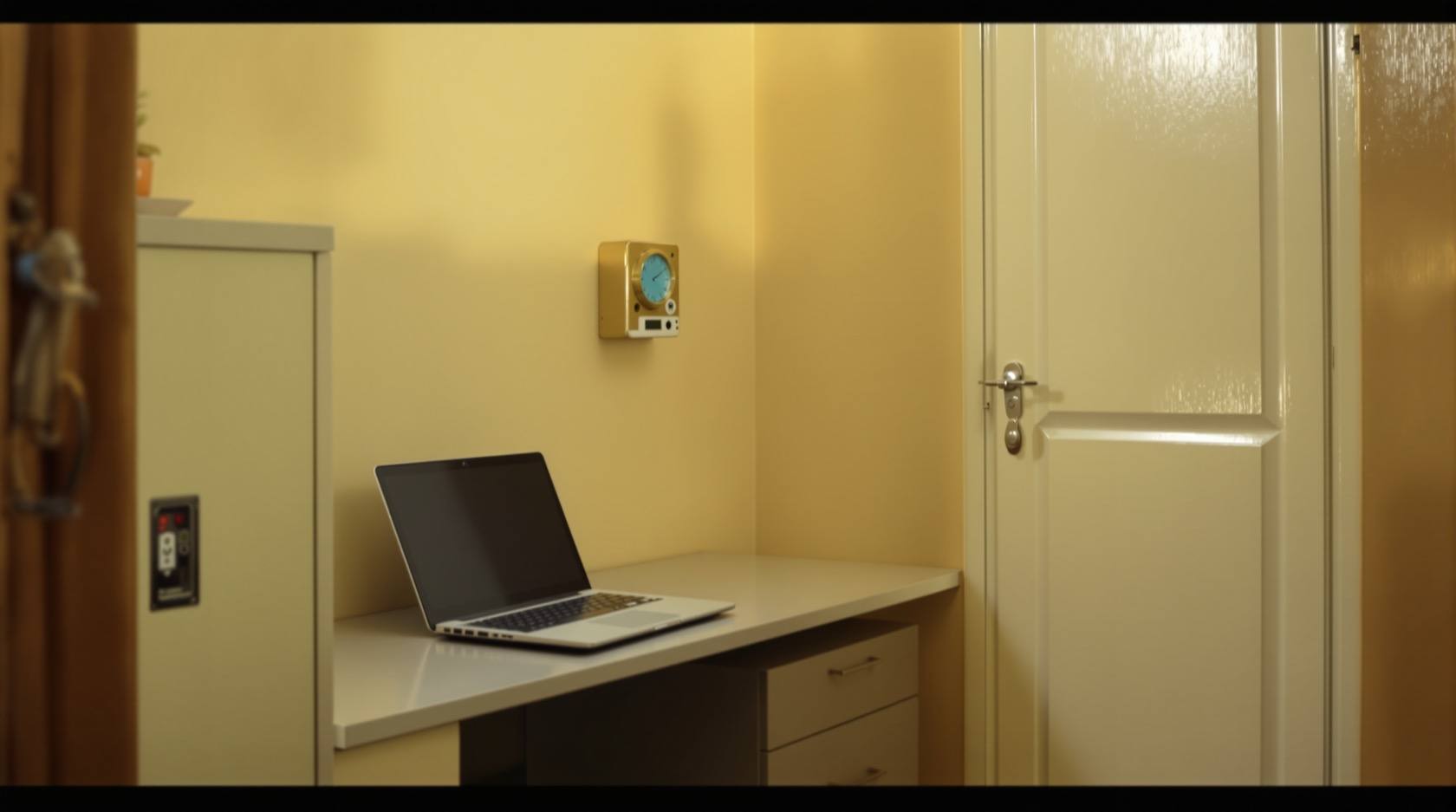
Start with where the office sits. If you have the choice, put the home office out of sight and out of temptation - not in a ground-floor room whose window frames an expensive setup for anyone passing on the street, and not the first room a stranger reaches through the front door. A laptop, monitor and camera on clear display through a window is an advertisement. The apartment home-office design guide covers how to carve out a workable office in a compact Indian flat, and where it can sensibly go.
A lockable room and door. The best single physical control is a door you can actually lock when you step away or leave the house, turning the office into a room a casual visitor, a delivery agent or an opportunist cannot simply wander into. A solid door with a decent lock is enough for most homes; the home-office door guide covers choosing one, and the openings sub-hub covers doors, windows and their weak points more broadly.
A lockable cabinet or small safe. Not everything can be behind a locked room door all the time, so add a second layer inside: a lockable cabinet, drawer or small safe for the things that hurt most to lose - external hard drives and backups, signed contracts and client paperwork, spare devices, and any cash or valuables a small business keeps. When you close the laptop for the day, it goes in the cabinet, not on the open desk. This also protects work data from the ordinary traffic of a shared home.
Protecting the equipment itself. Expensive kit deserves a few cheap habits: a laptop lock cable for a machine left on a desk, engraving or asset tags, a written note of make, model and serial numbers (invaluable for police and insurance), and not leaving devices visible in a car or by an open window. Fold the office into the home's wider security - see the home security systems guide and the ultimate home security guide for alarms, sensors and monitoring that cover the office room as well as the rest of the house.
The data half: this is genuinely half the job
You can lock every door in the house and still lose the thing that matters most - the data - through the network. For a remote employee especially, protecting the company's information is usually a contractual duty, not a nicety. This half of the work is covered in depth in the cybersecurity library; here is the home-office core.
A secure, ideally separate, work Wi-Fi. Your home network is shared with phones, smart TVs, streaming sticks and a growing crowd of cheap IoT gadgets - and any one of those can be the weak link. The clean answer is to keep work traffic on its own network, separate from the home and IoT devices, so a compromised smart plug cannot sit on the same network as your work laptop. A guest network or a dedicated work SSID is the simplest form of this. See secure Wi-Fi for security devices for locking the network down, and network segmentation for IoT for keeping work, home and gadgets in separate lanes.
A VPN and the employer's policy. If your employer provides a VPN, use it - it encrypts the link between your home and the company, so what travels over your broadband and any shared line cannot be casually read. More broadly, follow the employer's security policy to the letter: it exists because the company, and its clients, are trusting your spare room with their data. That usually means work only on the work device, approved apps only, no copying client data to personal drives, and prompt updates.
Encrypted, patched devices. Turn on full-disk encryption so a stolen laptop is a lost asset, not a data breach - the thief gets hardware, not the files. Keep the operating system and apps patched, use a strong screen-lock and a password manager, and never reuse the home Netflix password on a work account. The data encryption guide explains why encryption turns a theft into a manageable loss.
Backups. Hardware fails and laptops get stolen; a backup is what turns a disaster into an inconvenience. Keep at least one backup of work data that is not sitting on the same desk as the laptop - a second encrypted drive locked in the cabinet, or the employer's approved cloud. The rule of thumb is more than one copy, in more than one place, and test that you can actually restore it.
Confidentiality in a shared home
An Indian home is rarely empty and rarely private. Family move through it, guests visit, children play, and many homes have domestic staff. None of them are a threat - they are the people you live with and who help run the house - but client confidentiality still means their eyes and ears should not fall on work that is not theirs to see. This is about respect and duty, not suspicion.
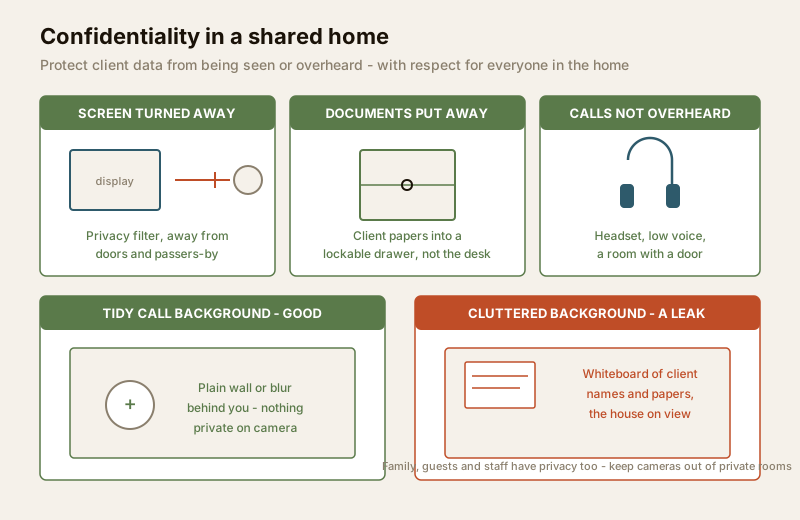
Screens and documents. Position the desk so the screen does not face an open door or a window, and use a privacy filter if people regularly pass behind you. Put sensitive documents away in the lockable drawer rather than leaving them spread across the desk overnight. A clear-desk habit at the end of the day protects client paper from the ordinary comings and goings of the house.
Calls not overheard. A confidential client call carried on speakerphone in a busy living room is a leak. Take sensitive calls in a room with a door, use a headset, and keep your voice down when names and numbers are involved. The apartment home-office design guide has ideas for a bit of acoustic and visual separation even in a small flat.
A tidy camera-call background. The video call is a window strangers look through into your home. Whatever is behind you - a whiteboard of client names, a wall of sticky notes, papers on a shelf, or simply a view into the rest of the house - is on camera. Set up a clean, plain background, use a virtual background or blur where the platform allows, and glance at what is visible before you join. This protects both your client data and your family's privacy from the people on the call.
Visitors and deliveries during work hours
Working from home means the doorbell rings during the day - couriers with parcels, a client dropping by, a service person. Each is a small decision about who gets near your equipment and data. Handle it with a simple, friendly routine rather than either paranoia or blind trust.
- Verify before you open. Use a door viewer or video door phone to see and speak to a caller before opening, and confirm who a delivery or visitor is expected. You do not owe a stranger entry.
- Keep deliveries at the door. A courier does not need to come inside. Take parcels at the threshold; agree a drop point or a trusted neighbour for when you are on a call and cannot answer. A clear, consistent delivery routine is safer and calmer than improvising each time.
- Do not leave strangers alone near the office. A service person or an unexpected visitor should never be left unattended in a room with an open laptop, client papers or the cash box. Log the office off and, if you can, keep them out of the office room entirely.
- For frequent or business callers, plan access properly. If clients, staff or regular deliveries come often, the visitor access management guide covers verifying and logging callers with dignity - treating people as guests to be welcomed and recorded, never as suspects.
Insurance: cover the kit and the working-from-home rider
Locks and passwords reduce the odds; insurance handles the day a loss still happens. Two points catch home workers out.
Ordinary home contents cover may not cover business equipment. Many household policies exclude or cap items used for business, and a work laptop or professional camera can fall in that gap. Check your policy, and ask about a working-from-home or home-office add-on (rider) that covers business equipment and, for some, the extra risk of running work from the home. If you hold client data or take business visitors, ask whether any liability cover is worth adding.
Get the paperwork right. Keep the serial numbers, purchase invoices and photographs you noted earlier, because a claim moves faster with proof of what was lost. If your employer owns the device, ask them what their insurance covers and what you are responsible for - do not assume. Read the fine print on single-item limits and on whether cover applies when a device leaves the house.
Separating work and home security - and the employer's line
A home office blurs two worlds, and a little deliberate separation keeps both sane and secure.
| Keep separate | Why it matters |
|---|---|
| Work device vs personal device | Company data stays on the company machine under company controls; your family photos and personal accounts stay off it. Cleaner for security and for privacy on both sides. |
| Work network vs home / IoT network | A compromised smart gadget cannot reach the work laptop; work traffic is not exposed to every device in the house. |
| Work accounts vs home accounts | Separate, unique passwords mean a leak of your personal login does not hand over a work system. |
| Employer's rules vs your own kit | The employer sets the policy for their data and devices; you decide the security of your own home, house-wide alarm and family privacy. Respect the line in both directions. |
For an employee, the employer's requirements come first for anything touching company data - device, VPN, approved apps, reporting a lost laptop quickly. For the home itself - the alarm, the cameras, the family's privacy - you are in charge, and you should not let a work setup quietly turn your home into a surveilled space. If you use smart devices for the office, smart home security, smart locks and smart-home privacy cover doing it without over-surveilling your own household.
The small-business-at-home extra: treat it like a small premises
If the home is not just a remote-work desk but a small business - a boutique, a repair service, a trader, a clinic - the stakes rise, and it is fair to borrow from how a small commercial premises is protected.
- Stock and cash need real physical security: a locked store area, a safe or cash box out of sight, and not keeping large amounts of either at home overnight where avoidable.
- Customer data is a serious duty. Order histories, phone numbers, payment details and identity documents are exactly the kind of personal data the DPDP Act, 2023 is about - collect the minimum, store it encrypted and access-controlled, and do not keep it forever. A security and privacy assessment helps you find where customer data is exposed.
- Business visitors change the risk. Regular customers, suppliers or staff coming and going means a proper access and logging routine, insurance that reflects business use and footfall, and keeping the office and stock areas separate from the family's private space.
- The house-wide system carries the load. Alarms, cameras (in public and work areas only, never private rooms), monitoring and away-mode all protect the business too - see remote monitoring, notifications and, for the shut-shop hours, occupancy simulation so the premises never looks obviously empty.
The home-office security checklist
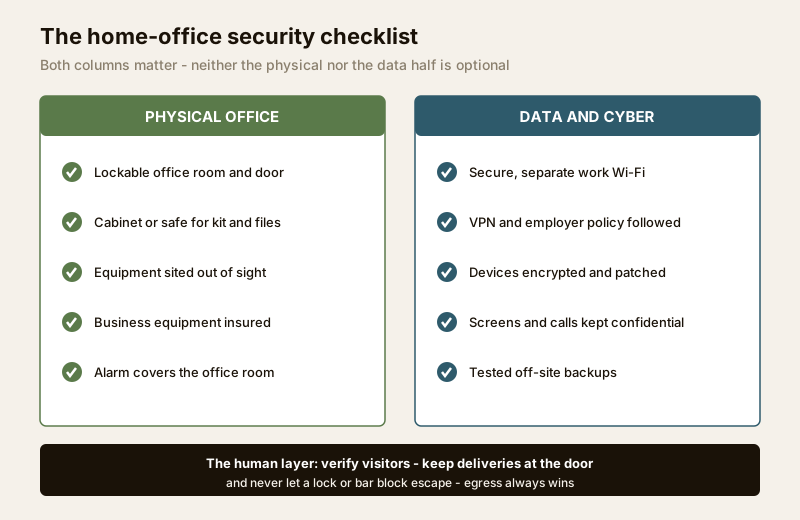
The two halves come together as one short list you can walk through for your own setup. Neither column is optional.
| Physical office | Data and cyber |
|---|---|
| Office in a room you can lock, sited out of sight from outside | Work Wi-Fi secured and, ideally, separate from the home and IoT network |
| Lockable cabinet or small safe for laptops, drives, documents, client files | VPN in use where provided; the employer's security policy followed |
| Equipment tagged, serials recorded, not left on display | Devices encrypted, patched, screen-locked, on unique strong passwords |
| Business equipment insured with a working-from-home rider | Work data backed up off the desk, tested, and kept confidential |
| Alarm and monitoring cover the office room | Screens turned away, calls not overheard, camera backgrounds tidy |
| Never: a lock or bar that could trap anyone in a fire | Never: work or client data on unsecured personal devices or public Wi-Fi |
| Visitors verified, deliveries kept at the door, strangers not left near the kit | Customer data (small business): minimal, encrypted, access-controlled |
To pressure-test your own home office against all of this in a few minutes, run the home security risk scorecard.
Key takeaways
- A home office has two halves - physical and data - and both need locking. An alarm does nothing for the data half, and a password does nothing for the physical half.
- Physical: a lockable room, a lockable cabinet, sensible siting. Put the office out of sight from the street, lock the door when you step away, and put the laptop, drives and client papers in a cabinet or small safe, not on an open desk.
- Data is genuinely half the job. A secure, ideally separate, work Wi-Fi, a VPN, encrypted and patched devices, tested backups, and following the employer's policy protect the information you are trusted with.
- Confidentiality in a shared home is respect, not suspicion. Turn screens away, put documents in a drawer, take sensitive calls behind a door, and keep the camera-call background tidy - protecting client data and your family's privacy at once.
- Handle visitors and deliveries with a calm routine. Verify callers, keep deliveries at the door, and never leave a stranger alone near equipment or data.
- Insure the kit and mind the line. Check that business equipment is covered and add a working-from-home rider; keep work and home devices, networks and accounts separate; and if you run a small business from home, treat stock, cash and customer data like a small commercial premises.
Where to go next
- Security for specific users - the pillar that frames security around who lives in and uses the home.
- Home-office door and apartment home-office design - designing the lockable, sensibly sited office itself.
- Openings sub-hub - doors, windows and their weak points for the office room.
- Cybersecurity library, secure Wi-Fi, network segmentation for IoT and data encryption - the data half in depth.
- Visitor access management and video door phone privacy - handling callers and deliveries with dignity.
- Home security systems guide and the ultimate home security guide - the house-wide alarm, sensors and monitoring the office sits inside.
- Home security risk scorecard - test your own home office in a few minutes.
References
- Digital Personal Data Protection Act, 2023 - the client, employee and customer data a home office holds is personal data; collect the minimum, keep it secured and access-controlled, and be mindful that cameras and monitoring in a shared home also capture family, guests and staff.
- Your employer's information-security and remote-working policy - the authoritative source for how a remote employee must protect company and client data (device rules, VPN, approved apps, incident reporting); confirm the current version with your IT or security team.
- Your household insurance policy and insurer - for whether business equipment is covered and the terms of any working-from-home or home-office rider; confirm single-item limits, business-use exclusions and liability cover with the insurer or a licensed broker.
- National Building Code of India (SP 7), Bureau of Indian Standards - fail-safe egress and life-safety provisions that any lock, bar or arming state in the office must respect; verify the current edition via the BIS catalogue: https://www.services.bis.gov.in/
This is an educational overview, not legal, security or insurance advice. Home-office security choices should be confirmed with a licensed installer for locks and alarms, your employer's IT or security team for work-device rules, a qualified insurer or broker for cover, and legal advice where client or customer data is involved, with any standard's current status verified via the BIS catalogue before you rely on it.
Export this guide
Related Guides — Deep-dive reading
Security for People Living Alone in India (2026): Calm, Practical Habits When There Is No Second Person to Notice
Living alone is an ordinary and growing part of Indian life - the student in a new city, the working single, the elder whose children are abroad, the person after a separation. It does not call for fear. It calls for a few deliberate habits, because there is no second person in the home to notice trouble, raise the alarm, or catch an accident. This is calm self-reliance, layer by layer.
SecurityComplete Guide to Security System Cybersecurity in India (2026): Protecting the Systems That Protect You
The cameras, locks, alarms and door phones you install to feel safer are internet-connected computers that can themselves be attacked, and an insecure one is worse than none. This pillar maps the whole attack surface — devices, network, accounts and data, operations — and points to every guide that hardens it.
SecurityCo-Living Security in India: Safe Shared Living for Young Residents
The co-living and managed-PG format is booming in Indian cities, packing many unrelated residents into one shared building with common amenities and constant churn. This guide shows how to hold open community and individual privacy together — layered access, visitor control, common-area CCTV that stops at the bedroom door, and life-safety for a building full of sleepers.
SecurityRelated Tools — Try Free
Acoustic Privacy (STC) Visualizer
Indian healthcare acoustic visualizer — compare wall assemblies and noise sources, see received SPL after STC attenuation, and check FGI 2018 / IS 1950 / NABH speech-privacy compliance with live dual-canvas waveform.
Acoustic ToolHome Security Risk Scorecard
Score your home across six security layers — perimeter, entry points, lighting, detection, alarm and habits — and get a prioritised action plan.
Security ScorecardInterior Contract Clause Checklist
16 sections and 98 checkboxes covering scope, BOQ, milestones, penalties, warranty, and disputes.
Contract Checklist