
Visitor Access Management in India (2026): Passes, Logs and Privacy at the Gate
How an Indian society, office or gated community controls and records who comes in as a guest, delivery, cab, maid or contractor, using pre-registration, time-limited gate passes, guard or app approval, a proper visitor log, and DPDP-safe handling of visitor data.
Every gate in India runs the same quiet negotiation dozens of times a day. A guest arrives for tea, a delivery rider pulls up, a cab waits, the daily maid walks in, a plumber comes to fix a leak. Each one is a stranger to the building until someone vouches for them, and each one leaves a trace of who they are and when they came. Visitor access management is the system that turns that daily churn into something controlled and recorded: the right people get in quickly, the wrong ones do not, and there is an honest log of what happened, held in a way that respects the visitor's privacy.
This guide is written for both sides of the gate. If you are a resident, it explains how to pre-register a guest, approve a surprise caller and keep your regular help moving without friction. If you run an RWA, a facility team or an office, it explains how to design the flow so it is fast, fair, has a fallback for everyone, and does not turn your visitor register into a privacy liability. It is part of Studio Matrx's access-control pillar and the wider security hub.
Scope & safety. This guide helps you plan and run a visitor process; it is not a licensed engineering job. Two hard rules override everything below. First, life-safety: any gate, turnstile or access-controlled door on an escape route must let a visitor EXIT freely in an emergency, must fail-safe (release on power loss and on a fire-alarm signal), and must carry a manual emergency release. Never trap anyone to enforce entry control. Second, privacy: a visitor's name, phone, photo, vehicle number and entry time are personal data under the Digital Personal Data Protection Act, 2023. Collect the minimum, tell people why, restrict who sees it, set a retention limit, and never misuse it. This is educational guidance, not legal advice.
What "managing visitors" actually means
It is easy to reduce visitor management to an app that spits out a QR code, but the value is in five moving parts working together. Miss one and the system either annoys everyone or protects no one.
- Pre-registration. The resident (or host) tells the system a guest is coming, before they arrive. This is what converts a stranger into an expected, vouched-for person.
- A time-limited gate pass. A credential, usually a QR code or an OTP, that is valid only for a specific visit window and dies afterwards. See the mechanics in the QR-code access guide.
- Approval at the gate. A guard at the desk, or the resident tapping allow or deny in an app, decides in real time whether this person comes in. The guard-to-resident intercom and the video door phone are the tools that carry this conversation.
- The visitor log. An honest record of who came, for whom, when they entered and when they left.
- Expiry and revocation. The pass stops working at the end of the visit, and the host can cancel it at any time.
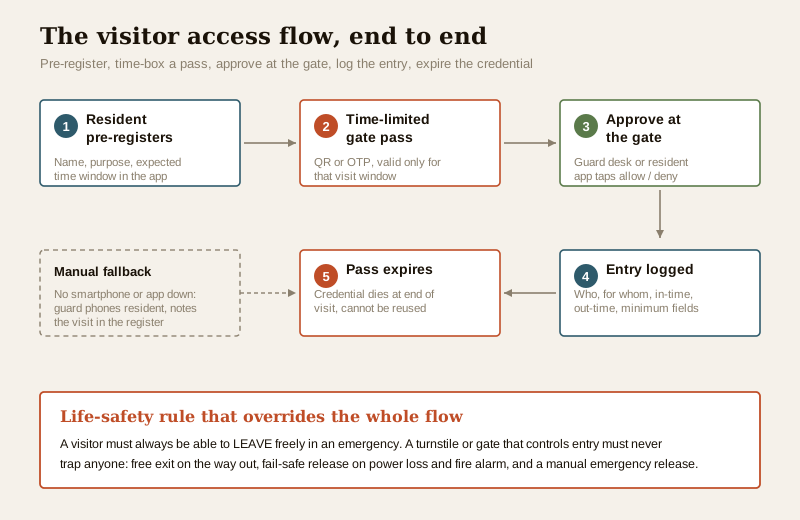
The whole point is that the validation and the record live in the system, not in the guard's memory or a scrap of paper. A pass the system cannot check, time-box or revoke is just a picture; a log nobody can search is just ink.
The everyday flows
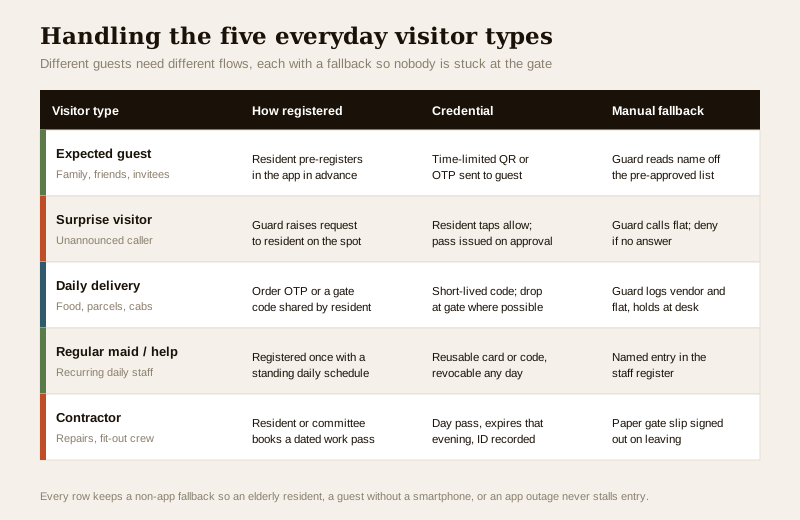
Real buildings do not have one visitor type; they have five, and each deserves a slightly different flow. The mistake is forcing all of them through the same rigid app step, which is exactly what makes residents and guards start bypassing the system.
The expected guest
The clean case. The resident opens the society app the evening before, adds the guest's name and expected arrival window, and the app sends the guest a time-limited gate pass as a QR code or OTP. At the gate the guard scans it (or the guest reads out the OTP), it matches, and they are in. The guard never has to phone anyone, and the entry is logged automatically against the host flat.
The surprise visitor
Someone turns up unannounced. There is no pre-registration, so the guard raises a request to the resident on the spot, through the app or the intercom, showing who is at the gate. The resident taps allow or deny. If they allow, a pass is issued on the spot and the visit is logged. If there is no answer, the default is deny and hold at the gate, never wave through.
The daily delivery and cab
High volume, low individual risk. Most food and parcel platforms already generate a delivery OTP the resident shares, or the resident issues a short gate code from the app. The best pattern, where the layout allows, is a controlled drop point at the gate so the rider never needs to go up. When they do go up, the guard logs the vendor name and the flat, and the pass is short-lived. Cabs are similar: log the vehicle only if there is a real reason to, and let it expire fast.
The regular maid, cook and domestic help
These are recurring daily visitors, not one-offs, so a fresh pass every morning is pointless friction. Register them once with a standing daily schedule and give them a reusable card or code that the resident can revoke any day (help leaves, a dispute arises). Their daily in and out is logged against a named staff entry, which also doubles as an informal attendance record for the resident. If you formalise that into payroll or hours, read the time-and-attendance integration guide, because attendance data carries its own privacy weight.
The contractor and fit-out crew
A plumber, an electrician, a painting crew for a week. The resident or the committee books a dated work pass; it expires that evening (or covers the agreed dates), the worker's ID type is noted, and on a big fit-out the committee may cap the number of workers or the hours. On leaving, the crew signs out so the log closes cleanly.
The pitfalls, and the fallback that saves you
Every visitor system in India eventually meets the same four failure modes. Design for them from day one.
| Pitfall | What goes wrong | The fix |
|---|---|---|
| Residents ignore app notifications | A surprise-visitor request pings the resident's phone, goes unseen, the guest waits ten minutes, everyone blames the app | Guard has a phone-call fallback to the flat; a clear default (deny and hold) if there is no answer within a set time |
| Elderly or non-app residents | A senior resident does not use the app or cannot approve quickly | Keep a manual register and a guard-managed approved-visitor list per flat; the guard can approve known guests by phone |
| Guests without a smartphone | A visitor cannot receive or show a QR | OTP read aloud, or the guard registers them manually at the desk from the resident's phoned-in approval |
| App or internet outage | The society server or the internet is down; the whole gate freezes | A paper register and phone-based approval that always works; the gate must never depend solely on the cloud |
The thread running through all four is the same: there must always be a manual fallback. A visitor system that only works when the app works, the network is up and everyone is tech-comfortable is a system that will be abandoned the first busy evening. The digital flow is the fast, tidy default; the manual flow is the safety net that keeps the gate moving for the elderly resident, the smartphone-less guest and the day the internet dies. This is the same offline-first logic that runs through offline access control: the gate must degrade gracefully, not fail shut.
And to be absolutely clear, "fail shut" must never mean trapping people. Entry control and exit are different problems. A visitor must be able to walk OUT of the gate freely at any time, and instantly in an emergency. If your gate or turnstile is on a fire-escape path, the free-exit and fail-safe requirements of the fire code apply, and that is a coordinated, licensed design, covered again in the professional callout below.
The visitor log: useful, and a responsibility
The log is what makes visitor management more than a doorman with a good memory. Done well it answers "who was in the building last Tuesday evening and for which flat?" in seconds. But that same log is a growing pile of other people's personal data, and it has to be treated as one.
What a good log records, and what it should not
Record the minimum that actually serves security and record-keeping: the visitor's name, the flat or person they are visiting, the purpose in a word or two, the in-time and the out-time. That is usually enough. Everything beyond that is a judgement call, and the default answer should be do we really need this?
| Field | Usually justified | Think twice |
|---|---|---|
| Name | Yes, core to any log | Nicknames are fine for low-risk deliveries |
| Flat / host visited | Yes | Show only to the guard and committee, not other residents |
| In-time and out-time | Yes, the point of the log | Make sure out-time is actually captured, not left blank |
| Phone number | Only if a genuine callback need exists | Do not collect by reflex on every parcel |
| Photo | Only where the risk genuinely warrants it | A gate photo of every delivery rider is usually overkill |
| Vehicle number | For parking or estate-entry control | Not for casual visitors on foot |
| Government ID | Note the type, never photocopy or store the number | Storing ID scans is a serious liability |
Handling visitor data the DPDP way
A visitor's name, phone, photo, vehicle number and entry time are personal data. Under the Digital Personal Data Protection Act, 2023, an RWA or office that collects them is handling personal data and owes the visitor some basic duties. You do not need to be a lawyer to get the spirit of it right.
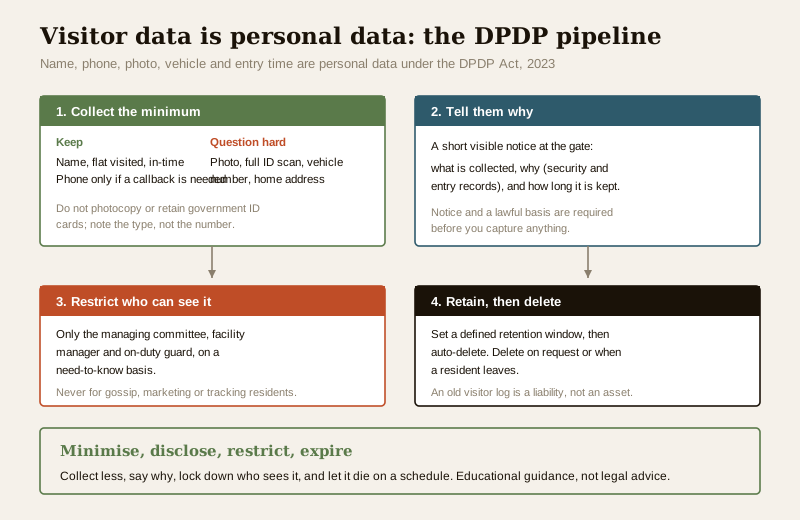
- Collect the minimum. Every extra field is extra risk. If the flat number and a name close the loop, do not demand an address, a photo and an ID scan as well.
- Tell them why. A short, visible notice at the gate, what is collected, why, and how long it is kept, is basic courtesy and good practice.
- Restrict who sees it. Only the people who need the log, the managing committee, the facility manager, the on-duty guard, should be able to read it, and ideally that access is itself logged. See the discipline in access-control audit trails.
- Set a retention limit, then delete. Do not keep visitor entries forever. Decide a defined period appropriate to your purpose, then delete automatically. An entry from two years ago is a liability, not an asset.
- Never misuse it. The log exists for security and records. It is not for tracking a resident's guests out of curiosity, for marketing, or for any purpose other than the one you told visitors about.
- Be able to delete on request or exit. When a resident leaves, or a visitor reasonably asks, you should be able to find and delete their records.
The over-collection trap is real: it feels safer to grab a photo and an ID of everyone, but a large, poorly secured store of visitor identities is itself a security risk, and it is the opposite of what data-minimisation asks. Less, held carefully, is safer than more, held loosely. The same principle governs every credential type in this section, mapped in the smart-locks & access-control sub-hub.
How it fits the building's wider security
Visitor management does not stand alone. It sits inside the layered picture set out for apartments and gated communities: the perimeter and gate, the guard, the CCTV coverage, the intercoms to each flat, and the access control on common doors. The visitor flow is simply the part of that picture that deals with guests rather than residents.
| Layer | Handles | Related guide |
|---|---|---|
| Gate and guard | First check, approval, the register | Guard-to-resident intercom |
| Resident credential | Residents' own daily entry | Card / mobile |
| Visitor credential | Time-limited guest passes | QR-code access |
| Door at the flat | Who reaches the resident's own door | Video door phone |
| The record | The searchable log and its audit trail | Audit trails |
To size and cost the gate hardware, readers and lanes for a real project, the access-control system designer and the cost estimator are the practical next tools.
When to bring in a professional. You can plan and run the visitor process yourself, and you should own the privacy policy, the retention period and the manual fallback. But the moment a gate, turnstile or boom barrier physically releases on a scan, three licensed trades must coordinate: the security-systems integrator (controller, reader, barrier), the electrician (mains, UPS, supply), and the fire-safety consultant (the fail-safe interlock, free-exit and fire-alarm tie-in required by the National Building Code). Never let a visitor-control gate be able to trap anyone, and never make it the only way out. Get the fail-safe design, the manual-override plan and the DPDP retention policy in writing before go-live.
Key takeaways
- Visitor access management is five parts working together: pre-registration, a time-limited gate pass, real-time approval at the gate, an honest log, and expiry or revocation of the pass, not just an app that prints a QR.
- Design for the five everyday flows, expected guest, surprise visitor, daily delivery and cab, regular help, and contractor, because forcing them all through one rigid step is what makes people bypass the system.
- Always keep a manual fallback, a phone-based approval and a paper register, so an elderly resident, a smartphone-less guest, or an app-and-internet outage never freezes the gate.
- Every visitor record is personal data under the DPDP Act, 2023: collect the minimum, tell people why, restrict who sees it, set a retention limit and delete, and never misuse the log.
- Life-safety overrides entry control: a visitor must always exit freely, the gate must fail-safe on power loss and fire alarm with a manual release, and it must never trap anyone, a coordinated, licensed job.
References
- Digital Personal Data Protection Act, 2023 — for lawful basis, notice, data minimisation, retention and deletion of visitor and attendance data (India Code / Ministry of Electronics and Information Technology).
- National Building Code of India and applicable state fire rules — for escape-route free-exit, gate and turnstile fail-safe, emergency release and fire-alarm integration; verify current status via the Bureau of Indian Standards at https://www.services.bis.gov.in/.
- Manufacturer and platform datasheets for the specific visitor-management software, gate readers and barriers specified — for pass time-boxing, offline behaviour, revocation and log-export details.
- Studio Matrx access-control pillar, the QR-code access guide and the wider security hub for the surrounding system context.
This article is educational guidance for planning and running a visitor process, not legal, fire-safety or electrical-engineering advice. Confirm fire-egress interlock and DPDP compliance with the appropriate licensed professionals for your building.
Export this guide
Related Guides — Deep-dive reading
Visitor Vehicle Management in India: A Professional Guide
The everyday weak point of every society and office gate is not the resident's car — it is the visitor, the cab, the delivery rider and the contractor who must be let in without opening the whole park to anyone. This is the process, not just the hardware: verify at the gate before the boom lifts, park visitors away from resident bays, and never jam the gate a fire tender needs.
SecuritySecurity for People Living Alone in India (2026): Calm, Practical Habits When There Is No Second Person to Notice
Living alone is an ordinary and growing part of Indian life - the student in a new city, the working single, the elder whose children are abroad, the person after a separation. It does not call for fear. It calls for a few deliberate habits, because there is no second person in the home to notice trouble, raise the alarm, or catch an accident. This is calm self-reliance, layer by layer.
SecurityApartment Access Control in India (2026): A Whole-Building Guide for Societies and RWAs
How to plan access control for a whole apartment building - main gate, lobby and tower doors, lifts, parking, visitor management and per-flat entry - with RWA governance, resident roles, DPDP privacy and fail-safe fire egress.
SecurityRelated Tools — Try Free
Apartment Video Door System Planner
Enter flats, entrances, floors and guard desk for a first-pass building intercom plan — door stations, indoor monitors, guard station, the right architecture and an indicative cost band.
Building PlannerWindow Hardware Cost Calculator
Estimate window hardware cost — hinges, handles, locks, rollers and multipoint gears.
Window CalculatorSecurity System Cost Estimator
Estimate the all-in capex with GST, annual running cost and 5-year total cost of ownership of a home or building security system.
Cost Estimator