
RFID Locks in India (2026): Cards, Fobs and Tags for Offices, PGs and Homes
How RFID card, fob and tag locks work, why 13.56MHz encrypted cards beat cheap 125kHz ones for security, and how to issue, revoke and manage credentials for offices, PGs, hostels and apartments in India.
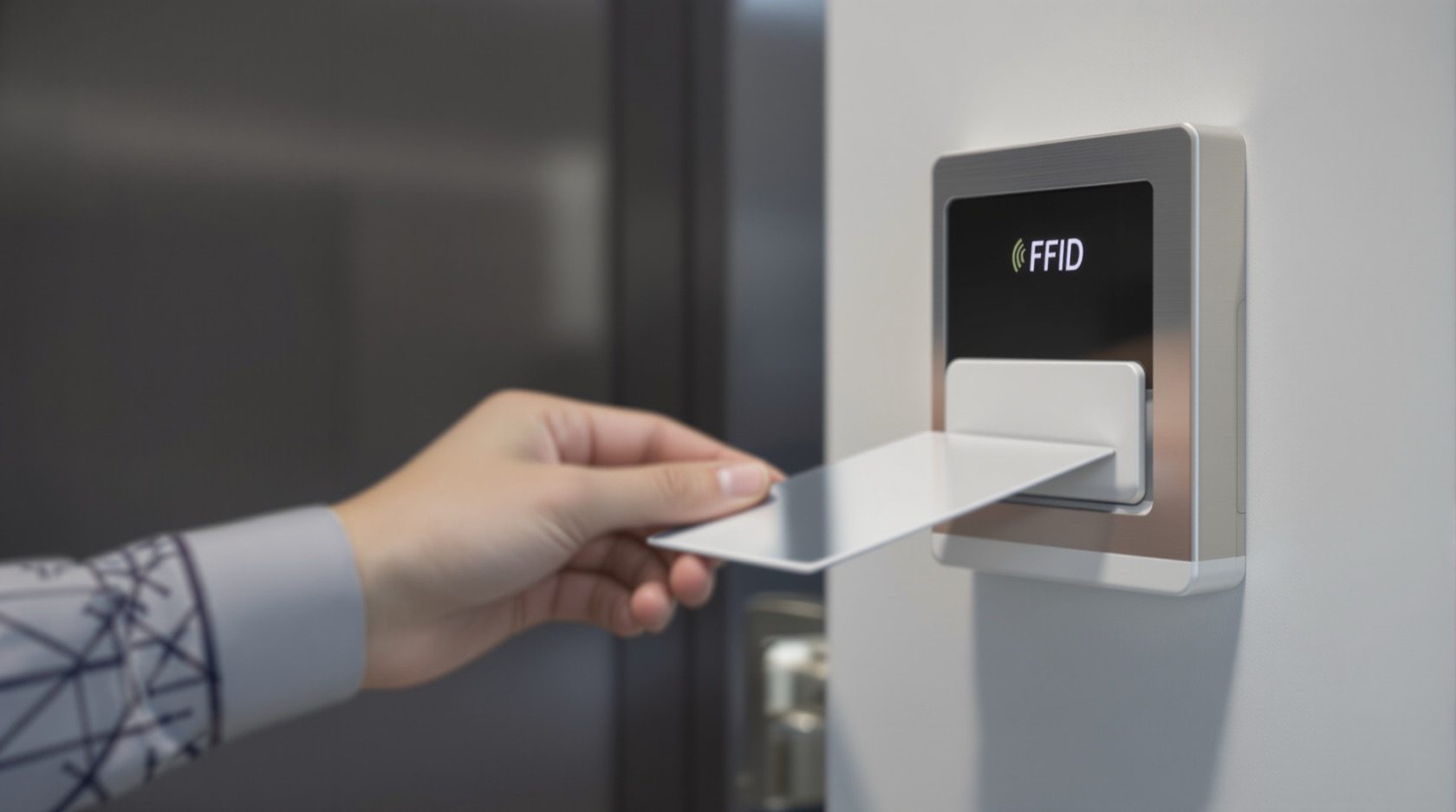
Tap a card on the reader and the door opens. That single, familiar gesture, in hotels, offices, gyms and increasingly homes, is what RFID locks deliver: a credential you carry (a card, a keyfob, or a small sticker tag) that opens a door without a physical key or a remembered PIN. What makes RFID genuinely useful is not the convenience of the tap, but what happens behind it: you can hand a new person a card in seconds, and cancel a lost or departed one just as fast, without ever changing a cylinder.
This guide is part of Studio Matrx's smart locks and access control library, a sub-hub of the Security Knowledge Hub. Its lens is the RFID credential itself: how it works, the one frequency choice that decides whether it is secure or trivially copyable, and how to run cards sensibly across the places RFID shines, offices, PGs, hostels, gyms and apartments. For the phone-tap cousin see NFC locks; for tapping a code instead of a card see PIN code locks.
Scope & safety. This guide helps you plan, choose and manage an RFID access system; the actual lock and door-hardware fitting, mains wiring and any fire-alarm interlock are a licensed job (door-hardware trade + electrician + fire consultant, coordinated). A lock on a door people escape through must fail-safe (release on power or alarm) and must never block an escape route, governed by the National Building Code and fire rules. Always keep a mechanical key override on a home door, and treat access logs as personal data under the Digital Personal Data Protection Act, 2023. Educational guidance, not legal advice.
What "RFID" actually means
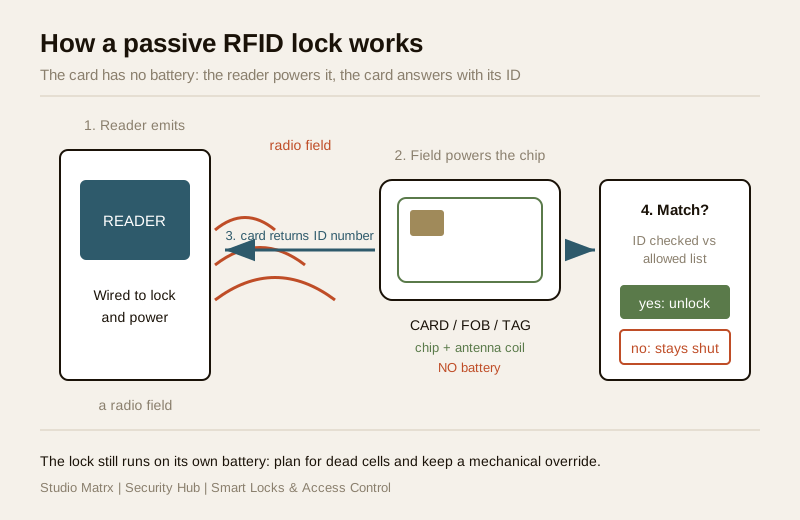
RFID stands for radio-frequency identification. The lock has a small antenna behind the reader plate; the card, fob or tag has a tiny chip and a coil of wire but no battery of its own. When you bring the card close, the reader's radio field induces just enough current in the card's coil to wake the chip, which answers back with its identity number. The reader checks that number against its list of allowed credentials and, if it matches, tells the lock to release. The whole exchange takes a fraction of a second and works through a wallet or lanyard.
Because the card is passive (powered entirely by the reader), it never needs charging and can be almost anything: a credit-card-sized ISO card, a rugged keyfob, a coin-sized disc, or a self-adhesive sticker tag you stick to a phone case. The battery you do need to plan for is in the lock itself, exactly as with any smart lock: plan for dead batteries and a mechanical override.
The one choice that decides everything: 125kHz vs 13.56MHz
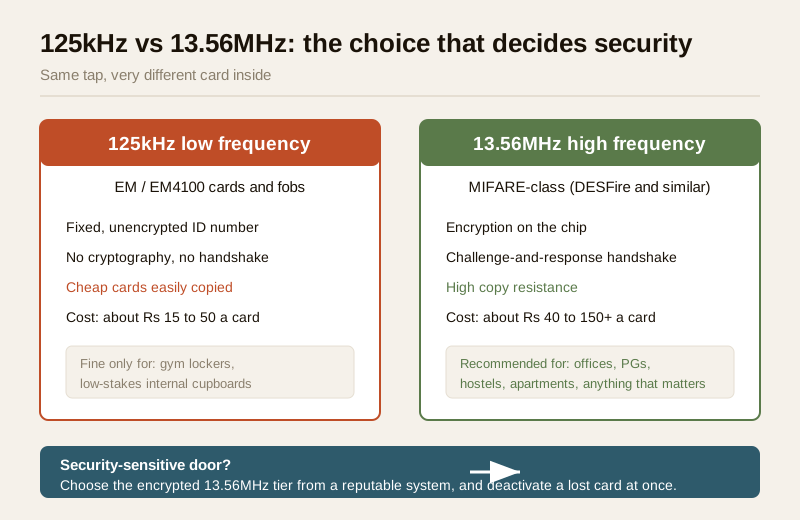
Not all RFID cards are equal, and the difference is not cosmetic, it is the single most important security decision in the whole category. RFID locks work at one of two common frequencies, and they behave very differently.
- 125kHz (low frequency), the old EM / EM4100 cards. These are the cheap white cards and blue fobs sold by the strip. They typically broadcast a fixed, unencrypted ID number, nothing more. There is no cryptography, no challenge-and-response, no protection. That makes them fine for very low-stakes uses (a gym locker, an internal store cupboard) but a poor choice anywhere that matters, because a fixed unencrypted number offers no real defence.
- 13.56MHz (high frequency), MIFARE-class and similar cards. These carry a proper chip that supports encryption and a challenge-response handshake: the reader and card exchange secured data rather than the card simply shouting a fixed number. MIFARE DESFire EV2/EV3 and similar are the modern, credible choice for anything security-sensitive, and they are what serious access-control systems use.
The buying rule follows directly: for anything security-sensitive, choose encrypted 13.56MHz cards from a reputable system, not the cheapest 125kHz cards. Low-frequency unencrypted cards are known to be easy to copy, so you treat that as a reason to pick the encrypted tier and to deactivate a lost card at once, exactly as you would cancel a lost debit card. This is a selection-and-mitigation point, not a technique: you harden by choosing well and revoking fast, never by learning to defeat anything.
| Feature | 125kHz (EM / low frequency) | 13.56MHz (MIFARE-class / high frequency) |
|---|---|---|
| Security | Fixed unencrypted ID, no crypto | Encryption + challenge-response handshake |
| Copy resistance | Low (cheap cards easily duplicated) | High (secured, reputable systems) |
| Typical cost per card | ₹15 – ₹50 | ₹40 – ₹150+ |
| Good for | Gym lockers, low-stakes internal doors | Offices, hostels, apartments, anything that matters |
| Data on card | Just an ID number | ID plus secured application data |
| Studio Matrx stance | Avoid for security-sensitive doors | Recommended for security-sensitive doors |
If you are weighing RFID against a code you tap or a fingerprint you press, run the trade-off through the smart lock selector, and compare with PIN code locks (nothing to carry, but a code can be shared or watched) and fingerprint locks (nothing to carry or lose, but biometrics are sensitive data).
Where RFID shines: many people, easy to issue and revoke
RFID's real home is any door with many users who change over time. That is exactly why offices, PGs, hostels, gyms, co-working spaces and apartment blocks reach for it.
- Offices and co-working. Every employee carries a card that doubles as an ID badge; you issue on day one and revoke on the last day in seconds, with no lock change. RFID integrates cleanly into building access control, so the same card can open the main door, a floor, or a meeting room, and it pairs naturally with a video door phone and access-control system at the entrance.
- PGs and hostels. Residents come and go every few months. A card per resident, cancelled the day they leave, is far less painful than re-keying rooms or chasing returned metal keys. Common doors (main gate, mess, laundry, terrace) can share the same credential set with different permissions.
- Gyms and clubs. A membership card that also opens the door and the locker means one credential, and access ends automatically when the membership lapses.
- Apartments and societies. A resident card at the lobby and lift, managed by the RWA, controls who reaches the building, complementing (not replacing) the flat's own door lock. See the apartment security guide and the gated-community guide for how this fits a wider plan.
For a single family home, RFID is convenient (kids and elderly parents find a tap far easier than a PIN or an app) but the "issue and revoke many cards" advantage matters less; a home often does just as well with a keypad or the family's phones. The villas and independent houses guide weighs these for a standalone home.
Managing credentials: issue, revoke and the admin card
The administrative side is where RFID earns its keep, and where a system either stays tidy or drifts into a mess of untracked cards.
- Issuing a card. New person, new card: you present a master or admin credential (or log into the management software), enroll the new card, set which doors and hours it may open, and hand it over. On networked systems this is a few taps; on standalone locks it is a short enrollment sequence with the admin card.
- The admin (master) card. Most standalone RFID locks ship with one or two special admin cards used only to add and delete user cards. Guard these like the master key they are: keep them locked away, note how many exist, and never leave them in a drawer at reception.
- Deactivating a lost or departed card. This is the whole point of RFID. The moment a card is lost, or a tenant or employee leaves, delete that credential from the system. On a networked access-control system it stops working instantly everywhere; on a standalone lock you remove it from that lock's memory. Treat a lost card exactly like a lost house key: cancel it immediately so it is inert, then issue a fresh one.
- Keep a register. Especially for PGs, hostels and offices: who holds which card number, issued when, for which doors. When someone leaves, the register tells you precisely which credential to kill.
| Credential job | Standalone RFID lock | Networked access-control system |
|---|---|---|
| Add a user | Enroll new card with the admin card | Add in software, assign doors and hours |
| Revoke a card | Delete from that lock's memory | Delete once, blocked everywhere instantly |
| Scope of access | Per lock | Per door, per zone, per time schedule |
| Audit trail | Limited or none | Full logs of who opened what, when |
| Best for | 1 to a few doors | Buildings, campuses, many doors and users |
For a building with many doors, a networked system pays off: one place to manage everyone, instant revocation everywhere, and an audit trail. That audit trail is genuinely useful, but it is also personal data: under the Digital Personal Data Protection Act, 2023, access logs that identify individuals need a clear purpose, a named administrator, minimum retention, and prompt deletion of an ex-tenant's or ex-employee's records. Decide who can see the logs before you switch the system on.
Power, backup, mechanical override and fire safety
An RFID lock is an electronic lock, so the same non-negotiables apply as for every lock in this library.
- Batteries. Most standalone RFID door locks run on batteries. Plan for them to die: note the low-battery warning behaviour, keep spares, and know the emergency-power option (many locks accept a 9V battery or USB power jump at the front so you can get in if the cells are flat). India's power cuts are a reason to prefer battery locks that fail gracefully, and to keep the override handy.
- Mechanical override. On a home door, always keep a mechanical key cylinder as backup, and store that key somewhere sensible off the door. Electronics fail; the metal key is your guaranteed way in.
- Fail-safe vs fail-secure, and fire egress. A powered magnetic-lock or electric-strike access system on a shared escape route must be fail-safe: it releases automatically on power loss and on a fire-alarm signal so no one is ever trapped. This selection, the fire-alarm interlock, and the wiring are a coordinated licensed job, not DIY, and are governed by the National Building Code and local fire rules. Never position a lock or reader so it blocks or complicates an escape route. For the mains and interlock side, coordinate with the electrical hub.
India realities: cost bands, card wear and the climate
- Price bands (2026, indicative). A standalone RFID home/room lock runs roughly ₹3,000 to ₹12,000; a good MIFARE reader plus controller for a single office door lands around ₹6,000 to ₹20,000 before wiring; extra cards cost ₹15 to ₹50 (125kHz) or ₹40 to ₹150+ (13.56MHz). A multi-door networked system for a PG, hostel or office is quoted per site.
- Card wear. Cards that live in a wallet get bent, cracked and demagnetised at the chip; fobs survive far better. For hostels and PGs where cards take a beating, budget a small stock of replacements and lean towards rugged fobs or tags.
- Climate. Heat, dust, monsoon humidity and salt air degrade reader electronics and contacts. Choose a reader rated for outdoor use (a sensible IP rating) at any exposed door, shade it from direct sun and rain, and expect readers at gates to need occasional cleaning.
- Networked-lock honesty. If the system is Wi-Fi or app-connected, it is also a network target: use strong unique credentials on the admin account, enable two-factor authentication, keep firmware updated, buy a reputable brand, and always keep the mechanical override, the same discipline as any connected lock.
When to bring in a professional. Do the planning yourself: choose 13.56MHz encrypted cards, decide which doors and who gets access, set up the register, and run the credential admin. Hand the lock and door-hardware fitting, any mains wiring, the controller install, and every fire-egress interlock to the licensed door-hardware trade, an electrician and a fire-safety consultant, coordinated, and see the electrical hub. For a building-wide system, pair the entrance with a video door phone and access-control setup and confirm the fail-safe behaviour and audit-log handling in writing before go-live.
Key takeaways
- RFID locks let you tap a battery-less card, fob or tag that is powered by the reader and returns an ID, giving fast, keyless entry and the ability to issue and revoke access in seconds.
- The frequency choice decides security: cheap 125kHz EM cards carry a fixed unencrypted number and suit only low-stakes doors, while 13.56MHz MIFARE-class cards add encryption and are the right pick for anything security-sensitive.
- RFID shines where many people come and go — offices, PGs, hostels, gyms and apartments — because you can hand out a card and, crucially, cancel a lost or departed one instantly; treat a lost card exactly like a lost key and deactivate it at once.
- Run the credentials tidily: guard the admin card, keep a register of who holds which card, and remember access logs are sensitive data under the DPDP Act, 2023.
- Respect the electronics and egress: plan for dead batteries, keep a mechanical override on a home door, and route the fitting, wiring and any fail-safe fire-alarm interlock to coordinated licensed professionals.
References
- Digital Personal Data Protection Act, 2023 — RFID access logs that identify individuals are personal data; set a clear purpose, a named administrator, minimum retention and prompt deletion of ex-tenant/ex-employee records.
- Manufacturer datasheets — verify the card technology (125kHz EM vs 13.56MHz MIFARE DESFire and similar), reader IP rating, battery life and emergency-power option on the maker's own datasheet before ordering.
- National Building Code of India (SP 7), Bureau of Indian Standards, and local fire rules for the fire-egress, fail-safe and electrical aspects of any powered access install; verify the current edition via the BIS catalogue: https://www.services.bis.gov.in/
This is an educational overview, not legal advice. Lock fitting, mains wiring and any fire-alarm interlock are qualified professional tasks — engage licensed installers and verify any standard's current status via the BIS catalogue before relying on it.
Export this guide
Related Guides — Deep-dive reading
Card-Based Access Control in India (2026): RFID Cards, Readers, Controllers and the Audit Trail
How card-based access control actually works end to end, why old low-frequency cards are a security caution, how to issue and revoke cards, and how to keep every door fail-safe for fire egress.
SecurityAccess Control Maintenance in India (2026): Readers, Locks and Fail-Safe Egress
How to keep a card, keypad, fingerprint or face access-control system reading reliably and locking securely — and, above everything, how to test that its doors still release on a fire alarm and on power loss, so an access-controlled door never becomes a life-safety trap.
SecurityFail-Safe vs Fail-Secure Locks: The Guide (India 2026)
Why fail-safe vs fail-secure is the single most important access-control decision, and how to get it right for every door.
Home Doors & EntrancesRelated Tools — Try Free
Smart Lock Finder
Find the right smart lock — access methods, tier and must-haves like a mechanical override — for your door and budget.
Door ToolAccess-Control Battery-Backup Calculator
Size the standby battery so an access system keeps running through a power cut, with an egress life-safety note.
Battery BackupApartment Video Door System Planner
Enter flats, entrances, floors and guard desk for a first-pass building intercom plan — door stations, indoor monitors, guard station, the right architecture and an indicative cost band.
Building Planner