
QR-Code Access Control in India (2026): Gate Passes, Visitor Access and How to Do It Securely
How QR codes on a phone or a printed slip open gates and doors in Indian societies, offices, gyms and events — how they work, why dynamic expiring codes beat static ones, and the fire-egress and DPDP rules that govern them.
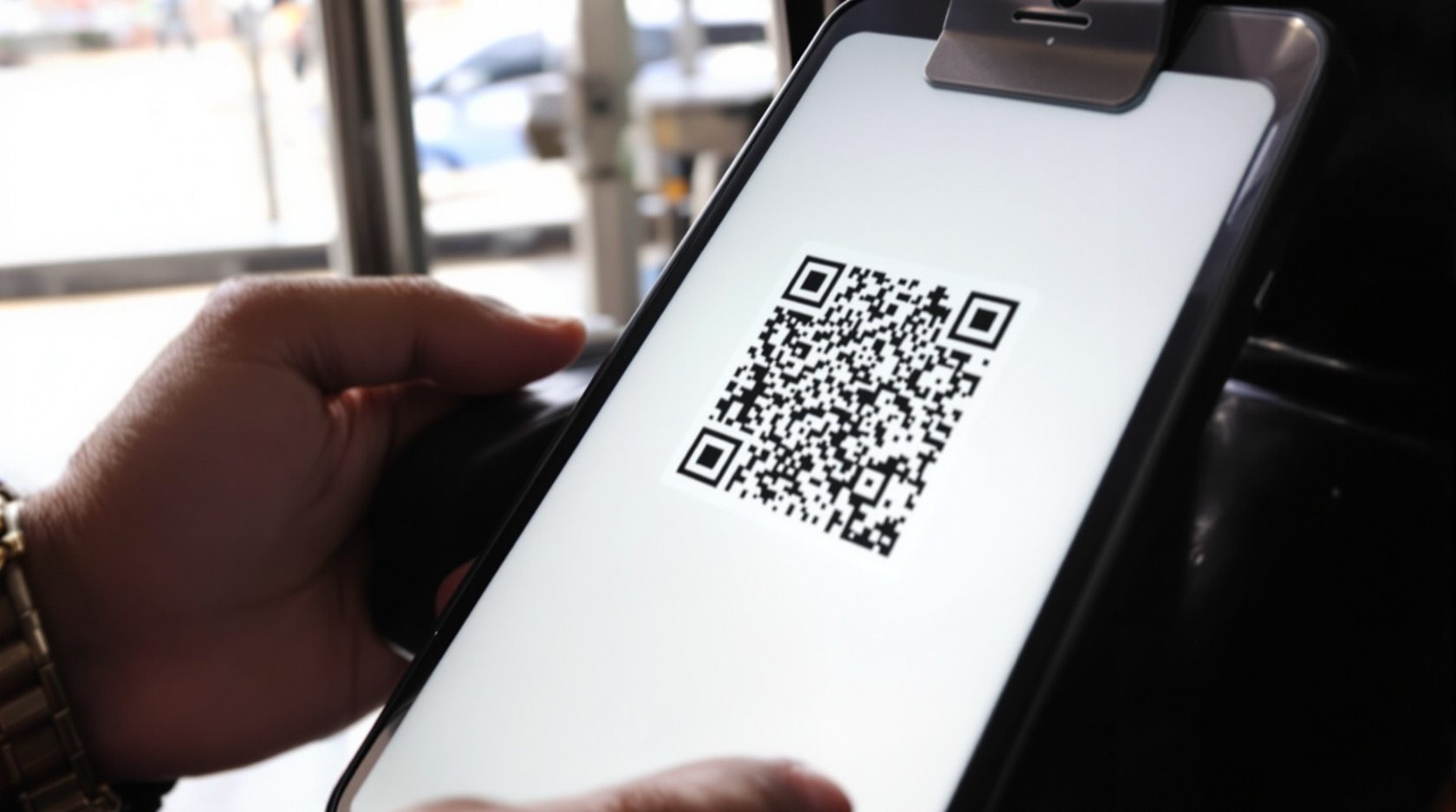
Walk up to almost any well-run apartment gate in an Indian city today and you will see it: a visitor or delivery rider holds up a phone, the guard scans a black-and-white square, the barrier lifts. No card was issued, no fingerprint enrolled, no key handed over. That square is a QR code, and it has quietly become the cheapest, most flexible way to let temporary people through a controlled entrance.
QR-code access control is a method within a larger access-control system: instead of a plastic card or a fingerprint, the credential is a QR code — a machine-readable square shown on a phone screen or printed on a slip — that a scanner reads and the system validates before it releases a door, gate or barrier. It is the natural sibling of the mobile credential: both live on a phone, but where a mobile credential is a permanent key for a regular user, a QR code shines for the visitor, the delivery, the guest, the day-pass holder — anyone who needs in once, or for a defined window, and then never again.
This guide explains how it works, where it earns its place in India (and where it does not), and the two rules that turn a casual convenience into an actual security control: make the code dynamic and expiring, and treat the visitor's data as personal data. As always on Studio Matrx, the hardware fitting and the fire interlock are a licensed job.
Scope & safety. This guide helps you plan, specify and supervise a QR-code access system — not fit one. A QR reader that releases a gate or a door still drives real lock hardware, and any door on an escape route MUST fail-safe: it has to release automatically on mains failure and on a fire-alarm signal, sit on a UPS, tie into the fire-alarm panel, and carry a manual emergency release (break-glass or request-to-exit) so a QR scan is never the only way out. That interlock is governed by the National Building Code and fire rules and is a coordinated job for a licensed security-systems integrator, an electrician and a fire-safety consultant. A visitor's name, phone number, photo and entry time are personal data under the Digital Personal Data Protection Act, 2023. This is educational guidance, not legal advice.
What QR-code access control actually is
A QR code is just data drawn as a pattern of squares — in access control, that data is a short, unique token (think of it as a one-time ticket number) that the system has issued and can look up. Nothing about the black-and-white square is secret by itself; the security lives in what the system does when it reads it.
The appeal is blunt economics. There is no card to buy, print, encode, post or replace when lost. There is no biometric to enrol. Almost every adult in India already carries the reader-friendly credential in their pocket — a phone with a screen. For temporary and high-churn access, that changes the maths completely: issuing the thousandth visitor pass costs the same as the first, which is nothing.
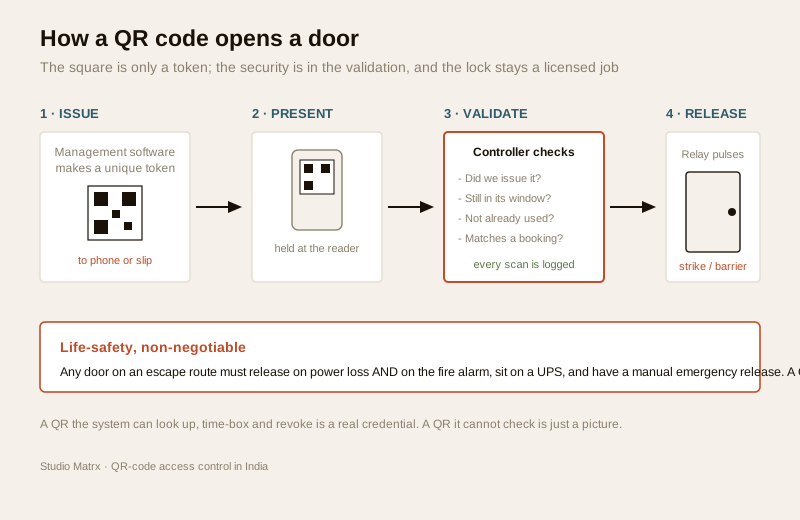
The chain, stage by stage
1. Issue. The management or visitor-management software generates a unique token and renders it as a QR code. A resident invites a guest, a receptionist books a contractor, an event platform sells a ticket, a gym app opens a day pass. The code is sent to the visitor's phone (WhatsApp, SMS, email, in-app) or handed over as a printed slip.
2. Present. At the entrance, the person holds up the phone screen or the printed slip.
3. Read & validate. A scanner — a fixed camera reader, a small QR terminal, or the guard's own phone/handheld — reads the token and passes it to the controller or cloud. The system checks: is this token one we issued? Is it still in its valid window? Has it already been used up? Does it match a real, approved booking or visitor record?
4. Decide & release. Only if all of that passes does the controller pulse the door hardware — an electric strike, a boom barrier, a maglock, a turnstile — to open. Every scan, pass or fail, is logged.
That validation step is the whole game. A QR code you cannot look up and check is just a picture. A QR code the system issued, time-boxed and can invalidate is a genuine, auditable credential.
Where QR codes win in India
QR-code access is not trying to replace the card or fingerprint on your main office door. It owns a different job: temporary and visitor access, at volume, cheaply. These are its killer use cases.
| Use case | The problem QR solves | How it works |
|---|---|---|
| Society visitor & guest entry | Guards juggling paper registers, illegible names, no record | Resident approves the guest in the society app; a time-limited gate-pass QR reaches the visitor's phone; the guard scans it at the gate |
| Delivery & e-commerce riders | Dozens of riders a day, none known in advance | The delivery platform or resident issues a short-window QR tied to that order; scanned once at the gate, then dead |
| Events & exhibitions | Thousands of attendees, one-day access, no time to issue cards | The ticket is the QR; scanned at the entry turnstile, marked used |
| Co-working & flexible offices | Day-pass and hot-desk users who are not permanent members | A day-pass QR valid only for that date and building |
| Gyms, clubs, amenities | Members plus guests plus trials, high churn | Member and guest passes as QR, checked at the turnstile |
| Contractors & temporary staff | Short engagements not worth a permanent card | A QR valid only for the contract dates and specific doors |
The common thread: the people are temporary, they change constantly, and issuing them a physical credential would be slow and wasteful. For your permanent residents, staff and members, a card or biometric or mobile credential is usually the better daily credential — QR handles everyone else. In a real building the two live side by side, which is exactly what a designer sizes in the access-control system designer.
For a society specifically, this slots into the wider picture of gated-community security and pairs naturally with the video door phone at the gate or lobby: the VDP verifies who the person is by sight and voice, the QR pass authorises and logs their entry.
The security point: static versus dynamic
Here is the single most important design decision, and it is a defensive one. A QR code can be static or dynamic, and the difference is the difference between security theatre and security.
A static printed QR — the same code stuck on a wall, printed in a brochure, or issued once and never changing — has an unavoidable weakness: because a QR code is just a picture, a picture can be photographed, screenshotted and forwarded in seconds. A static code that opens a door can be shared with anyone, and you would never know. That is not a flaw to exploit; it is a property to design around.
The mitigation is to make the credential dynamic, time-limited and single-use (or short-expiry), and tied to an identity or a booking:
- Time-limited. The code is valid only for a window — the visitor's expected arrival hour, the event day, the contract dates — and is worthless before and after.
- Single-use or short-expiry. Once scanned in (and, for a barrier, scanned out), the token is spent. A forwarded screenshot of a used code opens nothing. Some systems rotate the code every 30–60 seconds on the phone screen, so a screenshot is stale almost immediately.
- Tied to a record. The token maps to a named visitor, an order, a ticket or a member. If something looks wrong, you can see whose pass it was and revoke it.
- Revocable. Because the system owns the token, it can cancel it instantly — the guest didn't turn up, the contract ended, the ticket was refunded.
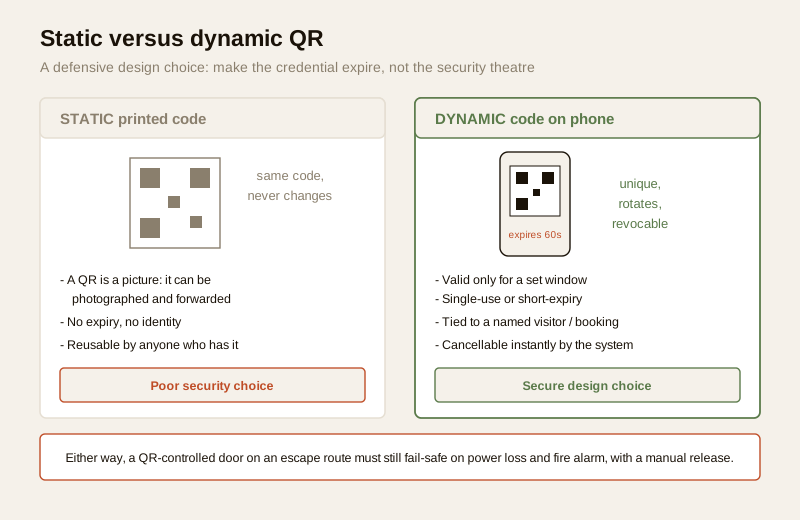
Stated plainly: for anything that matters, use dynamic, expiring, single-use QR codes tied to an identity or booking — never a static printed code as the only control. A static QR is fine for genuinely low-stakes, non-security uses (a parking-payment link, a menu, a feedback form). It is not fine as the credential that lifts your society barrier. This is a mitigation to specify up front, and it is a headline reason QR access belongs in a coordinated system rather than a stand-alone gadget — the same layered thinking behind multi-factor access, where a QR pass might be paired with a guard's visual check or a PIN for higher-value doors.
The visitor gate-pass flow, end to end
The society gate pass is the use case that made QR access mainstream in India, so it is worth walking through in full — it is also the flow most facility managers will actually specify.
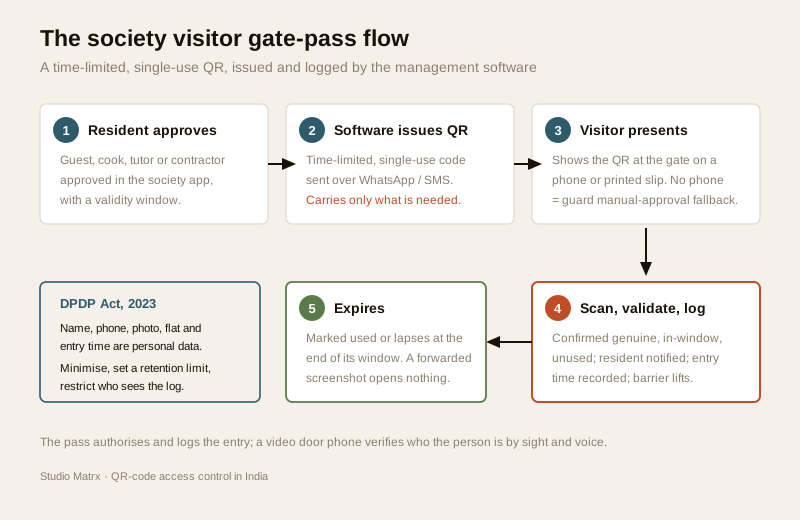
1. Invite / approve. A resident expecting a guest, cook, tutor or contractor approves them in the society app and sets the window (today, this week, weekdays 9–6 for a month).
2. Issue. The system sends a QR pass to the visitor — usually over WhatsApp or SMS. It carries only what is needed: a token, a validity window, sometimes the visitor's name and the flat they are visiting.
3. Arrive & present. At the gate the visitor shows the QR on their phone (or a printed copy). If the phone is dead or the visitor has no smartphone, the guard falls back to the app's manual approval — a good system always has that fallback.
4. Scan, validate, log. The guard's device or a fixed reader scans it; the system confirms it is genuine, in-window and unused, notifies the resident, records the entry time and the guard on duty, and releases the barrier.
5. Expire. The pass is marked used or lapses at its window's end. It cannot open the gate again.
Every one of those entry records — name, phone, photo, flat visited, time in and out — is personal data under the DPDP Act, 2023. That has real consequences, covered next.
Practical limits and buying cautions
QR access is cheap and flexible, but it is not free of trade-offs. Specify around these.
| Consideration | What it means | How to handle it |
|---|---|---|
| You need a reader and connectivity | A QR is useless without something to scan it and a system to validate against — usually online | Budget a camera reader or guard handheld per lane; confirm the gate has reliable network, and ask the vendor how the system behaves offline (some cache recent passes) |
| Screen and print quality | A dim phone at low brightness, a cracked screen, a crumpled or faded print, or glare in harsh sun can fail to scan | Choose readers rated for outdoor light; tell visitors to raise brightness; keep a manual-approval fallback |
| Weather on the reader | Gate readers face monsoon, dust and 45°C heat like any outdoor device | Specify a weather-rated (IP-rated) reader and a shaded, sheltered mounting |
| Power cuts | The reader, controller and barrier all need power to work and to fail-safe | Put them on a UPS; confirm the door/barrier fail-safe behaviour with the integrator and electrician |
| A code is only a token | QR proves someone holds a valid pass, not that they are the named person | For higher-security doors, pair it with a guard's visual check, a photo on the guard screen, or a second factor |
| Data privacy | Visitor passes create a detailed log of who came and went | Minimise fields, set a retention limit, control who can see logs — see below |
Cost, roughly
QR-code access is usually the software layer on top of a system you are already building, so its marginal cost is small. As very rough Indian bands (verify current quotes):
- Society visitor-management app with QR passes: often a per-flat annual SaaS fee, commonly in the ₹100–₹400 per flat per year range, bundled with the guard app and gate hardware.
- A gate QR reader / handheld: a guard's own phone can do it for free with the app; a dedicated fixed outdoor QR/camera reader is typically ₹8,000–₹30,000 depending on ruggedness and whether it also does a barrier interface.
- Event / co-working QR ticketing: usually a per-ticket or per-member fee inside the ticketing or coworking platform, not separate hardware.
Compare these against a card system's per-credential cost in the access-control cost estimator — for high-churn temporary access, QR almost always wins on total cost because there is nothing physical to issue.
Privacy: DPDP and the visitor log
A QR visitor system is, by design, a machine that records people. Every pass ties a real person to a place and a time. Under the Digital Personal Data Protection Act, 2023, that is personal data, and the society, office or venue that runs the system is responsible for it.
The educational essentials:
- Lawful basis and notice. Collect visitor details for the stated, legitimate purpose of managing entry and safety — and tell people that is what you are doing.
- Minimise. Capture only what the entry decision needs. A delivery pass rarely needs the rider's home address; an event pass rarely needs a photo. Fewer fields, less risk.
- Retention. Do not keep entry logs forever. Set a defined retention period appropriate to your purpose (and any society or fire-safety record-keeping obligation), then delete. An entry log from two years ago is a liability, not an asset.
- Access control on the data. Only the people who need it — the managing committee, the facility manager, the guard on duty — should see visitor logs, and their access should itself be logged.
- Deletion. When a resident leaves, a member cancels or a visitor asks, be able to delete their pass history.
Employee and staff use adds a layer: if a QR (or the reader that logs it) is also used to record staff attendance, that attendance data is personal data too, and using it for anything beyond its stated purpose needs care. The same principle runs through every method in this section — see the privacy notes in the access-control pillar.
How QR fits with the other methods
QR is one credential type. A real building blends several, and the smart-locks & access-control sub-hub maps the full set. As a quick placement:
| Method | Best for | Note |
|---|---|---|
| QR code | Visitors, deliveries, events, day passes — temporary, high-churn | This guide |
| Mobile credential | Regular users, permanent phone-as-key | The everyday sibling of QR |
| Card / RFID | Staff and residents wanting a simple daily tap | Prefer encrypted smartcards |
| Biometric | Higher-security doors, no shareable token | Most privacy-sensitive |
| Multi-factor | The most sensitive doors | Combine two of the above |
For a single door at home rather than a networked system, the standalone smart-lock guide and its app-controlled and PIN-code cousins are the right read — QR-code access is the many-doors, many-visitors answer, not the single front-door one.
When to bring in a professional. Design and specify the QR system with your security-systems integrator; they will size readers and lanes and choose the visitor-management platform. But the moment a QR scan releases a real door on an escape route, three licensed trades must coordinate: the integrator (controller, reader, relay), the electrician (mains, UPS, supply) and the fire-safety consultant (the fail-safe interlock, break-glass and fire-alarm tie-in required by the National Building Code). Never let a QR-controlled door be able to trap anyone, and never make it the only way out. Get the fail-safe design and the DPDP retention policy in writing before go-live.
Key takeaways
- QR-code access control turns a phone screen or printed slip into a credential — cheapest and most flexible for temporary and visitor access: society gate passes, deliveries, events, day passes, contractors.
- The security is in the validation, not the square: the system must issue, look up, time-box and be able to revoke the token. A code it cannot check is just a picture.
- Use dynamic, time-limited, single-use codes tied to an identity or booking — a static printed code can be photographed and shared, so it is fine only for genuinely low-stakes, non-security uses.
- Every visitor pass is personal data under the DPDP Act, 2023: minimise fields, set a retention limit, restrict who sees the logs, and be able to delete.
- Any QR-controlled door on an escape route must fail-safe on power loss and fire alarm, sit on a UPS, and carry a manual emergency release — a coordinated, licensed job, never DIY.
References
- Digital Personal Data Protection Act, 2023 — for lawful basis, notice, minimisation, retention and deletion of visitor and attendance data (India Code / MeitY).
- National Building Code of India and applicable state fire rules — for escape-route door fail-safe, emergency release and fire-alarm integration; verify current status via the Bureau of Indian Standards at https://www.services.bis.gov.in/.
- Manufacturer and platform datasheets for the specific QR reader, controller and visitor-management software specified — for offline behaviour, IP rating, code-rotation and validation details.
- Studio Matrx access-control pillar and the wider security hub for the surrounding system context.
This article is educational guidance for planning and specifying access control, not legal, fire-safety or electrical-engineering advice. Confirm fire-egress interlock and DPDP compliance with the appropriate licensed professionals for your building.
Export this guide
Related Guides — Deep-dive reading
Visitor Vehicle Management in India: A Professional Guide
The everyday weak point of every society and office gate is not the resident's car — it is the visitor, the cab, the delivery rider and the contractor who must be let in without opening the whole park to anyone. This is the process, not just the hardware: verify at the gate before the boom lifts, park visitors away from resident bays, and never jam the gate a fire tender needs.
SecurityAccess Control System Cost in India (2026): Priced Per Door, Per System, Per User
What a building-scale access control system actually costs in India — broken down per controlled door (reader, electric lock, controller, cabling and power) and per system (software, licences, integration and AMC) — with the standalone-versus-networked split, how the bill scales with the number of doors and the credential you choose, and the non-negotiable rule that escape-route doors must fail safe.
SecurityAccess Control Maintenance in India (2026): Readers, Locks and Fail-Safe Egress
How to keep a card, keypad, fingerprint or face access-control system reading reliably and locking securely — and, above everything, how to test that its doors still release on a fire alarm and on power loss, so an access-controlled door never becomes a life-safety trap.
SecurityRelated Tools — Try Free
Apartment Video Door System Planner
Enter flats, entrances, floors and guard desk for a first-pass building intercom plan — door stations, indoor monitors, guard station, the right architecture and an indicative cost band.
Building PlannerVisitor Access Planner
Size visitor handling at a gate or reception — lanes needed at peak and the temporary-pass pool.
Visitor FlowWindow Hardware Cost Calculator
Estimate window hardware cost — hinges, handles, locks, rollers and multipoint gears.
Window Calculator