
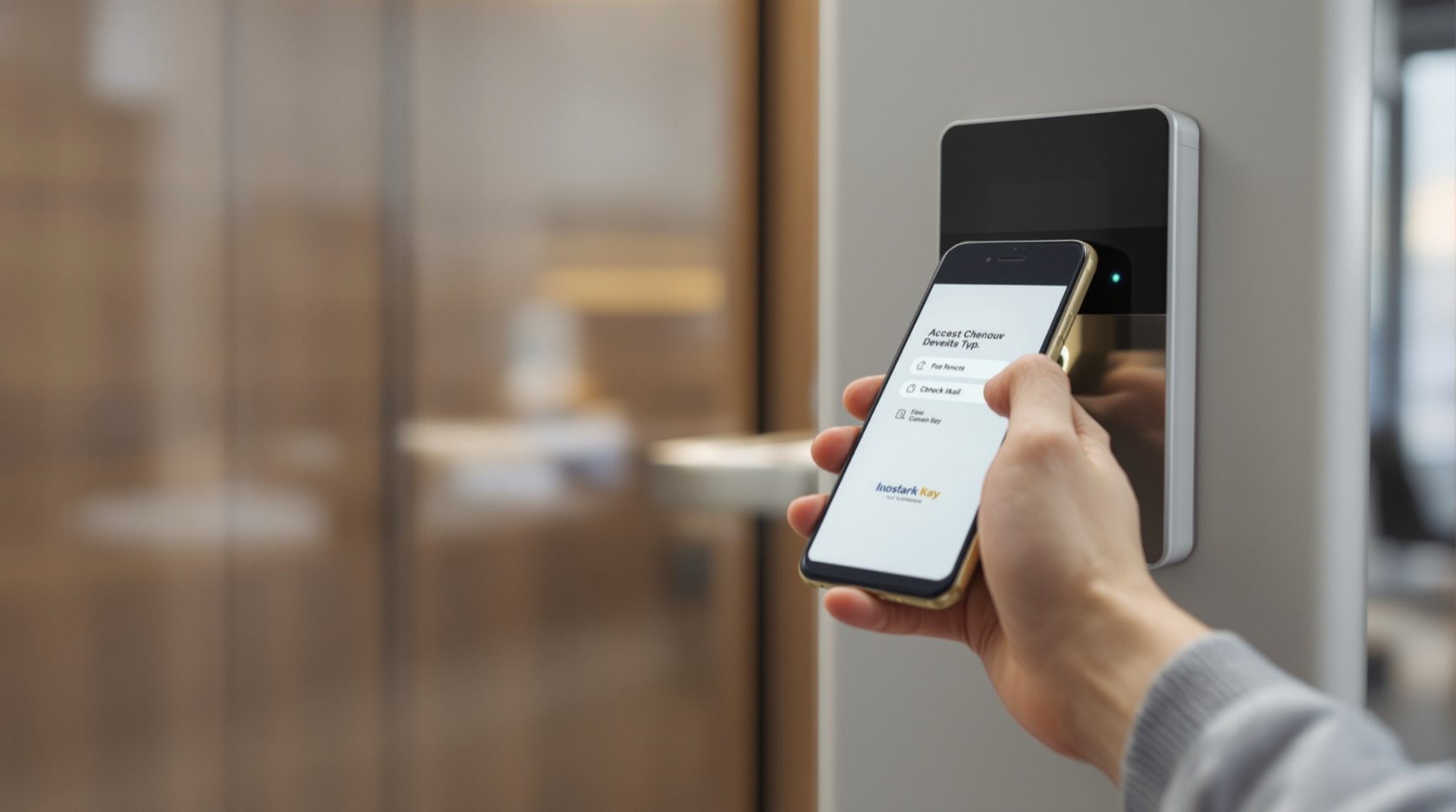
Mobile-Credential Access Control in India (2026): The Phone as the Card
How mobile-credential access turns the phone into the access card over BLE, NFC or a mobile wallet, why it is replacing plastic cards, and the honest trade-offs on phone dependence, iOS vs Android, account security, privacy and fire-egress fail-safe.
Almost everyone walking into an office, a co-working floor or an apartment tower is already carrying the credential in their pocket. Mobile-credential access is the idea that the phone itself becomes the access card: instead of printing, issuing and forever re-issuing plastic RFID cards, the door credential lives inside a secure app or a mobile wallet and is presented to the reader over Bluetooth (BLE), an NFC tap, or a scanned QR code. It is one of the credential methods in Studio Matrx's access-control pillar, and for offices, co-working, apartments and visitor management it is quietly displacing the plastic-card system that came before it.
This guide is written for the people who plan and run these systems — architects, builders, facility managers, RWA committees and office admins — not for a DIY fitter. Access control here means the whole system: credentials, readers, controllers, software and many doors serving many users. The single-door cousins are the standalone smart locks — app-controlled locks and NFC locks — and this guide cross-links them rather than repeating them.
Scope & safety. Plan, decide and coordinate here; route the actual reader, controller, maglock, mains and network wiring, and the fire-alarm interlock to a licensed security-systems integrator, electrician and fire-safety consultant working together. Any access-controlled door on an escape route MUST fail-safe: it has to release on power loss AND on a fire-alarm signal, tie into the fire-alarm panel, and carry a manual emergency release (break-glass / request-to-exit) so no one is ever trapped and no escape route is ever blocked — governed by the National Building Code and fire code. And a mobile credential means an app and an account holding sensitive personal data under the Digital Personal Data Protection (DPDP) Act, 2023. This is educational guidance, not legal advice.
Why the phone is replacing the plastic card
A card-based system works, but every plastic card is a small, recurring chore. Someone has to encode it, print it, hand it over, and — the moment it is lost, lent or the holder leaves — chase it down or disable it. Mobile credentials remove most of that friction:
- Nothing to print or physically issue. A credential is pushed to a phone in seconds from the management software. A new joiner can be granted access before they reach the building; a contractor can be given a credential that expires on Friday.
- Provision and REVOKE remotely and instantly. This is the single biggest gain. When an employee resigns, a tenant moves out, or a phone is lost, you kill the credential from the dashboard — no waiting to physically collect a card, no card still working in someone's drawer. For the security and DPDP reasons below, instant revocation is not a convenience, it is a control.
- Harder to casually hand around. People lend a plastic card without a second thought. Handing over your unlocked, personal phone with your messages, banking and photos is a much bigger ask, so credentials tend to stay with their owner. It is a soft deterrent, not a guarantee — see the honest cautions later.
- It uses the phone people already carry. No extra object to remember, lose or leave on the other desk. For co-working and serviced offices where members churn constantly, this is transformative.
- One credential, many doors, full log. The same mobile credential can open the main gate, the lift, the office floor and the server room according to each person's permissions, and every use is logged centrally.
How a mobile credential actually works
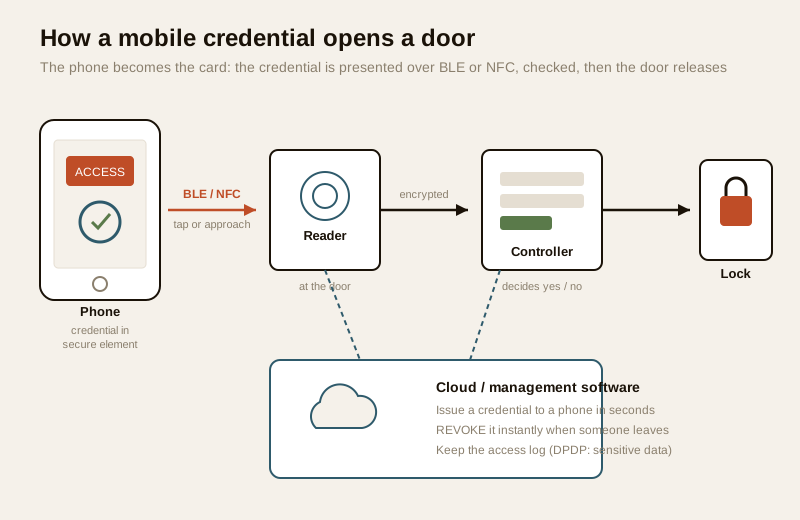
The chain is the same one every access system uses; only the credential and how it is presented change. A card-based system presents a card; a biometric system presents a fingerprint or face; here the phone presents a cryptographic credential.
1. The credential is issued to the phone. The management software generates a unique, encrypted credential and delivers it to the user's app or mobile wallet. On modern phones it is stored in a hardware-protected area (the secure element or trusted execution environment), not sitting in plain view.
2. The phone presents it to the reader. As the person approaches or taps, the phone and the reader talk over BLE (short-range Bluetooth) or NFC (a very-close tap), exchanging an encrypted challenge so the credential itself is never broadcast in the clear. A QR method instead shows a code the reader scans.
3. The reader passes it to the controller. The reader hands the verified credential to the door controller — the small brain wired near the door — over an encrypted link.
4. The controller decides and drives the lock. The controller checks the credential against its permission list (is this person allowed through THIS door, at THIS time?) and, if yes, releases the electric lock or maglock. Crucially, the controller can hold a cached copy of valid credentials so the door keeps working even if the internet or cloud is down.
5. The event is logged and syncs to the cloud. Every grant and denial is recorded, which is exactly why the log is sensitive personal data.
You size and lay this out the same way as any access system; the access-control system designer and cost estimator help you plan doors, readers and controllers, and the smart-lock selector helps at the single-door end.
BLE, NFC, wallet or QR: the presentation methods
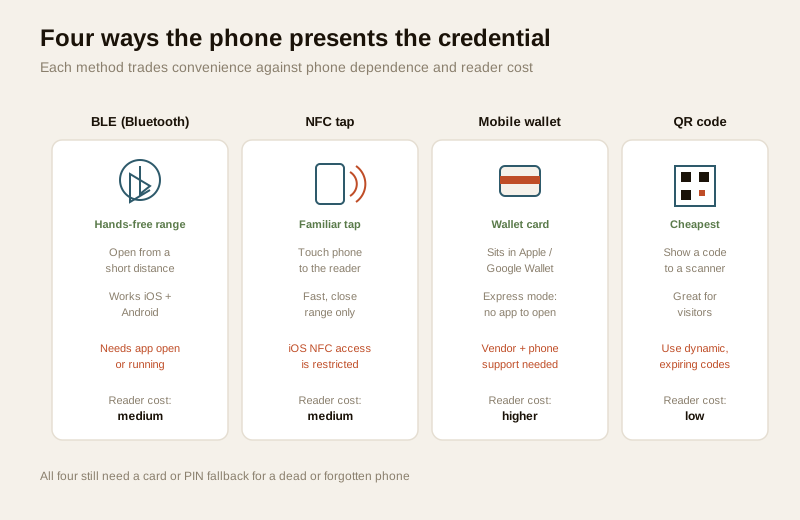
"Mobile credential" is an umbrella; how the phone talks to the reader is a real design choice with cost and behaviour consequences.
| Method | How it feels | Range | Best for | Watch-outs |
|---|---|---|---|---|
| BLE (Bluetooth) | Approach or twist-to-open; can be hands-free | Short (tunable) | Turnstiles, busy office lobbies, hands-full loading doors | The app usually needs to be running/allowed in background; range must be tuned so it does not open the wrong door |
| NFC tap | Touch the phone to the reader, like a card | Very close | People used to tapping cards; a direct card-to-phone swap | On iPhones, third-party NFC access has historically been restricted, so many vendors lean on wallet or BLE for iOS |
| Mobile wallet | Credential lives in Apple Wallet / Google Wallet; "express mode" opens without unlocking or opening an app | Very close (NFC) | Premium offices, campuses, hotels wanting the smoothest tap | Needs the reader, the access vendor AND the phone platform to all support it; usually the priciest readers; cross-link the hotel-style digital lock guide for the guest-key pattern |
| QR code | Show a code on-screen to a scanner | Line of sight | Visitors, deliveries, events, low-cost doors | Use only DYNAMIC, short-lived codes — a static printable QR can be forwarded or photographed; see QR-code access control |
Most real deployments mix these: staff on BLE or wallet for the daily doors, visitors on a dynamic QR sent by link, and a physical card kept as the fallback for everyone. Layering a phone credential with a PIN or a card is exactly the multi-factor approach for higher-security doors.
The honest considerations
Mobile credentials are genuinely good, but they carry real trade-offs that you must design around rather than wish away. Presenting these as buying cautions with mitigations — never as a way to attack a system — is the right posture.
Phone dependence: the dead-phone problem
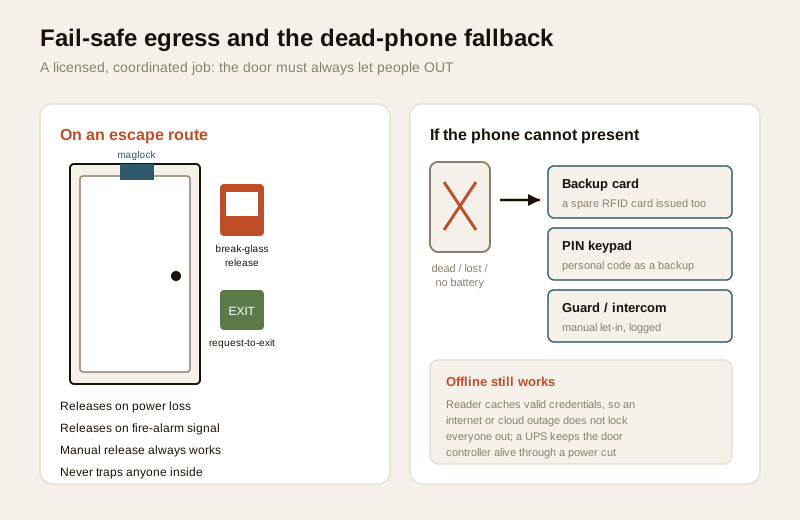
The credential lives on a phone, and phones die. A flat battery, a lost or stolen handset, a forgotten phone on the kitchen counter, or a cracked screen all mean the person cannot present a credential. You must never build a system where a dead phone traps someone or is the only way through a door. The fixes are planned fallbacks:
- Issue a backup physical card alongside the mobile credential for every user, or at least keep a small pool of temporary cards at the desk.
- Fit a PIN keypad on important doors so a personal code works when the phone will not — see PIN-code locks.
- Keep a guard or intercom manual let-in path for apartments and gated communities, logged like any other entry — see video door phones.
Fire egress and power: the non-negotiable
This sits above every other consideration. A mobile-credential door on an escape route is still a door on an escape route. It must fail-safe — release on power loss and on a fire-alarm signal — integrate with the fire-alarm panel, and carry a manual emergency release. A UPS keeps the controller and reader alive through India's routine power cuts so that a load-shedding evening does not become an access failure, and the fail-safe behaviour ensures that if power does go, people can still get OUT. This interlock is a coordinated, licensed job; do not let a general IT vendor wire a maglock into a fire-escape door. The building-security-systems guide and the electrical hub cover the wider integration.
iOS vs Android: capabilities differ
The two platforms are not equal for access. Android has generally allowed apps broader NFC and background BLE access, while Apple has kept tighter control over NFC, which is a major reason serious vendors route iPhone users through Apple Wallet or BLE rather than a raw NFC app. When you shortlist a system, ask the vendor to demonstrate the exact experience on BOTH a current iPhone and a current Android phone — including what happens when the app is closed or the phone is locked — rather than trusting a spec sheet.
Account and app security (defensive)
Turning a phone into a key means the security of the app and the account behind it matters as much as the reader. The defensive basics:
- Strong authentication and MFA on the management account and, where sensible, on the user's app login, so a stolen password cannot mint or move credentials.
- Credentials bound to the device and stored in the secure element, so they cannot simply be copied off to another phone.
- Prompt updates. The app and reader firmware are small computers; keep them patched, and prefer a vendor with a clear security-update track record.
- Instant revocation as the core control: a lost phone is a dashboard action away from being harmless.
- Least privilege: give each person only the doors and hours they need, and review the list regularly.
These are buying cautions and hygiene, not a licence to probe someone else's system.
BYOD, privacy and DPDP
If staff use their own phones (bring-your-own-device), you are asking people to install a work app on a personal device, so be clear and lawful about it. Access logs, and for staff any attendance derived from them, are sensitive personal data under the DPDP Act, 2023. In practice:
- Notice and lawful basis. Tell people what the app collects, why, and how long the logs are kept. A good access app needs very little — it should not be reading contacts, messages or continuous location.
- Data minimisation. Collect only what the door needs. Question any app that wants sweeping permissions.
- Consent and choice, especially for employees. Because of the power imbalance at work, offer a genuine non-phone alternative (a card) for anyone who does not want a work app on a personal phone. Do not force a single method.
- Retention and deletion. Set how long logs live and delete a departed employee's, tenant's or visitor's credential and personal data on exit — the same discipline the apartment security guide and commercial-buildings guide apply to any resident or staff record.
- Know who administers it. Name who holds the admin account and can see the logs, and restrict it.
Offline and connectivity
Many mobile-credential systems are cloud-managed, and Indian sites do not always have reliable internet. The safeguard is a controller that caches valid credentials locally and keeps deciding at the door even when the cloud is unreachable — logs then sync when the link returns. Confirm this offline behaviour with the vendor; a door that simply stops working when the broadband drops is not acceptable for an entrance people rely on.
Where mobile credentials fit best
| Setting | Why it fits | Typical mix |
|---|---|---|
| Offices | Fast onboarding/offboarding, central logs, no card printing | BLE or wallet for staff, card fallback |
| Co-working / serviced | Members churn constantly; instant provision and revoke | Wallet or BLE, QR for day-passes |
| Apartments / societies | No lost fobs to chase; visitor codes by link | BLE for residents, dynamic QR for visitors, guard fallback |
| Visitor management | Send an expiring credential before arrival | Dynamic QR or a time-boxed mobile pass |
| Factories / plants | Contractor access that self-expires | BLE + PIN on sensitive doors (multi-factor) |
For a whole-building plan, the smart-locks-and-access-control sub-hub and the gated-communities guide put mobile credentials alongside the readers, controllers and door hardware they depend on.
When to bring in a professional. You can decide the policy — who gets access, on which doors, for how long, and which fallback each door carries. Hand the physical work to licensed people, coordinated: a security-systems integrator for readers, controllers and software; an electrician for mains and lock power and UPS; and a fire-safety consultant to sign off that every escape-route door fails safe, ties into the fire-alarm panel and has a manual emergency release. Never let a single unqualified vendor wire an access-controlled door on an escape route, and get the DPDP data-handling and admin-access terms in writing before staff put a work app on their phones.
Key takeaways
- Mobile-credential access makes the phone the card — the credential lives in a secure app or mobile wallet and is presented over BLE, NFC or QR to a reader, then checked by the controller like any other access method.
- The killer feature is instant remote provision and revocation — no cards to print or chase, and a lost phone or a departing employee is disabled from the dashboard in seconds, which is a genuine security and DPDP control.
- Design for the dead phone — always provide a fallback (backup card, PIN keypad, or guard/intercom); never let a flat battery trap someone or be the only way through.
- Fire egress is non-negotiable — escape-route doors must fail-safe on power loss and fire-alarm signal, integrate with the fire-alarm panel, carry a manual release, and run on a UPS; this is a coordinated licensed job.
- Mind the platform, the account and privacy — check the real iOS and Android experience, secure the management account with MFA and least privilege, keep apps patched, and treat access logs as DPDP-sensitive data with clear notice, consent, minimisation and deletion.
References
- Digital Personal Data Protection Act, 2023 — access logs and staff attendance are sensitive personal data; establish a lawful basis, give notice, take genuine consent for employee BYOD apps (offer a card alternative), minimise collection, set retention, and delete a departed user's credential and data.
- Manufacturer specifications — verify on the vendor's own datasheet how the credential is stored (secure element), the supported methods (BLE / NFC / wallet / QR) on current iOS and Android, the offline caching behaviour, and the firmware-update policy before selecting a system.
- National Building Code of India (SP 7), Bureau of Indian Standards, and local fire bye-laws for fail-safe egress, fire-alarm interlock and any electrical work on access-controlled doors; verify the current edition via the BIS catalogue: https://www.services.bis.gov.in/
This is an educational overview, not legal advice. Reader, controller, lock, mains and network wiring, and the fire-alarm interlock are qualified professional tasks — engage a licensed integrator, electrician and fire-safety consultant, and verify any standard's current status via the BIS catalogue before relying on it.
Export this guide
Related Guides — Deep-dive reading
Access Control Maintenance in India (2026): Readers, Locks and Fail-Safe Egress
How to keep a card, keypad, fingerprint or face access-control system reading reliably and locking securely — and, above everything, how to test that its doors still release on a fire alarm and on power loss, so an access-controlled door never becomes a life-safety trap.
SecurityOffline Access Control in India (2026): Standalone Locks That Work Without a Network
How standalone, non-networked access control works when the permission lives on the door or on the card, where offline is the right choice, how you manage it, and the honest trade-offs versus a live cloud system.
SecurityHotel-Style Digital Locks in India (2026): Cards, Codes and the Front-Desk System
The RFID-card and PIN locks built for many rotating guests, run from a front-desk encoder that issues a per-stay credential and expires it at checkout, with a who-entered-when audit trail, for PGs, hostels, homestays and serviced apartments.
SecurityRelated Tools — Try Free
Video Door Phone Type Selector
Answer a few questions about your building, cabling, budget and internet and get the right video door phone — analog / wired / wireless / IP, single-home or multi-apartment, monitor or app.
Door Phone SelectorAccess-Control Battery-Backup Calculator
Size the standby battery so an access system keeps running through a power cut, with an egress life-safety note.
Battery BackupApartment Video Door System Planner
Enter flats, entrances, floors and guard desk for a first-pass building intercom plan — door stations, indoor monitors, guard station, the right architecture and an indicative cost band.
Building Planner