
Multi-Factor Access Control in India (2026): Two-Factor Doors, Anti-Passback and Mantraps Done Right
What multi-factor access control means, the three factor categories, common two-factor combinations, and which high-security doors truly need them versus where a second factor just slows honest people down.
Most doors in a building should open easily. The main entrance, the lobby, a meeting room, a society gate: you want people through them quickly, with a single tap or code, without a queue building up. But a handful of doors sit in front of something that would be genuinely serious to lose: the server rack that runs the whole office, the cash room, the pharmacy store, the lab. For those, one credential is not enough, because any single credential can be lost, shared, seen or stolen. That is where a second proof earns its keep.
Multi-factor access control means a door that will not open until it is satisfied by two or more independent proofs of who you are. It is the access-control cousin of the two-step login you already use on your bank app: a password alone is weak, a password plus a one-time code on your phone is strong. On a door, the factors are physical, but the logic is identical, and the pay-off is the same: an attacker now has to defeat two different things at once, which is far harder than defeating either alone.
This guide is part of Studio Matrx's access-control sub-pillar. It explains the factor categories, the combinations that actually get used in India, and, just as importantly, where multi-factor is overkill and simply slows honest people down. It sits alongside the credential-method guides for card-based, biometric, mobile-credential and QR-code access, and the single-door lock guides like PIN-code locks.
Scope & safety. This guide helps you plan, decide and coordinate. The actual door hardware, maglocks, readers, controller wiring and the fire-alarm interlock are a coordinated LICENSED job for a security-systems integrator, an electrician and a fire-safety consultant working together. The single non-negotiable: multi-factor governs ENTRY, never exit. Any access-controlled door on an escape route must fail-safe (release the lock on power loss AND on a fire-alarm signal), tie into the fire-alarm panel, and carry a manual emergency release such as a break-glass or push-bar request-to-exit, per the National Building Code and fire regulations. A door must never trap anyone inside. Access logs and biometric templates are sensitive personal data under the Digital Personal Data Protection Act, 2023. This is educational guidance, not legal advice.
What "a factor" actually is
A factor is a category of proof. Security only improves when the two proofs come from different categories, because each category fails in a different way. Two PINs are not multi-factor; they are the same category twice, and a person who watched you type one has probably seen both. There are three categories.
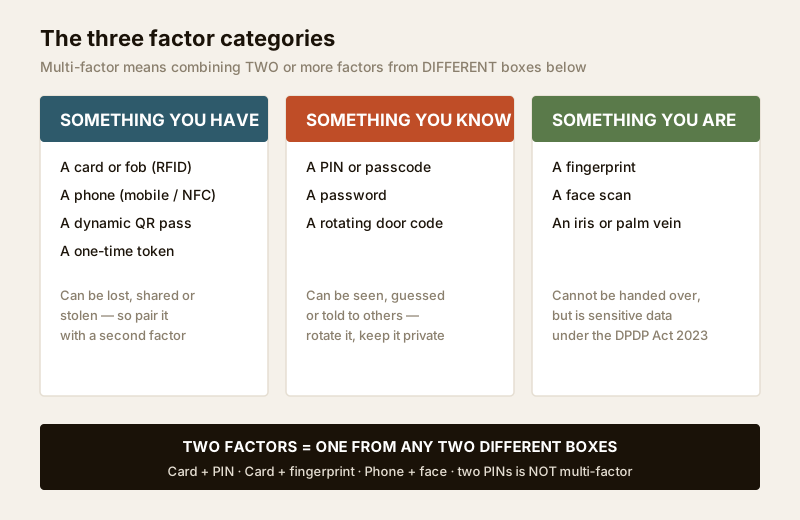
| Factor category | Examples | Fails when | Strength |
|---|---|---|---|
| Something you HAVE | Card, fob, phone, dynamic QR pass, hardware token | Lost, handed over, or stolen | Fast to use; easy to revoke |
| Something you KNOW | PIN, passcode, password, rotating door code | Watched, guessed, or told to a colleague | No hardware to carry; free |
| Something you ARE | Fingerprint, face, iris, palm vein | Cannot be handed over, but sensitive and slower | Tied to the person; hardest to share |
The insight behind multi-factor is simple: the ways these three fail do not overlap. A lost card (HAVE) is useless to a thief who does not also know the PIN (KNOW). A shoulder-surfed PIN is useless without the card. A photo of a face is useless if the door also demands a live card tap. Requiring one factor from two different boxes forces an attacker to compromise two unrelated things at the same time, and that is the entire point.
Two-factor versus true multi-factor
In practice, almost everything called "multi-factor" in an Indian building is two-factor: one HAVE plus one KNOW, or one HAVE plus one ARE. That is the sweet spot. Three factors (card plus PIN plus fingerprint on the same door) exists, but it is reserved for a tiny number of the highest-security doors, because every extra factor adds seconds, cost and failure modes. For the rest of this guide, "multi-factor" and "two-factor" can be read as the same thing unless noted.
The common combinations, and how the controller enforces them
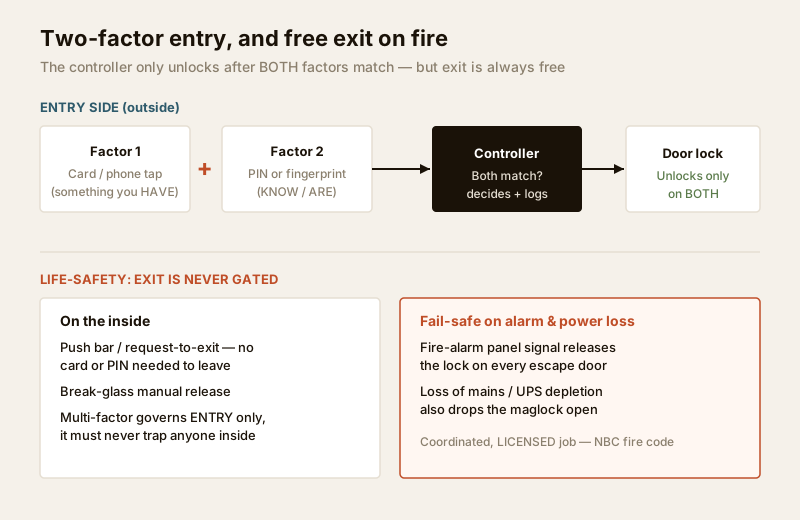
The reader does not make the decision. A reader captures a credential and passes it to the controller (the panel behind the door), and the controller checks it against the rules, decides, drives the lock, and writes the log. Enforcing two factors is a setting on the controller (or on the head-end software): the door is configured to require BOTH credentials, within a short time window, before it grants access. If only one arrives, the door stays shut and the event is logged as a failed or partial attempt.
| Combination | Factors | Typical door | Notes |
|---|---|---|---|
| Card + PIN | HAVE + KNOW | Server room, back office | Cheapest true two-factor; PIN pad on the reader |
| Card + fingerprint | HAVE + ARE | Cash room, pharmacy store | Strong; needs a biometric reader and DPDP consent |
| Phone + face | HAVE + ARE | Data centre, high-value lab | Contactless; phone as the credential, face as the check |
| Card + PIN + biometric | HAVE + KNOW + ARE | Vault, weapons store | Three-factor; only for the crown jewels |
A useful refinement is scheduling the second factor. Many controllers can be told: during working hours the door needs one factor, but out of hours it demands two. That keeps the daytime flow quick while tightening the door precisely when a lone intruder is most likely. This is far more practical than forcing two factors around the clock, and it is a good example of matching security to actual risk rather than fitting the strongest possible lock everywhere.
Where multi-factor is worth it, and where it is not
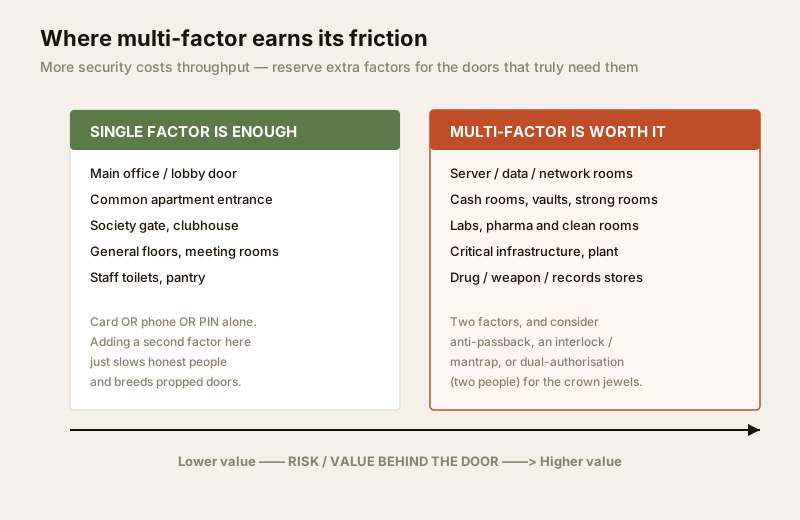
This is the decision that matters most, and the honest answer is that on the average door multi-factor is a mistake. Every extra factor costs throughput: a queue at the server-room door on a busy morning, a maglock that gets propped open with a fire extinguisher because two-factor is "annoying", a visitor who cannot get to a meeting because the whole floor demands a fingerprint. Security that people route around is worse than a lighter control they actually follow. Reserve multi-factor for the doors where the value or risk behind them justifies the friction.
| Door | Recommendation | Why |
|---|---|---|
| Main office / lobby entrance | Single factor | High traffic; a queue defeats the purpose |
| Common apartment or society gate | Single factor | Convenience wins; residents will prop a slow door |
| General floors, meeting rooms | Single factor | Low value behind them; keep the flow quick |
| Server / data / network room | Two-factor | Losing it stops the whole business |
| Cash room, vault, strong room | Two-factor, consider dual-auth | Direct financial loss; two people better than one |
| Pharma store, lab, clean room | Two-factor | Regulatory, safety and diversion risk |
| Critical infrastructure, plant room | Two-factor | Safety and continuity consequences |
A simple test: ask what happens in the hour after this door is wrongly opened. If the answer is "someone is somewhere they should not be, briefly" a single well-managed credential is fine. If the answer is "money, data, drugs or safety is compromised and it is hard to undo", the door has earned a second factor. See the commercial-buildings security guide for how this maps onto a whole office, and the access-control system designer to sketch which doors get which treatment.
Related high-security features
Multi-factor is usually deployed alongside a few other controls that harden the same doors. You do not need all of them; pick what the risk warrants.
Anti-passback
Anti-passback stops a credential being used to "let someone else in". The controller remembers that your card entered a zone and will refuse the same card a second entry until it has recorded an exit. It closes the loophole where one person enters legitimately and then passes their card back out for a second person, and it also keeps the occupancy log honest, which matters for a muster roll during a fire. Anti-passback needs readers on both sides of the door (in and out). Note the life-safety caveat: anti-passback must never interfere with free egress, and it is normally suspended automatically on a fire-alarm condition.
Interlock / mantrap
An interlock (or mantrap) is a small vestibule with two doors where only one door can be unlocked at a time. You enter, the outer door locks behind you, you present your factors, and only then does the inner door release. It defeats tailgating by physically allowing one person through at a time, and it is common at data centres and cash-handling areas. It is a coordinated hardware and controller design, and, as always, both doors must fail-safe to a state that lets people out in an emergency.
Dual-authorisation (two-person rule)
Dual-authorisation requires two different authorised people to present credentials before the door opens, so no single person can ever enter alone. It is the door equivalent of two keys turning together to launch, and it belongs on vaults, evidence rooms and the most sensitive stores. It is a strong deterrent against an insider acting alone, and it pairs naturally with role-based permissions so only specific senior roles can form a valid pair.
Role-based permissions themselves, deciding which people and roles may use which doors and when, are the layer that makes all of this manageable at scale, and they deserve their own treatment; a dedicated role-based access-control guide is planned in this series.
The honest trade-off: security against throughput
Every one of these features buys security by spending convenience. That is not a flaw to be engineered away; it is the fundamental exchange, and good access-control design is mostly about spending that budget wisely. The failure mode is uniform strictness: bolt two-factor onto every door and within a month the maglocks are propped, the fingerprint reader on the toilet corridor is bypassed, and the one door that mattered is no more secure than the rest because nobody trusts the system. Concentrate the strong controls on the few doors that deserve them, keep everything else quick, and the whole system stays both secure and used.
India realities to design around
- Power cuts. A controller, reader and maglock all need UPS backup, and every door must be configured to fail-safe when that backup finally depletes, dropping open rather than trapping people. Confirm this behaviour with the electrical and fire-safety consultants, not after the first outage.
- Weather on outdoor readers. A fingerprint reader at a plant-room door faces dust, heat and monsoon; a wet or dusty finger fails to read, so pair biometrics with a card fallback so a legitimate person is never stranded outside.
- Patchy internet. For cloud-managed systems, the controller must keep enforcing two-factor and logging locally when the link drops, then sync later. Ask the integrator to demonstrate offline behaviour before you sign off.
Privacy: logs and biometrics are sensitive data
The moment a door records who tapped, and especially when it stores a fingerprint or face template, you are holding sensitive personal data under the DPDP Act, 2023. That brings duties: a lawful basis and clear notice, genuine consent (employee biometrics need real care, not a blanket clause in the joining letter), collecting only what you need, a stated retention period, a named administrator, and prompt deletion of a departed employee's, tenant's or visitor's credentials and templates. Multi-factor doors tend to sit at the sensitive end of a building, so their logs are exactly the ones a data request or an incident review will scrutinise. Design the retention and deletion process at the same time as the doors, not afterwards. The biometric-access guide covers template protection in more depth.
When to bring in a professional. Multi-factor doors are never a DIY job. Sizing and locating maglocks, wiring readers and controllers, and above all interlocking every affected door with the fire-alarm panel so it releases on alarm and on power loss, is a coordinated brief for a security-systems integrator, a licensed electrician and a fire-safety consultant. Insist on a commissioning test that proves each door free-exits, fails safe on a simulated alarm, and logs correctly, and get that test documented. If a vendor cannot show you the fire-egress interlock working, do not accept the installation.
Key takeaways
- Multi-factor access control requires two or more independent proofs from different categories, something you HAVE, KNOW or ARE, so an attacker must defeat two unrelated things at once.
- Two PINs is not multi-factor; two factors means one credential from each of two different boxes, most commonly card plus PIN or card plus fingerprint.
- Reserve it for doors where a wrong opening means real loss, server and data rooms, cash rooms and vaults, labs and pharma stores, critical infrastructure, and keep ordinary doors single-factor and quick.
- Anti-passback, interlocks and dual-authorisation harden the same high-security doors further; add only what the risk warrants, and never at the cost of free exit.
- Multi-factor governs entry only. Every such door must fail-safe on power loss and fire alarm, carry a manual release, and never trap anyone, and its logs and biometrics are sensitive data under the DPDP Act.
References
- Digital Personal Data Protection Act, 2023 (India) — lawful basis, consent, minimisation and retention for access logs and biometric templates.
- National Building Code of India and applicable state fire regulations, via the Bureau of Indian Standards (https://www.services.bis.gov.in/) — egress, fail-safe locking and emergency release on controlled doors.
- Access-control controller and reader manufacturer datasheets — supported factor combinations, anti-passback, interlock and dual-authorisation configuration, and offline behaviour.
- Studio Matrx, complete guide to access control in India and the smart locks and access control sub-hub.
_This guide is educational and general in nature; it is not legal, security or engineering advice. Fire-egress interlocking, electrical work and DPDP compliance for your specific building must be confirmed with the relevant licensed professionals._
Export this guide
Related Guides — Deep-dive reading
Access Control Maintenance in India (2026): Readers, Locks and Fail-Safe Egress
How to keep a card, keypad, fingerprint or face access-control system reading reliably and locking securely — and, above everything, how to test that its doors still release on a fire alarm and on power loss, so an access-controlled door never becomes a life-safety trap.
SecurityAccess Control Testing Checklist for India (2026): Every Door Opens and Locks as Designed
A ready-to-adapt per-door and system checklist to verify an access-control installation at commissioning and as a periodic check, with the egress and fire-to-release life-safety tests that must always pass before sign-off.
SecurityBiometric Access Control in India (2026): Fingerprint, Face and Palm Systems Done Right
A professional's guide to networked biometric access control for buildings: fingerprint, face and palm readers on many doors, tied to attendance, planned around the DPDP Act, fire-egress fail-safe and honest field limits.
SecurityRelated Tools — Try Free
Access-Control Battery-Backup Calculator
Size the standby battery so an access system keeps running through a power cut, with an egress life-safety note.
Battery BackupSecurity System Cost Estimator
Estimate the all-in capex with GST, annual running cost and 5-year total cost of ownership of a home or building security system.
Cost EstimatorVisitor Access Planner
Size visitor handling at a gate or reception — lanes needed at peak and the temporary-pass pool.
Visitor Flow