
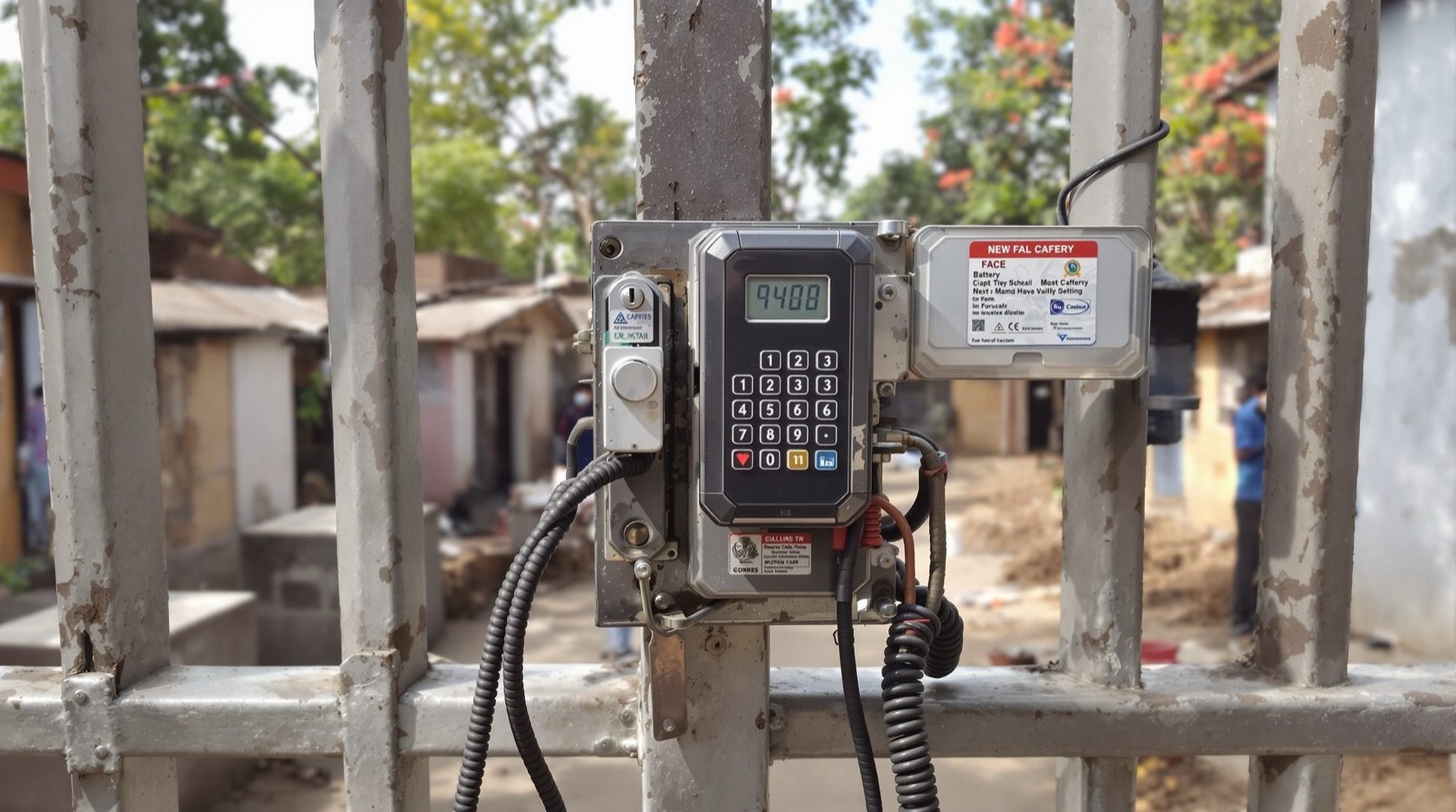
Offline Access Control in India (2026): Standalone Locks That Work Without a Network
How standalone, non-networked access control works when the permission lives on the door or on the card, where offline is the right choice, how you manage it, and the honest trade-offs versus a live cloud system.
Not every door can be reached by a cable or a Wi-Fi signal, and not every job can carry the cost of a wired controller and a monthly cloud fee. A remote borewell pump-house, a farm gate, a warehouse on the edge of a plot, a small clinic with four doors, a heritage building where you cannot chase walls for wiring, a society store-room block on a plot with patchy internet, all of these have the same question: how does a door know who is allowed in, when there is no live network and no central server to ask?
Offline access control is the answer that has quietly run hotels, hostels and remote sites for decades. The permission does not live on a server somewhere; it lives either inside the lock itself or is written onto the card the person carries. The door decides, on its own, in the moment, with no round-trip to the cloud. That independence is both its great strength (it keeps working during outages) and the source of its honest limitations (no real-time central control). This guide, part of Studio Matrx's access-control pillar and the wider smart locks and access control hub, explains how offline systems work, where they are the right call, how you actually manage one, and the trade-offs you must state plainly to a client before you specify it.
Scope & safety. This guide is to help you plan, specify and supervise. The actual fitting of door hardware, any mains wiring, and the fire-egress interlock are licensed professional jobs. The rule that overrides everything: a door on an escape route must fail-safe and free-exit even when the network, the server and the mains are all down, must release on the fire-alarm signal, and must have a manual emergency release, coordinated with the fire panel under the National Building Code. Offline does not exempt a door from life-safety; if anything it makes free-exit-when-everything-is-down the whole point. Access logs and any attendance data are sensitive personal data under the Digital Personal Data Protection Act, 2023. This is educational guidance, not legal advice.
What "offline" actually means
An access system is "online" when the door talks, in real time, to a central controller or a cloud service that holds the master list of permissions and receives every event as it happens. Pull the network and an online door is, at best, running on a cached copy and, at worst, dead.
An offline access control door never depends on that live link at the moment of decision. There is no cable and no live server between the credential and the lock. This splits into two clean models, and the difference between them shapes everything about how you manage the system.
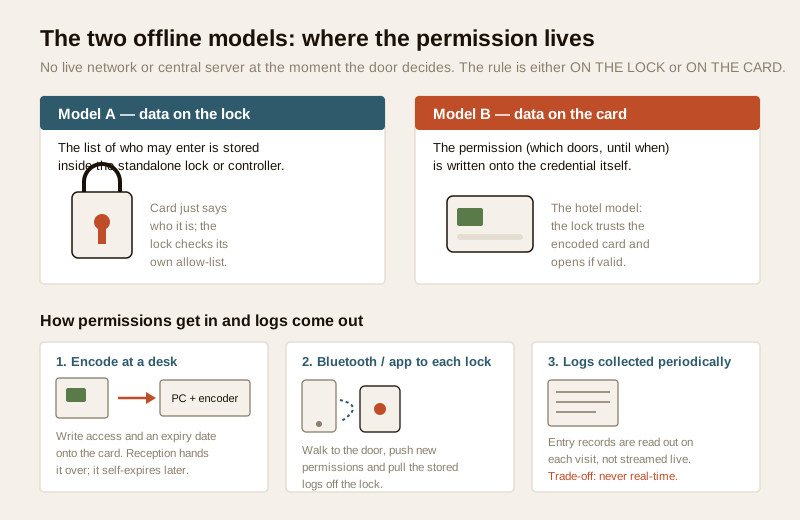
Model A: the permission lives on the lock
The standalone lock or a small local controller stores its own list of who may enter and when. The card, fob, PIN or fingerprint is just an identifier, "this is user 0472", and the lock checks that identity against its own internal allow-list. To add or remove a person, you change the list held inside the lock. This is how most standalone RFID locks, keypad locks and single-door biometric locks work.
Model B: the permission lives on the card (the hotel model)
The lock holds almost no list. Instead, the permission itself, which doors this card opens and until what date and time, is encoded onto the credential. The lock simply reads the card, checks the encoded rules are valid and current, and opens. This is the classic hotel-style digital lock model, "data-on-card": a guest's card is encoded at reception for room 214, valid until Sunday 11am, and the door has never heard of that guest until the moment it reads the card. When the encoded expiry passes, the card simply stops working; nothing had to reach the door to "cancel" it.
Real installations often blend the two, and both are genuinely offline: no live network is in the loop when the door decides.
Where offline is the right choice
Offline is not a downgrade you settle for; for a large class of jobs it is the correct engineering answer. Reach for it when one or more of these is true.
| Situation | Why offline fits |
|---|---|
| Remote gates and sites | A farm gate, pump-house, telecom tower, or plot boundary with no power or internet run to it. A battery standalone lock works where no cable ever will. |
| Small installations | Two to eight doors in a clinic, shop, hostel or small office. A central controller and cloud subscription is overkill; standalone locks cost far less per door. |
| Cost-sensitive jobs | No cabling to chase, no controllers, no recurring cloud fee. The whole-life cost is often a fraction of a wired online system. |
| Retrofit into finished walls | Battery locks on the door leaf mean no chasing walls for reader cable, ideal for heritage buildings, rented premises or occupied homes. |
| Resilience is paramount | Anywhere power and internet are unreliable, the door that never depended on them keeps working through every outage. |
That last point deserves its own heading, because in India it is often the deciding factor.
The big resilience point
India runs on patchy internet and routine power cuts. An offline door does not care: it was never waiting for a signal, so an ISP outage or a cloud provider's bad day changes nothing about whether a valid card opens the door. For a security professional, this is not a footnote, it is a design principle.
And the principle runs the other way too. Even a fully online or cloud system should degrade gracefully to offline. A well-designed cloud access-control system does not go dead the moment the internet drops; its controllers keep a local, cached copy of the allow-list and keep opening the door for valid cards, buffering the event logs locally and syncing them up when the link returns. If a "cloud" system stops working the instant the internet blips, that is a design defect, not a feature of the cloud. This is exactly why offline capability is the complement to, not the opposite of, a good online system.
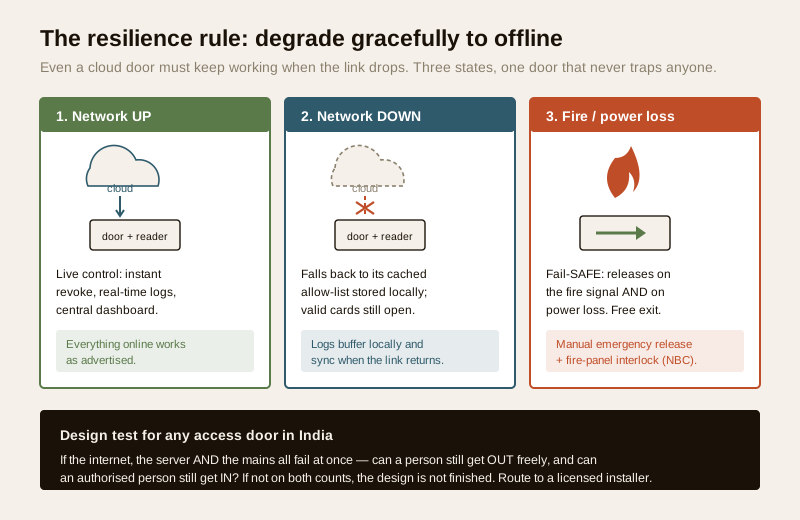
The design test in the banner is worth memorising and applying to every access door you specify, online or offline: if the internet, the server and the mains all fail at the same time, can a person still get out freely, and can an authorised person still get in? Getting out must always be yes (life-safety, non-negotiable). Getting in is where offline design earns its place.
How you actually manage an offline system
The catch with "no live server" is that there is no single dashboard where you type a name and instantly grant or revoke access everywhere. Management is deliberate and periodic. There are two main methods, usually combined.
Encode and expire cards at a desk (Model B)
You keep a small encoder, usually a PC or a standalone unit at reception or the site office, and write permissions onto cards as you issue them. The most powerful tool here is the expiry date: because the rule lives on the card, you encode a contractor's card to work only until Friday, or a guest's until checkout. When the date passes, the card dies on its own, no message ever had to reach the door. This is how you get controlled, time-limited access without a network: you manage risk through short-lived credentials rather than instant remote revocation.
Bluetooth or app to each lock (Model A)
For standalone locks that hold their own list, you update them by walking up with a phone or tablet. Over Bluetooth, an app authenticates to the lock, pushes the new permission list (add the new cleaner, remove the departed guard) and, on the same visit, pulls the stored event log off the lock so you have a record of who opened it. This is closely related to how mobile-credential access works, though here the phone is the management tool, not necessarily the key. For a handful of doors this is quick; for many doors spread across a site it is a real chore, which is a genuine limitation to price into the job.
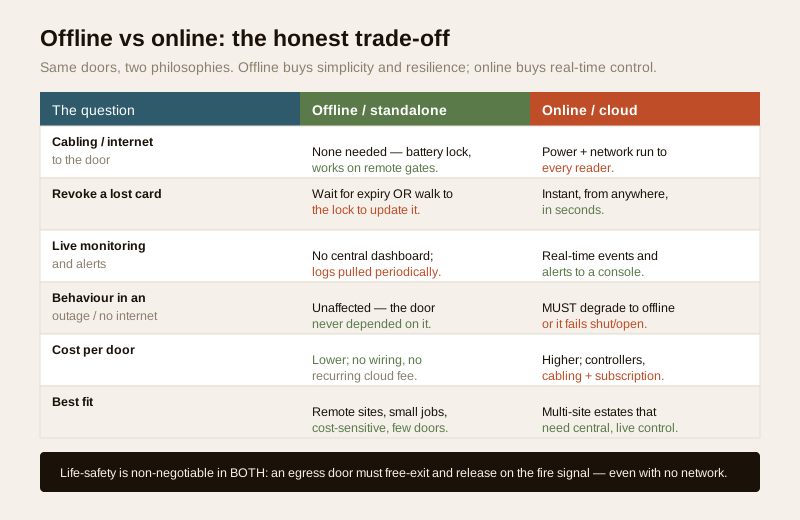
The honest trade-offs, stated plainly
Specifying offline without spelling out its limits is how a client ends up disappointed. Put these on the table before you quote.
| Trade-off | What it means in practice | How you mitigate it |
|---|---|---|
| No real-time central monitoring | There is no live console showing every door's activity as it happens. You cannot watch the site in real time. | Accept it, or pair critical points with CCTV and a video door phone for the doors that truly need eyes on them. |
| No instant remote revoke | If a card is lost, you cannot cancel it from your desk in seconds. You either wait for its encoded expiry, or physically walk to the lock(s) to update the allow-list. | Use short expiry dates on all cards (Model B); keep the affected locks few and reachable; re-encode locks promptly on loss (Model A). |
| Logs are collected periodically, not live | The event record sits inside each lock or card system and is only read out when someone visits to collect it, not streamed to a central log in real time. | Schedule log collection; treat audit trails as a periodic reconciliation, and record clock-drift so timestamps stay meaningful. |
| Management is manual and per-door | Updating many doors means visiting each one; there is no push-to-all-doors button. | Keep the door count matched to the method; if it grows past a dozen doors across a site, reconsider whether an online or hybrid system is now justified. |
| Battery dependence | Standalone locks run on batteries; a flat battery is a lockout risk. | Specify low-battery warnings, a documented battery-change schedule, and an external emergency-power or mechanical-override path for entry, never for exit. |
None of these is a reason to avoid offline. They are the reasons to match it to the right job: where the doors are few, the site is remote or cost-sensitive, and resilience matters more than a live dashboard.
Costs and where the money goes
Offline's headline advantage is cost, and it shows up in three places: no cabling, no central controllers, and no recurring cloud subscription. Treat the bands below as ballparks to sanity-check a quote, not fixed rates; they move with brand, credential type (RFID, PIN, fingerprint) and door hardware.
| Item | Typical offline range | Note |
|---|---|---|
| Standalone RFID / keypad lock, per door | ₹4,000 – ₹18,000 | Battery, on-leaf; no reader cabling |
| Standalone fingerprint lock, per door | ₹8,000 – ₹30,000 | Higher for weatherproof outdoor-rated units |
| Desk card encoder (Model B) | ₹8,000 – ₹40,000 | One per site, not per door |
| Management app / software | Often free or one-time | No monthly cloud fee is the whole point |
| Cards / fobs | ₹30 – ₹150 each | Buy spares; encode on issue |
| Recurring cost | Near zero | Batteries + occasional service only |
Against this, a wired online system adds controllers, cabling runs, power supplies and a monthly per-door cloud fee, which is why for a small or remote job offline can be a fraction of the whole-life cost. Use the access-control system designer to lay out doors and credentials before you price, and always confirm the mains and any interlock scope with a licensed electrical professional.
Fire egress and privacy still apply
Two things do not get a discount just because a system is offline.
Fire egress. A standalone lock on an escape-route door must still let people out freely at all times, with no card, no PIN and no power, and must release on the building's fire-alarm signal. That means the egress side is a mechanical free-handle or a fail-safe electric release wired to the fire panel, an interlock that is a coordinated, licensed job under the National Building Code. An offline door that traps someone in a fire is a fatal design error, not a saving. Never let "no network" become an excuse for a door that cannot be opened from the inside.
Privacy under the DPDP Act, 2023. Offline logs are still personal data. Because they are collected periodically and often held on a site PC or inside a lock, you must still say who administers them, keep a lawful basis and (for employees) notice and, where required, consent, minimise what you keep, set a retention period, and delete a departed user's records, both by removing their card rights and by not hoarding their entry history forever. Do not let the informality of an offline setup become an excuse to over-collect or over-surveil. See the audit-trails guide for how to keep an offline log defensible.
When to bring in a professional. Specifying which model and which locks, and where offline fits the brief, is planning work you and the client can do. Hand the door-hardware fitting, any mains wiring, the battery-backup and emergency-power arrangement, and above all the fire-egress interlock and free-exit release to a licensed installer and, for anything mains-connected, a licensed electrician, coordinated with the fire panel per the National Building Code. Do not sign off an offline door for an escape route without a qualified person confirming free-exit under total power and network failure.
Key takeaways
- Offline access control means the door decides on its own with no live network or server; the permission lives either on the lock (its own allow-list) or on the card (the hotel data-on-card model).
- Choose offline for remote sites, small or cost-sensitive jobs, retrofits, and above all resilience where power and internet are unreliable, an offline door keeps working through every outage.
- Even a cloud system must degrade gracefully to offline, keeping a cached allow-list and buffering logs locally, so the door still works when the internet drops; offline capability complements a good cloud system, it is not its enemy.
- State the trade-offs plainly: no real-time central monitoring, no instant remote revoke (you rely on expiring credentials or physically updating the lock), logs collected periodically not live, and per-door manual management, then mitigate each.
- Life-safety and privacy still apply: an offline egress door must free-exit and release on the fire signal even with no power or network, and offline logs remain sensitive personal data under the DPDP Act, 2023.
References
- Digital Personal Data Protection Act, 2023 (Ministry of Electronics and Information Technology, Government of India) access logs and any attendance data are personal data; set lawful basis, notice and consent, minimisation, retention and deletion even for an offline, site-held log.
- National Building Code of India (SP 7), Bureau of Indian Standards for fire-egress, free-exit hardware and fail-safe release on any access-controlled escape-route door; verify the current edition via the BIS catalogue: https://www.services.bis.gov.in/
- Manufacturer specifications verify offline capacity (number of users and events a lock stores), battery life and low-battery warning, credential type, encoder compatibility and IP weather rating on the maker's own datasheet before specifying.
This is an educational overview, not legal advice. Door hardware fitting, mains wiring, battery-backup and the fire-egress interlock are qualified professional tasks, engage licensed installers and a licensed electrician, coordinate egress with the fire panel under the National Building Code, and verify any standard's current status via the BIS catalogue before relying on it.
Export this guide
Related Guides — Deep-dive reading
Access Control Maintenance in India (2026): Readers, Locks and Fail-Safe Egress
How to keep a card, keypad, fingerprint or face access-control system reading reliably and locking securely — and, above everything, how to test that its doors still release on a fire alarm and on power loss, so an access-controlled door never becomes a life-safety trap.
SecurityHotel-Style Digital Locks in India (2026): Cards, Codes and the Front-Desk System
The RFID-card and PIN locks built for many rotating guests, run from a front-desk encoder that issues a per-stay credential and expires it at checkout, with a who-entered-when audit trail, for PGs, hostels, homestays and serviced apartments.
SecurityAccess Control System Cost in India (2026): Priced Per Door, Per System, Per User
What a building-scale access control system actually costs in India — broken down per controlled door (reader, electric lock, controller, cabling and power) and per system (software, licences, integration and AMC) — with the standalone-versus-networked split, how the bill scales with the number of doors and the credential you choose, and the non-negotiable rule that escape-route doors must fail safe.
SecurityRelated Tools — Try Free
Access-Control Battery-Backup Calculator
Size the standby battery so an access system keeps running through a power cut, with an egress life-safety note.
Battery BackupSecurity Backup Power Calculator
Size a UPS/inverter and battery to keep CCTV, NVR, router and alarm running through a power cut — load, Ah, VA and cost.
Backup PowerSmart Lock Cost Calculator
Estimate smart door lock cost by access type, tier and number of doors — and compare it to a mechanical lock.
Door Calculator