
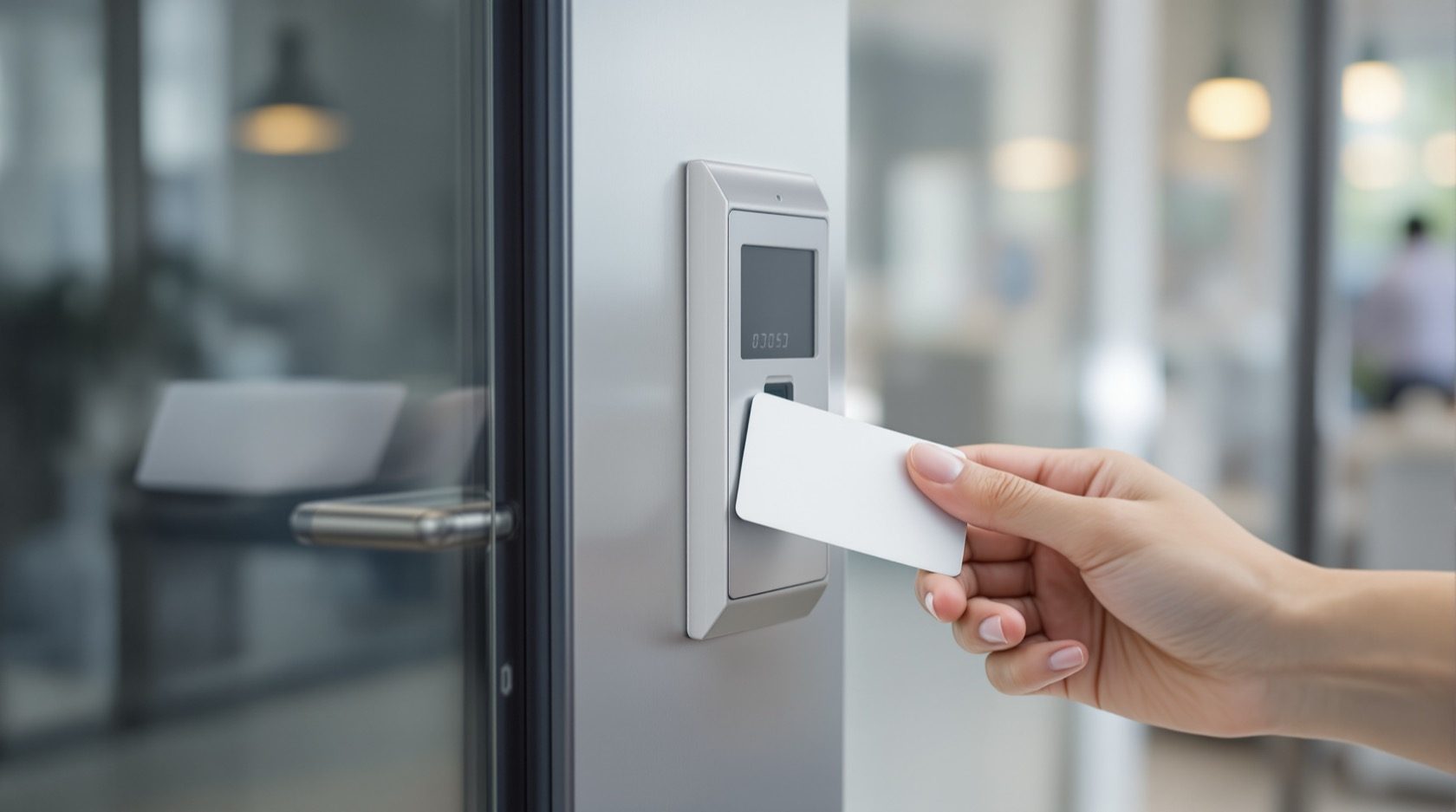
Card-Based Access Control in India (2026): RFID Cards, Readers, Controllers and the Audit Trail
How card-based access control actually works end to end, why old low-frequency cards are a security caution, how to issue and revoke cards, and how to keep every door fail-safe for fire egress.
Walk into almost any office tower, factory, gym or newer apartment block in an Indian city and you will meet the same quiet piece of infrastructure: a small reader on the wall, a card or fob in someone's hand, and a soft click as the door releases. That is card-based access control — the workhorse of building entry, the method that scales from one door to a hundred without handing out a single metal key.
This guide is the credential-methods companion in the Studio Matrx access-control pillar. It explains how a card system actually works end to end, the card technologies and which ones are safe for sensitive doors, how you issue and revoke cards for staff, visitors and contractors, what the audit trail gives you, and — the part no one may skip — how every controlled door stays fail-safe so it can never trap a person in a fire.
Scope & safety. This guide helps you plan, specify and supervise a card system; it is not a fitting manual. The door hardware, the maglock or electric strike, the mains and network wiring, and above all the fire-alarm interlock are a coordinated LICENSED job for a security-systems integrator, an electrician and a fire-safety consultant working together. Any card-controlled door on an escape route MUST fail-safe — it must release on power loss and on a fire-alarm signal — and MUST carry a manual emergency release (a break-glass or request-to-exit), under the National Building Code and local fire rules. Access logs are sensitive personal data under the Digital Personal Data Protection Act, 2023. This is educational guidance, not legal advice.
What "card-based access control" actually means
A standalone smart lock secures a single door and keeps its own list of who may enter. Card-based access control is the grown-up version: a networked system where credentials, readers, controllers, software and door hardware work together across many doors and many people. Its single distinguishing idea is that the decision to open a door is not made at the door — it is made by a controller, against a central list, and the whole event is recorded.
That separation is what gives a building three things a key or a single lock cannot:
- Central control. One administrator grants or removes access to any door for any person from one screen, instantly, without visiting the door or cutting a key.
- Granularity. A card can open the main gate and the second-floor office but not the server room, and only between 9 am and 8 pm on weekdays. A key cannot keep a schedule.
- An audit trail. Every tap — accepted or denied — is time-stamped against a person and a door. When something goes wrong, you have a record.
If you only need to secure one flat door, read the single-door cousin instead: the RFID lock guide covers self-contained card locks, and the NFC lock guide the phone-tap variety. This guide is about the system.
The chain: credential, reader, controller, lock, software
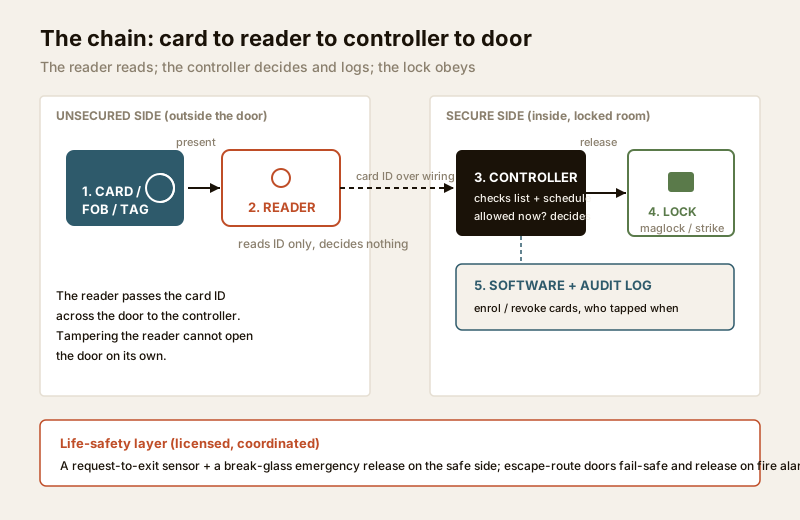
Every card system is the same five links in a chain. Understanding each link is how you specify a good one and spot a weak one.
1. The credential — card, fob or tag
This is what the user carries: a proximity card (the size of a debit card), a key fob on a keyring, or a small adhesive tag. Inside is a tiny chip and a coil of wire — an RFID transponder with no battery. When it comes near a reader, the reader's field powers the chip just long enough for it to send back its stored identity number. There is nothing to charge and nothing to press; you simply present it.
The credential is also the system's biggest security decision, because not all cards are equal — more on that below.
2. The reader
The reader sits on the unsecured side of the door. It energises a short-range radio field, reads the card's ID, and passes that ID to the controller. Crucially, in a well-designed system the reader does not decide anything — it is only an input device. That matters for security: even if someone tampers with a reader on the outside wall, the reader has no power to open the door by itself. Readers come rated for indoor or outdoor use; an outdoor reader in India needs a proper IP rating and a sun-and-rain shield, because monsoon, dust and forty-degree heat are hard on wall-mounted electronics.
3. The controller (the panel)
The controller — often called the panel — is the brain, and it lives in a locked cabinet on the secure side, typically in an electrical or server room. It holds the list of valid cards, the door-by-door permissions and the time schedules. When a reader sends it a card ID, the controller decides: is this card known, is it allowed on this door, is it allowed right now? If yes, it drives the lock to release. One controller usually manages several doors. Because it is the decision-maker, physical protection of the controller and its wiring is central to the system's security.
4. The door hardware — lock, strike and the fail-safe question
The controller's decision is carried out by an electric lock. In access control the two common types are an electromagnetic lock (maglock), which holds the door shut with a powered magnet, and an electric strike, which is a powered version of the keeper the latch sits in. Which one you choose is not only a hardware question — it decides how the door behaves when the power fails, and that is a life-safety matter covered in its own section below.
5. The management software and the audit log
Finally, software ties it together: a screen (local or cloud) where an administrator enrols people, assigns cards to doors and schedules, deactivates a lost card, and reads the audit trail of who tapped which door and when. For a small site this may be a simple application on the controller; for a campus it is a server or a cloud service. The access-control system designer helps you map how many controllers, readers and doors a site needs before you ask for quotes.
Card technologies — and the one security point that matters most
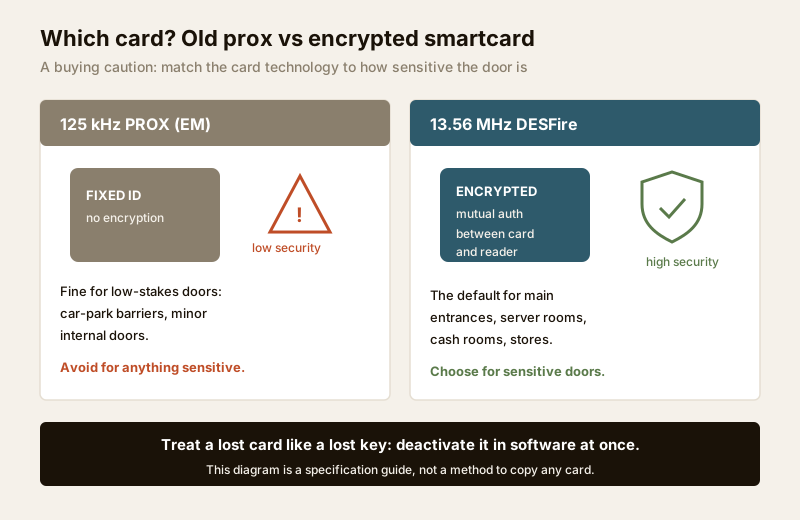
Here is the single most important buying decision in a card system, and the reason so many older Indian installations are quietly insecure. Not all RFID cards offer the same protection.
Older systems use low-frequency 125 kHz proximity cards (the classic "EM" prox card). They were the first mass-market access card and millions are still in service. Their weakness is simple to state as a buying caution: a 125 kHz prox card broadcasts a fixed number with no meaningful encryption. Treat it as a low-security credential — fine for a low-stakes internal door, a gym locker corridor or a car-park barrier, but not the right choice for anything you genuinely need to protect.
For any sensitive door — a server room, a cash room, a pharmacy store, a research area, a main entrance — specify encrypted 13.56 MHz smartcards, of which MIFARE DESFire (EV2/EV3) is the widely recommended standard. These cards use mutual authentication and encryption between card and reader, so the credential is far harder to copy. This guide states that purely as a specification and mitigation point: choose encrypted smartcards for sensitive doors. It does not explain, and you should never seek to learn, how any card is copied — that knowledge belongs to no one but the attacker.
| Card technology | Frequency | Security level | Where it fits |
|---|---|---|---|
| EM / low-frequency prox | 125 kHz | Low — fixed unencrypted ID | Car-park barriers, low-stakes internal doors; avoid for anything sensitive |
| MIFARE Classic | 13.56 MHz | Legacy / dated — not for new sensitive doors | Older installs; migrate away for high-value areas |
| MIFARE DESFire EV2/EV3 | 13.56 MHz | High — mutual authentication + encryption | The default for main entrances and any sensitive area |
| Encrypted fob / tag | 13.56 MHz | High (same chip families) | Same security as a card, in a keyring or sticker form |
A second, non-negotiable habit follows from all of this: treat a lost card exactly like a lost key. The moment a card goes missing — or a staff member leaves — deactivate it in the software at once. Because the system is central, revocation is instant and the old card becomes a dead piece of plastic. That single discipline is worth more than the card technology itself.
Fire egress and fail-safe: the rule that overrides everything
This is the part of access control that is a matter of life, not convenience, and it is where a cheap install becomes dangerous. An access-controlled door is a door that can be held shut electrically — which means it can, if wired wrongly, trap people during a fire or a power cut. The National Building Code and local fire rules do not allow that, and neither should you.
Two words govern the design:
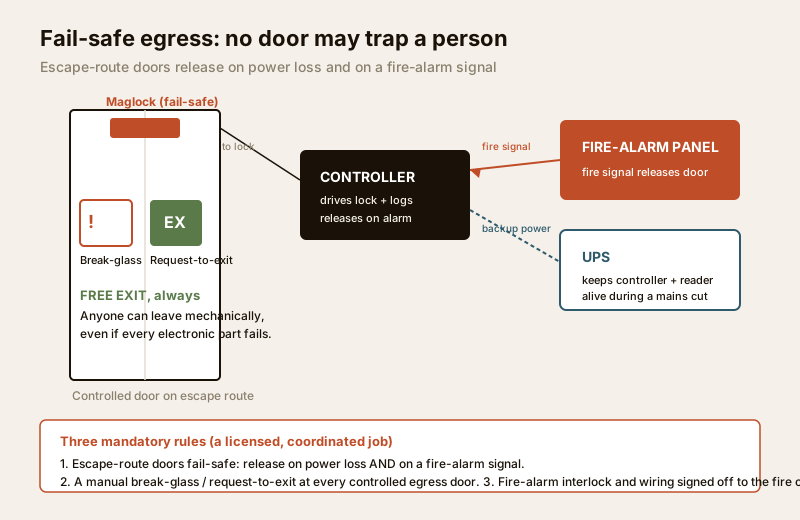
- Fail-safe means the door unlocks when power is lost. A maglock is inherently fail-safe: cut the power and the magnet lets go. Any door on an escape route must behave this way. When the fire alarm sounds or the mains fail, the door must open freely so people can get out.
- Fail-secure means the door stays locked when power is lost. This is appropriate only for a door that is not on an escape route and where security must survive a power cut — but it must still allow free exit from the inside by mechanical means.
For every controlled door on an escape path, three things are mandatory and must be coordinated by licensed professionals:
1. Fire-alarm interlock. The access system must be wired to the fire-alarm panel so that a fire signal releases the doors automatically — no card needed to escape.
2. Fail-safe on power loss. Because India runs on unreliable mains, the design must define exactly what happens in a cut. Egress doors release; a UPS keeps the controller and readers alive so the system logs and functions, but the life-safety behaviour never depends on that UPS staying up.
3. Manual emergency release. A clearly marked break-glass or a green request-to-exit button beside every controlled egress door lets anyone leave instantly, mechanically, even if every electronic part has failed.
None of this is a DIY or a "the electrician will sort it" job. It is a coordinated design between your security integrator, a licensed electrician and a fire-safety consultant, signed off against the fire code. The building security systems guide and the electrical hub set the wider context; the point to carry away is that no access control feature is ever allowed to stand between a person and an exit in an emergency.
Issuing and revoking cards: staff, visitors and contractors
The everyday work of running a card system is enrolment and revocation — and doing it in a disciplined way is what keeps the system honest. Different people need different cards with different lifespans.
| Card holder | What they get | Access scope | Lifespan & revocation |
|---|---|---|---|
| Permanent staff | A personal encrypted card, one per person | Only the doors and hours their role needs (least privilege) | Active while employed; revoke on the last working day, same day |
| Contractors / vendors | A temporary card, clearly identified | Only the specific area and only for the contract dates | Auto-expires on the end date; collect and deactivate on completion |
| Visitors | A day pass card or a pre-registered credential | Reception and the one area they are visiting | Expires the same evening; returned at the desk |
| Emergency / fire warden | A wide-access card, tightly controlled and logged | Broad, for response duties | Held securely; every use appears in the audit trail |
Three habits make this work:
- Least privilege. Give every card only the doors and hours the person genuinely needs — never "all doors" for convenience. A card that opens everything is a master key waiting to be lost.
- Expiry dates on temporary cards. A contractor or visitor card should carry an automatic end date so it dies on its own even if someone forgets to collect it.
- Same-day revocation. When an employee leaves, a card is lost, or a contract ends, deactivate that card the same day. This is the DPDP-aligned habit too: removing a departed person's access and, in time, their personal log data is part of handling their data responsibly.
If you want the phone to replace the plastic card entirely for some users, the mobile-credential access guide covers the phone-as-card successor, and QR-code access suits time-bound visitor entry without issuing hardware at all. For the highest-security doors, many sites pair a card with a second factor — see multi-factor access control and biometric access control.
The audit trail — and DPDP duties around it
The audit log — who tapped which door, when, allowed or denied — is one of the strongest reasons to choose a card system over keys. It resolves disputes, supports investigations, and quietly deters misuse because people know entries are recorded. But that same log is sensitive personal data under the Digital Personal Data Protection Act, 2023, and it must be handled with care rather than collected and forgotten.
Practical DPDP-aligned habits for an access log:
- Lawful basis and notice. Tell staff, tenants and visitors that entry is logged and why (security, safety). For employee attendance uses especially, be transparent about what is collected and how it is used.
- Minimisation. Log what security needs — identity, door, time — not more. Do not quietly repurpose an access log as a productivity-surveillance tool without a clear, disclosed basis.
- Retention limits. Keep logs for a defined, reasonable period, then delete them. "Forever" is not a retention policy.
- Access to the log. Restrict who can read the audit trail to named administrators, and log their access too.
- Deletion on departure. When an employee, tenant or contractor leaves, revoke the card and plan for the eventual deletion of their personal log data in line with your retention policy.
For an apartment society or gated community, this matters as much as it does for an office: the apartments security guide and the gated-communities guide cover who administers resident cards and how a managing committee should hold that responsibility. Where card access sits alongside a video door phone at the gate, the two logs together are powerful — and doubly worth protecting.
Where card systems fit: offices, factories, apartments, gyms
Card-based access control earns its keep wherever there are more people than a keyring can manage and more than one door to control.
- Offices. The classic case: a main entrance, floor doors, meeting rooms and a server room, each with its own permission set, plus tidy revocation when someone leaves. The commercial buildings security guide sets the wider system context.
- Factories and warehouses. Shift-based schedules, restricted stores and hazardous areas, and contractor cards that expire with the job. Anti-passback (a card cannot be re-used to "pass back" to someone) is common here as a policy control.
- Apartments and societies. Resident cards for the main gate, lift lobby and club facilities, with visitor passes issued at the gate. Central revocation means a moved-out resident's card simply stops working.
- Gyms, clubs and co-working. Membership tied to a card or fob, access limited to opening hours and to the tier a member has paid for.
Across all of these the design questions are the same — how many doors, which are on escape routes, which need encrypted cards, who administers — and the access-control cost estimator and system designer turn those answers into a specification and a budget. If a site is really just a handful of doors, compare the system approach against standalone locks first with the smart-lock selector; sometimes a few good RFID locks are the proportionate answer.
Indian realities to design for
- Power cuts. Put the controller, readers and — for fail-secure doors — the locks on a UPS, while ensuring escape-route doors still fail-safe on a total loss. Design the power behaviour explicitly; do not leave it to chance.
- Weather on outdoor readers. A gate or perimeter reader faces monsoon, dust and heat. Specify a properly IP-rated reader with a shield, and keep the controller indoors.
- Patchy internet for cloud systems. A cloud-managed system must keep working when the link drops — the controller should make door decisions locally and sync the log later, never depend on the internet to open a door.
- Retrofit vs new-build. New buildings can run cabling cleanly; a retrofit may lean on wireless or a mix. Either way, the fire-egress wiring is not the place to cut corners.
When to bring in a professional. You can plan the policy — which doors, which card technology, who gets access, retention rules — and you should. Hand the rest to licensed specialists: a security-systems integrator for the controllers, readers and software; a licensed electrician for mains and lock power; and a fire-safety consultant to design and sign off the fire-alarm interlock, the fail-safe behaviour and the emergency releases on every escape-route door. Coordinate them together, not one at a time — see the electrical hub and the building security systems guide. Never let anyone wire a controlled door on an escape route without the fire-egress design in place.
Key takeaways
- Card-based access control is a system, not a lock — credential, reader, controller, door hardware and software, where the controller (not the reader) makes every open/deny decision and logs it; for a single door, the RFID lock is the simpler cousin.
- The card you choose is a security decision. Old 125 kHz prox cards are low-security; for any sensitive door specify encrypted 13.56 MHz smartcards such as MIFARE DESFire — stated as a buying caution, never as a method to copy anything.
- Treat a lost card like a lost key and deactivate it in the software the same day; central, instant revocation is the whole point of a card system.
- Fire egress overrides everything. Every controlled door on an escape route must fail-safe, release on a fire-alarm signal, and carry a manual break-glass or request-to-exit — a licensed, coordinated design, never DIY.
- The audit trail is powerful and is sensitive data. Log who needs it, keep it for a defined period, restrict who can read it, and delete a departed person's data — DPDP duties, not optional courtesies.
References
- Digital Personal Data Protection Act, 2023 — access logs, and especially employee attendance data, are personal data; apply lawful basis, notice, minimisation, retention limits and deletion on departure. Educational summary, not legal advice.
- Manufacturer datasheets — verify card chip family and security (for example MIFARE DESFire EV2/EV3), reader IP ratings, controller door capacity and lock fail-safe/fail-secure behaviour on the maker's own datasheet before specifying.
- National Building Code of India (SP 7), Bureau of Indian Standards, and the applicable local fire and electrical rules for escape-route doors, fail-safe egress, fire-alarm interlock and emergency release; confirm the current edition via the BIS catalogue: https://www.services.bis.gov.in/
This is an educational overview, not legal advice. Door hardware, lock and reader fitting, mains and network wiring, and the fire-alarm interlock are qualified, licensed tasks — engage a security integrator, a licensed electrician and a fire-safety consultant together, and verify any standard's current status via the BIS catalogue before relying on it.
Export this guide
Related Guides — Deep-dive reading
Access Control Maintenance in India (2026): Readers, Locks and Fail-Safe Egress
How to keep a card, keypad, fingerprint or face access-control system reading reliably and locking securely — and, above everything, how to test that its doors still release on a fire alarm and on power loss, so an access-controlled door never becomes a life-safety trap.
SecurityEmergency Door Release in India (2026): The One Device You Never Defeat
The break-glass unit or green exit button that instantly unlocks any access-controlled door so people can escape, working even when the controller, network or software has failed.
SecurityFail-Safe vs Fail-Secure Locks: The Guide (India 2026)
Why fail-safe vs fail-secure is the single most important access-control decision, and how to get it right for every door.
Home Doors & EntrancesRelated Tools — Try Free
Video Door Phone Type Selector
Answer a few questions about your building, cabling, budget and internet and get the right video door phone — analog / wired / wireless / IP, single-home or multi-apartment, monitor or app.
Door Phone SelectorApartment Video Door System Planner
Enter flats, entrances, floors and guard desk for a first-pass building intercom plan — door stations, indoor monitors, guard station, the right architecture and an indicative cost band.
Building PlannerSecurity System Cost Estimator
Estimate the all-in capex with GST, annual running cost and 5-year total cost of ownership of a home or building security system.
Cost Estimator