
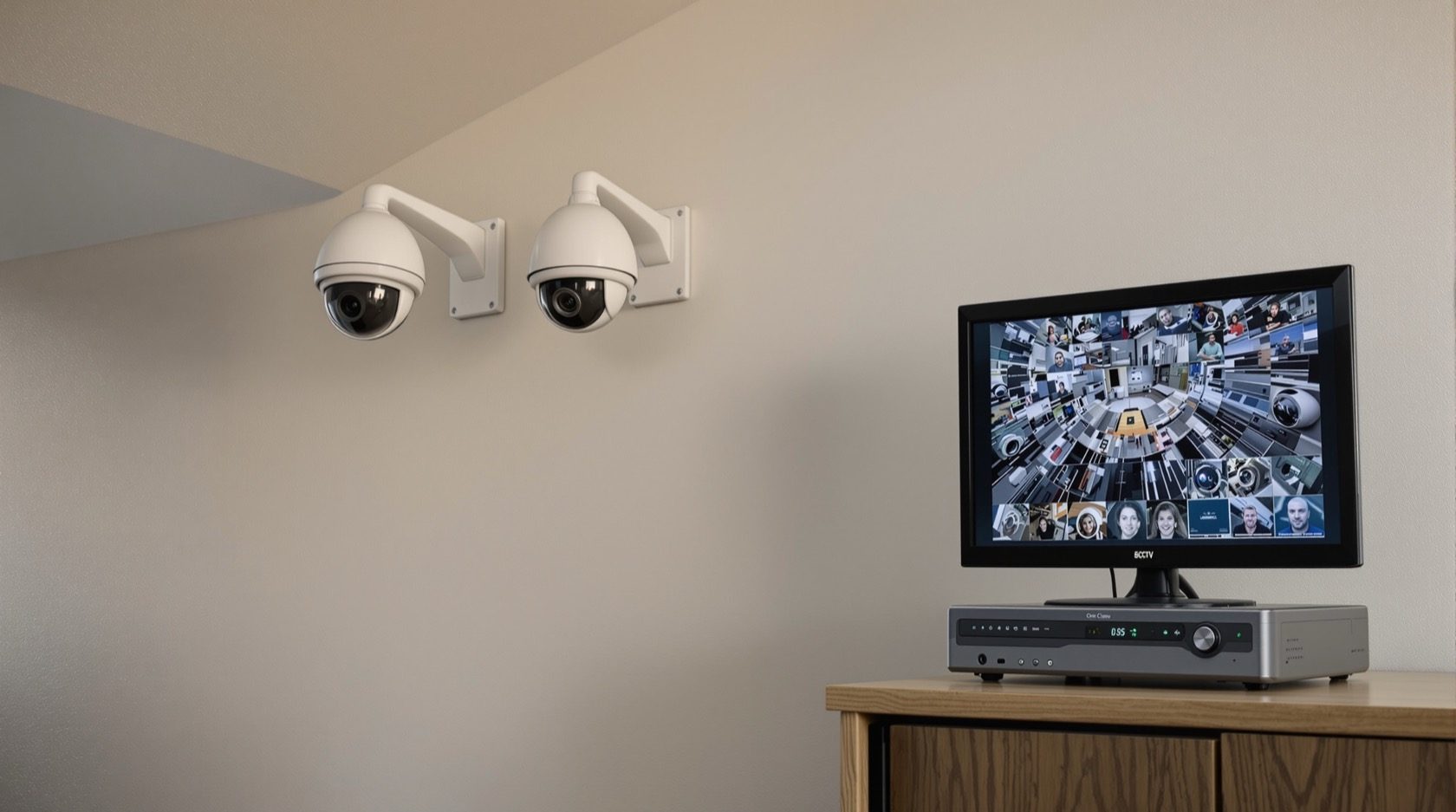
Complete Guide to CCTV Systems for Indian Homes
The master overview of home CCTV — what a system actually is, the three decisions that define it, and how to go from I want cameras to a coherent, professionally installed plan.
Every second week a neighbour asks the same question: "Which CCTV camera should I buy?" It is the wrong first question. A camera on its own records nothing — it is one part of a small system, and the parts have to be chosen together. Buy the camera before you understand the system and you end up with grainy night footage, a disk that overwrites the one clip you needed, and an app that never loads when you are away.
This is the pillar guide of Studio Matrx's CCTV knowledge hub — the one overview that makes CCTV make sense for an Indian home, flat or small shop. It sits under the broader complete guide to building security systems, which covers alarms and access control too, and the ultimate home security guide, which frames the overall strategy. Here we go deep on cameras: what a system is, the three decisions that define it, and how to turn a vague "I want cameras" into a plan an installer can execute.
Scope & safety. This guide helps you plan, decide and coordinate. Structured cabling and any mains-electrical work — running the security circuit, wiring PoE switches to a distribution board, surge protection — belong to licensed professionals. Cameras must never sit in private spaces (bathrooms, bedrooms, changing areas), and must respect neighbours, staff and India's data-protection expectations under the DPDP Act. Nothing here replaces a site-specific design.
What a CCTV system actually is
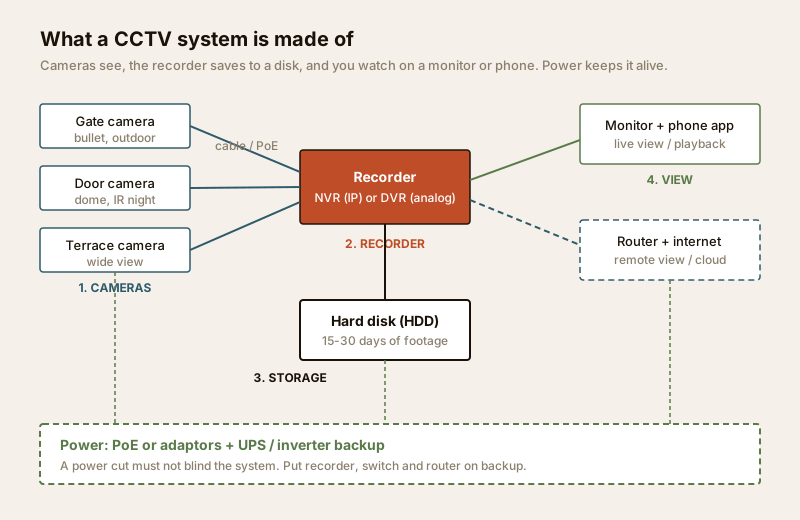
CCTV stands for closed-circuit television: cameras feeding a private, closed loop that you (and only you) can watch and record. Strip away the jargon and every home system is the same handful of parts working together.
| Part | What it does | What to know for an Indian home |
|---|---|---|
| Cameras | Capture the picture at each spot you want covered | Shape (dome, bullet, turret, PTZ) sets the view; must be IP66-rated outdoors for dust and monsoon |
| Recorder (NVR / DVR) | The brain that records all cameras and lets you play back | NVR for IP cameras, DVR for analog — they are not interchangeable |
| Storage (hard disk) | Holds the footage until it overwrites the oldest | Use a surveillance-grade disk; size it for the days of retention you want (15-30 is common) |
| Cabling & network | Carries video and, with PoE, power to each camera | Wired is a network/coax cable per camera; a router connects the recorder for remote viewing |
| Power & backup | Runs the kit and survives a power cut | PoE or adaptors, plus a UPS/inverter so a cut is not a blind spot |
| Monitor / mobile app | Where you watch live and review clips | A phone app is the norm; a wall monitor is optional |
The important mental model: cameras see, the recorder saves, the disk keeps, and the app shows. If any one link is weak — a camera that can't see in the dark, a disk too small to hold the day you need, an app that won't connect — the whole system fails you at the worst moment. For a step-by-step of how the signal actually travels from lens to phone, see how CCTV systems work.
The three decisions that define your system
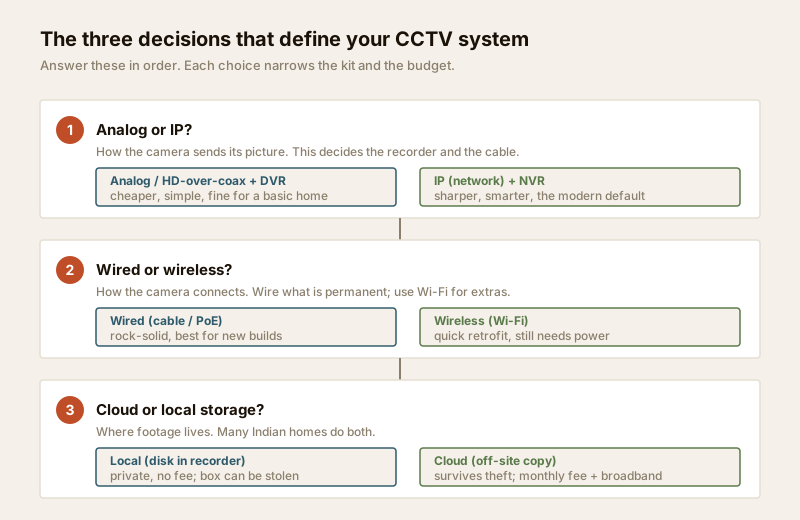
Almost every difference between two CCTV quotes comes down to three choices. Make them in order and the rest of the spec falls into place.
Decision 1 — Analog or IP?
This is how the camera sends its picture, and it decides which recorder and cable you need.
- Analog / HD-over-coax + DVR — the older, cheaper family. Coaxial cable, a separate power line, and a DVR. Perfectly fine for a basic 4-camera home on a tight budget. Deep-dive: analog CCTV explained.
- IP (network) + NVR — cameras that are tiny networked computers, wired with a single LAN cable and recorded on an NVR. Sharper images, smart features (motion zones, alerts, analytics), and the modern default. Deep-dive: IP CCTV explained.
Can't decide, or extending an old analog setup with a few new IP cameras? A hybrid recorder takes both — see hybrid CCTV systems.
Decision 2 — Wired or wireless?
This is how the camera connects.
- Wired (cable / PoE) — the most reliable choice, no dropped signal, and with Power over Ethernet one cable carries both power and video. Best for new builds and permanent core cameras. Deep-dive: wired CCTV.
- Wireless (Wi-Fi) — quick to fit with minimal cabling, ideal for rentals and retrofits. But it still needs a power point (unless battery), and Wi-Fi congestion or a weak signal from a far corner can cost you the footage. Deep-dive: wireless CCTV.
The honest recommendation for an owned Indian home: wire the permanent cameras (gate, main door, terrace) and use Wi-Fi only for extras or where cabling is genuinely impossible. If you are building or renovating, run the cables now — retrofitting later means chasing walls.
Decision 3 — Cloud or local storage?
This is where the footage lives.
- Local (disk in the recorder) — private, no subscription, and it works even when broadband is down. The weak spot: a thief who carries away the recorder takes your evidence with it.
- Cloud (off-site copy) — footage survives theft, fire or a smashed box, and you can reach it anywhere. It costs a monthly fee and leans on reliable upload bandwidth, which many Indian connections lack.
Many homes do both — local for everything, cloud for the two or three cameras that matter most. Not sure which combination suits your risk and budget? The CCTV system-type selector walks you through these three decisions and suggests a starting configuration.
Resolution and coverage basics
Two specs decide whether footage is useful or just comforting.
Resolution is the detail in the image, quoted in megapixels (MP):
| Resolution | Roughly | Good enough to | Storage impact |
|---|---|---|---|
| 2MP (1080p) | The sensible floor | See that someone is there; general awareness | Lowest |
| 4MP | The home sweet spot | Recognise a familiar face at a doorway | Moderate |
| 5MP / 4K | High detail | Read a number plate or a face at the gate from distance | High — plan disk and bandwidth for it |
More megapixels are not automatically better: they eat storage and bandwidth, and a cheap high-MP sensor can look worse at night than a good 2MP one. Match resolution to the job of each camera — high MP at the gate where you need to identify, lower MP for a wide "is anyone in the yard" view.
Coverage is about angles, not count. A camera sees a cone (its field of view); your job is to cover the points that matter — every entry, the driveway, blind corners — with as little overlap and as few cameras as possible. Two things spoil coverage in Indian homes: mounting too high (you get the tops of heads, not faces) and pointing into glare (a west wall at sunset, or a bright compound light at night). Two well-placed cameras beat five badly aimed ones. Work out how many you need and where with the CCTV camera coverage calculator, and check for gaps with the blind-spot identification guide. Night performance is its own subject — see the lighting and visibility assessment, because almost every incident happens after dark and a camera that can't see in the dark is decoration.
A tiered buying overview
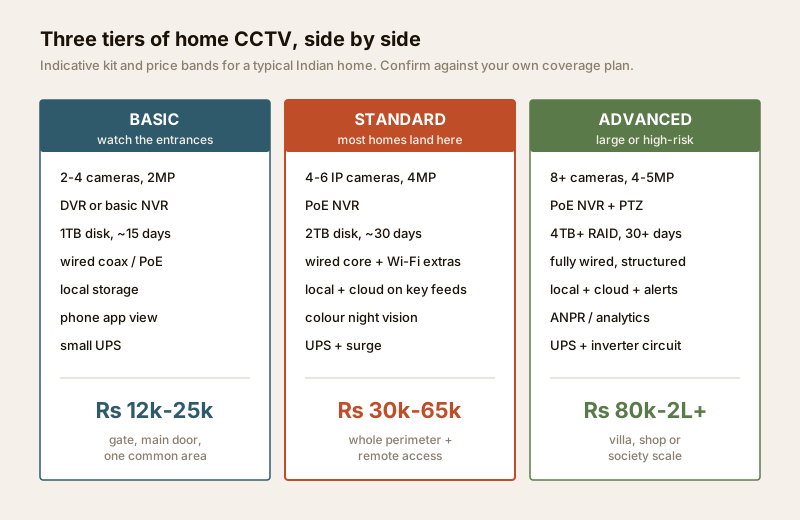
To turn choices into a shopping list, it helps to see the whole thing at three levels. These are indicative starting points for a typical Indian home, not a fixed spec — your coverage plan and risk decide the real numbers.
| Tier | Typical kit | Best for | Indicative band (kit + basic install) |
|---|---|---|---|
| Basic | 2-4 cameras at 2MP, DVR or entry NVR, 1TB disk (~15 days), local storage, phone app, small UPS | A flat or small home — cover the gate, main door and one common area | Rs 12,000 - 25,000 |
| Standard | 4-6 IP cameras at 4MP, PoE NVR, 2TB disk (~30 days), wired core + Wi-Fi extras, colour night vision, local + cloud on key feeds, UPS + surge | Most independent homes — full perimeter with reliable remote access | Rs 30,000 - 65,000 |
| Advanced | 8+ cameras at 4-5MP incl. a PTZ, PoE NVR, 4TB+ (RAID) 30+ days, fully structured wiring, cloud + smart alerts, ANPR/analytics, UPS + inverter circuit | Large villa, shop or society-scale, or higher-risk sites | Rs 80,000 - 2,00,000+ |
Prices move with brand, camera grade, cable runs and how much civil/electrical work the install needs. Get an itemised quote — camera model and count, recorder, disk size, cabling, backup and labour listed separately — so you can compare like with like. Price a full setup end-to-end with the security system cost estimator, and read the security cost planning guide so the recurring costs (cloud, AMC, disk replacement) don't surprise you later.
Viewing footage — live and remotely
A system you can't check when you are away is only half a system. There are three ways you will watch:
- On a local monitor — a screen wired to the recorder showing all cameras at once. Useful at a shop counter or a society guard desk; optional for a home.
- On your phone, at home — the app connects over your own Wi-Fi for instant live view and playback.
- On your phone, anywhere — the recorder links through your router and the manufacturer's cloud (usually a free P2P app) so you can view from work or travel. This needs a working internet connection at home and enough upload speed — the number most Indian broadband plans quietly skimp on.
For smooth remote viewing, your home network has to be ready: a decent router near the recorder, adequate upload bandwidth, and ideally the recorder on a wired link, not Wi-Fi. The internet and network readiness guide covers what "ready" actually means. Keep the app itself secure too — change the default password, use a strong one, and enable any two-factor option, so the camera meant to protect you doesn't become a way in. The security and privacy assessment covers this and where cameras should and should not point.
From "I want cameras" to a plan
The path from idea to a system that works is four steps, in order:
1. Assess. What are you actually protecting against, and where are the weak points? Walk the property at night. Note every entry, blind corner and dark patch. The security risk assessment guide turns this into a prioritised list.
2. Choose the system type. Make the three decisions — analog vs IP, wired vs wireless, cloud vs local — for your budget and building. Use the system-type selector if you are unsure.
3. Plan coverage. Decide how many cameras, of what resolution, aimed where. Size the recorder, disk and backup to match. The coverage calculator, the cabling and PoE planner and the backup-power calculator do the sums.
4. Professional install. Hand the plan to a licensed installer for the cabling, electrical work and commissioning — then have them show you how to use it.
Do the thinking first and the install becomes a short, clean job instead of a series of expensive surprises.
When to bring in a professional
You can and should plan the system yourself. Hand these parts to a licensed professional to design, install and certify:
- Mains-electrical work — the dedicated security circuit, powering the recorder and switch, surge protection at the board. This is a qualified electrician's job — see the electrical hub. Never run camera power off a random extension board.
- Structured cabling — neat, labelled, correctly terminated cable runs through walls and conduits. Cheap or sloppy cabling is the most common cause of a camera that "works for a month". The security cabling requirements guide sets the standard.
- Recorder and network commissioning — a good installer right-sizes the disk and backup, secures the app, and hands over a system you understand. If footage will be retained for a shop or society, the data storage planning guide helps you size it and stay on the right side of privacy expectations.
A camera fixing must never obstruct a fire exit, a window used for escape, or an electrical panel — security hardware never blocks egress. And if your CCTV is part of a wider connected-home setup, the smart home hub covers integrating it safely.
Key takeaways
- A CCTV system is cameras + recorder + storage + cabling/network + power + app — choose the parts together, never the camera alone.
- Three decisions define your system: analog vs IP, wired vs wireless, and cloud vs local storage — make them in that order, and read the sibling guides that go deep on each.
- Match resolution to the job (identify at the gate, watch wide in the yard) and plan coverage by angles, not camera count — two well-aimed cameras beat five badly placed ones.
- Think in tiers: Basic (Rs 12k-25k), Standard (Rs 30k-65k), Advanced (Rs 80k-2L+) — and get an itemised quote you can compare.
- Go assess -> choose type -> plan coverage -> professional install. Keep cabling and mains work with licensed pros, cameras out of private spaces, and the app password strong.
References
- Digital Personal Data Protection Act, 2023 (India) — the framework for handling personal data, including recorded footage of identifiable people; apply its principles when placing cameras and retaining footage.
- National Building Code of India (SP 7), Bureau of Indian Standards — means-of-egress and electrical provisions relevant to mounting equipment and running the security circuit; verify the current edition via the BIS catalogue: https://www.services.bis.gov.in/
- Your RWA / society CCTV and privacy policy for common-area cameras, retention and access.
This is an educational overview. Structured cabling, mains-electrical work and any equipment mounting near egress or electrical panels are qualified professional tasks — engage licensed installers, respect neighbours' and residents' privacy, and verify any standard's current status via the BIS catalogue before relying on it.
Export this guide
Related Guides — Deep-dive reading
How to Choose a CCTV Camera (2026): The Homeowner's Decision Guide for India
Cut through the spec-sheet noise and choose the right CCTV camera for each spot around an Indian home. What actually matters — sensor and low-light performance, lens and field of view, form factor, IP and IK ratings, honest smart features — and the marketing claims to ignore.
SecurityPoE vs Wi-Fi CCTV: Which Home Security Cameras Are Better?
One camera type runs power and video down a single Cat6 cable to an NVR and almost never drops out; the other clips to a wall in minutes and streams over your home Wi-Fi. This guide settles PoE vs Wi-Fi CCTV for Indian homes — reliability, video quality and bandwidth, cabling and power, retrofit versus new-build effort, NVR versus SD and cloud storage, hacking risk, real rupee costs, scalability and outdoor use — and gives a clear verdict for each kind of home.
Smart HomeLocal Storage vs Cloud CCTV in India (2026): Where Your Footage Should Live
A homeowner's honest head-to-head on where CCTV footage is kept — on a hard disk in the recorder at home, or uploaded to a per-camera cloud plan — across cost, theft resilience, internet dependence, retention, remote access and DPDP privacy, ending in a clear which-suits-whom, with hybrid usually the smartest answer.
SecurityRelated Tools — Try Free
CCTV Camera Coverage & Count Calculator
Estimate how many CCTV cameras you need, the NVR channels, storage in TB for your retention period, and an indicative all-in cost with GST.
CCTV CalculatorCCTV Cloud vs Local Cost Calculator
Compare cloud CCTV subscription against a local NVR + HDD — upfront, 5-year total, monthly fee and break-even.
Cloud vs LocalCCTV System Type Selector
Answer five questions and get the right CCTV setup — analog / IP / hybrid, wired / wireless, local / cloud — with reasons.
CCTV Selector