
Hybrid CCTV in India: Running Analog and IP Cameras Together
How a hybrid recorder lets you keep working analog cameras on coax while adding IP/PoE cameras — the smart way to migrate an existing Indian home or shop to IP one camera at a time.
You already have CCTV. Four analog cameras, a DVR, coaxial cable snaking through the walls — installed years ago, still recording, mostly fine. But the gate footage cannot read a number plate, the shop counter needs sharper detail, and every installer now pushes "IP cameras". Do you rip out a working system and start again?
Usually, no. A hybrid CCTV system lets you keep the cameras and cable you already have while adding modern IP cameras exactly where you need them — all on one recorder, one app, one screen. This guide explains what hybrid means, when it is the right call, and how to plan a phased upgrade without wasting the money you already spent.
It is a focused companion to the complete guide to CCTV systems and to the two guides on the pure paths — analog CCTV and IP CCTV. If you are still deciding between the three broad approaches, the CCTV sub-hub maps them all.
Scope & safety. This guide helps you plan, decide and coordinate. Structured cabling, PoE runs and any mains-electrical work are for a licensed professional — plan the layout, but have the cable pulled, terminated and powered by a qualified installer. Cameras belong on approaches, boundaries and shared spaces only — never in bathrooms, bedrooms or any private area — and your footage must respect neighbours, staff and India's data-protection law.
What "hybrid" actually means
Every CCTV system has two parts: the cameras, and the recorder that stores and shows their footage. The two camera families do not speak the same language:
- Analog cameras (including modern HD-over-coax) send a video signal down a coaxial cable, with power on a separate wire. Their recorder is a DVR.
- IP cameras send digital video down a network (LAN) cable, often with PoE (Power over Ethernet) carrying power on that same cable. Their recorder is an NVR.
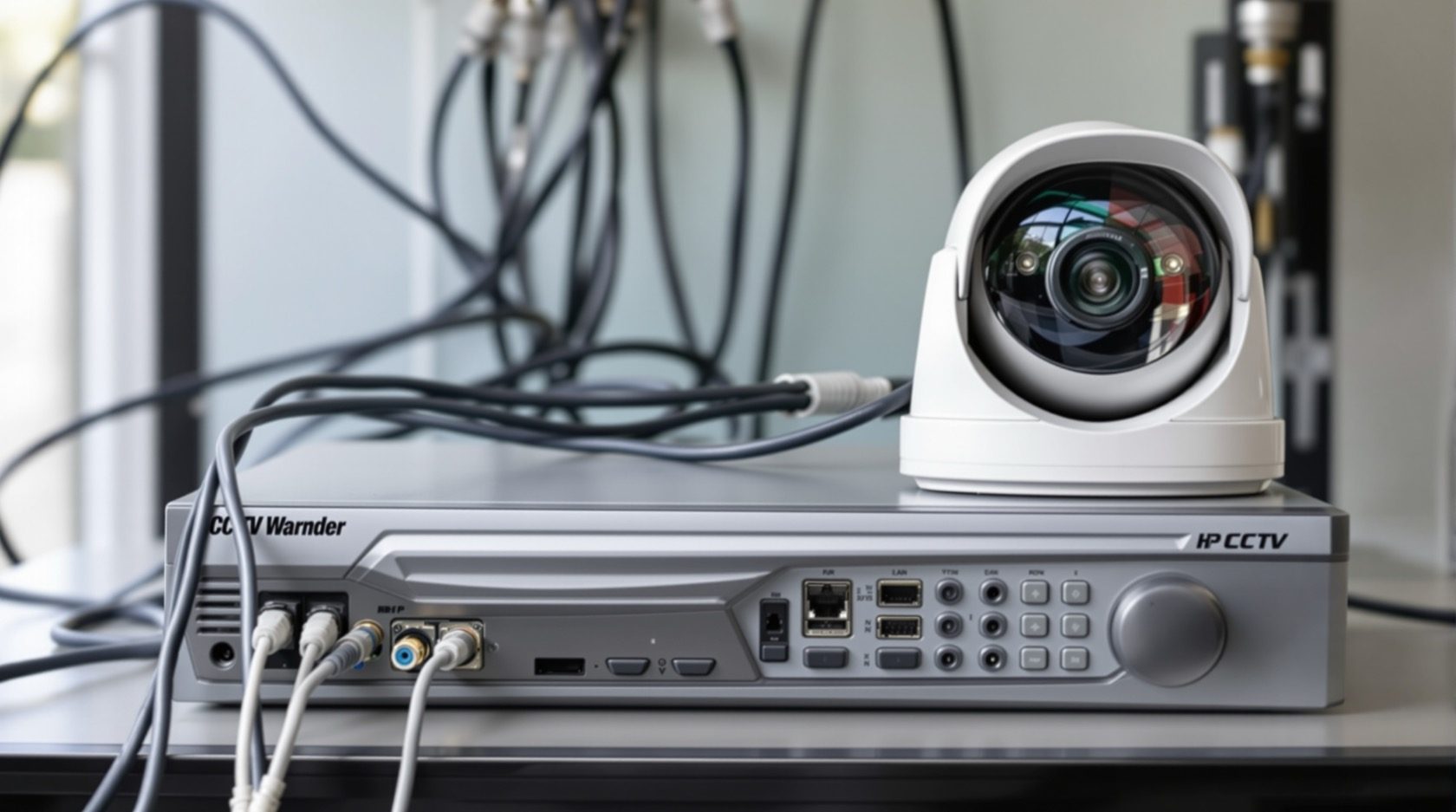
A hybrid recorder — sold as a HVR (Hybrid Video Recorder) or a DVR "with IP channels" — is a box that accepts both at once. Some inputs take coax from your old cameras; some channels take IP cameras over the network. On the screen and in the phone app, they all appear together as one system.
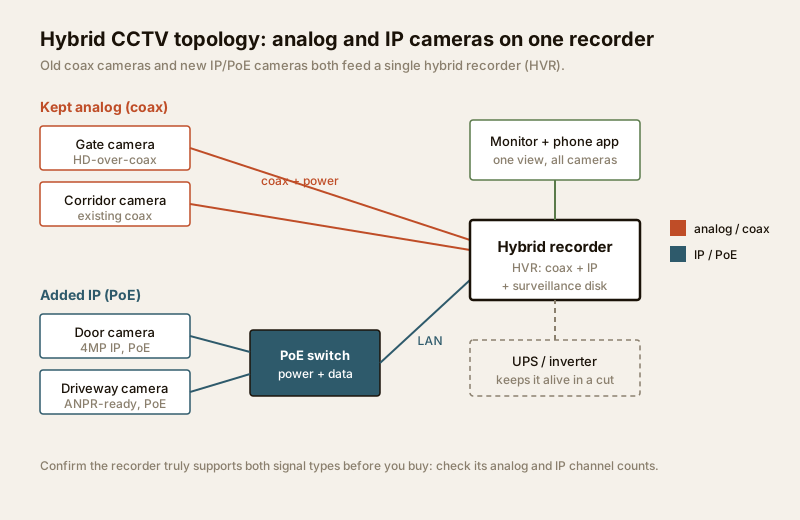
That single-box, single-app result is the whole point. You are not running two separate systems side by side — you are running one system that happens to contain a mix of old and new cameras. For the deeper mechanics of how each signal type is captured and stored, see how CCTV systems work.
The main use case: migrate to IP gradually
Here is the situation hybrid was built for. You have a functioning analog system. Nothing is broken. But you want the benefits of IP — higher resolution, sharper zoom, smarter motion and line-crossing analytics — at least at your most important points.
The wasteful option is to scrap everything and install a full IP system in one go: new cameras, new cable, new recorder, one large bill. The hybrid option is smarter:
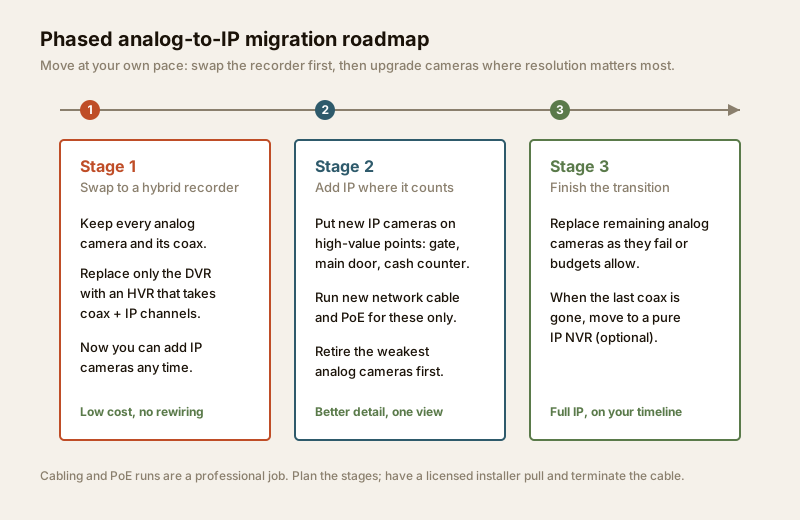
1. Replace only the recorder with a hybrid unit. Your existing analog cameras plug straight into it and keep working.
2. Add IP cameras one at a time, wherever the extra resolution or analytics actually earns its cost — the gate, the main door, the cash counter.
3. Retire the old analog cameras slowly, as they age out or as budget allows, replacing each with an IP camera on its own network cable.
You spread the cost over months or years, you never lose coverage during the switch, and you never throw away a camera that is still doing its job. Keep analog where it is; add IP where you need it. That is the hybrid philosophy in one line.
Other situations that fit
Migration is the headline, but hybrid also suits:
- Mixed sites. A property where some runs are already coaxed and cabling new Ethernet everywhere is disruptive — keep coax on the far corners, put IP on the important new positions.
- Budget phasing. A shop or small office that wants good CCTV now but cannot fund an all-IP install this quarter. Start hybrid, upgrade cameras as cash flow allows.
- Long existing cable runs. Coax already reaches a distant gate or terrace. Re-using that run avoids a fresh, costly cable pull.
Hybrid vs pure analog vs pure IP
Hybrid is a middle path, and like most middle paths it trades some purity for flexibility. This table sets the three approaches side by side.
| Pure analog (DVR) | Hybrid (HVR) | Pure IP (NVR + PoE) | |
|---|---|---|---|
| Cameras | Analog / HD-over-coax only | Analog and IP together | IP only |
| Cabling | Coax + separate power | Existing coax plus new LAN | Network cable, PoE (one cable) |
| Best for | Basic budget setups, existing coax | Migrating an existing system to IP | New builds, top resolution/analytics |
| Max resolution | Limited by analog camera + coax | Analog cameras stay limited; IP cameras full | Highest (4MP, 8MP and beyond) |
| Analytics | Basic motion | Only on the IP cameras | Full, on every camera |
| Upfront cost | Lowest | Low — reuses existing cameras/cable | Highest (all-new kit) |
| Complexity | Simple | Higher — two signal types to manage | Moderate, but uniform |
| Weak spot | You are stuck at analog quality | You inherit analog limits on old channels | No reuse of old coax cameras |
The honest trade-off: on a hybrid system, the analog channels are still analog. Those cameras do not magically get sharper because a modern recorder is behind them — a 2005-era analog camera on coax gives 2005-era footage. Hybrid lets you keep that camera cheaply; it does not upgrade it. The upgrade comes only when you replace that camera with an IP one.
The trade-offs, stated plainly
Hybrid is genuinely useful, but go in with eyes open:
- You inherit analog limits. Every retained coax camera keeps its old resolution, its old night performance, and its lack of analytics. Hybrid buys you time and phasing, not a free quality jump.
- It is more complex. You are running two signal types, two kinds of cabling, and sometimes two mental models of how a camera connects. A pure system is simpler to reason about and to service.
- Recorder support is not guaranteed. This is the big one. Many boxes advertised as "hybrid" support both analog and IP only up to a limit — for example, a 8-channel DVR that accepts analog on all 8 but IP on just 2, or that only allows IP channels if some analog inputs are left empty. Before you buy, confirm the exact analog channel count and IP channel count, and whether they can run at the same time. Ask the installer to show it on the spec sheet, not just say "yes, it is hybrid".
- Bandwidth and storage still apply. The IP cameras you add consume network bandwidth and, at higher resolution, more disk. Size the surveillance-grade storage for the mix you will end up with, not just today's cameras.
Planning a phased migration
The roadmap has three stages. Move through them at whatever pace your budget and needs allow — there is no clock.
| Stage | What you do | Cost | Coverage during the stage |
|---|---|---|---|
| 1. Swap the recorder | Replace the DVR with a hybrid recorder (HVR) that takes both coax and IP. Keep all analog cameras and coax as-is. | Low — one box | No change; every existing camera keeps recording |
| 2. Add IP where it counts | Fit IP/PoE cameras at high-value points (gate, main door, counter). Run new network cable and PoE for these only. Retire the weakest analog cameras first. | Medium — per camera | Full, and improving as sharp IP cameras join |
| 3. Finish the transition | Replace remaining analog cameras as they fail or budgets allow. When the last coax is gone, you may move to a pure IP NVR. | Spread over time | Full throughout; ends fully IP |
A few practical India notes on running this:
- Start Stage 2 at your worst blind spot, not your easiest camera. Put the first sharp IP camera where footage has actually failed you — usually the gate or the approach. Use the camera coverage calculator to check the new camera's field of view before you fix its position, and cross-check against your blind-spot map.
- Plan cabling and PoE up front, even if you install it in phases. Deciding cable routes and the PoE budget once — see the security cabling and PoE planner — avoids re-opening walls three times. Have a licensed cabling professional pull and terminate every run.
- Weatherproof for the monsoon on day one. Any outdoor IP camera you add needs an IP66-rated housing and a proper sun-shield; dust and heavy rain kill under-rated cameras in a single season. The pure-path guides — analog and IP — cover camera-body choices in detail.
- Keep the whole chain on backup power. The hybrid recorder, the PoE switch and the router must sit on a UPS or inverter circuit, or a power cut becomes a recording gap. Size it with the backup-power calculator.
When is hybrid the right choice?
If you are building fresh with no existing cameras, hybrid is usually the wrong answer — go straight to a clean IP system. Hybrid earns its place specifically when you have a working analog base to preserve. This decision aid walks the logic.
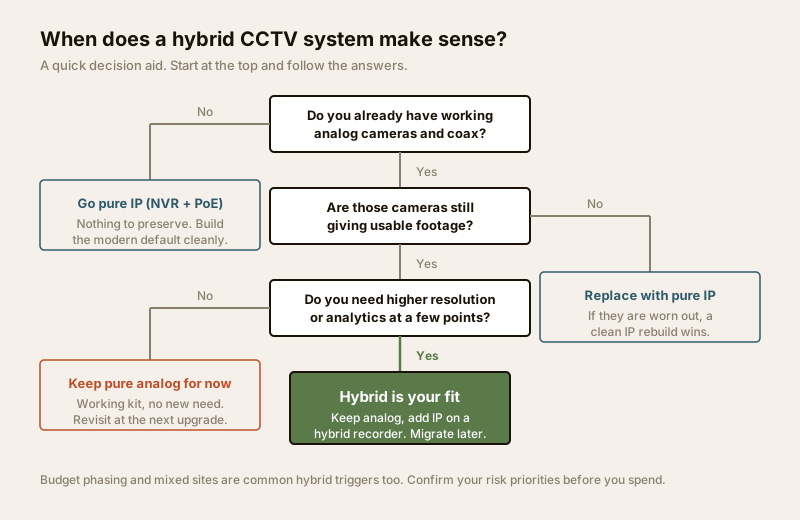
Not sure which path is yours? The CCTV system type selector turns a few answers about your existing setup and goals into a recommendation. And if you are pricing the whole exercise, the security system cost estimator will phase the spend across stages.
Typical India price bands
Indicative only, to frame conversations with installers — not a quote. Prices vary widely by brand, resolution and region.
| Item | Typical band (₹) | Note |
|---|---|---|
| Hybrid recorder (HVR), 8-channel | 6,000 – 15,000 | Confirm analog vs IP channel split before buying |
| HD-over-coax analog camera (kept) | already owned | Reuse — no new spend at Stage 1 |
| 4MP IP/PoE camera | 3,000 – 8,000 | Per camera, added in Stage 2 |
| PoE switch (4–8 port) | 3,000 – 9,000 | Needed once you add IP cameras |
| Surveillance-grade hard disk | 4,000 – 12,000 | Size for the final camera mix and retention |
| Cabling + PoE + install (professional) | Site-dependent | Always a licensed professional job |
When to bring in a professional
Plan and decide yourself, but hand these to a qualified installer:
- All structured cabling and PoE runs — pulling coax or LAN through walls, terminating connectors, and setting up the PoE switch. Bad terminations cause the intermittent faults that are miserable to trace later.
- Any mains-electrical work — the recorder circuit, the UPS/inverter connection and surge protection at the board. That is licensed-electrician territory; see the electrical hub.
- Recorder compatibility check — have the installer confirm, in writing, that the specific HVR runs your number of analog cameras plus your planned IP cameras simultaneously.
- A proper site survey — camera positions, coverage, retention and backup sized to your actual risk. A good installer hands over a system you understand and can operate.
For the strategy around all this — layering CCTV with alarms and access — the complete building security systems guide and the smart security systems guide sit one level up.
Key takeaways
- Hybrid = one recorder, both camera types. A hybrid recorder (HVR) accepts analog cameras on coax and IP/PoE cameras together, shown as one system in one app.
- Its best use is phased migration. Keep your working analog cameras and coax, swap only the recorder, then add IP cameras where higher resolution or analytics genuinely helps — spread the cost over time.
- You inherit analog limits. Retained coax cameras stay at their old quality; hybrid buys phasing and reuse, not a free upgrade.
- Verify the recorder really supports both — confirm the exact analog and IP channel counts and that they run at the same time, before you buy.
- Route cabling, PoE and mains work to a licensed professional, keep the whole chain on backup power, and weatherproof every outdoor camera for the monsoon.
References
- Bureau of Indian Standards catalogue — verify the current status of any relevant Indian Standard for CCTV, cabling and electrical safety: https://www.services.bis.gov.in/
- India's data-protection law (Digital Personal Data Protection Act, 2023) and your local municipal / RWA policy for CCTV placement, signage and footage handling — confirm current obligations before you install.
This is an educational overview. Structured cabling, PoE and mains-electrical work are qualified professional tasks — engage licensed installers, and verify any standard's current status via the BIS catalogue before relying on it.
Export this guide
Related Guides — Deep-dive reading
CCTV Recording Failure in India (2026): Live View Works but Nothing Was Saved
You open the recorder to pull footage of an incident and there is nothing there, even though every camera shows a crisp live picture. A calm, ordered guide to why an Indian CCTV system records live but saves nothing, and how to fix it before the next incident.
SecurityAnalog CCTV in India: HD-over-Coax, DVRs and When It Still Wins
A buyer-facing guide to analog CCTV for Indian homes and shops - how coax-and-DVR systems work, the jump from old 960H to today's 2MP and 5MP HD-over-coax, where analog is the smart low-cost choice, and where IP is worth the extra.
SecurityHow to Choose a CCTV Camera (2026): The Homeowner's Decision Guide for India
Cut through the spec-sheet noise and choose the right CCTV camera for each spot around an Indian home. What actually matters — sensor and low-light performance, lens and field of view, form factor, IP and IK ratings, honest smart features — and the marketing claims to ignore.
SecurityRelated Tools — Try Free
CCTV Camera Coverage & Count Calculator
Estimate how many CCTV cameras you need, the NVR channels, storage in TB for your retention period, and an indicative all-in cost with GST.
CCTV CalculatorSecurity System Cost Estimator
Estimate the all-in capex with GST, annual running cost and 5-year total cost of ownership of a home or building security system.
Cost EstimatorCCTV Recorder Selector
Camera type, count, PoE need and resolution to the right recorder — DVR, NVR, NVR-with-PoE or hybrid — with channels, HDD bays and PoE ports.
Recorder Selector