
Security Cost Planning Guide for Indian Homes
How to budget a home or building security system sensibly in India — the real cost drivers, tiered budgets with honest rupee ranges for a flat and an independent house, the ongoing costs people forget, prioritising spend by risk, and the 5-year total cost of ownership instead of the sticker price.
Most people buy home security the way they buy a phone on a festival sale — they see a shiny bundle, they like the discount, and they spend. Then the real bills arrive: the recording that needed a subscription, the alarm that needed an annual service, the batteries that died in the monsoon, the camera pointed at a wall. Good security is not the biggest cheque you can write; it is the right rupee spent in the right place, with the running costs planned for from day one.
This guide is about money, not gadgets. It helps you plan, decide and coordinate a security budget for an Indian home or building — a flat or an independent house — so you know what things really cost over five years, where the money actually matters, and how to phase the spend so you are never paying for depth you do not yet need.
Scope & safety. This guide helps you budget, prioritise and coordinate. It is not a shopping list, and prices move constantly. Fire and smoke detection and alarm, electronic access control and electric locks, mains electrical work and structural elements are life-safety-critical: cost them, then have a licensed professional design, install and certify them. Security hardware must never block a fire escape.
Start with risk, not with a catalogue
The single most expensive mistake in home security is spending money in the wrong order — buying a bank of cameras while the main door still has a weak lock, or a fancy alarm while the ground-floor window has no grille. Money follows risk, or it is wasted.
So before a single rupee is committed, know your weakest, highest-impact gaps. The fastest way is the home security risk scorecard; the deeper method is the security risk assessment guide. A ranked list of gaps is your budget's spine — it tells you what to fix first, and just as usefully, what you can safely leave for later.
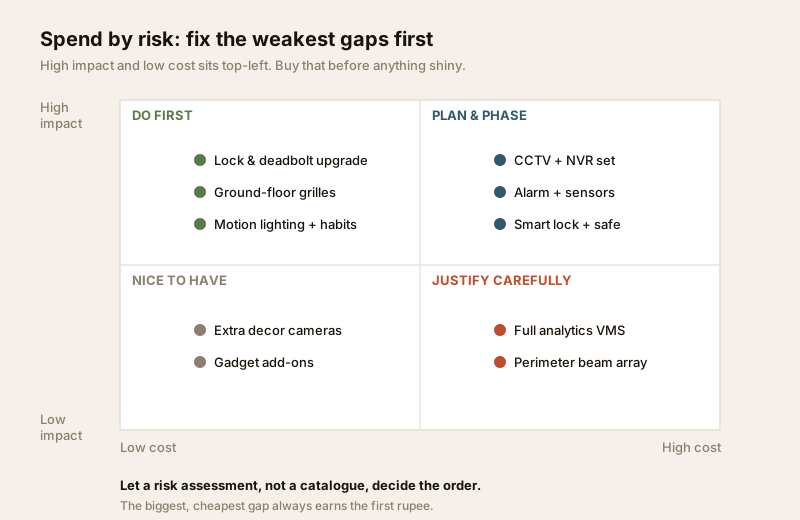
The rule is simple: the biggest, cheapest gap earns the first rupee. A Rs 3,000 deadbolt on a door that anyone can push open buys more real safety than a Rs 40,000 camera that watches an already-locked gate. Plot every candidate purchase on cost against impact, and always work the top-left — high impact, low cost — before you drift into the expensive corners.
The real cost drivers
Before the tiers, understand what actually moves a security bill up or down. It is rarely the headline camera price.
- How much you own. A flat owner buys the front door, a few cameras and an alarm; the boundary, gate and guard belong to the society. An independent house owns every layer — boundary wall, gate, grounds, grilles, the lot — so its bill is naturally two to three times a comparable flat's. The security guide for apartments and building-type guides work through who owns what.
- Coverage, not megapixels. The number of cameras and doors you must cover drives cost far more than the resolution of any one device. Plan coverage first with the CCTV camera coverage calculator so you buy the right count, not the most expensive model.
- Wired vs wireless. Wired systems cost more to install (conduit, cabling, labour) but are cheaper and more reliable to run. Wireless is cheap to fit but adds battery replacements and recurring costs. More on this below.
- Recording and retention. Where footage lives — a local recorder you own, or a cloud plan you rent every month — is one of the biggest hidden multipliers over five years.
- Install and integration. Professional design and installation of anything mains-powered or life-safety is a real, non-negotiable line item, not a place to cut.
- India conditions. Dust, monsoon humidity and daily power cuts shorten the life of cheap outdoor kit and make backup power (UPS/battery) a genuine cost, not a luxury.
Tiered budgets: Basic, Standard, Comprehensive
You do not need everything at once. Build a ladder — get the fundamentals right cheaply, then add depth. The ranges below are indicative all-India figures for a typical 2-3 BHK flat and a typical independent house; prices shift with brand, quality, city and installation. Use them to frame a plan, then firm up real numbers with the security system cost estimator.
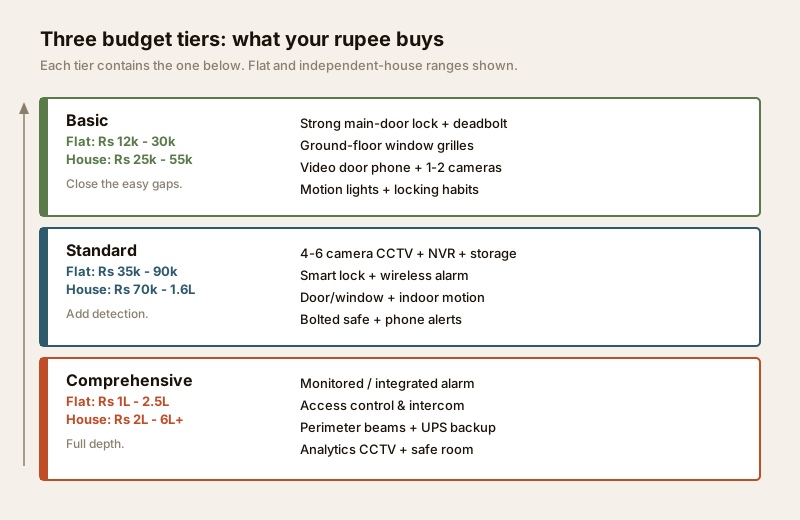
| Tier | What it includes | Flat (2-3 BHK) | Independent house |
|---|---|---|---|
| Basic | Strong main-door lock + deadbolt, ground-floor window grilles, a video door phone, 1-2 entry cameras, motion-sensor lights, good locking habits | Rs 12,000 - 30,000 | Rs 25,000 - 55,000 |
| Standard | Everything above, plus a 4-6 camera CCTV set with recorder and storage, a smart lock, a wireless alarm with door/window and indoor motion sensors, a bolted safe, phone alerts | Rs 35,000 - 90,000 | Rs 70,000 - 1,60,000 |
| Comprehensive | Everything above, plus a monitored or integrated alarm, access control and intercom, perimeter beams or fence sensors, full-coverage analytics CCTV, UPS/battery backup, professionally designed safe room | Rs 1,00,000 - 2,50,000 | Rs 2,00,000 - 6,00,000+ |
Each tier contains the one below — you never throw away the earlier spend, you build on it. The most common budgeting error is skipping Basic to buy a Standard toy: a premium camera on an unlocked flimsy door is worse value than the cheap deadbolt it should have bought first.
The costs everyone forgets: capex vs opex
Here is where budgets quietly blow up. The price you are quoted is almost always capex — the one-time cost of hardware and installation. But a security system is not a purchase, it is a subscription to being protected, and the ongoing opex runs for as long as you use it.
The recurring costs people forget:
- AMC (annual maintenance contract) — servicing cameras, alarm panels, gates and access control. Typically 5-12% of the hardware cost per year, or a flat per-visit fee.
- Professional monitoring — a central station that watches your alarm and responds. Roughly Rs 300-1,500 per month depending on service level; genuinely valuable for empty homes, an ongoing cost nonetheless.
- Cloud / storage subscriptions — off-site recording for cameras that do not have a local NVR. Commonly Rs 100-500 per camera per month; for a six-camera home that is a serious annual line.
- Electricity — cameras, recorders, routers and a monitor run 24x7. A modest CCTV set adds a few hundred rupees a month to the bill.
- Battery replacements — wireless sensors, smart locks and battery cameras need periodic new cells; in India's heat and humidity they die sooner than the box promises.
- Connectivity — a reliable internet plan (and often a mobile-data failover SIM) is what makes remote viewing and alerts actually work.
A useful discipline: for every one-time purchase, ask and what will this cost me every year to keep running? The honest answer reshapes plans. A cheaper camera with a free local recorder can beat a dearer one that only works on a paid cloud plan the moment you add up five years.
Five-year total cost of ownership
Judge a system by its total cost of ownership (TCO) over five years, not its sticker price. Capex is paid once; opex is paid every year, and it adds up to something remarkably close to the original hardware bill.
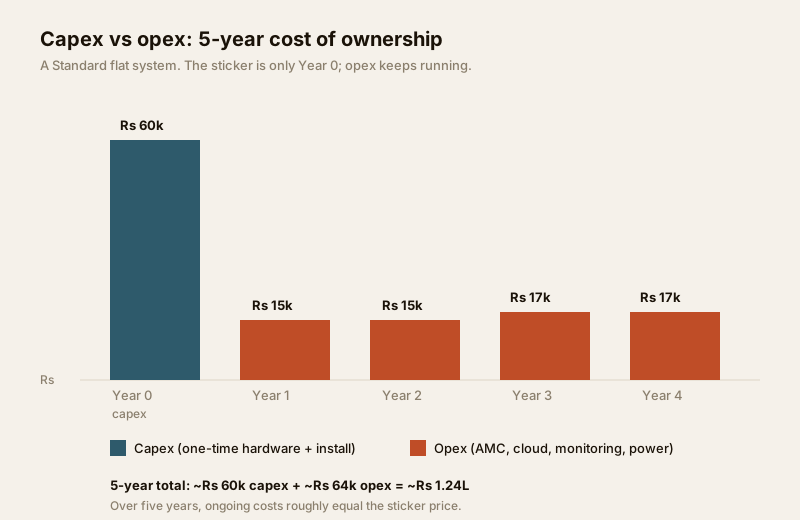
Here is a worked example for a Standard-tier flat, the kind of system most owned homes end up with:
| Cost line | Type | Year 0 | Per year (1-4) | 5-year total |
|---|---|---|---|---|
| Hardware (cameras, NVR, alarm, smart lock, safe) | Capex | Rs 55,000 | — | Rs 55,000 |
| Professional installation + wiring | Capex | Rs 8,000 | — | Rs 8,000 |
| AMC (service contract) | Opex | — | Rs 6,000 | Rs 24,000 |
| Cloud / extra storage | Opex | — | Rs 4,000 | Rs 16,000 |
| Electricity + connectivity share | Opex | — | Rs 4,000 | Rs 16,000 |
| Battery + minor replacements | Opex | — | Rs 1,500 | Rs 6,000 |
| Total | Rs 63,000 | Rs 15,500 | ~Rs 1,25,000 |
The lesson jumps out: over five years, the running costs roughly equal the sticker price. A system that looked like a Rs 63,000 decision is really a Rs 1.25 lakh commitment. Add professional monitoring at Rs 600 a month and you add another Rs 36,000 across five years. None of this is a reason not to spend — it is a reason to plan the spend, so an opex line never surprises you into switching off a service you have already paid to install.
Phasing the build-out on a budget
You almost never need to buy everything in one month, and doing so is how people overspend on depth they will not use for a year. Phase it, letting risk set the order.
1. Phase 1 — close the cheap, critical gaps. The Basic tier: main-door lock and deadbolt, ground-floor grilles, a video door phone, motion lighting, and disciplined locking habits. This is the highest return per rupee you will ever get, and it stops the intrusions opportunists actually attempt.
2. Phase 2 — add detection. Once the shell is hard, add cameras and an alarm so a breach becomes a known event. Buy coverage, not glamour.
3. Phase 3 — extend and integrate. Perimeter sensors, access control, monitoring and backup power — the Comprehensive additions — only once the fundamentals are solid and the budget is comfortable.
Spread across six to eighteen months, the same total feels affordable and each phase is fully useful the day it goes in. For a step-by-step retrofit sequence, see the security upgrades for existing homes guide; if you are building or buying new, security planning for new homes shows how to bake the cabling and provisions in cheaply while walls are open.
Wired vs wireless: the cost trade-off
The wired-versus-wireless choice is really a capex-versus-opex choice.
| Factor | Wired | Wireless |
|---|---|---|
| Upfront (capex) | Higher — cabling, conduit, labour | Lower — quick to fit, less labour |
| Running (opex) | Lower — no batteries, very reliable | Higher — battery replacements, sometimes cloud |
| Best when | New build, walls open, permanent home | Rented home, retrofit, minimal drilling |
| Reliability in India | Excellent; unaffected by Wi-Fi drops | Good, but depends on batteries and signal |
Neither is simply cheaper — wired costs more to install and less to run; wireless flips that. In a new home with walls open, wired usually wins on five-year TCO. In a rented flat or a quick retrofit, wireless saves the disruption and the deposit. Match the choice to how long you will stay.
DIY vs professional install
Plenty of Standard-tier kit — a plug-in camera, a battery doorbell, a stick-on sensor — is genuinely DIY-friendly, and doing that yourself is a fair saving. But two categories are professional regardless of budget, because getting them wrong costs far more than the install ever could:
- Life-safety items — always professional. Fire, smoke and gas detection and alarm, electronic access control, electric locks and any mains electrical work. A badly wired electric lock can trap someone in a fire; a mis-installed alarm can fail silently. These are specified by you and installed and certified by a licensed professional, full stop.
- Structural and integrated work. Grilles, security gates, safe rooms and integrated multi-device systems need a competent fabricator or systems integrator working to a proper detail — anchored correctly, and never blocking egress.
The saving from DIY-ing a doorbell is real; the "saving" from DIY-ing an electric lock is a life-safety gamble. Scope the professional lines with the access control cost estimator before you brief an installer, so you can compare quotes on equal terms.
When to bring in a professional
Budget and decide these yourself — but do not design, wire or certify them yourself:
- Fire, smoke and gas detection and alarm — life-safety-critical; must be designed and commissioned to the National Building Code fire and life-safety provisions and local municipal bye-laws. Cost it as professional work, always.
- Electronic access control and electric locks — a badly installed electric lock can trap people in a fire; specify, then use a licensed installer.
- Mains electrical work — cameras, gates and alarms often need proper wiring; budget for a licensed electrician (see the electrical hub).
- Structural perimeter — grilles, gates and safe rooms must be anchored and fire-escapable; budget a competent fabricator working to a proper detail.
Your job is to set the budget, choose the systems and coordinate the trades. Their job is to make it safe, code-compliant and reliable — and that professional line is not where you economise.
Key takeaways
- Spend by risk, not by catalogue. Fix the biggest, cheapest gaps first — the risk scorecard sets the order, not the sale price.
- Build the ladder. Get the Basic fundamentals right before Standard or Comprehensive; each tier contains the one below, so no rupee is wasted.
- Budget opex, not just capex. AMC, monitoring, cloud, electricity and batteries run every year — over five years they roughly equal the hardware bill.
- Judge by 5-year TCO. A Rs 63,000 system is often a Rs 1.25 lakh commitment; plan for it so no running cost surprises you into switching a service off.
- Phase the spend, match wired vs wireless to your stay, and keep life-safety items professional — regardless of what the budget says.
Where to go next
- Estimate real numbers: Security System Cost Estimator, CCTV Camera Coverage Calculator and Access Control Cost Estimator.
- Set the order of spend: Security Risk Assessment Guide.
- Sequence the build-out: Security Upgrades for Existing Homes and Security Planning for New Homes.
- See the whole subject: The Ultimate Guide to Home Security in India, or browse the Security Hub.
References
- National Building Code of India (SP 7), Bureau of Indian Standards — fire and life-safety provisions relevant to alarms, egress and safe rooms; verify the current edition via the BIS catalogue.
- Local municipal building bye-laws and your housing society bye-laws — govern boundary walls, gates, CCTV in common areas and guard arrangements; check your city and society rules before budgeting shared work.
- Vendor and installer quotations, AMC schedules and subscription terms — the only source of firm, current pricing; always compare like-for-like on capex and opex together.
This is an educational overview for budgeting and decision-making; prices are indicative and move constantly. Fire and smoke detection and alarm, electronic access control, mains electrical work and structural perimeter elements are qualified professional work — engage licensed professionals for design, installation and certification, and verify any standard's current status via the BIS catalogue before relying on it.
Export this guide
Related Guides — Deep-dive reading
Wireless CCTV Cost in India (2026): Cheap to Buy, Read the Running Costs First
What Wi-Fi and wire-free CCTV really costs an Indian home — a low, DIY-friendly install price that hides a subscription, battery and reliability bill. An honest, capex-versus-opex look at where the money actually goes over three to five years, with indicative bands and the drivers that move them.
SecuritySecurity Fire Alarm Integration in India (2026): Smart Alerts, Certified Systems, Fail-Safe Egress
The most important sentence a smart-home designer can say about fire is also the least profitable: a smart-home smoke sensor or fire notification is a helpful add-on, not a substitute for a certified fire-alarm system. This guide draws the line hard — life-safety detection and alarm belongs to the NBC-governed certified system — and then covers the genuinely useful, correctly-scoped automations the smart layer can add on a verified fire signal: unlock for egress, open the gate for the fire tender, light the escape path, stop the away-scene, and notify everyone loudly. All of it fail-safe. None of it in the way of the system that actually saves lives.
SecurityPoE vs Wi-Fi CCTV: Which Home Security Cameras Are Better?
One camera type runs power and video down a single Cat6 cable to an NVR and almost never drops out; the other clips to a wall in minutes and streams over your home Wi-Fi. This guide settles PoE vs Wi-Fi CCTV for Indian homes — reliability, video quality and bandwidth, cabling and power, retrofit versus new-build effort, NVR versus SD and cloud storage, hacking risk, real rupee costs, scalability and outdoor use — and gives a clear verdict for each kind of home.
Smart HomeRelated Tools — Try Free
Security System Cost Estimator
Estimate the all-in capex with GST, annual running cost and 5-year total cost of ownership of a home or building security system.
Cost EstimatorCCTV Camera Coverage & Count Calculator
Estimate how many CCTV cameras you need, the NVR channels, storage in TB for your retention period, and an indicative all-in cost with GST.
CCTV CalculatorHome Security Risk Scorecard
Score your home across six security layers — perimeter, entry points, lighting, detection, alarm and habits — and get a prioritised action plan.
Security Scorecard