
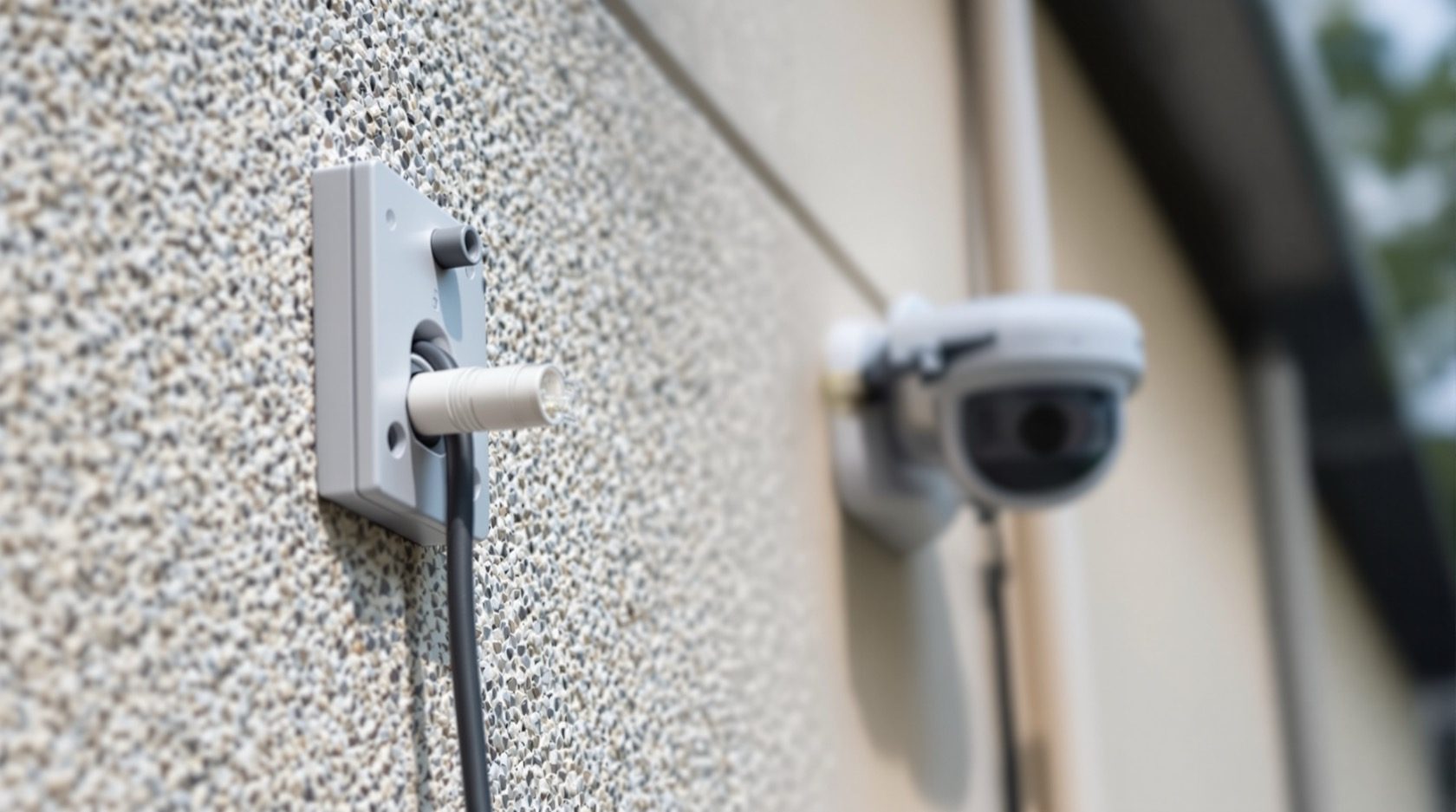
Wired CCTV for Indian Homes: The Reliable Backbone
What wired CCTV means, why a cable is the most dependable way to run a camera, and how to plan the cabling at construction or as a retrofit for an Indian home.
A wireless camera is easy to love: it goes up in minutes and it looks clever in the app. But the day the Wi-Fi drops, the battery dies mid-week, or the router simply cannot reach the far gate, the clever camera stops being a security camera. A cable does not have those moods. This guide makes the case for wired CCTV as the reliable backbone of a home system, explains exactly what "wired" means, and shows you how to plan the cabling so the install is clean rather than a wall-chasing nightmare.
This is part of Studio Matrx's CCTV cluster. If you are still choosing between system families, start with the complete guide to CCTV systems and the plain-language how CCTV systems work. Its opposite number is the wireless CCTV guide — read both, because the honest answer for most homes is a mix.
Scope & safety. This guide helps you plan and decide. Structured data cabling, conduit in walls and slabs, and any mains-electrical work are professional tasks — coordinate them, but have them designed and installed by a licensed electrician and a competent CCTV installer. Cameras must never be placed in private spaces (bathrooms, bedrooms, changing areas), and cabling must never obstruct a fire-exit route. Respect neighbours, domestic staff and India's data-protection expectations under the DPDP Act 2023.
What "wired" actually means
"Wired" simply means the camera is connected to the recorder by a physical cable rather than by radio. There are two cabling families, and the difference matters:
- Coax for analog / HD-over-coax cameras. The classic setup: a coaxial (RG59-type) cable carries the video signal to a DVR, and a separate two-core wire carries power to the camera. Two things per camera — video and power.
- Ethernet / PoE for IP cameras. A single network cable (Cat6) carries the digital video to an NVR, and with Power over Ethernet (PoE) that same cable also delivers the power. One cable does data and power — no adaptor at the camera end. This is the modern default for new installs.
So "wired" is not one thing. On a coax system the wire is the video path; on a PoE system the wire is the video path and the power path. Either way, the signal never has to fight through the air.
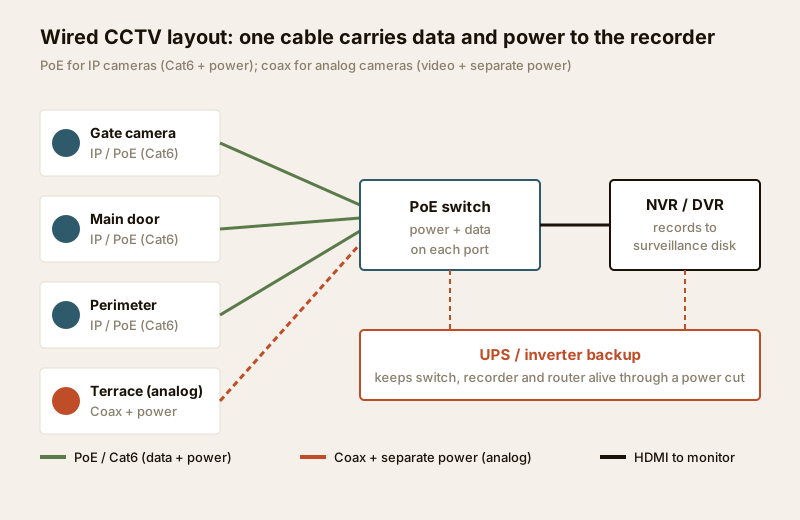
If the terms DVR, NVR and PoE are new, the analog CCTV guide and the IP CCTV guide unpack each family in full; the hybrid CCTV guide covers running both on one recorder.
Why wiring is the reliable backbone
A camera exists to give you usable footage at the worst possible moment — 2 a.m., in the rain, with the power flickering. Every advantage of wiring points at that moment.
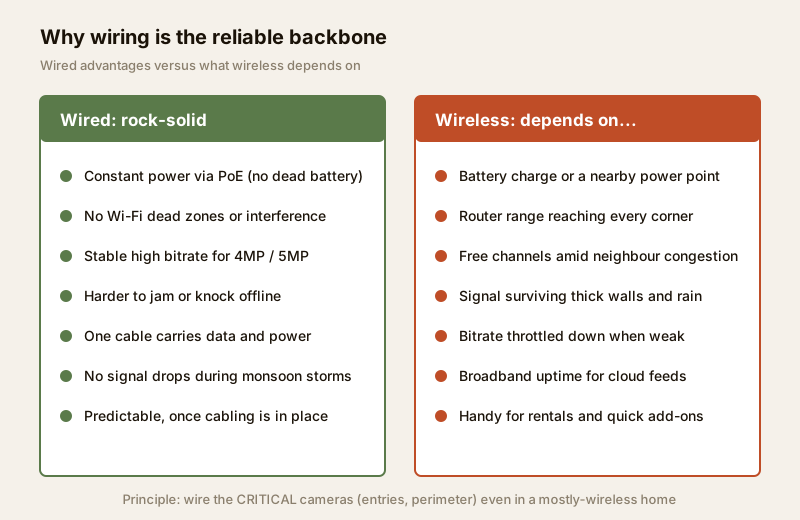
- Rock-solid reliability. No radio link means no signal drops, no "camera offline" notifications when the microwave runs or the neighbour's router crowds your channel. A cabled link is either connected or it is not — and it stays connected.
- No interference or Wi-Fi dead zones. Indian homes are full of thick brick and RCC walls that murder Wi-Fi. The gate, the terrace and the back boundary are exactly where wireless is weakest and where you most need a camera. A cable does not care about walls.
- Constant power via PoE. A PoE camera is powered from the cable, continuously. There is no battery to charge every few weeks and no dead camera the one night it matters. On coax there is a dedicated power line doing the same job.
- Stable high bitrate for high resolution. 4MP and 5MP cameras produce a lot of data. A cable carries that full bitrate without throttling, so you keep the detail that lets you read a face or a number plate. A weak wireless link quietly drops the quality to stay connected.
- Harder to jam or knock offline. A wireless signal can be blocked; a buried cable cannot be jammed from outside. For the cameras that protect your entries, that resilience is the whole point.
- One cable, less clutter. With PoE, a single Cat6 run replaces both a video cable and a power adaptor — tidier, fewer failure points, and no power socket needed at each camera.
The trade-offs — be honest about them
Wiring is not free of downsides, and pretending otherwise leads to bad installs.
- It needs cabling work. Someone has to run a cable from every camera to the recorder. That is the whole cost and inconvenience of wired.
- Best done at construction stage. Cabling is cheapest, cleanest and completely hidden when it goes in before plastering. Doing it later means conduit or trunking on finished surfaces.
- Less flexible to move. Once a camera point is cabled, relocating it means a new run. Wireless wins for temporary or frequently-moved cameras.
- Distance and standards. Ethernet has a practical run limit of about 90–100 metres per camera before you need a switch or extender. A long compound may need a mid-point PoE switch. This is exactly the kind of thing an installer sizes for you.
None of these is a reason to go fully wireless. They are reasons to plan the cabling — which is the rest of this guide.
Wired vs wireless: the comparison
| Factor | Wired (PoE / coax) | Wireless (Wi-Fi / battery) |
|---|---|---|
| Reliability | Very high — no signal drops | Depends on Wi-Fi strength and congestion |
| Power | Constant, from the cable (PoE) or power line | Battery (recharge) or a nearby power point |
| Video quality | Full, stable high bitrate for 4MP/5MP | Throttled down when the signal weakens |
| Interference | None — immune to Wi-Fi congestion | Vulnerable to walls, distance, other networks |
| Tamper / jamming | Buried cable is hard to disrupt | Radio link can be jammed or blocked |
| Install effort | Cabling work; plan at construction | Quick; minimal cabling |
| Flexibility to move | Low — a new run per relocation | High — pick it up and re-mount |
| Best for | Entries, perimeter, permanent core cameras | Rentals, retrofits, temporary or spare corners |
The takeaway is not "wired beats wireless everywhere". It is that they are good at different jobs. Which leads to the single most useful principle in home CCTV.
The principle: wire the cameras that matter
Even in a mostly-wireless home, the critical cameras should be wired. Those are the ones covering your entries and perimeter — the front gate, the main door, the compound boundary, the terrace access. These are the feeds you cannot afford to have offline, jammed, or dropped to a fuzzy low bitrate on the one night something happens.
Use wireless deliberately, for what it is good at: a temporary camera on a renovation, a spare view of the garden, a rented flat where you cannot chase walls, a spot where a cable run is genuinely impossible. Everything load-bearing gets a cable.
This mirrors the layering logic in the complete home security guide: put your reliability where the risk is highest. To decide which points are truly critical, a security risk assessment and a blind-spot check are worth doing before you commit cable routes.
Planning the cabling: construction vs retrofit
When you run the cable decides how clean, cheap and painless it is.
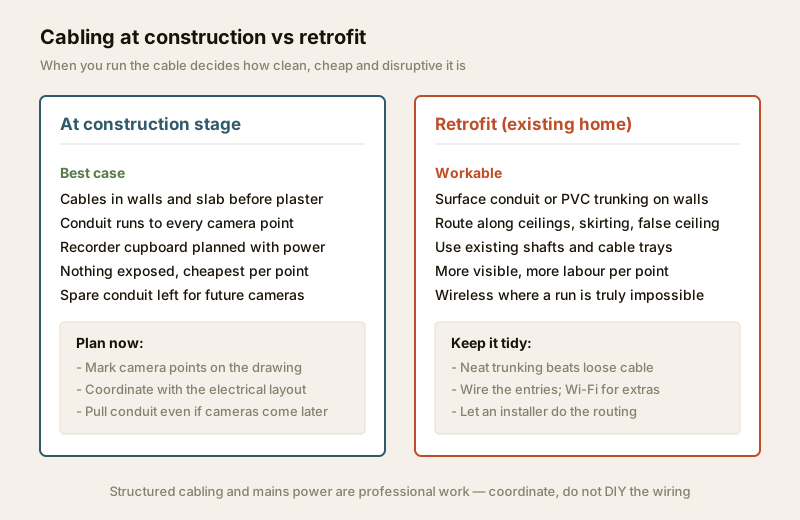
At construction stage (the best case). If you are building or doing a major renovation, this is the moment. Mark every camera point on the drawing, run conduit to each one before plastering, and plan a small ventilated cupboard for the recorder with a power point and a UPS. Pull spare conduit to likely future positions even if you install fewer cameras now — an empty pipe costs almost nothing and saves a wall later. Coordinate the routes with the electrical layout so cabling and power arrive together.
As a retrofit (existing home). You can still wire a finished home well. Route cables through surface PVC conduit or trunking, along false ceilings, skirting lines and existing electrical shafts or cable trays. It is more visible and more labour per point than construction-stage work, but neat trunking is a world away from loose cable stapled to a wall. Where a single run is genuinely impossible, that is the honest place to use a wireless camera.
Either way, the actual routing, the conduit in walls, and any new power circuit are jobs for a professional. Get the plan right and hand the execution over.
A wired CCTV planning checklist
| Planning step | What to decide / check | Route to |
|---|---|---|
| Camera points | List entries and perimeter first; mark each on a plan | Homeowner + installer |
| Cable family | PoE Cat6 for new IP cameras; coax only if extending analog | Installer |
| Run lengths | Keep Ethernet runs under ~90 m; add a mid-point switch if longer | Installer |
| Recorder location | Ventilated, lockable cupboard near a power point | Homeowner + electrician |
| Conduit / trunking | Concealed conduit at construction; neat surface trunking on retrofit | Electrician / installer |
| Power + UPS | Recorder, PoE switch and router on a UPS or inverter circuit | Electrician |
| Spare capacity | Extra conduit / a spare port or two for future cameras | Homeowner + installer |
| Privacy | No cameras in private spaces; angle away from neighbours | Homeowner |
For the number-crunching side of the plan — cable routes, PoE budgets and backup — use the cabling and PoE planner, the camera coverage calculator and the backup power calculator. If you are unsure which system family suits your home at all, the CCTV system-type selector walks you through it. For the deeper cabling and power specifics, the security cabling requirements guide and the security power supply requirements guide go further.
When to bring in a professional
Plan the layout yourself, but hand these over:
- Structured data cabling — running Cat6/coax through walls, slabs and conduit, terminating connectors, and testing the runs. A badly-crimped cable is an intermittent fault you will chase for months.
- Mains electrical work — the power point and circuit for the recorder, the UPS/inverter tie-in, and any surge protection at the board. This is licensed-electrician work; see the electrical hub.
- The recorder and network setup — sizing the NVR/DVR, the PoE switch and the surveillance-grade disk, and keeping the whole thing off the open internet. A competent installer does a site survey and hands over a system you understand.
Budgets sit alongside all of this: the security cost planning guide and the system cost estimator keep the wiring plan and the bill in step. Building this into a home from scratch? The smart home hub is the wider context for running cabling once, well.
Key takeaways
- Wired means a cable does the work — coax carries video on analog systems (with a separate power line); PoE Cat6 carries data and power on one cable for IP cameras, the modern default.
- Wiring is the reliable backbone: constant power, no Wi-Fi dead zones or interference, full high-bitrate video, and a link that is hard to jam.
- The trade-off is real — it needs cabling work, is best done at construction, and is less flexible to move — so plan it rather than avoid it.
- Wire the critical cameras (entries, perimeter) even in a mostly-wireless home; use wireless deliberately for extras and true no-run spots.
- Cabling is cheapest and cleanest at construction stage (concealed conduit + spare runs); retrofit works with neat surface trunking. Leave the cabling and mains work to licensed professionals.
References
- Ministry of Electronics and Information Technology (MeitY), Digital Personal Data Protection (DPDP) Act, 2023 — the framework for handling personal data, including surveillance footage of identifiable people; verify the current text and rules at https://www.meity.gov.in/
- Bureau of Indian Standards catalogue for current electrical and cabling standards relevant to installation: https://www.services.bis.gov.in/
- Your RWA / housing society security and common-area CCTV policy, and local municipal building bye-laws.
This is an educational overview. Structured cabling, conduit work and mains-electrical work are qualified professional tasks — engage a licensed electrician and a competent CCTV installer, and verify any standard's current status via the BIS catalogue before relying on it.
Export this guide
Related Guides — Deep-dive reading
PoE vs Wi-Fi CCTV: Which Home Security Cameras Are Better?
One camera type runs power and video down a single Cat6 cable to an NVR and almost never drops out; the other clips to a wall in minutes and streams over your home Wi-Fi. This guide settles PoE vs Wi-Fi CCTV for Indian homes — reliability, video quality and bandwidth, cabling and power, retrofit versus new-build effort, NVR versus SD and cloud storage, hacking risk, real rupee costs, scalability and outdoor use — and gives a clear verdict for each kind of home.
Smart HomeElectrical Safety for Security Systems in India (2026): Powering It Without Peril
A homeowner's guide to the power side of home and RWA security systems, CCTV, alarms, gates, access control and NVRs, done so it protects you instead of quietly becoming a shock or fire hazard. What makes a supply safe, what to insist on, and why the mains work belongs to a licensed electrician.
SecuritySecurity Cabling Requirements for Indian Homes
How to plan the wiring behind a home security system - which cable feeds which device, the 90-metre ethernet rule and the interference rules, and why laying conduit at construction stage beats surface trunking every time.
SecurityRelated Tools — Try Free
CCTV System Type Selector
Answer five questions and get the right CCTV setup — analog / IP / hybrid, wired / wireless, local / cloud — with reasons.
CCTV SelectorSecurity Backup Power Calculator
Size a UPS/inverter and battery to keep CCTV, NVR, router and alarm running through a power cut — load, Ah, VA and cost.
Backup PowerCCTV Cable-Length Calculator
Total cable to buy for a CCTV job and a warning when a run exceeds the cable's maximum length.
Cable Length