
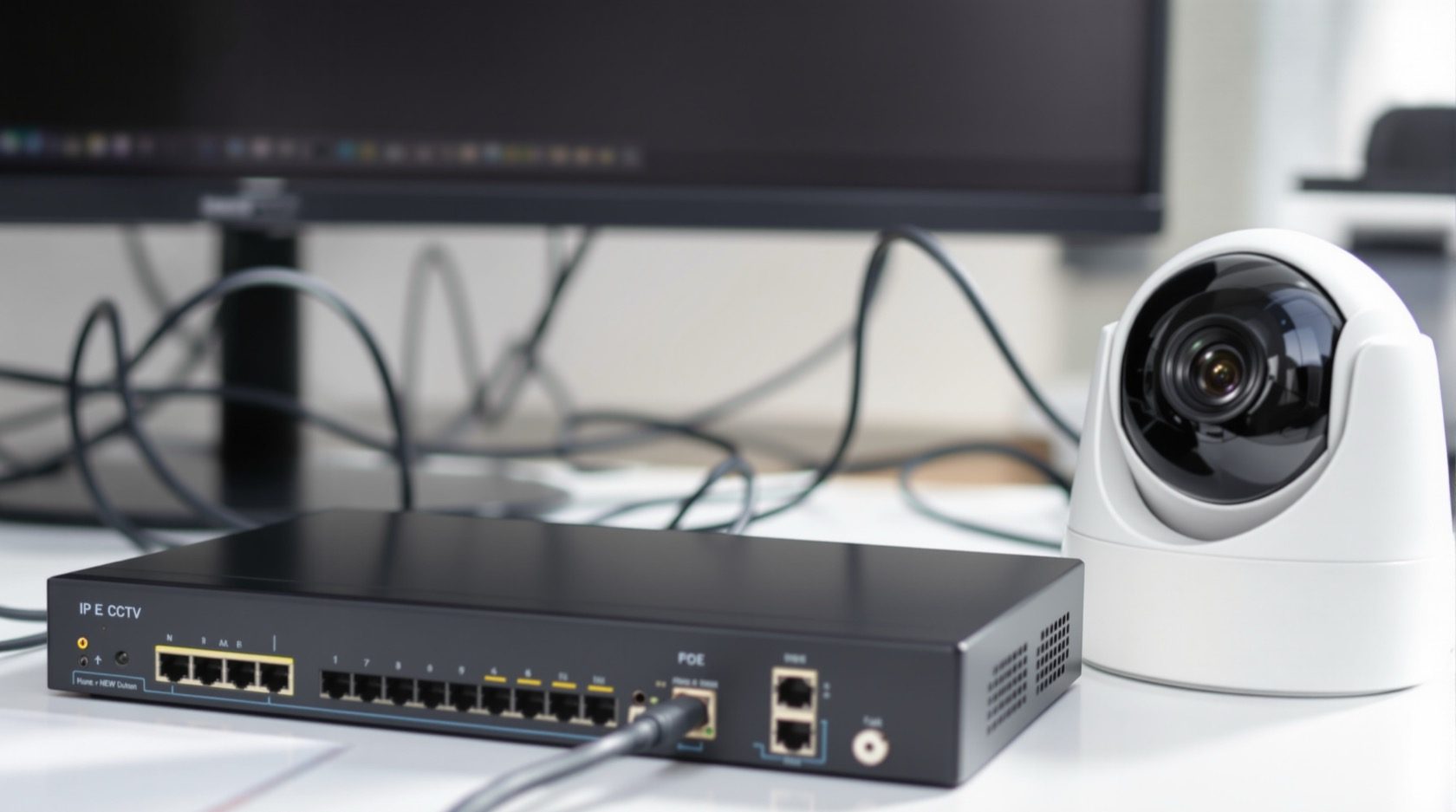
IP CCTV in India: The Modern Network Camera System, Explained
How IP (network) CCTV works, why it is now the default for new homes and shops, and how to plan a PoE + NVR system that stays sharp, secure and easy to expand.
If you are buying cameras today for a new home, a renovation or a shop, the honest default is IP CCTV — network cameras that send crisp digital video over the same kind of LAN cable that runs your broadband. It has quietly replaced the older analogue-over-coax world for most fresh installs, and for good reasons: higher resolution, one tidy cable per camera, smart on-camera detection, and painless remote viewing.
This guide is the focused explainer on IP systems in Studio Matrx's CCTV hub. It goes deeper than the complete guide to CCTV systems and complements how CCTV systems work — read those for the wider map, then use this to decide whether IP is right for you and how to plan it well.
Scope & safety. This guide helps you understand, choose and coordinate. Structured cabling, PoE switches on the mains, and any electrical work belong to licensed professionals — plan them here, but have them installed and certified by a qualified installer. Security hardware must never block a door, window or fire-escape route.
What "IP CCTV" actually means
IP stands for Internet Protocol — the same addressing scheme your phone and laptop use on a network. An IP camera is a tiny networked computer with a lens: it captures the image, compresses it into digital video on the camera itself, and sends that stream over an Ethernet (LAN) cable to a recorder or software.
Contrast that with older analogue / HD-over-coax cameras, which push a raw video signal down a coaxial cable to a DVR that does the processing. In an IP system the intelligence lives in the camera; in an analogue system it lives in the box. That single shift is what unlocks everything below. For the analogue side of the story, see the analogue CCTV guide; for mixing old coax with new IP, see the hybrid CCTV guide.
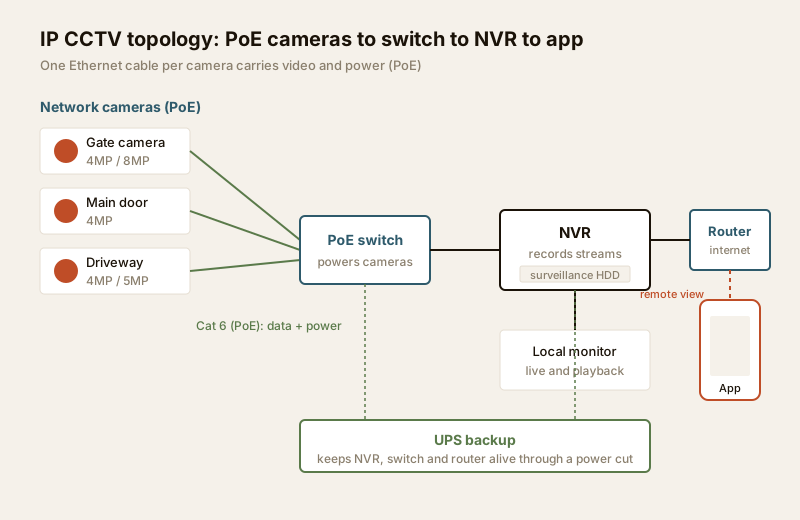
The chain, end to end
1. Network cameras capture and compress video on-board.
2. One Ethernet cable per camera carries that video — and, with PoE (Power over Ethernet), the camera's power too, so there is no separate adaptor at each camera.
3. A PoE switch gathers all the camera cables in one place and powers them.
4. An NVR (Network Video Recorder) — or recording software on a PC/mini-server — records the streams to a hard disk. Many NVRs have PoE ports built in, so the switch and recorder are one box.
5. The system links to your home router so you can view live and recorded footage from a phone app anywhere with internet.
Everything runs over a local network (LAN). Remote access rides on top of your broadband — which is why network readiness matters as much as the cameras.
Why IP is the modern default
Set beside a like-for-like analogue system, IP wins on the things that decide whether footage is useful the night you actually need it.
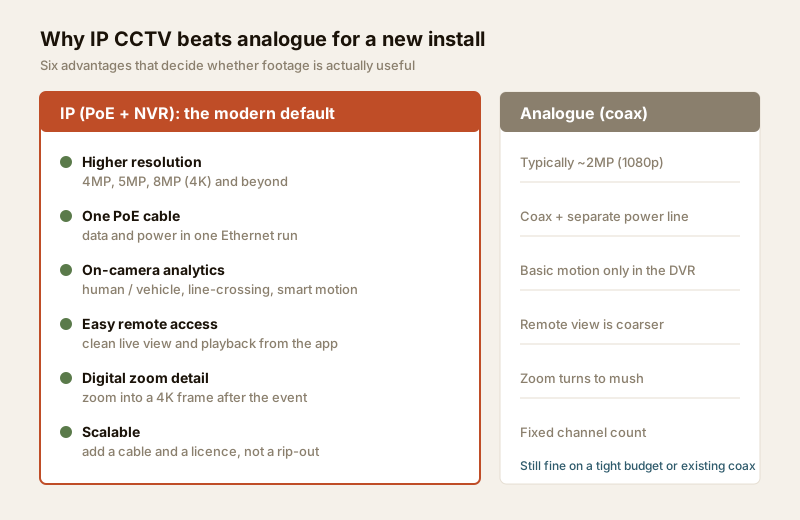
- Higher resolution. Analogue tops out for most homes around 2MP (1080p). IP starts there and climbs to 4MP, 5MP, 8MP (4K) and beyond — the detail that lets you actually read a face or a number plate, not just "someone in a dark shirt".
- One cable, data and power (PoE). A single Ethernet run carries video and power. No hunting for a plug point behind every camera; no separate power line to fail. Cleaner installs, fewer parts.
- On-camera analytics. Because the camera has a processor, it can do the thinking: human vs vehicle detection, line-crossing and intrusion zones, loitering, and smart motion that ignores swaying trees and stray cats. That turns hours of footage into a handful of alerts worth looking at.
- Easy remote access. Live view and playback from the app, clean and quick, because the stream is already digital.
- Digital zoom that holds up. With 4K sensors you can zoom into a recorded frame after the fact and still make out detail — impossible on a soft analogue image.
- Scalability. Adding a camera is usually one more cable to the switch and a licence on the NVR — not a rip-out. Good for homes that will grow their coverage over a couple of years.
The trade-offs — read these before you commit
IP is better, not free. Go in with eyes open.
- Higher upfront cost. IP cameras, a PoE switch and an NVR cost more than an equivalent analogue kit — though the gap has narrowed a lot, and the resolution you get per rupee is far better.
- It needs real network planning. You are building a small network. That means the right Cat 6 cabling, a correctly sized PoE switch (enough ports and enough total power budget), and cable runs kept under the ~90 m Ethernet limit. This is where a rushed install goes wrong. Plan runs with the PoE and cabling planner, and route the actual cabling to a professional (see the security cabling requirements).
- Cybersecurity is now your job. A networked camera is a device on the internet, so it must be treated like one: change every default password, keep firmware updated, put the cameras on a separate network segment / VLAN so a compromised camera cannot reach your laptops and banking, and disable risky remote features (like UPnP port-forwarding) in favour of the maker's secure app. A cheap camera you never patch is a doorway, not a guard.
- Storage adds up faster. More megapixels mean more data to store. A 4K camera recording all day can need several times the disk of a 2MP one. This is a planning number, not a surprise — the table below sizes it.
When to bring in a professional. Specify and plan the layout, camera count and retention yourself — then hand the structured cabling, PoE switch mounting, mains power and the NVR commissioning to a licensed installer. They will pull Cat 6 properly, terminate connectors correctly, size the switch's power budget, set up the network segmentation, and hand over a system you can actually operate. Any work at the mains board is a licensed electrician's job — see the electrical hub.
IP vs analogue vs hybrid — the best-fit table
| Factor | Analogue (HD-over-coax) | IP (PoE + NVR) | Best when... |
|---|---|---|---|
| Resolution | ~2MP typical | 4MP / 5MP / 8MP+ | You need to identify faces / plates → IP |
| Cabling | Coax + separate power | One Ethernet (PoE) | Fresh build or renovation → IP |
| Analytics | Basic motion in DVR | On-camera human/vehicle, line-cross | You want fewer, smarter alerts → IP |
| Upfront cost | Lower | Higher | Tight budget, small basic setup → analogue |
| Reusing old coax | Native | Needs converters / hybrid | Existing coax you cannot replace → analogue or hybrid |
| Expandability | Fixed channel count | Add a cable + licence | Coverage will grow → IP |
| Cyber upkeep | Minimal (not networked) | Passwords + firmware + VLAN | You will maintain it → IP |
For most owned homes and shops being built or renovated today, IP is the right default. Analogue still earns its place on a tight budget or where good coax already exists; a hybrid recorder lets you keep old coax cameras while adding new IP ones. If you are unsure which family fits, the CCTV system type selector walks you through it.
Storage and bitrate — the number people forget
Every camera produces a bitrate — how much data per second — that depends on its resolution, frame rate, scene busyness and the compression codec (H.265 / H.265+ roughly halves the data of the older H.264, so prefer it). Multiply bitrate by cameras by seconds by retention days, and you get the disk size. Here is a practical quick-reference for H.265, 24x7 recording, per camera — real numbers vary with motion and settings, so treat these as planning estimates.
| Resolution | Typical bitrate | ~1 day / camera | ~15 days / camera | Good for |
|---|---|---|---|---|
| 2MP (1080p) | ~2 Mbps | ~22 GB | ~330 GB | Indoors, short runs, budget |
| 4MP | ~4 Mbps | ~43 GB | ~650 GB | The home sweet spot — gate, doors |
| 5MP | ~5 Mbps | ~54 GB | ~810 GB | Driveways, detail at medium range |
| 8MP (4K) | ~8 Mbps | ~86 GB | ~1.3 TB | Wide compounds, plate/face at range |
Two ways to cut the disk without losing the moment that matters: record motion-only or on smart events instead of 24x7 for low-traffic cameras, and drop frame rate on cameras that only need evidence, not smooth video. Always use a surveillance-grade hard disk rated for continuous writing — a desktop drive dies early under a 24x7 CCTV load. For sizing a whole system and retention policy, see security data storage planning.
ONVIF and avoiding lock-in
A quiet but important word: ONVIF. It is an open standard that lets cameras and recorders from different brands talk to each other. Buying ONVIF-conformant cameras and NVRs means you are not married to one manufacturer forever — you can add a better camera next year without replacing the recorder, or swap a failed unit for whatever is available. Some makers add proprietary features that only work brand-to-brand; that is fine, but check the core recording works over ONVIF so you always have an exit. It is the single easiest way to protect a growing system from a dead-end.
India price bands (indicative)
Prices move with brand, sensor and season — treat these as ballparks to sanity-check a quote, not fixed rates.
| Item | Typical range (₹) | Notes |
|---|---|---|
| 4MP PoE IP camera (dome/bullet) | ₹2,500 – ₹6,000 | The home workhorse; IP66 for outdoors |
| 8MP (4K) PoE camera | ₹5,000 – ₹12,000 | For range and detail; more storage |
| 4-channel PoE NVR | ₹5,000 – ₹12,000 | Built-in PoE = switch + recorder in one |
| 8-channel PoE NVR | ₹9,000 – ₹20,000 | Room to grow; check total PoE watts |
| Surveillance HDD (2–4 TB) | ₹5,000 – ₹11,000 | Continuous-write rated, not a desktop drive |
| Cat 6 cable + termination | ₹25 – ₹45 / m (installed) | Professional pull; keep runs under ~90 m |
| Small UPS for NVR + switch | ₹3,000 – ₹7,000 | Covers the typical evening power cut |
A tidy 4-camera 4MP home IP system — cameras, a PoE NVR, a surveillance disk, cabling and a small UPS — commonly lands around ₹28,000 – ₹55,000 installed, before you add cloud or extra analytics. Size and price your own with the camera coverage calculator and the security system cost estimator.
Planning an IP system well
Get these right on paper before anyone drills a wall.
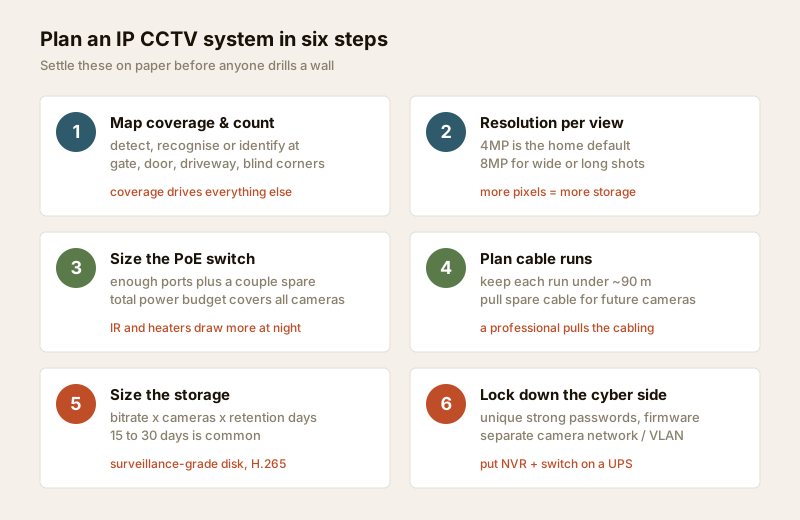
1. Map coverage first. Decide what each camera must achieve — detect, recognise or identify — at the gate, the main door, the driveway and blind corners. Coverage drives everything else.
2. Match resolution to the view. 4MP is the home default; reserve 8MP for wide or long shots where you need to read detail at range.
3. Size the PoE switch. Count the ports you need plus a couple spare, and check the switch's total power budget covers all cameras (IR and heaters draw more at night).
4. Plan the cable runs. Keep each Ethernet run under ~90 m, avoid running data alongside heavy power cables, and pull spare cable for future cameras. This is a professional's job — plan it with the PoE and cabling planner.
5. Size storage for your retention. Use the bitrate table, pick your days (15–30 is common), and buy a surveillance-grade disk with headroom.
6. Lock down the cyber side. Unique strong passwords, firmware updates on a schedule, a separate camera network/VLAN, and the maker's secure app instead of raw port-forwarding.
Put the NVR, PoE switch and router on a UPS so a power cut is not a scheduled blind spot — India's supply is not guaranteed, and a security system that dies with the lights is only half a system. For the broader four-block picture — cameras, alarms, access and resilience — see the building security systems guide.
Key takeaways
- IP CCTV is the modern default for new and renovated homes: network cameras over one PoE cable, from 4MP to 8MP and beyond.
- The real wins are resolution, one-cable PoE, on-camera analytics, easy remote access and painless scalability — the things that make footage genuinely useful.
- The real costs are higher upfront price, proper network/PoE planning, more storage, and ongoing cybersecurity (passwords, firmware, a separate camera network).
- Size storage from bitrate: roughly 43 GB/day for a 4MP camera on H.265 at 24x7 — prefer H.265 and record on smart events to save disk.
- Buy ONVIF-conformant kit to avoid brand lock-in, put the recorder and network on a UPS, and route cabling and mains work to a licensed professional.
References
- ONVIF (Open Network Video Interface Forum) — the interoperability standard for network video devices; verify a product's conformance on the official ONVIF product finder.
- Digital Personal Data Protection Act, 2023 — position cameras to cover only your own property and shared areas with legitimate purpose; avoid capturing neighbours' private spaces.
- National Building Code of India (SP 7), Bureau of Indian Standards, and local municipal bye-laws for any structural, electrical or life-safety aspects of an install; verify the current edition via the BIS catalogue: https://www.services.bis.gov.in/
This is an educational overview. Structured cabling, PoE switching on the mains, and any electrical work are qualified professional tasks — engage licensed installers and verify any standard's current status via the BIS catalogue before relying on it.
Export this guide
Related Guides — Deep-dive reading
CCTV Remote Access in India (2026): Watch From Your Phone, Safely
How to view your own cameras from anywhere without leaving the front door open to the internet — change the defaults, use strong credentials and 2FA, keep firmware current, prefer the vendor's secure cloud relay or a VPN, segment the camera network, and treat footage as personal data.
SecurityHow CCTV Systems Work
Follow the picture from the lens to your phone: capture, compression, transmission, recording, storage and secure remote viewing, explained in plain language for Indian homes.
SecurityComplete Guide to Security System Cybersecurity in India (2026): Protecting the Systems That Protect You
The cameras, locks, alarms and door phones you install to feel safer are internet-connected computers that can themselves be attacked, and an insecure one is worse than none. This pillar maps the whole attack surface — devices, network, accounts and data, operations — and points to every guide that hardens it.
SecurityRelated Tools — Try Free
CCTV Camera Coverage & Count Calculator
Estimate how many CCTV cameras you need, the NVR channels, storage in TB for your retention period, and an indicative all-in cost with GST.
CCTV CalculatorPoE Power-Budget Calculator
Whether a PoE switch can power the connected cameras with cable-loss headroom, and how many devices it supports.
PoE BudgetCCTV Resolution Selector
The camera resolution (MP) a scene needs for identify, recognise or detect, using DORI pixel density.
Resolution