
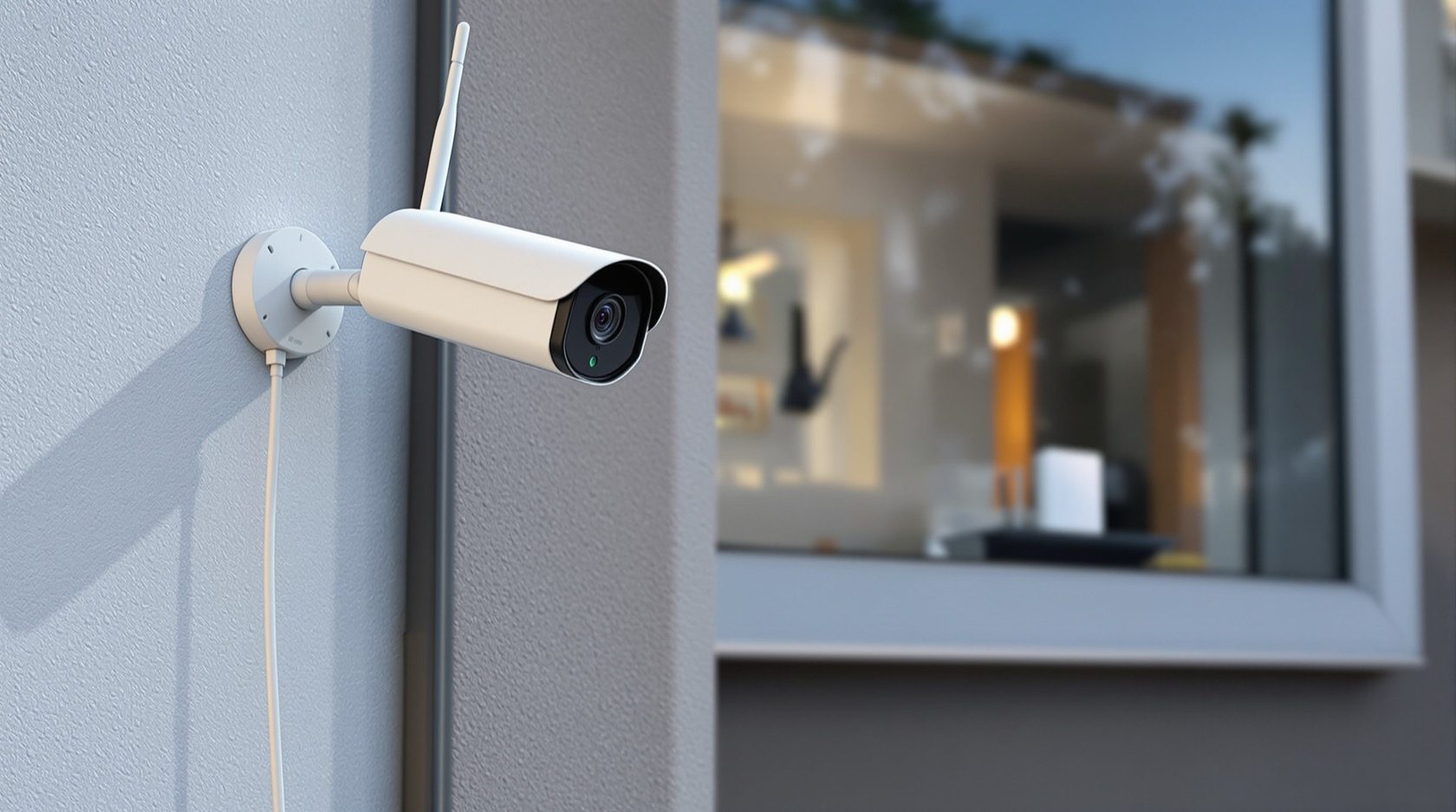
Wireless CCTV in India: How Wi-Fi Cameras Really Work
What wireless CCTV actually means, where it shines and where it quietly fails — Wi-Fi range, dead zones, router dependence and the security care networked cameras demand in an Indian home.
"Wireless CCTV" is the phrase every shop leads with, and it is the most misunderstood two words in home security. Buyers picture a camera they stick on a wall with no wires at all. What they actually get, most of the time, is a camera whose video travels over Wi-Fi but whose power still comes down a cable to the nearest plug point. Understanding that gap — and the handful of pitfalls that come with putting your cameras on your home network — is the difference between a system that quietly works and one that quietly fails on the night you needed it.
This guide sits in Studio Matrx's CCTV cluster and goes deep on the wireless option specifically. For the full menu of system types, start at the complete guide to CCTV systems; to see how footage actually gets from lens to screen, read how CCTV systems work. The systems-level overview lives in the building security systems guide.
What "wireless" really means
There are two cables at every camera: one for power and one for data (video). "Wireless" almost always refers only to the data cable — the video rides your home Wi-Fi to the router instead of running down a network or coax cable. The power cable usually stays.
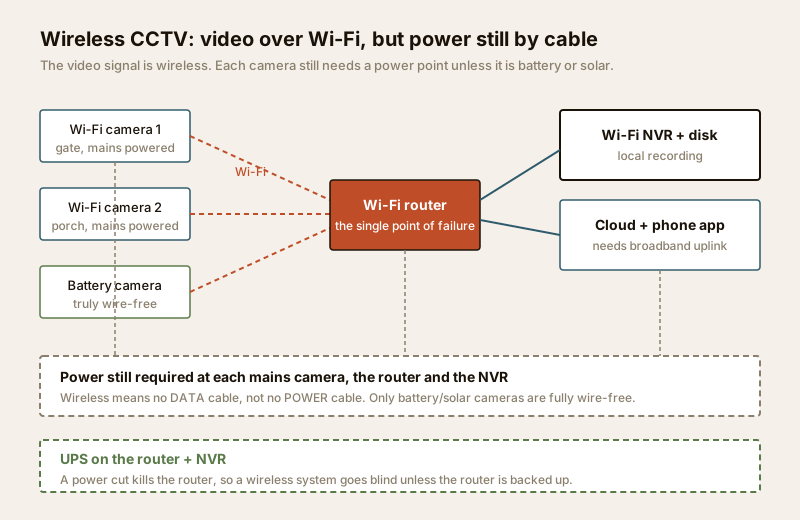
So there are really three levels of "wireless", and it is worth knowing which one a quote is offering:
- Wi-Fi camera, mains powered — the common case. No data cable, but a power adaptor plugs into a socket near the camera. Genuinely quick to fit if a plug point is nearby.
- Battery camera — a rechargeable pack powers the camera; video is still Wi-Fi. Truly wire-free, but you climb a ladder to recharge every few weeks to months, and it records in bursts (on motion) to save battery, not continuously.
- Solar camera — a battery camera with a small solar panel that tops it up, so recharging is rare. The closest thing to fit-and-forget, good for a far gate or boundary with sun but no power.
Battery and solar are the only fully wire-free options. Everything else is "no data cable, still needs a plug". That single fact rearranges most people's plans — see the dedicated wired CCTV guide for the other side of the coin, and the IP CCTV guide for the network cameras that wireless kits are usually a variant of.
The genuine advantages
Wireless is not a compromise everywhere — for the right home it is clearly the better call:
- Fast install, minimal mess. No chasing walls for data cable, no false ceilings opened up. A camera can be live in an hour.
- No structured data cabling. You skip the cost and disruption of running network cable back to a recorder — a big deal in a finished, occupied home.
- Easy to reposition. Wrong angle? Move it to another wall with a plug and re-point. Wired cameras are fixed where the cable ends.
- Ideal for rentals. Minimal or no drilling, and it all comes with you when you move. For tenants who cannot cut into a landlord's walls, wireless (especially battery) is often the only practical option.
- Perfect for retrofits and extras. Adding one camera to cover a new blind spot, without re-cabling the whole house, is exactly what wireless is for. Find those gaps first with the blind-spot identification guide.
The pitfalls to plan around
Every wireless advantage has a matching risk, and in Indian conditions these are not theoretical. Plan for them and wireless works well; ignore them and you get dropped footage at the worst moment.
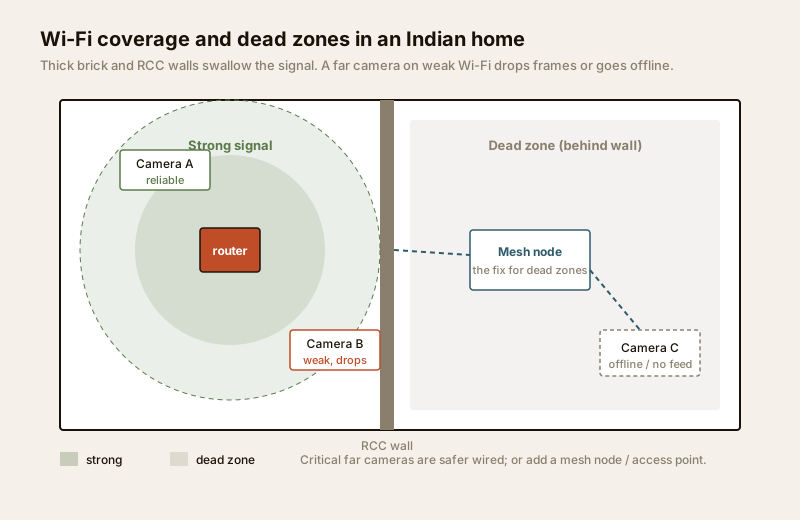
Wi-Fi range and dead zones. Indian homes are built of solid brick and RCC — walls that eat Wi-Fi far faster than the plasterboard of the homes these products are designed for. A camera two rooms and a slab away from the router may show four bars on install day and drop offline in the monsoon when the signal weakens. The coverage map above is the reality: strong near the router, patchy across a wall, dead beyond two.
Interference and congestion. In a dense colony or apartment block, dozens of routers, phones, microwaves and Bluetooth devices crowd the 2.4 GHz band that most budget cameras use. More cameras and more neighbours mean more collisions and more lag.
Bandwidth load on your home network. Each HD camera streaming to a recorder or the cloud consumes upload bandwidth continuously. Indian broadband is usually asymmetric — a fat download but a thin upload — so four cameras uploading to the cloud can throttle your own video calls and slow the whole house.
Router dependence — and power cuts. Every wireless camera funnels through one box: the router. If the router reboots, the whole system is blind. Worse, in a power cut the router dies instantly, so a wireless system goes dark exactly when an intruder might act — unless the router (and recorder) sit on a UPS. This is why backup power is not optional; size it with the security backup power calculator and read the security power supply requirements.
Latency. Wireless adds a beat of delay between real life and your screen. Fine for reviewing footage, less ideal for a live "who is at the gate right now" glance.
Cybersecurity. This is the big one. A wireless camera is a computer on your network with a lens — and a badly secured one is a doorway into your home network and a feed a stranger can watch. Networked cameras need real care: change every default password, keep firmware updated, and ideally isolate cameras on a separate guest/IoT network so a compromised camera cannot reach your laptops. The smart security systems guide and the internet and network readiness guide cover this properly.
Pitfalls and how to mitigate them
| Pitfall | Why it bites in India | Mitigation |
|---|---|---|
| Wi-Fi dead zones | Brick/RCC walls, multi-floor homes | Mesh Wi-Fi or an access point near far cameras; wire the critical ones |
| Band congestion | Dense colonies, many 2.4 GHz devices | Prefer dual-band (5 GHz) cameras; limit camera count per access point |
| Upload bandwidth | Asymmetric broadband (thin upload) | Record locally to an NVR; send only key cameras to cloud |
| Router = single point | One box carries every feed | Reliable router; reboot schedule; monitor for drop-offs |
| Power cut blindness | Frequent cuts, no genset in most homes | UPS on router + NVR; battery/solar cameras for edge coverage |
| Weak cybersecurity | Default passwords, un-patched firmware | Strong unique passwords, firmware updates, camera VLAN/guest network |
| Weatherproofing | Dust, heat, monsoon | IP66+ rated body; deep sun-shield; sheltered mounting |
4G / SIM cameras — wireless without Wi-Fi
A separate class of "wireless" camera skips your Wi-Fi and router entirely and uses a 4G SIM to send video over the mobile network. These suit a site with no broadband — a plot under construction, a farm, a shop between connections — but they run on a data plan (which adds up quickly at HD), depend on mobile coverage at that spot, and still need power. Treat them as a niche tool for the no-internet site, not a default for a home with a working router.
Where wireless fits — and where to prefer wired
The honest rule is simple: wire the cameras you cannot afford to lose; use wireless for the rest.
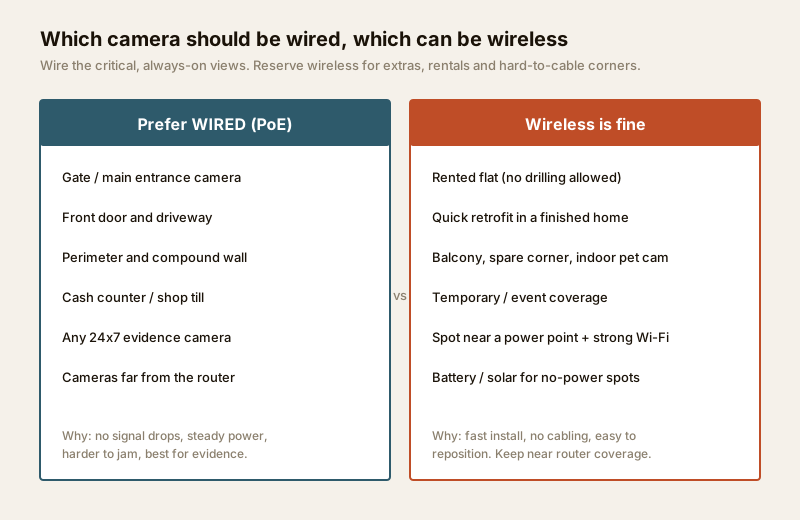
Your gate camera, front-door camera, shop till and any camera whose footage might become evidence deserve the rock-solid, never-drops reliability of a wired PoE feed. A balcony extra, an indoor pet camera, a rental you will vacate in a year, or a corner the cabling can never reach — that is wireless territory. Many Indian homes end up hybrid: a wired backbone for the critical views plus a few Wi-Fi cameras for flexibility. That middle path has its own guide — the hybrid CCTV guide — and if you are torn between the two families entirely, the analog CCTV guide rounds out the comparison.
Wireless CCTV: pros, cons and best fit
| Factor | Wireless (Wi-Fi) | Reading it |
|---|---|---|
| Install speed | Fast, low mess | Best advantage — hours, not days |
| Cabling | None (data); power still needed | "Wireless" is not "wire-free" unless battery/solar |
| Reliability | Depends on Wi-Fi strength | Weak spot for critical cameras |
| Repositioning | Easy | Move to any spot with power + signal |
| Bandwidth | Loads home network | Record locally; cloud only for key feeds |
| Power-cut behaviour | Blind unless backed up | UPS the router and NVR |
| Security exposure | Higher (on your network) | Needs passwords, firmware, isolation |
| Best fit | Rentals, retrofits, extras, edge coverage | Not the choice for gate/evidence cameras |
Not sure which family suits your home overall? Run the CCTV system type selector — it turns your walls, layout and priorities into a recommendation.
When to bring in a professional
You can plan a wireless system yourself and even fit a plug-in camera or two. Bring in a licensed professional when:
- A camera needs a new power point near an outdoor mount — that is mains electrical work for a licensed electrician; see the electrical hub.
- Wi-Fi will not reach and you need a mesh network, access point or a wired backbone designed and pulled properly — coordinate with the security cabling requirements guide.
- You want the cameras isolated on their own network segment for security — a competent installer or network professional should set up the VLAN/guest network.
- Cameras must never block fire escape routes, and any exterior mounting must be safe and secure. Security hardware must never obstruct egress.
A good installer will do a Wi-Fi survey before quoting, right-size your backup power, and hand over a system whose passwords and firmware you control.
Key takeaways
- "Wireless" means no data cable, not no wires. Most Wi-Fi cameras still need mains power; only battery and solar cameras are truly wire-free.
- The real strengths are fast install, no data cabling, easy repositioning, and a great fit for rentals and retrofits.
- Plan around dead zones through brick/RCC walls, band congestion, upload bandwidth, router dependence, latency and cybersecurity — each has a clear mitigation.
- A power cut kills the router, so put the router and recorder on a UPS or the whole wireless system goes blind.
- Wire the critical cameras (gate, door, perimeter, till, evidence); use wireless for extras and edges. Most Indian homes land on a hybrid mix.
References
- Digital Personal Data Protection Act, 2023 — governs handling of personal data, including CCTV footage of identifiable people; site cameras responsibly and respect neighbours, staff and visitors. Verify obligations via the official gazette and current rules.
- Bureau of Indian Standards catalogue for ingress-protection (IP rating) and electronic equipment standards relevant to outdoor cameras: https://www.services.bis.gov.in/
This is an educational overview. New power points, structured cabling and network segmentation are qualified professional tasks — engage a licensed electrician and installer, and verify any standard's current status via the BIS catalogue before relying on it.
Export this guide
Related Guides — Deep-dive reading
CCTV Remote Access in India (2026): Watch From Your Phone, Safely
How to view your own cameras from anywhere without leaving the front door open to the internet — change the defaults, use strong credentials and 2FA, keep firmware current, prefer the vendor's secure cloud relay or a VPN, segment the camera network, and treat footage as personal data.
SecurityComplete Guide to Security System Cybersecurity in India (2026): Protecting the Systems That Protect You
The cameras, locks, alarms and door phones you install to feel safer are internet-connected computers that can themselves be attacked, and an insecure one is worse than none. This pillar maps the whole attack surface — devices, network, accounts and data, operations — and points to every guide that hardens it.
SecurityPoE vs Wi-Fi CCTV: Which Home Security Cameras Are Better?
One camera type runs power and video down a single Cat6 cable to an NVR and almost never drops out; the other clips to a wall in minutes and streams over your home Wi-Fi. This guide settles PoE vs Wi-Fi CCTV for Indian homes — reliability, video quality and bandwidth, cabling and power, retrofit versus new-build effort, NVR versus SD and cloud storage, hacking risk, real rupee costs, scalability and outdoor use — and gives a clear verdict for each kind of home.
Smart HomeRelated Tools — Try Free
CCTV System Type Selector
Answer five questions and get the right CCTV setup — analog / IP / hybrid, wired / wireless, local / cloud — with reasons.
CCTV SelectorCCTV Camera Coverage & Count Calculator
Estimate how many CCTV cameras you need, the NVR channels, storage in TB for your retention period, and an indicative all-in cost with GST.
CCTV CalculatorSecurity Backup Power Calculator
Size a UPS/inverter and battery to keep CCTV, NVR, router and alarm running through a power cut — load, Ah, VA and cost.
Backup Power