
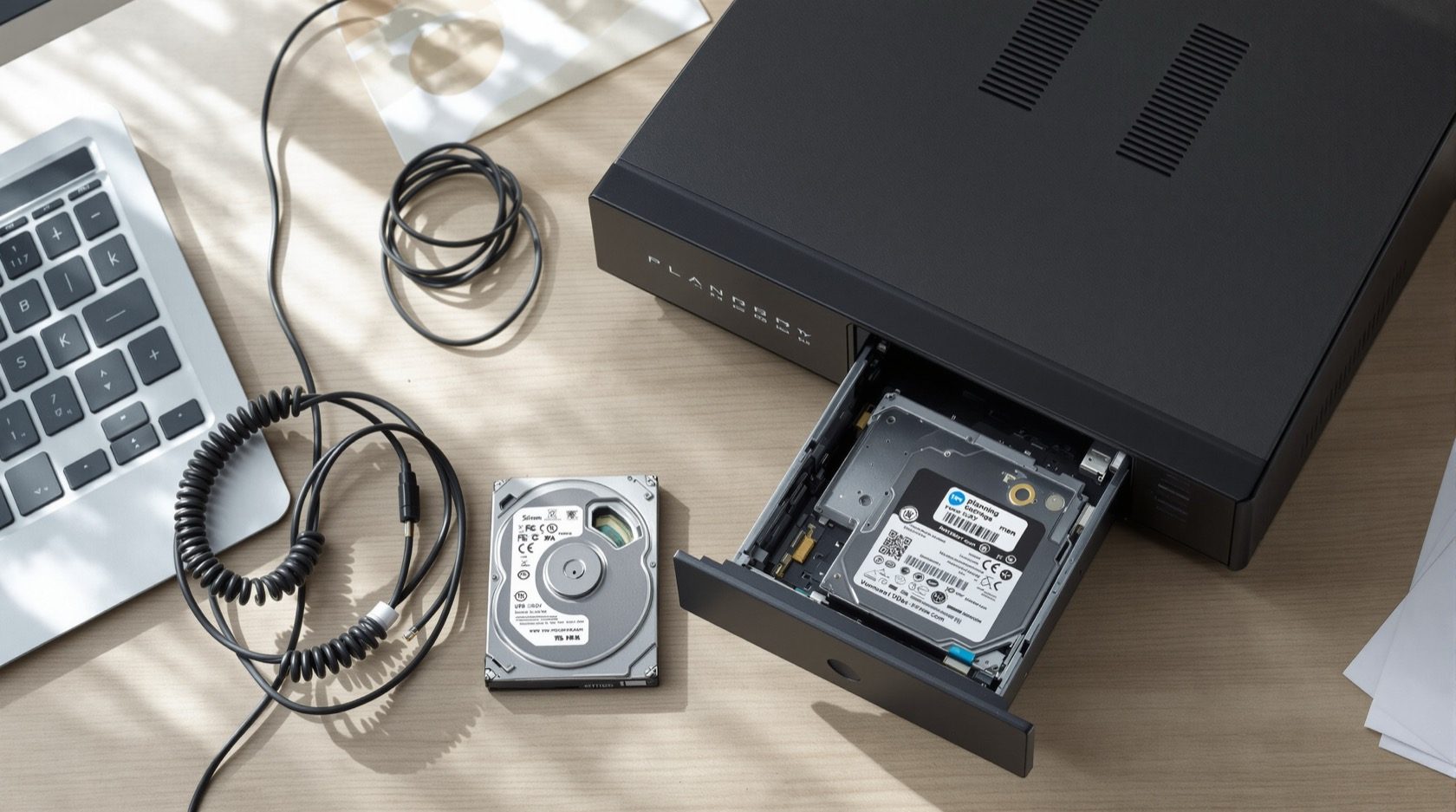
Security Data Storage Planning for Indian Homes
Where and how to store CCTV footage so it survives the one night you need it — local NVR vs cloud vs hybrid, how many days to keep, surveillance-grade drives, and the offsite copy that outlives a stolen recorder.
Cameras are the part of a security system everyone thinks about. Where the footage actually lives is the part that decides whether that system is worth anything on the one night it matters. A burglar who lifts the recorder walks away with the only record of himself. A hard drive that quietly died three months ago has been recording nothing over blackness. And a "cloud" plan that your broadband upload cannot sustain drops exactly the clips you need. Storage is not an afterthought to the cameras — it is the evidence layer, and it deserves its own plan.
This guide helps you decide where the footage is stored (local, cloud, or hybrid), how long to keep it, what kind of drive to record on, and how to protect the data so only you can reach it. It is a planning guide — it turns choices into a spec you can hand to an installer. It sits alongside your wider home security risk assessment, and once you know your camera count and resolution, the CCTV camera coverage calculator turns your retention target into an actual terabyte number.
Scope & safety. This is a defensive planning guide for your own footage. It never explains how to defeat, access or tamper with anyone else's system. Mains-power work for the recorder and its backup is licensed electrical work — specify it, then have a professional install and certify it. Nothing here should block a fire-escape route or lock you inside your home.
Where footage lives: local, cloud, or hybrid
Every home system stores footage in one of three places, and the right answer depends on your bandwidth, budget, and how much the recording would matter as evidence.
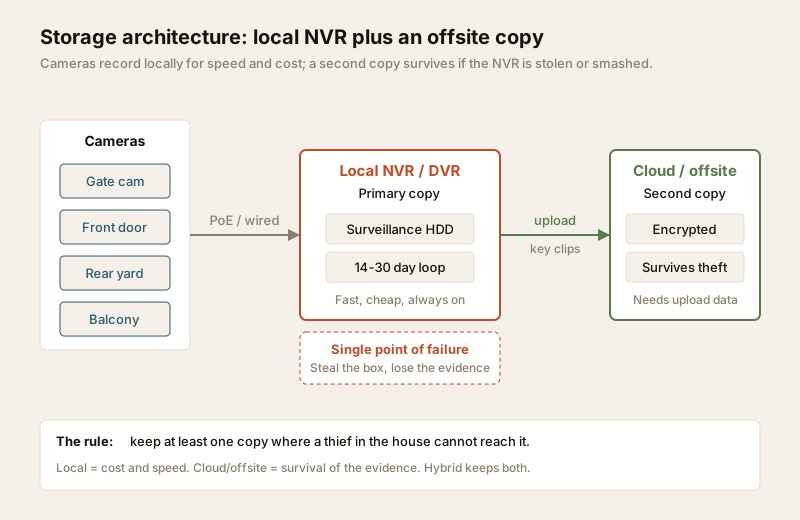
Local (NVR or DVR with a hard disk). The recorder sits in your home, cameras feed it over cable, and everything writes to an internal hard drive on a rolling loop. This is how most Indian homes record. It is cheap after the one-time hardware cost, it never needs internet, and playback is instant. Its fatal weakness is that the footage and the box are in the same place — steal or smash the recorder and the evidence goes with it, along with any risk from fire, flood or a failed drive.
Cloud. Footage (or event clips) is uploaded to a provider's servers over your internet connection, usually on a monthly or annual subscription. The evidence is safely offsite the instant it uploads, you can view it from anywhere, and there is no box to steal. The costs are real: it consumes upload bandwidth every hour of every day, and Indian home broadband is often provisioned with far less upload than download, so continuous multi-camera cloud recording can choke a connection. Subscriptions also recur forever, and higher retention costs more.
Hybrid. Record everything locally for speed and cost, and push a second copy — either continuous or just motion and event clips — to the cloud or an offsite drive. This is the resilient middle path and, for anyone who genuinely cares whether the footage survives, the sensible default. You keep local playback and low running cost while guaranteeing that at least one copy is beyond a thief's reach.
| Option | One-time cost | Running cost | Upload bandwidth need | Resilience if recorder stolen | Best for |
|---|---|---|---|---|---|
| Local NVR/DVR | Moderate (recorder + drive) | Near zero | None | Poor — evidence lost with the box | Budget systems, weak internet |
| Cloud | Low (cameras only) | Recurring subscription | High — continuous upload | Good — offsite by design | Few cameras, strong upload link |
| Hybrid | Moderate to high | Small subscription | Moderate (clips) or high (full) | Best — two copies, one offsite | Anyone who needs the evidence to survive |
For most Indian homes the honest recommendation is local as the workhorse, plus a slim cloud or offsite copy of key events — full cloud only if your upload link and budget comfortably allow it. Confirm your real upload headroom with the internet and network readiness assessment before you commit to any cloud plan.
How long to keep it: retention and capacity
"How many days of footage do I need?" is the question that sets your storage size. Keep too little and the clip you need has already been overwritten; keep too much and you are paying for drives or cloud you never use — and, under India's data-protection expectations, holding footage longer than you have a reason to is itself a liability.
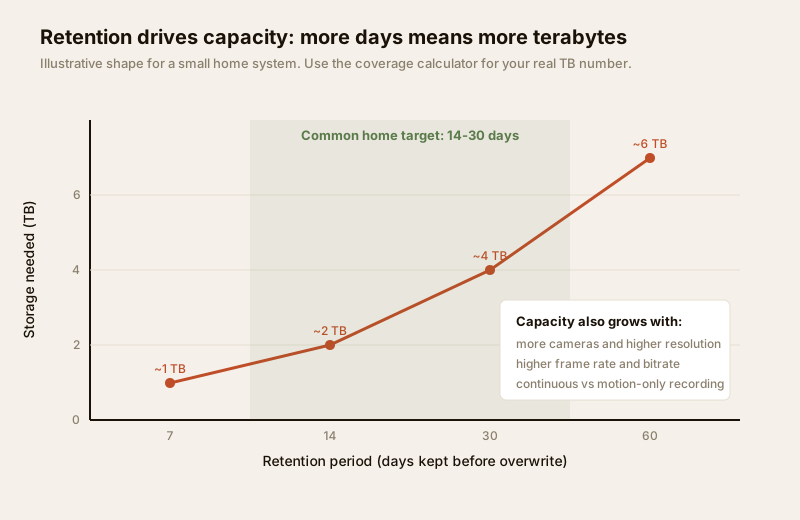
A useful way to think about retention: keep footage long enough to cover the gap between an incident happening and someone noticing it. If you travel, that gap is the length of your longest trip. For most homes, 14 to 30 days is the practical sweet spot — long enough to survive a holiday and to review a slow-burn issue, short enough to keep storage affordable and privacy tidy.
Capacity then follows from four things, not just the number of days: how many cameras, at what resolution, at what frame rate and bitrate, and whether they record continuously or only on motion. Motion-only recording can cut storage dramatically for quiet areas. Rather than guess, feed your camera count and resolution into the CCTV camera coverage calculator, which converts a retention target into a terabyte figure you can buy against.
| Retention target | Typical use | Rough capacity (small home, motion-biased) | Notes |
|---|---|---|---|
| 3-7 days | Very tight budget, few cameras | ~0.5-1 TB | Risky — one long trip overruns it |
| 14 days | Common home baseline | ~1-2 TB | Survives a short holiday |
| 30 days | Recommended for most homes | ~2-4 TB | Comfortable margin; tidy privacy window |
| 60-90 days | Larger homes, higher assets | ~4 TB and up | Justify the need; more data to secure |
Always size the drive for a little more than your target so the loop is not perpetually at the edge, and remember that adding a camera or raising resolution later will shorten your real retention unless you add storage too.
Surveillance-grade drives vs ordinary desktop drives
Here is the detail installers skip and homeowners regret: the hard drive inside an NVR is not the same as the one in a desktop PC. A CCTV recorder writes continuously, 24 hours a day, every day, from several cameras at once — a workload an ordinary desktop drive was never designed for. Desktop drives are built for bursts of activity and idle time; run one flat out in an always-writing recorder and it tends to run hot, and its failure rate over a year or two climbs sharply.
Surveillance-grade drives (sold specifically for CCTV and NVR use) are built for this duty cycle: constant writing, multiple simultaneous streams, higher heat tolerance, and firmware tuned to keep video flowing smoothly rather than pausing for error-checking the way a desktop drive might. They cost a little more per terabyte and are worth it, because a drive that dies silently means you were recording nothing during exactly the period you now need. The extra spend is small next to the cost of the cameras — and tiny next to the cost of having no evidence.
Practical drive guidance:
- Buy a surveillance / NVR-rated drive, not a plucked-from-a-laptop desktop drive, for any system that records around the clock.
- Match capacity to your retention target plus headroom — size from the calculator, then round up.
- Treat the drive as a wear part. It has a finite life under constant writing; note its install date and plan to replace it before it fails, not after.
- Ensure the recorder is cooled and dust-protected — Indian heat and dust shorten drive life. This is where the equipment room planning guide matters: a ventilated, dust-managed spot for the recorder directly extends drive life.
- Keep the recorder on backup power so an abrupt cut does not corrupt the drive mid-write — plan this with the security power supply requirements guide.
Redundancy: surviving the stolen or smashed recorder
The single most common way a home CCTV system fails to deliver is heartbreakingly simple: the intruder takes the recorder. A visible NVR sitting on an open shelf is the first thing a prepared thief removes, because it holds his picture. Everything you spent on cameras is undone in one motion. Planning for this is not paranoia — it is the whole point of storage planning.
Three layers of defence, in order of how much they help:
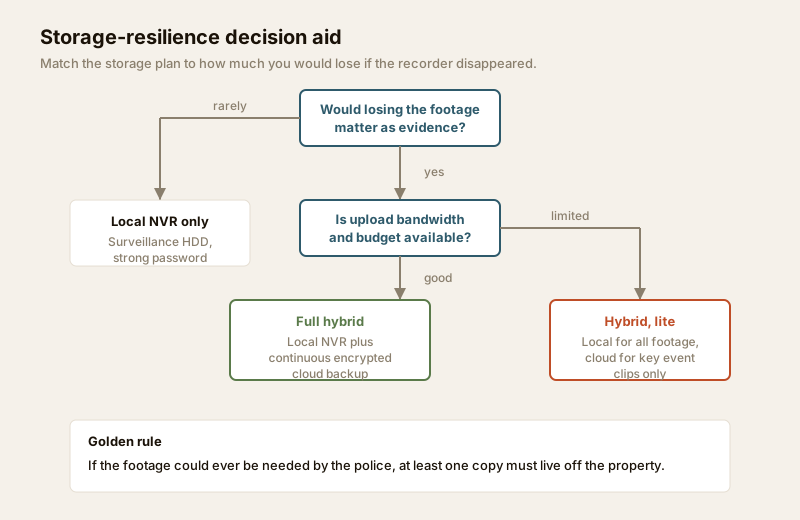
1. Keep at least one copy offsite. This is the golden rule. Whether it is cloud backup or a second recorder in a separate, hidden location, if any copy leaves the property then taking the box no longer takes the evidence. For most homes, uploading key event clips to the cloud is the cheapest way to achieve this.
2. Hide and secure the recorder itself. Put the NVR out of sight and out of easy reach — inside a locked cabinet or a discreet part of the equipment room, not on an open shelf by the TV. A recorder a thief cannot quickly find or grab is a recorder that keeps recording him.
3. Protect against non-theft loss too. Drives fail, power surges kill boards, water and fire happen. A second copy offsite covers all of these at once, which is why redundancy earns its keep even in homes at low burglary risk.
The decision aid above sums it up: if losing the footage would ever matter as evidence, you need more than a single local box. How much more depends on your bandwidth and budget — full continuous hybrid if the link allows, event-clip cloud backup if it does not.
Securing the data: access, encryption and lawful use
Footage is personal data — of your family, your domestic staff, your visitors and often your neighbours' comings and goings. Storing it carries a duty to protect it and to use it lawfully. India's data-protection framework (the DPDP Act, cited generically here) expects personal data to be held securely, kept only as long as there is a genuine purpose, and not shared casually. Good storage planning bakes this in.
A practical footage-security checklist:
| Control | What to do | Why it matters |
|---|---|---|
| Strong passwords | Change every default password on the recorder, cameras and app; use a long, unique password | Default and weak passwords are the number-one way home systems are remotely compromised |
| Restrict access | Decide who can view and export — ideally one or two adults, not a shared login | Fewer hands means less chance of misuse or a leaked clip |
| Encryption | Prefer recorders and cloud services that encrypt footage at rest and in transit | Protects the data if a drive or account is stolen |
| Secure network | Keep cameras on a segregated part of the network; keep firmware updated | Reduces remote attack surface — see the network readiness guide |
| Controlled export | Export clips only for a real reason; share with police, not on group chats | Casual sharing of footage of identifiable people is a privacy breach |
| Retention discipline | Let old footage overwrite on schedule; do not hoard indefinitely | Holding data with no purpose is both a liability and a privacy risk |
| Physical security | Lock the recorder away; protect backups the same as the primary | Data security includes the box the data sits in |
The privacy side of storage — where cameras may and may not point, how long you may keep footage, and your responsibilities to staff and neighbours — deserves its own careful read. Plan it deliberately with the security and privacy assessment so your storage plan is lawful as well as robust. Cameras must never point into genuinely private spaces such as bathrooms, bedrooms or a neighbour's interior, no matter how the footage is stored.
When to bring in a professional
Do the storage planning yourself — the decisions above are yours to make. Bring in qualified people for the parts that are specialist or safety-related: an installer to size and configure the NVR, RAID or drive setup and the cloud backup; a licensed electrician for the recorder's mains supply and its backup power; and a network professional if you want proper camera-network segregation and encryption done correctly. For homes with high-value assets or complex layouts, a one-off professional review of the storage and backup design is money well spent. If you are building or renovating, fold storage and cabling into the design early with the security planning guide for new homes.
Putting your storage plan together
Bring it into one short spec you can hand to an installer or use to check a quote:
- Where: local NVR as primary, plus cloud or offsite backup of at least key event clips (hybrid). Full cloud only if upload bandwidth and budget allow.
- How long: a retention target in days (14-30 for most homes), sized to your longest likely absence.
- How much: a terabyte figure from the coverage calculator, rounded up for headroom, on a surveillance-grade drive.
- Resilience: at least one copy off the property; the recorder hidden and locked away, not on an open shelf; on backup power.
- Security: default passwords changed, access limited, encryption preferred, retention allowed to expire on schedule, use kept lawful.
Get those five right and your cameras finally do what you bought them for — produce footage that is still there, still usable, and still yours on the night you need it.
Key takeaways
- Storage is the evidence layer — plan where and how footage lives as carefully as you plan the cameras themselves.
- Hybrid wins for most homes — local NVR for cost and speed, plus a cloud or offsite copy so the evidence survives a stolen recorder. Cloud needs upload bandwidth and a subscription; local alone is cheap but vulnerable.
- Set retention deliberately — 14 to 30 days suits most homes; size the terabytes with the CCTV coverage calculator, and use a surveillance-grade drive built for 24/7 writing.
- Keep one copy offsite and hide the recorder — the "thief takes the box" failure is the most common way home CCTV disappoints; redundancy defeats it and also covers drive failure, fire and flood.
- Secure and use the data lawfully — strong passwords, limited access, encryption, disciplined retention, and privacy respected via the privacy assessment.
Start with your overall security risk assessment, size your storage with the CCTV camera coverage calculator, then browse the full security guides collection to plan the rest of your system.
This is an educational planning guide. It is strictly defensive, respects privacy, and does not describe how to defeat or access any security system. Mains-electrical, backup-power and structural work is qualified professional work — engage licensed installers and follow any applicable National Building Code or municipal requirement and India's data-protection obligations for your project.
Export this guide
Related Guides — Deep-dive reading
Local Storage vs Cloud CCTV in India (2026): Where Your Footage Should Live
A homeowner's honest head-to-head on where CCTV footage is kept — on a hard disk in the recorder at home, or uploaded to a per-camera cloud plan — across cost, theft resilience, internet dependence, retention, remote access and DPDP privacy, ending in a clear which-suits-whom, with hybrid usually the smartest answer.
SecurityLocal Storage CCTV in India: NVR, DVR and Your Own Hard Disk, Explained
How on-site CCTV recording works, why a one-time recorder-plus-disk setup with no monthly bill still suits most Indian homes and shops, and how to counter its one real weakness — a stolen recorder.
SecurityCloud CCTV in India: Footage That Survives a Stolen Recorder
How cloud-stored CCTV works, its genuine advantages for Indian homes and shops, the real trade-offs of subscriptions, upload bandwidth and third-party data, and why hybrid local-plus-cloud is usually the smart middle.
SecurityRelated Tools — Try Free
CCTV Camera Coverage & Count Calculator
Estimate how many CCTV cameras you need, the NVR channels, storage in TB for your retention period, and an indicative all-in cost with GST.
CCTV CalculatorCCTV Cloud vs Local Cost Calculator
Compare cloud CCTV subscription against a local NVR + HDD — upfront, 5-year total, monthly fee and break-even.
Cloud vs LocalCCTV Storage & Bitrate Calculator
Cameras, resolution, frame rate, codec and retention days to per-camera bitrate, daily footage size, total NVR storage and a suggested disk.
Storage & Bitrate