

How CCTV Systems Work
Follow the picture from the lens to your phone: capture, compression, transmission, recording, storage and secure remote viewing, explained in plain language for Indian homes.
Most people buy CCTV as a black box: a camera goes on the wall, an app appears on the phone, and the bit in between is a mystery. That mystery is exactly why quotes feel unreadable and why so many systems disappoint — the picture is grainy at night, the disk fills in a week, or the "remote view" turns out to be a security hole. Understand the chain the image travels and every one of those problems becomes a decision you can make on purpose.
This guide is a conceptual walk-through of that chain, written for a non-technical homeowner. It is the "how it works" companion to the complete guide to CCTV systems in India, which covers the buying decisions, and it sits inside Studio Matrx's wider security knowledge hub. If you want the whole-house picture — alarms, access, power — start with the building security systems guide.
Scope & safety. This guide helps you understand and plan. Running new cabling, tapping mains power and mounting equipment are jobs for a licensed electrician and a qualified installer. Cameras must never be placed in private spaces (bathrooms, bedrooms, changing areas), must respect neighbours and staff, and must follow the Digital Personal Data Protection Act 2023. Security kit must never block a fire exit or egress route.
The signal chain at a glance
Every CCTV system, from a single doorbell camera to a society control room, moves the image through the same six stages. The technology at each stage differs between analog and IP systems, but the sequence never changes.
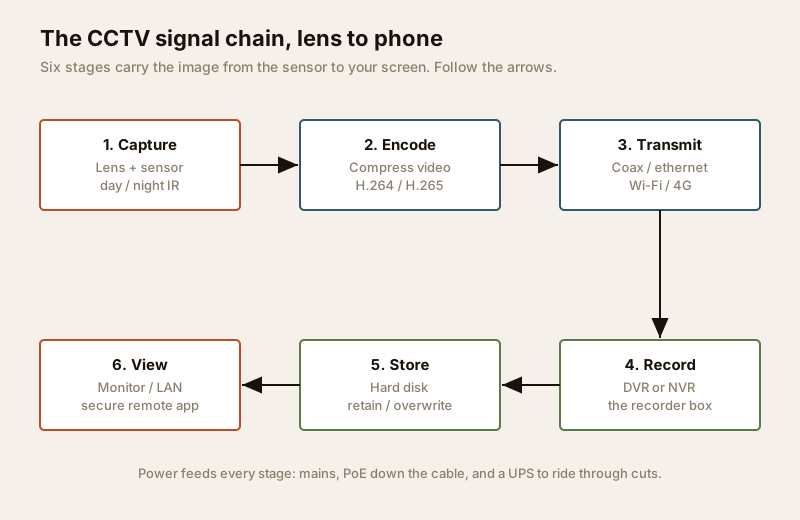
| Stage | What happens | Why it matters to you |
|---|---|---|
| 1. Capture | The lens focuses light onto a sensor; IR helps it see in the dark | Decides how clear the picture is, and whether you get anything at all at night |
| 2. Encode | The video is compressed into a compact digital stream | Sets how much storage and bandwidth you need — the difference between 10 days and 30 |
| 3. Transmit | The stream travels over coax, ethernet, Wi-Fi or 4G | Decides reliability and how the cable is run |
| 4. Record | A DVR or NVR writes the streams to disk | The box that keeps evidence; the heart of the system |
| 5. Store | Footage sits on a hard disk until it is overwritten | Sets how many days back you can look |
| 6. View | You watch on a monitor, on the LAN, or remotely on a phone | Where the whole thing pays off — and where it can leak |
The rest of this guide takes each stage in turn.
Stage 1: Capture — the lens and sensor
The camera is not a magic eye; it is a small digital camera built to run 24x7 outdoors. Two parts do the capturing.
- The lens gathers light and sets the field of view — how wide a scene the camera sees. A wide lens covers a whole room but shrinks distant faces; a narrower lens reaches further down a driveway but sees a slimmer slice. This is why one camera cannot do everything.
- The image sensor is the chip that turns light into an electrical signal. Its size and quality matter more than the headline megapixels. A large, good sensor gives a cleaner picture in poor light; a tiny sensor stretched to a big megapixel number just gives you a large, noisy image.
Day and night vision. Almost every incident that matters happens after dark, so night performance is not a luxury. Most cameras handle it one of two ways. Infra-red (IR) cameras switch to a black-and-white mode after dusk and light the scene with invisible IR LEDs; the IR range is quoted in metres, and you match it to the distance you are covering. Full-colour night cameras keep a colour image using a very sensitive sensor plus a discreet warm-light LED — useful when the colour of a car or clothing is the detail you need. In dusty, humid Indian conditions, look for a properly weatherproofed body (an IP66 rating or better) so the optics do not fog or corrode through the first monsoon.
Stage 2: Encode — why H.264 and H.265 matter
Raw video is enormous. A single camera producing uncompressed footage would swamp any disk and any home broadband in minutes. So immediately after capture, the video is encoded — squeezed into a compact stream using a compression standard, or "codec". This is the single most misunderstood stage, and the one that quietly decides your storage and internet bills.
Two codecs dominate CCTV:
- H.264 (also called AVC) — the long-standing default. Reliable, supported by everything, but heavier on storage.
- H.265 (also called HEVC) — the newer standard. It stores roughly the same picture quality in about half the data, because it is cleverer about only re-sending the parts of the scene that changed. Many brands add a "smart" or "+" variant (H.264+ / H.265+) that squeezes further when nothing is moving.
Compression is measured as bitrate — how much data per second the camera sends. Lower bitrate means smaller files and lighter bandwidth, but push it too low and the image turns blocky. The codec is what lets you keep quality and shrink the bitrate.
| Aspect | H.264 (AVC) | H.265 (HEVC) |
|---|---|---|
| Storage for same quality | Baseline | About half |
| Typical 2MP bitrate (medium quality) | ~4 Mbps | ~2 Mbps |
| Days on the same disk | Baseline | Roughly double |
| Upload load for remote view | Heavier | Lighter — kinder to Indian broadband |
| Device support | Universal | Very wide; check older phones / NVRs |
| Processing needed | Lower | Higher (handled inside modern cameras) |
The practical takeaway: on a new system, prefer H.265. On typical Indian broadband — where upload speed is far smaller than download — halving the bitrate is the difference between a smooth phone view and a stuttering one. Just confirm your recorder and your phone both support it; almost all current kit does. For a deeper look at how much internet headroom you actually need, see the internet and network readiness guide.
Stage 3: Transmit — getting the stream to the recorder
Once encoded, the stream has to reach the recorder. How it travels is the biggest practical difference between the two families of CCTV, and it drives what cable your electrician runs.
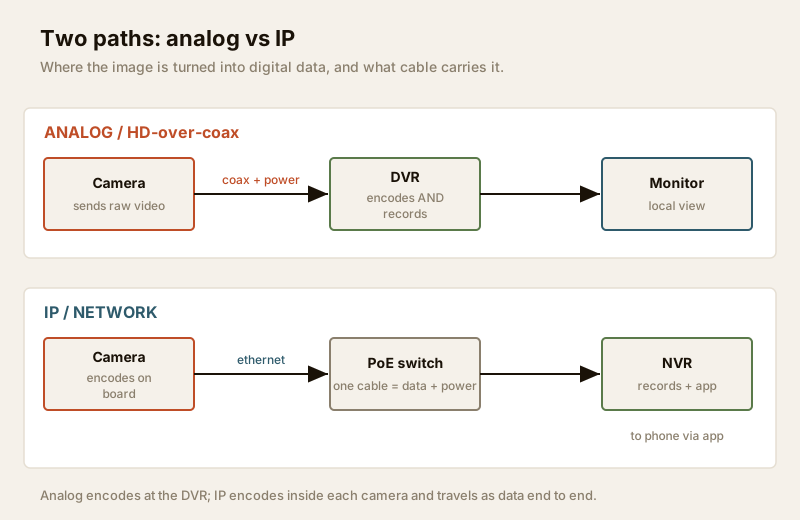
- Coax (analog / HD-over-coax). The camera sends its video down a coaxial cable to the recorder, with a separate wire for power. This is the older approach: robust over long runs, cheap, and the basis of most legacy installs. The analog CCTV guide covers where it still makes sense.
- Ethernet / PoE (IP). An IP camera puts its encoded stream onto the network like any other device, over a standard LAN cable. With Power over Ethernet (PoE), that one cable carries both the video and the power, so there is no separate adaptor at the camera. This is the modern default; the IP CCTV guide goes deeper, and the wired CCTV guide covers running it cleanly.
- Wi-Fi / 4G (wireless). Some cameras skip the cable and send their stream over Wi-Fi, or, where there is no broadband, over a 4G SIM. Convenient for retrofits and far corners, but they still usually need a mains point for power, and they depend on signal strength. The wireless CCTV guide is honest about the trade-offs.
A quick word on cabling: whichever path you choose, the wiring belongs in the plan from day one. Retrofitting cable through finished walls is disruptive and expensive. The security cabling requirements guide explains what to run and where.
Stage 4: Record — what a DVR and an NVR actually do
The recorder is the box that receives the streams and writes them to disk. There are two kinds, and they match the two transmission paths.
- DVR (Digital Video Recorder) works with analog / coax cameras. Because those cameras send raw video, the DVR does the encoding itself before writing to disk. One coax cable per camera plugs into the back.
- NVR (Network Video Recorder) works with IP cameras. Here each camera has already encoded its own stream, so the NVR simply receives finished digital data over the network and records it. A PoE NVR often has the network ports and power built in, so cameras plug straight into the recorder.
The difference in one line: a DVR encodes then records; an NVR just records what the cameras already encoded. For most new homes an NVR with PoE cameras is the cleaner, more future-proof choice. If you are mixing old analog cameras with new IP ones, a hybrid recorder bridges both worlds — see the hybrid CCTV guide.
Stage 5: Store — hard disks, retention and overwrite
Recorded footage lives on a hard disk (HDD) inside the recorder. The key idea is retention — how many days of video you keep before the oldest is automatically deleted to make room. This is not a fixed number; it is the result of a simple balance:
- More cameras = more streams = faster fill.
- Higher resolution / bitrate = bigger files = faster fill.
- 24x7 recording fills far faster than motion-only recording, which writes only when something moves.
- H.265 roughly doubles the days you get from the same disk, because each stream is half the size.
When the disk is full, the recorder does not stop — it overwrites the oldest footage first, so you always keep the most recent days on a rolling loop. A common home target is 15 to 30 days of retention. Two practical rules for India: use a surveillance-grade hard disk rated for continuous writing (an ordinary desktop drive fails early under 24x7 load), and decide up front whether you also want cloud backup for a few critical cameras, so footage survives even if a thief carries the recorder away. The security data storage planning guide helps you size all of this, and the CCTV system type selector turns your answers into a shortlist.
Stage 6: View — locally, on the LAN, and safely over the internet
This is where the system finally earns its keep, and where the most dangerous mistakes are made. There are three ways to watch:
- Local monitor — a screen plugged straight into the DVR/NVR. Simplest, no network needed, ideal at a guard desk.
- On the LAN — any phone or PC on your home Wi-Fi opens the recorder's app and views live or recorded footage. Still entirely inside your home; nothing is exposed.
- Remote, over the internet — you are away and want to watch on mobile data. This is the useful case, and the risky one.
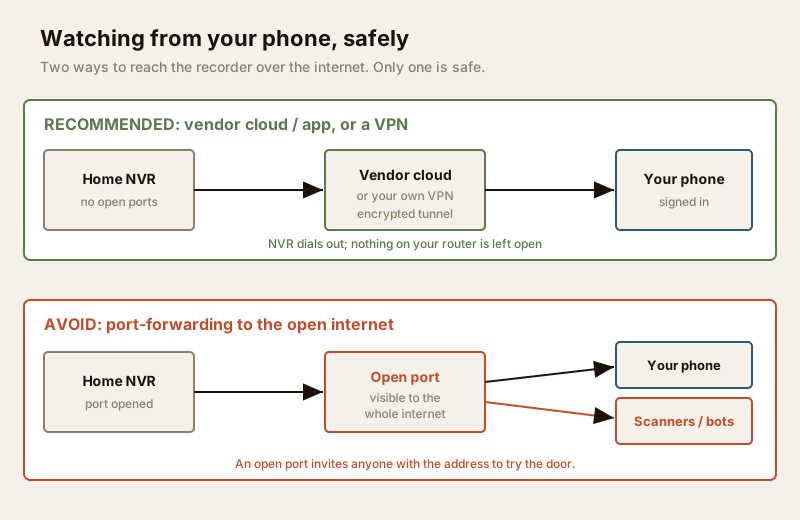
There are two ways to reach your recorder from outside, and they are worlds apart on safety.
The safe way — vendor cloud/app or a VPN. Reputable systems use a cloud relay: the recorder quietly dials out to the manufacturer's service, and your phone app connects through that service. Nothing on your home router is left open to the world; the connection is encrypted, tied to your account, and you simply log in. The more advanced alternative is a VPN — a private encrypted tunnel into your home network — but for most homeowners the vendor app is the right default. Whichever you use, protect it with a strong, unique password and two-factor authentication, and change the camera's default login immediately.
The way to avoid — port-forwarding. Older guides (and some installers) tell you to "port-forward" the recorder: open a door on your router that points straight at the NVR so you can reach it by your internet address. Do not do this. An open port is visible to the entire internet, and automated bots constantly scan for exactly these exposed recorders. It is one of the most common ways home cameras get hijacked and streamed by strangers. If an installer offers only port-forwarding, treat it as a red flag and ask for cloud or VPN access instead. The smart security systems guide goes further on keeping the cameras themselves from becoming the weak point.
Power: the stage that fails first in India
Notice that every stage in the chain needs electricity — and in most of India, mains power is not guaranteed. A CCTV system that dies the moment the lights go out has a scheduled blind spot, usually in the evening, exactly when you want it most.
- Mains feeds the recorder, the switch/router and analog camera power supplies. This is licensed electrical work — see the electrical hub.
- PoE carries power to IP cameras down the same data cable, which simplifies wiring but means the switch becomes the single point you must keep powered.
- Backup during cuts. Put the recorder, the PoE switch and the broadband router on a UPS or inverter circuit so cameras keep recording and remote view keeps working through a cut. Even a small UPS covers a typical evening outage. Size it with the security backup power calculator, and read the security power supply requirements guide for the full picture. Also add surge protection — monsoon lightning and grid spikes are a leading cause of dead CCTV.
When to bring in a professional
You can and should plan the system yourself — that is what this guide is for. But hand these to a licensed professional to design, install and certify:
- New cabling and cable routing — coax or structured LAN through walls, ceilings and conduit.
- Mains electrical work — the security circuit, the UPS/inverter connection, and surge protection at the board.
- Mounting on facades, gates and at height — safe, weatherproof fixing that will not work loose.
- Network configuration for remote access — so the cloud/VPN is set up correctly and nothing is left exposed.
A good installer will survey the site, right-size the disk and the backup, avoid private-space and neighbour-facing angles, and hand over a system you actually understand and control.
Key takeaways
- CCTV always follows the same six stages: capture, encode, transmit, record, store, view. Knowing them makes every quote readable.
- Encoding is the quiet decider. Prefer H.265 — same picture at roughly half the data, which means more retention days and a smoother remote view on Indian broadband.
- Transmission drives the wiring: coax to a DVR for analog, ethernet/PoE to an NVR for IP (the modern default), with Wi-Fi/4G for retrofits and far corners.
- Storage is a rolling loop — the disk overwrites the oldest footage; aim for 15 to 30 days on a surveillance-grade drive, and consider cloud backup for critical cameras.
- View remotely through the vendor cloud or a VPN — never by port-forwarding. Use a strong unique password and two-factor login.
- Power fails first in India. Put the recorder, switch and router on a UPS, add surge protection, and keep cameras out of private spaces.
References
- Digital Personal Data Protection Act, 2023, Government of India — obligations relevant to recording and storing footage of identifiable people; verify the current text and any rules via the official gazette.
- Bureau of Indian Standards catalogue for equipment and cabling standards; verify the current edition before relying on any code: https://www.services.bis.gov.in/
- Your RWA / society CCTV and privacy policy, and local municipal bye-laws, for placement and retention obligations.
This is an educational overview. Cabling, mains electrical work, mounting and secure network configuration are qualified professional tasks — engage a licensed electrician and a competent installer, and verify any standard's current status before relying on it.
Export this guide
Related Guides — Deep-dive reading
CCTV Remote Access in India (2026): Watch From Your Phone, Safely
How to view your own cameras from anywhere without leaving the front door open to the internet — change the defaults, use strong credentials and 2FA, keep firmware current, prefer the vendor's secure cloud relay or a VPN, segment the camera network, and treat footage as personal data.
SecurityElectrical Safety for Security Systems in India (2026): Powering It Without Peril
A homeowner's guide to the power side of home and RWA security systems, CCTV, alarms, gates, access control and NVRs, done so it protects you instead of quietly becoming a shock or fire hazard. What makes a supply safe, what to insist on, and why the mains work belongs to a licensed electrician.
SecurityHow to Choose a CCTV Camera (2026): The Homeowner's Decision Guide for India
Cut through the spec-sheet noise and choose the right CCTV camera for each spot around an Indian home. What actually matters — sensor and low-light performance, lens and field of view, form factor, IP and IK ratings, honest smart features — and the marketing claims to ignore.
SecurityRelated Tools — Try Free
CCTV Bandwidth Calculator
Total network bandwidth an IP CCTV system needs, camera-to-recorder on the LAN and the internet upload for remote viewing.
BandwidthCCTV System Type Selector
Answer five questions and get the right CCTV setup — analog / IP / hybrid, wired / wireless, local / cloud — with reasons.
CCTV SelectorCCTV Camera Coverage & Count Calculator
Estimate how many CCTV cameras you need, the NVR channels, storage in TB for your retention period, and an indicative all-in cost with GST.
CCTV Calculator