
Analog CCTV in India: HD-over-Coax, DVRs and When It Still Wins
A buyer-facing guide to analog CCTV for Indian homes and shops - how coax-and-DVR systems work, the jump from old 960H to today's 2MP and 5MP HD-over-coax, where analog is the smart low-cost choice, and where IP is worth the extra.
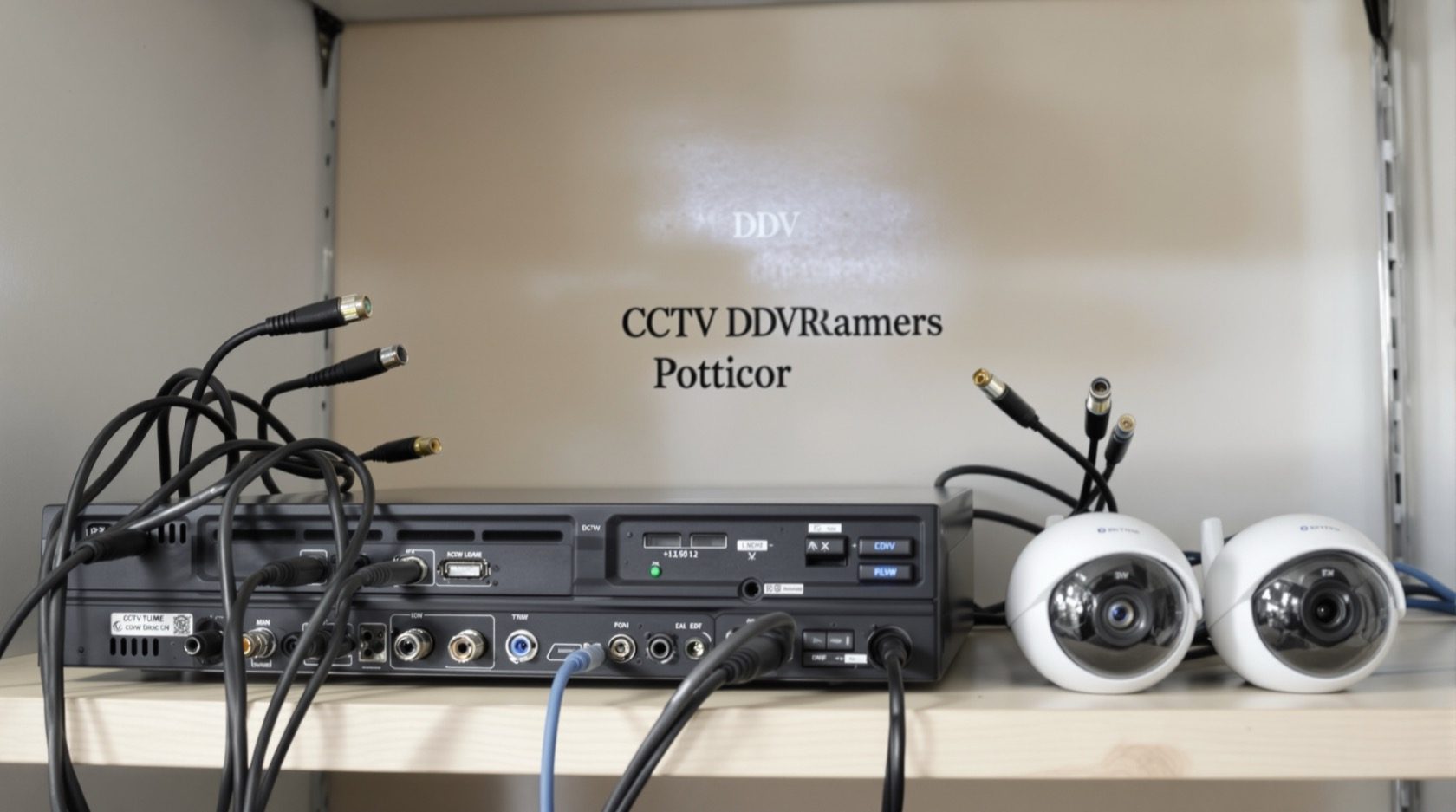
Walk into any electronics market from Lamington Road to SP Road and the cheapest CCTV kit on the shelf is almost always analog: a set of cameras, a length of coaxial cable, and a small DVR box. For a two-camera shop or a modest home, it can be the most sensible money you spend on security. But "analog" today is not the grainy footage of a decade ago - modern HD-over-coax sends a sharp 2MP or 5MP picture down the same humble cable.
This guide is the analog chapter of Studio Matrx's CCTV cluster. It sits beside the complete guide to CCTV systems, which surveys every option, and how CCTV systems work, which explains the underlying signal chain. Here we go deep on one question: is a coax-and-DVR system the right buy for you, and if so, what should you ask for?
Scope & safety. This guide helps you understand and specify. Running coaxial or power cable, working near the mains, and any electrical point work are jobs for a licensed electrician or a professional installer - plan the system, but have it wired and certified by a qualified person. Cameras belong on approaches, entrances and shared boundaries, never in bathrooms, bedrooms or any private space, and pointed away from a neighbour's windows.
How analog CCTV actually works
An analog CCTV system has three parts and one wire that ties them together:
1. Cameras capture the scene and turn it into a video signal.
2. Coaxial cable (usually RG59 with a power pair, sold as "3+1") carries that video signal - one dedicated cable per camera - back to a central box.
3. A DVR (Digital Video Recorder) receives every camera's feed, digitises and compresses it, writes it to a hard disk, and sends a picture to your monitor and phone app.
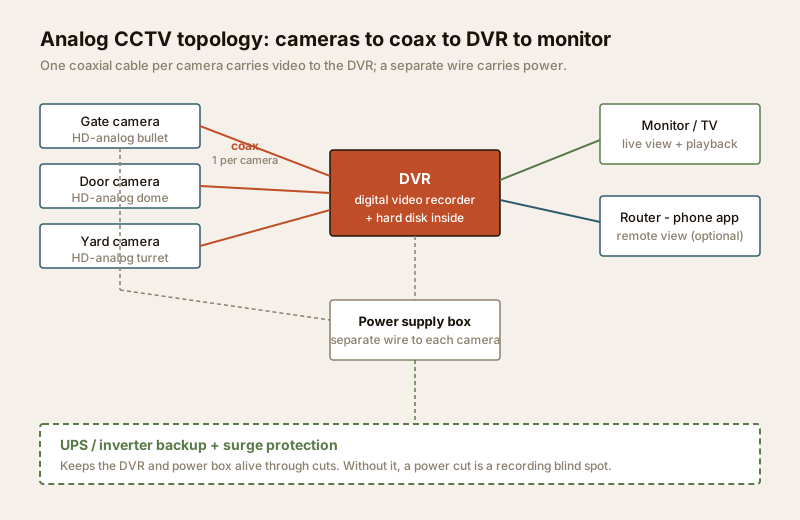
The defining trait is that word analog: the camera sends a continuous video signal down the coax, and the DVR is where it becomes digital. Contrast that with an IP CCTV system, where each camera is a tiny networked computer that digitises on board and sends data over a LAN cable. The analog approach is older, but it is also simpler, cheaper, and - crucially for a retrofit - it can often reuse coax that is already in the walls.
Two practical consequences fall out of the design:
- One cable per camera. Every camera runs its own coax back to the DVR. An eight-camera system means eight coax runs converging on one box - fine for a home or shop, more cumbersome across a large building.
- Power is separate. Unlike PoE on the IP side, analog cameras usually need their own power wire (the "+1" in 3+1 cable, fed from a central supply box). Plan a power point near the DVR and, ideally, a small UPS so a cut does not create a recording blind spot.
The leap from old analog to HD-over-coax
For years, "analog CCTV" meant 960H or D1 - standard-definition footage good enough to see that someone was there, but rarely sharp enough to recognise a face or read a number plate. That reputation still colours how people talk about analog, and it is now out of date.
Around the mid-2010s, three competing HD-over-coax technologies arrived that push a high-definition picture down ordinary coaxial cable:
- HD-TVI (Transport Video Interface)
- AHD (Analog High Definition)
- HD-CVI (Composite Video Interface)
All three do the same job - carry a 2MP, 5MP or higher picture over the same RG59 coax an old 960H camera used - but they are different signalling formats. The practical rule for a buyer: match your cameras and DVR to the same format, or buy a multi-format DVR (most modern DVRs auto-detect TVI, AHD, CVI and old analog on each channel, which is why they are the safe default). This is what lets you upgrade a tired 960H system to a 5MP one by swapping the cameras and DVR while keeping the cable.
Here is the quick reference:
| Format | Full name | Typical resolutions | Notes for a buyer |
|---|---|---|---|
| Old analog (960H / D1) | Standard definition | 0.3-1MP (D1, 960H) | Legacy only. Fine to view, poor for identification. Upgrade if you can |
| AHD | Analog High Definition | 1MP, 2MP, 5MP, up to 8MP | Very common on budget Indian kits; wide camera choice |
| HD-TVI | Transport Video Interface | 2MP, 5MP, up to 8MP | Strong on longer coax runs; common on branded DVRs |
| HD-CVI | Composite Video Interface | 2MP, 5MP, up to 8MP | Backed by a major manufacturer; good long-cable performance |
| Multi-format DVR | Auto-detect / "5-in-1" | Reads all of the above | The safe buy - mixes formats and future-proofs the recorder |
A note on cable distance: HD-over-coax comfortably runs the tens of metres a typical home or shop needs on good RG59 or RG6 cable. Very long runs - across a large compound or between buildings - start to lose signal and are one of the places an IP system pulls ahead. Cable specification and routing is a job to hand to your installer.
Where analog still makes sense
Analog is not a compromise you settle for - for the right site it is the correct answer. It shines when:
- Budget is the deciding factor. Analog kit is the lowest-cost way to get real, recorded coverage. A basic branded 4-camera 2MP set with DVR and disk lands well below the equivalent IP system.
- Coax is already run. Older shops, homes and buildings often have coax in the walls from a previous CCTV or cable-TV install. Reusing it saves the biggest cost and mess of any camera project - the cabling.
- The system is small and standalone. A shop counter, a gate and a back door - two to four cameras feeding one DVR and a monitor. Analog does this cleanly, with no network to configure or secure.
- You want it to work without a network. An analog DVR records to its own disk whether or not the internet is up. In areas with patchy broadband, that local-first simplicity is a genuine strength (add the phone app on top when the link is available).
- Simplicity and long life matter. Fewer settings, mature technology, and cameras that many local technicians can service.
For a small kirana, a clinic reception, a single-floor home or a workshop, an HD-analog set is often the honest recommendation. The security cost planning guide can help you weigh it against the alternatives without overspending.
The limits - and when to choose IP
Being fair about analog means being clear about where it runs out of road. Weigh these before you buy:
- A resolution ceiling. HD-over-coax tops out around 8MP today, and most affordable kits are 2MP-5MP. IP cameras go well beyond, to 12MP and more, which matters when you need to read fine detail across a wide scene.
- Limited analytics. Smart features - reliable line-crossing, intrusion zones, face or vehicle detection, people counting - are far more capable on IP cameras. Analog offers basic motion detection and little else.
- One cable per camera, plus power. More cabling, and a separate power run to each camera, versus a single PoE cable on IP.
- Shorter effective range for advanced features. Over long distances and for the smartest functions, IP holds its quality and capability better.
- Harder to scale across a big site. Many cameras, multiple buildings, or a plan to keep expanding all favour the networked IP approach.
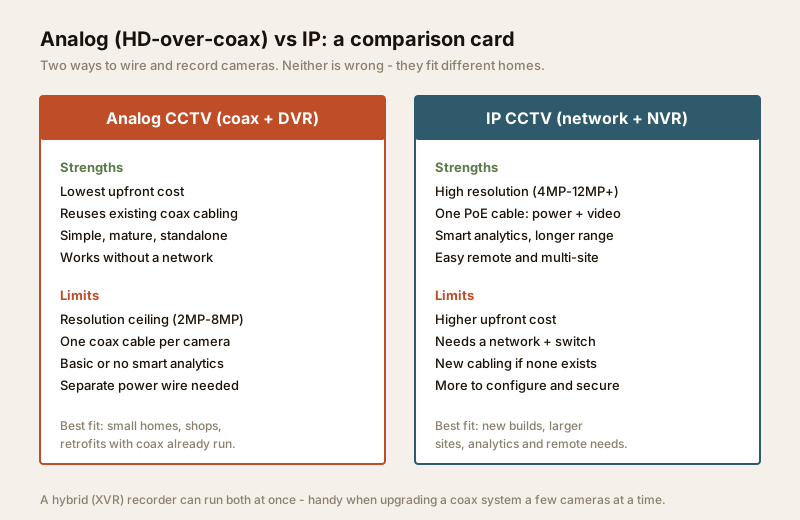
If your needs are growing - number-plate capture at a society gate, analytics, remote viewing across several sites - read the IP CCTV guide before committing. And if you want the low cost of coax today with a path to IP later, a hybrid (XVR) recorder runs both analog and IP cameras on one box - covered in the hybrid CCTV guide, and a smart way to upgrade a coax system a few cameras at a time.
Analog vs IP at a glance
| Factor | Analog (HD-over-coax) | IP (network) |
|---|---|---|
| Upfront cost | Lowest | Higher |
| Resolution | 2MP-8MP | 4MP-12MP and beyond |
| Cabling | Coax per camera + power wire | One PoE cable (power + data) |
| Analytics | Basic motion | Advanced (line-cross, face, ANPR) |
| Reuse existing coax | Yes - a big saving | No (needs network cable) |
| Works without a network | Yes, DVR records locally | Yes, but built around a network |
| Best for | Small homes, shops, retrofits | New builds, larger sites, analytics |
| Expandability | Limited by DVR ports | Easy - add to the switch |
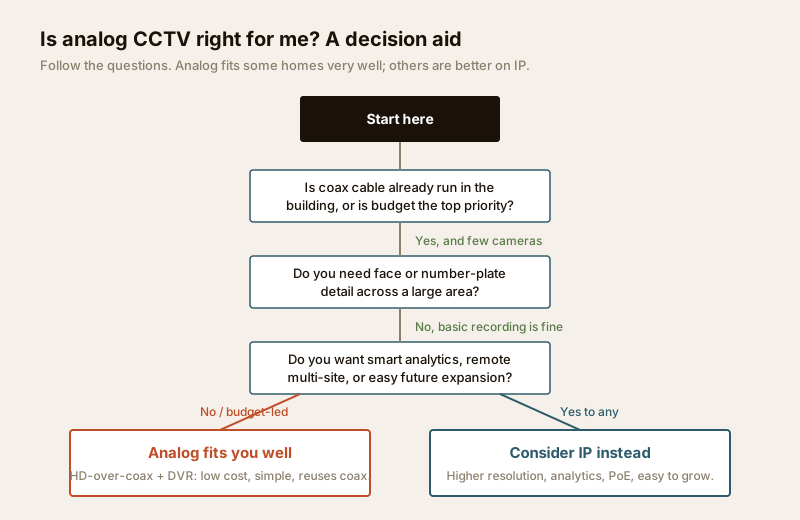
Neither wins outright. Match the system to the site: analog for lean, low-cost, standalone coverage; IP where resolution, analytics and growth justify the spend. Still unsure? The CCTV system type selector walks you through it, or use the decision aid below.
The DVR and storage
The DVR is the heart of an analog system, and the two numbers that matter most are channels and days of retention.
- Channels. Buy a DVR with more channels than cameras you have today - a 4-channel box for 3 cameras, or an 8-channel for 5 - so you can add one later without replacing the recorder.
- Retention. Footage records to a hard disk inside the DVR until it fills, then overwrites the oldest. A common target is 15 to 30 days. More cameras, higher resolution, and continuous (versus motion-only) recording all fill the disk faster.
Two rules that save grief:
- Fit a surveillance-grade hard disk rated for continuous 24x7 writing. A pulled-from-a-laptop desktop drive will fail early under constant recording.
- Decide local, cloud, or both. The disk in the DVR is private and subscription-free, but a thief can carry the whole box away. A few critical feeds mirrored to cloud survive that, at a monthly fee and dependent on your upload speed. For sizing this properly, see the security data storage planning guide.
India price bands
Indicative 2026 street prices for branded, warrantied kit - not a quote. Local no-name gear is cheaper but riskier on lifespan and support. Cabling and installation are extra and vary by site.
| Setup | Typical range (hardware) | What it covers |
|---|---|---|
| 2-camera 2MP + DVR + disk | ₹6,000-12,000 | A shop counter and door, or a small home entrance |
| 4-camera 2MP + DVR + 1TB | ₹10,000-20,000 | A typical small home or shop, all approaches |
| 4-camera 5MP + DVR + 2TB | ₹18,000-32,000 | Sharper detail for faces and plates at the gate |
| 8-camera 5MP + DVR + 2TB | ₹30,000-55,000 | A larger home or a multi-room shop / clinic |
| Add: UPS for the DVR | ₹2,500-6,000 | Rides through the typical evening power cut |
| Add: installation + cabling | ₹500-1,500 per camera | Depends on runs, height and wall type |
Prices move with the rupee, brand and warranty. Weigh a slightly dearer branded DVR and a surveillance-grade disk against a bargain set that fails in a monsoon - the cheap system that stops recording is the expensive one. Size the whole spend with the security cost planning guide.
When to bring in a professional
Specify the system yourself, then hand these to a licensed professional to install and certify:
- All cabling and power - routing coax and power runs, any new electrical point, and tying the DVR into a UPS or inverter circuit. Mains work belongs to a licensed electrician (see the electrical hub).
- Camera mounting at height - on compound walls, parapets and poles, safely and at the right angle.
- Weatherproofing - outdoor cameras and joints must be sealed against India's dust and monsoon; look for IP66-rated bodies and get the connections done right the first time.
A good installer will also do a quick site survey, right-size the disk and backup, and hand over a system you can actually operate. For getting the runs planned early, the security cabling requirements guide is a useful primer, and the whole CCTV series lives on the CCTV hub.
Key takeaways
- Analog CCTV = cameras + coax + DVR. Modern HD-over-coax (HD-TVI, AHD, HD-CVI) carries a sharp 2MP-8MP picture down ordinary coaxial cable - a world away from old 960H.
- Buy a multi-format DVR so it reads TVI, AHD, CVI and legacy analog, and match camera resolution to the DVR.
- Analog wins on cost, on reusing existing coax, and for small standalone shops and homes that do not need heavy analytics or wide-area identification.
- Its limits are a resolution ceiling, basic analytics, one cable-plus-power per camera, and harder scaling - where those bite, look at IP or a hybrid XVR.
- Fit a surveillance-grade disk, plan 15-30 days of retention, and put the DVR on a UPS so a power cut is never a blind spot. Leave cabling and mains work to a licensed professional.
References
- Bureau of Indian Standards catalogue for the current status of any relevant standard on CCTV, cabling and electrical safety: https://www.services.bis.gov.in/
- Digital Personal Data Protection Act, 2023 - handle any recorded footage of identifiable people lawfully and proportionately; place cameras only on your own approaches and shared boundaries, never in private spaces.
This is an educational overview. Coaxial and power cabling, mains electrical work and mounting at height are qualified professional tasks - engage licensed installers, and verify any standard's current status via the BIS catalogue before relying on it.
Export this guide
Related Guides — Deep-dive reading
PoE vs Wi-Fi CCTV: Which Home Security Cameras Are Better?
One camera type runs power and video down a single Cat6 cable to an NVR and almost never drops out; the other clips to a wall in minutes and streams over your home Wi-Fi. This guide settles PoE vs Wi-Fi CCTV for Indian homes — reliability, video quality and bandwidth, cabling and power, retrofit versus new-build effort, NVR versus SD and cloud storage, hacking risk, real rupee costs, scalability and outdoor use — and gives a clear verdict for each kind of home.
Smart HomeHow to Choose a CCTV Camera (2026): The Homeowner's Decision Guide for India
Cut through the spec-sheet noise and choose the right CCTV camera for each spot around an Indian home. What actually matters — sensor and low-light performance, lens and field of view, form factor, IP and IK ratings, honest smart features — and the marketing claims to ignore.
SecurityLocal Storage vs Cloud CCTV in India (2026): Where Your Footage Should Live
A homeowner's honest head-to-head on where CCTV footage is kept — on a hard disk in the recorder at home, or uploaded to a per-camera cloud plan — across cost, theft resilience, internet dependence, retention, remote access and DPDP privacy, ending in a clear which-suits-whom, with hybrid usually the smartest answer.
SecurityRelated Tools — Try Free
CCTV Camera Coverage & Count Calculator
Estimate how many CCTV cameras you need, the NVR channels, storage in TB for your retention period, and an indicative all-in cost with GST.
CCTV CalculatorCCTV Cloud vs Local Cost Calculator
Compare cloud CCTV subscription against a local NVR + HDD — upfront, 5-year total, monthly fee and break-even.
Cloud vs LocalCCTV System Type Selector
Answer five questions and get the right CCTV setup — analog / IP / hybrid, wired / wireless, local / cloud — with reasons.
CCTV Selector