

Local Storage vs Cloud CCTV in India (2026): Where Your Footage Should Live
A homeowner's honest head-to-head on where CCTV footage is kept — on a hard disk in the recorder at home, or uploaded to a per-camera cloud plan — across cost, theft resilience, internet dependence, retention, remote access and DPDP privacy, ending in a clear which-suits-whom, with hybrid usually the smartest answer.
You have chosen the cameras. Now comes the quieter question that decides your running cost, your privacy and whether the footage is actually there when you need it: where does the recording live? In Indian homes and shops the choice comes down to two places. Local means a hard disk inside a recorder — an NVR for IP cameras or a DVR for analogue ones — sitting in a cupboard in your own house. Cloud means the camera uploads its footage over your internet to the vendor's servers, on a subscription you pay for every month, per camera, for as long as you want the footage kept.
The honest one-line answer: it depends on how you weigh a one-time cost against a forever bill, and how worried you are that the recorder itself could be stolen. For most Indian homes and small shops, a local recorder is cheaper over its life and perfectly sufficient. Cloud earns its place in a few specific situations. And for many people the smartest answer is not one or the other at all — it is a hybrid, keeping the bulk locally and a small offsite copy in the cloud as a backstop. This guide walks the whole comparison so you can place yourself.
Scope and how to read this. This is a neutral head-to-head to help a homeowner or shopkeeper decide where footage is stored, not a review of brands or a price list. Both options are legitimate; each genuinely wins in some situations, and the right pick is the one that matches your home, not the one a salesperson pushes hardest. Footage is personal data of everyone it captures, so privacy and the DPDP Act 2023 run through both choices. For the wider "local versus cloud" question across your whole security system, this guide complements the local versus cloud security guide; for exact numbers, defer to the cost libraries linked below.
What each option actually is
Local storage — a disk in your own recorder
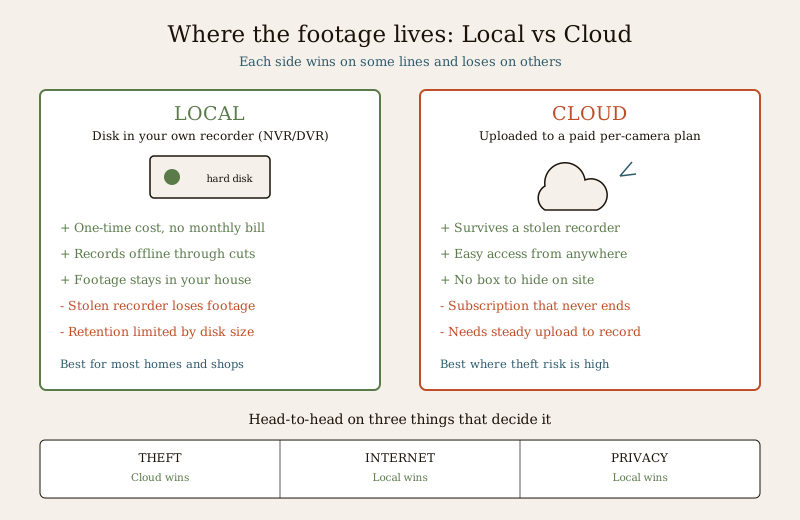
With local storage, footage is written to a hard disk fitted inside your NVR or DVR at home. You buy the recorder and the disk once. From then on the footage sits under your roof, on your equipment, with no monthly fee and no dependence on the internet to record. You reach it on the TV or monitor the recorder is wired to, and — if you set it up — remotely through the maker's app when your internet is up. When the disk fills, the recorder loops, overwriting the oldest footage first. How many days you keep therefore depends on disk size, camera count and resolution.
Cloud CCTV — footage uploaded to a paid plan
With cloud storage, each camera streams its footage up through your internet connection to the vendor's data centre, where it is kept for the number of days your plan allows. You pay a subscription — typically per camera, every month or year, indefinitely. In return you get footage that lives somewhere other than your house, reachable from anywhere on your phone, and usually no box to hide or protect on site. Stop paying and, after a grace window, the stored footage and often the recording itself go away. Cloud depends entirely on a steady upload connection: no internet, no recording.
The head-to-head, dimension by dimension
Both approaches record your cameras. What separates them is where the footage rests and what that costs you in money, resilience and privacy. Take it one dimension at a time, because a clear winner on one line is often the loser on the next.
| Dimension | Local storage (disk in recorder) | Cloud CCTV (paid plan) |
|---|---|---|
| Cost model | One-time: buy recorder and disk once, no monthly bill | Recurring: a per-camera subscription that never ends |
| Theft / tamper resilience | A thief who takes the recorder takes the footage — unless you hid a copy | Footage survives even if every camera and the recorder are stolen |
| Internet dependence | Records fully offline; internet only needed for remote viewing | Needs steady upload to record at all; weak links drop footage |
| Retention (how many days) | Limited by disk size, camera count and resolution | Set by the plan you pay for; more days costs more |
| Scale (many cameras) | Add disks or a bigger recorder; cost barely rises per camera | Cost rises with every camera, every month |
| Remote access | Possible via the app, but depends on your home upload | Easy and reliable from anywhere by design |
| Reliability of recording | Very reliable while the disk is healthy; disks do wear out | Reliable while internet and the vendor both hold up |
| Privacy / DPDP | Footage stays in your house, on your hardware | Footage sits on a vendor's server — where, who sees it, is it encrypted |
| Ongoing worry | Replace an ageing disk every few years | The bill, and the vendor's continued existence and terms |
A few of these deserve unpacking, because they are where homeowners get the decision wrong.
Cost is the big one. Local is a one-time outlay. Cloud is a subscription that quietly outgrows the hardware it replaced — small per camera, but paid every month, per camera, forever. Over a few years, and especially across several cameras, that recurring bill is what most often tips an Indian household back to local. For the real arithmetic, see the cloud CCTV cost guide and the CCTV data-storage cost guide; this guide stays with the trade-off, not the numbers.
Theft resilience is cloud's genuine strength. The classic failure of a purely local setup is the intruder who simply unplugs and carries off the recorder, taking the only copy of the very footage that would have identified him. Cloud is immune to that, because the evidence is already off-site. But note the honest counter: local can be hardened against exactly this by hiding the recorder out of sight, or keeping a second copy — which is the whole logic of the hybrid setup below. Theft is a real cloud advantage, but not an unanswerable one.
Internet is cloud's Achilles heel in Indian homes. Cloud only records while the upload holds. Many Indian homes have solid download but weak, variable upload, or connections that drop in rain and load-shedding — and continuous camera upload is demanding. When the link falters, cloud footage has gaps, or stops, exactly when trouble may be happening. Local keeps recording through every outage because it never needed the internet to write to its own disk. Before choosing cloud, be honest about your upload's real steadiness — the cloud recording failure guide walks through how and why cloud recording drops in Indian conditions.
Privacy cuts both ways, and DPDP applies to both. Your CCTV captures family, domestic staff, visitors and neighbours — their personal data. With local storage that footage never leaves your house, so you control it completely. With cloud, it rests on a vendor's servers: you should know where those servers are, who at the vendor can access footage, whether it is encrypted in transit and at rest, how long they keep it after you stop paying, and what their terms allow them to do with it. Neither choice removes your responsibility under the DPDP Act 2023 to use cameras proportionately and to protect what they record — cloud simply adds a third party you must be able to trust.
Which suits whom — the verdict by scenario
This is the part that matters. There is no universal winner; the right storage follows the home and the risk.
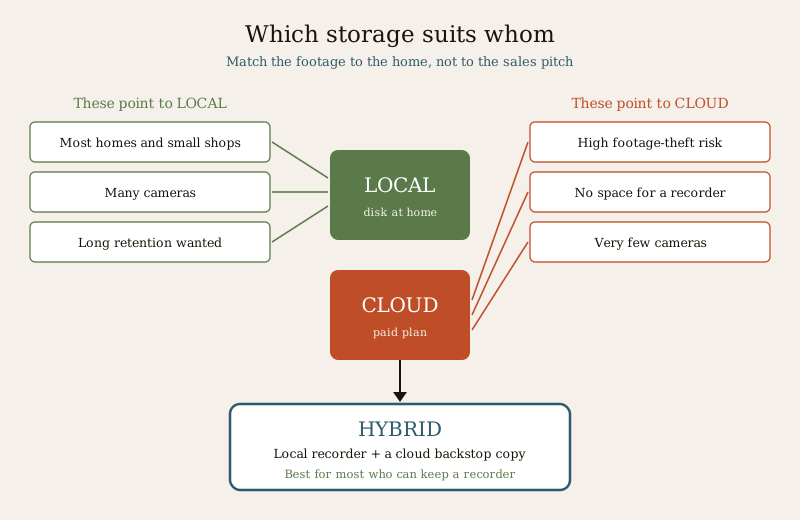
- Most Indian homes and small shops — local. A house or shop with a handful of cameras, a recorder that can be tucked away, and a wish to avoid a permanent bill is the textbook local case. It is cheaper over its life, records through every power and internet cut, and keeps the footage private under your own roof. This is the default, and for good reason.
- Many cameras — local. The more cameras you run, the more a per-camera cloud subscription stings, month after month. A local recorder swallows extra cameras for the price of a bigger disk. Larger homes, villas and shops with several feeds lean local on cost alone.
- Long retention wanted — usually local. If you want weeks of footage kept, adding disk capacity once is cheaper than paying every month for a longer cloud retention window across every camera.
- High footage-theft risk — cloud (or hybrid). A standalone shop, an isolated plot, a site where a burglar could reach and remove the recorder before help arrives — here cloud's off-site copy is worth real money, because it survives the very theft it is meant to prove.
- No room, or no wish, for a recorder — cloud. A small flat, a rented home, a single doorway camera where there is nowhere to place and secure a box, is a natural fit for a cloud camera that needs no recorder at all.
- Very few cameras and a strong connection — cloud is reasonable. With one or two cameras and a genuinely steady upload, the monthly cost stays small and the convenience of anywhere-access and no on-site box can be worth it.
- Best of both — hybrid. For most people who can keep a recorder, the strongest answer is local for the bulk, plus a small cloud or off-site copy of the most important camera as a theft-proof backstop.
The hybrid answer, and why it is often best
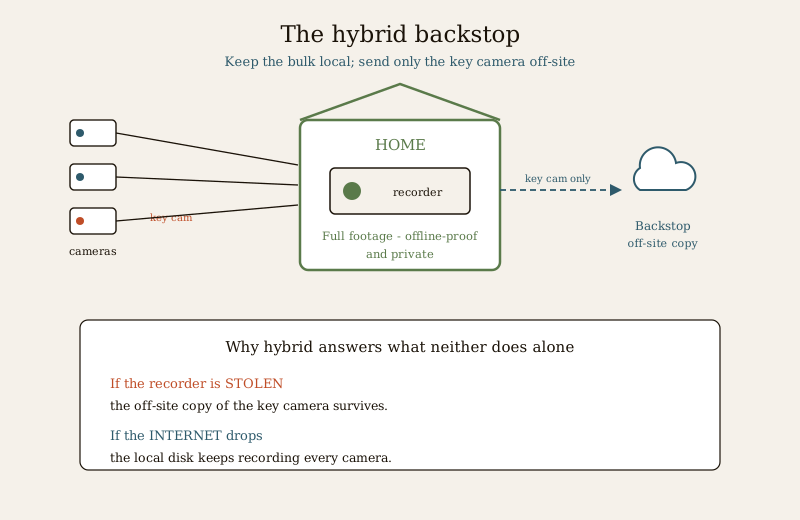
The framing of "local or cloud" hides the option that most often wins in practice: have both. Keep your full recording locally, where it is cheap, offline-proof and private — and send a slim copy of your most important footage off-site, either to a modest cloud plan on one or two key cameras, or to a second copy kept somewhere a thief cannot reach in the same grab.
Hybrid neutralises the one thing local cannot answer on its own — the stolen recorder — without surrendering the things local does best. You still record through every internet and power cut, because the local disk never needed the network. You still keep the bulk of your footage private on your own hardware. But now, if someone walks off with the box, the footage that matters is already safely elsewhere. You are not paying a per-camera cloud fee across every feed, only backing up the few that count. For a home that can afford a little more than the bare minimum and wants both cheapness and theft-proof evidence, hybrid is usually the smartest configuration.
How to decide — a simple framework
Walk these questions in order and the answer usually names itself.
1. Can I place and hide a recorder? If there is genuinely no room or you do not want a box — lean cloud. If you can tuck one away, keep reading; local is in play.
2. How steady is my internet upload, really? Weak, variable or rain-prone upload argues hard against cloud recording. A genuinely steady connection keeps cloud viable.
3. How many cameras, and for how many days? More cameras and longer retention both push toward local, because cloud charges for each, every month.
4. How high is the footage-theft risk? An isolated shop or plot where the recorder could be grabbed raises the value of an off-site copy — cloud or, better, hybrid.
5. How comfortable am I with footage on a vendor's server? If vendor access, server location and encryption worry you, local keeps everything at home; if you go cloud, choose a vendor whose DPDP posture you can actually check.
6. Can I stretch to a hybrid? If yes, and you can keep a recorder, hybrid usually beats either alone: local bulk plus a cloud backstop on the key camera.
For most Indian homes and shops, that walk ends at local, and hybrid if the budget allows. Cloud is the right answer for the specific cases above — no space, high theft risk, very few cameras — but it should be a deliberate choice, made knowing the forever bill and the internet dependence, not a default accepted because an app looked convenient.
Key takeaways
- Local means a hard disk in your own NVR or DVR at home; cloud means footage uploaded to a paid, per-camera plan on a vendor's server. The choice is really about where the footage rests and what that costs you.
- Local is a one-time cost with no monthly bill; cloud is a subscription that never ends — over years and across cameras, this is what most often tips Indian homes to local.
- Cloud's real strength is theft resilience — a stolen recorder loses local footage, while cloud survives it; but local can be hardened with a hidden or second copy.
- Cloud needs a steady upload to record at all — weak Indian home upload and outages make this its biggest weakness; local records fully offline.
- Privacy and the DPDP Act 2023 apply to both — local keeps footage in your house; cloud puts it on a vendor's server, so check where, who can access it, and whether it is encrypted.
- For most Indian homes and shops, local is cheaper and sufficient; cloud earns its place where footage-theft risk is high, there is no room for a recorder, or there are very few cameras — and a hybrid of local plus an off-site copy is often best.
Where to go next
- Local versus cloud security — the same question across your whole security system, not just CCTV.
- Cloud CCTV cost and CCTV data-storage cost — the numbers this guide deliberately deferred.
- Cloud recording failure — how and why cloud recording drops in Indian internet conditions.
- The CCTV sub-hub and the wider security hub — cameras, siting and the rest of the picture.
References
- Digital Personal Data Protection Act, 2023 — CCTV footage is personal data of everyone it captures; use cameras proportionately, and where footage is stored in the cloud, verify where the servers are, who may access footage, encryption in transit and at rest, and retention after a subscription ends. Read the current text via the official gazette and MeitY resources.
- Bureau of Indian Standards catalogue — for any product standard or storage-medium specification you wish to verify, check current status via https://www.services.bis.gov.in/
- CERT-In advisories on securing internet-connected cameras and recorders — relevant to both cloud accounts and locally networked NVRs/DVRs reachable over the internet.
This is an educational head-to-head for homeowners and shopkeepers, not a product review, price list or legal advice. Both local and cloud storage are legitimate; the right choice depends on your home, cameras, internet and threat, and often a hybrid of both. Use cameras proportionately and protect the footage you keep under the DPDP Act 2023; for exact costs, consult the linked cost guides and a licensed installer.
Export this guide
Related Guides — Deep-dive reading
Local versus Cloud Security for Security Systems in India (2026): Where Should Your Footage Live?
The most important cyber choice you make about a camera or alarm is where its footage and control actually live: on-site in your hands, in a vendor's cloud, or both. This even-handed guide weighs privacy, resilience in India's outages, convenience and cost, and shows why a hybrid design is often the safest home answer.
SecurityCloud CCTV in India: Footage That Survives a Stolen Recorder
How cloud-stored CCTV works, its genuine advantages for Indian homes and shops, the real trade-offs of subscriptions, upload bandwidth and third-party data, and why hybrid local-plus-cloud is usually the smart middle.
SecurityLocal Storage CCTV in India: NVR, DVR and Your Own Hard Disk, Explained
How on-site CCTV recording works, why a one-time recorder-plus-disk setup with no monthly bill still suits most Indian homes and shops, and how to counter its one real weakness — a stolen recorder.
SecurityRelated Tools — Try Free
CCTV Cloud vs Local Cost Calculator
Compare cloud CCTV subscription against a local NVR + HDD — upfront, 5-year total, monthly fee and break-even.
Cloud vs LocalCCTV Camera Coverage & Count Calculator
Estimate how many CCTV cameras you need, the NVR channels, storage in TB for your retention period, and an indicative all-in cost with GST.
CCTV CalculatorBefore vs After — Cost Reality Check
Compare what you expected to pay vs what you actually paid, category by category.
Reality Check