
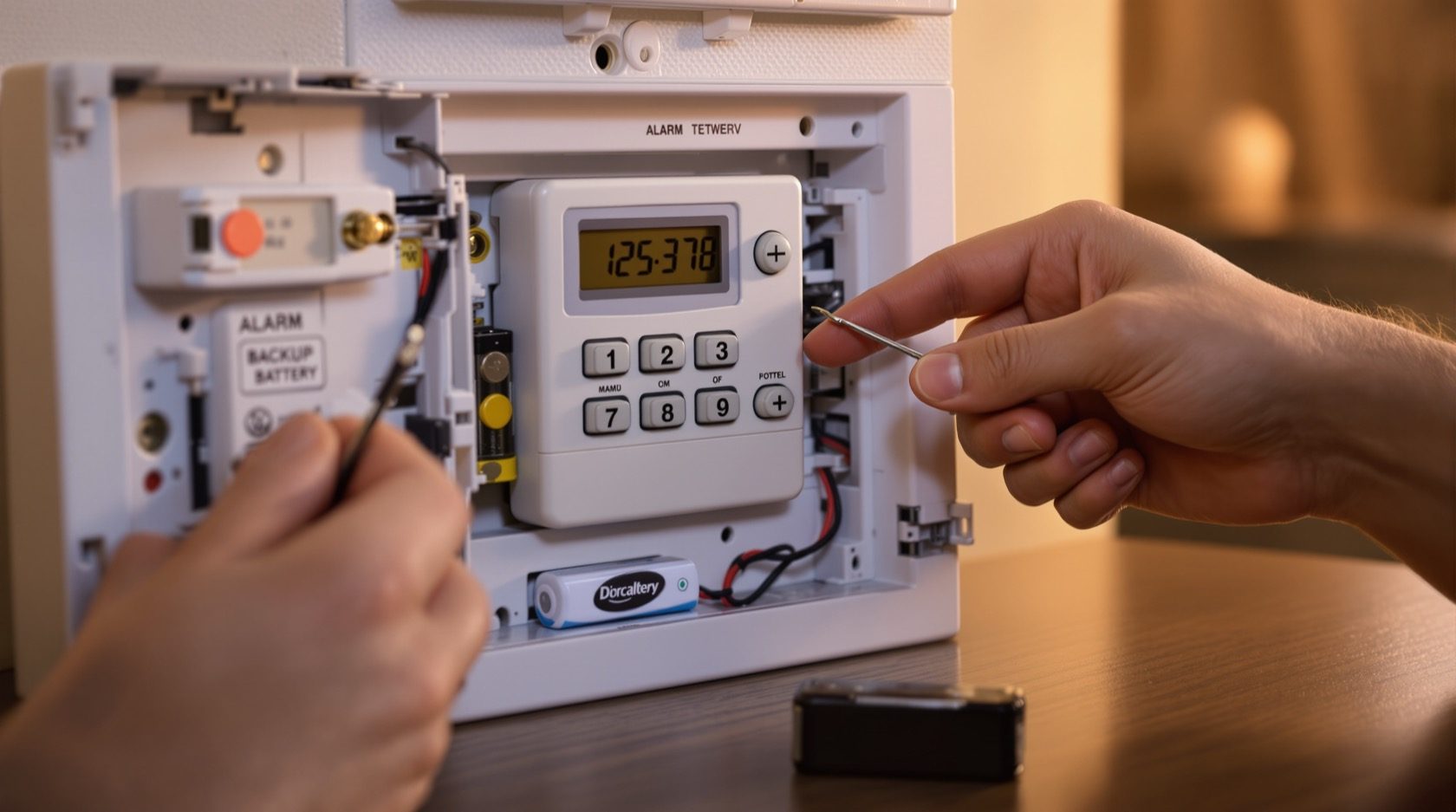
Burglar Alarm Maintenance in India: Testing, Batteries & AMC (2026)
How to keep a burglar alarm actually working: weekly walk-tests, backup and sensor battery cycles, clean sensors, a live SIM, and an end-to-end alert check, plus what a good AMC covers.
A burglar alarm is the one security device you hope never to hear. That is exactly why it rots quietly. Nobody notices the backup battery died two monsoons ago, that the GSM SIM lapsed and stopped sending alerts in March, or that a spider has spun a web across the PIR lens. The system still looks armed on the keypad — the little light glows — and then the one night it matters, the siren stays silent or the alert never reaches your phone.
Burglar alarm maintenance is the unglamorous habit that keeps an alarm from becoming decoration. This guide is the upkeep chapter of Studio Matrx's burglar alarm hub: after the system is installed and zoned, how do you keep every part of the chain — sensor, panel, battery, SIM, siren, app and call-list — actually firing? It covers what you can safely do yourself in a few minutes a week, what needs the installer, and whether an Annual Maintenance Contract (AMC) earns its fee.
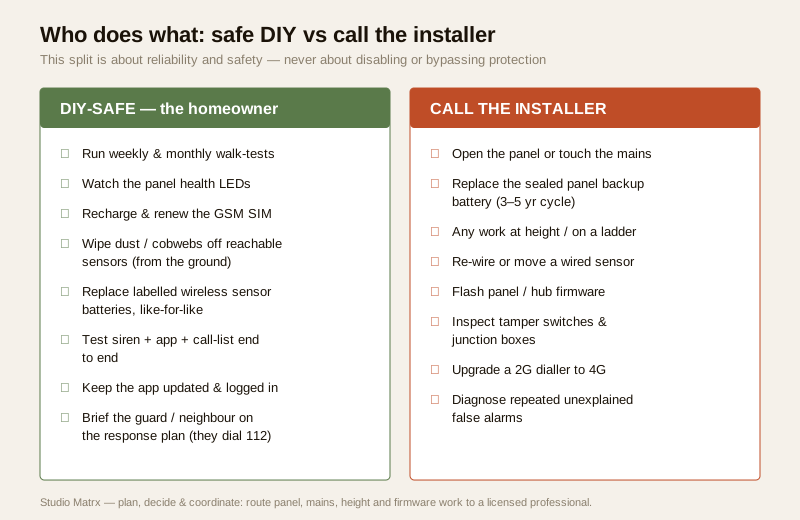
Scope & safety. This guide helps you plan upkeep, run safe tests and hold a service provider to account. Pressing a keypad, walk-testing a room, wiping a reachable sensor and swapping a clearly-labelled sensor battery are homeowner tasks. Opening the panel, touching the mains connection, working at height, and replacing the sealed panel backup battery are a licensed installer's or electrician's job — see the electrical hub. Nothing here is about creating blind spots or defeating detection; it is purely about keeping the system reliable. This is educational guidance, not legal advice.
Why an alarm needs tending at all
An alarm is a chain, and a chain fails at its weakest link. The sensor detects, the panel decides, the battery keeps it alive through a power cut, the siren warns, and the GSM/app path tells you and your call-list. If any one link is dead, the whole system is dead — but the keypad rarely tells you which link failed. In Indian conditions, four things drift:
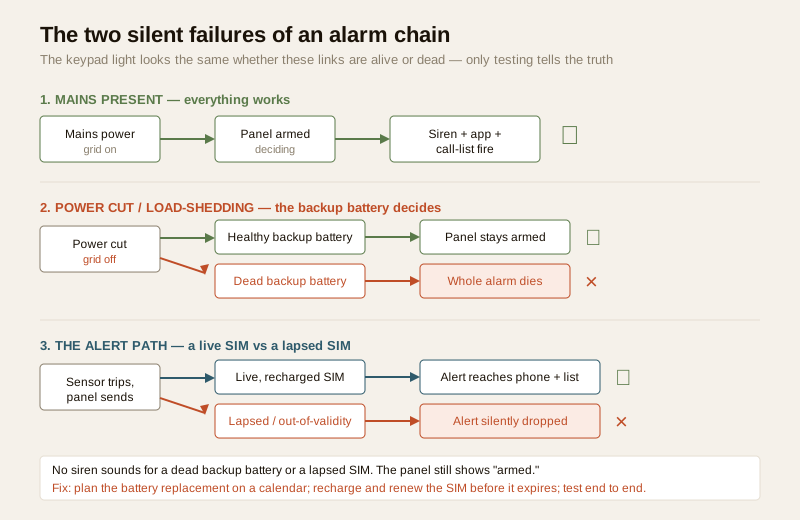
- Batteries age out silently. The panel's backup battery and every wireless sensor's cell have a finite life. A flat backup battery does nothing on a normal day — the mains carries the load — but the first power cut, the panel dies mid-arm and the intruder walks in during load-shedding.
- The SIM lapses without a word. A prepaid GSM SIM that is not recharged simply stops sending, and no siren announces it. You find out only when you test — or when an alert you expected never arrives.
- Sensors get dirty and mis-triggered. Dust, cobwebs, insects drawn to the warm lens, and monsoon grime on an outdoor sensor cause both missed detections and endless false alarms.
- The physical layer degrades. A door contact drifts out of alignment as the frame swells in the monsoon, a wireless sensor's signal weakens, a siren's own battery fades.
The fix is not clever; it is regular. A short, repeatable routine catches every one of these before it becomes the night you needed the alarm and it stayed silent.
The maintenance calendar
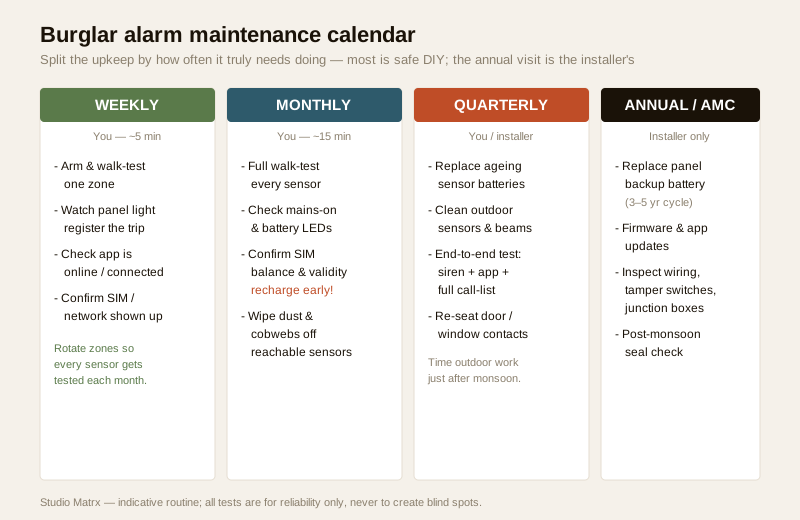
The trick is to split the work by how often it truly needs doing. Most of it you can do yourself; the parts that need the panel opened, the mains, or a ladder belong to the installer.
| When | Task | Who | Time / cost |
|---|---|---|---|
| Weekly | Arm the system and walk-test one zone; confirm the panel registers the trip | You | ~5 min, free |
| Weekly | Glance at the app: is the system online and the SIM/network connected? | You | included |
| Monthly | Full walk-test — trigger every motion sensor, door and window contact and confirm each shows on the panel/app | You | ~15 min, free |
| Monthly | Check the mains-on and battery LEDs; confirm no fault or low-battery warning | You | included |
| Monthly | Confirm the GSM SIM has balance and is within validity; recharge before it lapses | You | recharge cost only |
| Monthly | Wipe dust and cobwebs off every sensor you can reach from the ground | You | included |
| Quarterly | Replace wireless sensor batteries showing low, or on their planned cycle | You | battery cost |
| Quarterly | Clean outdoor sensors and beam sensors; clear insects, webs, monsoon grime | You / installer | part of AMC |
| Quarterly | Full end-to-end test: siren sounds, app alert arrives, every name on the call-list is reached | You | free |
| Quarterly | Check door/window contact alignment; re-seat any that drifted with the frame | You / installer | included |
| Annual | Replace the panel backup battery around its rated life (typically 3–5 years) | Installer | battery + labour |
| Annual | Apply firmware and app updates to panel and hub | Installer | part of AMC |
| Annual | Inspect wiring, tamper switches and junction boxes, especially post-monsoon | Installer | part of AMC |
Time the quarterly outdoor clean and the annual service for just after the monsoon (roughly October across most of India). That is when grime, insect nests and moisture ingress are at their worst, so a single well-timed visit catches the most.
The weekly walk-test, in plain steps
A walk-test is simply arming the system (or using the panel's dedicated test/walk mode, which sounds no siren) and then moving through the protected area to confirm each sensor "sees" you and the panel logs it. It is the single most valuable habit, because it exercises the whole detect-decide chain. Weekly:
1. Arm or enter test mode. Use the installer-set walk-test mode if you have one, so the siren does not sound and the neighbours are not disturbed.
2. Trip one zone. Walk past a PIR, open a door contact — watch the panel or app register the zone.
3. Watch the health LEDs. Mains-on steady, backup battery healthy, no fault light.
4. Confirm the app is online. A greyed-out or "offline" app usually means the GSM/network path is down — the exact link that carries your alert.
Rotate which zone you test so that over a month, every sensor has been walk-tested at least once. For how each sensor type should behave, see the guides on PIR sensors and dual-technology sensors.
Batteries: the number-one silent failure
More alarms are let down by a dead battery than by anything else, and the reason is cruel: a flat battery is invisible until the exact moment you need it. There are two battery systems to keep alive.
The panel backup battery
The panel runs on mains, but a sealed rechargeable backup battery (commonly a 12V sealed lead-acid or lithium pack) is what keeps it armed through a power cut. In India, where load-shedding is routine, this battery is the heart of reliability. A healthy one holds the panel up for several hours; an aged one that no longer takes charge means the alarm dies the instant the power blinks — which is also a favourite moment for a break-in.
- Life is 3–5 years typically. It degrades whether or not it is ever called on. Plan a replacement on a calendar, not on a warning.
- Watch for the low-battery/fault signal. Most panels flag a failing backup with a fault light or app alert — but do not rely on it alone, because a truly dead cell can fail to report.
- The swap is an installer job. The backup battery sits inside the panel enclosure alongside mains-connected terminals. Replacing it means opening the panel — hand this to the installer, and insist they fit the correct rated battery, not a generic substitute.
- After any long power cut, re-check. A backup battery that just carried a multi-hour outage should recover; if the panel does not clear its low-battery state after a day back on mains, the battery is done.
Wireless sensor batteries
Every wireless motion sensor, door contact and window contact runs on its own small cell (often a CR123A, a coin cell, or a AA/AAA pack). These you can usually change yourself.
- Most systems report low sensor batteries by zone on the panel or app — treat that as a to-do, not a nuisance to dismiss.
- Replace like-for-like. Match the exact cell the sensor uses; a wrong or cheap cell can under-power the radio and cause dropouts that look like false alarms.
- Do a planned sweep. Rather than waiting for each to die, many households swap all sensor batteries on a yearly cycle so nothing lapses unnoticed. Note the date inside the sensor lid.
- Walk-test the sensor after every swap to confirm it re-joined and detects — a battery change that leaves a sensor un-paired is a silent hole.
Keeping sensors clean and clear
A PIR sensor detects the heat of a moving body through a segmented lens. Anything on that lens — dust film, a cobweb, a dead insect, monsoon grime on an outdoor unit — both blinds it to real intruders and triggers false alarms when a web strand or insect crosses the field. In India, sensors near a warm outdoor light are insect magnets, and the monsoon coats everything outdoors in a fortnight.
- Wipe with a soft, dry or barely-damp microfibre cloth. Never spray cleaner directly onto a sensor or use anything abrasive.
- Clear webs, nests and insects from the whole housing, not just the lens face — including beam sensors and outdoor perimeter units where a broken beam path means constant false trips or a blind spot.
- Check the sensor's aim has not drifted. A unit knocked by a cleaner, a curtain or a ceiling-fan draft may now stare at a heat source (a window catching afternoon sun, an AC outdoor unit) and false-trigger — re-aiming is part of false-alarm prevention, never about opening a gap in coverage.
- Only clean what you can reach from the ground. Anything at height is a ladder job, and a ladder job is the installer's.
Door and window contacts drift too. As timber frames swell in the monsoon and shrink in summer, the gap between the magnet and the reed contact changes; a contact that no longer closes reliably throws faults or fails to detect an opening. A quick monthly check — open and close each protected door and watch the zone register — catches it.
The SIM, the siren and the whole alert chain
An alarm that detects perfectly but cannot tell anyone is only half a system. The Indian reality is that almost all home alarms are self-monitored: the siren warns locally, and a GSM/app path pushes an alert to you and a call-list. There is no automatic verified-alarm-to-police dispatch — a human verifies, then dials 112 (or 100). So every link in that human chain has to be tested end to end.
The GSM SIM — validity is everything
- A prepaid SIM lapses silently. If it runs out of balance or crosses its validity date, it stops sending — and nothing on the panel screams about it. Set a calendar reminder to recharge and renew validity well before it expires, and keep a note of the number and plan.
- Confirm balance and validity monthly. Many alarm SIMs are on an annual or long-validity plan precisely to avoid lapses — but "long validity" still ends, so verify the date.
- Choose 4G, not 2G. With the 2G sunset underway, a 2G-only alarm dialler can go dark when the carrier retires the band. If your panel is 2G-only, plan a connectivity upgrade with the installer.
- Test that an alert actually arrives. Balance showing is not proof of delivery — trigger a test and confirm the SMS/app notification lands on every listed phone.
The siren, app and call-list — test end to end
Quarterly, run one full live test (warn the family and neighbours first so nobody panics):
1. Trigger a sensor with the system armed and confirm the siren actually sounds at full volume — a siren with a flat internal battery may only chirp.
2. Confirm the app push and SMS arrive on your phone within seconds.
3. Confirm every name on the call-list is reached — the second and third contacts often never get tested and quietly have the wrong number saved.
4. Confirm the practical first responder knows the drill — in most Indian homes and gated communities that is the society guard or a neighbour, who then verifies and dials 112. There is no police auto-dispatch; the human chain is the system.
| Alert link | How to test | A pass looks like | A silent failure looks like |
|---|---|---|---|
| Local siren | Trigger armed; listen | Full-volume sound | A weak chirp (flat siren battery) |
| GSM SIM | Check balance + validity; send test | Alert delivered | "Sent" but nothing arrives (lapsed SIM) |
| App push | Trigger; watch phone | Notification in seconds | Nothing (app logged out / offline) |
| Call-list | Test each contact | Every name reached | Wrong or old number saved |
| First responder | Brief the guard/neighbour | They know to verify + dial 112 | No one knows the plan |
Firmware and app updates
The panel, hub and app are small computers, and an un-patched one is both a security hole and a source of bugs. Once a year, or when the manufacturer flags a fix:
- Apply firmware updates to the panel and hub — carefully, ideally via the installer, since a bad flash can brick a panel. Read the maker's release notes.
- Keep the mobile app current and confirm you are still logged in with a strong password and, where offered, two-factor authentication. An app that logged itself out is an alert path that is silently down.
- Review who has access — remove any departed installer's standing remote access, the same way you would take back a house key. See the smart security systems guide.
Is an AMC worth it?
An Annual Maintenance Contract is a yearly agreement with the installer or a service company to keep the alarm healthy — scheduled visits, cleaning, tests, battery replacement and a promise to respond when something breaks. AMC culture is well established in India, and for the parts you cannot safely do yourself it earns its fee.
An AMC makes sense when:
- Sensors are at height or the system is large (a villa, a society, a shop) and you cannot clean, test or re-align everything yourself.
- You want the panel backup battery and any mains work handled by a qualified hand on a schedule.
- You want a guaranteed response time when the alarm faults, rather than scrambling to find someone.
You might skip a formal AMC when:
- It is a small wireless home system of a few reachable sensors and you are happy to do the weekly walk-tests, monthly checks and battery swaps yourself, calling a technician only when something actually breaks (pay-per-visit).
What a good AMC must cover
The difference between a useful AMC and a paper one is in the fine print. Insist these lines are named explicitly:
| Line item | What to insist on |
|---|---|
| Number of visits | A specific number a year (2–4), not "as needed" |
| Testing | Every visit walk-tests all sensors and runs a full end-to-end alert test |
| Batteries | Panel backup battery replaced on cycle; is it included or billed? |
| Cleaning & alignment | Sensors, beams, door/window contacts cleaned and re-aligned each visit |
| SIM & connectivity | Checked for validity and network; 2G-to-4G upgrade path noted |
| Firmware | Panel/hub updates applied as part of the contract |
| Fault response time | A written SLA (e.g. same-day or within 48–72 hours) |
| Parts: included or extra | Comprehensive (parts covered) vs labour-only (parts billed) |
| Visit report | A short written report you keep after every visit |
| Data & access terms | No standing remote access; your passwords and app account stay yours |
Typical Indian AMC cost bands
Treat these as indicative 2026 ballparks to sanity-check a quote, not fixed rates — they move with city, sensor count, brand and whether parts are included, and are generally quoted inclusive of GST for a bundled service.
| System | Labour-only AMC (₹/yr) | Comprehensive AMC, parts included (₹/yr) |
|---|---|---|
| Small home, few wireless sensors | ₹1,500 – ₹3,500 (indicative) | ₹3,500 – ₹7,000 (indicative) |
| Larger home / villa | ₹2,500 – ₹6,000 (indicative) | ₹6,000 – ₹14,000 (indicative) |
| Small shop / office | ₹3,000 – ₹7,000 (indicative) | ₹8,000 – ₹18,000 (indicative) |
| Society / gated community | ₹15,000 – ₹60,000+ (indicative) | negotiated per site |
| Pay-per-visit (no contract) | — | ₹500 – ₹2,000 per visit (indicative) |
Recurring costs sit alongside the AMC and are easy to forget when budgeting — cross-check the full picture with the burglar alarm cost guide and the cost estimator:
| Recurring item | Indicative 2026 range | Notes |
|---|---|---|
| GSM SIM recharge/validity | ₹150 – ₹1,000 / yr | Long-validity plans avoid silent lapses |
| Wireless sensor batteries | ₹80 – ₹300 per sensor, every 1–2 yr | Replace like-for-like |
| Panel backup battery | ₹800 – ₹2,500, every 3–5 yr | Installer-fitted |
| App / cloud monitoring subscription | ₹0 – ₹3,000 / yr | Many self-monitored systems are free |
| AMC | see table above | Optional but valuable for large/high systems |
For a small reachable wireless system, pay-per-visit plus your own weekly checks often works out cheaper than a full AMC. For a villa, shop or society, a comprehensive AMC with a named response time and per-visit reports is usually money well spent — and the RWA should hold the vendor to those reports.
When to bring in a professional. Do the weekly walk-tests, monthly health checks, SIM recharges, ground-level sensor cleaning, wireless sensor battery swaps and the end-to-end alert test yourself. Hand anything inside the panel, the sealed backup battery, mains-connected work, work at height, wired-sensor changes, firmware flashing and any repeated unexplained false alarm to a licensed installer or electrician — see the electrical hub. If you run a society system, make the AMC vendor produce a written report each visit and keep them to the response-time SLA. Never give a departing contractor lingering remote access to your system.
Key takeaways
- Burglar alarm maintenance is a weekly habit, not an annual event — a short walk-test each week plus monthly health checks catch a dead link before the night it matters.
- Batteries are the number-one silent failure: a flat panel backup battery kills the alarm during load-shedding, so plan a replacement on a 3–5 year calendar and swap wireless sensor cells on a yearly sweep — never wait for the warning that may never come.
- A lapsed SIM fails silently — set a reminder to recharge and renew GSM validity before it expires, choose 4G over 2G, and test that an alert actually arrives, not just that balance shows.
- Keep sensors clean and aligned: dust, cobwebs and insects blind a PIR and cause false alarms; wipe reachable units monthly and re-check door/window contact alignment as frames move with the seasons.
- Test the whole chain end to end — siren, app push and every call-list contact — and remember the practical first responder in India is the guard or neighbour who verifies and dials 112; an AMC is worth it for large, high or society systems where you want a guaranteed response.
References
- Manufacturer specifications — verify the panel backup battery type and rated life, wireless sensor battery model, GSM band support (prefer 4G with the 2G sunset), and firmware release notes on the maker's own datasheet before replacing or updating any part.
- Emergency response — India has no automatic verified-alarm-to-police dispatch; a person must verify and dial the national emergency number 112 (or police 100). Brief your household, guard or neighbours on this chain.
- Digital Personal Data Protection Act, 2023 — alarm-linked app accounts and any linked camera footage are personal data; keep passwords private and do not leave a service provider standing remote access without written terms.
- National Building Code of India (SP 7), Bureau of Indian Standards, and local bye-laws for any mains-connected or fixed-wiring aspect of an alarm service; verify the current edition via the BIS catalogue: https://www.services.bis.gov.in/
This is an educational overview, not legal advice. Opening the panel, the sealed backup battery, work at height, wired-sensor changes, firmware flashing and any mains-connected work are qualified professional tasks — engage licensed installers and verify any standard's current status via the BIS catalogue before relying on it.
Export this guide
Related Guides — Deep-dive reading
False Alarm Prevention for Burglar Alarms in India: Causes & Fixes (2026)
Why home alarms cry wolf — ceiling fans, pets, heat, insects, weak batteries, power blips and poor door alignment — and how correct placement, the right sensors and simple upkeep keep the system trusted and armed.
SecurityAlarm Siren Not Working (2026): Why It Triggers but Stays Silent in India
Your burglar alarm detects and the panel reacts, but the siren does not sound, or sounds weak and thin. A calm, ordered diagnostic for Indian homes: the settings, power, backup battery, wiring and hardware faults that leave an alarm that cannot be heard, what you can safely check yourself, and when to call your installer.
SecuritySecurity Sensor Testing in India (2026): A Homeowner's Monthly Walk-Test
How to regularly test the detectors your alarm depends on — PIR motion, door and window contacts, glass-break and vibration, and perimeter beams — safely and without setting off a real monitored alarm, so an untested sensor never becomes a silent gap the night it matters.
SecurityRelated Tools — Try Free
Burglar Alarm Cost Estimator
Get an indicative burglar alarm cost for India — upfront equipment and fitting plus first-year and five-year running costs — from your home size, system type, coverage, monitoring and add-ons. A planning ballpark, not a quote.
Cost EstimatorSecurity System Cost Estimator
Estimate the all-in capex with GST, annual running cost and 5-year total cost of ownership of a home or building security system.
Cost EstimatorApartment Video Door System Planner
Enter flats, entrances, floors and guard desk for a first-pass building intercom plan — door stations, indoor monitors, guard station, the right architecture and an indicative cost band.
Building Planner