
Wireless Burglar Alarms in India (2026): A Homeowner's Buying Guide
How radio-linked burglar alarms work, why they dominate Indian retrofits and rentals, and the honest trade-offs to weigh before you buy: batteries to monitor, radio range through thick walls, and choosing a supervised, encrypted system.
Ask most Indian homeowners why they never fitted a burglar alarm and the answer is rarely cost. It is the mess: chasing channels into finished walls, running cable behind furniture, the plaster dust, the electrician for three days. A wireless burglar alarms system removes that objection entirely. The sensors talk to the control panel over radio, so nothing is buried in a wall, and a whole flat can be protected in an afternoon with a drill, some screws and a smartphone.
That convenience is exactly why wireless has become the default for the Indian retrofit and DIY market. But wireless is a genuine engineering choice with genuine trade-offs, and the cheapest kit online hides most of them. This guide, part of Studio Matrx's burglar alarm hub and its pillar overview, explains how radio alarms actually work, why they suit finished homes and rentals, and the buying questions that separate a system you can trust from one that quietly fails.
Scope & safety. This is a buyer's and planner's guide, not an installation manual, and it is strictly about how detection works and how to choose it well — never how to defeat any alarm. Two things to hold in mind throughout. First, most Indian alarms are self-monitored: they warn you, a guard or a neighbour via siren, a GSM call/SMS or an app; there is no reliable automatic police dispatch as in the US or UK, so plan around who actually responds. Second, a wireless system runs on batteries and needs power backup at the panel — get that wrong and it dies silently. This is educational guidance, not legal advice.
What "wireless" actually means here
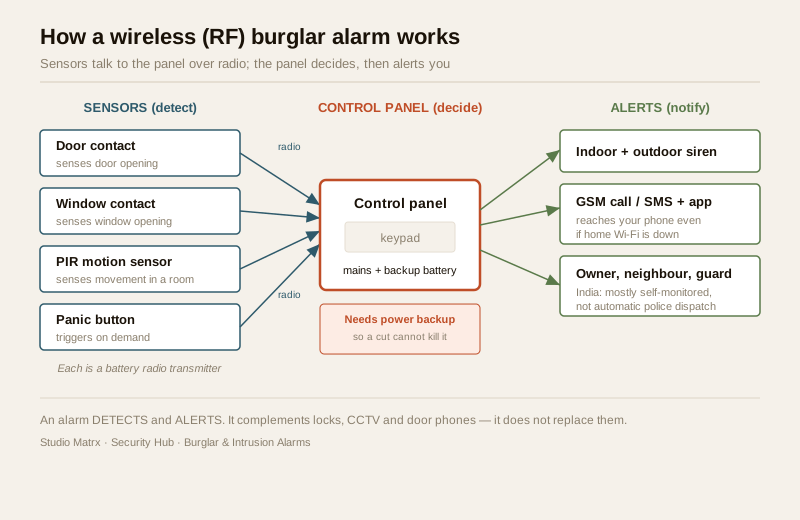
Every intrusion alarm has the same three parts: sensors that detect (a door opening, motion in a room, glass breaking), a control panel that decides whether that means an intrusion, and alerts that tell someone (a siren, a phone call, an app notification). The word "wireless" describes only the first link — how the sensors talk to the panel.
- In a wired system, every sensor has a cable running back to the panel. Robust and battery-free at the sensor, but it means cabling through your walls — see wired burglar alarms.
- In a wireless (RF) system, each sensor is a small self-powered radio transmitter. When a door opens, the sensor sends a short coded radio message to the panel on a licence-free band. No cable to the sensor at all.
- A hybrid system mixes both — wired where it is easy, wireless where it is not — covered in hybrid alarm systems.
The panel is still the brain and still needs mains power (with a backup battery), and the outdoor siren still needs its own power. What wireless changes is that you no longer chase cable to every window and door. That single difference is why it wins in finished homes.
Why wireless dominates the Indian retrofit market
For a home that is already lived in, wireless is not just easier — it is often the only sensible option. The reasons stack up:
- No wall-chasing, no plaster damage. The biggest one. Sensors mount with screws or adhesive pads; nothing is cut into a finished wall. A flat that is fully furnished and occupied stays that way.
- Fast install — hours, not days. A typical apartment kit goes up in an afternoon. There is no cable to pull, so no long electrician visit and no downtime.
- Easy to add, move or expand. Decided the study needs a motion sensor too? Pair one more and stick it up. Rearranged the rooms? Move a sensor. A wired system would need fresh cable each time.
- Ideal for rentals. Tenants can protect a rented flat without cutting into a landlord's walls, and take the kit with them when they move. For rented apartments this is often the deciding factor — see the apartment security guide.
- Reaches awkward spots. A detached gate, an outhouse, a first-floor window with no easy cable route — a radio sensor reaches places a cable run would fight.
For a new build, where walls are open and cable is cheap to lay, the calculus shifts back towards wired or hybrid; plan that at the wiring stage alongside your electrical work. But India's installed housing stock is overwhelmingly finished, and that is why the retrofit market runs on wireless.
The honest trade-offs — as buying questions
Wireless convenience is real, and so are its trade-offs. None of them makes wireless a bad choice; each is simply a question to ask before you buy, with a clear way to get it right. Framing them as buying considerations is the whole point — a well-chosen wireless system handles all three.
1. Every sensor has a battery — so insist on supervision
The flip side of "no cable" is that each sensor carries its own battery, usually a coin cell or a small lithium pack lasting one to several years. That is a set of small power sources you are now responsible for. The danger is not the battery itself; it is a battery going flat without you knowing, leaving a door silently unprotected.
The answer is a single feature: supervision. A supervised system has every sensor check in with the panel at regular intervals. If a sensor's battery runs low, or a sensor stops reporting altogether, the panel tells you — a low-battery warning on the app, a beep, a keypad message. Buy a supervised system and battery management becomes a calm, scheduled task; buy an unsupervised one and you are trusting to luck. This is the most important single question to ask of any wireless kit.
2. Radio range and thick walls
Radio signals weaken with distance and with what they pass through. Indian homes are frequently built with thick brick, RCC and stone — kinder to privacy than to radio. A sensor at the far end of a large villa, or behind two reinforced-concrete walls, may sit at the edge of reliable range.
This is a layout and product question, not a reason to avoid wireless. Ask about the kit's rated range and choose one with margin; place the panel centrally; and for larger homes look for a system that supports repeaters (which relay the signal) or a mesh design. A supervised system also helps here, because if a distant sensor's link is marginal, the panel's check-in will flag it rather than let it fail quietly. For a large plot or a villa, size this deliberately — the villa and independent-house security guide covers the spread-out-site problem.
3. Choose a reputable, encrypted, supervised system — not the cheapest kit
The market is full of very cheap unbranded wireless kits. The problem with the bottom of the market is reliability and integrity: thin build quality, short battery life, poor after-sales support, and radio links that are neither encrypted nor supervised. An encrypted, supervised, rolling-code link from a reputable maker is a robust, dependable system; treat encryption and supervision as a quality and reliability benchmark you are buying, the same way you would judge a lock by its make.
Practically, that means: buy from an established brand with Indian service support, insist the radio link is encrypted and the sensors supervised, check the warranty, and read the datasheet rather than the marketplace listing. Spending a little more here buys years of dependable operation.
Wireless vs wired vs hybrid — which fits your home
There is no universally best answer; there is a best answer for your building and situation.
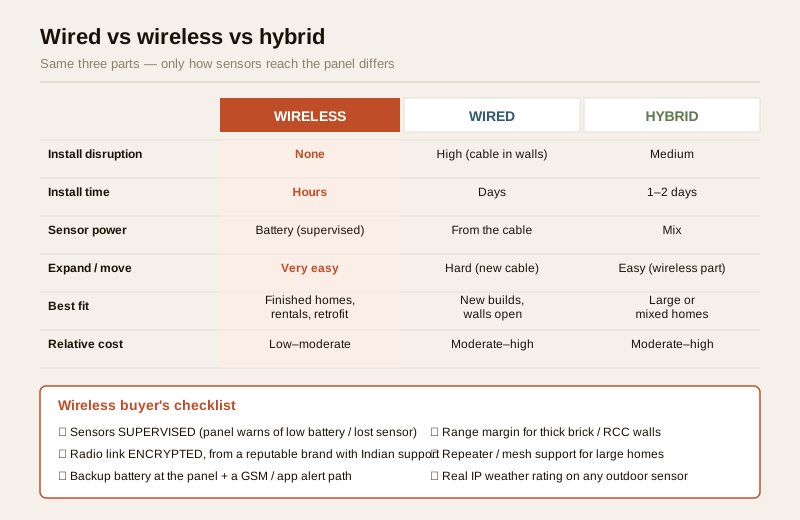
| Factor | Wireless (RF) | Wired | Hybrid |
|---|---|---|---|
| Install disruption | None — no wall-chasing | High — cabling in walls | Medium |
| Install time | Hours | Days | 1–2 days |
| Sensor power | Battery (monitor + replace) | Powered by the cable | Mix |
| Expand / move sensors | Very easy | Hard (new cable) | Easy for wireless parts |
| Best fit | Finished homes, rentals, retrofits | New builds, walls open | Large or mixed homes |
| Rentals | Ideal — take it with you | Poor — cuts into walls | Poor to fair |
| Typical relative cost | Low to moderate | Moderate to high (labour) | Moderate to high |
A quick way to choose:
- Finished flat or house, or a rental? Wireless is almost always the right call.
- Building or fully renovating? Consider wired or hybrid while the walls are open.
- Large villa or mixed situation? Hybrid often wins — wired on the easy runs, wireless for the awkward corners.
Not sure? The burglar alarm system selector walks you through home type, tenure and budget to a shortlist, and the smart security systems guide covers how an alarm sits alongside app control and other devices.
Power cuts: the reliability question wireless makes you face
Here is the point most cheap kits skate over, and it matters more in India than almost anywhere. A wireless system is only as reliable as its power. Two distinct power problems:
- The sensors run on their own batteries — handled by supervision, above.
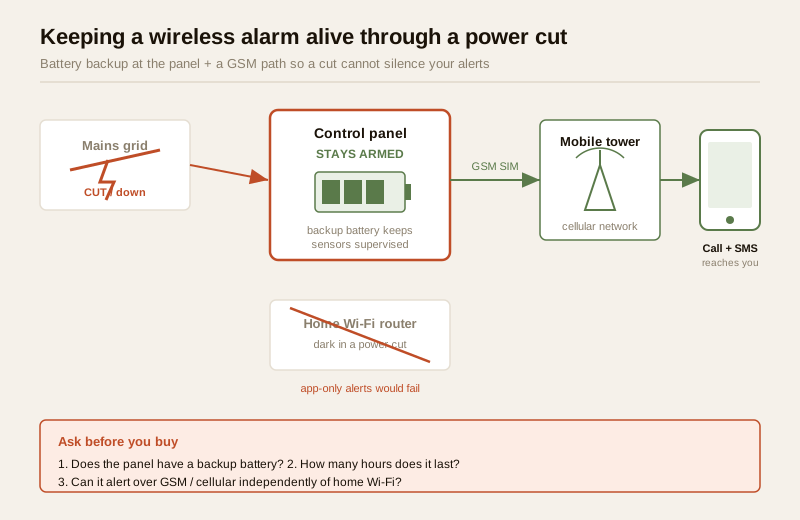
- The control panel and siren normally run on mains, and India has power cuts. A panel with no backup battery dies the moment the power goes, and a burglar does not wait for the grid. So the panel must have its own rechargeable backup battery, and you should know roughly how many hours it lasts on a cut.
There is a subtler trap. If your alerts depend only on home Wi-Fi or the internet, a power cut that takes down your router also silences your alerts — the siren may sound locally, but no message reaches your phone. This is exactly why a GSM/cellular path matters: a panel with its own SIM can call or SMS you even when the mains and broadband are down, provided its battery is holding. When you buy, ask three questions: does the panel have a backup battery, how long does it last, and can it alert over GSM/cellular independently of home Wi-Fi? For the mains supply and any spur to the panel, involve a licensed electrician — see the electrical hub.
| Power scenario | What happens | What protects you |
|---|---|---|
| Sensor battery runs low | Door could go unprotected | Supervision warns you in advance |
| Short power cut | Panel loses mains | Panel backup battery keeps it armed |
| Long cut + router down | Wi-Fi alerts fail | GSM/cellular path calls/SMS you |
| Panel battery flat + cut | System dies silently | Know the battery hours; recharge/replace on schedule |
India realities: monsoon, dust and outdoor sensors
Most wireless sensors — door contacts, PIR motion detectors — live indoors, where they are happy. The moment you extend wireless outdoors, Indian weather enters the picture:
- Monsoon and humidity. An outdoor wireless sensor must be genuinely weather-rated (a real IP rating on the datasheet), or moisture works into it and causes false alarms or early failure. Check the rating; do not trust "outdoor" on a listing.
- Dust and heat. Summer dust and 40-plus-degree heat shorten battery life and can foul a lens. Outdoor battery sensors need their power checked more often — another reason supervision earns its keep.
- Insects, pets and fans. Indoor motion sensors can false-trigger on ceiling fans, curtains moving in a draught, insects crossing the lens, or a pet. Choose pet-immune PIRs if you have animals, mount sensors thoughtfully, and use the panel's zones so a fan-heavy room is handled sensibly. Placement is a buying-and-planning skill; sensor-by-sensor deep-dives come in later guides in this hub.
- Cost, in rupees. A basic wireless kit (panel, keypad, a few door sensors, one PIR, a siren) starts modestly and scales with sensor count, GSM/app features and brand. Spending at the reputable, supervised, encrypted end is the value buy over a five-year horizon; the cheapest kit is usually the most expensive once it fails.
An alarm is one layer. It detects and alerts — it does not lock a door or record a face. Pair it with good locks and access control, CCTV and a video door phone, and think in layers using the layered security design guide. For the outer boundary of a plot, a perimeter alarm system is the outdoor-first cousin of the indoor kit described here.
When to bring in a professional. You can mount wireless sensors, pair them and run the app yourself — that is the whole appeal. Hand over the parts that are not DIY: any mains connection or spur to the panel and outdoor siren belongs to a licensed electrician (electrical hub); a large or spread-out property benefits from a professional survey to place the panel, size repeaters and confirm range; and if you want central-station or guard-response monitoring, contract a reputable provider and read exactly what "response" means — remembering that automatic police dispatch is not a given in India.
Key takeaways
- Wireless burglar alarms link sensors to the panel over radio, so they install in hours with no wall-chasing — which is why they dominate India's retrofit, rental and DIY market.
- Every wireless sensor has a battery, so insist on supervision — a supervised system warns you of a low battery or a lost sensor instead of leaving a door silently unprotected.
- Radio range and thick Indian walls are a layout question, not a dealbreaker: choose a system with range margin, place the panel centrally, and use repeaters for large homes.
- Buy reputable, encrypted and supervised, not cheapest — treat encryption and supervision as a reliability benchmark you are paying for, the same way you judge a lock by its make.
- Plan for power cuts: the panel needs a backup battery, and a GSM/cellular alert path so a cut that downs your Wi-Fi cannot also silence your alerts. Use the system selector to choose, and remember an alarm complements — never replaces — locks, CCTV and door phones.
References
- Digital Personal Data Protection Act, 2023 — an app-connected or monitored alarm, and any indoor motion sensor tied to it, handles personal data; keep app passwords private and agree in writing who may access alerts or any linked footage before signing up to a monitoring service.
- Manufacturer specifications — verify a wireless system's radio encryption, sensor supervision, rated range, battery life, panel backup-battery hours, GSM/cellular capability and any outdoor sensor's IP weather rating on the maker's own datasheet before buying.
- National Building Code of India (SP 7), Bureau of Indian Standards, and local municipal bye-laws for the mains-electrical aspects of a panel or siren supply; verify the current edition via the BIS catalogue: https://www.services.bis.gov.in/
This is an educational overview, not legal advice. Mains-electrical connections, work at height and any professional monitoring or response contracting are qualified tasks — engage licensed electricians and reputable providers, and verify any standard's current status via the BIS catalogue before relying on it.
Export this guide
Related Guides — Deep-dive reading
Wired Burglar Alarms in India (2026): The Reliability Benchmark
Why a hardwired alarm — every sensor on a cable back to the panel — is the set-and-forget benchmark for reliability, when it is the right call, and the honest trade-offs of running it in an Indian home.
SecurityFalse Alarm Prevention for Burglar Alarms in India: Causes & Fixes (2026)
Why home alarms cry wolf — ceiling fans, pets, heat, insects, weak batteries, power blips and poor door alignment — and how correct placement, the right sensors and simple upkeep keep the system trusted and armed.
SecuritySmart Home Security Systems in India: CCTV, Sensors, Alarms & AI
How to think in layers — perimeter, entry, interior — and build a system that actually protects an Indian home: AI cameras, video door phones, door and glass-break sensors, alarms, panic buttons, gate automation, monitoring and DPDP-aware privacy, with real brands and rupee costs.
Smart HomeRelated Tools — Try Free
Apartment Video Door System Planner
Enter flats, entrances, floors and guard desk for a first-pass building intercom plan — door stations, indoor monitors, guard station, the right architecture and an indicative cost band.
Building PlannerBurglar Alarm System Selector
Answer a few questions about your property, cabling, coverage, monitoring and power and get the right burglar alarm — wired / wireless / hybrid, self or professionally monitored — with the design non-negotiables.
Alarm SelectorVideo Door Phone Type Selector
Answer a few questions about your building, cabling, budget and internet and get the right video door phone — analog / wired / wireless / IP, single-home or multi-apartment, monitor or app.
Door Phone Selector