
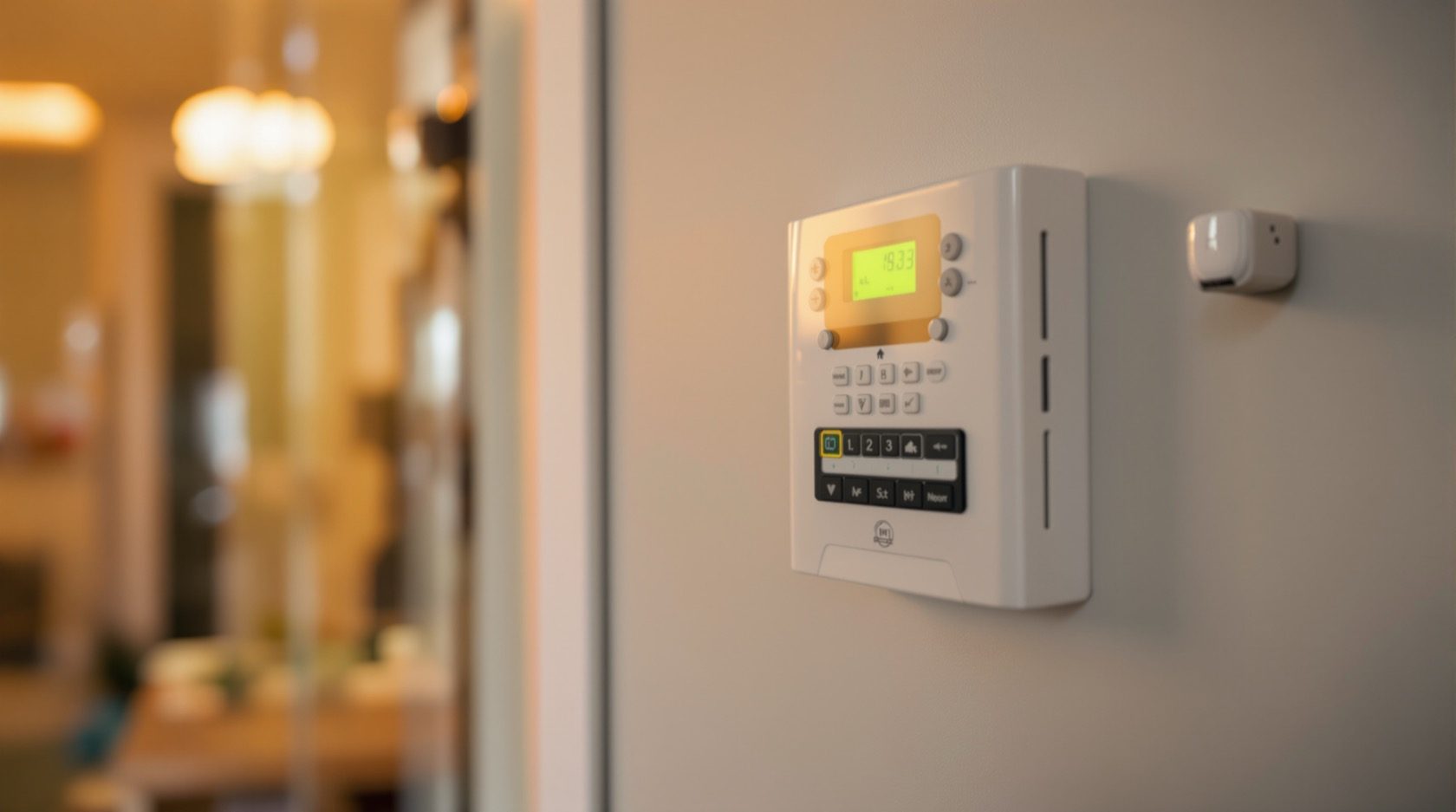
Hybrid Alarm Systems in India (2026): Wired Where You Can, Wireless Where You Can't
One control panel that accepts both wired and wireless sensors — so you hardwire the main doors and critical zones for rock-solid reliability, and go wireless for hard-to-reach windows, outbuildings and later expansions. Why hybrid is often the pragmatic best-of-both for Indian homes.
Most homeowners are told they must pick a side: a fully wired alarm, run in conduit for rock-solid reliability, or a fully wireless one, quick to fit with no chasing of walls. In practice, a real Indian home rarely fits neatly into either box. The main doors are easy to reach during a renovation; the first-floor windows and the detached pump-house are not. The living areas are being re-plastered anyway; the finished bedrooms upstairs are off-limits to cable. Forcing the whole house into one method means either tearing up finished walls, or trusting your front door to a coin-cell battery.
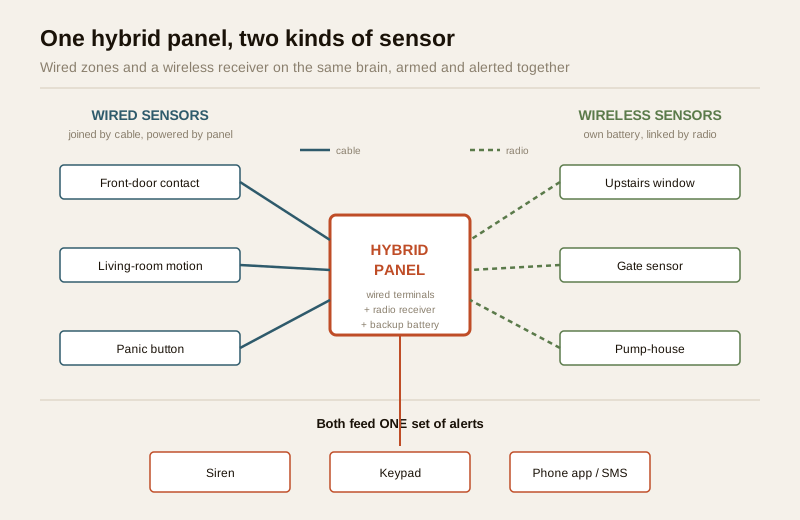
Hybrid alarm systems solve exactly this. A hybrid panel is a single control panel that accepts both wired and wireless sensors at the same time — so you hardwire the parts you can reach and go wireless where you can't, all reporting to one panel and one app. It is very often the pragmatic best-of-both for Indian homes, and this guide explains why, when it makes sense, and how to decide which zone goes which way.
Scope, safety & the honest India picture. This guide helps you plan and specify a hybrid system and brief an installer; leave mains-electrical work, cabling at height and any professional monitoring contract to licensed pros. Be clear-eyed about monitoring: unlike the US or UK, central-station monitoring with automatic police dispatch is limited and nascent in India — most alarms here are self-monitored, alerting you (and perhaps a guard or neighbour) by siren, GSM call/SMS or app. And whichever mix you choose, the panel and its sensors are only as reliable as their battery backup — in a country of routine power cuts, a system with no backup dies with the mains. This guide is strictly about how to detect and be alerted well; it is educational, not legal advice.
What "hybrid" actually means
Every alarm system, wired or wireless, has the same three parts: sensors that detect (door contacts, motion detectors, glass-break, panic buttons), a control panel that is the brain, and alerting (siren, keypad, GSM dialer, app). The only thing that differs between wired and wireless is how the sensors talk to the panel:
- In a wired system, each sensor is joined to the panel by a physical cable. It is powered and monitored down that wire — supremely reliable, but every sensor needs a cable run back to the panel.
- In a wireless system, each sensor has its own battery and radio, and speaks to the panel over the air. Fast to fit, no chasing walls, but each sensor needs its battery watched.
A hybrid panel simply has both kinds of input: hardwired zone terminals and a wireless receiver. So one panel can watch a cabled front-door contact and a radio-linked window sensor on the same partition, arm and disarm them together, and report the lot to one app. You are not running two systems — you are running one system fed two ways.
If you want the fundamentals of each half in depth, read the two companion guides — wired burglar alarms and wireless burglar alarms — and the pillar guide to burglar alarms in India for the whole picture. This guide is about combining them.
Wired vs wireless: the trade-off a hybrid lets you dodge
The reason hybrid is so often the sensible answer is that wired and wireless have almost exactly opposite strengths. A hybrid system lets you spend each one where it counts instead of accepting the weakness of a single method across the whole house.
| Consideration | Wired sensor | Wireless sensor |
|---|---|---|
| Reliability of link | Excellent — physical cable, continuously monitored | Very good on a quality system; depends on radio range and battery |
| Install disruption | High — needs conduit/chasing; easy in a renovation, hard in a finished wall | Low — stick or screw and pair; minimal mess |
| Best fitted | During construction or a renovation, on reachable runs | Any time, especially retrofit and hard-to-reach spots |
| Power | From the panel down the wire | Own battery, needs periodic replacement (typically 1–3 years) |
| Reach | Anywhere you can run a cable | Anywhere in radio range (extendable with repeaters) |
| Ongoing upkeep | Almost none | Watch battery and signal-strength alerts |
| Per-sensor cost | Sensor cheap; labour/cable adds up | Sensor dearer; labour minimal |
The insight a hybrid unlocks: you no longer have to accept one column's weakness everywhere. Put wired where disruption is low and reliability matters most; put wireless where cabling would be painful or impossible. You get the wired column's reliability on your critical points and the wireless column's reach on the awkward ones.
When a hybrid system is the right call
Hybrid is not automatically best for every home — a small, finished flat with a handful of openings is often perfectly served by an all-wireless kit, and a house being built from bare brick can be fully wired at little extra cost. Hybrid shines in the very common in-between cases:
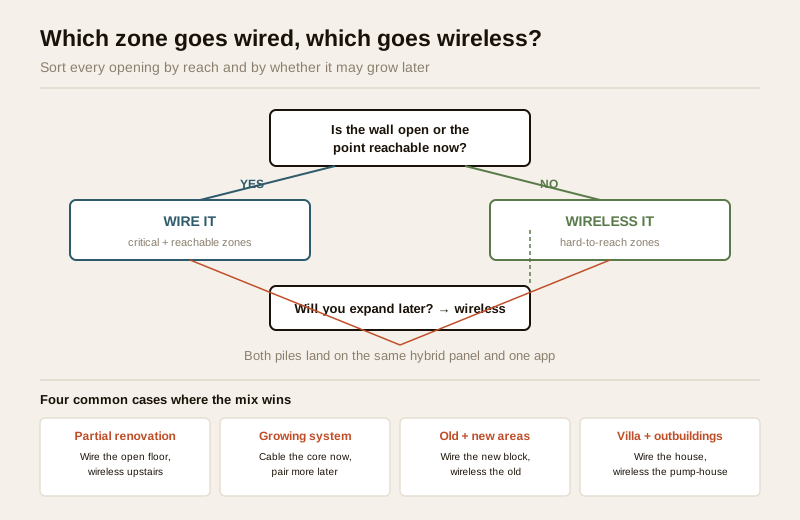
- A partial renovation. You are re-doing the ground floor but the bedrooms upstairs are untouched. Hardwire everything in the area that is already open to the mason; go wireless upstairs so you never touch a finished wall.
- A growing system. You want to start with the essentials now and add sensors later — a new gate sensor, a sensor on the store-room you will build next year. A hybrid panel lets you cable today's core and simply pair tomorrow's additions wirelessly, with no re-wiring.
- A mix of old and new areas. An old house with a modern extension: wire the new block while it is open, add wireless to the old block where chasing plaster would be destructive.
- A villa or farmhouse with outbuildings. The main house can be wired; a detached pump-house, gate cabin, garage or servant quarter is far easier to cover wirelessly (with a repeater if it is far). See the dedicated security guide for villas and independent houses.
- Long-term reliability on the front line, flexibility everywhere else. You want your main entry doors and the master-bedroom route on unbreakable wired links, but do not want to cable every window in the house.
How to decide which zones go wired vs wireless
This is the real design work of a hybrid system, and it is simpler than it sounds. Walk your home and sort every opening and zone into two piles, guided by three questions: How critical is this point? Can I reach it with cable without tearing up finished work? Might it move or grow later?
Lean wired for a zone when:
- It is a critical, first-line point — the main entry doors, the gate, the route an intruder must cross first. You want these on the most robust link available.
- The wall is already open (new build or active renovation) so cabling is cheap and tidy.
- The sensor is in a high-traffic or high-value spot where you never want to think about a battery — a strong-room, a main-door contact.
- It is a fixed, permanent location that will not move.
Lean wireless for a zone when:
- The point is hard to reach — a first-floor window, a high vent, a skylight, a spot behind finished cabinetry.
- It is in a detached structure — outbuilding, gate cabin, garage — where trenching a cable is costly.
- You expect it to be added later or to change — a future room, a temporary need.
- Chasing a cable there would damage finished surfaces you do not want to disturb.
| Zone in a typical Indian home | Usual best choice | Why |
|---|---|---|
| Main entry door(s) | Wired | First-line, critical, usually reachable — deserves the most robust link |
| Gate / compound entry | Wired if trench is open, else wireless | Depends whether cabling is feasible without digging |
| Ground-floor windows (renovation area) | Wired | Walls open during work; cheap to cable now |
| First-floor / upstairs windows | Wireless | Reaching them means disturbing finished walls |
| Living-room / hall motion sensor | Wired if reachable, else wireless | Central, often near the panel; either works |
| Detached pump-house / outbuilding | Wireless (with repeater if far) | Trenching a cable across a plot is costly |
| Panic / duress button (bedside, till) | Wireless | Must be placeable exactly where a person needs it; protects people |
| A room you will build next year | Wireless | Add it when it exists, no re-wiring |
A useful rule of thumb: hardwire your first line of defence and go wireless for depth and expansion. For a structured way to map every zone and vulnerability before you decide, the layered security design guide and the perimeter vulnerability assessment are worth a read, and the burglar-alarm system selector will suggest a starting configuration for your home type.
The trade-offs of going hybrid
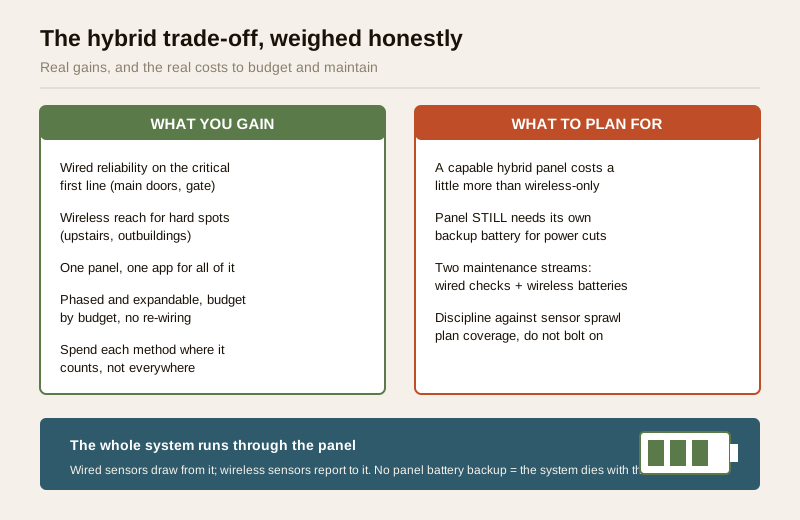
Hybrid is powerful but not free of compromise. Be honest with yourself about three things before you commit:
- A capable hybrid panel costs a bit more. A panel that accepts both wired zones and a wireless receiver is generally dearer than a bottom-end wireless-only kit. The premium is usually modest and repaid the first time you avoid tearing open a wall — but it is real, so budget for it.
- It still needs panel battery backup. This is non-negotiable and easy to forget. The whole system — wired and wireless parts — runs through the panel, and in an Indian home the panel must have its own rechargeable backup battery to survive the routine power cut. A hybrid panel with a dead backup battery is as useless in an outage as any other; size and maintain it. The wired sensors draw from the panel, and every wireless sensor still has its own battery to watch.
- Two things to maintain, not one. You inherit a little of each method's upkeep: the occasional check of wired connections and, for the wireless side, keeping an eye on the battery and signal-strength alerts the app raises. A good panel surfaces both in one place, so it is a light load — but it is not zero.
There is also a design discipline point: because a hybrid panel makes it easy to keep adding wireless sensors, it is tempting to sprawl. Plan the whole coverage first — treat the wireless expandability as headroom for a considered plan, not an invitation to bolt on sensors ad hoc.
Phasing a hybrid system over time — the Indian reality
One of hybrid's quiet strengths suits how Indian homes actually get built and improved: in phases, as budget allows. You rarely do everything at once. A hybrid panel lets you buy reliability where you are working now and add reach later, without ever re-doing what you already installed.
A typical phased path:
1. Phase one — the core, wired. While a room or floor is open for other work, hardwire the main entry doors, the ground-floor windows in the work area, and a central motion sensor. This is your robust first line.
2. Phase two — the reach, wireless. Once you move back in, add wireless sensors to the upstairs windows, the gate, and any awkward opening — no walls disturbed.
3. Phase three — depth and growth. As the home grows or budget frees up, pair in sensors for the new store-room, the pump-house, a panic button by the bed, all onto the same panel and app.
Because everything lands on one panel, arming, disarming and alerting stay unified across all three phases — you never juggle two apps or two systems. Roughly budget the hybrid panel and its wired core as the bigger up-front spend, with each wireless addition a small incremental cost thereafter; get itemised quotes, as pricing varies widely by brand, sensor count and city. For how a hybrid alarm sits alongside your other layers, see the building security systems guide and the smart security systems guide; an alarm detects and alerts, and complements — never replaces — good locks, CCTV and video door phones.
For the perimeter-first angle — protecting the boundary before an intruder reaches the building — the companion perimeter alarm systems guide covers gate, wall and compound detection, much of which is naturally wireless in a hybrid design.
When to bring in a professional. You can and should do the planning — walk the home, sort zones into wired and wireless, decide your phases, and brief the installer with a clear zone list. Hand the execution to a licensed professional: mains connection and panel power, any cabling at height or in conduit, mounting sensors on finished façades, and configuring the panel, GSM dialer and app. If you are considering a professional monitoring or guard-response contract, read the terms carefully — confirm exactly what happens when the alarm triggers, because in India automatic police dispatch is not the norm. Get the installer to demonstrate the whole system arming, triggering and alerting on both the wired and wireless zones before you sign off, and to hand over a written zone map. For any mains-connected work, see the electrical hub.
Key takeaways
- A hybrid alarm system uses one control panel that accepts both wired and wireless sensors, so you hardwire the parts you can reach and go wireless where you can't — one panel, one app.
- It is often the pragmatic best-of-both for Indian homes: reliability on the critical first line (main doors, reachable zones) and reach for the awkward ones (upstairs windows, outbuildings, later additions).
- Decide zone by zone with three questions — how critical, how reachable, will it move or grow? Lean wired for critical and reachable points, wireless for hard-to-reach, detached and future ones.
- Mind the trade-offs: a capable hybrid panel costs a little more, it still needs its own backup battery to survive India's power cuts, and you maintain two sensor types — plan the coverage rather than bolting on sensors ad hoc.
- Hybrid suits phased, budget-led upgrades: wire the core while walls are open, add wireless reach and growth later, all onto the same panel — and remember an alarm detects and alerts, complementing (not replacing) locks, CCTV and door phones.
References
- Digital Personal Data Protection Act, 2023 — indoor motion sensors and any app or professional-monitoring link involve personal data; keep panel and app passwords private and agree in writing who may access alerts or a monitoring feed.
- Manufacturer specifications — verify a hybrid panel's number of hardwired zones, its wireless capacity and frequency, backup-battery rating and standby hours, and sensor battery life on the maker's own datasheet before buying or expanding.
- National Building Code of India (SP 7), Bureau of Indian Standards, and local municipal bye-laws for any mains-electrical or life-safety aspect of an install — an alarm must never impede a fire-escape route; verify the current edition via the BIS catalogue: https://www.services.bis.gov.in/
This is an educational overview, not legal advice. Mains-electrical work, cabling at height and professional monitoring or response contracts are qualified professional matters — engage licensed installers and reputable providers, confirm what actually happens on an alarm trigger, and verify any standard's current status via the BIS catalogue before relying on it.
Export this guide
Related Guides — Deep-dive reading
Wired Burglar Alarms in India (2026): The Reliability Benchmark
Why a hardwired alarm — every sensor on a cable back to the panel — is the set-and-forget benchmark for reliability, when it is the right call, and the honest trade-offs of running it in an Indian home.
SecuritySmart Home Security Systems in India: CCTV, Sensors, Alarms & AI
How to think in layers — perimeter, entry, interior — and build a system that actually protects an Indian home: AI cameras, video door phones, door and glass-break sensors, alarms, panic buttons, gate automation, monitoring and DPDP-aware privacy, with real brands and rupee costs.
Smart HomeHow to Choose a Burglar Alarm in India (2026): Sensors, Alerts and What Actually Matters
A homeowner's guide to selecting an intruder alarm that fits your flat, villa or shop and alerts you the way you want — matching the sensor mix, control panel and the big siren-versus-monitored decision to your real risk, and dodging the false-alarm traps that make people switch systems off.
SecurityRelated Tools — Try Free
Burglar Alarm System Selector
Answer a few questions about your property, cabling, coverage, monitoring and power and get the right burglar alarm — wired / wireless / hybrid, self or professionally monitored — with the design non-negotiables.
Alarm SelectorVideo Door Phone Type Selector
Answer a few questions about your building, cabling, budget and internet and get the right video door phone — analog / wired / wireless / IP, single-home or multi-apartment, monitor or app.
Door Phone SelectorAccess-Control Battery-Backup Calculator
Size the standby battery so an access system keeps running through a power cut, with an egress life-safety note.
Battery Backup