
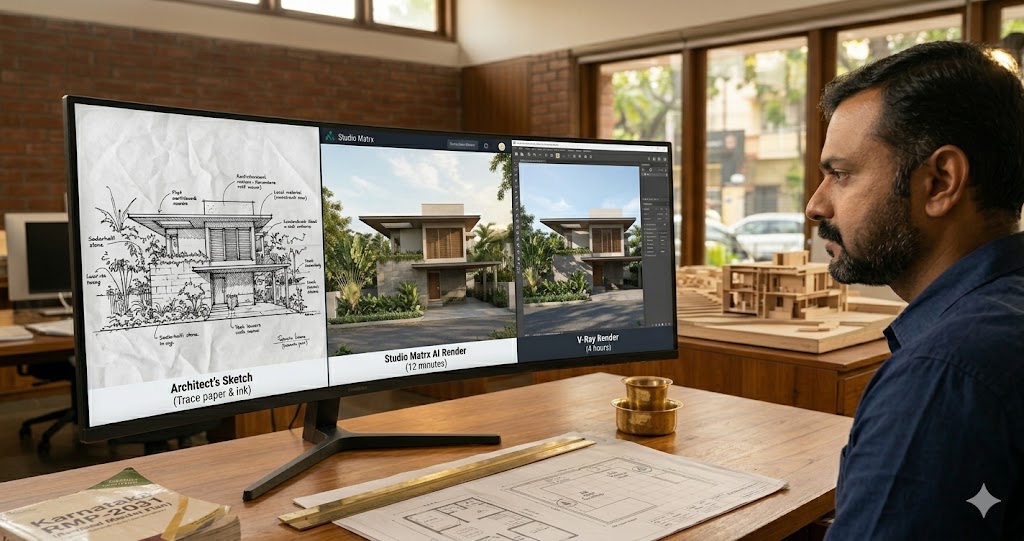
AI Render Generator — Photoreal AI Rendering for Indian Architects + Designers (2026)
Sketch/photo/white-box → photoreal · 12 min vs V-Ray 4 hr · Studio Matrx + Lumion + D5 + Twinmotion + Enscape
An AI render generator turns a sketch, a white-box SketchUp model, a phone photo, or a single-line text brief into a photoreal architectural visualisation in minutes — not days. For Indian architecture firms still grinding 4-hour V-Ray frames on dual-Xeon workstations the speed jump is not 2x or 5x — it is 20x to 200x, at a quality tier that already passes for client pitches, brochures, and Instagram reels. The technology stack underneath — diffusion models, ControlNets, neural radiance fields, Gaussian splatting — has matured faster than any other corner of architectural CAD in the last 24 months.
This guide is the rendering-technology lens. We will go deep on inputs (sketch, white-box 3D, photo, text), outputs (still, 360, walkthrough), generation time (seconds vs hours), quality tiers (concept, marketing, forensic), and how Studio Matrx's render layer — and the ArchitectAI render pipeline for firms — fits between the consumer toys (RoomGPT) and the heavyweight DCC engines (Lumion AI, D5 Render, V-Ray). India context throughout: most Bengaluru and Mumbai firms are still on V-Ray + 3DS Max, which means the AI render generator is not a replacement yet — it is a 5-minute alternative for the 80% of presentations where forensic accuracy is overkill.
Speed is a quality of its own. A render that lands in the client's WhatsApp before the meeting ends wins more often than a render that lands three days later with one more bounce of global illumination.
Read this alongside our companion guides on AI interior design, AI home design, AI architecture software, and AI home visualization for the broader workflow.
This guide refreshes every 12 months. Last verified: May 2026 · Next verify: May 2027.
What AI Render Generator Actually Means (and What It Doesn't)
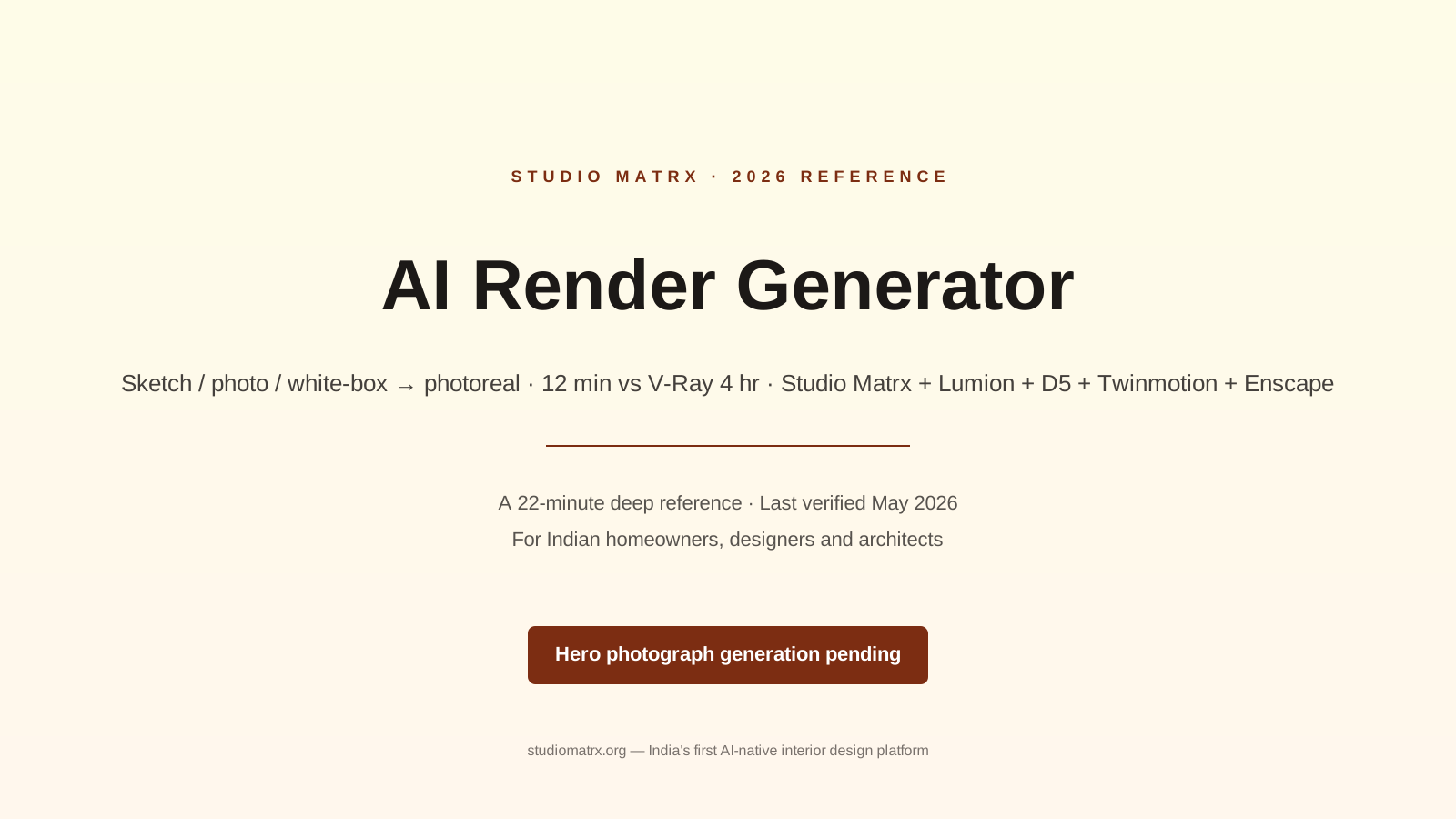
An AI render generator is software that takes a low-information input — a hand sketch, a clay-grey 3D massing, a phone photograph of a half-built shell, or a 200-character text brief — and produces a high-information output: a photorealistic image (or 360 pano, or short walkthrough) of how that scene should look finished. Under the hood it is almost always a diffusion model (Stable Diffusion, Flux, Imagen) conditioned by a ControlNet or depth-map that locks the output to the geometry you gave it, then upsampled and post-processed for material fidelity.
The crucial distinction from a traditional renderer: a path tracer like V-Ray, Corona, or Arnold simulates light bouncing off geometry with measured materials and physical cameras. An AI render generator hallucinates a plausible-looking image that matches your geometry and your prompt. The first is forensic — every photon is accounted for, every shadow is causally correct. The second is plausible — it looks right, it sells the design, but a window mullion may have moved 50 mm and a chair leg may have grown a fifth foot. For 90% of client communication, plausibility is enough. For the 10% where it isn't (legal disputes, fabrication drawings, daylight compliance proofs), it isn't.
Five things an AI render generator is NOT:
1. Not a CAD replacement. It does not produce dimensioned drawings, sectional cuts, or working details. The geometry has to come from somewhere — SketchUp, Rhino, Revit, ArchiCAD, or even a sketch — and the renderer only adds the photoreal skin.
2. Not a daylight simulator. The "sunlight" in an AI render is statistically plausible — it is not Radiance, it is not Ladybug, it is not IES file accurate. Do not use it to prove BIS 875 (Part 5) compliance or LEED daylight credits.
3. Not material-physically accurate. The Pantone-2455-C cushion in the brief may render as a slightly different teal. For client mood communication, fine. For specification sign-off, no — use a physical sample.
4. Not a 3D model. Most AI renderers produce 2D images. A few (NeRFs, Gaussian splatting) produce 3D scenes, but they are not editable in SketchUp. You cannot pull a wall, change a window, or extract a section from the output.
5. Not a substitute for site visits. The render assumes the site looks like the brief. If the actual site has a transformer in the foreground, a neighbour's water tank, or a Sintex tank on the parapet, the render is a fiction.
Why AI Render Generators Matter in 2026 India
India has roughly 1.2 lakh registered architects (CoA, 2025) and an estimated 35,000 active design-build firms doing residential and small-commercial work. The traditional rendering stack — V-Ray + 3DS Max, or Lumion, or Corona + SketchUp — is mature, beautiful, and slow. A typical 4K interior frame on a Bengaluru firm's dual-Xeon RTX workstation takes 90 minutes to 4 hours depending on bounces, denoising, and material complexity. An exterior with vegetation and physical sky can hit 6-8 hours. A 60-frame walkthrough is an overnight job, sometimes a 2-day job on a render farm.
For the average ₹40 lakh interior project in Whitefield or Powai, the rendering line item — done in-house — costs roughly ₹15,000 to ₹40,000 in workstation time and visualiser fees. Outsourced to a Lower Parel or Sector 62 viz studio it runs ₹8,000 to ₹25,000 per image. Multiply by 6-12 client revisions and rendering becomes a 5-8% drag on project margin.
The AI render generator collapses the per-image cost to roughly ₹50 to ₹500 (Studio Matrx and most consumer tools), and the per-image time to 30 seconds to 12 minutes. That changes the design process — not just the tooling. When a render is cheap and fast, you render every iteration, not just the final three. You let the client compare a teak warm-minimal scheme against a stone-and-lime-wash earthy scheme against a fluted-panel feature wall in the same hour-long meeting — see our guides on warm minimal interiors, earthy interior palette, and fluted panel design for the schemes themselves.
The seam Studio Matrx fills sits between three categories. On one end, consumer toys (RoomGPT, Reroom) — fast, cheap, but no India context, no Vastu awareness, no BoQ output, and a tendency to put fireplaces in Bangalore living rooms. On the other end, heavyweight engines (Lumion AI, D5 Render, V-Ray) — beautiful, mature, but expensive (Lumion Pro is ₹2 lakh/year), GPU-hungry, and still slow. In the middle, Studio Matrx — text/voice brief in Hindi/English/Kannada/Tamil/Marathi, India-aware materials (Indian marble, Kadappa, IPS, terrazzo, terracotta jaalis), Vastu hint overlays, render in 8-12 minutes, BoQ generated in the same flow.
For the small Bengaluru firm doing 30 residential jobs a year, the math is brutal: a Studio Matrx Pro plan at ₹2,499/month replaces roughly ₹1.5 lakh/year of render-farm and visualiser cost, and frees 200+ hours of designer time. That is the case for adoption — not the technology, the time.
The Seven Capabilities That Matter
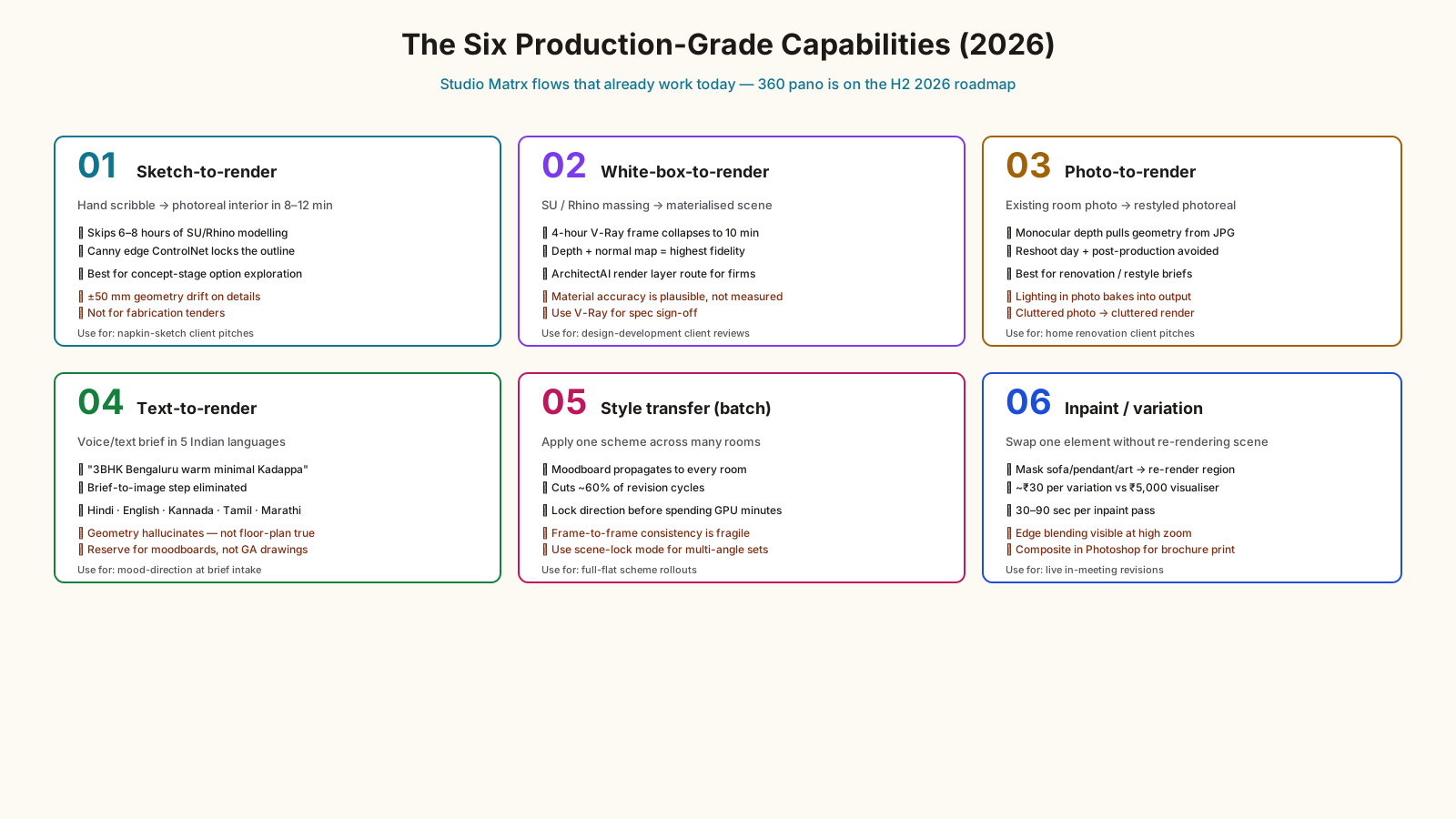
| Capability | What it does | Time / cost saved | Studio Matrx flow that does it |
|---|---|---|---|
| Sketch-to-render | Hand sketch or scribble → photoreal interior or exterior | 6-8 hours of modelling skipped | Sketch upload → render in 8-12 min |
| White-box-to-render | SU / Rhino / Blender massing → photoreal materialised scene | 4-hour V-Ray frame → 10 min | SU import → ArchitectAI render layer |
| Photo-to-render | Existing room photo → restyled photoreal output | Reshoot day + post avoided | Photo upload → restyle → render |
| Text-to-render | "3BHK Bengaluru warm minimal with Kadappa kitchen" → render | Brief-to-image step eliminated | Voice/text brief → moodboard → render |
| 360 panorama | Spherical render for VR / web embed | 12-hour stitched render → 25 min | Pano output (H2 2026 roadmap) |
| Style transfer | Apply one scheme to many rooms in batch | 60% of revision cycles cut | Moodboard → propagate across rooms |
| Inpainting / variation | Swap one element (sofa, art, light) without re-rendering whole scene | Per-revision cost → near-zero | Variation flow in render canvas |
The capabilities are not all equally mature in 2026. Sketch-to-render and white-box-to-render are production-grade across Studio Matrx, Lumion AI, D5 Render, and Veras. Text-to-render is good for moodboards but still flaky for geometry-faithful output — most tools hallucinate. 360 panorama is live in Lumion and D5 but on the Studio Matrx roadmap (H2 2026). VR walkthroughs are still a heavyweight-engine game — Twinmotion and Enscape lead.
How Studio Matrx Does AI Rendering — End-to-End Walkthrough
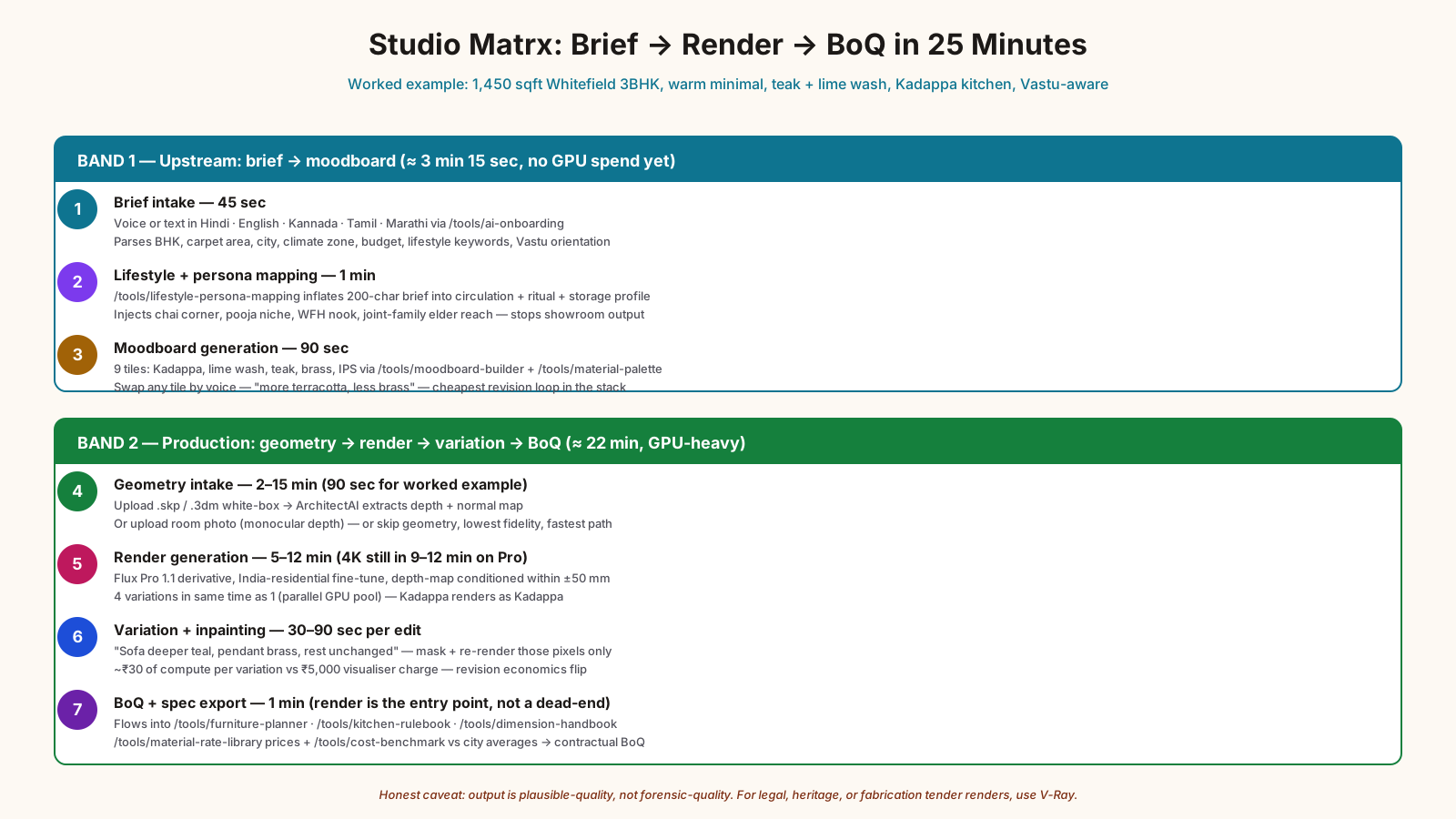
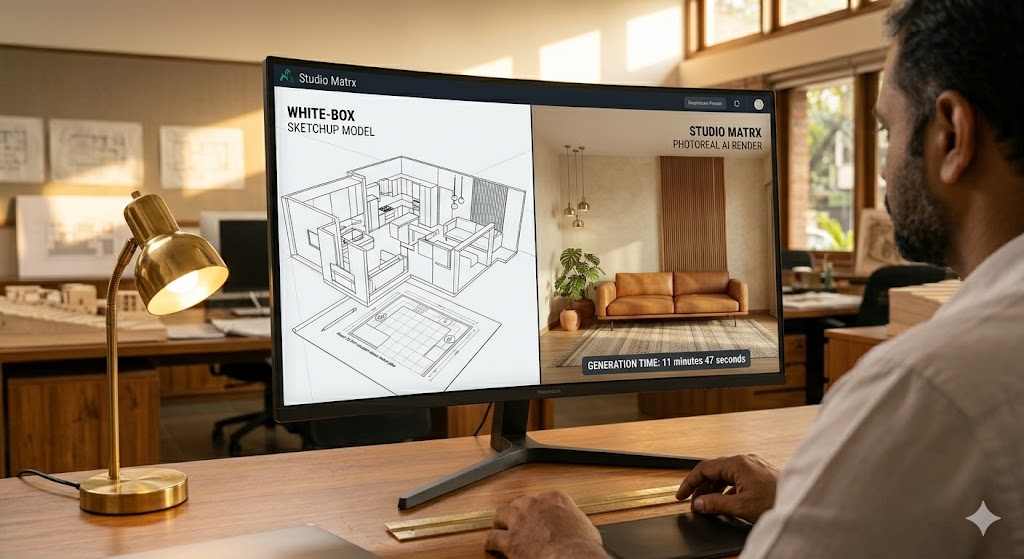
Here is the actual pipeline a Bengaluru homeowner or a Pune designer follows when they generate a render on Studio Matrx today. We will use the canonical worked example throughout: white-box SketchUp model of a 1,450 sqft 3BHK in Whitefield, brief says "warm minimal, teak and lime wash, Kadappa kitchen counter, north-facing entrance Vastu compliant."
Step 1 — Brief intake (45 seconds). The user lands on the AI onboarding flow and either types or voice-records (Hindi, English, Kannada, Tamil, Marathi) the brief. Studio Matrx parses BHK, carpet area, city, climate zone, budget range, lifestyle keywords (warm, minimal, family, joint-family, pet, work-from-home, pooja-room), and the orientation/Vastu constraints. Output: a structured brief object that the rest of the pipeline reads.
Step 2 — Lifestyle and persona mapping (1 minute). The brief flows into lifestyle persona mapping which inflates the 200-character brief into a full design persona — circulation patterns, daily rituals, storage profile, entertaining frequency, pet/child considerations. This step is what stops Studio Matrx from rendering a sterile showroom scene — the persona injects real-use cues (a chai corner near the puja niche, a fold-out work nook for the WFH parent, a low-shelf reach for the joint-family elder).
Step 3 — Moodboard generation (90 seconds). The moodboard builder and material palette tools produce a 9-tile moodboard — material chips (Kadappa, lime wash, teak, brass, IPS), colour swatches via the color scheme generator, lighting reference, and 2-3 anchor product shots. The user can swap any tile by tapping and saying "more terracotta, less brass" — this is the cheapest revision loop in the whole stack.
Step 4 — Geometry intake (variable, 2-15 min). Three paths converge here. (a) Upload a SketchUp .skp or Rhino .3dm white-box model — Studio Matrx extracts a depth map and a normal map via the ArchitectAI render layer. (b) Upload a photograph of an empty or under-construction room — monocular depth estimation pulls the geometry. (c) Skip geometry entirely and let the diffusion model invent it from the brief (lowest fidelity, fastest path). For the worked example, the SU model uploads in 90 seconds.
Step 5 — Render generation (5-12 minutes). The depth-map-conditioned diffusion model — currently a Flux Pro 1.1 derivative fine-tuned on Indian residential interiors — generates the photoreal frame. On the Studio Matrx Pro tier the user gets a 2K still in roughly 5 minutes, a 4K still in 9-12 minutes, and 4 variations in the same time as one (parallel generation on the GPU pool). The output respects the depth map within ±50 mm — wall positions hold, window mullions hold, the kitchen counter Kadappa material renders as Kadappa not as "generic dark stone".
Step 6 — Variation and inpainting (per-edit, 30-90 seconds). The client says "change the sofa to deeper teal, swap the pendant for brass, keep everything else." Inpainting masks the sofa and pendant regions and re-renders only those pixels, conditioned on the original scene. This is where the revision economics turn — each variation is roughly ₹30 of compute, not ₹5,000 of visualiser time.
Step 7 — BoQ + spec export (1 minute). Once the client signs off on the render, the same scene flows into furniture planner, kitchen rulebook, dimension handbook, and the BoQ generator. The render is not a dead-end image — it is the visual entry point to a procurement plan with vendor links, material rate library prices, and a cost benchmark comparison against city averages.
End-to-end total for the worked example: brief at 0:00, first render at 0:12, signed-off variation at 0:24, BoQ at 0:25. The traditional V-Ray equivalent for the same scene is roughly 6-8 hours of modelling-to-materialising-to-rendering, plus a 4-hour render pass, plus 2-3 revision cycles spread over 2-3 working days.
Honest caveat: the Studio Matrx render is plausible-quality, not forensic-quality. If the client needs a render to compare against a built outcome with millimetre fidelity — for a legal dispute, a heritage approval, or a fabrication tender — use V-Ray. We will tell you that in the UI.
AI Render Generators vs Traditional V-Ray / Corona / Lumion
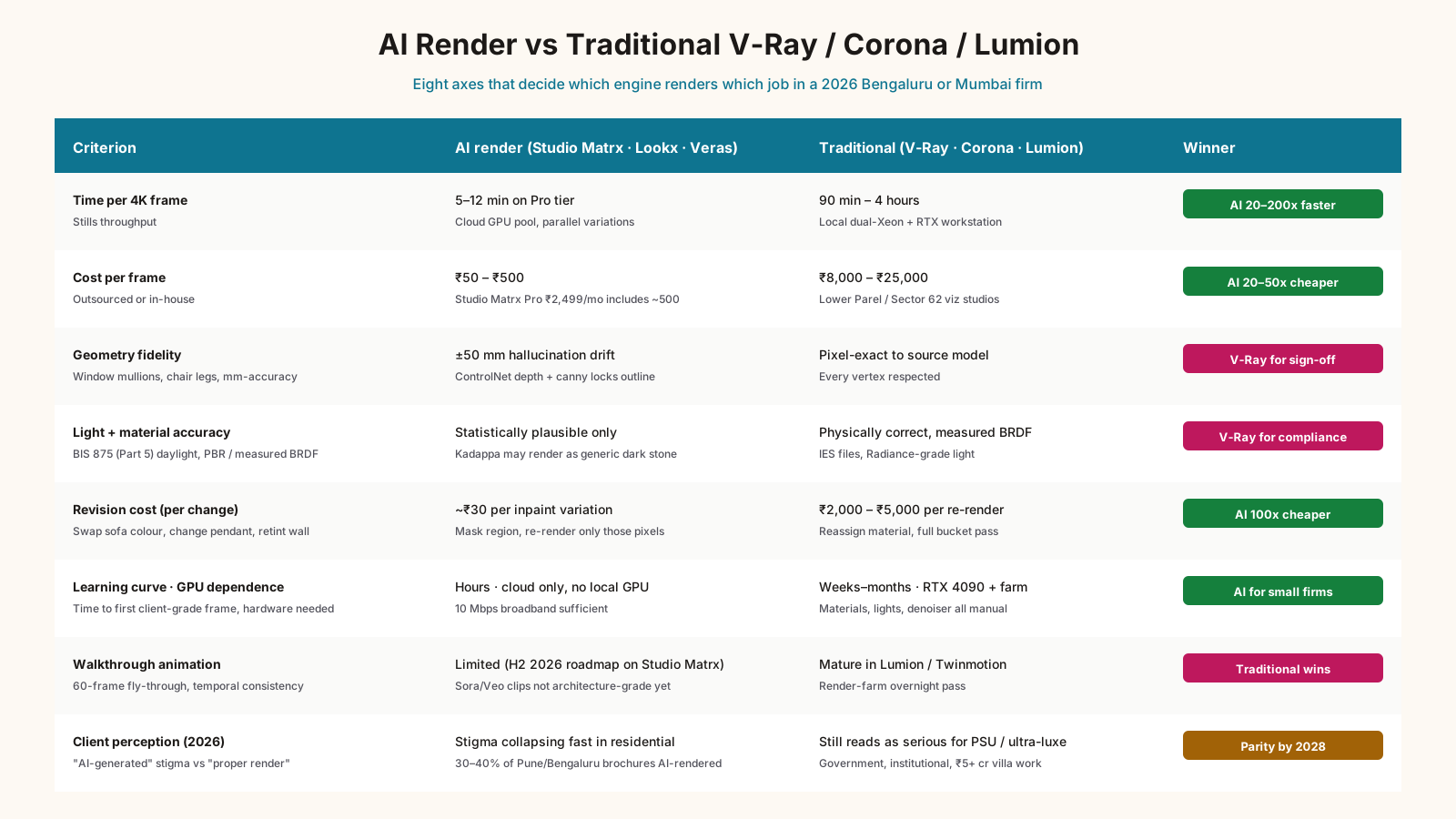
| Criterion | AI render (Studio Matrx / Lookx / Veras) | Traditional (V-Ray + 3DS Max / Corona / Lumion) | Winner + caveat |
|---|---|---|---|
| Time per 4K frame | 5-12 min | 90 min - 4 hours | AI (V-Ray for forensic only) |
| Cost per frame | ₹50 - ₹500 | ₹8,000 - ₹25,000 (outsourced) | AI by 20-50x |
| Geometry fidelity | ±50 mm hallucination | Pixel-exact to model | V-Ray for dimensional sign-off |
| Material accuracy | Plausible, not measured | PBR / measured BRDF | V-Ray for spec sign-off |
| Light accuracy | Statistically plausible | Physically correct | V-Ray for daylight compliance |
| Revision cost | ₹30 per inpaint variation | ₹2,000-5,000 per re-render | AI by 100x |
| Learning curve | Hours | Weeks to months | AI for non-visualisers |
| GPU dependence | Cloud (no local hardware) | Local RTX 4090 / render farm | AI for small firms |
| Walkthrough animation | Limited (H2 2026 roadmap on Studio Matrx) | Mature in Lumion / Twinmotion | Traditional |
| Client perception | "AI-generated" sometimes a stigma | "Proper render" reads as serious | Traditional in 2026, parity by 2028 |
The headline reading: for 80% of client communication — moodboards, schematic options, marketing reels, Instagram, brochures — AI wins on every axis except perceived seriousness, and that is collapsing fast. For 20% of work — daylight compliance proofs, fabrication tenders, heritage submissions, legal disputes — V-Ray and Corona still own the territory because forensic accuracy matters.
The honest 2026 truth: AI is not killing V-Ray. It is killing the 80% of V-Ray jobs that did not need V-Ray in the first place — the moodboards, the option studies, the WhatsApp-grade client pings. V-Ray retreats to the 20% where the bounces actually have to be true.
Tool Landscape 2026
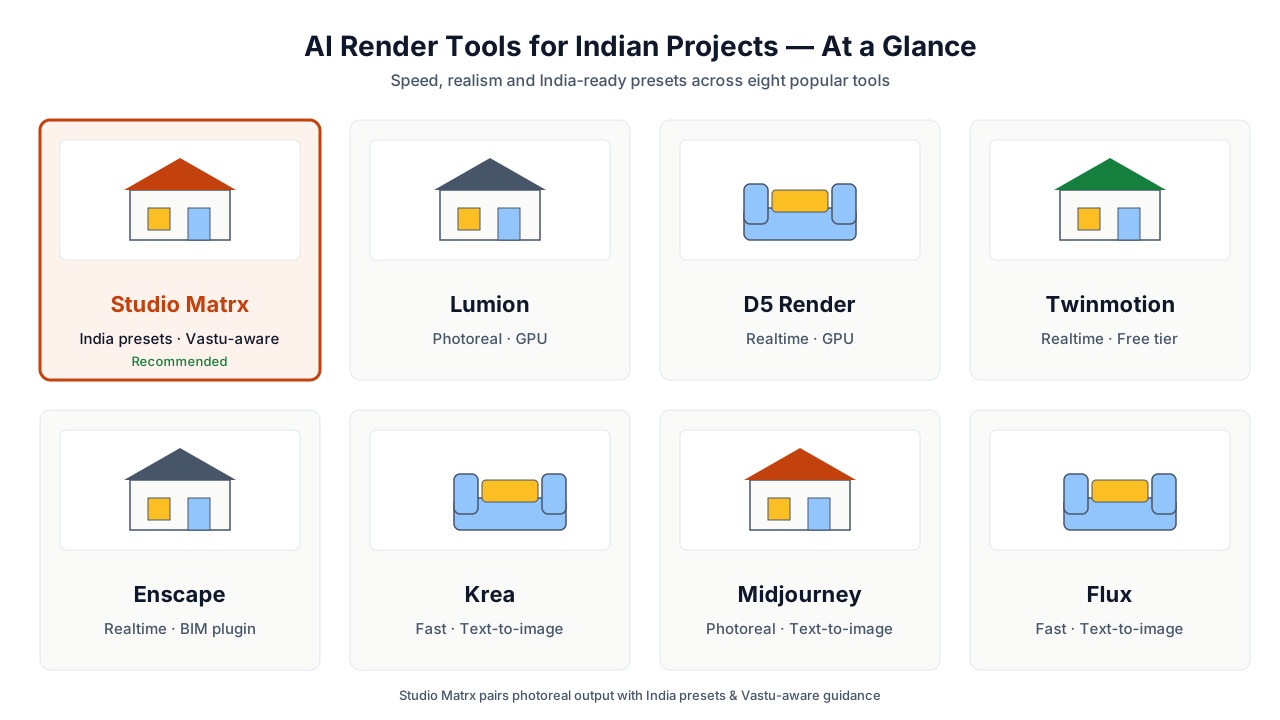
| Tool | Best for | Generation time | Input types | India fit | Pricing (₹/month) |
|---|---|---|---|---|---|
| Studio Matrx (+ ArchitectAI render layer) | India residential + small commercial, text-to-BoQ flow | 5-12 min | Sketch, white-box SU/Rhino, photo, text (5 languages) | Built for India — Vastu hints, Kadappa/IPS/terracotta in palette, NBC-aware | ₹999 (Patron) - ₹2,499 (Pro) |
| Lumion AI | Architects already on Lumion, walkthrough animation | 2-8 min for stills, hours for video | SU, Rhino, Revit, Archicad | Strong, but no Vastu/India-specific materials | ₹2 lakh/year (Pro) |
| D5 Render | Real-time photoreal, Asian residential aesthetic | Near-real-time | SU, Rhino, Revit, FBX | Good — D5 has strong Indian/Asian asset library | ₹70k/year (Pro) |
| Twinmotion AI | Epic Games ecosystem, Unreal Engine pipeline | Near-real-time | Revit, ArchiCAD, SU | Decent — generic global library | ₹40k/year (Personal); free for sub-₹1 cr revenue |
| Enscape AI | Revit/SU users wanting one-click photoreal | Real-time + 2-5 min for finals | Revit, SU, Rhino, Vectorworks | Decent — generic library | ₹50k/year |
| Lookx AI | Sketch-to-render concept stage, architects | 30-90 sec | Sketch, white-box | OK — generic, India context light | ₹2,500/month |
| Veras (EvolveLAB) | Revit/SU users wanting AI restyling in-place | 60-120 sec | Revit/SU viewports | OK — generic | ₹4,000/month |
| RoomGPT | Consumer single-room restyling | 15-30 sec | Photo only | Weak — no India materials, fireplace bias | ₹500/month |
| Reroom AI | Consumer single-room restyling, mobile | 10-20 sec | Photo only | Weak — same as RoomGPT | ₹400/month |
| Krea AI | Real-time concept iteration, designer tool | Real-time (5-15 sec) | Sketch, photo, text | Weak for India — generic asset bias | ₹2,000/month |
| Midjourney v7 | Concept art, marketing imagery | 30-60 sec | Text only (geometry-blind) | Weak — beautiful but cannot hold a floor plan | ₹2,500/month (Standard) |
| Flux Pro 1.1 | Best-in-class base model for fine-tuners | 10-30 sec via API | Text + ControlNet | Indirect — Studio Matrx and others run on Flux | ₹0.04/image via API |
The shortlist for a Bengaluru / Mumbai architecture firm depends on what stack you are already on. If you are V-Ray + 3DS Max with no plans to migrate, add Lookx or Veras as a concept-stage front-end and keep V-Ray for finals. If you are Lumion already, add Lumion AI — it is included in your subscription. If you are doing residential interiors and want the end-to-end brief-to-BoQ pipeline, Studio Matrx is the most India-aware option in the market. If you are doing high-end villa or hotel work where every render is a 4-hour V-Ray, the AI tools are a marketing-stage accelerator only — V-Ray stays in the production pipeline.
Eight Risks, Pitfalls and Honest Limits
1. Geometry hallucination. Even with depth-conditioned diffusion, the model can drift the window mullion by 30-50 mm or invent a fifth chair leg. Mitigation: lock high-fidelity geometry via ControlNet depth + canny edge maps (Studio Matrx does this by default on the Pro tier); for fabrication-critical views, use V-Ray.
2. Material misrepresentation. A rendered "Kadappa black" may render as a slightly different stone. Mitigation: always pair the render with a physical sample in the client meeting; use Studio Matrx's material palette tool to lock to a real SKU.
3. Light non-physicality. AI renders cannot prove BIS 875 (Part 5) daylight factor compliance. Mitigation: pair with daylight factor tool for the numeric proof, use the AI render only for client communication.
4. Cultural bias in training data. Most diffusion models are trained on Pinterest-scale Western interior photography. Without India-specific fine-tuning, you get hardwood floors where you wanted IPS, fireplaces in Bangalore living rooms, and tulip vases instead of brass diyas. Mitigation: use India-fine-tuned tools (Studio Matrx) or careful prompting with India-specific style anchors.
5. Aspect-ratio and resolution caps. Most AI tools cap at 2K or 4K. For 6K+ print brochures or back-lit displays, you may need V-Ray or upscaling. Mitigation: use a topaz or magnific.ai upscaler downstream; or render the hero in V-Ray, supporting frames in AI.
6. Inconsistency between frames. Two renders of the same room from two angles may show different sofa fabric, different art on the wall. Mitigation: use the scene-lock or "consistent scene" mode (Studio Matrx, D5, Lumion AI all have this in 2026); avoid raw text-to-render for multi-angle sets.
7. Copyright and commercial-use ambiguity. AI renders sit in a copyright grey zone — US Copyright Office (2023) and the Delhi High Court (2024) have both held that purely AI-generated images are not copyrightable, though significant human curation/editing can qualify. Mitigation: for brochure / marketing / contractual use, ensure substantial human editing (compositing, retouching, framing decisions are documented) and read each tool's commercial-use TOS. Studio Matrx grants full commercial rights to outputs on the Pro tier.
8. Data residency and DPDP compliance. Uploading a client's floor plan to a US-hosted AI renderer can be a DPDP Act 2023 violation if it contains identifying information. Mitigation: redact addresses and names before upload; prefer India-hosted tools (Studio Matrx hosts on India region) for any project with PII in the brief.
India-Specific Considerations
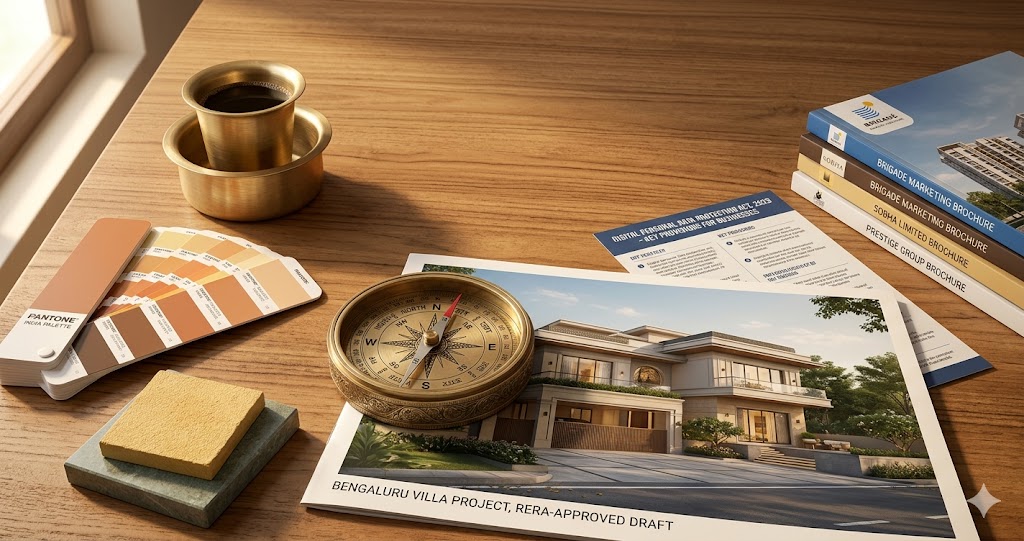
NBC 2016 and rendering. The National Building Code does not regulate renders directly, but it does regulate the things renders depict — minimum room heights (Part 3, 2.75 m for habitable rooms), staircase widths (1.0 m for residential), ventilation openings (1/8th of floor area per IS 3362). An AI render that shows a 2.4 m ceiling height in a Mumbai apartment is depicting a non-compliant condition; the client will notice the moment they walk in. Studio Matrx checks brief-derived dimensions against NBC defaults and flags mismatches before render.
IS codes that touch render decisions. IS 1893 (Part 1) for seismic safety — your render of a triple-cantilevered terrace may not be buildable in Zone IV or V (Delhi NCR is Zone IV); cross-check with seismic zone checker. IS 3362 for daylight factor — covered above. IS 1893 informs structural feasibility of the spans you render. IS 2470 for septic — irrelevant to render but relevant to the BoQ that follows.
DPDP Act 2023. The Digital Personal Data Protection Act treats floor plans with addresses as personal data when linked to an identifiable individual. Uploading "Mr Sharma, Flat 504, Prestige Lakeside Habitat" to a US-hosted AI tool is a notifiable breach risk. India-hosted tools (Studio Matrx, ArchitectAI) keep render data on India-region infrastructure with DPDP-compliant consent flows. Cross-border data transfer requires explicit consent under Sec 16(2).
Vastu compatibility. AI renders should not silently violate Vastu — even if your client says they don't care, the parents/in-laws do, and the deal can break at handover. Studio Matrx overlays Vastu hints on render output: kitchen in south-east (Agneya), pooja in north-east (Ishan), master bedroom in south-west (Nairutya), entrance per north-facing house Vastu or whichever orientation applies. See also vastu for kitchen, vastu for bedroom, entrance vastu, vastu colors for home, and staircase vastu.
Regional vendor reality. A render that shows Carrara marble in a ₹40 lakh Whitefield 3BHK is selling a lie — the client is going to source Kadappa, Banswara, or Makrana, not Carrara. Studio Matrx's material palette is biased toward India-available SKUs with vendor links in Bengaluru (Mahaveer / Hosur Road belt), Mumbai (Dadar / Vile Parle), Delhi NCR (Kirti Nagar / Sector 18), Pune (Camp / Hadapsar), and Hyderabad (Kukatpally).
Language coverage. Studio Matrx accepts voice and text briefs in Hindi, English, Kannada, Tamil, and Marathi as of May 2026. Telugu, Bengali, and Malayalam are on the H2 2026 roadmap. Most international tools (Lumion AI, D5, Veras) are English-only.
Climate zone. NBC 2016 Part 11 defines five climate zones — hot-dry (Jaipur), warm-humid (Mumbai, Chennai), composite (Delhi, Bengaluru fringe), temperate (Bengaluru core, Pune), cold (Shimla, Leh). The render should reflect the climate — large overhangs and verandas in warm-humid, smaller punched openings and verandas in hot-dry, fully glazed conservatories in cold. Generic AI tools don't know this; Studio Matrx and ArchitectAI both inject climate context.
The Studio Matrx Stack for AI Rendering
- AI onboarding — voice/text brief intake in five Indian languages; the entry point to every render.
- Client discovery — structured interview flow for professional users running render projects with clients.
- Lifestyle persona mapping — inflates brief into a design persona so the render is lived-in, not showroom.
- Moodboard builder — 9-tile moodboard upstream of the render; lock direction before spending GPU minutes.
- Material palette — India-SKU-aware palette generator; what the render's "Kadappa" actually is.
- Color scheme — palette generator that informs render tone.
- Furniture planner — pulls plausible-fit furniture into the rendered space with dimensions checked.
- Kitchen rulebook — work-triangle, counter-height, appliance-clearance rules the kitchen render must obey.
- Dimension handbook — Indian-anthropometric dimensions for rendered furniture and clearances.
- Daylight factor — the forensic daylight check that the AI render cannot prove.
- Material rate library — feeds the BoQ generated from the signed-off render.
When NOT to Use an AI Render Generator
Forensic daylight or thermal proof. If a Bengaluru Mahanagara Palike officer or a LEED reviewer needs evidence of daylight factor ≥ 1% on 80% of the floor area, the AI render will not pass — use Radiance, Ladybug, or DIVA. Studio Matrx flags this and routes you to the daylight factor tool.
Heritage or court submissions. A render going into an INTACH file, a state heritage committee, or a court-ordered demolition / restoration brief needs forensic accuracy. Use V-Ray or photogrammetry, not AI.
Fabrication tender visuals. A render that ships with a fabrication tender — say, a bespoke staircase or a façade screen — needs to depict exactly the geometry being tendered. AI's ±50 mm drift becomes a contractual landmine. Use V-Ray on the tendered model.
Pre-construction lien or insurance disputes. An insurer or surveyor will not accept an AI render as evidence of pre-loss condition. Photograph the site instead.
Children's spaces with regulatory furniture spec. Crèche, daycare, school playroom renders feeding into a regulatory licence application (Department of Women & Child Development, state-specific) need accurate furniture spec — most regulators want photographs of installed condition, not renders.
Healthcare clean-room or laboratory. AI renders cannot depict ISO 14644 cleanroom airflow or BSL-2 lab containment with the rigour required. Use specialist HVAC visualisation.
Heritage retrofit before opening. A render of a 19th-century Mumbai Art Deco facade after retrofit needs material chemistry the AI does not understand (lime mortar vs cement, original timber profiles, traditional teak shutters). Combine on-site documentation, photogrammetry, and hand-drawn elevations.
When the client genuinely cannot tell. Some clients — institutional, government, PSU — read "AI-generated" as a serious project red flag. Until 2027-2028 cultural perception shifts, use V-Ray for the official renders and AI for the internal workflow.
The 5-Year Trajectory: AI Render Generators in 2030
By 2030, four shifts are highly likely.
1. Real-time photoreal becomes baseline. What is "5-12 minutes" in 2026 will be "10-30 seconds" by 2028 and effectively instant by 2030. Combined with eye-tracking VR (Apple Vision Pro 3, Meta Quest 5), the experience is "walk through the design as you brief it" — the brief and the render are simultaneous, not sequential.
2. Gaussian splatting and NeRFs displace polygon rendering. Neural radiance fields and 3D Gaussian splatting — both emerging in 2023-2024 and maturing in 2026 — produce volumetric scenes that are walked into, not viewed. By 2030, a typical Studio Matrx output may be a NeRF scene the client explores on their phone, not a flat 4K image. ArchitectAI's render layer roadmap includes a Gaussian splat output for H1 2027.
3. India-language voice becomes the primary brief modality. Hindi/Tamil/Kannada/Marathi/Telugu voice brief → render is already live on Studio Matrx in 2026; by 2030 it is the default — typing a brief will feel as old as faxing one.
4. Render-to-BoQ becomes legally meaningful. Today the render is a marketing artefact; the BoQ is a contractual one. By 2030 — assuming DPDP, NBC 2026 update, and CoA digital-deliverables guidance all converge — the signed-off render itself becomes part of the design contract, with material spec, dimensions, and vendor SKUs hashed into a tamper-evident bundle. Studio Matrx and ArchitectAI are both architecting toward this.
What does NOT change by 2030: V-Ray and Corona stay alive for the forensic 20% — daylight compliance, heritage, fabrication, dispute. Lumion and D5 stay alive for walkthrough animation as long as the diffusion models lag on temporal consistency. Photography stays alive for as-built documentation. The AI renderer is additive, not substitutive — it eats the moodboard and option-study layer that previously consumed V-Ray time, and leaves the production layer intact.
Frequently Asked Questions
How long does an AI render take vs V-Ray?
A typical 4K interior frame: Studio Matrx 5-12 minutes, Lumion AI 2-8 minutes, D5 Render near-real-time, V-Ray 90 minutes to 4 hours. For a 60-frame walkthrough animation: AI tools 1-3 hours, V-Ray 12-24 hours on a single workstation or 4-8 hours on a render farm. The speed gap is genuinely 20-200x for stills.
Is AI render quality good enough for client presentations?
For 80% of presentations — moodboards, option studies, schematic design reviews, marketing reels, Instagram, brochures — yes, comfortably. Studio Matrx, Lumion AI, and D5 Render in 2026 produce stills indistinguishable from V-Ray on a phone screen, and only mildly distinguishable on a 4K monitor. For the remaining 20% — daylight compliance proof, fabrication tender, heritage submission, court evidence — no, use a physically-based renderer.
Sketch-to-render vs photo-to-render — which works better?
Depends on the project stage. Sketch-to-render wins early — concept stage, no geometry yet, fast option-exploration. Photo-to-render wins for renovation projects where the existing room is the brief — phone-photograph the room, describe the desired transformation, render the result. White-box-to-render (SU/Rhino) wins anywhere geometry already exists — it gives the highest fidelity because the depth map is exact. Text-to-render is the weakest geometrically and best reserved for moodboard / mood-direction work.
Studio Matrx vs Lumion AI vs D5 Render — which fits my Bengaluru architecture firm?
If you already have Lumion in your stack and are doing villas, hotels, and large commercial — stay on Lumion, the AI is included free. If you are residential-interior-focused and your clients want end-to-end brief-to-BoQ — Studio Matrx is the most India-aware option, and the ₹2,499/month Pro tier replaces ₹1.5 lakh/year of visualiser + render-farm cost. If you need real-time walkthrough during client meetings — D5 Render at ₹70k/year is the best price-performance. Many firms run two — Studio Matrx for residential + ArchitectAI for the firm-wide pre-design layer, D5 or Lumion for walkthrough.
Are AI renders accepted by builders for marketing brochures?
Yes, increasingly — by mid-2026 roughly 30-40% of new residential project brochures in Bengaluru and Pune are AI-rendered (industry estimate, no public dataset). The acceptance is highest in 2-3 BHK ₹40-80 lakh segment; lower in the ultra-luxury ₹5+ cr segment where V-Ray's perceived seriousness still matters. RERA does not regulate render technology — it regulates whether the depicted features ("club house", "swimming pool") are actually delivered, so the rendering technology is moot legally.
What about copyright on AI-generated renders for commercial use?
The US Copyright Office (2023) and the Delhi High Court (2024) have both held that purely AI-generated images without substantial human authorship are not copyrightable. However, AI-assisted works with significant human curation, editing, compositing, framing, and material direction are copyrightable in the human contributor's name. For commercial use (brochures, signage, ads), ensure: (a) you document the human direction (brief, iteration count, edits); (b) the tool's TOS grants commercial rights to outputs — Studio Matrx Pro does, Midjourney does, RoomGPT free tier does not; (c) for high-stakes commercial campaigns, a final compositing/retouching pass in Photoshop strengthens the copyright claim.
Can AI render generators do walkthroughs and 360 panoramas yet?
Stills are solved. 360 panoramas are live in Lumion AI, D5 Render, and Twinmotion as of 2026, and on the Studio Matrx roadmap for H2 2026. Walkthrough animations with temporally consistent diffusion are still nascent — Sora-image, Veo, and Runway Gen-3 can produce short 10-second clips, but architectural-fidelity 60-second walkthroughs are 2027-2028 territory. For 2026, Twinmotion and Enscape still lead on walkthrough.
Do I need an expensive GPU on my workstation?
No, not for cloud AI tools. Studio Matrx, Lookx, Veras, RoomGPT, Krea — all run server-side. You need only a decent broadband connection (10 Mbps+ for upload of 50 MB SketchUp files). Local GPU matters only if you are running Stable Diffusion / Flux / ComfyUI locally for IP-sensitive projects. Lumion AI and D5 still want a local RTX 4070+ for the non-AI parts of their pipeline.
What does an AI render cost per image, all-in?
On Studio Matrx Pro (₹2,499/month, ~500 renders/month included): roughly ₹5 per render at the cap, ₹50-100 per render at typical usage. On Lookx (₹2,500/month): ₹25-50 per render. On RoomGPT/Reroom: ₹10-25. On Lumion AI: bundled in the ₹2 lakh/year subscription, so per-render is effectively ₹0 above that fixed cost. Compare to ₹8,000-25,000 per outsourced V-Ray frame and the order-of-magnitude difference is clear.
Will the AI replace my visualiser?
Not yet, but the role is shifting. The straight-line "build geometry → assign materials → set lights → render" workflow is collapsing. The visualiser of 2026-2028 is a prompt-engineer + scene-curator + final-Photoshop-compositor + the V-Ray specialist for the forensic 20%. Firms that previously had 2-3 visualisers are running 1 with AI assistance for the same throughput. Firms that need genuinely high-end ultra-luxury renders still need V-Ray-grade specialists.
References
1. National Building Code of India 2016, Bureau of Indian Standards — Part 8 (Building Services) and Part 11 (Approach to Sustainability). https://www.bis.gov.in
2. IS 3362:1977 Code of practice for natural ventilation of residential buildings, Bureau of Indian Standards.
3. IS 875 (Part 3 & 5):2015 Code of practice for design loads (other than earthquake) for buildings and structures — wind loads and special loads / load combinations, Bureau of Indian Standards.
4. Digital Personal Data Protection Act 2023, Government of India, Ministry of Electronics & Information Technology. https://www.meity.gov.in
5. Council of Architecture (CoA), Minimum Standards of Architectural Education Regulations 2020 and CoA Registered Architects directory. https://www.coa.gov.in
6. Rombach, R. et al. (2022), "High-Resolution Image Synthesis with Latent Diffusion Models", CVPR 2022 — the Stable Diffusion paper.
7. Zhang, L. et al. (2023), "Adding Conditional Control to Text-to-Image Diffusion Models", ICCV 2023 — the ControlNet paper that enables depth/canny-conditioned architectural rendering.
8. Mildenhall, B. et al. (2020), "NeRF: Representing Scenes as Neural Radiance Fields for View Synthesis", ECCV 2020 — the seminal NeRF paper.
9. Kerbl, B. et al. (2023), "3D Gaussian Splatting for Real-Time Radiance Field Rendering", SIGGRAPH 2023 — the Gaussian splatting paper that is reshaping architectural visualisation.
10. KPMG India and Indian Institute of Architects (2024), "State of Indian Architecture Practice 2024" — workflow and rendering-stack survey.
11. IBEF (Indian Brand Equity Foundation) (2025), "Indian Real Estate Sector Report" — context on residential pipeline driving render demand. https://www.ibef.org
12. Houzz Pro India (2024), "Residential Renovation Trends Report India" — context on revision cycles and rendering economics.
13. US Copyright Office (2023), "Copyright Registration Guidance: Works Containing Material Generated by Artificial Intelligence", Federal Register, 16 March 2023.
14. Delhi High Court (2024), order in matter relating to AI-generated work copyrightability — referenced in the Indian Performing Right Society Ltd litigation.
15. RERA (Real Estate Regulatory Authority) Maharashtra and Karnataka — guidance on marketing representations in residential project brochures. https://maharera.maharashtra.gov.in and https://rera.karnataka.gov.in
Related Guides
Export this guide
Related Guides — Deep-dive reading
AI Home Visualization — Decision-Maker Lens for Indian Homeowners (2026)
Compare 3 wall colors · A/B sofa options · Phone AR · Studio Matrx walkthrough · Render-to-reality fidelity
Design StylesAI Home Renovation — Photo-to-Renovated AI for Existing Indian Homes (2026)
Before/after AI · Demolish vs retain · Renovation BoQ · 1990 Andheri 720 sqft worked example
Design StylesAI-Powered Interiors — A 2026 Practitioner's Guide for Indian Homes
Six AI capabilities · Augmented workflow · Tool comparison · Risks and pitfalls
Design StylesRelated Tools — Try Free
Cross-Ventilation Analyzer
Estimate airflow and air changes per hour (ACH) from room size, window areas, layout, and local wind — with NBC 2016 Part 8 compliance check.
Ventilation CalculatorVastu Window Planner
Vastu guidance for window placement and size by wall direction and room — rating and remedies.
VastuWindow Orientation Planner
Pick the best window type, glass and shading by wall direction — north, east, south and west.
Window Tool