
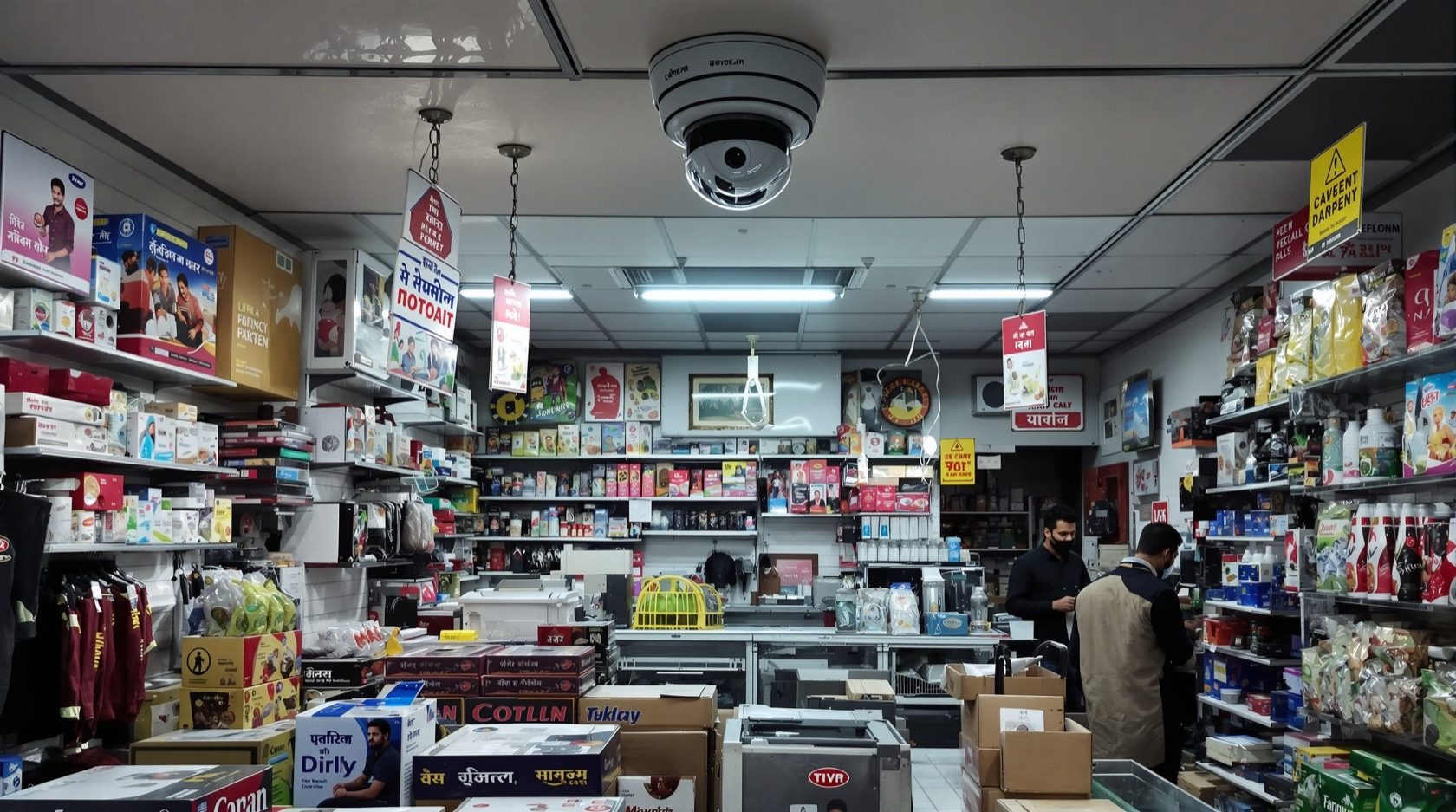
Commercial CCTV in India: A Buyer's Guide for Shops, Offices & Clinics
How to plan CCTV for an Indian commercial premises — retail floors, POS points, offices, showrooms, restaurants and clinics — with the right coverage, retention, integration and staff-and-customer privacy done properly.
A shop, office or clinic is not a scaled-up home. The threats are different — shrinkage at the till, disputes over a transaction, a slip-and-fall claim, after-hours intrusion — and so are the obligations, because you are now recording staff and customers, not just your own family. Getting commercial CCTV right means matching cameras to business risk zone by zone, tying footage to events that matter, integrating with the rest of your security, and handling privacy the way the law and good practice expect.
This is the commercial-premises deep-dive in Studio Matrx's CCTV hub. It builds on the wider complete guide to CCTV systems and pairs with the broader security guide for commercial buildings — read those for the full picture, then use this to specify a system for your own premises.
Scope & safety. This guide helps an owner or facility manager plan, decide and coordinate. Mains-electrical work, structured cabling and any working-at-height belong to licensed professionals — specify them here, have them installed and certified by a qualified contractor. Cameras and enclosures must never obstruct a fire-exit route, a corridor or emergency signage.
Start from business risk, not camera count
The wrong way to buy commercial CCTV is "how many cameras for my square footage". The right way is to list what could go wrong and where, then place cameras to give usable evidence of each. A camera that sees a blurry figure is decoration; a camera positioned to catch a clear face at the entrance or a readable number plate in the car park is evidence.
Walk the premises and mark the zones below. For each, the question is not "is it covered" but "what must this camera achieve here — detect motion, recognise a person, or identify a face at evidential quality?"
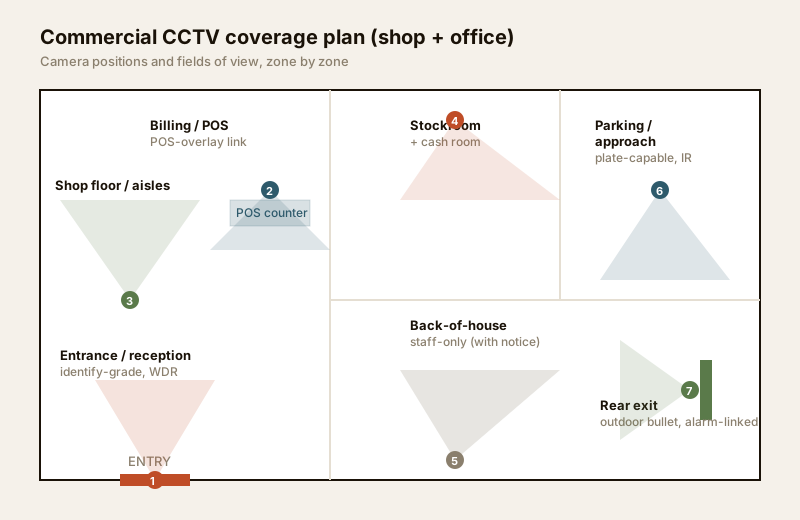
Coverage by zone — the commercial checklist
Every commercial site shares a common spine of zones. Prioritise the ones that carry the most risk or the most value, and specify the camera capability each needs — not just its presence.
| Zone | Primary risk | Camera / feature to specify |
|---|---|---|
| Entrance / reception | Who came and went; incident evidence | Identify-grade camera at face height, WDR for backlit doorways, good low-light |
| Billing / POS counter | Till shrinkage, refund fraud, disputes | Overhead + counter-facing camera, POS-overlay to tie transactions to footage |
| Shop floor / aisles | Customer theft, slip-and-fall claims | Wide-coverage domes, no blind aisles, people-count analytics optional |
| Stockroom / storage | Internal shrinkage, stock loss | Door-facing camera, motion alerts after hours |
| Cash room / safe | Cash handling, high-value theft | Discreet camera, tamper-alert, integrated with alarm and access control |
| Staff-only / back-of-house | Internal theft, safety, disputes | Corridor and exit coverage — with clear staff notice; NEVER in toilets or changing areas |
| Parking / approach | Vehicle theft, break-in, disputes | Number-plate-capable camera at the choke point, IR for night |
| Perimeter / rear exit | After-hours intrusion | Outdoor bullet with IR, motion analytics linked to alarm |
For choosing between indoor and outdoor bodies for each of these, see the indoor CCTV and outdoor CCTV guides; to make sure nothing falls in a gap, run a blind-spot identification walk-through and check the lighting and visibility assessment — under-lit doorways defeat even a good camera.
Retail vs office — different priorities
A boutique and a chartered-accountant's office both need CCTV, but they weight it differently. Spend where your risk actually sits.
| Priority | Retail / shop / showroom | Office / clinic |
|---|---|---|
| Highest-value zone | POS counter + shop floor | Reception + server/records room |
| Shrinkage focus | Customer + staff theft, refund fraud | Petty theft, document / data access |
| POS-overlay | Essential — transaction-to-footage link | Rarely needed |
| Customer flow | People-counting, dwell analytics useful | Visitor log at reception |
| After-hours | Full intrusion coverage, alarm-linked | Perimeter + records room |
| Privacy pressure | Customer notice at entry | Employee expectation, DPDP focus |
| Typical camera mix | Domes on floor, counter cams, entry ID cam | Discreet domes, reception ID cam, door cams |
Restaurants sit between the two — a POS-linked till camera, kitchen-entry and store coverage, plus dining-area domes for dispute and safety evidence. Clinics lean office-like but add a records/pharmacy-store focus and stricter privacy at consultation-room doors (cover the corridor, never inside the room).
POS-overlay — tying the transaction to the footage
For any business with a till, the single most valuable commercial feature is POS-overlay (also called transaction or text overlay). The point-of-sale terminal feeds each transaction — item, amount, void, refund, "no-sale" drawer-open — to the recorder, which stamps that text onto the corresponding video. Now a suspicious pattern in the sales data (a run of refunds, repeated no-sales, discounts to the same card) links straight to footage of what actually happened at the counter.
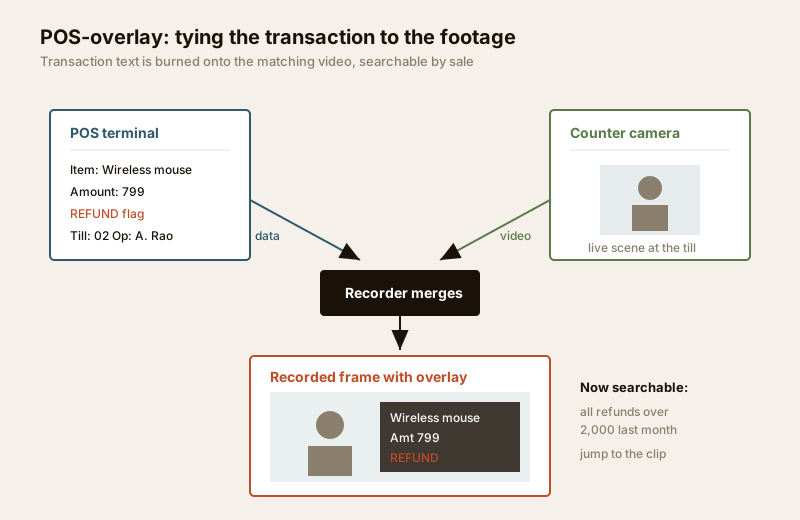
This turns the recorder from a passive tape into a searchable ledger: search "all refunds over ₹2,000 last month" and jump to the exact clip. It is the backbone of retail loss-prevention and resolves disputes in seconds. Specify a recorder and camera that support POS/text integration up front — retrofitting it is awkward. Pair it with AI-powered analytics (AI-powered CCTV) for people-counting and dwell insight if customer-flow data matters to you.
Integrate — CCTV is one block of four
CCTV alone records what happened; a proper commercial system also prevents and responds. Plan how the cameras talk to the rest of your security so that an event triggers the right reaction.
- Access control. Link door controllers so a badge-in or a forced-door event bookmarks the camera at that door — you jump straight to who opened it, not a scrub through hours of footage. Essential for the cash room, server/records room and staff entrances.
- Intrusion alarm. After hours, an alarm zone trip should call up the relevant camera and push a verified clip to whoever is monitoring — cutting false-alarm call-outs, because a human can see it is a stray dog, not a burglar.
- Fire and life-safety. Cameras and their cabling must never compromise egress; on a fire alarm, access-controlled doors must fail safe (unlock) regardless of the security state.
For the full four-block model — surveillance, alarms, access and resilience — see the building security systems guide. Size the whole thing against a proper security risk assessment rather than guessing.
Monitoring — who watches, and when
A recording no one watches only helps after a loss. Decide your monitoring model deliberately:
- Self / on-site monitoring. Staff or a facility manager view feeds on a local monitor and get app alerts. Low cost, fine for small single sites, but nobody watches at 3 a.m.
- Remote / cloud monitoring. Owners and managers view live and playback from anywhere via app — the norm for multi-site and after-hours oversight. Depends on network quality (see internet and network readiness).
- Central-station / third-party monitoring. A professional monitoring company watches alarm-verified events 24x7 and dispatches a response. Worth it for cash-heavy, high-value or unmanned-after-hours sites. Adds a monthly fee.
Most commercial sites blend these: on-site during trading hours, cloud alerting for managers, and — for higher risk — a central station after hours.
Scale — one shop today, five branches next year
If you may grow, design for it now. Commercial systems scale on three axes: more cameras per site (buy a recorder with spare channels and PoE headroom), more sites (a cloud or VMS layer that unifies branches under one login), and more retention (bigger disks or cloud archive). Standardise camera models and recorder brands across branches so spares, training and an AMC stay simple. A cloud CCTV or hybrid approach makes multi-site oversight far easier than a rack of isolated DVRs; balance it against local storage for the on-site recording tier.
Retention and evidentiary quality
Footage is only useful if it is clear enough to identify and kept long enough to matter. Two levers:
- Evidential quality at the choke points. Entrances and the POS need identify-grade pixels-on-target — a face you can actually recognise, a plate you can read. Wide floor domes can be lower grade. Size this with the camera coverage calculator.
- Retention period. Commercial disputes, chargebacks and staff issues surface weeks later, so 30–90 days is a common commercial target — longer than a typical home. More cameras plus longer retention plus higher resolution multiply storage fast.
| Setup (H.265, 24x7) | Cameras | Retention | Indicative storage | Indicative fit-out (₹) |
|---|---|---|---|---|
| Small shop / clinic | 4–6 (4MP) | 30 days | ~4–6 TB | ₹45,000 – ₹90,000 |
| Showroom / restaurant | 8–12 (4–5MP) | 45 days | ~10–16 TB | ₹1,10,000 – ₹2,50,000 |
| Large / multi-floor office | 16–32 (mixed) | 60–90 days | 24 TB+ / cloud tier | ₹3,00,000+ |
Treat costs as indicative planning bands, not quotes — brand, analytics, POS integration and cabling swing them. Sanity-check any quote with the security cost planning guide and the security system cost estimator. Always use surveillance-grade drives rated for continuous write, and put the recorder, switch and router on a UPS — India's supply gaps must not become scheduled blind spots.
Privacy, notice and the DPDP Act
This is where commercial CCTV differs most from home CCTV, and where cutting corners creates real liability. You are recording other people, so plan privacy deliberately.
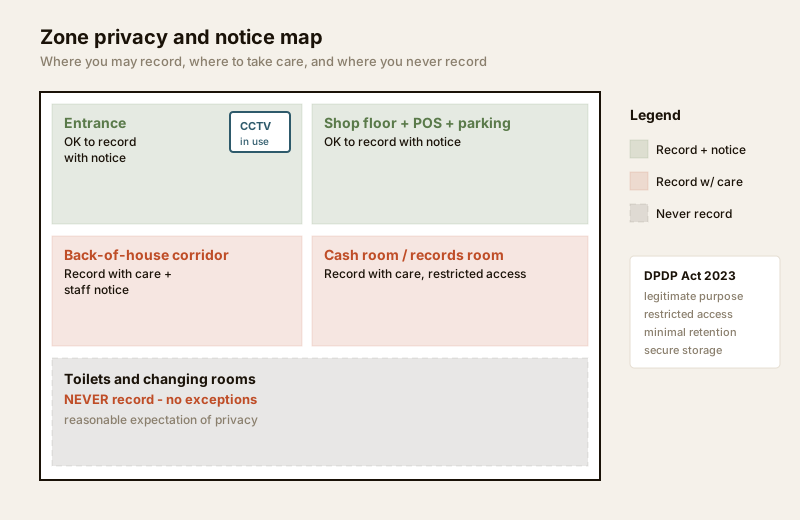
- Display clear notice. Put visible "CCTV in use" signage at entrances and monitored areas so customers and staff know they are being recorded and why. This is both courtesy and good legal hygiene.
- Never record private spaces. No cameras — ever — in toilets, changing rooms, or areas with a reasonable expectation of privacy. This is non-negotiable regardless of theft concerns.
- Respect employee expectations. Staff can be monitored in work areas for legitimate purposes, but tell them it is happening, keep it proportionate, and avoid covert or continuous monitoring of rest areas.
- Follow the DPDP Act 2023. Treat recorded footage as personal data: collect only for a legitimate, stated purpose (security, loss-prevention, safety), restrict who can view and export it, keep it only as long as needed, and secure the recorder against unauthorised access. Cite the Act generically and confirm current obligations before relying on specifics.
- Cover your own premises only. Angle cameras to your property, entrances and shared approaches — not into neighbours' shops, homes or the street beyond what your legitimate purpose needs.
For a structured way to weigh coverage against privacy, work through the security and privacy assessment.
Getting a proper spec and AMC
Commercial CCTV is a professional install, not a weekend DIY. Do this in the right order:
1. Write a spec from your zone list: camera capability per zone, resolution targets, retention, POS and access-control integration, and the monitoring model. This document is what you send out for quotes — it makes tenders comparable.
2. For larger or multi-site premises, engage a security consultant (independent of the installer) to design the system and review tenders — it pays for itself against oversized or under-specified quotes.
3. Route cabling and electrical to licensed professionals. Structured cabling, PoE switching, mains power and any work at height are qualified trades — see the electrical hub. Insist on proper containment, tested terminations and a labelled cable schedule.
4. Sign an AMC (Annual Maintenance Contract). A commercial system that is not maintained silently rots — a dirty dome, a failed disk or an offline camera is only discovered the day you need footage. An AMC should cover periodic health checks, firmware updates, disk-health monitoring, cleaning and a response SLA.
When to bring in a professional. You can and should own the spec — the zone list, capability targets, retention and privacy policy. Hand the design of anything beyond a few cameras to a security consultant, and the cabling, PoE, mains and commissioning to a licensed installer. For a multi-site or cash-heavy business, that upfront expertise is the difference between evidence and a wall of useless blur.
Compare system families with the CCTV system type selector and camera bodies with the camera type selector before you finalise the spec.
Key takeaways
- Design from business risk, zone by zone — specify what each camera must achieve (detect / recognise / identify), not just how many you buy.
- POS-overlay is the retail superpower — it ties transactions to footage and turns your recorder into a searchable loss-prevention ledger.
- Integrate CCTV with access control and intrusion alarms so events trigger a response, and never let cameras or cabling compromise fire egress.
- Match retention to commercial reality — 30–90 days is common; size storage for more cameras, longer keep and higher resolution, on surveillance-grade disks and a UPS.
- Privacy is a legal duty, not an afterthought — clear "CCTV in use" notice, never in toilets or changing rooms, respect staff expectations, and treat footage as personal data under the DPDP Act 2023.
- Buy a proper spec and an AMC — engage a security consultant for larger sites, route cabling and mains to licensed professionals, and maintain the system so it works the day you need it.
References
- Digital Personal Data Protection Act, 2023 — treat CCTV footage as personal data: legitimate purpose, restricted access, minimal retention and secure storage; confirm current obligations before relying on specifics.
- ONVIF (Open Network Video Interface Forum) — the interoperability standard for network video devices; specify ONVIF-conformant cameras and recorders to keep a multi-site estate expandable.
- National Building Code of India (SP 7), Bureau of Indian Standards, and local municipal bye-laws for any structural, electrical, fire-egress or life-safety aspect of an install; verify the current edition via the BIS catalogue: https://www.services.bis.gov.in/
This is an educational overview for owners and facility managers. Structured cabling, PoE switching, mains power and working at height are qualified professional tasks — engage licensed installers and, for larger sites, an independent security consultant, and verify any standard's current status via the BIS catalogue before relying on it.
Export this guide
Related Guides — Deep-dive reading
CCTV Recording Failure in India (2026): Live View Works but Nothing Was Saved
You open the recorder to pull footage of an incident and there is nothing there, even though every camera shows a crisp live picture. A calm, ordered guide to why an Indian CCTV system records live but saves nothing, and how to fix it before the next incident.
SecurityParking Security Audit in India: A Walk-the-Park Method
Most parking areas were never audited honestly. This is the capstone method that ties the whole parking-security library together: walk the park by day and after dark, grade every layer Good / Weak / Absent, gate it on life-safety, and turn the gaps into a prioritised action plan before a thief or an incident finds them first.
SecurityRemote Security Monitoring in India (2026): Watching and Responding From Anywhere
Watching your home from your phone is easy; making an alert lead to a real response is the hard part. The two honest models compared — self-monitoring by you and your family versus a paid professional monitoring centre — plus the secure tech behind remote access, the privacy stakes of a stranger watching inside your home, and why remote monitoring is only ever as good as the responder behind it.
SecurityRelated Tools — Try Free
CCTV Camera Coverage & Count Calculator
Estimate how many CCTV cameras you need, the NVR channels, storage in TB for your retention period, and an indicative all-in cost with GST.
CCTV CalculatorCCTV Camera Quantity Calculator
How many cameras a site needs from boundary length, coverage width per lens and key points — plus the recorder channel count.
Camera CountCCTV Recorder Selector
Camera type, count, PoE need and resolution to the right recorder — DVR, NVR, NVR-with-PoE or hybrid — with channels, HDD bays and PoE ports.
Recorder Selector