
Indoor CCTV for Indian Homes and Shops: Coverage With Privacy
What indoor cameras are actually for, where they belong (and the rooms where they never do), how to choose and place them for full coverage, and how to stay lawful and respectful under the DPDP Act.
Outdoor cameras stop trouble at the boundary; indoor CCTV is about what happens once someone is inside — the delivery agent at the door, the flow through your hall, the shop floor during a rush, or simply the peace of mind of checking on an elderly parent from work. Done well it is quietly reassuring. Done thoughtlessly it becomes intrusive and, in some rooms, unlawful. This guide is about doing it well.
It sits in Studio Matrx's CCTV hub alongside its natural partner, the outdoor CCTV guide. Read them together: most Indian homes and shops want a small blend of both. For the wider map of a whole system, start with the complete guide to CCTV systems.
Scope & safety. This guide helps you plan, choose and coordinate an install. Any mains wiring, fixed power points and in-wall cabling belong to a licensed electrician and installer — plan the layout here, have it fitted and certified by a professional. A camera or its wiring must never block a door, window or fire-escape route.
What indoor cameras are actually for
Be clear about the job before you buy hardware. Indoor CCTV in an Indian home or small shop usually earns its place doing a handful of specific things:
- Covering the main door from inside. The single most useful indoor view. It captures who actually comes in and out, timestamps deliveries, and complements the outdoor door camera.
- Watching the living and common areas. The hall, the passage, the staircase landing — the shared paths everyone uses, where a problem would show up.
- The shop floor. For a small retail or service shop, an indoor camera over the counter and the aisle deters petty theft, settles disputes, and records the point of sale.
- Monitoring domestic help and deliveries — openly. A camera in the common area, that everyone knows about, is a fair record for everyone. A hidden camera to secretly watch staff is not (more on that below).
- Keeping a caring eye on children or elderly family, with consent. A camera in the living room to check that an elderly parent is up and about, or that a toddler is safe in a play area, is a legitimate comfort — provided the adults involved know and agree.
Notice what is not on that list: bedrooms, bathrooms and changing areas. That boundary is absolute, and we come back to it because it is the thing people most often get wrong.
The privacy line — non-negotiable
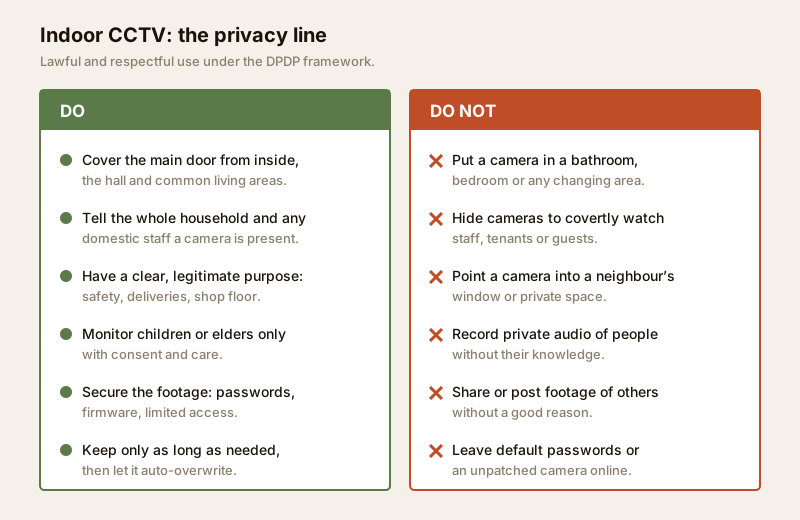
An indoor camera looks at your family, your guests and the people who work in your home. That raises the stakes far above an outdoor camera pointed at your own gate. Hold this line:
- Never in bathrooms, bedrooms or changing areas. These are spaces of a reasonable expectation of privacy. A camera there is wrong even if it is your own home, and can be a criminal act — there is no exception for it.
- Inform the household and the staff. Everyone who lives, works in or regularly visits the space should know a camera is present. Openness is both the decent thing and, under India's Digital Personal Data Protection (DPDP) Act, 2023, part of collecting personal data for a clear, legitimate purpose. Treat covert surveillance of staff as off-limits.
- Have a real purpose and keep footage minimal. Record for safety and legitimate monitoring, secure the footage, limit who can see it, and let it auto-overwrite rather than hoarding months of everyone's daily life.
- Respect the wider household. Do not point cameras where they capture a neighbour's window, and be cautious with audio — recording private conversations without knowledge is intrusive and often unlawful.
For a structured walk-through of what you are collecting, why, and how to stay on the right side of the line, use the security & privacy assessment guide before you position a single camera. The smart-home privacy & security guide covers the same care for connected cameras and voice assistants.
Camera types suited to indoors
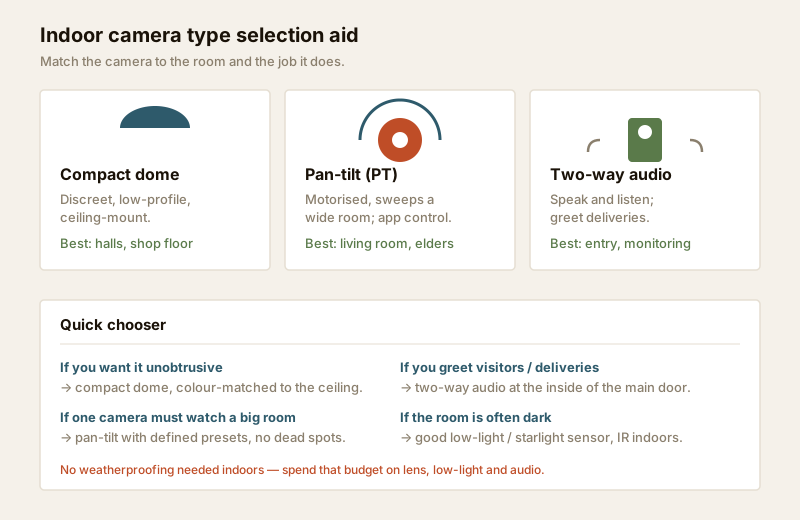
Indoors you are optimising for tact, coverage and low light — not for weatherproofing. A few types fit the job:
- Compact dome. Low-profile, ceiling-mounted, discreet, and its housing hides which way it points. The default for a hall or a shop floor where you want the camera to fade into the ceiling.
- Pan-tilt (PT). A motorised camera that sweeps left-right and up-down from the app, so one unit can cover a large living room. Good where you would otherwise need two fixed cameras, and handy for checking in on an elderly relative across a room.
- Discreet / mini cameras. Small fixed units that sit unobtrusively on a shelf or wall. Discreet is fine; hidden to spy on people is not — keep them visible enough that the household knows they exist.
- Two-way audio cameras. A built-in speaker and microphone let you greet a delivery agent, talk to a child, or tell a visitor you are on your way. Very useful at the inside of the main door.
Indoors, put the money you would have spent on an IP66 weatherproof housing into a better lens, a good low-light (starlight) sensor and useful audio instead. If your indoor cameras will be network (IP) units, the IP CCTV guide explains resolution, PoE and cybersecurity in depth.
Indoor camera placement — area by area
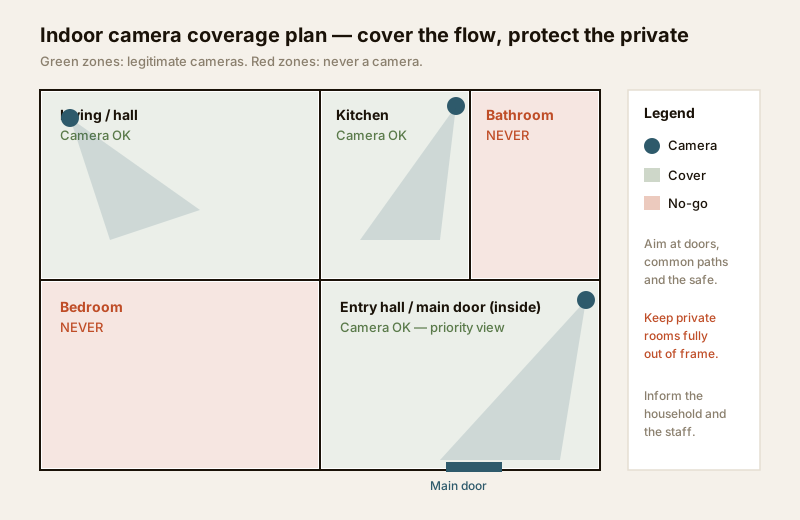
Placement decides whether footage is useful. The aim indoors is full coverage of the paths people take, with the private rooms kept entirely out of frame. Plan it on the floor plan first.
| Area | What to cover | Camera type | Privacy note |
|---|---|---|---|
| Main door (inside) | Everyone entering / leaving, deliveries at the threshold | Compact dome or two-way audio | Frame the door and entry, not into rooms beyond |
| Living / hall | The common gathering and pass-through area | Pan-tilt or wide dome | Inform family and guests; angle away from any bedroom door |
| Kitchen | Rear door, back access, valuables area | Fixed dome | Fine as a common area; avoid staff-only covert intent |
| Staircase / passage | Movement between floors and the flow through the home | Compact dome | Keep bedroom doorways out of the frame |
| Shop floor / counter | Point of sale, aisle, cash area | Dome (counter) + wide dome (floor) | Post a visible notice for customers and staff |
| Child / elder area | A play corner or a seating area, with consent | Pan-tilt | Only with the knowledge and agreement of the adults involved |
| Bathroom / bedroom / changing | — | None — ever | Absolute no-go, no exceptions |
A few placement habits that remove dead spots without over-covering:
- Mount high and angle down from a corner so one camera sees the width of a room and faces are lit, not silhouetted.
- Watch the doors, the safe and the till — the points of value and entry — rather than trying to see every square metre.
- Avoid pointing straight at a bright window, which turns everyone in front of it into a dark shape. Angle across the light instead.
- Overlap coverage at handoffs — where the hall meets the entry — so a person is never briefly invisible between two cameras. The camera coverage calculator helps you count cameras and check for gaps.
Lighting and low light indoors
Indoor lighting is uneven and often dim in the evening, so low-light performance matters more than raw megapixels. Choose a camera with a good low-light or starlight sensor, and keep its infra-red (IR) night mode in mind: IR reflects hard off nearby glass and mirrors, so avoid aiming a camera straight at a glass cabinet or a framed picture, which can wash the whole image white. Where you rely on a camera at night, make sure there is at least some ambient light — a landing light left on does more for image quality than a higher-resolution sensor in pitch dark. For a fuller treatment of lighting for security, see the lighting & visibility assessment.
Aesthetics and discreetness
An indoor camera lives in a room you actually use, so it should not shout. Compact domes in white or the ceiling colour disappear overhead; a small unit tucked on a bookshelf reads as another gadget. Route the cable neatly — a dangling wire is what makes a camera look intrusive, not the camera itself. The goal is a camera that is present and known but visually quiet: discreet in appearance, never hidden in intent.
Power, and Wi-Fi vs wired indoors
Indoors you have two honest choices, and the trade-offs differ from outdoors.
- Wi-Fi cameras are the easy retrofit: a nearby plug point, connect to your home Wi-Fi, done. They suit renters and homes where you cannot chase cable into walls. The catch is dependence on Wi-Fi coverage and a plug near each camera, plus the same cybersecurity duties as any connected device. See the wireless CCTV guide and confirm your network is ready for it.
- Wired (PoE) cameras run video and power over one network cable to a recorder — tidier, more reliable and better for a permanent install, but the cabling is a professional, in-wall job best planned during construction or renovation. The wired CCTV guide covers it.
Either way, plan for India's power cuts: put the recorder, router and any PoE switch on a small UPS so an evening outage is not a scheduled blind spot. Any new plug points, switch mounting or in-wall cable is a licensed electrician's and installer's job — see the electrical hub. Size backup with the security backup-power calculator.
How indoor differs from outdoor cameras
They look similar but the priorities are different. Buying an outdoor camera for an indoor job wastes money on features you do not need; buying an indoor camera for outdoors leaves it to fail in the first monsoon.
| Factor | Indoor camera | Outdoor camera |
|---|---|---|
| Weatherproofing | Not needed — spend the budget elsewhere | IP66 / IP67 rated for rain, dust, heat |
| Housing | Compact, discreet, blends with the room | Rugged, vandal-resistant, weather shroud |
| Main worry | Privacy, tact, low indoor light | Range, wide scenes, glare and darkness |
| Placement care | Keep private rooms out of frame | Cover only your property, not neighbours |
| Night light | Ambient room light; short-range IR | Long-range IR or floodlight; full-dark scenes |
| Audio | Two-way audio genuinely useful | Less common; usually one-way if any |
| Temperature | Room temperature | Must survive 45°C sun and monsoon damp |
| Power | Plug point or PoE, both easy | Often longer PoE runs; weather-sealed joints |
The short version: indoors, tact and low light matter most and weatherproofing is irrelevant; outdoors, ruggedness and range dominate. Match the camera to the environment. If you are still choosing the overall system family, the CCTV system-type selector helps.
Costs (indicative)
Indoor cameras are generally cheaper than their outdoor cousins because they skip the weatherproof housing. Treat these as ballparks to sanity-check a quote, not fixed rates.
| Item | Typical range (₹) | Notes |
|---|---|---|
| Wi-Fi indoor camera (fixed, 2–4MP) | ₹1,500 – ₹4,000 | Easy retrofit; needs plug + Wi-Fi |
| Pan-tilt Wi-Fi camera | ₹2,500 – ₹6,000 | One camera covers a large room |
| Compact PoE dome (indoor) | ₹2,500 – ₹5,500 | For a permanent wired install |
| microSD card (64–128 GB) | ₹600 – ₹1,500 | Local storage in Wi-Fi cameras |
| Small UPS for recorder + router | ₹3,000 – ₹7,000 | Covers the typical evening cut |
A simple two- or three-camera indoor Wi-Fi setup — main door inside, hall and one more — commonly lands around ₹6,000 – ₹18,000 before any cloud subscription. For a whole-home blend of indoor and outdoor on a recorder, size it with the security system cost estimator.
When to bring in a professional. Decide the camera count, the views and the privacy boundaries yourself — that judgement is yours. Hand the in-wall cabling, any new power points, PoE switch mounting and recorder commissioning to a licensed installer and electrician. They will route cable cleanly, avoid the fire-escape paths, and hand over a system you can actually operate. Any work at the mains board is a licensed electrician's job.
Key takeaways
- Indoor CCTV is for the main door from inside, common areas, the shop floor, and openly monitoring help, deliveries or family with consent — not for covering every room.
- The privacy line is absolute: never in bathrooms, bedrooms or changing areas; inform the household and staff; keep a legitimate purpose and minimal footage under the DPDP Act.
- Pick the camera to the job: compact dome for discretion, pan-tilt for big rooms, two-way audio at the door, and a good low-light sensor for dim evenings.
- Place for the flow, not the floor — watch doors, safes and tills, mount high in a corner, overlap at handoffs, and keep private rooms out of frame.
- Indoors needs no weatherproofing: spend that on lens, low light and audio, put the recorder and router on a UPS, and route all wiring to a licensed professional.
References
- Digital Personal Data Protection Act, 2023 — collect personal data (including footage) for a clear, legitimate purpose, inform those affected, secure it, and retain it no longer than needed. Never place cameras in private spaces such as bathrooms, bedrooms or changing areas.
- Bureau of Indian Standards catalogue and local municipal bye-laws for any electrical or life-safety aspect of an install — verify the current edition via the BIS catalogue: https://www.services.bis.gov.in/
- ONVIF (Open Network Video Interface Forum) for interoperable network cameras and recorders — verify a product's conformance on the official ONVIF product finder.
This is an educational overview. In-wall cabling, new power points and any electrical work are qualified professional tasks — engage licensed installers and verify any standard's current status via the BIS catalogue before relying on it.
Export this guide
Related Guides — Deep-dive reading
How to Choose a CCTV Camera (2026): The Homeowner's Decision Guide for India
Cut through the spec-sheet noise and choose the right CCTV camera for each spot around an Indian home. What actually matters — sensor and low-light performance, lens and field of view, form factor, IP and IK ratings, honest smart features — and the marketing claims to ignore.
SecurityCCTV vs Video Door Phone: Which Does Your Home Need?
They look similar and get confused constantly, but a CCTV camera and a video door phone do different jobs — one watches the whole property and records, the other answers your door and controls who comes in. This guide settles CCTV vs video door phone for Indian homes: what each is for, where they overlap, real rupee costs, apartment versus villa relevance, and why most homes end up wanting both.
Smart HomeSecurity Privacy Assessment for Indian Homes
Getting the privacy side of home security right: camera placement ethics and limits, notice and consent, the extra caution audio demands, and treating footage as personal data you store, retain and delete responsibly under India's DPDP Act 2023 direction.
SecurityRelated Tools — Try Free
CCTV Camera Coverage & Count Calculator
Estimate how many CCTV cameras you need, the NVR channels, storage in TB for your retention period, and an indicative all-in cost with GST.
CCTV CalculatorCCTV Cloud vs Local Cost Calculator
Compare cloud CCTV subscription against a local NVR + HDD — upfront, 5-year total, monthly fee and break-even.
Cloud vs LocalCCTV System Type Selector
Answer five questions and get the right CCTV setup — analog / IP / hybrid, wired / wireless, local / cloud — with reasons.
CCTV Selector